Exploring and Creating with 3D Bear Poth

Sponsored Content, All opinions are my own

Sign up for your free one month trial! https://3dbear.io/freetrial

Exploring the world in AR: 3DBear brings your environment to life

Ever since learning about 3DBear a few months ago, I have continued to be impressed with the platform and the company’s focus on meeting the needs and interests of educators and students. At both FETC and TCEA, I had the opportunity to spend time speaking with the 3DBear team and was able to get a better understanding of their vision for 3DBear and learn more about the newer features and ways to use it in the classroom. Even when I first started creating with 3DBear, I immediately saw a lot of benefits for classroom use regardless of content area or grade level, or even one’s role in education. With a library full of icons to choose from, animations, music, options for changing colors and sizes, moving object positions, and other functions like adding audio and student voice, it is possible to engage students in truly unique ways to learn. It did not take long to see the potential for using 3DBear not only as a tool for students as the creators but also as an instructional tool for teachers as a way to engage students more in learning by “hooking” them in with the use of augmented reality. 3DBear can be a game changer for students, acting as a catalyst to draw students in and let them go on a creative adventure. Get started today with a free teacher trial here!

Why use Augmented Reality?

A popular topic at both FETC and TCEA was Augmented and Virtual Reality. Often questions are asked whether the use of AR and VR has sustainability in education and I believe that there is. Each day I receive numerous email alerts sharing news from around the world about how teachers are using augmented and virtual reality to amplify student learning. Tools like 3DBear have tremendous potential to immerse students in a meaningful learning adventure, giving them more control of how, when and where they learn. Besides being fun to use, it offers students time to build their skills in critical thinking, problem-solving, collaboration and fosters creativity. It lets students make decisions and leads to a more student-driven classroom. This is what we want for our students, choices, agency, and engagement.
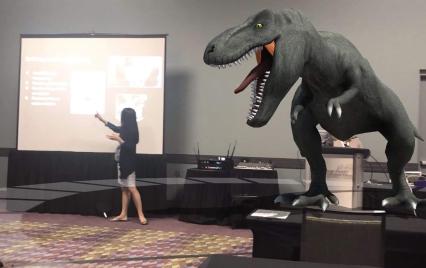
(photo credit to Mitch Weisburgh)

Walking among or narrowly escaping the dinosaurs

While presenting several sessions at both of these conferences this month, I noticed a lot of people starting to use 3DBear in unique ways. During sessions, attendees chose to be more active, and rather than simply listening in to how these augmented reality tools can be used, instead began quickly creating with them and even sharing them out socially. Completely unaware of the danger that I was in until seeing the tweet, I was surprised and thankful that I escaped the dinosaur lurking behind me as I presented at FETC! But I was concerned about the attendees when I saw the dinosaur that was lurking in the front of the room near Jaime. The excitement behind using these tools is evident when people begin creating and sharing them during your session, just minutes after you’ve introduced and only minimally demonstrated the tool. The learning curve of 3DBear? Not much at all! It’s very easy to navigate and dive right in to create your own world in your physical environment. Get started today!
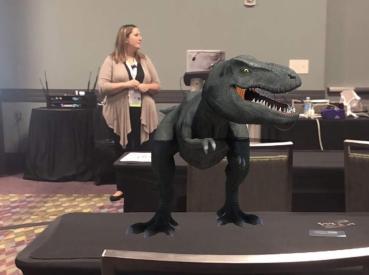
(photo credit Mitch Weisburgh)

Why 3DBear

Students can use it to create 3D objects in different spaces and can then record a story to go along with it. The potential and power of storytelling in AR is awesome. What better way to have students represent their learning than to design their own world, decide what 3D objects to place in their environment and then create a narration to go along with it. Students can even upload items from their device or from Thingiverse. Student-driven learning and possible for students in grades K and up. More than just listening to teachers and how it benefits students, ask students for feedback. (See a video from a school in Medford and how students responded to 3DBear). Also seek feedback from educators, whether on social media or in my experience from attendees in the different sessions presented at FETC and TCEA.

Potential for Storytelling and Adventure

As educators, we want our students to have a learning “experience,” more than the traditional methods of learning and classroom instruction can offer. We need to empower students to become more than consumers of content, and instead help them to embrace the opportunity to become the creators and driving their own learning. By doing this, we start them on a learning journey that will serve to attach more meaning to the content, in a personalized and exciting way to learn, and above all, a more authentic experience.

There are many possibilities for using 3DBear and because time can be a deciding factor when it comes to exploring new tools and methods for classroom use, this is where 3DBear offers a lot for educators. Teachers have access to a teacher dashboard where they can see student work, track progress and explore the worlds that students are creating. There are lesson plans for Coding, Design Thinking, ELA, Math, Science, Social Studies, STEM, and STEAM-related themes available for different grade levels which include pacing guidelines. While the lessons are drafted for certain grade levels or range of grades, slight adjustments in the content enables teachers to implement these lessons into their classroom.

One of the best things about 3DBear is that teachers won’t have to spend a lot of time trying to figure out how to get started using it in the classroom. We can learn just enough and then put it in the hands of our students and let them run with it. Many students learn more by doing, and when they have opportunities to engage in hands-on activities, it leads to more personalized experiences and student-driven learning. A world of learning that they create is right in their hands.

When thinking about adding some new technology into the classroom, we really need to focus on the why behind choosing a specific tool or method. Ask ourselves what makes it different and what can it do differently for students that can enhance the learning process and go beyond the traditional methods that are already being used in the classroom. What sets it apart from other options or methods you have been using? I think the answer is clear. Students are the designers.

A Few Ideas to Try

  1. My town: Sharing where we live, describing a location or any lesson where students need to narrate a story, they can create an environment using 3DBear and add characters and more into their project. Once created, students can tell a story about the scene or even narrate in a foreign language. Why not have students create a “welcome to our town” project, adding in 3D objects and telling a story that can be shared with the community? A good way to share student work and give more meaning to the work they are doing.
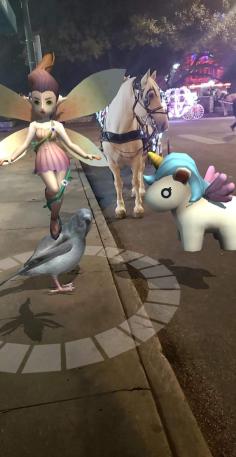
(Alamo photo credit Jaime Donally)

  1. A book summary: One idea is to have students review a book, summarize something they read in class by bringing it to life with 3DBear. If the number of devices is an issue, use stations and have students work in pairs or small groups, each adding to the story.
  2. Let me teach you: Give students an opportunity to be the teacher. Choose a theme or have students select a topic and then come up with a way to use 3DBear to explain it to classmates. There are many options available for students to choose from, and it will reinforce their problem-solving, critical thinking, and collaboration skills, as well as boost creativity as they decide how to best visualize their lesson for others.
  3. Actors in a scene: Give students the chance to interact with a 3D character and maybe even sing together or dance together (who doesn’t love doing the floss with a 3D character?).
  4. Random objects: To really push their thinking, why not create a scene with a variety of characters, objects and more, and then ask students to write a story about it. A task like this can be applied to so many content areas, and grade levels and will definitely be a more authentic way to practice and learn. For students in Spanish classes, it is fun to add random objects into the classroom and have students write a story to describe it. Or, another possibility is to provide students with a narration in the target language and have them create a scene to represent the story.

So many ways for students to leverage technology for learning. They need our guidance to find a starting point sometimes, but then we need to just let them go with it and explore and create on their own. Besides building technology skills and learning about emerging trends, they will engage in powerful learning that not only reinforces the content area but also promotes the development of social emotional learning skills in the process. Augmented Reality has many benefits, the key is staying focused on your “why” for wanting to use it, and then finding the right task to get started. And remember, let the students take charge and learn from and teach one another, including you. Sign up for your teacher trial at 3DBear!

And share how you are using 3DBear in your classroom! @Rdene915
3 Quick Ways to Implement Blended Learning In The Classroom


Best practices for blending or flipping your classroom continue to be topics of discussion in education today. Much of the discussion focuses on finding clear definitions of what these terms mean and the benefit to classrooms.

There are many resources and ways to educate yourself on this topic available including a diverse selection of books and blogs (such as the book Blended by Michael B. Horn and Heather Staker, and of course the Getting Smart blog) related to the topic, reaching out to colleagues or members of your PLN or attending conferences such as FETC, ISTE, state edtech conferences, edcamps and other professional development experiences.

All of these are great for finding examples, vignettes, templates, suggested tools and ideas. But even with all of these options, sometimes it is more valuable to take a risk and try something out on your own. The outcomes will not always be the same for each teacher, classroom or student, but it’s at least worth a try.

There are different models for implementing blended learning, and the method used will vary depending on your classroom. I recommend starting with one method–if you see positive effects, that you have more time to collaborate in class and your students are more engaged then continue. If not, then use this opportunity as a way to learn more about your students and their needs. As teachers, we need to constantly reflect on our methods and encourage self-assessment with our students, all part of learning and growing together. Getting started can take some risk and exploration, and definitely time.

Here are some different ways to use technology to “blend” or “flip” learning that in my experience have worked well. These tools can offer innovative or creative learning methods in your classroom, opening up the time and space for where and when the learning occurs.

1. Flipping and Blending with Videos

In the past when I heard “flipped classroom” I thought that meant simply assigning a video for students to watch. It can be, as it was originally considered the traditional way of flipping the classroom, but there has to be follow-up, accountability and more than just simply assigning a video. How will we know what the students gained from the experience?

The benefit of having students watch a video outside of class is that it reserves the class time for discussion and peer collaboration, and moves the teacher to more of a facilitator in the classroom. There are video tools such as EDpuzzle and PlayPosit, through which students interact with the video.

By responding to questions throughout, they are held accountable for the material and can show what they are learning. The teacher has instant feedback and can better understand how the students are learning and provide more personalized instruction. Either of these tools are great for the teacher to create lessons, but also provide the opportunity for students to create lessons that can be shared with other students.

In my experience, these tools have both provided a lot of authentic learning, problem-solving, critical thinking and collaboration. More importantly, they create an opportunity for students to move from learners to leaders, and from consumers to creators in the classroom. This is one of our main goals as teachers–to provide opportunities which empower students to take more control and drive their own learning. These leadership opportunities also help the students to feel valued because of the work that they are doing. There are sample lessons or “bulbs” available, so try one of from the library, and see how it works in your classroom.

2. Game Based Learning and “Practice” as Homework Alternatives

Perhaps you want students to simply play a game or have some practice beyond the school day. There are lots of options available, some of which enable students to create and share their games as well.

A few of these that you are probably familiar with are Kahoot, Quizizz and Quizlet. Creating a game with any of these three apps is simple. There are many public games and Quizlet flashcards available to choose from, and it is simple to create your own or for students to create something to share with the class. You can use these to differentiate homework and have students create something more personalized and beneficial for their own learning, and then share these new resources with other students and classes.

It’s another great opportunity to understand student needs because of the types of questions they design and the vocabulary they choose to include. Another bonus is that using something like Quizizz means students can complete it anywhere. Have you tried these  three? Give Gimkit a go. Created by a high school student, this is a game that students enjoy, especially because they can level up, use multipliers and really practice the content with the repetitive questions that help them to build their skills.

3. Discussion Beyond the School Day and Space

There are tools available for having students brainstorm, discuss topics or write reflections which can be accessed at any time and from any place.  For example, Padlet is a “virtual wall” where teachers can post discussion questions, ask students to brainstorm, post project links and more. It is a quick and easy way to connect students and expand where and when learning occurs. Take the posts and use them as discussion starters in the next class.

Synth is great for having students create or respond to a podcast. The idea is that students can do some of these activities outside of the classroom period, and teachers can create prompts which provide opportunities to engage students with their peers in a more comfortable way.

Even though all of these involve technology at some level, they are interactive tools to engage students, to expand and “flatten the walls” of the classroom and offer students an opportunity to do more than just sit and learn; to become more actively involved, giving them a voice and choice, through more authentic learning.

By giving the students a chance to do more than absorb information, but instead to create, design and think critically, we not only give them the knowledge to be successful, we encourage them to create their own path to success. And hopefully, in the process, they learn to better self-assess and reflect, both of which are critical skills they’ll need for success in school and in their careers.


Bringing Augmented, Virtual and Mixed Reality to all Classrooms

Bringing Augmented, Virtual and Mixed Reality to all Classrooms

Jaime Donally’s book “Learning Transported” is the resource to go to to learn how immersive technology can be used in education. For anyone looking to get started with bringing augmented, mixed or virtual reality and different learning experiences into the classroom but not sure of where to begin, Jaime provides a well laid out format which provides the reader with the all of the information and resources they need to feel comfortable in using AR and VR in the classroom.
For some readers, knowing the differences between augmented and virtual reality or knowing the different apps available for each of these may not be clear. However, the structure of the Learning Transported book enables the reader to progress from understanding how it is used, and even more importantly “why” it should be used education, to reminders of some things to consider before getting started and then how to have a successful implementation into the classroom.

IMG_20170627_083505096.jpg

Beyond just having students as consumers of the content, Jaime offers ways for students to become the creators and design their own stories through augmented and virtual reality experiences.
Jamie is constantly looking for more tools and new ways to bring immersive learning experiences to educators and students, and has done nothing but share her wealth of knowledge and fully invest herself in making sure that educators feel comfortable with using the technology and knowing that she is available to help them in the process.
Learning Transported is a book that can be enjoyed by anyone, as the resources and experiences that she shares within this book definitely have application to other settings besides education.

Before Jaime even dives into the content of the book, she engages the reader with her message of “why” for using AR and VR. She shares the reasons why educators need to understand the possibilities of using immersive technology and the benefits that will happen as a result. She explains how to use the book, and guides the reader on how to navigate each of the chapters, explaining the process involved when starting to implement some of these augmented virtual and mixed reality tools, and encourages the reader to join in with other educators through social media using the #ARVRinEDU chat.

Learning Transported is geared toward anyone looking to try immersive technologies in the classroom and Donally provides all of the resources and many examples, especially through the lesson plans written by Jaime and how they were facilitated in different classrooms.

Another key features of Learning Transported is in Jaime’s message about why educators should use AR, VR and MR in education. The largest benefit is for students being able to engage and explore in the content in a different and more authentic way. It also facilitates building skills of communication and collaboration as well as social-emotional learning, when students connect with their peers and learn more about places and life outside of their own community. Jaime also explains exactly how the use of these tools can meet the ISTE Standards for Students, and encourages the reader to think about how these tools can benefit the students in their own classrooms.

Each chapter provides a wealth of examples and images for reference, explanations of each tool shared and ways that it can be used, and ends with a “Learning Transported” challenge for the reader. Jaime provides clears definitions and more detailed explanations throughout each chapter, and continues to encourage educators to challenge themselves to implement some of these different tools into their classroom and to share their experiences using the #ARVRinedu hashtag.

Some of the best features of the book are the way that Jaime conveys the information, reassuring educators that it is okay to take some chances with trying these in the classroom and involve students in the process. Chapters 5 through 8 include so many different examples of augmented and virtual reality tools, including ideas for creating with the tools, brief descriptions of how the tool works and for using it, as well as including some sample lesson plans that educators can try within their own classrooms.

The last chapter focuses on preparing for the future of mixed reality and Donally reminds us to keep moving forward as these tools are constantly evolving, and having an impact on the learning environment and educational market. In the conclusion, Jaime ends by stating “Teachers will facilitate a class of explorers, developers and designers as they experience, build and present their own immersive technology resources.”
Donally reminds us that “authentic learning experiences and opportunities that have never been accessible in the classroom are now possible with virtual field trips, interactive stories, and tools that can allow students to explore the world, the solar system and beyond.”

The book concludes with an appendix listing all of the apps shared within the book as well as the websites to find the apps and a brief description of what the after does. The standards for students are also included

She encourages the reader to share whatever they create after completing some of the learning transported challenges

Learning Transported makes a topic that can be overwhelming to anyone just starting with augmented and virtual reality, become something that is digestible and helps the reader to build confidence in learning more throughout the book. Donally provides answers to the questions that educators all have to consider when starting to implement these tools, and gathered everything into one well laid out guide for learning.

A better way to track growth and promote reflection

Assessments used to track student progress are certainly not new to teachers. However, it is important to consider that if you consistently use the same tool for assessment, these materials should be curated and referred to throughout the year. This ensures a conversation can happen between teachers, students, and guardians, reviewing  progress and growth.

Kidblog offers extended options for promoting student choice, giving students ownership in learning, and facilitating communication between home and school (family engagement in learning is critical for student success).  Over the years, I have tried to encourage students to keep prior assessments or writing assignments as artifacts of their work to share with families. It wasn’t long before these papers were misplaced and the opportunities for review, reflection and growth disappeared. Using Kidblog’s built-in digital portfolios empower students to self-regulate learning and develop their metacognitive skills. It also allows a conversation between student, teacher, and families happen.

Tracking growth in a more accessible way

There are many benefits of using safe student publishing that go beyond simply blogging and improving communication skills. Through Kidblog, students gain the tools necessary to prepare for their future with the skills they need to be successful.

  • Promotes digital literacy and citizenship: Blogging engages students in building their writing skills whether it be basic English grammar, practicing foreign language skills, or learning to write in a specific format such as a persuasive text or narrative. Students can share their posts with classmates and provide feedback to one another. Peer assessment builds student collaboration skills and promotes digital citizenship and the responsible use of digital tools.
  • Track their growth: Students build their online presence and create their own space unique to their needs. They develop confidence as they become more creative in their expression and learn to self-assess with each blog post they write. Because Kidblog offers a safe learning space, students can get started by writing posts that are private, visible by the teacher, and then continue to grow their audience, sharing their work with classmates, connections, and beyond. Using Kidblog across multiple courses provides students with an even greater opportunity to track their progress across the course of a semester, school year, or even year-over-year.


  • Build relationships and become confident learners: Receiving feedback throughout the learning journey is critical to student growth. However, some students may be hesitant in sharing their thoughts with their peers in the classroom. Through blogging, when students create their own online space, they can comfortably begin to develop their voice, express their thoughts in a personal space, and become more confident learners. The relationships that form by sharing their work at first with their teacher and then by publishing it to a larger community have a tremendous impact on student growth. Publishing work to a wider audience benefits the student through the additional feedback that can be provided. Students know their work is having an impact on readers.
  • Goal setting: When students consistently create through blogging, they can use their history (in digital portfolios) as a guide to push forward with goals. Each student can use Kidblog as a space to set personal learning goals. By publishing their goals in the class, they are held accountable and, in turn, will be motivated to hit those goals. Preparing students for their future requires that we provide opportunities for them to learn responsibility, to work within a schedule with different tasks and timelines.


  • Personal expression and growth mindset: Kidblog provides a space for students to explore their passions, be creative, and reflective. Students have the opportunity to share these passions with the world, and hopefully, make a connection with another student based off of these passions.


Consider adopting Kidblog as your tool for promoting student growth and formative assessment. Teacher premium memberships are a great way for an individual teacher to pilot Kidblog in all their classes, with benefits like automatic digital portfolio curation for your students, a class page, moderation tools to customize your audience levels per post, and so much more.

It’s not too late to take advantage of the summer for learning

Rachelle Dene Poth

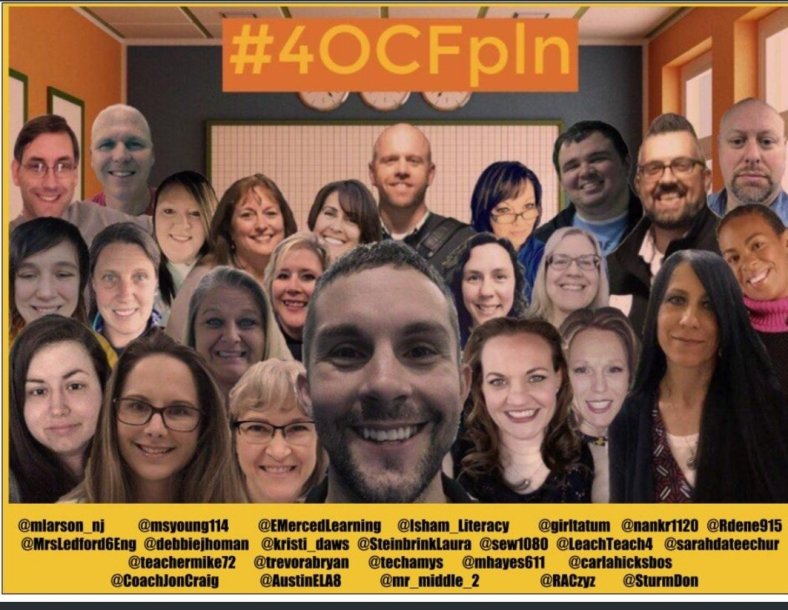
While it’s true, that most teachers do have their summers “off.”, I know that the reality is quite the opposite. Being involved in a few different PLNs,( #4OCFPLN , #EDUGLADIATORS, #EDUMATCH) the talk has been about our ongoing pursuit of learning, with the benefit being that we have the extra time to spend on personal and professional growth. As for myself, I had a tremendously busy but awesome June, several conferences and so many opportunities to make new connections and learn.  I know many educators who participate in some form of professional development or get involved in teaching summer classes, working at camps, or find other temporary employment. Summer is a great time to learn, explore and seek out new opportunities. It’s also an excellent time to continue to build PLN!


It is the end of July, (I cannot believe it!), but there is still plenty of time for PD, and the best part is that so much of the PD is available any time, through Twitter, Voxer, learning communities through ISTE, Google Communities, as well as the different edtech companies that offer webinars and podcasts for educators.   We all need a break, time to relax, reflect and recharge, but it is really nice to be able to learn over the summer and create our own schedule for learning and growing as educators. And also to come up with a few new ideas to get the year started.

Some ideas for summer learning

As has been the case the past few years, this has been a summer full of conferences (Superior Tech 4 Teachers, Summer Spark and ISTE), as well as virtual events including EdChange Global and EdCamp Voice on Voxer. There are ongoing book studies, Twitter Chats, Voxer groups, Google Hangouts, Podcasts, Webinars and more. There are also some great blogs to read, see the side of my page for those that I follow).  So many choices, but where to begin? My advice?  At least what has worked for me, is to think about an area that you would like to improve upon or something maybe you have been wanting to try, and make that a goal in the upcoming school year.  


Twitter chats and Voxer Groups

There are so many chats going on, some nights are difficult to keep up with Tweetdeck because you don’t want to miss the conversation. But the nice thing is that you can always go back and read through, see the resources shared and add to your PLN. If you are not on Voxer, I highly recommend that you give it a try. You can read about it in my prior post linked above, but it is so helpful for engaging in conversations with educators from around the world. Groups are available based on interest areas such as Blended Learning, ARVRinEDU, BreakoutEDU, PasstheScopeEDU, and there are some for PLN/PLFs such as Edugladiators, Edumatch and the #4OCFPLN !! Interested in a book study? There are those too. I have been in an Innovators Mindset, Four O’Clock Faculty, What School Could Be, Let Them Speak, LAUNCH and a few more. Let me know if you want to join any that I belong to, or I can share a link of groups as well.

4OCFPLN

20180625_202832

Matt, two Spanish Teachers!

FOUR awesome opportunities! (online and on your schedule!)

Going on now is the Ditch Summit, hosted by Matt Miller! Different speakers each day from July 25-29, awesome way to learn. Sign up here  You will receive an email each morning and you have until August 10th to watch the videos, so plenty of time. Don’t forget to get your Badges!

Coming up next week, there will be a few virtual learning events that might be of interest. Quizlet will be holding an “unconference” on August 1st and 2nd. Join in to see what the new topics are and the ideas for using Quizlet. Register here .quizletlive

The Hive Summit kicks off on August 1st and goes for 14 days of learning, great speakers and promises to be a fantastic opportunity for adding to our toolkits. And there are live chats each day as well #HiveSummit,  lots of ways to learn and connect. More information here. 

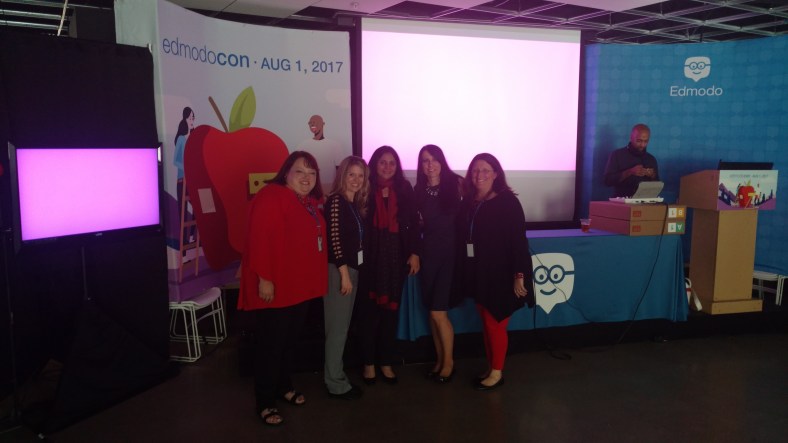
The following week is EdmodoCon, a two-day virtual event held on August 6th and 7th. I was fortunate to speak at EdmodoCon last summer and brought back so many new ideas, so I definitely recommend checking it out.

IMG_20170801_184215600.jpg

Celebrating our time speaking at Edmodocon 2017

Last few weeks of summer

Sign up for one of those virtual learning events, jump into a Twitter chat, or read a book (See BookCampPD) for some recommendations or join in the chat on Saturday mornings, 9:00 a.m. EST. Meredith Johnson has a great lineup of authors.

Lots of ways to learn, on a relaxed summer schedule, and have a little extra time for the PD that you need. You don’t have to leave the comfort of your home, move away from the pool, or be anywhere specific. Find something that you are curious about and make some time for it now, before the school year arrives and time starts to disappear quickly. You might find that these experiences will get you excited to return to school and feeling refreshed! 

And if you have extra time, check out the upcoming conferences(EdSurge 60+) and see where your PLN might be headed! Let me know if you will be attending iNACOL, FETC or ASCD Empower


The real story of being a teacher

ocean under blue sky

Photo by Artem Bali on Pexels.com

Being a teacher is easy.

It must be nice to have your summers off.

You’re so lucky, you don’t have to work on the weekends.

You have such long holiday breaks!

If you are a teacher, you likely have heard at least one of these statements before, perhaps from friends and family, or from people you just meet, that respond with similar statements when they find out that you are a teacher. Are these statements accurate? Well, I guess to an extent, but there are some ways to counter these comments.


It can be easy to be a teacher, if you love what you do, it does not feel like” work.” I enjoy  working with students, learning with and from them, and having the opportunity to start fresh each day and create experiences to engage students in learning. Having the summer off is nice too, but most teachers I know either work in the summer, attend conferences, or pursue some professional development. The “summer off” is nice for providing a more flexible schedule, and a time to reflect, explore new things and prepare for the new school year.

And as for weekends, I am fairly certain that most teachers look forward to the weekend for many reasons. Of course, time with family and time to relax are important. But it is also a time to catch up on some grading, emails, or exploring new methods to bring into the classroom. So weekends without work, I don’t think they happen too much.

And the extended holiday breaks are nice as well. But again, many teachers use this time to reflect, recharge and prepare for the return to school.

So, What is the reality?

The reality of being a teacher is that teaching today can be quite challenging. Maybe in the past, the life of the teacher was perceived to be a pretty comfortable and easy profession. The typical school day of 7:00 to 3:00 or some variation, with weekends and holidays off and of course, that summer break. With those hours and that schedule who wouldn’t want to be a teacher? From the outside looking in, it might seem like each day is the same, right? Each passing year the same as the year prior. How could it be that difficult? Once you make a worksheet or a test you have them to use forever, right?  Lesson plans are the same, projects are the same, and folders full of worksheets and activities pulled from the file cabinet, simply copy it, teach it and then move on to the next day. Same. (hopefully not).

There may be some truth to this, as I’m sure there are some teachers who are teaching the same way that they were taught and/or are using the same materials each day with each class and then doing it all over again the next year. No judgments made.

To an extent, I myself was this type of teacher for a long time. Not because I was trying to take the easy way out or save time. Rather I was using some of the methods that worked for me when I was a student. I thought this was the right way to prepare. And sometimes I used some of the same materials each year because I thought there was value to them for student learning. I know that when I was a student, some of the same issues that exist today existed then (copying homework, cheating on tests), but we didn’t have the technology, which creates tremendous learning opportunities but it also takes away some opportunities as well.

Foreign Language Teacher vs. Online Translators

I thought that being a foreign language teacher meant that I was a member of a group that had a distinct battle not experienced by any other content area.  It took some time for me to notice some bothersome trends in student work. The copying of assignments, the use of online language translators, and even copying information directly from websites. So the struggle was to find a way for students to have authentic practice that would not encourage student copying or trying to take a shortcut with learning. But each year it becomes more and more challenging to stay ahead of technology in this sense. I don’t know the answer as to how to get students to stop copying homework other than to not assign homework. And this has been a very strong discussion as to the value of homework, the type of homework, and whether or not homework should even be given at all. #ditchthehomework (follow the hashtag)


I will not make a decision either way, other than to say that for me, I do assign some “practice” tasks for the students to do, but they typically don’t come in the form of a worksheet. And sometimes when we are working in stations in class, if students do not finish something, I do ask that they work on it until complete. But I do add, “at their pace.”  Instead, I encourage students to practice the content by playing a game of review using the Quizlet cards, sharing a Quizizz game or provide prompts for writing a blog post. And these are ongoing practice tasks that are due on a weekly basis or that I have students create to use in the class. Why? Because in doing this rather than assigning the same worksheet to each student to complete,  I know that it is more authentic, will provide students with personalized practice and it is not something that can readily be copied.

But recently I was rather surprised when I saw some students switching between screens on their computer while working in their practice workbook. (As a side note, I stopped assigning practice from the workbook for homework because of copying).

I thought that by having students work on the pages in class, during stations, that I could interact more and provide more one on one feedback and  give time for students to collaborate with their peers. I did not anticipate this “new” form of copying, until one day a few weeks ago, I caught a glimpse of a student switching screens on his laptop and then writing in the workbook. The process repeated and continued for a few minutes. From across the room I had an idea of what they were doing, but I gave it some time before I walked over. Hoping that I was wrong, and that it was not the website that provides answers to so many books and workbooks. (Still cannot believe what is available).


It was exactly as I had thought, one of the students was using that website, to look up and copy the answers for the workbook. While I understand that there can be comfort in having a resource to look at, especially when a student may be struggling with a concept, it is helpful to learn that you were on the right track. But I do have a problem when the answers to all questions in every book are so easily accessible and available to students. I know when I was in school, often our math teachers would assign questions opposite to the answers that were available in the back of the book. It was nice to have an option to look at some answers to do practice problems and see if we were working on them correctly, and there were times when I did wish that all of the answers were available. But it forced us to push through the challenges and solve the problems. There were struggles in the learning but that’s how we improved and kept going forward.

Simple lesson learned. In these experiences, and on a personal basis, you cannot or should not assign students the exact same thing if you can avoid it. Especially when teaching a higher level course or one in which students have the possibility to create, rather than simply consume. We need to give them more authentic opportunities to practice what they are learning. They need to create, not consume, be active, not passive, and have the opportunity to set their learning path and be curious in their pursuit of knowledge. This is how we prepare them for the future.

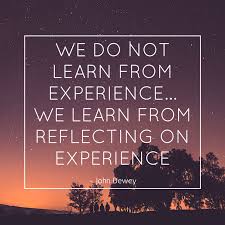
DEWEY


A fun way to learn, a great story

PBL and GimKit

So the tool was Gimkit and I only heard bits of a conversation in the #4OCFPLN group (Thank you Laura Steinbrink) and I honestly thought it was something only for elementary school. I decided last weekend to look it up, create an account and give it a try. At the end of the school year, I love trying new tools and ideas to keep students engaged in learning and finish strong. A few years ago, Goose Chase was a huge success, and so I was excited for the possibilities with Gimkit.

It was so easy to create a game, referred to as a “kit.” I created several “kits” for my classes and then noticed that I needed to upgrade to make additional kits. I reached out to the game’s creator to find out if I could have a brief trial period, so that I could make more games. Since the school year was ending, and I had conferences coming up, I really wanted to try out as many features as I could.  I was quite surprised to find out that this is a tool that has been created by a high school junior, as a part of project-based learning.

“Being uncomfortable is a great way to increase your skill of learning”

Learning the story behind the creation of Gimkit

When I asked Josh asked about his background, he told me that during the last school year, a new project-based learning high school opened in his district and he decided to attend.(See an interview done by Michael Matera, #xplap, where he interviews Josh).

In May of 2017, as he was completing one of his projects , he thought back to traditional school, where he really enjoyed using other game based learning tools, and thought he could create something to improve upon them. He started by interviewing different students and teachers, and compiled a list of the most common issues expressed, which became part of his focus in creating Gimkit.

GimKitHW

As an assignment

Last summer he worked on creating the first version of Gimkit, and ran a small beta test in October and officially launched the day before Halloween. He says they have spent “little to no time and money on marketing,”  and the user base is growing, over the past few weeks he has seen around 20x the usage he did from just a month ago. As for the team, for the most part, it’s just Josh who does all of the engineering and responds to customer support messages. He started to code between freshman and sophomore years, and then developed GimKit over the following summer. Josh also has a mentor who works with the customers and provides business advice. Listening to his interview with Michael, there are three questions that he asked himself which impressed me. “Am I working to improve the product every single day? Am I improving myself every single day? Am I doing something to push the product further everyday?” He clearly has a growth mindset and is reflective in his “challenges” that he has set up for himself.


I was so surprised when I received a response to my email to Gimkit  within about fifteen minutes of having sent it. I can’t recall the last time that I got a response so quickly.

GImkitCreate

Giving it a try

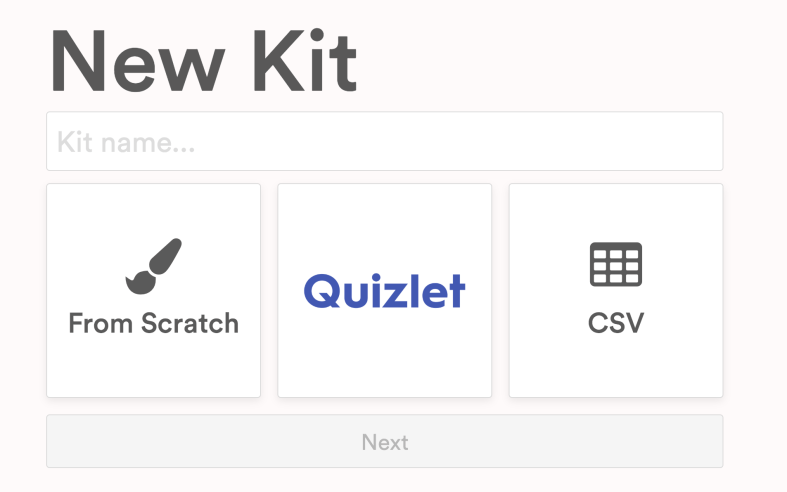
So last week I decided to give it a try in my classes without really knowing what to expect. I got started over the weekend by creating classes, entering the students’ names to make it easier in class. I created a few “kits”, which are games. It is very easy to create. You can start from scratch, upload your own sets of terms or connect with Quizlet to export a list of words directly into your game. The goal is to make as much money as you can, or for students to reach a set goal. Students can play individually or in teams and logging in is done through a code, where students can then either find their name if part of a class, or enter their name.. You can also set a time period to play, I have been using 10 and 12 minutes, just as a start.

I was very excited to try this with my classes and actually only intended to play during my Spanish I classes. To start, I told them that I really wasn’t sure how it worked and told them to just go for it.

Playing this reminded me of that day five years ago when we play Kahoot! for the first time. The students wanted to keep on playing more games every day and said it was their favorite. They were excited and having fun but more importantly I noticed that they were learning the words and their recall of the words became faster and faster with each time played. It was fun to observe them as they played, learning how the game worked, and hearing their interactions. Some students were yelling at their teammates “to stop buying things”, as they can “shop” and level up with extra money per question, buy insurance, bonus streak or other options. Eventually they all had fun buying things,  when they saw how quickly the money was being added to their account.

After the first round of games, I think the total won was around three million which seemed like a lot until the next class came in and had 17 million. The third group to play earned 37 million and when we decided to continue this the next day we were in the billions!

GimkitLIbrary

Gathering feedback and assessing the benefits of the tool

Once the game is done, a report is available which opens as a PDF. The summary shows the class results and the individual report lists each student, money earned and lost, correct and incorrect answers, followed by a list of the terms asked and the number of correct and incorrect responses. It is a great way to see what areas that the class as a whole needs some review with, but more importantly, something that can be shared with each student and used as a tool to study. Teachers can create 5 kits for free and edit each kit once. There are also paid plans that enable you to create more.


For the determining the benefit for students, I value their feedback very much and I ask them what they liked about the game and how they felt it impacted their learning of the vocabulary. They liked the game setup and the repeated questions, the music and the teamwork made it fun as well. Creating the kits was so fast and made it easy to keep adding more into my library. Another nice feature is the ability to assign kits for students to play outside of class for practice.

There are different options available for play in class as well as assignments. I love that students can work at their own pace and that they are learning more and feeling more confident with the material.  I definitely recommend that you check them out and follow them on Twitter, @Gimkit. Just in the past few days, there are already new features added, one favorite is the messages sent to teammates letting them know when someone on the team buys something.


No-tech, Low-Tech or All Tech: 5 new ideas to try


**Slightly updated from an earlier post, but some ideas to get that energy back up

Ending  the year with 5 random ideas: Going back to basics 

The end of the school year is a great time to try some new ideas. With summer approaching,  we have time to reflect on methods used this year and to seek out new ideas and tools, to come up with creative and innovative methods and ways to welcome to students back in the fall. Hopefully these new activities will help to keep students more engaged in learning.

Here are 5 ways to have students connect, collaborate and create. These are also helpful for building peer relationships and for reviewing content or assessing skills at the end of the year. These ideas can be no-tech or using something suggested by the students.

1) Random games or icebreaker style: There are tons of ways to create icebreakers, whether by using paper and pencil or even with digital tools. For example, with Buncee, Piktochart or Canva students can come up with four statements about themselves to share with classmates. These can be in the form of three truths and a lie, as a way to help students learn about their peers and for the teacher to learn about the students. It is beneficial for making connections with one another, finding things in common, but also to appreciate the different perspectives and backgrounds students bring into the classroom. It will be a great way to enhance communication and comfort in the classroom and also, if tech is used, to start teaching students alternative ways to present information.

Screen Shot 2017-12-07 at 8.37.18 PM.png

2) Categories:  Create a template with 4 or 5 different categories related to the content area and grade level being taught. After deciding on categories, select 5 or 6 letters of the alphabet, or use numbers, that students must use to come up with a word, topic or date, that ties into each category. Students can randomly be assigned to small groups and can then share what their group came up with. This activity will promote communication between peers and provide an opportunity for collaboration and some fun as well. It can also be a good way to have students review, be creative and brainstorm new ideas even. It will provide time for teachers to assess student needs and decide the next steps in the lesson, as we keep moving toward the summer break.


3) Word art: Students need different ways to practice the content and one way that helps some learners is through visual learning. Students can use vocabulary, verbs or any content material to generate word art. Students can create a word cloud using paper and marker or try using a digital tool like WordCloud, or WordItOut, or other similar word cloud generators available. After the word clouds are created, teachers can build on the learning potential by having students post their work in the classroom, having a gallery walk where other groups can discuss the terms, brainstorm new ideas, define or translate them (if a foreign language) and increase the authentic learning materials in the classroom.


4) Music: Music can really liven up the classroom and be useful for helping students remember the material. One idea is to have students create rhymes or a song using a vocabulary list, names of famous people, state or world capitals, monuments or anything related to the content area. Students can work in pairs or a small group and create a song which can be used as a mnemonic device, to help them retain the information in a more meaningful way. For presentation purposes, students can then have the choice of sharing live in class or perhaps trying a tool like Flipgrid or Recap to record and share with classmates. It can even be followed up by posting the video on a Padlet and encouraging students to comment in writing, or leave a reply on Flipgrid. These student creations will add to the authentic classroom resources and engage students more in learning.

Screen Shot 2017-10-28 at 9.04.12 PM.png

5) Creating games: Students can create a game as a way to help themselves and their peers practice the material. It can be a game made up using paper or any materials the students decide on or created using one of the digital tools available like Kahoot, Quizlet or Quizizz. Students will have a more authentic learning experience when they select the specific vocabulary they need to practice, which will will give more personalized learning opportunities.

In trying one or all of these activities, it presents an opportunity for the students to work together, to build their relationships, to collaborate and to engage in more authentic learning experiences. And it provides the teacher with an opportunity to step aside and become a facilitator, and to use the time as an opportunity to not only assess student learning but to interact more and provide feedback for students.


There are many ways to practice the content material and engage students more in learning, these are just a few of the ideas that I have tried in my classroom this school year, and they are a work in progress. Knowing that something works takes reflection and student input, and one thing I have noticed in the few short weeks we have been in school, is that students are asking more questions and thinking of new ways to extend their learning. I have more time to move around and work with every student and provide more individualized instruction and really understand each student’s progress.

They are asking, “Can we…?, What if…?, Is it okay to…?” and adding their creativity into our activities. They are also suggesting improvements, “Maybe we could…, It might be better if you…, and This has helped me to remember…can we keep doing these activities?”  And my answer to all of these has been “Yes, I think we should try it.” If it works, then great. And if not, we will try again!”


12 Tools to Try…before summer break!

Updated from the Original Post on Getting Smart, January 19, 2018

Looking for new ideas to try before the end of the school year? If you have not tried some of this, now is the time!

There are so many digital tools available today that offer opportunities for promoting student creativity, student voice, and expanding where and how students learn. I had my own list of the tools that I found made a big difference in my classroom, but decided to ask students for their input.

Here is a list of tools to try in 2018, (or to try before the end of the year, let’s keep learning!)

Each of these offer multiple ways for students to create, connect and engage in more authentic learning experiences.

Promoting Connected Learners

We were able to take our learning to a whole new level this year through Project Based Learning (PBL). Using these tools enabled us to connect with students from several Spanish speaking countries, which created tremendous possibilities for more authentic learning and broadening our cultural understanding.

1) Edmodo: Virtual learning space, where teachers can set up a digital classroom to connect students with the resources they need, in a safe learning environment. Edmodo can be used for assessments and integrates with Microsoft Office and Google, making it easy to share files with students. Students relied on Edmodo to connect with students in Argentina, Mexico and Spain for their PBL. One student said “these connections enabled me to sculpt my PBL, and learn in ways that books, videos and regular classroom lessons cannot provide.”

2) Flipgrid: Video response tool, which became one of the most talked about tools this past year after launching new features, making it even easier and more fun for students to share their ideas. Students can record up to a five minute response, add emojis to their photos and access the “grid” quickly through a grid code. It is a great tool for helping students to become more comfortable and confident in sharing their ideas and sparking curiosity with their peers.

3) Padlet: Padlet, a virtual wall, is a favorite in our classroom. Students can create a digital portfolio by uploading files and links to projects, curate resources for PBL, or have discussions with classrooms around the world. Other popular ways to use Padlet are to ask questions, post homework, or as a classroom website. Newer features include being able to “like”, “grade” or “upvote” a post and directly transfer posts to another Padlet wall.

4) Recap: Recap 2.0 is a free video response tool, which integrates with Edmodo, Canvas, Schoology, Google Classroom and Blackboard, making it easy to implement right away. It provides a comfortable way for teachers and students to ask questions by setting them up in a “Queue”. Students can submit questions and receive direct feedback, in a safe moderated environment.

Tools to Engage Students in Learning

5) Quizlet Live: Quizlet Live is a fun way to encourage student collaboration by playing a team game using a set of Quizlet study cards. Teachers select a set of study cards, launch a Live game by providing students with a join code, and students are divided into teams. To play, you need at least four players and a study set with at least 12 unique terms. Only one member of the team has the correct answer and answering incorrectly bounces the team score back to zero.

6) Quizizz: Quizizz has launched some new features, including integrating with Edmodo and Google Classroom, which makes sharing or assigning games and reviewing results much easier. When playing live, students can see the class accuracy reflected as it updates the leaderboard live with each response. There are thousands of games available in the library, making it easy to get started or create your own.

7) Kahoot!: Some big changes to the layout and options of the platform make it easier to navigate and review questions in class. Teachers can now assign “challenges” to students as a fun way to practice by sharing a code. The new “Nickname Generator” creates fun and unique usernames such as “Mystery Panda” or “Fantastic Bat” to students. It definitely saves time rather than waiting for students try to come up with their own “creative” names.

8) Kidblog: Blogging has many benefits for helping students to express themselves and begin to develop their online presence. Teachers can provide students with a variety of writing prompts to not only assess student learning, but promote creativity, communication, collaboration and digital citizenship skills. With Kidblog, teachers can even AppSmash (use two or more apps or tools together to complete a task) by embedding other tech tools into the platform, such as Buncee, Flipgrid or by uploading images and documents directly from Google Drive.

Creativity, Assessments, Interactive Lessons and More

9) Buncee: Buncee, a versatile presentation and assessment tool, is great for creating multimedia projects full of animations, graphics, audio, and videos. Choose from thousands of templates, backgrounds, animations and other graphics to create invitations, classroom signs, and unique “Buncees” for any purpose. Buncee enables every student to find exactly what they need to add into their project and to bring out their creativity.

10) Formative: An interactive tool for creating formative assessments, for use in class or as student-paced practice. Students enjoy using Formative because they receive feedback quickly, they are able to “show” their work and when done as practice, move at their own pace. Teachers can create Formatives with different question types, content and even the ability to upload and transform files. Try having students create their own Formatives as a way to have more personalized and authentic practice.

Immersive Learning, Coding and Problem Solving

11) Nearpod: Nearpod continues to be a game changer in our classroom. It provides so many options for presenting material as well as assessing students through diverse activities. The chance to be immersed in the virtual field trips and explore places around the world is of tremendous value for students. Educators can quickly create interactive lessons which include multiple question formats, the ability to upload content, BBC lessons, PhET simulations, and even add in GIFS! Nearpod integrates with Google Classroom and Canvas, and most recently with Remind, making it even easier to share lessons. Nearpod also added 27 “College Tours”, available in VR, a great way to have students experience different schools by immersing in the campus, without having to travel the distance.

12) CoSpacesEDU: CoSpacesEDU provides students with a way to not only create their own “spaces”, but to be able to walk in the spaces created by their peers. To explore in VR (Virtual Reality) and problem solve by figuring out how to code using Blockly, offers students a truly authentic way to learn, create and problem solve. The Gallery is full of examples to get you started with ideas for your classroom. Use CoSpaces to have students represent a scientific concept, a book report, or create a scene representing something studied in any content area. Talk about creativity, imagination, innovation and critical thinking, and more all in one tool.

In the End

These are just 12 of the many tools out there for education. The most important thing to remember is the “Why”? behind using these in the classroom. While these 12 tools made a difference in my classroom, they may not have the same impact in yours, but I do recommend giving them a try. Think about the tools you are currently using to amplify or facilitate student learning. What is making a difference in how, what and where students learn? Could one of these be used in place of another, as a way to engage students more in learning, or even better, provide opportunities for students to move from consumers to creators?

My advice is to simply choose one of these 12 tools and give it a try. See how it goes, ask your students for some feedback, and then plan your next steps.

Rubicon Summit: Classroom’s Journey To Student-Led, Interactive Lessons

A Classroom’s Journey To Student-Led, Interactive Lessons

Written for the RUBICON SUMMIT

About two years ago, I found myself struggling to find ways to keep my students engaged in the lesson. I tried to get them involved more in class activities by offering more choices and providing opportunities for them to be part of the decisions made about what we were doing in the classroom. Why did I do this? Partially because I saw – and could feel – a decrease in student motivation and engagement. It was approaching the end of the school year, and the focus had shifted more to “when does summer begin?”

So I tried to do things a bit differently, think creatively, and take some risks. I wanted to keep us all moving, to finish strong at the end of the school year and begin summer vacation with a sense of accomplishment, to celebrate all that we had learned throughout the year and also what we had gained from these new experiences.

Educational Technology and Digital Tools with Purpose
Educational Technology provides so many resources that enable students to learn anywhere and at any time, and at a pace that is comfortable for each student. We can instruct from inside the traditional classroom, ​”​the brick-and-mortar​” ​as it is called, or from anywhere around the world. Using digital tools provides more differentiation and personalized learning, and provides opportunities for the students to move from consumers to creators. When students have choices in how to show what they have learned, they are more likely to be engaged and excited for learning. They will feel valued​,​ and the lesson and learning will be more meaningful because it has been made perso​n​al to them.

Creating Interactive Lessons
What did I change? I started by having my students create some interactive lessons using educational technology tools like Formative, Nearpod, and EDPuzzle, or even games with Kahoot! and Quizizz. It proved to be a very beneficial learning experience for all of us. By doing this, we had extra resources available that could be shared with students who might need some extra practice. I thought it went so well that I decided to take it a step further and start a “teacher for a day” activity during which the students create a lesson based on a grammar topic or vocabulary.

I stepped back and had the students lead our classroom. It was a really good way to learn a lot more about the students, to better understand what their needs were in terms of the content material, and for the students to learn about each other. Giving students the control and the opportunity to become the creators and leaders in the class has tremendous benefits and it has been something that we have enjoyed.

Giving Students the Control
At first when students created interactive lessons, I would launch the lesson and control it on the SmartBoard, but find ways to involve the student who created it during the presentation. I eventually decided to move aside, and took a seat in the back of the room, having the student lead the lesson, give explanations, answer questions, call upon students for answers, and provide feedback. Having the opportunity to sit back and experience this was tremendous. The students enjoyed the activity, supported each other, collaborated, and provided some positive feedback to each of their classmates. I was very impressed with how well they taught, led, and learned during each of the “teacher for a day” lessons.

Empowering Students in Learning
The use of these digital tools means ​that ​the “time and place for learning” is no​ longer​ confined to the ​traditional time and setting of the physical ​classroom​. It opens up the learning environment ​to​ anywhere​, at any time and at a pace that is comfortable for the students as well. Learning and having timely, purposeful and authentic feedback is critical ​for growth to happen. When we shift our focus to creating opportunities, giving students the control, leaving the decision making to students to choose ​how t​o show what they have learned, or ​letting them​ design their own assessments, they are more empowered in their learning.

What are the Next Steps?
Have a conversation with your students and ask for their honest feedback. What did they like? What did they not like? Which lesson or format seemed to help the most? What did it feel like to be in control, decide how to deliver the lesson, and experience being the teacher? You can have this as a face to face conversation, students can respond on paper, or use one of the many digital tools available for communication. No matter which way you choose, look to your students for the valuable feedback to decide your next steps. Be sure to ask yourself these same questions and continue to reflect on steps taken and progress made!

For more strategies about integrating technology into instruction, read Overcome

EdTech’s Problems With Blended Learning!