New features to our Favorite tools! Part I

Here is the first part of a series focused on some of the latest updates to four of the digital tools that we regularly use in our classroom. I admit that I may have been more excited than the students, when I came across these updates, but once we tried them in class, the students were just as excited for these new features.

First is Nearpod. Nearpod + VR College Tours and Remind! Nearpod has been a game changer in my classroom. Students have engaged more in learning when we do lessons in class and they are interested in creating their own lessons, and taking on more of a leadership role by running the lessons on their own. Nearpod continues to add new features, making it a versatile tool that provides an immense library of lessons to choose from and a wide selection of activities, content and other resources to include into each lesson. Over the past few months, Nearpod has made some updates and integrated new features into the already extensive platform. Some of the new features  launched include: having more than 50 video lessons available through the BBC, option to view in “Student Mode” on the Teacher Dashboard, PheT Sims interactive Math and Science Lessons, and  making lessons with these resources available for immediate implementation into class. It is easy to find lessons that pertain to different content areas and grade levels, and which include a variety of tools for assessment and for engaging students more in learning.

Nearpod provides a very user friendly interface, which makes it easier for teachers to start using Nearpod and to build comfort when designing their own lessons. It is also highly beneficial for keeping the students actively learning on days when teachers have to be away from the classroom, through the use of Nearpod for Subs.
Launching lessons can be done live, with a join code in class, or shared through
a link, social connections, or through Google Classroom. But there is a new
update that makes it even easier to share, and that is Nearpod’s integration of
Remind as a way to share lessons. By integrating with Remind, educators send
the link through Remind, enabling students to start the lesson whenever they can
and wherever they are.
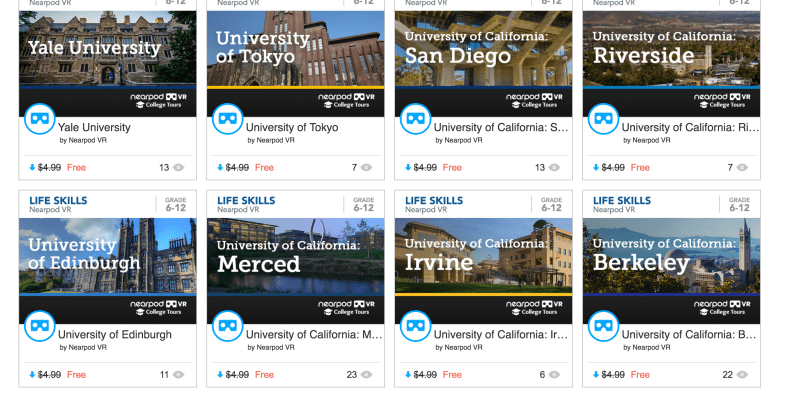
Another recent addition to the vast Nearpod library are the College Tours,
available in VR. What a great way to have students take a look at different
schools, without having to travel the distance, and to be able to immerse in the
campus and look around. There are currently 27 different colleges represented in
the collection, which include Universities such as Cambridge, Oxford, UNAM and
Taiwan and Tokyo, to name a few. A really great addition to the Nearpod collection and I recommend checking out the tours, and you can even use these as a way to create a scavenger hunt for students.

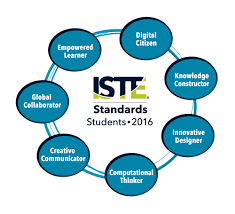
How Kidblog supports and meets the ISTE Standards for Students


  1. Empowered Learner
  2. Digital Citizen
  3. Knowledge Constructor
  4. Innovative Designer
  5. Computational Thinker
  6. Creative Communicator
  7. Global Collaborator


The Student Standards reflect the skills that we want the students of today to develop, so they can become more connected with their learning and prepare for their future in an increasingly digital world. The use of blogging is a good way to address the ISTE Standards for Students. The new standards, which were released in June 2016, focus more on what we want for students – The pursuit of lifelong learning and ways in which we can help to empower students in their learning. The emphasis is on providing opportunities which promote student voice and choice and help educators to implement technology in ways that will increase student growth and readiness for the future. The ISTE standards represent the skills and qualities that students need for su​​ccess in the 21st century.

Supporting the standards with technology
There are many educational tools (both digital and traditional) available to promote student voice in the classroom. Blogging is one tool that serves to support and meet the ISTE standards. Educators can refer to the standards as a guide for selecting tools to use with students that will amplify learning and promote student choice. The goal is to support students so they begin to take ownership in their learning. A move in the classroom from teacher-centered, to student-centered and optimally, student driven. Here is how Kidblog can help.

1. Empowered Learner: As empowered learners, students “leverage” technology to show their learning and demonstrate their mastery in a platform that is comfortable to them and in a personalized space. Students take more responsibility for and have choices in how to show their learning.

2. Digital Citizen: Blogging promotes digital citizenship as it helps students to develop their social presence. Through blogging, students become active in online communication, learn about proper use of internet and resources and interact in a safe learning environment. Posting online and sharing information helps students to develop the skills they will need in the future and to recognize their responsibility when it comes to digital resources. Blogging gives students the opportunity to practice appropriate and ethical online behaviors, which transfer into the classroom space as well.

3. Knowledge Constructor: Students gather information and resources to use in creating stories, conveying information in a way that is more authentic and meaningful for their learning. The use of blogs helps students to work on their writing skills and ties in nicely with gathering information to share in their digital space. Students can research and analyze the resources, to determine which is most relevant and applicable to their task.

4. Innovative Designer: Students can use the different tools and features in the Kidblog platform to express themselves in a more unique way, share ideas and create in an innovative way. Designing and creating more authentic ways to show their knowledge as well as creating new and more “imaginative” solutions to a question or problem presented.

5. Computational Thinker: Students can use blogs as a way to discuss and talk through a process of decision-making. Blogging is a great format for working through projects or solving complex problems, and to demonstrate the thought processes and analysis involved through their writing.

6. Creative Communicator: Students can use the different features of Kidblog to share their knowledge, convey information or tell a story in a more engaging and creative way, to be shared with peers and the teacher. Blogging opens up more opportunities for students to be more expressive than the traditional formats such as paper or other digital tools. Students can express themselves in a way which promotes creativity and with Kidblog, can incorporate other tools to present their information in a way that supports the learning goals and meets individual student needs and interests.

7. Global Collaborator: Students can use blogs as a way to learn about other cultures and connect with others by posting their blogs and sharing information with peers. Students narrate background experiences and connect with others in a safe learning environment that builds confidence and promotes student learning. Students share their blogs with peers and can also connect with other students from around the world. It facilitates the opportunity to local and global issues and perspectives, and to use the blog as a way to express their thoughts.

The focus of the ISTE Student Standards, helping students to become better with communication, collaboration, critical thinking, problem solving and to express themselves in more creative and innovative ways, falls in line with the features of Kidblog.

7 Tips to Get The Most Out of Blogging This Year

Getting ready for the start of a new school year – new students, new curriculum, and new tools – means teachers have a lot of preparation ahead of them. Whether new to Kidblog or a veteran classroom blogger, these tips will help you get the most out of your class blog this year.

1) There is no better way to start the year than by way of introductions. Blogging can be a great way to get your students comfortable with you as their new teacher, as well as, their new classmates. In my classroom, I also use this time to cover expectations in the classroom. This is all done in a “Welcome back to school” blog post. Choose a fun theme for the class, add some links and include helpful information. Share information about you, including some fun facts, and encourage students to then respond to your post. You can begin to develop those vital relationships for your classroom.

2) Get parents connected. Make the decision to use blogs as a way to keep parents informed about what is going on in the classroom. Set a goal to write a blog post with a weekly update and share what is going on in the classroom, give highlights of upcoming events and activities the students will be participating in. Also, use the blog as a way to share student work with parents, which will really connect the home and the classroom, and involve all members of the learning community.

3) Involve students in planning for blog posts. Encourage students to come up with their own ideas or to work with peers to brainstorm some writing prompts to use throughout the year. Gather their ideas and then draw from their prompts. Involving students in the decision making process in the classroom helps to provide more authentic and meaningful learning experiences. It promotes student voice and choice in the classroom and helps students feel more valued and empowered. By actively engaging them in classroom decisions, students will feel more connected to the content and their peers.

4) Create a bridge between content areas by doing some cross-curricular blog posts. Find time to talk with and encourage other teachers who may not be using blogs, to work with you to create some cross-curricular opportunities. The blog can be a way for students to complete some writing assignments or projects for communicating their ideas and showing their learning. Students create their own personal space to share ideas and really have an opportunity to practice their skills for multiple content areas in a comfortable manner.

5) Try adding some other tech tools to app smash with Kidblog or use Kidblog as the means to share student work! Implementing other tools will help students develop their technology skills and digital literacy. For example, have students create a Buncee and write about what they’ve created, or, they may share it with a peer to create a story. These apps can be easily embed into Kidblog for their classmates to comment.

6) Have a routine for sharing student blog posts and set aside time in class for the students to work together to share their blogs, offer feedback and learn to reflect on their work. Making time for students to work with peers will build those positive classroom relationships and help students to become more confident in their learning. Their confidence will increase through the writing process and also by communicating and collaborating in the classroom.

7) Be sure to have resources available for students so they understand how to use the blog, how to write a post and to properly cite any images or other information they add to their posts. A great way to do this is by screen-casting a tutorial available to students, as well as, creating a “guide post” that gives students pointers on how to publish a post, the required format, and other information related to your expectations. By providing all the information in a place which is accessible, the process will be much easier for students throughout the year to have the support they need when they need it.

Kidblog

Why we need to reflect: Learning from our Mistakes

Reading the words of John Dewey: “We do not learn from experience…We learn from reflecting on experience.”, I give myself constant reminders to be reflective in my practice. Reflecting led me to really evaluate some things in my classroom.

A few weeks ago, I had a challenging week. Probably the most challenging week as far as behaviors, in several years. It came in the form of disrespectful behaviors, classroom disruptions whether it was students talking out loudly, exchanging words, or other similar interruptions.  I really tried to work through these, with the students, patiently and with every possibly method I could think of. I wanted to push forward and in another post, I explain what happened, but for now, these are the lessons that I have learned. And this is how I reflected and did what I needed to do, to restore balance in my classroom.

I am not one to yell in class, in fact, over the 21 years teaching in my current school, maybe there have been 7 or 8 times that I have really yelled. Whether that is good or bad, not going to decide, but I can say these were not the best reactions  in my years of teaching. However they have led me to take time to really reflect and remember a couple of things.

1) I am the adult and my role is to provide a supportive, engaging place for students to learn, to feel welcome and to thrive.

2) I don’t always know what’s going on in the lives of the students beyond my classroom and so their behaviors may be a result of something happening throughout the day or in their home or social life.

3) I cannot know everything but if I don’t take the time to get to know something about them, that is doing them a disservice.


So I did yell. It felt awful.  I myself further disrupted the learning environment, and for this, I also apologized. I shared this experience with some friends and was asked several times, “why” and “to whom?”


I apologized to my class and to each of the students to whom I yelled, because I did not handle it well. I myself further disrupted the learning and had an effect or impact on not just that student, but on everyone in the classroom. So it was a trying week because I had to really take a hard look at myself and my responses to some situations that I could have handled differently. I could have handled them better. I should have. But I am very open about the fact that I am a work in progress, that I make mistakes and I will own my mistakes and grow from them.

It took a few days for me to really shake off that negative energy and that is an awful feeling. But I did that myself, it was my choice to act, how to handle it and I definitely could have handled it better. I should have handled it better. A lesson learned, a new focus and a new reminder to think before acting and speaking.

Practice patience, use kind words and show empathy.


Teaching is hard sometimes. We can have lesson plans ready, very detailed objectives on the board, every material and activity ready for the students for the day, but one slight ripple ,one small interruption, can completely change the course of even the most perfect plans.

Rita Pierson said “Every kid needs a champion” and even in her math class, when one of her students had missed 18 out of 20 questions on a test, she wrote a plus two. Why? She said because that looks better than a -18 and it tells the student “you got two right and are on your way”.  It sends a positive message. We need to be the positive for the students. We may be the only positive they have each day. 

CHAMPIONSYLVIA

So avoid the negative, focus on relationships, reflection and constant growth. It starts with us and we make an impact, and we may never know how large of an impact we make,  from the smallest interaction.

So make every moment matter, because the students matter, and we need to be their champion. Even when they push back, push back harder with kindness.


Thanks to Sylvia Duckworth for this amazing image.


Quizlet Live: A student perspective

Teacher to Teacher: Does technology in the classroom help? Ask the students.

Quizlet HQ ·

This post was written by Rachelle Dene Poth and Sean, a student in one of her Spanish classes. Rachelle teaches French, Spanish, and STEAM at Riverview Junior-Senior High School in Pennsylvania. 

quizletlive

Quizlet Live: An instant hit in my classroom

The availability of technology, and especially of digital tools like Quizlet, have opened up tremendous possibilities for classrooms today. Because of the diverse tools available, teachers now have new ways to deliver content both in and out of the classroom, and students have more engaging and personalized ways to learn.

Quizlet is something I have used in my classroom for the past few years in many different ways. I have used it in class to play Quizlet Live, to give students time to use the activities to review while I work with them individually, and to play games like Gravity on the Smartboard. Toward the end of last school year, I was able to beta test Quizlet Live, their newest collaborative in-class game, with my Spanish II class. It was an instant hit. Once we figured out how to play the game (which was easy), it became a great way to practice the vocabulary and verbs. It also created more opportunities for students to work with and learn from their peers, and build those vital classroom relationships that form a positive classroom culture. (To learn more about how to play Quizlet Live, check out my previous post on this topic.)

How to know when the technology has a purpose: Ask the students

IMG_20161108_131159.jpg

Sean, an 11th grader in my Spanish courses, has been an advocate for the use of technology at school. He recently led a presentation for an edtech conference, TRETC (Three Rivers Education and Technology Conference) and chose to present on Quizlet Live. He explained the purpose of the game, highlighted how to play, and led a game with those present — many of whom were playing for the first time. Sean had great, first-hand information to share and, coming from a student, the benefit of using Quizlet Live in the classroom was clear to everyone.

In Sean’s own words

Quizlet has a purpose when it comes to studying or just having fun. For example, in my Spanish II class, we used Quizlet for studying outside of class or to create cards for homework, and then when we met again as a class, we would play Quizlet Live and it would be fun for everyone. It is a tool that can be used multiple ways for school and work. An example of using it outside of school is when we were coming home from the PAECT student technology showcase. We were bored during the bus ride, so Mrs. Poth asked us if we wanted to play and we said sure.

Screen Shot 2017-01-10 at 1.08.33 PM.png

At the time we didn’t know any topics that could be played on Quizlet Live except for school topics, but we were introduced to some of the other topics that could played. We struggled with some of the TV trivia, which dated back to the 1950s, but we worked as a team and won the game. This activity showed our group that there were a variety of things that could be done using Quizlet Live.

This school year, I have already created a Quizlet Live that my class has played and everyone loved it. I will continue to create more Quizlets to use and help out the class, and to also have a fun time at home. We will be presenting a session during our state technology conference, PETE&C, and in addition to the student showcase, we will take over a full session and teach teachers about these tools. The students will once again be the leaders and engage the attendees with Quizlet Live.

6 Digital Tools To Engage Students

 Original Post Published on Teach Thought May 22, 2017, few updates added


Are you looking for some new ways to get students engaged this school year?

Here are 6 tools that I had found to be quite helpful as this school year winds down. More importantly, these are also some of the student favorites, in no particular order.


Flipgrid

Flipgrid is another video response tool that offers ways for students and teachers to interact with a variety of discussion topics. You start by creating a “grid” and then adding a “topic.” There have been some major updates and new features added to Flipgrid this summer. Longer recording length, stickers, gifs, integrations and more. Be sure to check it out!

A grid in my case is one of my Spanish classes.  Students go to the grid to see new topics which are posted for discussion and then record a response and even reply to classmates.

I have used Flipgrid as a way for students to reflect on their project-based learning, and for basic speaking assessments with my Spanish 1 and 2 students, where I can listen to their pronunciation and provide feedback. Flipgrid is also a way to connect students with other classrooms or even professionals in different fields, to connect with real-world applications of the content material.

Some additional features include the ability to give a rating to the response, read the transcript, provide written feedback which can then be emailed to each respondent, as long as an email address has been provided.

When setting up the topic, there are options for recording a video prompt, adding additional details in writing, and then customizing the topic based on whether or not other people can see the responses. You can freeze a topic, so new responses cannot be recorded but all prior responses can be viewed.

There are other features such as tracking the number of views, likes, and comments. Flipgrid is available on Chromebooks, iOS and Android devices and can also be embedded into an LMS or other websites. It is another tool that is easy to set up and might just be what you are looking for, especially at the end of the year,  to have students provide feedback on the course, to offer some information to help with the summer reflection.


This slideshow requires JavaScript.

Recap 2.0

Recap 2.0 is a Question and Answer platform available on Chromebooks, iPads, iPhones and Android devices, which can be implemented right away and is easy to use. Recap enables teachers and students to ask questions, share a reflection, and provides a comfortable way for students to communicate their thoughts. Recap also had many new updates this summer and is a great way to spark curiosity in students and to help students learn ways of asking questions and seeking more independent learning.

Students can submit questions and receive direct feedback from the teacher, parents can receive feedback by email through Recap, and there are many other features available for assessment and classroom management. Recently Recap added another feature to its platform by introducing ‘Journeys.’

In a Recap Journey, teachers create a multi-step path for students. It starts with a 60-second video and then the learning path, which leads to more independent learning and can also be a great way to differentiate instruction. As an end to the “Journey”, students can share their information or create a presentation.

In my experience with the Journeys, I had students explore Spanish-speaking countries and included different links for them to explore more based on their own interests.

It was very easy to create my own Journey and there are also many Journeys available to try through the Recap Discover.

2016 Pioneer Badge

Kahoot!

By now, you’ve likely heard of Kahoot! Especially last week when CHALLENGES came out after a period of Beta testing following discussions at ISTE in San Antonio. I was fortunate to be one of the testers and Challenges are great for having students practice the content and even for fun with family and friends.

Kahoot! is great for assessments and having a game based learning element added to your classroom. It can even be used for professional development or family fun. Kahoot! offers many quizzes in the public library which can be duplicated and then edited to make your own.

When playing, it also has added new features for auto advancing, playing in ” ghost mode ” which enables players to try and beat their first score. ‘Jumble,’ which is one of the most recent additions has proved to be a lot of fun and very beneficial for learning.

In Jumble, you create a question and each of the four colored tiles becomes part of the response. When the question appears on the board, the squares on the board are shown but the order is “jumbled.” Players must then slide the squares into the right order to either spell the word, properly form the sentence, or answer the question.

As a foreign language teacher, this has been quite beneficial for having students practice their spelling as well as for reinforcing proper word order for sentence structure in Spanish. Playing with Jumble mode has livened up the classroom because it is something different to try and the students are always excited about trying new things.

Setting up a game played in Jumble mode, or encouraging students to create games as a review, will add to classroom resources and be more authentic practice for the students.

Buncee

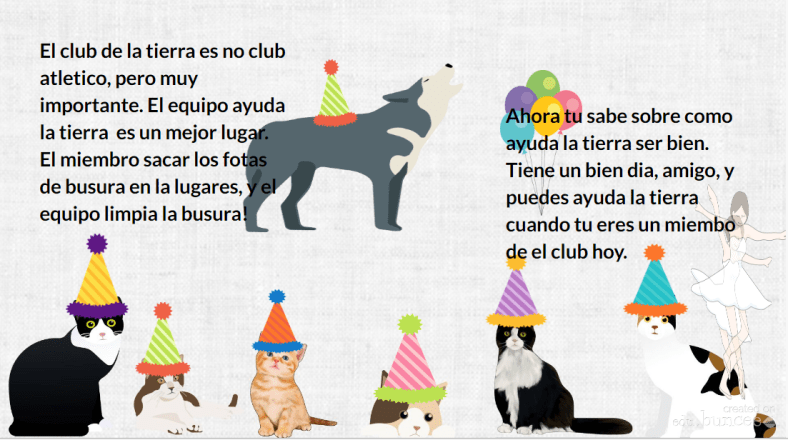
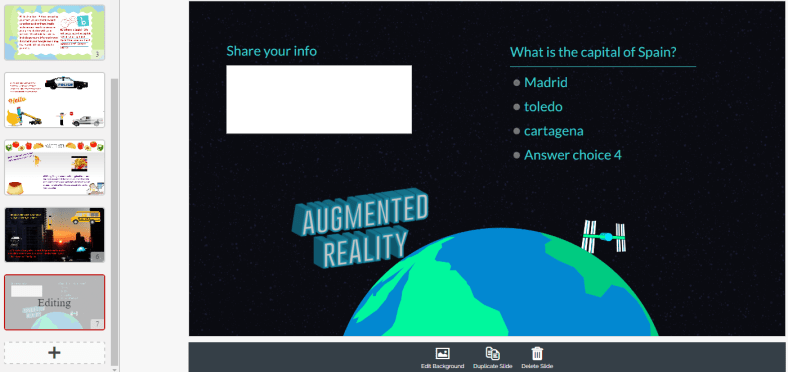
Buncee is a multimedia presentation tool which can be used to create interactive presentations, cards, signs and other engaging visuals.  (see recent post on new Buncee features, and look into Buncee Classroom)

There are many new items added to their library and some additional features, including the ability to use it for assessment. I have enjoyed testing out Buncee with my students. It is easy to create with Buncee, you can add multiple items o n to the canvas and move them around very easily. Teachers can create lessons with assessments through the classroom edition.

But what is most exciting about Buncee is that it offers many ways for students to be creative and more engaged in learning by creating something authentic, as there are thousands of items that you can add to bring it to life and make it your own.

Students can design Buncees for any class and will have the opportunity to create more authentic work which represents what they can do with the language material we have covered. Creating will be a lot of fun for students and teachers. And great for doing a Twitter Chat too! Lots of great templates.
full-1

Telegraph

Telegraph is a very easy site to publish a stand-alone web page, which can be used to create a sign, a newsletter, a journal entry, or anything as an alternative format to pen and paper or using a Word or Google Document.

It is simple to use: type in the website, add a title to it, your name and add some pictures or links to other websites and once you’re finished, you publish it and it provides you with a web address. You can easily share that link with anyone.

My students created a site to tell about a favorite trip, one to talk about sports and favorite athletes, and another some even made Mother’s Day pages and then printed them. If you’re looking for a way to have students practice simple writing skills and do so in a more digital way, I’d recommend trying Telegraph. No log-in is required and it’s very easy to use.

Quizizz

Quizziz is a fun assessment tool that continues to add more features, which makes obtaining feedback from students and providing feedback to them much easier. Some of the newer features include receiving a daily report of the Quizizz summary and being able to send parents the results of a student’s Quizizz game. (See new Quizizz features)

The daily summary report shows the number of Quizizz games used, number of responses, percentage correct as well as additional information. It’s nice to be able to have that data available so quickly. There is also the option to email the data directly to parents, which is great especially for communicating student progress and in a timely manner.

Quizizz is another tool which is easy to implement, you simply create your own by adding your own questions or search from the public Quizizz available and drag in the questions you want and then edit them according to your preferences.

Other benefits include the ability to either play it live or assign it as “practice” or homework. You can store your Quizizz games into Collections to find them easily, quickly build games and it has a much improved UI, and it was pretty good to begin with.

And if you create the Quizizz and do not have enough time for students to finish, no worries because when students use the same login and pin number, they can pick up right where they left off in the game.

This slideshow requires JavaScript.

Building Skills with App Smashing: Buncee, Padlet and now new Buncee Boards!!

Buncee

There are a lot of great digital tools that promote student creativity and choice and give students an opportunity to learn about each other in the process. Two tools that have worked well together for this purpose are Buncee and Padlet. Using these together promotes student creativity, provides more authentic and meaningful ways for students to share backgrounds and introduce themselves to classmates. It builds digital citizenship and technology skills by teaching students how to interact in a virtual space. It promotes communication and collaboration through the sharing of projects and opens the ability to engage in conversation through the commenting feature on Padlet.


When students start the school year, learning about classroom procedures and becoming familiar with their peers are important activities. Teachers go about these procedures in different ways, some even choosing to dive right into the content material and to open up opportunities for these typical procedures on a daily basis. The past few years I have tried to get students to interact more at the start of the year, share who they are, their experiences, their interests and have them set some goals as well. I try to do so with variety of icebreakers or other activities like surveys or classroom games to get the conversations started. However, this year I plan to have students share their information by creating a visual representation. Students will be able to choose from the library of thousands of images, props, icons, animations and more in Buncee to tell their story. The requirement will be that they use very little in terms of text and rather choose the images, animations and even videos to tell their story. I also hope that it creates a way for students to share some learning goals they may have or things they wish their teacher knew.

BunceeJenna

Before the advancements in technology and the increase in types and number of tools available, sharing these creations required either printing or sending through email or storing on a flash drive. But with collaborative tools such as Padlet, it has been very simple to not only share the information quickly but to embed a Buncee project right onto the Padlet so it is fully visible to everyone instantly. By doing this, students have gained new knowledge of technology, developed peer relationships, teachers learn about the students, the students will learn about each other, and it will start the conversations going. By using imagery rather than so many words, students will be able to see some commonalities in the classroom which will help to drive the development of a classroom culture.

Besides the learning potential in this, I think it is a lot of fun and highly engaging for students to create and to see what their classmates have created. I would not be setting a good example if I myself did not create a Buncee and add it into the group. Students need to learn about their teachers as much as the teachers need to learn about the students. I’ve heard the quote and read the quote of Teddy Roosevelt many times “Children do not care how much you know until they know how much you care.”  This couldn’t be truer, so we need to learn about our students and show that we care about them and their success.

BunceeSpain

Combining Buncee and Padlet

Throughout this app smashing (when two tools are used in conjunction to create and present a product), students enhance their skills in many areas. In terms of the ISTE Student Standards, all seven are addressed in completing these activities. The main one addressed is 6, Creative Communicator. Students have a choice and their voice is represented in creating their Buncee. But in the process of creating, they become Global Collaborators because by posting it on Padlet, others can view their work and comment. They are Empowered Learners because they have choice and voice in their learning experiences. Computational Thinkers because they are deciding how to present the information in the Buncee, Innovative designers choosing from the thousands of features available in the library to put into their own creation. Digital Citizens because they are learning to respect others’ work and to publish and post responsibly. For some students, this will be the first time they are really interacting with digital tools and so it will be perhaps a big learning curve. However, everyone will be doing the same thing and there will be comfort in this which will help student confidence to increase. I promote student empowerment and it will be a good way to set up the classroom culture and to help students gain some new skills moving forward.

FETCpresentation

New Buncee Boards! Announced today!

Today is an exciting day for Buncee and the many users of Buncee. The newest feature, Buncee boards, provide a great way to gather resources in one place, open up communication and collaboration, and share ideas with others in and out of the classroom. There are a lot of great ideas for using #BunceeBoards in the classroom, so be sure to check out this post: 10 ways to use Buncee Boards to see some of the ways Buncee Boards can be used in the classroom. There are a lof of great ways to use these in the classroom, and even better, students can have fun sharing, commenting and posting reactions to the boards.

There are many possibilities for using Buncee in the classroom and the nice thing about it, the best thing about it, is that it promotes choice and authentic creations for students and teachers and anyone. It is a skill that students can learn and can share with their families which will open up more learning opportunities beyond the school setting and move it into the community and beyond.


Storytelling with Kidblog

Previously Published on MARCH 9, 2017   Kidblog

hands-hand-book-readingBlogging helps develop critical skills students need. In addition to working on necessary skills for communication and mastering grammar, blogging boosts creativity, increases confidence in expressing thoughts and ideas, and encourages authenticity when students write with purpose. Blogging for increased social interaction in the classroom will also lead to a more positive learning environment and help students develop critical peer relationships and collaboration skills.

The prompts

I have focused on transforming my classroom from “teacher centered” to “student-centered” and, as a result, created a student-driven learning environment. Moving the direction of your classroom in this way can help students emerge from learners to leaders and become more aware of their strengths and weaknesses in writing. Writing prompts are often discouraged in blogging – hindering student creativity. However, there are ways to design prompts that increase student engagement, lead to more authentic and meaningful learning, and provide an opportunity for students to be in charge of their learning.

It is important to offer a varietyof prompts to reinforce student choice and voice in the classroom. Additionally, prompts that include a picture lead to a variety of creative and authentic responses, while also giving students ownership in learning. Not to mention, it is a fun way to practice their writing skills.

Something new I tried this year, in an effort to open up more options for student choice and authentic and meaningful learning, was to design a “let’s tell a story” prompt. My goal was to help students build their vocabulary and refine their writing skills by learning and applying new words outside of our textbook chapter theme. To do this, students in Spanish II read a short Spanish book and while reading, they were tasked with creating a list of unfamiliar vocabulary words in each chapter. These lists would become their personal “dictionary” of (ideally) 50 – 60 words. I wanted them to select words that they did not understand and incorporate these words within their stories. This provided an authentic method for the students to create with the language and practice their writing skills.

Co-creating a story

I decided to have students participate in writing a collaborative story. Using a theme similar to the reader, which was a story involving a student who solved a crime and helped to capture a thief, each student was to select a certain number of their words, and create a story of their own. Once a story had been created, we selected another student to continue the story using different words from their vocabulary “bank”. In the process, I would read each of the posts, provide feedback and keep my own lists of some of the most commonly selected words, so that I could later use these additional words for building vocabulary.

This was a fun way for students to collaborate with their peers and make learning more meaningful through their own choice and voice. It enabled students to work together, to provide support and to keep each other focused on the writing task. After all, collaborative skills are so important, especially for building vital classroom relationships and social interactions.

Overall, this activity was an engaging way for students to practice the language, increase opportunities to show their language skills, all while being the main driver in their learning. Giving students the chance to demonstrate what they know, in their own way, amplifies their learning and connects them with the subject content in a more personalized, meaningful way.

Kidblog

Wrong about the value of Social Media: Snapchat!


SNAPAs part of my ongoing realization that there is a lot of value in social media, especially for education, I had to acknowledge that Snapchat has more to offer than what I originally thought. I will be honest, I never really understood how Snapchat worked and thought it was something that only teenagers used, offering little more than fast  disappearing messages with funny pictures. I did not try to find anything out about it at all. I did not have an account or want one (same story as all of those other accounts I now have), but a friend (Chris Stengel) encouraged me to create an account so that he could send me some snaps or whatever they’re called.
I tried to give it some effort and explore. Fortunately because I learned about Voxer, through Facebook (this is rough), I joined a Snapchat! team through Voxer  (thank you Christy Cate). The team was set up to help others learn about using Snapchat, but I was still having difficulty. I could figure out how to take pictures and how to add on to them but I struggled with how to add contacts, open messages and reply. I even asked some of my students to help me out earlier this year, and maybe it was something with my phone, it is an Android which causes people to gasp sometimes, but even the students at one point could not point me in the right direction.


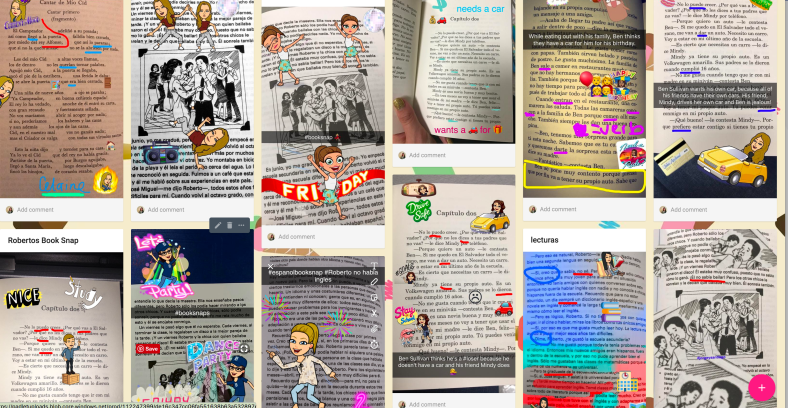
It was not until I learned about “book snaps” that I could see what a fun tool this could be in the educational world. When it comes to homework or practice, finding ways for students to do something that is authentic, fun and engaging can be challenging. Even though social media tools can be considered a distraction, especially in the classroom, when we find unique ways to use them for educational purposes, it makes a tremendous difference. The most interesting way I found was to use #booksnaps a la Tara Martin. (@taramartinedu) When I learned of this use I thought it was really quite cool, what a fun way to have students share their takeaways, find a quote or share anything while reading and then add some kind of a note or text to it and then share it with the rest of the class. Each student adding their own personal touch and using something that can make their learning more meaningful because it is connecting a tool they are familiar with and giving them the opportunity to use it for education and to have fun learning. A great way for teachers to learn more about their students based on each students’ booksnaps. (I got some #booksnaps with #spanishsnaps Spanish Booksnaps )

Screen Shot 2017-09-17 at 9.43.09 PM.png

Another great resource is the book Social Leadia by Jennifer Casa Todd (@jcasatodd) in which she shares different ways to use Snapchat in the classroom. Having these tools available, following the #booksnaps on Twitter and reading the ideas shared by Jennifer about integrating social media into the classroom and how to do so, expands the ways for students and teachers to learn.

I enjoy trying these tools, especially when I realize that I was so wrong about the value of them. As for Snapchat, I was quite pleased with myself when I did my first book snap and shared it with Rodney Turner (@techyturner) who I met through social media (Facebook and Voxer), and connected through those accounts that I had no interest in creating but I’m so thankful that I have today. My friends Mandy Froehlich (@Froehlichm) and Tisha Richmond (@Tishrich) have been encouraging me to join in the Sing Off with our Snapchat group. However, I am not much of a singer, so I have enjoyed recording random videos and changing the sound of my voice. But I have enjoyed listening to Rodney, Mandy and Tisha sing great songs and maybe, I might try it soon since I have been pretty actively using Snapchat for 24 hours as of now. I would rather sing with friends, Jaime Donally (@JaimeDonally) and Claudio Zavala (@ClaudioZavalaJr) with the #singasong on Flipgrid to have their support like at ISTE, but I may try the Snapchat Sing Off soon.

IMG_20170627_083505096_TOP.jpg

#singasong


So once again I was wrong about social media. Now I see some of the ways that these tools can be brought into the classroom to expand learning opportunities for students and teachers, and really open up authentic ways for students to show what they know and can do with the material they are learning.

If you want some ideas for using Snapchat, check out Twitter, yes I said Twitter, another social media platform and the hashtag #booksnaps to see some great ideas and have some fun. Why not start the year having students use Snapchat to introduce themselves? Or share a fun fact or summer experience using Snapchat! I still have a lot to learn!

And for the record, they got me to sing, inspiration from their singing and the help of Lady Gaga, Sugarland, Pearl Jam, oh goodness 🙂 Thankfully the videos disappear….right?


And finally Periscope – up next!


3 Ways to Implement Blended Learning In The Classroom


3 Quick Ways to Implement Blended Learning In The Classroom

Best practices for blending or flipping your classroom continue to be topics of discussion in education today. Much of the discussion focuses on finding clear definitions of what these terms mean and the benefit to classrooms.

There are many resources and ways to educate yourself on this topic available including a diverse selection of books and blogs (such as the book Blended by Michael B. Horn and Heather Staker, and of course the Getting Smart blog) related to the topic, reaching out to colleagues or members of your PLN or attending conferences such as FETC, ISTE, state edtech conferences, edcamps and other professional development experiences.

All of these are great for finding examples, vignettes, templates, suggested tools and ideas. But even with all of these options, sometimes it is more valuable to take a risk and try something out on your own. The outcomes will not always be the same for each teacher, classroom or student, but it’s at least worth a try.

There are different models for implementing blended learning, and the method used will vary depending on your classroom. I recommend starting with one method–if you see positive effects, that you have more time to collaborate in class and your students are more engaged then continue. If not, then use this opportunity as a way to learn more about your students and their needs. As teachers, we need to constantly reflect on our methods and encourage self-assessment with our students, all part of learning and growing together. Getting started can take some risk and exploration, and definitely time.

Here are some different ways to use technology to “blend” or “flip” learning that in my experience have worked well. These tools can offer innovative or creative learning methods in your classroom, opening up the time and space for where and when the learning occurs.

1. Flipping and Blending with Videos

In the past when I heard “flipped classroom” I thought that meant simply assigning a video for students to watch. It can be, as it was originally considered the traditional way of flipping the classroom, but there has to be follow-up, accountability and more than just simply assigning a video. How will we know what the students gained from the experience?

The benefit of having students watch a video outside of class is that it reserves the class time for discussion and peer collaboration, and moves the teacher to more of a facilitator in the classroom. There are video tools such as EDpuzzle and PlayPosit, through which students interact with the video.

By responding to questions throughout, they are held accountable for the material and can show what they are learning. The teacher has instant feedback and can better understand how the students are learning and provide more personalized instruction. Either of these tools are great for the teacher to create lessons, but also provide the opportunity for students to create lessons that can be shared with other students.

In my experience, these tools have both provided a lot of authentic learning, problem-solving, critical thinking and collaboration. More importantly, they create an opportunity for students to move from learners to leaders, and from consumers to creators in the classroom. This is one of our main goals as teachers–to provide opportunities which empower students to take more control and drive their own learning. These leadership opportunities also help the students to feel valued because of the work that they are doing. There are sample lessons or “bulbs” available, so try one of from the library, and see how it works in your classroom.

2. Game Based Learning and “Practice” as Homework Alternatives

Perhaps you want students to simply play a game or have some practice beyond the school day. There are lots of options available, some of which enable students to create and share their games as well.

A few of these that you are probably familiar with are Kahoot, Quizizz and Quizlet. Creating a game with any of these three apps is simple. There are many public games and Quizlet flashcards available to choose from, and it is simple to create your own or for students to create something to share with the class. You can use these to differentiate homework and have students create something more personalized and beneficial for their own learning, and then share these new resources with other students and classes.

It’s another great opportunity to understand student needs because of the types of questions they design and the vocabulary they choose to include. Another bonus is that using something like Quizizz means students can complete it anywhere. Have you tried these  three? Give Gimkit a go. Created by a high school student, this is a game that students enjoy, especially because they can level up, use multipliers and really practice the content with the repetitive questions that help them to build their skills.

3. Discussion Beyond the School Day and Space

There are tools available for having students brainstorm, discuss topics or write reflections which can be accessed at any time and from any place.  For example, Padlet is a “virtual wall” where teachers can post discussion questions, ask students to brainstorm, post project links and more. It is a quick and easy way to connect students and expand where and when learning occurs. Take the posts and use them as discussion starters in the next class.

Synth is great for having students create or respond to a podcast. The idea is that students can do some of these activities outside of the classroom period, and teachers can create prompts which provide opportunities to engage students with their peers in a more comfortable way.

Even though all of these involve technology at some level, they are interactive tools to engage students, to expand and “flatten the walls” of the classroom and offer students an opportunity to do more than just sit and learn; to become more actively involved, giving them a voice and choice, through more authentic learning.

By giving the students a chance to do more than absorb information, but instead to create, design and think critically, we not only give them the knowledge to be successful, we encourage them to create their own path to success. And hopefully, in the process, they learn to better self-assess and reflect, both of which are critical skills they’ll need for success in school and in their careers.