Build Research Skills with Learnics

Sponsored post in collaboration with Learnics. All opinions are my own

Digital literacy is a critical skill, and with access to so many resources, it is essential that educators work with students in all classrooms to help them develop their research skills. Especially with the rapidly advancing technology available to everyone, such as ChatGPT, we want to provide students with opportunities as crucial as reading and writing. Teachers are constantly seeking innovative tools to enhance their students’ research skills. Learnics offers a digital space for students to conduct their research and track time spent and resources found!
What is Learnics?

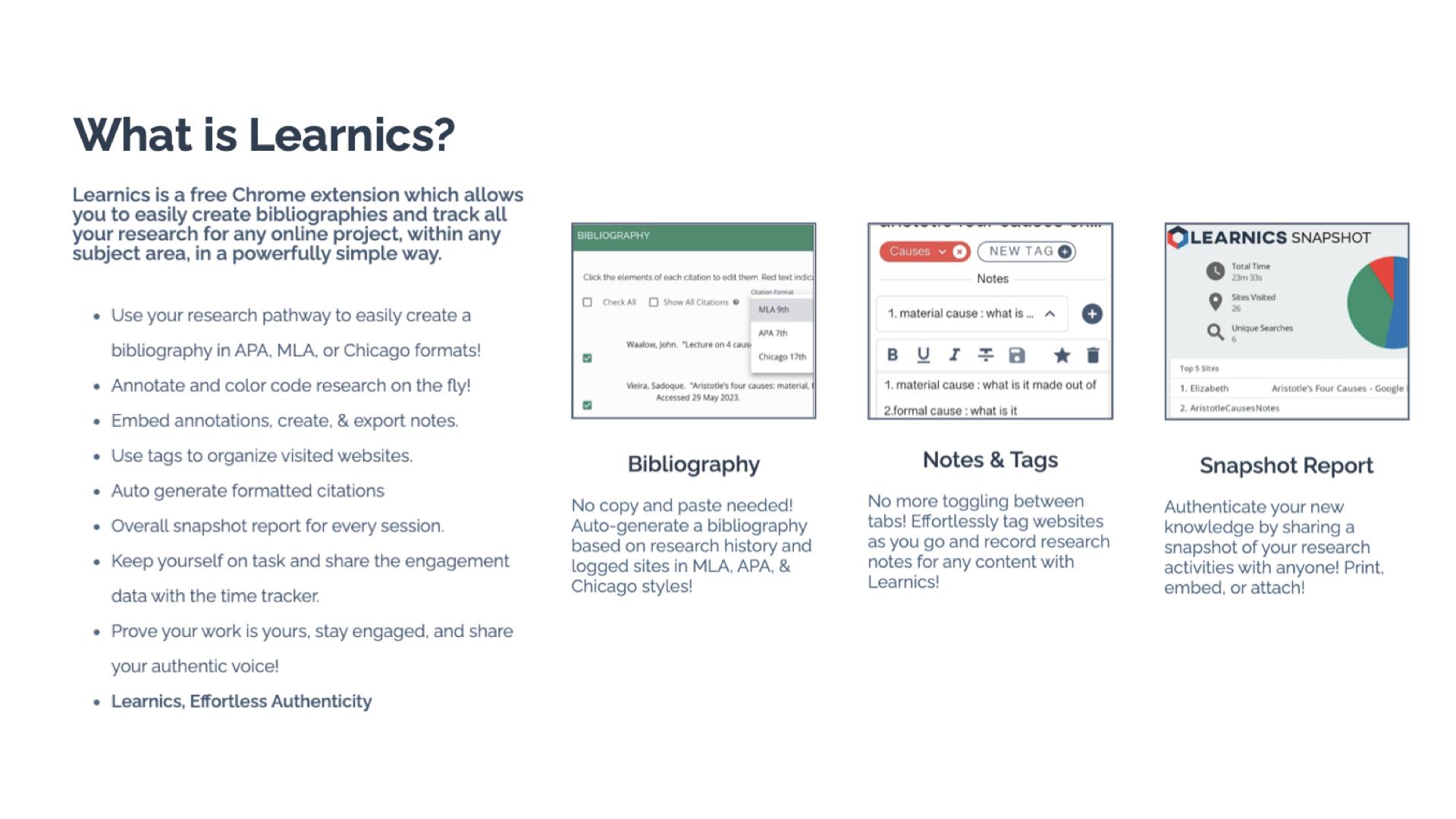
Learnics is a free Chrome Extension that helps students to streamline the research process. Through its robust platform, students conduct research, and Learnics will track the websites visited and the amount of time spent on each site, take notes, create tags, and even generate bibliographies automatically. It can assist with the process, but the main focus is on enhancing the quality of work and also helping students to focus on academic integrity as they work. By using Learnics, students are able to organize their research more effectively and also see a detailed overview of their research process. Learnics provides a space for nurturing responsible research practices and critical thinking skills among students.

Standout Features of Learnics

  • Website Capture and Time Tracking: Learnics automatically logs sites visited and the time spent on each, providing invaluable insights into students’ research habits.
  • Notes and Tags: Students are able to keep everything in one space. They can take notes and use tags to help them keep their research organized. Students can also download the record of their research.
  • Auto-generated Bibliography: Students learn how to properly cite resources used with the auto-generated bibliographies created in Learnics. Bibliographies based on students’ research history are created in alignment with APA, MLA, and Chicago formats.
  • Snapshot Report: One of my favorite features of Learnics is the snapshot report. When doing research, it is helpful to see the process, and with Snapshot, students have an overview of their entire research journey. The Snapshot report helps to promote reflection and critical thinking skills among students.

Learnics Classroom Pro

Diving into Classroom Pro, I immediately thought it was a game-changer. For educators, it is important to support students as they develop and refine their research skills. Teaching students how to conduct research and properly cite sources is key. With Learnics Classroom Pro, teachers can create a lesson for students and then review their students’ research process in real time. Teachers can monitor class progress, view sites visited, check search terms used, and assess notes, tags, and annotations made by students. Having access to this information also helps educators to better understand student needs during research and provide additional resources to help them with each task. Classroom Pro is an invaluable tool for ensuring the authenticity of student work and fostering a focused, engaged research environment.

Benefits of Using Learnics

For students, Learnics helps them to streamline the research process. With all of their research in one space, it eliminates the need to use multiple tools or toggle between different tabs. Learnics helps students develop better organization skills through the use of notes and tags, which makes their writing process more efficient.

And when it comes to citations, having assistance to learn from is quite helpful. With the auto-generated bibliography feature, students understand the importance of properly citing their sources and can further develop their skills.

For teachers, gaining insight into student research practices helps to provide better support. Through Classroom Pro, teachers can view each student’s research process and then use this to provide more targeted instruction and authentic and meaningful feedback. Understanding students’ research habits enables teachers to observe how and where students spend their time or if they are struggling to find reliable sources. With this insight, teachers can better provide targeted instruction to address individual and class-wide learning needs.

With the features of Learnics, teachers can check the originality of student work while also tracking the potential use of AI. Learnics also helps students to engage in peer review and collaboration and share resources and feedback, which better prepares them for future success in the workplace.

Get Started with Learnics

It is easy to get started with Learnics. Simply download the Chrome Extension from the Chrome Web Store and begin exploring the resources available. Students choose to enable the Chrome extension on their browser as they engage in research.

For teachers, check out the demo to learn more about Classroom Pro. The ability to conduct effective, efficient, and responsible research is essential. Learnics provides a space for students to enhance their academic skills and become digitally literate.

About the Author:

Rachelle Dené is a Spanish and STEAM: What’s Next in Emerging Technology Teacher at Riverview High School in Oakmont, PA. Rachelle is also an attorney with a Juris Doctor degree from Duquesne University School of Law and a Master’s in Instructional Technology. Rachelle is an ISTE Certified Educator and Community Leader and served as president of the ISTE Teacher Education Network. She was named one of 30 K-12 IT Influencers to follow in 2021.

She is the author of eight books including ‘In Other Words: Quotes That Push Our Thinking,” “Unconventional Ways to Thrive in EDU,” “The Future is Now: Looking Back to Move Ahead,” “Chart A New Course: A Guide to Teaching Essential Skills for Tomorrow’s World, “True Story: Lessons That One Kid Taught Us,” and her newest book “Things I Wish […] Knew” is now available at bit.ly/thingsiwishedu.

Follow Rachelle on Twitter @Rdene915 and on Instagram @Rdene915. Rachelle has a podcast, ThriveinEDU available at https://anchor.fm/rdene915.

Looking for PD for your school or keynotes for your conference? I provide in-person and virtual training on the following topics. If you want to learn more about and explore AI and ChatGPT, contact me to schedule! Rdene915@gmail.com or use the Book Me form on my website. bit.ly/thriveineduPD

**Interested in writing a guest blog or submitting a sponsored post for my site? Would love to share your ideas! Submit your post here. Looking for a new book to read? Find these available at bit.ly/Pothbooks

College and Career Readiness for Middle School Students

Regardless of our role in education or the grade levels that we work with, we all have a responsibility to bring in a variety of learning opportunities to prepare our students for successful careers. They need to engage in learning that will equip them with essential skills and the right knowledge so they can thrive after they leave our classrooms and our schools. Helping students to learn about potential future careers or options for continuing their education should not be limited to the high school years. By starting to focus on career and college readiness at the middle school level, we can help students learn about the many options available to them and spark their curiosity for learning.

There are many ways to get started, and there are a lot of benefits to creating college and career readiness opportunities for middle school students. Finding methods and tools or comprehensive resources will have a positive impact on student academic success, increase engagement in learning, and foster the development of essential future skills. Educators can offer an innovative and engaging approach to introduce students to various professions, ignite their passion, and empower them to shape their future.

In this post, I will share the benefits of focusing on career exploration with middle school and even younger students.

Early Exposure to Career Options

Introducing college and career readiness in middle school helps to inform students about a wide range of career options. Through career exploration activities and resources, students can explore job roles in various industries and professions. Defined Learning, offers comprehensive career exploration tools that provide K through 12 students with insights into different careers. With the K-5 program, this early exposure helps students gain a clearer understanding of their interests, passions, and the skills required for 16 different career clusters. For middle and high school students, interactive modules and videos give students the chance to explore diverse career options, such as engineering, entrepreneurship, healthcare, or even art. By learning more about a variety of careers, we can help students to discover their interests and passions, allowing them to make informed decisions about their educational and career paths.

Defined Learning Careers offers resources to help students develop these skills through career courses. Each Career Course focuses on providing students with relevant career experiences and skills needed for a specific career. Once students explore a career, schools can then invite guest speakers from various professions to share their experiences and insights can inspire students to explore different career options and set meaningful goals. By incorporating technology and interactive learning, students can access these materials at any time and experience a dynamic and engaging learning environment. Students learn about careers they may not have ever heard of and it might just be something that really piques their interest!

Hands-On Learning:

There are a lot of opportunities available in STEM-related careers. When it comes to STEM, we have many ways to implement STEM activities, even through PBL. By exploring the careers that are highlighted through Defined Careers, students become aware of the different fields that require STEM-related skills. By connecting this learning with hands-on activities that simulate real-world scenarios, we can spark curiosity and help students to think about where their interests may lie. For example, with grades K through 5, students can learn about a specific career and then engage in PBL experiences that mimic tasks typically performed by professionals in different fields. These experiences provide a glimpse into various careers’ daily responsibilities and challenges, helping students develop a deeper understanding of their interests and potential career paths.

Mentorship and Networking Opportunities

It is important for students to learn about different types of work and what might be expected of them in a potential career of interest. With the options available through place-based learning or project-based learning (PBL), students can connect with professionals in related fields. With the Defined Careers, students can explore careers of interest and then work with teachers and the community to find a mentorship program or seek opportunities to connect with and learn from professionals in different industries. In my experience, we have taken students on field trips to job sites to see firsthand the type of work that is done in a factory or a corporation, for example.

Building these connections early, primarily through opportunities at the middle-school level, helps students gain valuable insights, learn the importance of expanding their learning network, and offers them a connection to receive valuable advice for their future endeavors. Educators can also offer their own guidance by providing one-on-one meetings with students to discuss their career goals and help them create a plan for achieving those goals. Another excellent option is bringing in community members to talk to students as part of a career day. When students explore some of the careers in the Defined Careers resources, we can find local community members to create a real-world learning experience for them.

Online career learning programs offer a transformative educational experience that prepares all students for the challenges and opportunities of the future. By exploring diverse professions, engaging in hands-on activities, connecting with mentors, developing future skills, and through the flexibility of personalized learning, students become excited and motivated about their future careers.

Building a knowledge base early on will help students to think about their interests, reflect on their growth and set goals. We want students to see learning as a process and to be aware of the many opportunities that exist for them in the future.

About the Author:

Rachelle Dené is a Spanish and STEAM: What’s Next in Emerging Technology Teacher at Riverview High School in Oakmont, PA. Rachelle is also an attorney with a Juris Doctor degree from Duquesne University School of Law and a Master’s in Instructional Technology. Rachelle is an ISTE Certified Educator and Community Leader and served as president of the ISTE Teacher Education Network. She was named one of 30 K-12 IT Influencers to follow in 2021.

She is the author of eight books including ‘In Other Words: Quotes That Push Our Thinking,” “Unconventional Ways to Thrive in EDU,” “The Future is Now: Looking Back to Move Ahead,” “Chart A New Course: A Guide to Teaching Essential Skills for Tomorrow’s World, “True Story: Lessons That One Kid Taught Us,” and her newest book “Things I Wish […] Knew” is now available at bit.ly/thingsiwishedu.

Follow Rachelle on Twitter @Rdene915 and on Instagram @Rdene915. Rachelle has a podcast, ThriveinEDU available at https://anchor.fm/rdene915.

Looking for PD for your school or keynotes for your conference? I provide in-person and virtual training on the following topics. If you want to learn more about and explore AI and ChatGPT, contact me to schedule! Rdene915@gmail.com or use the Book Me form on my website. bit.ly/thriveineduPD

**Interested in writing a guest blog or submitting a sponsored post for my site? Would love to share your ideas! Submit your post here. Looking for a new book to read? Find these available at bit.ly/Pothbooks

Guest blog: Think Pair GROUP Share

 by laura steinbrink, posted in education

Getting students to talk about your content and share their thinking Is often a struggle, and having lots of strategies in your tool belt is a must. Overusing a strategy can diminish its effectiveness, so having a variety that you can use with planning or on the fly is a must. Many of you have probably heard of or have used the researched-based think pair share strategy, so my addition to that to create “Think Pair Group Share” will be easy to adopt, adapt, and apply to your teaching repertoire.

Key Takeaways:
* Collaborative learning is essential and has many benefits.
* Students need to discuss and share their learning.
* New addition to the Think Pair Share activity helps students in many ways and is easy to implement.

IF YOU EVER FIND YOURSELF STUCK IN THE MIDDLE OF THE SEA

There are several things I like about this activity. After reading Frank Smith’s book, Learning and Forgetting, I became more conscientious about adding collaboration to the activities I use. As Smith points out repeatedly, paraphrased in summary here by Goodreadslearning is a social process that can occur naturally, effortlessly, and continually through collaborative activities (Goodreads 2024). Students do love to talk with each other, generally speaking, and Smith also points out that “Anything that stimulates our imagination and promotes our enjoyment of an activity is a green light for learning” (Smith 89). While talking to each other is enjoyable, students aren’t as eager for academic discussion, so that is where activities like this, when done thoughtfully, can be so successful for student learning.

I’LL SAIL THE WORLD TO FIND YOU

Anytime I plan lesson activities, I consider ways to add collaboration. Knowing what I do about how we learn is the most natural way to help students move my content from their working memory to their long-term memory. Whatever question, problem, hypothesis, etc., that I want students to think about and discuss during the class period, they can greatly benefit from this activity. Often students aren’t excited about sharing their thinking with the class and teacher seconds after being presented with the question/problem.

IF YOU EVER FIND YOURSELF LOST IN THE DARK AND YOU CAN’T SEE

After the students have independent thinking/solving/writing time, they still might need some collaboration with a peer and/or peers before sharing their thinking with the teacher and class for various reasons. This allows them to refine their thinking, receive validation, or help them come closer to the right answer if all students are struggling. The beauty of this activity is that you also have the flexibility to structure it so that the share-out time is in the small group instead of the whole class if that suits your needs or the needs of a particular student or students.

I’LL BE THE LIGHT TO GUIDE YOU

Here’s how I run this activity (adjust as needed for your age level and students):

1️⃣ THINK: Give students a question, prompt, or problem that covers what you are working on that day or in that lesson. Allow a set amount of time for students to complete the task on their own. It is important to time it. Time is an effective and creative constraint to motivate students. While students process content at different rates, those students who are slower at processing will still have time during the pair and group time to refine their thinking on the content before sharing it with the whole class.

2️⃣ PAIR: Time this as well. Assign students to work in pairs or allow them to select a partner. Instruct them that they first need to decide who will be Partner A and Partner B. Tell the class that your partner (A or B, you pick) will share first, and then the other partner will share. TIP: It is important to monitor that both partners are actually sharing their thinking. After both students have shared, they can adjust their own responses based on their partner’s suggestions or responses. If we are honest with each other and ourselves, this is how much of the assigned homework gets done, or some version of “I got this for number 12. What did you get?” By incorporating this into the activity, it becomes a natural flow for students, but it does need monitoring, so make your rounds through the pairs to ensure the sharing is actually by both and is your content, not what event they are attending after school, what video game they’re currently playing, etc.

WE’LL FIND OUT WHAT WE’RE MADE OF

3️⃣ GROUP: Next, put students into triads or a group of four. It’s like a repeat of the process from step 2, but now you add in Partner C and or D. It is important to remember that students cannot be with their original partner. Changing up the partnerships into new and slightly larger groups adds an additional layer of benefits, too. All students will need to share individually. If you keep partners together, then one of them will end up not talking or sharing during the group round, and that leads to the opportunity for off-task behavior. This addition to the Think, Pair, Share activity also adds a buffer for students who aren’t sure that either their partner, themselves, or both understood the content or problem/prompt, so this is their chance to find out if they are on the right track or have gone off the rails in the wrong direction.

4️⃣ SHARE: At this stage, you can have each group volunteer to have one student share their responses. I use a blend of the following:

  • Randomly call on non-volunteers (I use an online spinning name wheel, popsicle sticks, or shuffled index cards with student names).
  • Allow individuals to share a classmate’s response that they liked better from their discussions, etc.
  • Call on individuals to share their partner’s or a classmate’s response.
  • Call on individuals randomly to share their own responses.

To save time or achieve better results, have students share directly with you (and the group, but not the whole class) as you circulate with the small groups, using the same options from #4.

5️⃣ ASSESS: I don’t generally enter grades for this because I use it as formative assessments to adjust my teaching or to see what misconceptions need to be corrected. However, if you need to enter a grade, have an exit ticket reflection prompt ready in your LMS or preferred platform.

WHEN WE ARE CALLED TO HELP OUR FRIENDS IN NEED

I have used this strategy with all levels of high schoolers, but since Think Pair Share works at all levels, this variation will too. We know the benefits of students having academic conversations, discussing the content, and working independently and collaboratively. Adding the Group activity to the Think Pair Share strategy also breaks up the normal routine, which makes it interesting. By layering the conversations from pairs to small groups to potentially the whole class, student anxiety levels are lowered as well. Adjust this strategy as needed and prepare for engaged learners who will grow better at sharing their learning.

WORKS CITED

“The Book of Learning and Forgetting.” Goodreads, Goodreads, http://www.goodreads.com/book/show/236318.The_Book_of_Learning_and_Forgetting?ac=1&from_search=true&qid=bvd2JnqHYl&rank=3. Accessed 9 Jan. 2024.

Smith, Frank. The Book of Learning and Forgetting. Teachers College Press, 1999.

RECOMMENDED INSTRUCTIONAL STRATEGIES:
HEADING TITLES ARE PARTIAL LYRICS FROM COUNT ON ME BY BRUNO MARS.

Be sure to follow Laura on twitter (X) @SteinbrinkLaura

About Rachelle

Follow Rachelle on Twitter @Rdene915 and on Instagram @Rdene915. Rachelle has a podcast, ThriveinEDU available at https://anchor.fm/rdene915.

Looking for PD for your school or keynotes for your conference? I provide in-person and virtual training on the following topics. If you want to learn more about and explore AI and ChatGPT, contact me to schedule! Rdene915@gmail.com or use the Book Me form on my website. bit.ly/thriveineduPD
**Interested in writing a guest blog or submitting a sponsored post for my site? Would love to share your ideas! Submit your post here. Looking for a new book to read? Find these available at bit.ly/Pothbooks

Nurturing Digital Literacy and Citizenship in Students with PebbleGo

In collaboration with Capstone

As we start to see more technology being used in our classrooms and students having access to endless resources with just a few clicks, it’s critical that students not only become proficient in using digital tools but also understand the responsibilities that come with it. Providing opportunities for students to develop skills in digital literacy and digital citizenship will help them to navigate the digital world safely and effectively. With resources available through Capstone, students have access to so many beneficial and engaging learning materials. In addition to the educational content, the learning materials provide students with an opportunity to practice and develop good habits when it comes to using digital tools. Using PebbleGo and PebbleGo Create are excellent ways to help students build essential digital citizenship and digital literacy skills.

Why does Digital Literacy matter?

Digital literacy is a skill that is required now and for the world of work. When we start building these skills early, it equips students with the tools they need to succeed in their future careers, where technology is certain to play an integral role. Digital literacy also helps to promote critical thinking. For students, being able to think critically, evaluate and process the information they find online is important, especially when trying to avoid fake news and misinformation. Teaching students to discern credible sources, fact-check, and critically analyze digital content are vital skills for making informed decisions. Using PebbleGo resources, students learn about proper citations and reliable resources and they learn basics about how to use digital technology!

With ebooks available to take students through lessons on important topics related to the use of technology, teachers can guide students through activities to help them develop their skills and understand the power of the technology they have access to.

Digital literacy also teaches students about the importance of online safety, privacy, and the responsible use of technology. Students need to understand the potential risks and know how to protect themselves when using technology and interacting online. With resources available on PebbleGo focused on topics like cyberbullying, online privacy, and internet safety, students can explore on their own and understand the importance of these topics We want students to know how to stay safe online and there are great books available to read with students that can spark classroom discussions and a positive learning community.

It is important to engage students in conversations about real-world online situations, and support and guide them in making safe and ethical choices. There are articles and books available to help students learn about these topics and then create a presentation to teach classmates or make a poster to display in the classroom.

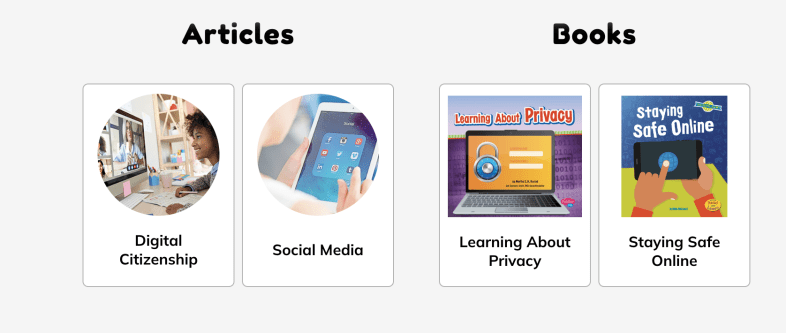
Students can explore articles on topics such as digital citizenship or read books to learn more about privacy and how to keep themselves safe. PebbleGo offers interactive materials that make learning fun for students!

Here are five creative ideas for using PebbleGo and PebbleGo Create to build digital citizenship and digital literacy skills:

  • Digital Citizenship Pledge: Once students learn about digital citizenship, they can then create digital citizenship pledges using PebbleGo Create. With all of the fantastic choices, students can create visually engaging infographics that share their commitment to responsible online behavior, respecting others, and being kind online. We can then display their PSAs in the classroom or on the school’s website to promote a positive digital environment.

Digital literacy and digital citizenship are essential components that will best equip students with the skills they need to navigate the digital world responsibly, ethically, and safely. Educators have valuable resources from PebbleGo that will help students by providing a structured and engaging platform for teaching these crucial skills. PebbleGo Create allows students to take what they have learned and illustrate their understanding and ideas through a variety of media features in authentic and meaningful ways.

About the Author

Rachelle Dené Poth is an edtech consultant, presenter, attorney, author, and teacher. Rachelle teaches Spanish and STEAM: What’s Next in Emerging Technology at Riverview High School in Oakmont, PA. Rachelle has a Juris Doctor degree from Duquesne University School of Law and a Master’s in Instructional Technology. She is a Consultant and Speaker, owner of ThriveinEDU LLC Consulting. She is an ISTE Certified Educator and currently serves as the past -president of the ISTE Teacher Education Network and on the Leadership team of the Mobile Learning Network. At ISTE19, she received the Making IT Happen Award and a Presidential Gold Award for volunteer service to education. She is also a Buncee Ambassador, Nearpod PioNear, and Microsoft Innovative Educator Expert.

Rachelle is the author of seven books, “In Other Words: Quotes That Push Our Thinking,” “Unconventional Ways to Thrive in EDU” (EduMatch), and “The Future is Now: Looking Back to Move Ahead,” Rachelle Dene’s latest book is with ISTE “Chart A New Course: A Guide to Teaching Essential Skills for Tomorrow’s World.” True Story: Lessons That One Kid Taught Us, Your World Language Classroom: Strategies for In-Person and Digital Instruction and Things I Wish […] Knew.

Rachelle is a blogger for Edutopia, Defined Learning, Getting Smart, and NEO LMS.

Rachelle provides professional development and keynotes on topics including artificial intelligence, augmented and virtual reality, emerging technologies, SEL, and STEM.

Follow Rachelle on Twitter @Rdene915 and on Instagram @Rdene915. Rachelle has a podcast, ThriveinEDU https://anchor.fm/rdene915.

Data Science for Everyone

Updated post from an earlier post for Getting Smart

As the world continues to change, educators need to stay up to date with all of the emerging technologies to best understand the essential skills that students need for whatever lies ahead in the future. To do so, we have to find the most beneficial resources to bring into the classroom regardless of the content area or grade level being taught.

With the rise in the use of artificial intelligence, augmented and virtual reality, blockchain, NFTS, the metaverse, and web3, the world of work will look very different. Students need to develop a variety of skills, especially in STEM-related fields and in areas such as computational thinking or data science. Students need to be data literate and have opportunities to develop their skills in all grade levels.

What does being data literate mean?

Let’s first look at the difference between data science and data literacy. When we take the information that we get from data and interpret it, look for patterns, this is data science. Educators inform instruction based on assessments given in classrooms. The data we receive from students helps us understand where they are in their learning journey and helps us to plan our next steps. Data science skills are an essential component of life and work.

​While we hope that students will become more interested in data science because of the increase in jobs available, the focus needs to be on providing each student with an opportunity to learn. It has been predicted by the Bureau of Labor Statistics that the number of statistician jobs will increase by almost 34% from 2016 to 2026.

Being data literate means that you understand what the data represents, know how to process it, and use it to inform your next steps and make decisions. ​While it is a technical skill, it is how we analyze, visualize, interpret, and even communicate what we are taking away from the data.

How do we prepare?

More schools are starting to offer courses in data science to students in grades K through 12. Some are providing a full-year course or an individual lesson or unit of study for courses. Colleges have data science degrees and some majors require students to demonstrate competency in data science before taking certain courses.

In some schools, data science becomes part of the math curriculum or is offered as an elective. There are schools that may require it for graduation. There are 65 schools in the United States, in which the first full-year course called Introduction to Data Science is now being taught. These offerings are highly beneficial but may not be an option due to budgeting or lack of staff. A solution is for teachers to incorporate data literacy into different lessons or as a standalone learning experience during the year. Whether students are in elementary, middle or high school, there are resources available.

Data Science 4 Everyone

Fortunately, educators have access to a variety of resources to make it easier and less time consuming to bring data science to the classroom. Learn about the Data Science 4 Everyone (DS4E) Coalition that has been created to help students in grades K through 12 build the necessary skills in data literacy. The Data Science 4 Everyone was created by the University of Chicago Center for Radical Innovation for Social Change (RISC). In addition to the resources provided by DS4E, the RISC launched Algo-Rhythmas a gamified way for students to learn about data science. Students in grades 4 through 6 can learn about the basics of data science through music! There are multiple levels and the player has to analyze the different music types to find the right data set. It is fun for educators too!

Knowledge and skills in data science will lead to more opportunities in education and careers in the future. DS4E provides teachers with lessons for use with students in grades K through 12

Thinking about colleges, having all students take a course in data science would be something that could benefit them across all sectors of work and in terms of education, with pre-service teachers, helping them to become more diligent with benefit them in the work that they do.

In addition to DS4E, here are more options to explore for learning about data science.

  • ASU Crash Course Data Literacy offers a 15-video series for educators and students to learn about data literacy. It helps students to build their skills while promoting more student independence in learning as they work through and learn the basics and continue all the way to advanced concepts and interpreting data.
  • Khan Academy offers online courses that include practice activities and videos. These can be used with younger students all the way up through high school and college. Relevant activities can be found by searching for a specific topic area related to data science and the interpretation of data.
  • MOOCS: There are paid options through some of the MOOCs available such as Coursera, EdX. Udacity, and Udemy. Some of these courses are provided from institutions such as Harvard, Johns Hopkins and MIT. Depending on exactly what an educator wants to learn, or in some cases, another option for older students considering majors in data science or related fields. Taking these courses can also be used as a model for younger students.

Get started

With DS4E, there are ready-to-use presentations that can be used to show the importance of data science and why it needs to be added to the K through 12 curriculum in our schools. There is also an advocacy pack available for educators to share with their school administrators.

It can be uncomfortable for teachers who feel like they don’t have the expertise needed to teach a concept, however there are enough resources available that make it easier for educators to get started.

About Rachelle

Follow Rachelle on Twitter @Rdene915 and on Instagram @Rdene915. Rachelle has a podcast, ThriveinEDU available at https://anchor.fm/rdene915.

Looking for PD for your school or keynotes for your conference? I provide in-person and virtual training on the following topics. If you want to learn more about and explore AI and ChatGPT, contact me to schedule! Rdene915@gmail.com or use the Book Me form on my website. bit.ly/thriveineduPD
**Interested in writing a guest blog or submitting a sponsored post for my site? Would love to share your ideas! Submit your post here. Looking for a new book to read? Find these available at bit.ly/Pothbooks