

Sponsored post in collaboration with Learnics. All opinions are my own
Digital literacy is a critical skill, and with access to so many resources, it is essential that educators work with students in all classrooms to help them develop their research skills. Especially with the rapidly advancing technology available to everyone, such as ChatGPT, we want to provide students with opportunities as crucial as reading and writing. Teachers are constantly seeking innovative tools to enhance their students’ research skills. Learnics offers a digital space for students to conduct their research and track time spent and resources found!
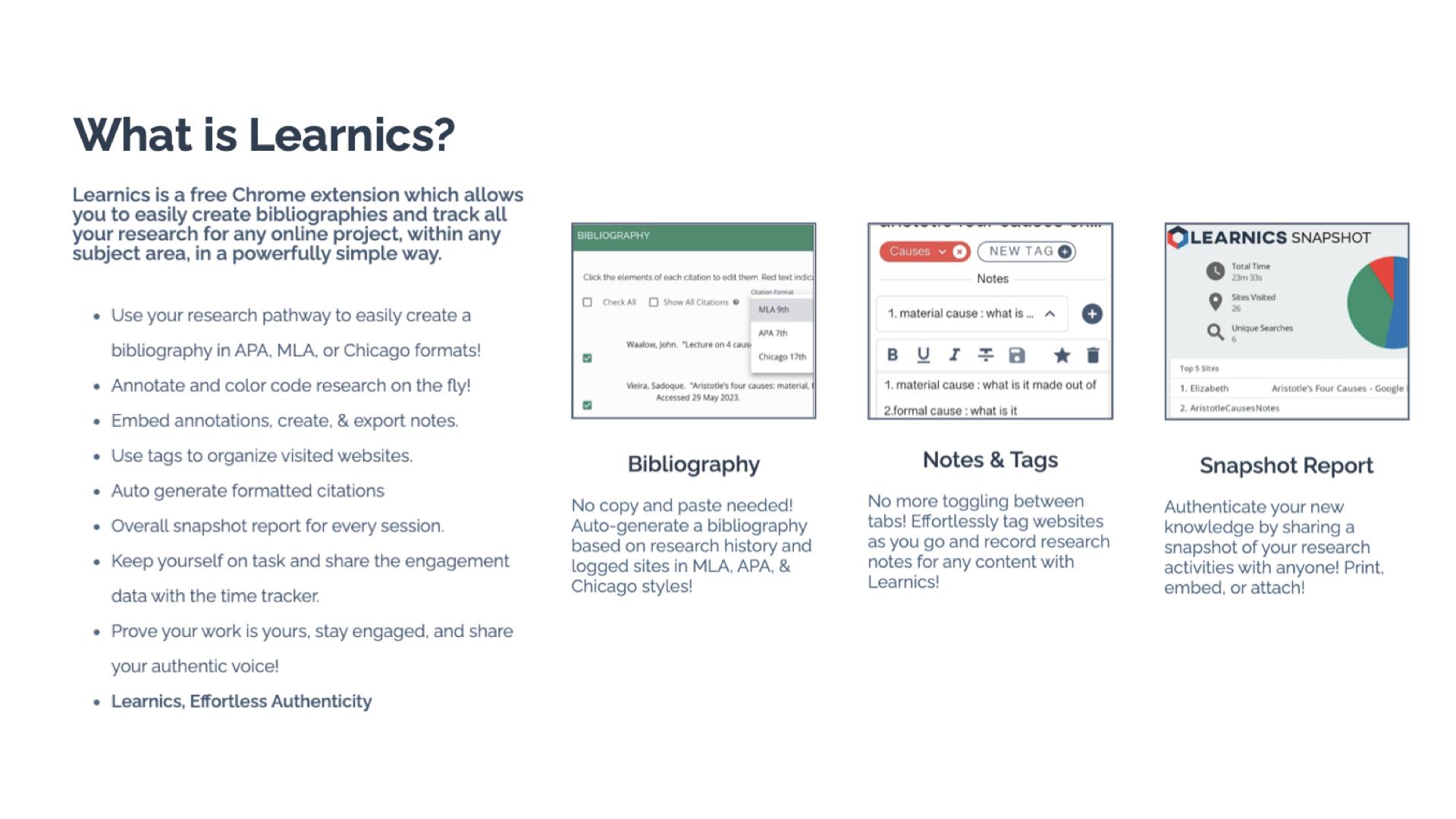
What is Learnics?
Learnics is a free Chrome Extension that helps students to streamline the research process. Through its robust platform, students conduct research, and Learnics will track the websites visited and the amount of time spent on each site, take notes, create tags, and even generate bibliographies automatically. It can assist with the process, but the main focus is on enhancing the quality of work and also helping students to focus on academic integrity as they work. By using Learnics, students are able to organize their research more effectively and also see a detailed overview of their research process. Learnics provides a space for nurturing responsible research practices and critical thinking skills among students.

Standout Features of Learnics
- Website Capture and Time Tracking: Learnics automatically logs sites visited and the time spent on each, providing invaluable insights into students’ research habits.
- Notes and Tags: Students are able to keep everything in one space. They can take notes and use tags to help them keep their research organized. Students can also download the record of their research.
- Auto-generated Bibliography: Students learn how to properly cite resources used with the auto-generated bibliographies created in Learnics. Bibliographies based on students’ research history are created in alignment with APA, MLA, and Chicago formats.
- Snapshot Report: One of my favorite features of Learnics is the snapshot report. When doing research, it is helpful to see the process, and with Snapshot, students have an overview of their entire research journey. The Snapshot report helps to promote reflection and critical thinking skills among students.

Learnics Classroom Pro
Diving into Classroom Pro, I immediately thought it was a game-changer. For educators, it is important to support students as they develop and refine their research skills. Teaching students how to conduct research and properly cite sources is key. With Learnics Classroom Pro, teachers can create a lesson for students and then review their students’ research process in real time. Teachers can monitor class progress, view sites visited, check search terms used, and assess notes, tags, and annotations made by students. Having access to this information also helps educators to better understand student needs during research and provide additional resources to help them with each task. Classroom Pro is an invaluable tool for ensuring the authenticity of student work and fostering a focused, engaged research environment.
Benefits of Using Learnics
For students, Learnics helps them to streamline the research process. With all of their research in one space, it eliminates the need to use multiple tools or toggle between different tabs. Learnics helps students develop better organization skills through the use of notes and tags, which makes their writing process more efficient.
And when it comes to citations, having assistance to learn from is quite helpful. With the auto-generated bibliography feature, students understand the importance of properly citing their sources and can further develop their skills.

For teachers, gaining insight into student research practices helps to provide better support. Through Classroom Pro, teachers can view each student’s research process and then use this to provide more targeted instruction and authentic and meaningful feedback. Understanding students’ research habits enables teachers to observe how and where students spend their time or if they are struggling to find reliable sources. With this insight, teachers can better provide targeted instruction to address individual and class-wide learning needs.
With the features of Learnics, teachers can check the originality of student work while also tracking the potential use of AI. Learnics also helps students to engage in peer review and collaboration and share resources and feedback, which better prepares them for future success in the workplace.
Get Started with Learnics
It is easy to get started with Learnics. Simply download the Chrome Extension from the Chrome Web Store and begin exploring the resources available. Students choose to enable the Chrome extension on their browser as they engage in research.
For teachers, check out the demo to learn more about Classroom Pro. The ability to conduct effective, efficient, and responsible research is essential. Learnics provides a space for students to enhance their academic skills and become digitally literate.
About the Author:
Rachelle Dené is a Spanish and STEAM: What’s Next in Emerging Technology Teacher at Riverview High School in Oakmont, PA. Rachelle is also an attorney with a Juris Doctor degree from Duquesne University School of Law and a Master’s in Instructional Technology. Rachelle is an ISTE Certified Educator and Community Leader and served as president of the ISTE Teacher Education Network. She was named one of 30 K-12 IT Influencers to follow in 2021.
She is the author of eight books including ‘In Other Words: Quotes That Push Our Thinking,” “Unconventional Ways to Thrive in EDU,” “The Future is Now: Looking Back to Move Ahead,” “Chart A New Course: A Guide to Teaching Essential Skills for Tomorrow’s World, “True Story: Lessons That One Kid Taught Us,” and her newest book “Things I Wish […] Knew” is now available at bit.ly/thingsiwishedu.
Follow Rachelle on Twitter @Rdene915 and on Instagram @Rdene915. Rachelle has a podcast, ThriveinEDU available at https://anchor.fm/rdene915.
Looking for PD for your school or keynotes for your conference? I provide in-person and virtual training on the following topics. If you want to learn more about and explore AI and ChatGPT, contact me to schedule! Rdene915@gmail.com or use the Book Me form on my website. bit.ly/thriveineduPD
 Learning as I go: Reflections & lessons learned