Navigating the Teacher Shortage: The Impact on Student Programs and the Solution for Civic Engagement

Blog + Social Headers (10)-1

Guest post in collaboration with @x2VOL

Civic engagement is of the utmost importance for students. Service and community engagement during formative high school years improve social-emotional growth, student outcomes, leadership skills, and more. But how are these programs being managed when educators are leaving schools in record numbers?

The current teacher shortage in the United States has far-reaching implications for education.

According to The Washington Post, the teacher shortage is impacting schools across the country. In a study done by Kansas State University, 37 states were surveyed to assess the extent of the current shortage: The teacher shortage increased by 35% in the past year alone in these states. Districts across the country are seeing teachers and other faculty leaving education citing stress, low pay, and safety concerns, among other reasons.

While classrooms are suffering due to fewer teachers and larger class sizes, how do the teacher shortages impact other student programs?

Being “Voluntold”

Because there are many vacancies in school positions, there’s a lack of staff to run student programs. Many teachers and student administrators are reporting they are being “voluntold” to take on new responsibilities. These include different clubs and organizations, service programs and requirements, work-based learning programs, and more – programs that can’t run without staff involvement.

Teachers and educators are passionate about student success and want to see their students flourish; they take on these responsibilities for the betterment of their students.

However, educators aren’t always given the proper compensation or resources to manage these additional responsibilities. These student programs are vital in student development, but what happens when they aren’t given proper attention?

Student engagement suffers without proper leadership over these programs. Community service, service learning, and work-based learning programs are important elements of a student’s education. There are a number of benefits such as:

  • Betterment of skills such as communication, teamwork, leadership, initiative, and more
  • Career discovery from experiencing new industries and positions
  • Social-emotional development and widened worldview leading to personal growth
  • Increased feelings of belonging from being engaged in one’s community

These benefits lead to well-rounded students. Students who participate in community service during their high school career learn valuable life skills that increase college acceptance, university success, job acquisition, and more.

The Solution

x2VOL Founder & CEO, Michele Pitman discussed this topic and solutions to support teachers on the ThriveInEdu Podcast with Rachelle & Mel. Check out the full podcast and discussion below.

Watch ThriveInEdu

In this podcast, Michele joins the ThriveInEdu team to share current trends in schools, why student programs are vital, and what districts can do to better support their educators.

x2VOL is a resource that steps in to make the management of these important student programs much easier, allowing educators to focus on student engagement and growth. x2VOL takes tracking and reporting for student programs online. Whether schools have a service hour requirement or a work-based learning program, x2VOL tracks hours and experiences for student programs online. Students are empowered with an activity log of their experiences and reflections and educators are relieved from the burden of managing these platforms.

Student service and WBL programs are an important piece in a young person’s education and managing these programs shouldn’t be a burden to educators.

Learn more in our one-minute demo below and reach out to our team to get started!

View x2VOL Demo

About Rachelle

Follow Rachelle on Twitter @Rdene915 and on Instagram @Rdene915. Rachelle has a podcast, ThriveinEDU available at https://anchor.fm/rdene915.

Looking for PD for your school or keynotes for your conference? I provide in-person and virtual training on the following topics. If you want to learn more about and explore AI and ChatGPT, contact me to schedule! Rdene915@gmail.com or use the Book Me form on my website.

**Interested in writing a guest blog or submitting a sponsored post for my site? Would love to share your ideas! Submit your post here. Looking for a new book to read? Find these available at bit.ly.pothbooks

Tonies Toniebox: A Game-Changer for Early Childhood Education

In collaboration with Drew Vernon

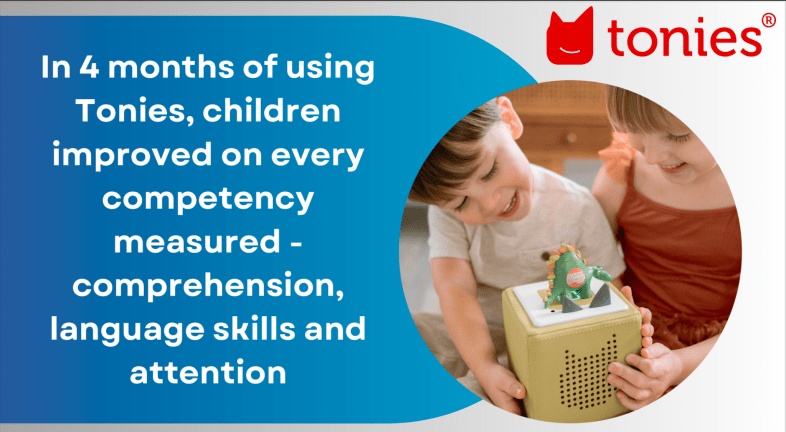
In a world where technology often competes with traditional learning methods, educators are always on the lookout for innovative tools that can genuinely impact children’s development. The Toniebox, a revolutionary audio device, has recently released the results of a study conducted between January and June 2023. The study explored how this creative tool can influence young learners’ comprehension, language skills, and attention.

Unlocking the Potential of the Toniebox

We should first understand what makes the Toniebox stand out. It’s an audio storytelling device that combines the magic of bedtime stories with captivating learning content. It makes it an excellent addition to the early childhood education toolkit and the best part is that kids are independent in their learning and can use it without much help at all.

A recent study

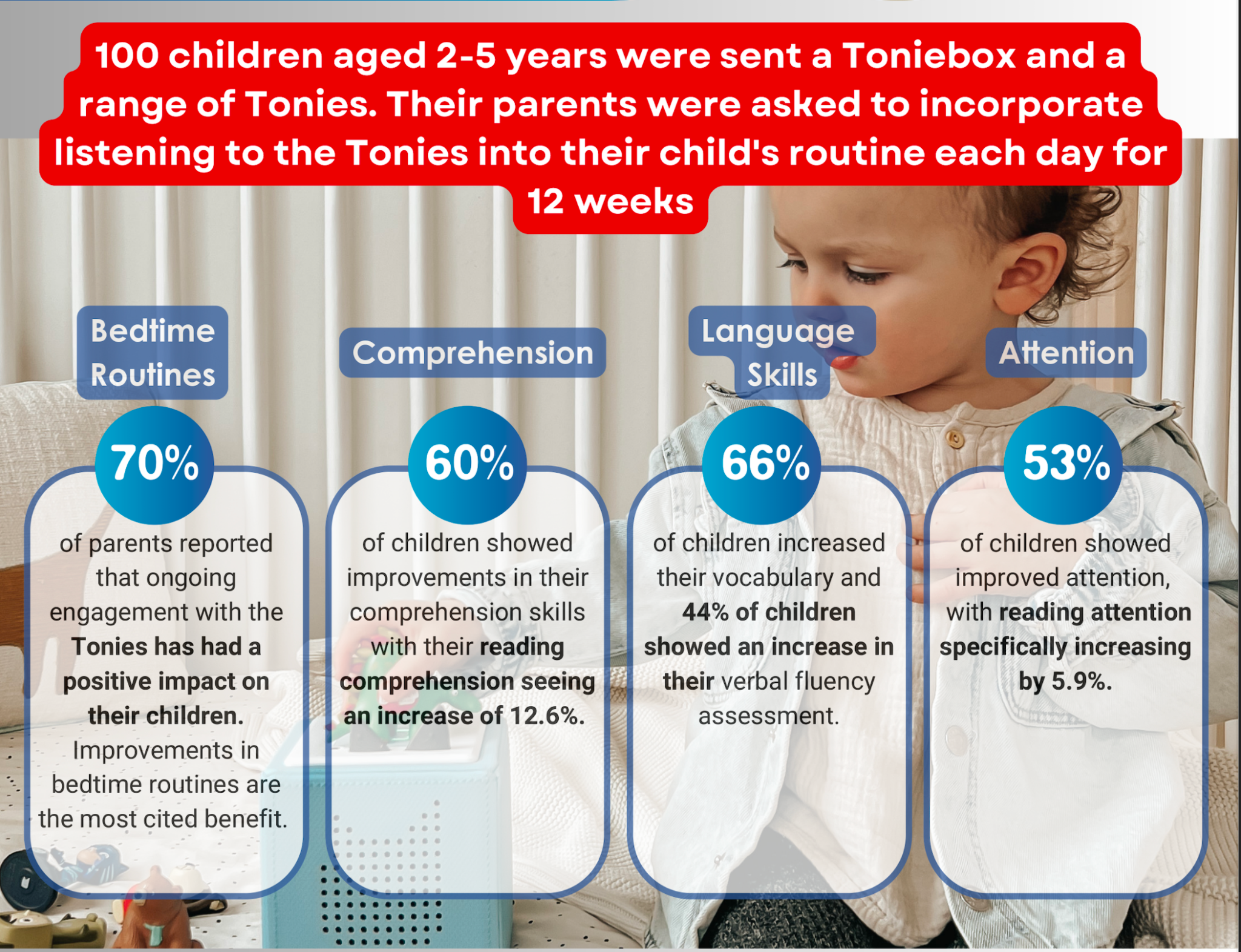
Imagine a learning tool that cultivates comprehension, language skills, and attention in young children. The recent study included 100 families from the UK and the United States, and involved children of ages 2 through 5. The research began with interviews to establish baseline measurements for each child’s development. Families were then provided with a Toniebox and bedtime Tonies, along with instructions to integrate them into their bedtime routines. After a period of 2-3 weeks, there were follow-up interviews that assessed the impact of Tonies on each child. Families were then provided with additional Tonies from the 4 Learning Centers: Discovery, Reading, Mindfulness, and Independent Play. After at least 12 weeks, there was another round of interviews which evaluated the effects of the Toniebox on children’s learning.

The Impact

1. Bedtime Routine Improvement:

– For parents who initially struggled with bedtime, using the Toniebox improved the situation for a remarkable 92% of them.

– Even if routines took longer, parents noted less resistance from their children, a welcome relief for many.

– Satisfaction scores increased significantly, from 6.6 to 7.4 out of 10, indicating happier bedtime experiences.

2. Comprehension and Language Skills:

– 60% of children’s comprehension scores increased

– Researcher-assessed comprehension levels improved by an impressive 6.3%.

– Reading comprehension scores saw a substantial increase of 12.6%.

– Verbal fluency jumped by over 10%, with 44% of children demonstrating improved verbal fluency.

– Vocabulary scores increased by 13.2%, with 66% of children scoring higher.

3. Enhanced Attention and Engagement:

– 53% of children’s general attention scores improved.

– For reading-specific attention, there was a 5.9% average increase.

– Engagement with stories increased by 7%, indicating greater interest.

Educators’ Takeaway: Tonies Toniebox

What makes the Toniebox an invaluable addition to early childhood education? It’s the perfect blend of entertainment and education. Here’s why educators should consider integrating it into their teaching strategies:

1. Promotes Literacy and Learning: The Toniebox enhances comprehension, language skills, and attention, crucial for early childhood education. The significant boost in reading comprehension is especially noteworthy.

2. Bedtime Routine Improvement: Better bedtime routines mean well-rested, alert learners in the classroom. Educators can appreciate the positive impact on children’s behavior and readiness to learn.

3. Screen-Free Learning: In a world dominated by screens, the Toniebox offers a refreshing screen-free alternative, promoting auditory learning and imaginative thinking.

4. Parent and Child Collaboration: The Toniebox encourages parent-child interaction, fostering a love for storytelling and learning from an early age.

Feedback from parents

The feedback offered by parents provides some valuable insights into the unique experiences they had with the Toniebox in their home.

1. Vocabulary Development and Screen-Free Engagement: A parent highlighted how Tonies significantly contributed to her child’s vocabulary development while serving as a screen-free alternative. The child’s enthusiasm for their Toniebox was so profound that he even listened to them for extended periods during road trips, showcasing the potential of this audio-based medium.

2. Design and Quality: Parents appreciated the figurine design of Tonies, which differentiated it from other devices. Many found Tonies ideal for storytelling, while other devices were preferred for music. The Toniebox engaged a child’s mind safely and offered high-quality manufacturing.

3. Innovative Possibilities: Parents associated reduced screen time with improved behavior in their children, emphasizing Tonies’ role in promoting a healthy balance.

The Toniebox is a valuable addition to childhood The feedback from parents underscores the versatility and potential of the Toniebox. While the study’s quantitative findings reveal its substantial impact on bedtime routines, comprehension, language skills, and attention, the individual comments paint a more comprehensive picture of its role in children’s lives. The Toniebox offers not only educational benefits but also a unique opportunity for children to engage with audio-based content in a screen-free and imaginative manner.

Toniebox is more than just a device; it’s a tool that empowers educators and parents to inspire young minds while nurturing positive habits and fostering a lifelong love for learning. As we navigate the ever-changing landscape of early education, the Toniebox supports the development of young learners in a dynamic and enriching way.

It is more than just a storytelling device; it’s a game-changer for early childhood education. Its potential to transform bedtime routines, enhance comprehension, language skills, and attention makes it a tool that educators should bring to their classroom. This innovative approach to learning is not only effective but also a whole lot of fun for young learners.

Contact Rachelle to schedule sessions for your school or keynotes for your conference about Artificial Intelligence, Coding, AR/VR, SEL, STEM and more!

Follow her on Twitter and Instagram at @Rdene915

**Interested in writing a guest blog for my site? Would love to share your ideas! Submit your post here. Looking for a new book to read? Find these available at bit.ly/Pothbooks

************ Also check out my THRIVEinEDU Podcast Here!

Join my show on THRIVEinEDU on Facebook. Join the group here

Reflecting on AI in education

 I have been speaking and teaching about AI in my classroom for more than five years. I was curious to understand where we see it in the world and how to teach about it in our schools. I was also fascinated by the capabilities of AI for learning and in the world. 

I reached out to several educators and some students to find out what they thought about the changes we are experiencing in education, especially with these emerging technologies. There are, of course, concerns, ongoing conversations, and definitely excitement, although sometimes hesitant excitement, about what these technologies might bring to the world of education and work. 

Educator predictions

Nicole Biscotti @BiscottiNicoleEducator 

“AI has exploded on the scene and everyone is trying to figure it out at the same time which is exciting. A lot of educators are afraid that kids will use technologies like ChatGPT to cheat and have even banned its use. The reality is that kids have been cheating since the beginning of school and we have an exciting opportunity as educators to shape the narrative around this new technology. Biscotti plans to continue to learn as much as she can about how to use AI to better support her students. She says as an educator, “I feel that I am obligated to prepare my students for their future, not my past. These tools will only improve and they are here to stay. It’s imperative that kids are familiar with them and know how to use them or we risk sending graduates out into the workforce at a competitive disadvantage.”  

Dr. Michael Harvey @doctor_harvesPedagogical Prognosticator from Blenheim New Zealand

“AI/emerging tech has yet to really shape this past school year. Questions are being asked of what learning is and the role of assessment, but the actions to this change are yet to be realized.” He is thinking about /planning how to transition assessment tasks to a process rather than a product model. As for the future, Harvey thinks that “the next school year will bring pushback from the establishment and for those who want to progress in education a movement away from assessment of learning to assessment for learning and the role of AI to support student independence in learning.”

Alex Isaacs @mr_isaacs_mathEdtech Specialist from Long Branch Public Schools 

“Emerging tech has helped teachers gain time while assisting with lesson planning, quick questions, and providing feedback to students in real-time. It has also helped increase data analytic capabilities by providing insights into student performance trends and instructional practice.” He plans to delve more into emerging technologies and how they can benefit the teachers and students in his school district. By participating in multiple coaching cohorts, including GoGuardian and Pear Deck, he hopes to gain more insight into helping his colleagues with these platforms. As for the future, “the discussions surrounding the ethical use of emerging tech will continue next school year.” He believes that more edtech platforms will increase their integrations of AI-related tech to provide differentiated instruction and personalized pathways to every learner.” Check out his AI-themed Wakelet collection that he and colleague Lois Alston created.

Vicki Van Matre @MsVanMatreArtRmTeacher at Bluffton High School and  ISTE Certified Instructor 

Next year, Vicki will be teaching a class called the” 3rd class” for their new Education Professions pathway. One basis for this class is introducing technology’s role in the modern classroom. She was planning on discussing AI and how it could help the teacher but also discuss how to use it appropriately as a student. Her plans focus on involving students more in learning about ChatGPT by writing a lesson for them and having them make modifications where necessary. She also wants her students to experiment with a variety of technology to see “what THEY think would work best in the classroom.”  While she uses technology in her art room, she has not yet experimented a lot with DALL E to see if I want to use AI for any of my art classes. However, she believes that if she does choose to use it, most likely it would be with the senior independent study students to have them experiment with it. 

Student reflections

Holden, grade 10

“As soon as I was introduced to AI, I knew that it would change the world. The more I interacted with it, the more I understood its vast potential.” He shared that he “may or may not have used it to complete a few small assignments (Never in Spanish).” His uses were more as a study tool, in particular for reviewing for Chemistry. He would ask it to give a simple definition and an example and it worked perfectly to help him process the information and content better. He believes that “AI by itself is mediocre at best. However, when collaborating with humans, it can do amazing things.” As for benefits, he has an interest in starting an online store but has never really had the time and he hopes that with the help of AI to get a jumpstart this summer. “The school will look right through all the great things that AI is capable of and try to prevent it from being used completely.”

Lola, grade 11

“I believe that emerging technology has provided and created new opportunities for students. The new ideas and aspects of technology accessible to students now provide new experiences and can help to improve a student’s capabilities and knowledge about the subject they are studying.” Looking ahead, “I believe that by next school year, technology will continue to grow and emerge in new ways that will allow students to continue to have opportunities that will enhance their learning environment.”

Dimitri, grade 8

“AI and a lot of new tech has helped me with coming up with ideas for projects or providing me with a summary of a book, if I forgot something that I had read or I didn’t understand it.” As for the next school year, “I hope we will be allowed to use ChatGPT in class to help us understand books and literature more.”

With the rapid advancements in AI and emerging technologies, there are now incredible opportunities available to us and as we reflect on the past year, it becomes evident that AI and emerging tech have revolutionized education in ways we never imagined.

About Rachelle

Follow Rachelle on Twitter @Rdene915 and on Instagram @Rdene915. Rachelle has a podcast, ThriveinEDU available at https://anchor.fm/rdene915.

Looking for PD for your school? I provide in-person and virtual training on the following topics. If you want to learn more about and explore AI and ChatGPT, contact me to schedule! Rdene915@gmail.com

**Interested in writing a guest blog or submitting a sponsored post for my site? Would love to share your ideas! Submit your post here. Looking for a new book to read? Find these available at bit.ly/Pothbooks

Addressing Teacher Shortages: The Role of Substitute Teachers and Swing Education

In Collaboration with Swing Education

Over the past few years, teacher shortages have become a challenge in schools across the United States. There has been a shortage in filling full-time teaching positions as well as finding substitute teachers to fill in on a day-to-day basis. The shortages add to the pressure on all teachers as they take on additional responsibilities to cover classes and other duties. As a result, teachers lose time that can be spent working with students and also valuable planning time.

Earlier this year, I learned about Swing Education, which is a centralized platform that connects substitute teachers with schools and school districts. They serve as a recruiter of substitute teachers in support of school districts. Swing Education helps schools to streamline the process of hiring, expanding their pool of substitute teachers, easing payroll and onboarding. Swing’s value for substitute teachers is that they have more jobs to choose from because Swing lists all the openings in their area. They also get paid each week (instead of each month) and becoming a sub is much faster because Swing helps with onboarding. I had the opportunity to speak with Mike Teng, Co-Founder of Swing Education and enjoyed the conversation and also gained insight into how large of a problem schools in the United States are facing.

The teacher shortage is affecting schools in every state. According to a report by the nonprofit Learning Policy Institute, there is currently a shortage of approximately 314,000 teachers in the U.S. school system. That means they need subs, but when there aren’t enough, it negatively impacts the learning experience for students and can also lead to teacher burnout. Substitute teachers play a vital role in addressing teacher shortages. They can step in when full-time teachers are absent, ensuring that students receive consistent instruction. Furthermore, substitute teachers can also bring fresh perspectives and diverse experiences to the classroom, enriching students’ learning experiences. I have experienced this in my own classroom when I needed a substitute teacher.

Swing Education’s Initiative

Swing Education launched a campaign to recruit substitute teachers throughout California and in Texas, in the Dallas/Fort Worth area. These are the areas of biggest need at this exact moment for the Swing schools. However, schools all over the nation are facing a shortage, and substitute teachers are needed everywhere. Because Swing Education has a centralized platform, it is easier for schools to find and manage substitutes. The platform handles recruiting, onboarding, and payroll, giving schools more control over their substitute pool. Substitute teachers can find teaching assignments that fit their schedules and have the resources they need to be classroom-ready from day one.

The Benefits of Swing Education

The Swing Education platform offers numerous benefits, such as:

Streamlined Recruitment: Swing simplifies the recruitment process, making it easier for schools to find qualified substitutes quickly.

Improved Management: Schools can efficiently manage their substitute pool, ensuring they have adequate coverage for teacher vacancies.

Support for Substitutes: Substitutes have access to resources via the Swing Education site to help them get started.

Community Engagement: Swing encourages college students, prospective teachers, retirees, and others to sign up as substitutes, fostering community involvement.

Recruiting substitute teachers not only helps with immediate staffing needs but also helps to bring in opportunities for people who may not have considered teaching. There are substitute teachers that are college students, prospective teachers, or even retirees who decide to pursue teaching as a long-term career after having some experience in classrooms. By actively recruiting and supporting substitutes, schools can bring in prospective future educators and work toward eliminating or at least, reducing the teacher shortage crisis.

Swing Education’s initiative to recruit substitute teachers is a significant step toward addressing this challenge. By leveraging platforms like Swing, schools can ensure that classrooms are adequately staffed, and students continue to receive quality instruction. Furthermore, by the support offered for substitute teachers, schools can contribute to building a stronger and more sustainable teaching workforce for the future. Click here to learn how to become a sub. For schools and districts, click here to learn more about Swing.

About Rachelle

Follow Rachelle on Twitter @Rdene915 and on Instagram @Rdene915. Rachelle has a podcast, ThriveinEDU available at https://anchor.fm/rdene915.

Looking for PD for your school? I provide in-person and virtual training on the following topics. If you want to learn more about and explore AI and ChatGPT, contact me to schedule! Rdene915@gmail.com

**Interested in writing a guest blog or submitting a sponsored post for my site? Would love to share your ideas! Submit your post here. Looking for a new book to read? Find these available at bit.ly/Pothbooks

YouMatter

Teaching Tips

Guest post by Jerry Blumengarten @cybraryman1

From day one it is very important that your students know that you care about them. This was especially important for me as I worked in a very high crime area and many of my students came from broken homes. (East New York – Brooklyn https://cybraryman.com/eny.html )

At the beginning of the school year, I had each student complete an information sheet. I wanted to know what skills or abilities they possessed. This information came in handy when I had: to do bulletin boards as I used their artistic ability or plan auditorium programs like class plays where I was able to use their dancing, singing, and musical talents. I felt it was good to know their passions and help them achieve them especially when it came to choosing high schools to attend.

When I served as Attendance & Lateness Coordinator I would stand at the front door as students entered the building. I greeted each student with a smile and a kind word. It was rare for many of them to be acknowledged with a kind word. For my track team members when they came to school I would hand them a recap of the previous day’s meet making sure each runner was mentioned.

I made sure during passing between periods to greet all the students who came up to our floor. The Assistant Principal loved this and she also joined me with the welcomes. I also made sure to greet each student as they entered my classroom. I told my classes that I was not a mind reader. I wanted them to notify me either by speaking to me or giving me a note if they were having a problem or did not feel well before our class started.

It is wise to build community in the classroom and have your students help you design the expectations for your classroom. Classroom and Behavior Management

https://cybraryman.com/classroom.html

During my first year of teaching, I decided to give students who did their work, handed in their homework, and tried their best letters to take home to their parent/guardian before the December holidays. I wanted to acknowledge the work of the good students as usually, I would contact the parent/guardian of the students who were either acting out or not doing their work. The day after I had given out those letters a student came back to me and told me she told her mother she had a letter from her teacher and the mother hit her. She had never gotten a good letter about her child before. In future years I told the students to say they had a good letter from their teacher.

Students are very perceptive and know from the start if you really care about them. Make sure to let them know that they matter to you.

Have an awesome year of learning.

Jerry Blumengarten

@cybraryman1

Contact Rachelle to schedule sessions for your school about Artificial Intelligence, Coding, AR/VR, and more!

Follow her on Twitter and Instagram at @Rdene915

**Interested in writing a guest blog for my site? Would love to share your ideas! Submit your post here. Looking for a new book to read? Find these available at bit.ly/Pothbooks

************ Also check out my THRIVEinEDU Podcast Here!

Join my show on THRIVEinEDU on Facebook. Join the group here

Professional Learning Networks for Teachers

Teachers need ways to connect with peers, exchange ideas, collaborate and share resources, and engage in meaningful discussions.

Finding time throughout the school year to engage in professional learning can be a challenge for educators. Being part of a learning community can help. Learning communities and professional learning networks (PLNs) can be a catalyst not only for professional growth, but for our personal growth as well.

Read the full article on Edutopia.

About Rachelle

Follow Rachelle on Twitter @Rdene915 and on Instagram @Rdene915. Rachelle has a podcast, ThriveinEDU available at https://anchor.fm/rdene915.

Looking for PD for your school? Contact me for more information here.

I provide in-person and virtual training on the following topics. If you want to learn more about and explore AI and ChatGPT, contact me to schedule! Rdene915@gmail.com

**Interested in writing a guest blog or submitting a sponsored post for my site? Would love to share your ideas! Submit your post here. Looking for a new book to read? Find these available at bit.ly/Pothbooks

Learning about Civics and Government: The Ethics of AI in Political Campaigns

Guest post by: Torrey Trust and Robert W. Maloy, University of Massachusetts Amherst

The Ethicist” – Kwane Anthony Appiah’s column in the New York Times Magazine – offers philosophical advice about how to respond to the dilemmas and complexities of everyday life. People submit questions they want answered, and the rights and wrongs or ethics of what to do are not immediately clear or self-evident. Questions posed include: “Is it ever acceptable to visit a Confederate historical site?” “My salary is too high. Is it wrong to stay in my job?” “Can I sell my Taylor Swift tickets for thousands of dollars?” and “Can I use ChatGPT for the tedious parts of my job?” In July 2023, the Ethicist responded to this last question about ChatGPT, which was written by the chair of the English department at a small college. The reply was “yes,” as long as “you exercise proper vigilance and can stand by what you submit” (para. 4). 

Utilizing “The Ethicist” as the starting point for instructional ideas, we envision giving elementary, middle, and high school students ongoing opportunities to develop their own ethical responses to authentic questions and issues they are facing in their lives, schools, and communities – especially those related to the use of GenAI tools and large language models (LLMs) – as a means of helping them develop their civic engagement skills and knowledge. Ideally, students engage in discussions about how they and others should act in the different situations and settings of everyday life. By stating their views and restating and understanding the views of others, students will become more socially conscious and civically engaged as members of our diverse society. 

Questions of ethics and ethical behavior are central to how individuals and groups conduct political campaigns. In the run-up to the 2024 election, political candidates, parties, and action and advocacy groups have been using GenAI tools to generate campaign speeches, policy proposals, and even fundraising emails. In one example, the Democratic Party used AI to write fundraising emails and found that AI-generated fundraising requests performed as well as or better than human-generated requests in generating financial responses from donors (Goldmacher, 2023). However, not all uses of GenAI in political campaigns have been done with honorable intentions. University of Georgia journalism professor David E. Clementson (2023) identified multiple ways that GenAI tools could make political campaigns more deceptive than ever, including using these tools to design customized bogus campaign promises, write outright lies presented as truthful statements, convince voters to reevaluate their choice of candidates, and craft manipulated photos of candidates.

Following the model of “The Ethicist,” students could be asked: “Is it ethical to use GenAI tools to craft political campaign materials and media?” To begin this activity, students could be encouraged to use the Teacher and Student Guide to Analyzing AI Writing Tools to critically investigate popular GenAI tools, including ChatGPT, Bard, Stable Diffusion, and DALL-E. This guide provides a series of prompts that motivate students to examine the design and production of AI tools (questioning things like “Who designed this tool and why? “How does this tool make money?” “What data was used to train this tool?” “What biases are represented in the data?” and “What privacy protections are in place for users’ data?”) and the output of AI tools (questioning things like “Who or what is included in the output and who or what is left out?” and “How does the AI-generated output compare to human-generated text or media?”). Through this type of critical investigation, students might uncover that GenAI tools are trained on data that has embedded biases and consider what that might mean if political campaign staff use these tools, for example, to write fundraising campaigns based on demographic data. 

Next, students could work on designing their own political campaign to run for a local or statewide political office (see the “Online Campaigning for Political Office” activity). Students could start this activity without any assistance from GenAI tools and then mid-way through the activity have the opportunity to use AI to help with or improve their campaign materials. For example, students might ask ChatGPT to generate a series of social media posts related to their campaign promises, write a script for a podcast or video that will be embedded into their campaign website, improve the quality of the text for their campaign website, or devise a strategy for increasing voter engagement with their campaign. Or, they could use image generators, like Microsoft Bing Image Creator powered by DALL-E, to produce visuals for their campaign websites or social media posts. 

After designing their own political campaigns with and without the assistance of GenAI tools, students could engage in a discussion or debate about whether they think it is ethical for politicians and their campaign staff to use GenAI tools to craft political campaign materials and media. Integrating an ethical question about the use of AI in political campaigns as students design their own run for political office gives students an opportunity to investigate what AI can and cannot do and what AI should and should not do as a tool. The cognitive scientist Fei-Fei Li said nearly a decade ago: “AI is a machine that can make a perfect chess move while the room is on fire” (quoted in Knight, 2017, para. 4). Her point is AI can generate content, but not critical thought or socially and morally ethical plans for action. Through this activity, students consider what role AI should play in politics, and then they should be able to form their own opinion to the prompt: “Is it ethical to use GenAI tools to craft political campaign materials and media?”

Author Bios

Torrey Trust, Ph.D. is a Professor of Learning Technology in the Department of Teacher Education and Curriculum Studies in the College of Education at the University of Massachusetts Amherst. Her scholarship and teaching focus on how technology shapes educator and student learning. Specifically, Dr. Trust studies how educators engage with digitally enhanced professional learning networks (PLNs), how emerging pedagogical tools (e.g., HyperDocs), practices (e.g., Making), and technologies (e.g., 3D printers, augmented reality) facilitate new learning experiences, and how to design and use open educational resources (OERs). Dr. Trust served as a professional learning network leader for the International Society for Technology in Education (ISTE) for five years, including a two-year term as the President of the Teacher Education Network from 2016 to 2018. In 2018, Dr. Trust was selected as a recipient of the ISTE Making IT Happen Award, which “honors outstanding educators and leaders who demonstrate extraordinary commitment, leadership, courage, and persistence in improving digital learning opportunities for students.” www.torreytrust.com

Robert W. Maloy is a senior lecturer in the College of Education at the University of Massachusetts Amherst where he coordinates the history teacher education program and co-directs the TEAMS Tutoring Project, a community engagement/service learning initiative through which university students provide academic tutoring to culturally and linguistically diverse students in public schools throughout the Connecticut River Valley region of western Massachusetts. His research focuses on technology and educational change, teacher education, democratic teaching, and student learning. He is co-author of Transforming Learning with New Technologies (4th edition); Kids Have All the Write Stuff:  Revised and Updated for a Digital Age; Wiki Works: Teaching Web Research and Digital Literacy in History and Humanities Classrooms; We, the Students and Teachers: Teaching Democratically in the History and Social Studies Classroom; Ways of Writing with Young Kids: Teaching Creativity and Conventions Unconventionally; Kids Have All the Write Stuff: Inspiring Your Child to Put Pencil to Paper; The Essential Career Guide to Becoming a Middle and High School Teacher; Schools for an Information Age; and Partnerships for Improving Schools. 

**Interested in writing a guest blog for my site? Would love to share your ideas! Submit your post here. Looking for a new book to read? Find these available at bit.ly/Pothbooks

************ Also check out my THRIVEinEDU Podcast Here!

Join my show on THRIVEinEDU on Facebook. Join the group here

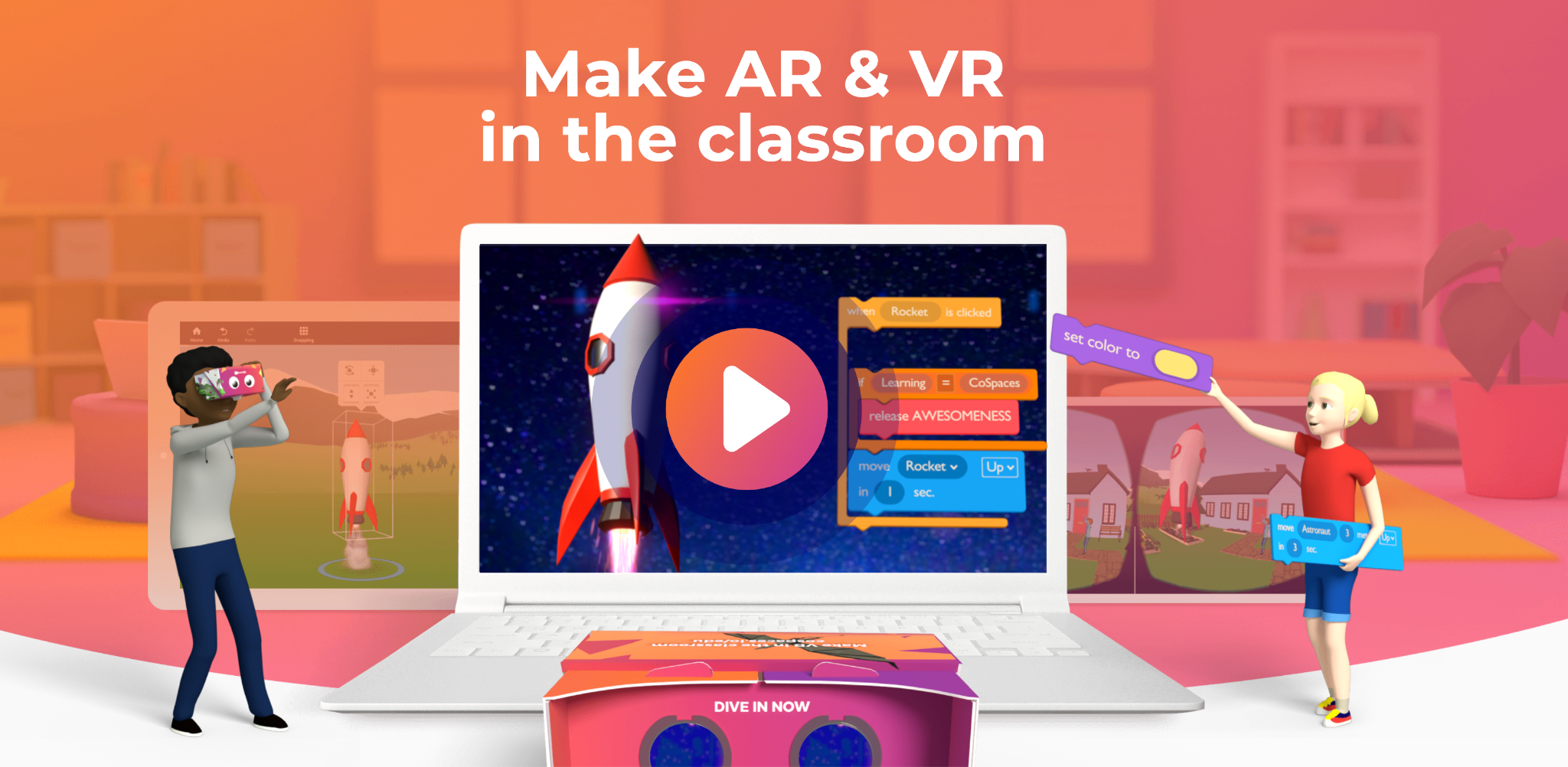
Exploring AR and VR with CoSpaces Edu for Back-to-School

In Collaboration with CoSpaces Edu, opinions expressed are my own

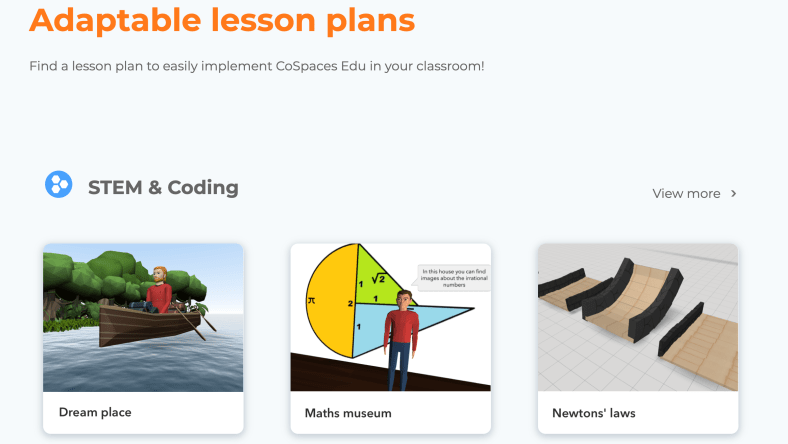
As we see the education landscape continue to evolve, especially with innovative technologies like Augmented Reality (AR) and Virtual Reality (VR) emerging as powerful tools to transform the way students learn and engage with academic content, we need to bring learning experiences to our students. In my classroom for the past six years, we have used CoSpaces Edu because it is such a versatile and accessible platform for educators. It is user-friendly, which makes it an excellent choice for teachers looking to integrate these technologies into their lessons without worrying about the learning curve or the time involved to get started. Another great benefit is that it can be used in any grade level or content area and there are lesson plans to explore!

Let’s take a look at some of the benefits of bringing AR and VR into our classrooms!

  • Immersive Learning: AR and VR are great ways to immerse students in more interactive, hands-on learning. With three-dimensional environments, CoSpaces can help students to enhance their understanding of complex concepts and it also encourages active and collaborative learning. Collaborative projects in CoSpaces foster teamwork and communication skills as students work together.
  • Personalized Learning: Because of all of the options available within CoSpaces, it can meet each student’s interests and needs. These AR and VR experiences can be tailored to individual preferences, which allows students to progress at their own pace and explore topics that better align with their interests. If students want to dive into coding, they can do that right within CoSpaces!

Project Ideas using CoSpaces Edu:

  • Virtual Museum Tour (Suitable for Social Studies, History, Art, and Language Arts): Have students create a virtual museum tour showcasing artifacts, and historical figures, and representing important events. Students can research and present what they have learned in a creative, interactive way. It also can be shared with classmates and the school community to highlight these emerging technologies and student innovation!
  • Storytelling in AR (Suitable for Language Arts and Creative Writing): Students can write and narrate their stories and then bring them to life in augmented reality. Using CoSpaces Edu, they can design interactive characters, scenes, and backgrounds to represent what they are learning. They can then turn their narratives into immersive experiences. A project like this fosters creativity and enhances storytelling skills.
  • Historical Time Travel (Suitable for Social Studies and History): Imagine a history project where students create a virtual time machine to travel to different historical periods. They can research various eras, dress up their avatars accordingly, and explore significant events and cultures firsthand through CoSpaces Edu. This project encourages historical empathy and a deeper appreciation for the past. It can be a great way to create exhibitions in AR and VR.
  • Literary Landscapes (Literature): Incorporate literature into AR and VR by having students create immersive environments inspired by novels or poems they have read in class. Students can use CoSpaces Edu to build scenes, depict characters, and even add audio elements to capture the essence of the literary work.

Integrating AR and VR into the educational journey has shown tremendous potential in transforming the way students engage with content and learn. With CoSpaces Edu, we can empower students to explore a wide range of subjects in an immersive and interactive manner. Just check out the gallery full of amazing examples and training for educators! The benefits of increased student engagement, more active learning, inclusivity, and creativity can positively and significantly impact students’ educational journeys.

As we head back to school, it is the perfect chance to explore and embrace these immersive technologies, making learning an adventure for all students in any grade level or content area. Diving in is easy with all of the support available in the Resources Hub from CoSpaces Edu!

About the Author

Rachelle Dené Poth is a Spanish and STEAM Educator at Riverview High School in Oakmont, PA. She is also an Attorney, Edtech Consultant, Speaker, and the Author of seven books about education and edtech. Rachelle is available to provide PD on Artificial Intelligence, Augmented and Virtual Reality, Coding, SEL and STEM.

Contact Rachelle to schedule sessions for your school about Artificial Intelligence, Coding, AR/VR, and more! Rachelle is also available for Keynotes.

Follow her on Twitter and Instagram at @Rdene915

**Interested in writing a guest blog for my site? Would love to share your ideas! Submit your post here. Looking for a new book to read? Find these available at bit.ly/Pothbooks

************ Also check out my THRIVEinEDU Podcast Here!

Join my show on THRIVEinEDU on Facebook. Join the group here

Embrace the New School Year with New Coding Resources: Matatalab’s Tale-Bot Pro and VinciBot

In collaboration with Matatalab, Opinions expressed are my own

As we head into a new school year, it’s the perfect time to explore innovative ways to ignite students’ passion for learning while providing them with opportunities to develop essential skills for the future. An area that is in demand and can be brought into every classroom is STEM-focused curriculum and activities. One great example is exploring coding!  In my STEAM course, we spend a good amount of time during the year learning about coding and talking about the importance of developing skills in these areas, especially for the increasing demand for coding skills in the future. 

Finding the right resources is key and it is so helpful when you can find one resource that provides options for multiple grade levels and content areas. Matatalab‘s coding resources are fantastic for learners of various age groups, starting as young as 3! 

Tailored for Different Age Groups

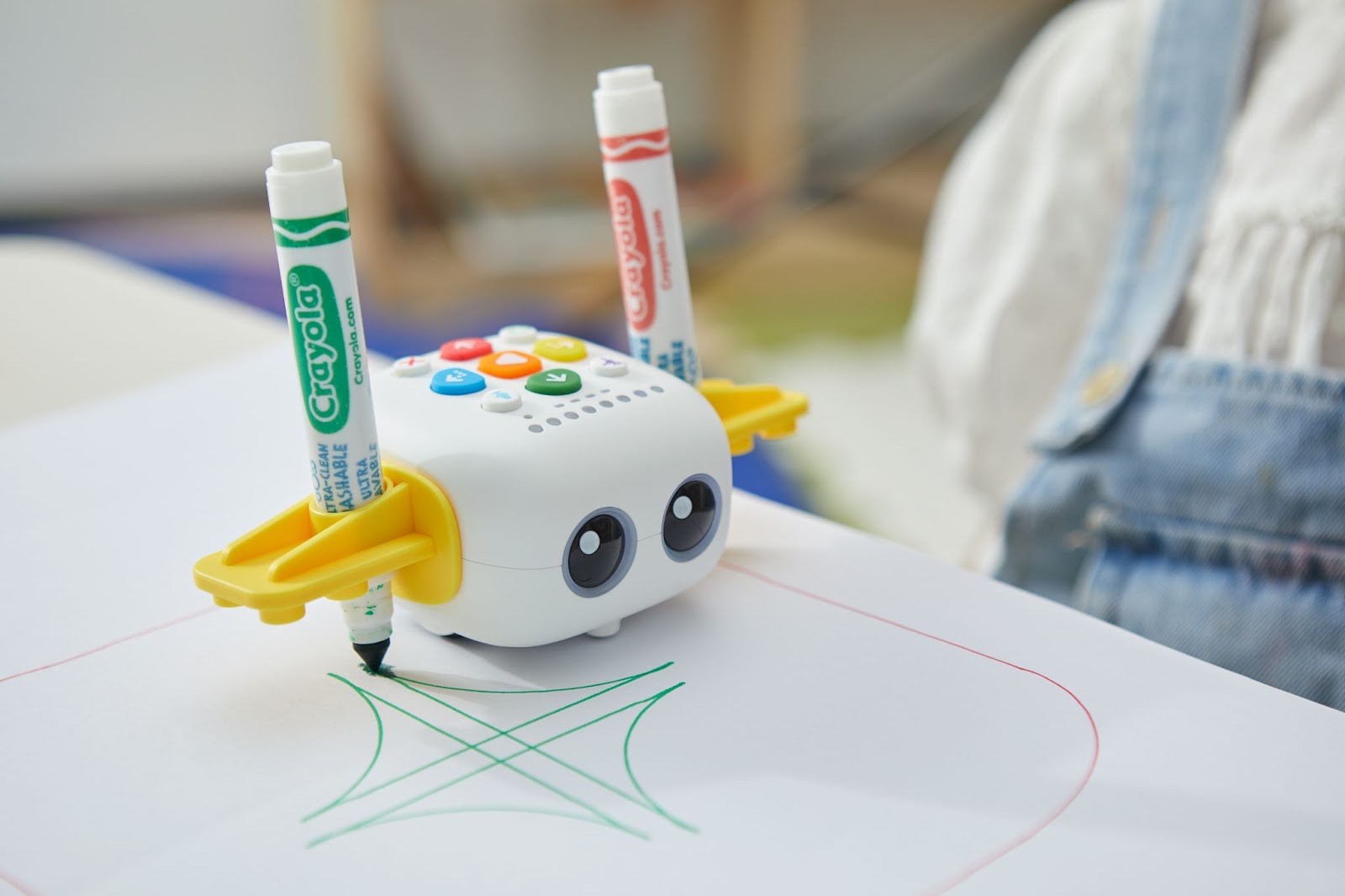
Matatalab recognizes that learning needs evolve as students grow. What I love about Matatalab is that they offer two coding robots that are easy to get started within the classroom. Students can dive right in and learn about coding and have fun exploring the possibilities with these great options! Read about our experience with the Tale-Bot Pro and the VinciBot

The Tale-Bot Pro is designed for Pre-K and above, while the VinciBot is geared towards students from the 3rd grade and up. Being able to bring coding opportunities to even the youngest learners is a way to spark curiosity and boost engagement in learning about these essential STEM skills.  

Here are four of the highlights for using Matatalab products:

1. An Ideal Autonomous Learning Assistant

Diving into coding and learning how to create opportunities for students can take time. However, Tale-Bot Pro and VinciBot come equipped with challenge booklets full of activities for students to explore. Matatalab also provides additional learning activities that can be downloaded from their website. With access to a variety of resources, it ensures that educators and students have enough materials to dive into the world of coding and also be able to infuse student choice in learning. What I think sets Tale-Bot Pro apart is that it provides instant voice feedback and guidance for students. As students code, they can observe the response of Tale-Bot Pro and understand if they completed the coding challenge correctly. This then empowers students to take charge of their learning and encourages self-guided exploration. As students take the lead more, it enables teachers to take on the role of facilitators in the classroom and be there to nurture student independence in learning.

2. Endless Creative Coding Practices

When it comes to using Tale-Bot Pro or Vincibot, there are so many ways that students can create something authentic, meaningful, and fun! We want to spark creativity and foster problem-solving abilities in our classrooms and with Matatalab’s coding robots, we are better able to facilitate this for our students. The beauty of Matatalab’s coding robots lies in their adaptability and versatility. By seamlessly integrating with Lego building bricks, students are not just limited to coding on screen; they can bring their creations to life in a tangible and interactive way. Imagine the excitement of coding a robot to navigate a custom-built obstacle course or perform a unique dance routine. This hands-on experience transforms abstract coding concepts into concrete, real-world applications, fostering a deeper understanding of the subject matter. 

As students experiment with different configurations and functionalities, they not only enhance their coding skills but also develop a strong sense of ownership over their learning journey. This not only brings in an element of play but it also nurtures imagination. 

As we think about the benefits, as students create and share their unique robot projects, they have opportunities to showcase achievements, which helps to boost their confidence and promotes more collaboration in the learning environment. 

3. Enjoyable Learning Experience

When you first open the box and get started with these robots, the fun starts right away. Students and teachers are excited to see the possibilities and amazed at how easy it is to create something. Coding can be thought of as something difficult that requires an extended amount of time or a higher level of knowledge, however, that is not the case with Matatalab. Their coding robots instantly make coding a more enjoyable and engaging experience for all students. It leads to more interactive learning with real-time feedback and is engaging for students.  Being able to quickly code and see the results, helps students to understand coding concepts right away. These robots bridge the gap between learning and fun!

4. Future-Proofing Your Career

With technology and the need for STEM skills increasing rapidly, understanding coding is no longer an option but has to be considered a necessity. When we introduce coding at an early age, it helps students to develop skills over time. Whether by starting early with Matatalab’s Tale-Bot Pro and then advancing to the VinciBot, educators are helping students gain skills that will benefit them in the future. Tale-Bot Pro and VinciBot not only nurture coding skills but also instill a growth mindset that is essential for adapting to the ever-evolving technological landscape. As students engage with these robots, they cultivate resilience, adaptability, and the ability to embrace challenges—all attributes that are highly sought after in any profession.

There are many “in demand” skills developed through coding such as collaboration, creativity, critical thinking, and problem-solving, which are transferable across various fields. As students master these skills, they not only enhance their academic skills but also set a strong foundation for future career success. 

If you are looking to get started with coding and worried that you don’t have enough time, or that your learners are too young, then it is time to explore Matatalab’s coding resources, particularly the Tale-Bot Pro and VinciBot. These options provide students with a chance to dive into coding and learning and appreciate the process involved. 

During ISTE 2023, I had a chance to talk with the team and share my experience with attendees!

About the Author

Rachelle Dené Poth is a Spanish and STEAM Educator at Riverview High School in Oakmont, PA. She is also an Attorney, Edtech Consultant, Speaker, and the Author of seven books about education and edtech. Rachelle is available to provide PD on Artificial Intelligence, Augmented and Virtual Reality, Coding, SEL and STEM. 

Contact Rachelle to schedule sessions for your school about Artificial Intelligence, Coding, AR/VR, and more!

Follow her on Twitter and Instagram at @Rdene915

**Interested in writing a guest blog for my site? Would love to share your ideas! Submit your post here. Looking for a new book to read? Find these available at bit.ly/Pothbooks

************ Also check out my THRIVEinEDU Podcast Here!

Join my show on THRIVEinEDU on Facebook. Join the group here

Exploring AI: Tools for All Learners

As a classroom teacher with more than five years of experience integrating AI into my teaching practice and also providing PD and conference sessions for educators, I have enjoyed exploring the different tools and seeing the changes happen over this time. I try to find a variety of resources to help educators, especially ones that offer something for all grade levels and content areas. When we give students the chance to explore AI and develop a greater understanding of it, we also help to foster skills of critical thinking, problem-solving, and a deeper understanding of AI concepts. opportunities for engagement, personalized learning, and skill development

By introducing AI tools and exploring generative AI like ChatGPT, learners can develop essential 21st-century skills such as critical thinking, problem-solving, and digital literacy. These experiences allow them to explore and engage with cutting-edge technologies, preparing them for the future workforce. It is important for educators to create a balance between AI and traditional teaching methods, ensuring that AI integration is purposeful, age-appropriate, and aligns with educational goals. By harnessing the benefits of AI, educators can inspire young learners, nurture their curiosity, and empower them to become active contributors in an AI-driven world.

AI Impact on Learners

In our schools, when we purposefully leverage technology such as AI, it can have many benefits for student learning. Here are four ways that AI can have a positive impact on education.

  • Adaptive learning: One way that AI can benefit learners, especially young learners, is through adaptive learning platforms. These platforms utilize AI algorithms to analyze students’ strengths and weaknesses and can then tailor educational content to each student’s individual needs, reinforcing concepts they struggle with and challenging them in areas where they excel. While the AI is not a replacement for the teacher-to-student interaction and the feedback loop, it does help to provide what each student needs, when they need it. DreamBox is an example of an adaptive learning platform that can enhance students’ mathematical and literacy skills. Prodigy is an adaptive math platform that uses AI to create personalized math lessons and practice activities.
  • Content retention: For students to have multiple methods of reviewing the material, Quizlet has AI functionality that adapts to students’ progress and identifies areas that need further review. It provides personalized feedback and helps students strengthen their understanding and retention of key concepts. “Q-Chat is the “first fully adaptive, AI-powered tutor experience built on OpenAI’s ChatGPT API.”
  • Language Learning: Chatbots powered by natural language processing (NLP) algorithms can engage students in interactive conversations, providing instant feedback and opportunities to build skills at their own pace. For example, Duolingo’s chatbots enable students to practice world language skills by engaging in conversational exercises. AI-powered translation tools like Google Translate can also be used to enable students to explore and compare different languages. Another option is to read articles through Newsela which uses AI to adapt reading materials to students’ reading levels, making comprehension more accessible and enjoyable.
  • Social-emotional learning: Students can develop their social and interpersonal skills as they learn to interact through a conversational chatbot. For building confidence, engaging in a conversation with a chatbot that can provide feedback, helps students to develop their skills in many ways.

In addition to the benefits for learners, especially with creating more personalized, “just-in-time” supports, there are many tools and resources that benefit students in all grade levels. Here are six that are great to get started with:

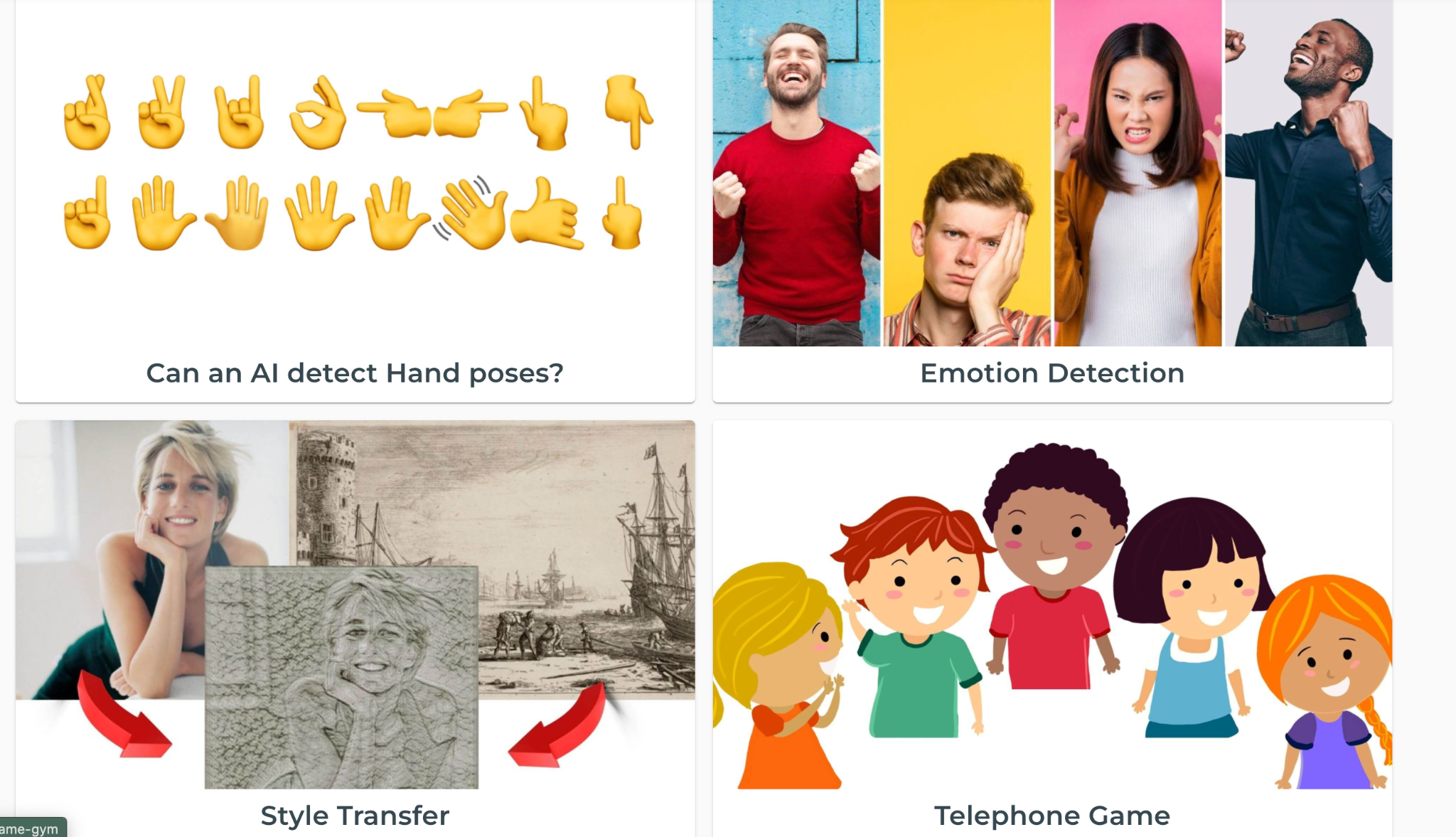
  • AIClub: An online platform that offers a K-12 curriculum covering AI, but it also has a range of AI-related resources and activities for students. There are interactive lessons, coding challenges, and AI project ideas. Middle school students and younger learners can explore the AI Club Gym and try some activities to develop an understanding of AI and how it works.

[via AI Club Gym resources]

[Examples of resources via AI World School]

For educators looking for ways to learn more about AI and also experience some of its benefits, there is a growing list of tools we are already using that are building in AI functionalities and some new ones that help us save valuable time. Here are three examples to test out:

  • Canva Magic Write Canva now offers an AI text generator called Magic Write, which can inspire creativity in writing. It provides ideas, helps with brainstorming, supports lesson planning, crafting emails, making it a useful tool for educators.
  • Curipod: Teachers can create interactive lessons in minutes using AI. Teachers simply type in a topic and a ready-to-run lesson is generated.

[example generated lesson via Curipod]

As with all new technologies, we need to make sure that we explore the benefits and concerns. Don’t be afraid to explore these tools because as educators, we need to be prepared to guide our students and help them to understand the technologies that may become a big part of their future by equipping them with knowledge and skills to navigate the world of AI effectively and ethically.

Coming up on October 7th is the EduMatch AI Summit! A free event and I am honored to be a Featured Speaker during the Summit and can’t wait to share AI resources and how to get started! Read the post from Dr. Sarah Thomas here to learn more and find out how to sign up to present and participate!

About Rachelle:

Rachelle Dené is a Spanish and STEAM: What’s Next in Emerging Technology Teacher at Riverview High School in Oakmont, PA. Rachelle is also an attorney with a Juris Doctor degree from Duquesne University School of Law and a Master’s in Instructional Technology. Rachelle is an ISTE Certified Educator and serves as the past president of the ISTE Teacher Education Network. She was named one of 30 K-12 IT Influencers to follow in 2021.

She is the author of seven books including ‘In Other Words: Quotes That Push Our Thinking,” “Unconventional Ways to Thrive in EDU”, “The Future is Now: Looking Back to Move Ahead,” “Chart A New Course: A Guide to Teaching Essential Skills for Tomorrow’s World, “True Story: Lessons That One Kid Taught Us” and her newest book “Things I Wish […] Knew” is now available at bit.ly/thingsiwishedu.

Follow Rachelle on Twitter @Rdene915 and on Instagram @Rdene915. Rachelle has a podcast, ThriveinEDU available at https://anchor.fm/rdene915

Rachelle is available for PD sessions in-person and virtual on a variety of topics. Key focus areas are AI, ChatGPT, Generative AI, AR and VR, SEL and STEM.

**Interested in writing a guest blog for my site? Would love to share your ideas! Submit your post here. Looking for a new book to read? Find these available at bit.ly/Pothbooks