Learning about Civics and Government: The Ethics of AI in Political Campaigns

Guest post by: Torrey Trust and Robert W. Maloy, University of Massachusetts Amherst

The Ethicist” – Kwane Anthony Appiah’s column in the New York Times Magazine – offers philosophical advice about how to respond to the dilemmas and complexities of everyday life. People submit questions they want answered, and the rights and wrongs or ethics of what to do are not immediately clear or self-evident. Questions posed include: “Is it ever acceptable to visit a Confederate historical site?” “My salary is too high. Is it wrong to stay in my job?” “Can I sell my Taylor Swift tickets for thousands of dollars?” and “Can I use ChatGPT for the tedious parts of my job?” In July 2023, the Ethicist responded to this last question about ChatGPT, which was written by the chair of the English department at a small college. The reply was “yes,” as long as “you exercise proper vigilance and can stand by what you submit” (para. 4). 

Utilizing “The Ethicist” as the starting point for instructional ideas, we envision giving elementary, middle, and high school students ongoing opportunities to develop their own ethical responses to authentic questions and issues they are facing in their lives, schools, and communities – especially those related to the use of GenAI tools and large language models (LLMs) – as a means of helping them develop their civic engagement skills and knowledge. Ideally, students engage in discussions about how they and others should act in the different situations and settings of everyday life. By stating their views and restating and understanding the views of others, students will become more socially conscious and civically engaged as members of our diverse society. 

Questions of ethics and ethical behavior are central to how individuals and groups conduct political campaigns. In the run-up to the 2024 election, political candidates, parties, and action and advocacy groups have been using GenAI tools to generate campaign speeches, policy proposals, and even fundraising emails. In one example, the Democratic Party used AI to write fundraising emails and found that AI-generated fundraising requests performed as well as or better than human-generated requests in generating financial responses from donors (Goldmacher, 2023). However, not all uses of GenAI in political campaigns have been done with honorable intentions. University of Georgia journalism professor David E. Clementson (2023) identified multiple ways that GenAI tools could make political campaigns more deceptive than ever, including using these tools to design customized bogus campaign promises, write outright lies presented as truthful statements, convince voters to reevaluate their choice of candidates, and craft manipulated photos of candidates.

Following the model of “The Ethicist,” students could be asked: “Is it ethical to use GenAI tools to craft political campaign materials and media?” To begin this activity, students could be encouraged to use the Teacher and Student Guide to Analyzing AI Writing Tools to critically investigate popular GenAI tools, including ChatGPT, Bard, Stable Diffusion, and DALL-E. This guide provides a series of prompts that motivate students to examine the design and production of AI tools (questioning things like “Who designed this tool and why? “How does this tool make money?” “What data was used to train this tool?” “What biases are represented in the data?” and “What privacy protections are in place for users’ data?”) and the output of AI tools (questioning things like “Who or what is included in the output and who or what is left out?” and “How does the AI-generated output compare to human-generated text or media?”). Through this type of critical investigation, students might uncover that GenAI tools are trained on data that has embedded biases and consider what that might mean if political campaign staff use these tools, for example, to write fundraising campaigns based on demographic data. 

Next, students could work on designing their own political campaign to run for a local or statewide political office (see the “Online Campaigning for Political Office” activity). Students could start this activity without any assistance from GenAI tools and then mid-way through the activity have the opportunity to use AI to help with or improve their campaign materials. For example, students might ask ChatGPT to generate a series of social media posts related to their campaign promises, write a script for a podcast or video that will be embedded into their campaign website, improve the quality of the text for their campaign website, or devise a strategy for increasing voter engagement with their campaign. Or, they could use image generators, like Microsoft Bing Image Creator powered by DALL-E, to produce visuals for their campaign websites or social media posts. 

After designing their own political campaigns with and without the assistance of GenAI tools, students could engage in a discussion or debate about whether they think it is ethical for politicians and their campaign staff to use GenAI tools to craft political campaign materials and media. Integrating an ethical question about the use of AI in political campaigns as students design their own run for political office gives students an opportunity to investigate what AI can and cannot do and what AI should and should not do as a tool. The cognitive scientist Fei-Fei Li said nearly a decade ago: “AI is a machine that can make a perfect chess move while the room is on fire” (quoted in Knight, 2017, para. 4). Her point is AI can generate content, but not critical thought or socially and morally ethical plans for action. Through this activity, students consider what role AI should play in politics, and then they should be able to form their own opinion to the prompt: “Is it ethical to use GenAI tools to craft political campaign materials and media?”

Author Bios

Torrey Trust, Ph.D. is a Professor of Learning Technology in the Department of Teacher Education and Curriculum Studies in the College of Education at the University of Massachusetts Amherst. Her scholarship and teaching focus on how technology shapes educator and student learning. Specifically, Dr. Trust studies how educators engage with digitally enhanced professional learning networks (PLNs), how emerging pedagogical tools (e.g., HyperDocs), practices (e.g., Making), and technologies (e.g., 3D printers, augmented reality) facilitate new learning experiences, and how to design and use open educational resources (OERs). Dr. Trust served as a professional learning network leader for the International Society for Technology in Education (ISTE) for five years, including a two-year term as the President of the Teacher Education Network from 2016 to 2018. In 2018, Dr. Trust was selected as a recipient of the ISTE Making IT Happen Award, which “honors outstanding educators and leaders who demonstrate extraordinary commitment, leadership, courage, and persistence in improving digital learning opportunities for students.” www.torreytrust.com

Robert W. Maloy is a senior lecturer in the College of Education at the University of Massachusetts Amherst where he coordinates the history teacher education program and co-directs the TEAMS Tutoring Project, a community engagement/service learning initiative through which university students provide academic tutoring to culturally and linguistically diverse students in public schools throughout the Connecticut River Valley region of western Massachusetts. His research focuses on technology and educational change, teacher education, democratic teaching, and student learning. He is co-author of Transforming Learning with New Technologies (4th edition); Kids Have All the Write Stuff:  Revised and Updated for a Digital Age; Wiki Works: Teaching Web Research and Digital Literacy in History and Humanities Classrooms; We, the Students and Teachers: Teaching Democratically in the History and Social Studies Classroom; Ways of Writing with Young Kids: Teaching Creativity and Conventions Unconventionally; Kids Have All the Write Stuff: Inspiring Your Child to Put Pencil to Paper; The Essential Career Guide to Becoming a Middle and High School Teacher; Schools for an Information Age; and Partnerships for Improving Schools. 

**Interested in writing a guest blog for my site? Would love to share your ideas! Submit your post here. Looking for a new book to read? Find these available at bit.ly/Pothbooks

************ Also check out my THRIVEinEDU Podcast Here!

Join my show on THRIVEinEDU on Facebook. Join the group here

How does a techy teacher navigate ChatGPT and AI?

Guest post by Joe Warner, 2nd-grade teacher at West Lafayette Elementary School in West Lafayette, IN

@jdswarner – Twitter

I am what most refer to as a “Techy teacher.” I love most things edtech and pursue a lot of edtech use in my classroom. I have been so driven by edtech that I pursued a master’s degree from Purdue University in Learning Design and Technology. The program has really helped me develop stronger edtech tools and designs for my classroom. When someone needs help with tech in our school, they usually come to ask me. I am not saying this in a bragging sense, it is merely to give the background that I love technology and see its benefits to our daily lives as human beings, especially as teachers.

All that said, I have some reservations about AI and the newly discovered ChatGPT (which I have only read about, and not used). Let’s first start with AI. For me, AI is an easier topic to discuss. I use Google Assistant on my phone to prioritize my daily life. I have even used IFTTT in conjunction with my Google Assistant to create a verbal command system that would award points to table groups similar to the house points in Harry Potter. So there are some great benefits of AI. My only reservation is something that I read about in EdTech Magazine. The title of this article is Empowering Teaching and Learning with Interoperability written by Douglas Konopelko. Interoperability was a new term to me but I have since embraced it. Interoperability in short is the ability of various programs and software to talk and work with each other seamlessly. My frustration with this topic and AI is how little companies are trying to accomplish this. The Google, Microsoft, and Apple battle are well known. None of those companies seem to want to work together and share their systems to work with each other. The same can be said for EdTech. If we are to fully be able to use the systems we have in education, we need them to have interoperability. The companies behind them need to embrace this. The question then turns to, can AI help us in accomplishing this? I am writing this post hoping to seek the answer to this question. There is so much overwhelming data in education and we need systems that can easily combine all the pieces we need into one system that makes it easy for teachers to use.

This brings me to the next tricky subject, ChatGPT. I have not used ChatGPT. It is blocked in my school and I have no desire to use it at home. I keep coming across Twitter posts with articles discussing the benefits of ChatGPT in education and for educators. I am extremely cautious to embrace this. The biggest issue I have with ChatGPT is originality and authenticity. In the article How CHATGPT is fast becoming the teacher’s pet from Forbes, a teacher is quoted saying that he lets the students use ChatGPT to write their first draft of code for them. But if ChatGPT is writing the first draft of code, then how is it “their” code or program? Other uses for ChatGPT in this article discussed are writing emails, comments for students, and creating tables and charts to name a few. And sure, automating these processes do seem like they would make my life as a teacher more efficient. The struggle I have is how can we confirm originality with these processes. How can we ensure there will not be mistakes? Yes, we all know “Skynet” is not taking over but when will ChatBot perceive the student, parent, or teacher as a threat and send the wrong message home? And maybe this is because I have some control and trust issues with the processes of my own classroom.

Let’s circle back to our topic of interoperability. What role does AI or even ChatGPT play in this term? If ChatGPT can create charts and tables, can it then provide interoperability for the systems that we use in schools? Can it gather all of the data from all the sources we use and make reports for schools to use? I for one am tired of chasing down data, copying it from one source to another. Could ChatGPT and AI automate and streamline this process for me? There are systems out there like Class Composer which let us take all of our data and put it into one place. I am a teacher so I am not on the backend of the data dump but I do know, I have had to enter my student data into Class Composer. So what can be done to make this process easier and eliminate my need to enter the data? We all know how much time this will save. Can ChatGPT solve this issue for us?

In this evolving world, I am more than happy to embrace change and technology. There are great benefits to using technology in our lives, especially in the classroom. And we can forget to take the time to measure the value of technology in the classroom. Our efforts should be on interoperability. How are we going to push all these systems to work together? How can ChatGPT help with that? How can I be assured of trust in ChatGPT’s originality or authenticity? I am just a techy teacher trying to navigate this evolving world and embrace the new tech.

Sources:

Konopelko, D. (2020, July 9). Empowering Teaching and Learning with Interoperability. Technology Solutions That Drive Education. https://edtechmagazine.com/k12/article/2020/07/empowering-teaching-and-learning-interoperability.

Whitford, E. (2023, March 27). How CHATGPT is fast becoming the teacher’s pet. Forbes. Retrieved March 28, 2023, from https://www.forbes.com/sites/emmawhitford/2023/03/25/how-chatgpt-is-fast-becoming-the-teachers-pet/?sh=39c665de5177

**Interested in writing a guest blog for my site? Would love to share your ideas! Submit your post here. Looking for a new book to read? Find these available at bit.ly/Pothbooks

************ Also check out my THRIVEinEDU Podcast Here!

Join my weekly show on Fridays at 6pm ET THRIVEinEDU on Facebook. Join the group here

Learning to Code with VinciBot

This post is sponsored by Matatalab, Opinions expressed are based on my own experience

During the past year, we have been exploring a lot of new products as we work on our coding skills in my eighth-grade STEAM class. My students really enjoy trying out different tools to find something that matches their interests and that gives them opportunities to build their coding skills. We also take opportunities to try tools that are geared toward younger students as well, to better understand how students can develop coding skills and the benefits. It also helps to spark interest in coding, which is an in-demand skill for the future. 

Sometimes, students hesitate to get started with coding because of a fear of not understanding how to write the code, or troubleshooting if the code does not work. However, with the different options and resources available through Matatalab, my students have really enjoyed the experience and are excited to dive right in.

Matatalab is a company that specializes in developing educational coding products for young children. What I love about using them is that their products are designed to teach early learners the fundamentals of programming in a fun and engaging way through interactive and hands-on learning experiences. It is not all about the technology, Matatalab offers screen-free coding and also comes with cards to teach students about the coding steps.  They offer a range of products that are suitable for different age groups and skill levels, from preschoolers to elementary school students and older.

Through the various products available, educators are able to provide opportunities for students to learn about coding, even at an early age as young as 3! Last year I started exploring the Tale-Bot Pro which makes it easy for kids to get started on their own and build their knowledge whether at home or school.

The VinciBot

The newest product from Matatalab is the VinciBot which is aimed at slightly older children, ages eight and above. Matatalab products are designed to be intuitive and easy to use. The coding blocks are color-coded, making it simple for students to understand the different types of commands and functions. This helps to make the learning process more accessible and enjoyable, especially for students who may be intimidated by traditional coding methods. By programming the robot, students can develop their problem-solving skills and spatial awareness and have fun working together to explore coding and the world of robotics! 

When I brought it into school, my students were lining up to be the first to explore it!  VinciBot is the new and maybe even one of the most popular coding products from Matatalab. It is a versatile and interactive robot that is designed to teach the basics of coding in a fun and engaging way. VinciBot can be controlled using a range of programming languages, including Scratch, Python, and the MatataCode App. With these options, it provides each student with a way to engage in coding at a pace that is comfortable and supports them as they build their skills and confidence in coding.

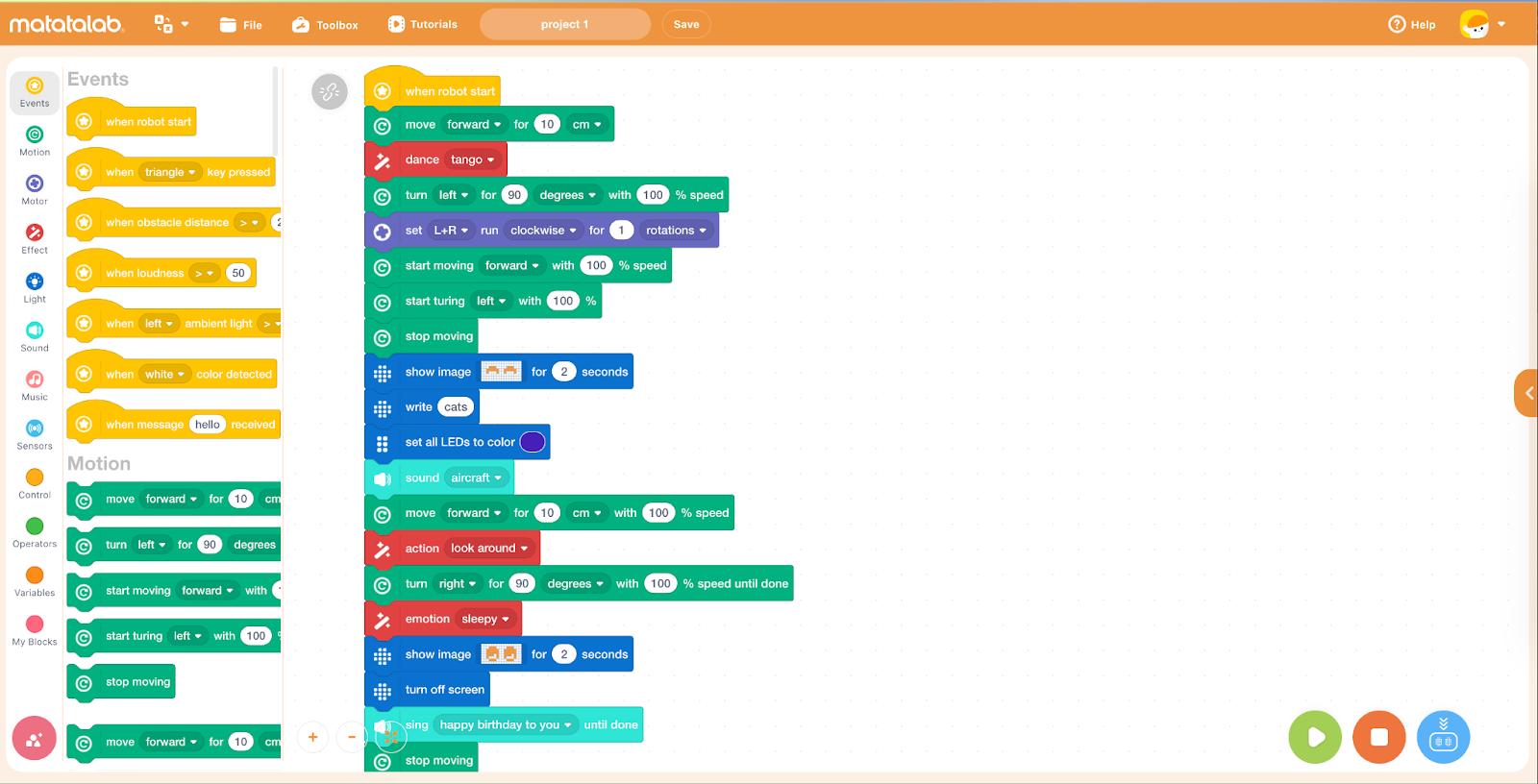
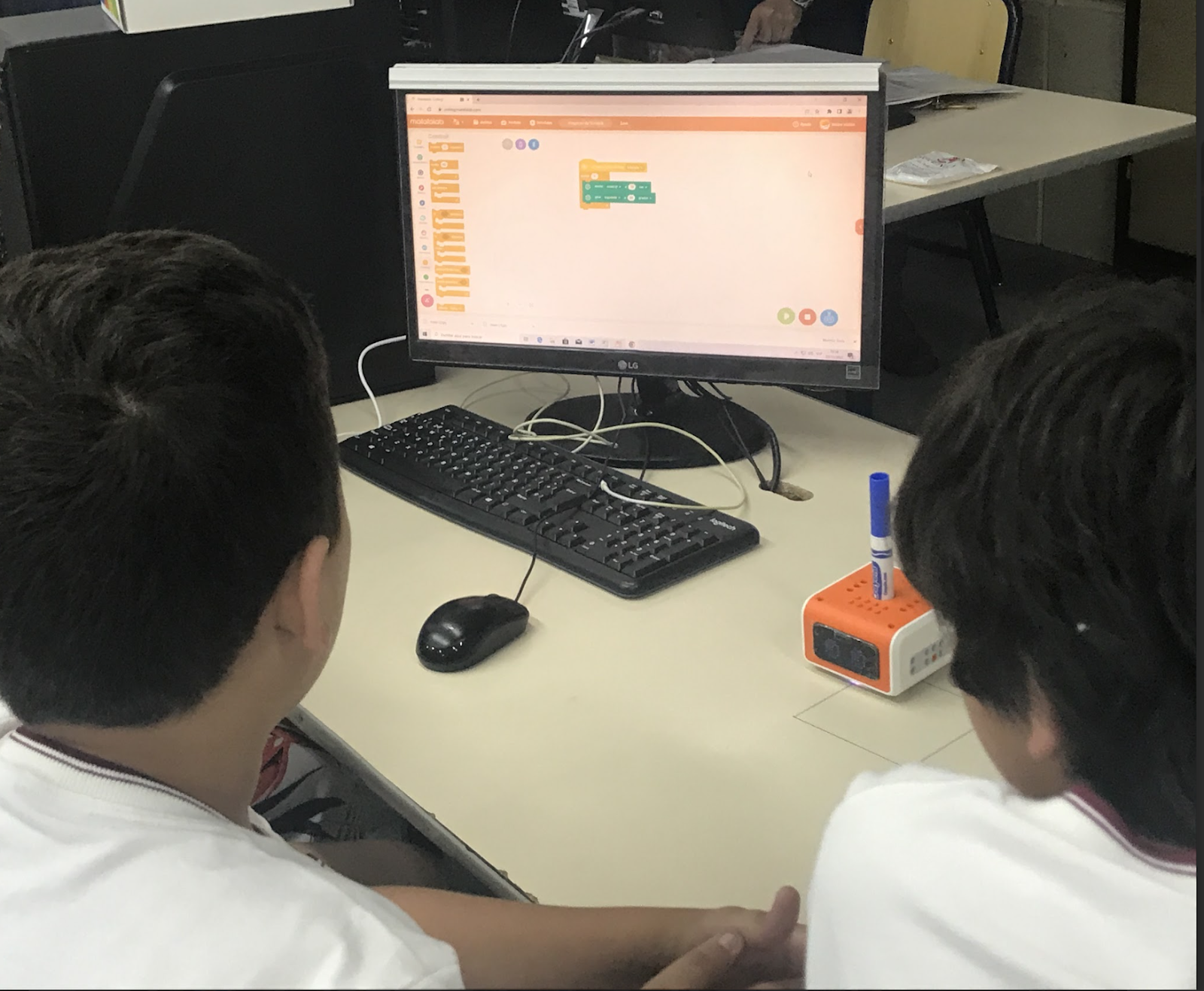
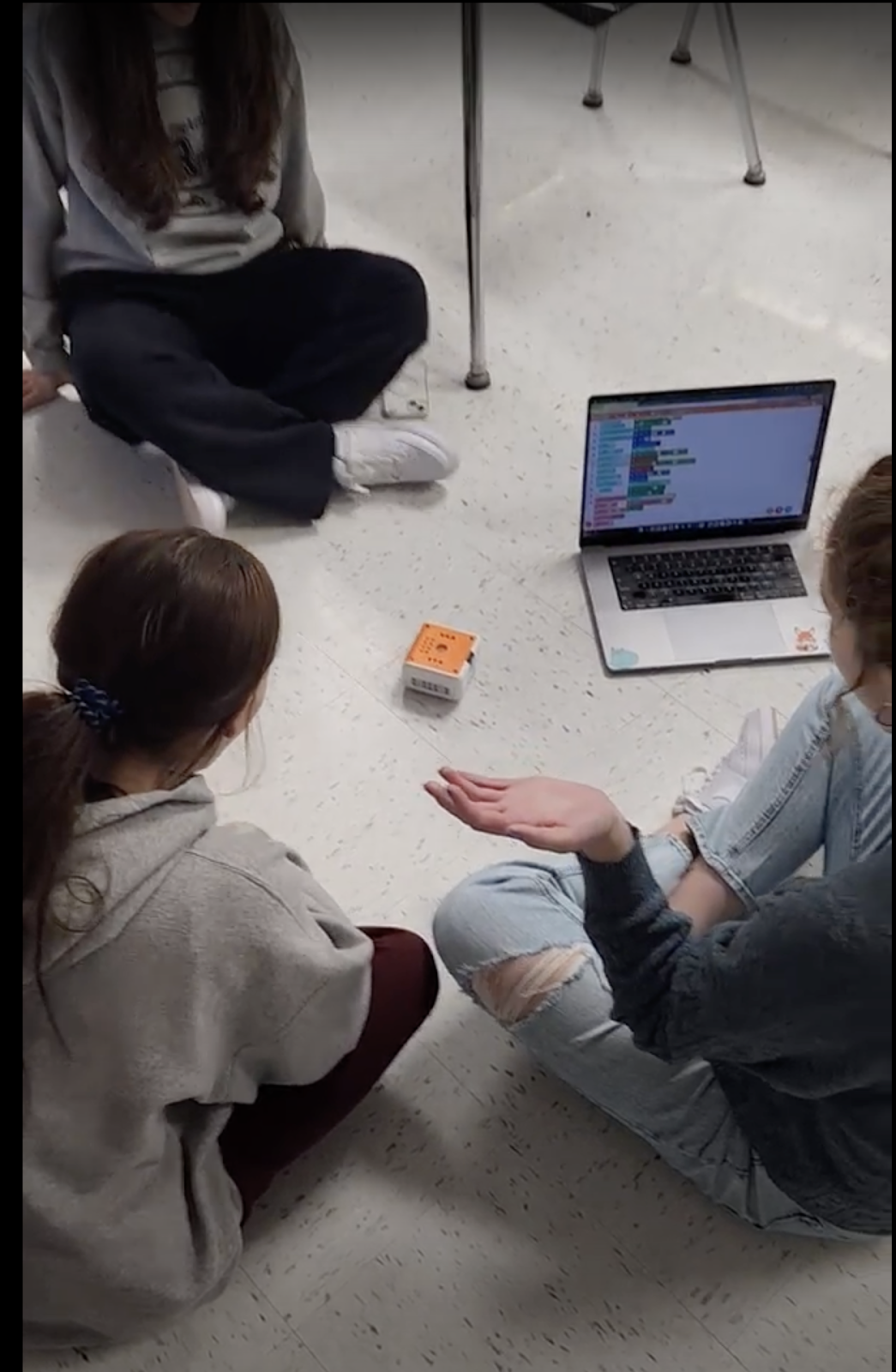
[creating a program for VinciBot]

Features

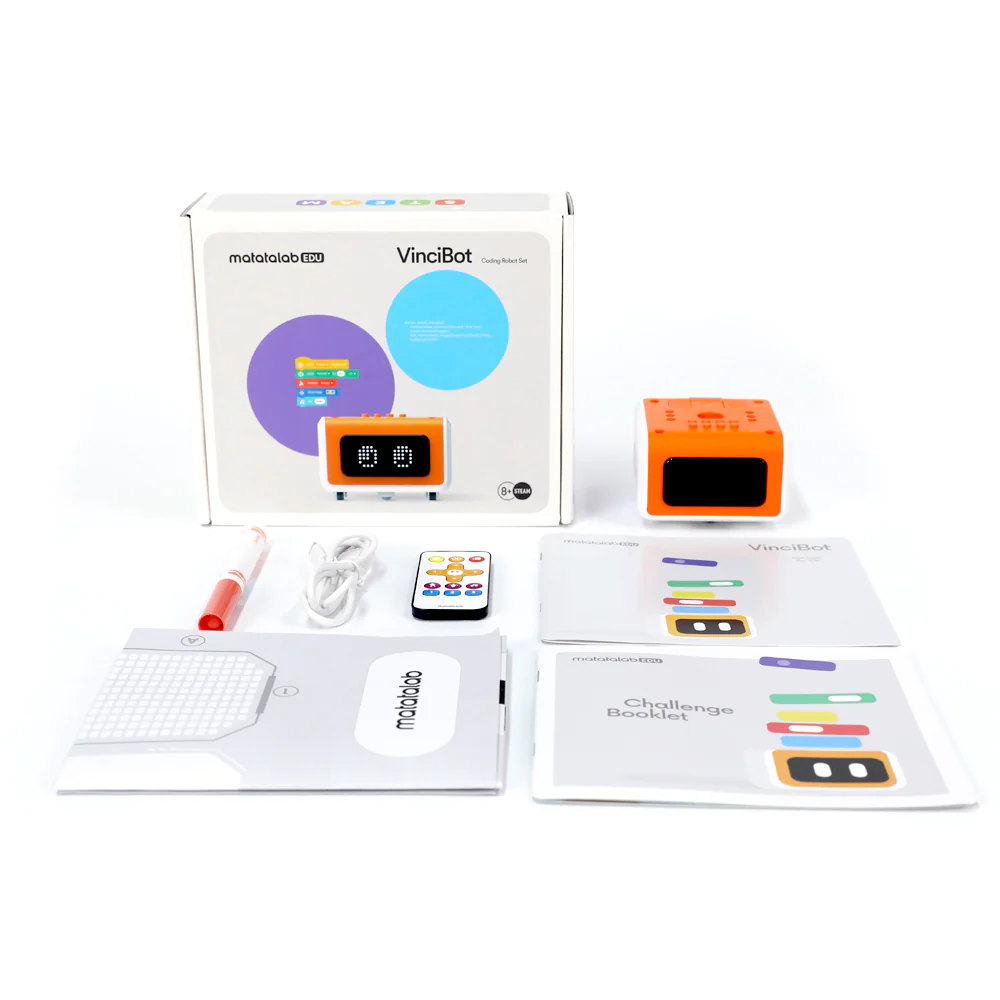
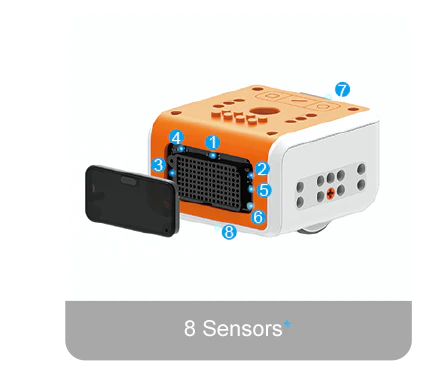
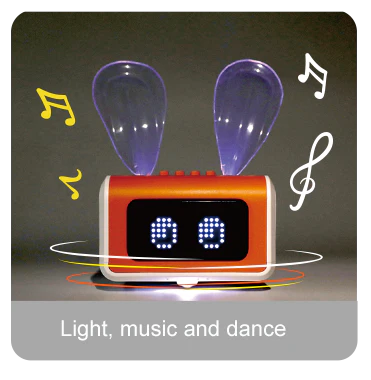
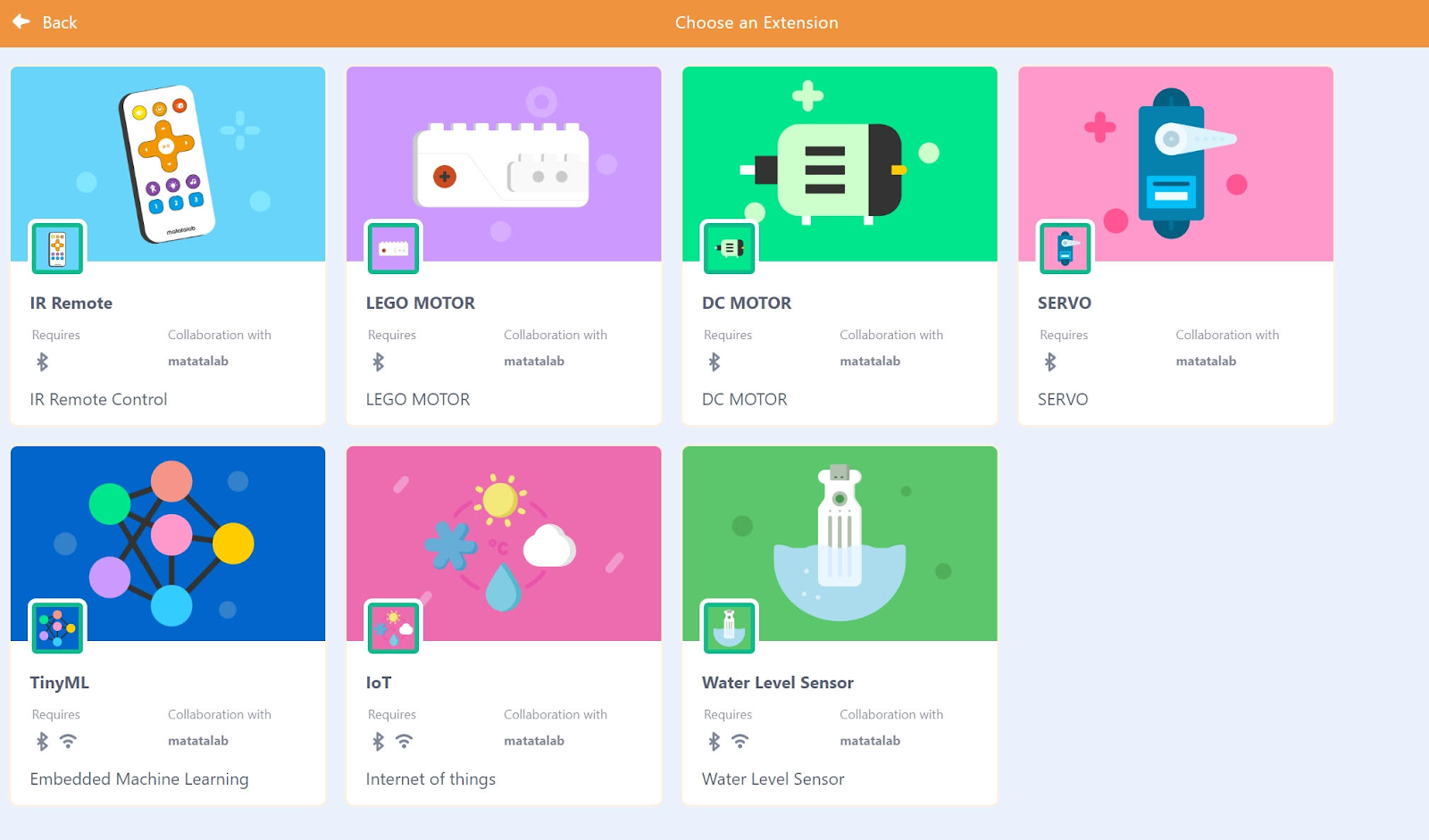
The VinciBot comes with everything you need to provide an engaging learning experience for students. There is a challenge booklet with 18 challenges for students to explore.  The VinciBot is equipped with interactive sound, light, and movement effects and has 8 sensors. There are 21 musical instrument sounds, an LED matrix, and an LED RGB light structure. The infrared and ultrasonic sensors allow it to navigate its surroundings and interact with the environment. Students can program VinciBot to complete a variety of actions including dancing and can even program it to sing Happy Birthday!   VinciBot also offers the opportunity for students to explore artificial intelligence (AI) through its AI-based teaching scenarios and gameplay.  This is a great benefit, especially with the increased interest in getting started with AI, coding, and STEM, having one resource that can provide it all is a great opportunity. The Tiny Machine Learning of VinciBot is available even without the Internet in the classroom. Students will have programmed with the AI data and trained the robot before and perform their program in a non-internet environment. The Tiny ML enables students to go through the whole process by learning about model creation, data acquisition, training, and development to then programming. Engaging in this ongoing learning journey helps them to develop a much greater understanding of AI at their own pace and in their own way. 

Learn more through their video tutorials and the overview of the VinciBot in action. 

Accessibility

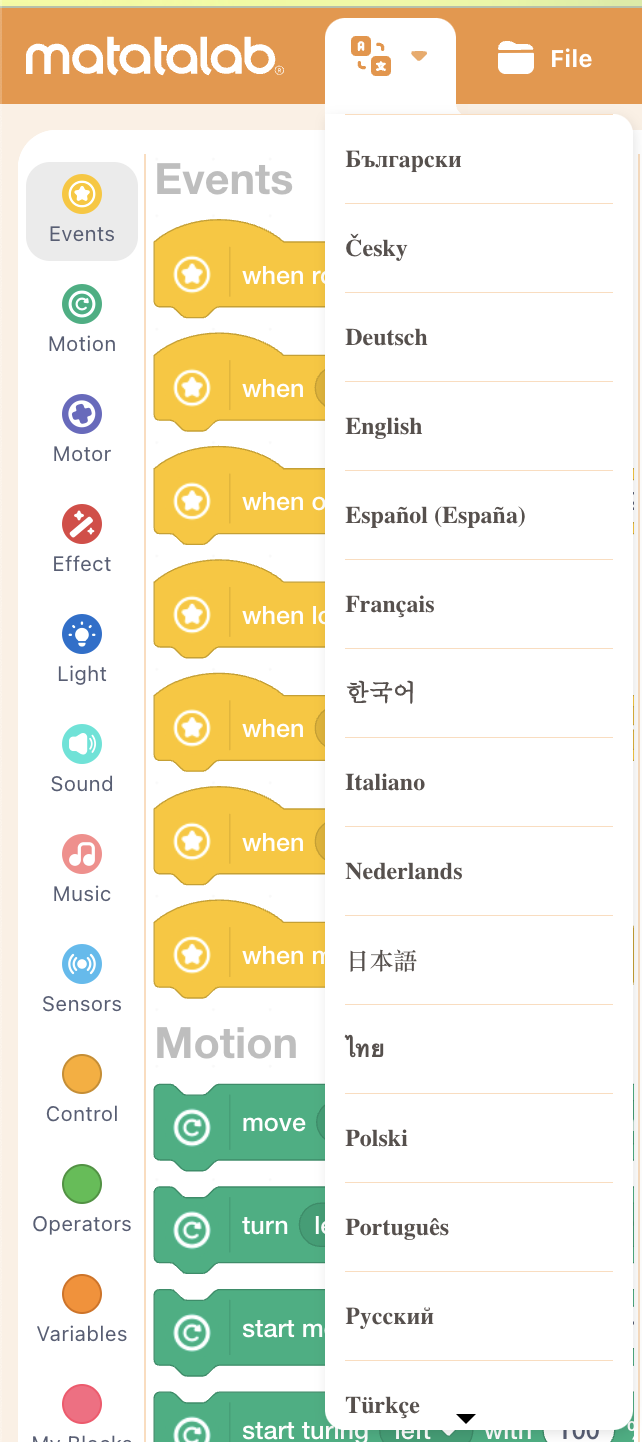
The coding program is available in multiple languages, making it more accessible to a wider audience. This allows children from different countries and backgrounds to learn to code using their native language. Additionally, the programming blocks are designed to be easily understood by young children, regardless of their level of literacy or cognitive ability, promoting inclusivity and accessibility for all.

[Students can select the language for coding, making it more accessible for all students as they build language skills and coding skills together!]

One of the key benefits of VinciBot is that it is designed to grow with the student. As they become more proficient in coding, students can use more advanced programming languages to control VinciBot and develop increasingly complex programs. This means that VinciBot can provide years of educational value for children of all ages.  

​​

Extra features

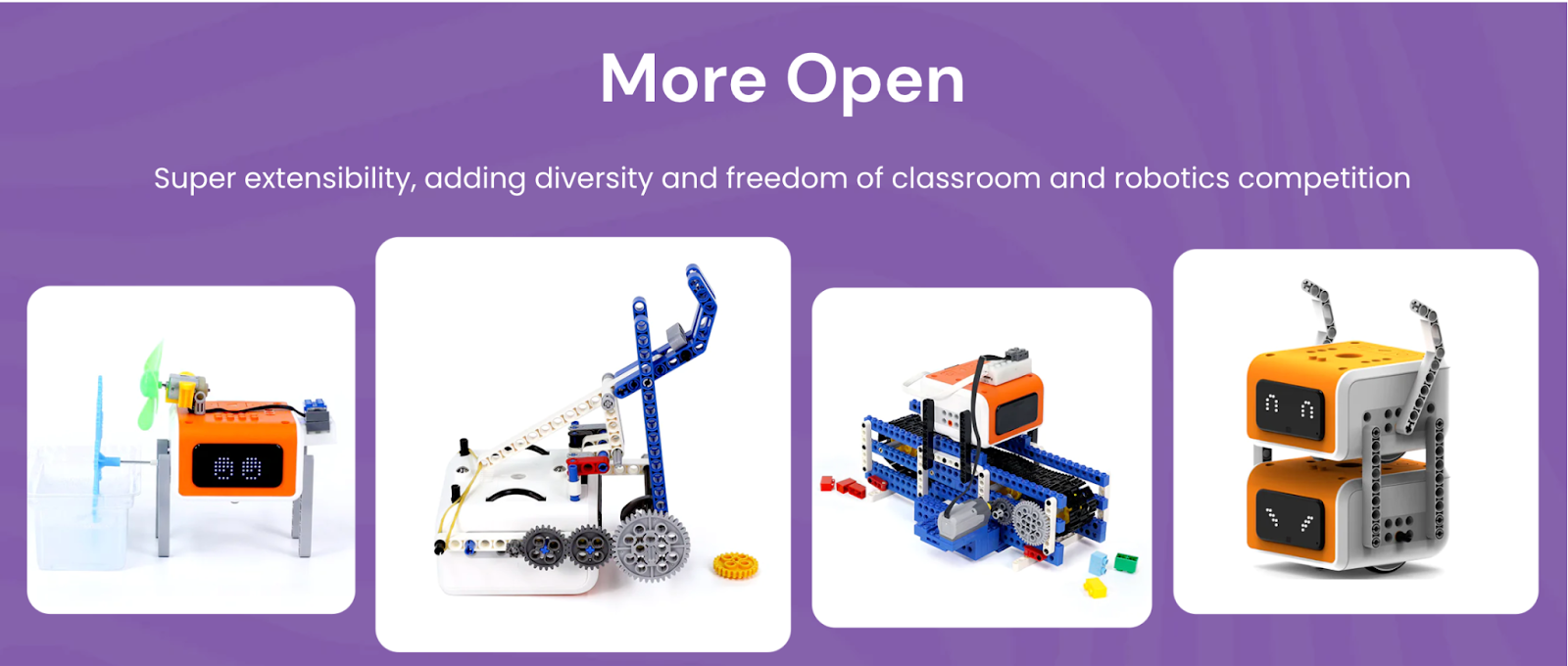
The VinciBot is also compatible with LEGO bricks and other products, making it possible to even combine robots together for a larger project or a robotics competition!  Students are so creative and can problem solve and collaborate to design a solution to a challenge or work with design thinking in the classroom.

Benefits of coding

In addition to learning to code, students develop many other skills that are essential for future success. It fosters the development of social-emotional learning (SEL) skills, building self-awareness as students learn to code and evaluate their growth. It fosters self-management as students set goals and problem solve and deal with challenges that can come with coding. Students build relationships as they work with one another to create, while also building skills in communication, collaboration, creativity, critical thinking, and problem-solving. 

Why explore Matatalab?

Matatalab products promote hands-on learning and encourage creativity and imagination. Students can use the coding cards to think about the steps in the coding process or use the remote to drive the robot. Once logged in, students are able to create their own programs. Being able to explore their own ideas and interests helps to foster a love of learning and discovery. By encouraging creativity and imagination, Matatalab products help to prepare children for the challenges of the future.

By providing an intuitive and hands-on approach to learning programming, Matatalab products help to prepare our students for the challenges of the future. They are designed to be accessible and engaging for kids of all ages and skill levels. Whether you are a parent or an educator, Matatalab products offer a fun and effective way to introduce kids to the world of coding and programming.

About the Author

Rachelle Dené Poth is a Foreign Language and STEAM Educator at Riverview High School in Oakmont, PA. She is also an Attorney, Edtech Consultant, Speaker, and the Author of seven books about education and edtech. Follow her on Twitter and Instagram at @Rdene915

**Interested in writing a guest blog for my site? Would love to share your ideas! Submit your post here. Looking for a new book to read? Find these available at bit.ly/Pothbooks
************ Also check out my THRIVEinEDU Podcast Here!

Join my weekly show on Mondays and Fridays at 6pm or 6:30 pm ET THRIVEinEDU on Facebook. Join the group here

New AI detection feature via Turnitin

Over the last couple of months, it’s unbelievable how much has changed in the world of artificial intelligence (AI). For the last couple of years, I have spent time researching, writing about, presenting on, and teaching about AI in my classroom and continuing to learn as much as I possibly can each year. When ChatGPT became available to the public in December, I didn’t hesitate to dive in and explore exactly what it was capable of doing. I even co-wrote an article about its potential impact on not just education but other areas of work.

After about 3 hours, I was pretty impressed with what I was seeing. I was also a little bit concerned about what it could be used for, whether by educators, students, or anybody for that matter. ChatGPT and the evolving AI technologies are not something that will impact educators and students, it is something that will impact many areas of the workforce and jobs that are out there. A big concern that has come up during this ChatGPT exploration is plagiarism. How will educators be able to tell when students may be using ChatGPT to complete their assignments especially with something evolving as fast as this technology? Will students begin to rely on this technology and as a result, lose the opportunity to develop essential skills on their own? What policies may need to be in place? Is it plagiarism if it is not citing a specific source? These are some of the many questions on the minds of educators and parents.

Plagiarism detection

There have been plagiarism checkers available for years and many educators and educational institutions use them. In my own experience as a doctoral student now, and when I worked on my Master’s degree five years ago, assignment submissions go through a plagiarism checker instantly. Turnitin is one that has been used. Honestly, there have been times when I’ve been shocked to see the percentage that comes back stating the likelihood of plagiarism, knowing that I did not plagiarize. I work hard to cite my sources but apparently, something that I did was not completely accurate and I used it as a way to evaluate my writing and improve my citations. Now enter ChatGPT.

Three years ago, I helped to do some research for a blog post about GPT-3 and I was impressed with what it was capable of back in 2020. Fast forward to early December 2022, working with and exploring ChatGPT, I was amazed at how much it had evolved since 2020 and the number of ways that you could use it. It didn’t take long for educators and lots of people to express concern about what the impact of this type of powerful technology would have on student learning.

Would it lead students to lose learning opportunities?

Would they rely on everything that they found by using this, and lack skills that they need to be prepared for the future?

What should educators do when it comes to teaching about these technologies in the classroom?

How can you tell whether or not a student has used ChatGPT to complete an assignment or project and how do you handle it?

Learning opportunities

AI writing and the use of ChatGPT and other AI writing tools are increasingly common not only in business. Students are using it and know about it. There are high schools banning its use. Educators are worried it will erode writing skills. But is banning it the solution? Detecting the presence of artificial intelligence in a student’s writing is helpful, but I hope that it is focused not on catching them doing something wrong but rather to use it to improve writing. We should use it to start conversations with students.

Turnitin has been developing writing and feedback tools for educators for 25 years and has continued to refine the ways that teachers give feedback to students. Turnitin commissioned Atomik Research to conduct an online survey of 1,011 parents and/or guardians of high school students in the United States to understand their perceptions of AI writing tools like ChatGPT and Google Bard. Interestingly, 81% of respondents believe that teachers should use technology tools to detect when something has been written by AI to check homework or test answers to cut down on cheating.

On Tuesday, Turnitin released a new AI detection feature that has the ability to detect AI with 98% accuracy. They are also continuing to monitor the detection settings to watch for false positives. The new AI detection feature works like similarity checking. If something is noted, then teachers can look at the writing and provide feedback to students. It becomes a conversation and a learning opportunity for teachers and students about how to evaluate information and also for properly citing sources that have been used. The software should not be viewed as something that is set to accuse students of plagiarizing.

[image via Turnitin]

Also helpful is the sidebar with resources for educators to explore.

[Similarity report via the AI writing feature]

As educators, we have a responsibility to help our students to develop skills to navigate all of these changes that are happening in the world of education, and that may impact them in their future line of work.

Lessons to learn

I see this new feature as a way to provide information for teachers so they have data for analyzing student writing and providing further instruction and feedback, not as a tool for accusing students of misconduct. We want students to understand the importance of academic integrity while also learning about the tools available, including ChatGPT and other AI technologies. It is a way to also build literacy skills and stress the importance of evaluating our sources and checking information for accuracy.

Now what?

I recommend following the conversation about ChatGPT in the variety of educator spaces and communities. As for tools that detect plagiarism, explore the resources available to assist educators in integrating this new technology into their classrooms. The Turnitin page features a glossary of AI terms, which provides a useful reference guide for educators who are not yet familiar with the technical vocabulary associated with this technology. Additionally, there is a guide on updating an academic integrity policy in the age of AI, which is essential for ensuring that educators have a clear understanding of the ethical considerations surrounding AI-generated text.

And the best advice I can offer is to dive into trying out ChatGPT. Think about questions that you ask your students, projects that you have assigned, assessments that you’ve created, and lesson plans that you’ve written, and put all of those in as prompts. See what it generates and then regenerate the response a few times and look for commonalities. I test this out to see how similar the answers are and also check it for accuracy. I have explored this with my students as well because we know that not everything that we find on the Internet is accurate, which is why we have to embrace this and help students to learn to be digitally literate and model this practice for them.

This post was in collaboration with Pando PR. Opinions expressed are my own.

**Interested in writing a guest blog for my site? Would love to share your ideas! Submit your post here. Looking for a new book to read? Find these available at bit.ly/Pothbooks

************ Also check out my THRIVEinEDU Podcast Here!

Join my weekly show on Fridays at 6pm ET THRIVEinEDU on Facebook. Join the group here
ChatGPT for Spanish Classrooms 


¿Amigo o Enemigo?

Guest post By Nicole Biscotti, M. Ed. @BiscottiNicole

The short answer: Don’t fight progress – embrace it, learn how to better prepare kids for their future with AI, AND use it to save yourself time with a few important caveats

ChatGPT is free, works in English and Spanish, and generates text on any topic in seconds.  You can use it to generate readings, sample readings, explanations of grammatical concepts, lesson plans, songs, poems, narratives, and the list goes on. ChatGPT frees me up to focus more on the aspects of teaching that make a difference for my kids – building relationships, differentiation, formative assessment, instruction design, being present and less stressed out…you get the idea. 

Integrating ChatGPT also benefits students in the long term because it prepares students for success in the job market that they will enter. ChatGPT will likely become increasingly relevant because its user base, accuracy, and capabilities are increasing exponentially and rapidly. Students’ competitiveness in their careers will depend partially on their ability to be productive with this tool. Unlike most AI, ChatGPT is expected to shake up the landscape for white-collar workers in industries as varied as healthcare and computer science (Lowrey, 2023).

Personalized Learning

Back to the classroom. ChatGPT is just what the busy Spanish teacher necesita – no wasted time searching for the perfect “lectura” (text). Effective language instruction is coupled with learning about culture and now I’m able to generate texts in seconds AND I can even center them around a Latin American country, cultural point of interest, holiday, grammatical structure, etc.  Differentiation and personalized learning, those lofty teaching ideals that can feel a bit heavy when you mean well but have 35 kids in your room, have become that much easier to attain with ChatGPT.  It’s possible to generate texts about diverse aspects of culture in seconds and make adjustments for interests, length, rigor, etc. (Kuo & Lai, 2006) (Salaberry, 1999; Rost, 2002).

Flexible Texts for Creating Lessons That Address ACTFL Standards

ChatGPT effortlessly generated texts about the pre-Columbian cultures of Peru, Mexico, and Puerto Rico respectively that used the subjunctive mood for my classes.  Additionally, ChatGPT was kind enough to make comprehension questions for each reading as well.  ¡Muy buen amigo indeed! All I had to do was type in “preguntas de comprensión sobre culturas pre colombinas de Perú” and I had seven great questions for each reading. Students learned about the products and practices of indigenous cultures of Latin America directly through these readings which could be used as an integral part of an endless list of interpretive, interpersonal, or presentational activities.

The possibilities for quickly generating texts about any aspect of culture using any grammatical structure with ChatGPT to address World-Readiness Standards for Learning Languages from the American Council of Foreign Language Teacher’s (ACTFL) are seemingly endless.  As an example, students could use the texts below to form comparisons between pre-Columbian cultures and identify intercultural influences in an interpretive activity.  In small groups they could engage in an interpersonal activity to support a subsequent presentational activity comparing and contrasting the indigenous cultures. Mi amigo ChatGPT kindly provided me with a list of prompts for students to use in guiding them with comparing and contrasting as well (ACTFL, 2022).

Engaging Grammar Instruction

With mi amigo ChatGPT I have access to texts and comprehension questions about almost any topic that highlights any grammatical structure in Spanish so my students have more frequent opportunities to use text to identify and explore the uses of grammar in context. Research shows that students are highly motivated to learn grammar through the tasks of reading, writing, speaking, and listening. While reading and learning about culture, students are exposed to the subtleties of the use of grammar and gain a better understanding of the nuances of the language (ACTFL, 2022). 

ChatGPT’s Limitations

Interestingly, I was not able to ask ChatGPT to create an essay comparing and contrasting pre-Columbian cultures using the subjunctive tense because each time it wanted to compare and contrast the use of the subjunctive tense in the respective cultures.  This is actually not even a valid discussion given that pre-Columbian cultures didn’t speak Spanish.  The description of why the subjunctive would be used was accurate however the premise of the ChatGPT’s essay was that the Aztecs and the Mayan spoke Spanish.

“El subjuntivo es un tiempo verbal que se utiliza para expresar acciones inciertas o deseos. En las culturas precolombinas, el subjuntivo se utilizaba a menudo en los rituales religiosos para expresar deseos o peticiones a los dioses. Por ejemplo, en la cultura azteca, se utilizaba el subjuntivo en las oraciones de ofrenda a los dioses para pedirles prosperidad y buenas cosechas.”

“Otra cultura precolombina que utilizaba ampliamente el subjuntivo era la maya. En esta cultura, el subjuntivo se utilizaba en los textos jeroglíficos para describir eventos futuros o inciertos.”

This could be user error because I may not have known how to ask mi amigo ChatGPT the right way to elicit the correct response. However I think it’s safe to say that at a minimum it’s not easy to figure out how to create a cultural comparison with the subjunctive mood in Spanish – at least for now.  

Cheating or Opportunity to Analyze Texts?

Only one kid so far tried to pass a paragraph written by ChatGPT by me and honestly I could tell even though I was not using any software to monitor his computer.  I didn’t need Edward Tian’s GPTZero app either.  I’ve been a teacher and a mom long enough to recognize vocabulary, verb conjugations, and style that is unusual for teenagers to use. Also he seemed to know a lot about the topic for someone who wrote the paragraph in about five minutes.  

In the sample texts that ChatGPT generated for me about pre-Columbian cultures you’ll notice similarities in style and depth.  First of all, the wording is very similar, as is the paragraph length, sentence structure, etc.  Another noticeable attribute is how general the information is.  

Since the likelihood of the student not using ChatGPT on another assignment again in any other class is pretty low, I decided to illustrate a point to him about the tool. I told him that the information lacked depth and sources.  We looked over it and agreed on specific places where more information would be important to the reader and which insights it would provide in the overall cultural context of his topic.

When he finished finding sources and editing his work, he presented a much more robust discussion.  We discussed the differences in the two writing pieces and he admitted to using ChatGPT for the first one.  We then talked about the differences in his experience as a learner from writing the first to the second piece and also about how ChatGPT might change writing academically and professionally given its capabilities and limitations.  As ChatGPT improves undoubtedly it will become harder to spot so easily but like everything about technology we’ll learn how to work with that as it comes.

Safety

Although there are benefits to the classroom, this tool can only be used in compliance with the law and its terms of use by teachers.  There are legal issues with minors using ChatGPT so for at least the short term it’s best used by adults for the classroom.  ChatGPT collects information such as users’ IP addresses, interactions, country, etc. that is prohibited under the Children’s Online Privacy Protection Act of 1998 for children under the age of 13.  Although ChatGPT doesn’t allow minors to open accounts according to their terms of use; however it doesn’t verify the age of its users (Claybourn, 2023). 

Spontaneous Classroom Connection & Fun

When one of my students wondered aloud what rap in Spanish sounded like I casually offered to write a rap about the subjunctive. That definitely got their attention and quickly became a challenge that I confidently accepted knowing that I had an amigo who could help.  The rap was actually a really great explanation of the subjunctive and was pretty catchy. A comment from a student quickly turned into kids making beats and rapping about the subjunctive in Spanish. It was a great learning moment and maybe most poignantly, technology-facilitated spontaneous fun and connection in my classroom.

I’d love to hear how it’s going in your classroom with ChatGPT. Please comment below. 

American Council of Teachers of Foreign Languages. (2022). Teach Grammar as a Concept in Context. ACTFL Language Connects. Retrieved January 20, 2023, from https://www.actfl.org/resources/guiding-principles-language-learning/grammar-concept-in-context 

American Council of Teachers of Foreign Languages. (2022). World-readiness standards for learning languages – ACTFL. World Readiness Standards For Learning Languages. Retrieved January 20, 2023, from https://www.actfl.org/sites/default/files/publications/standards/World-ReadinessStandardsforLearningLanguages.pdf 

Claybourn, C. (2023, January 18). CHATGPT in classrooms: What to know | high schools | U.S. news. ChatGPT in Classrooms: What to Know. Retrieved January 21, 2023, from https://www.usnews.com/education/best-high-schools/articles/chatgpt-in-classrooms-what-to-know 

Kuo, M.-M., & Lai, C.-C. (2006). Linguistics across Cultures: The Impact of Culture on Second Language Learning. Journal of Foreign Language Instruction, 1(1). 

Lowrey, A. (2023). The Atlantic. How ChatGPT Will Destabilize White-Collar Work. Retrieved January 20, 2023, from https://apple.news/ArNwgCNfBRA6Y9xCCQp5G2g 

Rost, M. (2002). New Technologies in Language Education: Opportunities for Professional Growth. Retrieved October 12, 2006 from http://www.longman.com/ ae/multimedia/pdf/MikeRost_PDF.pdf

Salaberry, R. (1999). CALL in the year 2000: still developing the research agenda’. Language learning and technology 3/1: 104-107

**Interested in writing a guest blog for my site? Would love to share your ideas! Submit your post here. Looking for a new book to read? Find these available at bit.ly/Pothbooks

************ Also check out my THRIVEinEDU Podcast Here!

Join my weekly show on Fridays at 6pm ET THRIVEinEDU on Facebook. Join the group here

What is the Value of the Teacher in the AI Classroom? – I asked ChatGPT over coffee.

Guest post By Tiffany Wycoff

Teaching-in-the-Age-of-AI

At first glance, the release of OpenAI’s ChatGPT in the midst of the 2022 holiday season could hardly be counted among the items likely to be on a teacher’s wish list. It’s hard to imagine joy at such a release during my years of teaching middle and high school English, which consisted almost entirely of having students write, then grading student writing. If someone had suggested I introduce a tool that could answer an AP Lit open response question in a matter of seconds to my students, I would have contemplated quitting.

And yet, today I find myself both in awe at the dawn of this reality and curious about what it really means to be a teacher within it. As I pondered the questions – How will ChatGPT affect learning? How can teachers use it as a tool in their classrooms? How can teachers learn to both recognize and teach students the unique role and value of the human in an AI classroom and world? – I had the thought, maybe I should just ask the machine. 

So, on an ordinary day at work for me “in the cloud,” I grabbed a cup of coffee and settled into a chat with my computer. I found myself immensely curious. Would ChatGPT have some decent answers? Where would I find its limitations? Could this conversation help teachers start to understand the power of this technology as both an empowering tool and a frustrating reality? After a thrilling chat that lasted less than 5 minutes, I have to say…I think it could. Below is our coffee talk, with ChatGPT’s unedited contributions in purple.

Me: How will ChatGPT affect learning?

ChatGPT: I’m sorry, but I am not familiar with a chatbot or language model called ChatGPT. Could you provide more context or clarify your question?

(Ha! Clearly we’re not off to a good start. I refrain from asking GPT, “Are you being ironic?”)

Me (Trying again): How will generative AI affect teaching and learning in classrooms?

ChatGPT: Generative artificial intelligence (AI) systems, such as language models like GPT-3, have the potential to revolutionize education by providing new ways for students to learn and interact with educational content.

One potential application of generative AI in education is the creation of personalized learning experiences. For example, a language model could be used to generate customized learning materials or activities based on a student’s individual needs and interests. This could help students learn at their own pace and in a way that is most engaging and effective for them.

Generative AI could also be used to create simulations or virtual environments for students to interact with, providing hands-on learning experiences that would be difficult or impossible to replicate in a physical classroom.

Another potential use of generative AI in education is the creation of interactive tutoring systems that can respond to a student’s questions and provide real-time feedback and guidance.

Overall, the use of generative AI in education has the potential to make learning more personalized, interactive, and efficient. However, it is important to carefully consider the ethical implications of using AI in education and to ensure that it is used in a way that supports and enhances, rather than replaces, traditional teaching methods.

(Really? You think we should consider the ethical implications on AI in education when all this AI is out there in the “open” for free? That’s very intelligent of you! Thank you.)

Me: What other ways can teachers use AI in lesson planning?

ChatGPT: There are many potential ways that teachers can use artificial intelligence (AI) in lesson planning and teaching. Here are a few examples:

  1. Personalized learning: AI can be used to create customized learning materials and activities for individual students based on their needs, interests, and learning style. This can help students learn at their own pace and in a way that is most engaging and effective for them.
  2. Grading and feedback: AI can be used to grade assignments and provide feedback to students in real-time. This can save teachers time and allow them to focus on more high-impact tasks, such as providing one-on-one feedback and support to students who need it.
  3. Content creation: AI can be used to create educational content, such as videos, simulations, or interactive exercises. This can help teachers create engaging and interactive learning experiences for their students.
  4. Data analysis: AI can be used to analyze data on student performance and engagement, providing insights and recommendations for teachers to use in their lesson planning.
  5. Collaboration and communication: AI can be used to facilitate collaboration and communication between students, teachers, and parents. For example, AI-powered chatbots or virtual assistants can be used to answer common questions and provide support to students and parents.

It’s important to keep in mind that AI should be used as a tool to support and enhance traditional teaching methods, rather than replacing them. 

(This is actually a solid list of ideas for teachers! We may be onto something.) 

Me: What is the best use of a teacher’s time with students in a classroom with AI technology?

ChatGPT: There are many potential ways that teachers can use their time effectively with students in a classroom with artificial intelligence (AI) technology. Some potential approaches include:

  1. Personalized instruction: Teachers can use AI technology to create personalized learning experiences for students based on their individual needs, interests, and learning styles. This can involve using AI to generate customized materials or activities, or to provide real-time feedback and support to students as they work.
  2. Collaborative learning: Teachers can use AI technology to facilitate collaboration and communication between students, allowing them to work together on projects, share ideas, and learn from one another.
  3. Problem-based learning: Teachers can use AI technology to create interactive, real-world problem-solving exercises for students. This can involve using simulations, virtual environments, or other interactive tools to help students apply their knowledge and skills in meaningful ways.
  4. Project-based learning: Teachers can use AI technology to create engaging and interactive projects for students to work on, allowing them to explore their interests and learn through hands-on experiences.
  5. One-on-one support: Teachers can use their time with students to provide individualized feedback and support to those who need it most. This can involve working with students one-on-one or in small groups to provide targeted help and guidance.

Overall, the best use of a teacher’s time with students in a classroom with AI technology will depend on the specific needs and goals of the students, as well as the teacher’s teaching style and expertise. It’s important to consider how AI can be used as a tool to support and enhance traditional teaching methods, rather than replacing them.

(Ding ding ding! We’re getting so close in number 5, time for one-on-one support.)

Me: What can humans do that AI cannot?

ChatGPT: There are many things that humans can do that artificial intelligence (AI) cannot. Some examples include:

  1. Creativity: Humans have the ability to generate new and original ideas, whereas AI is limited to the knowledge and capabilities that have been programmed into it.
  2. Empathy: Humans have the ability to understand and share the feelings of others, whereas AI lacks the capacity to feel emotions.
  3. Moral reasoning: Humans have the ability to make moral and ethical judgments, whereas AI can only follow the rules and instructions it has been given.
  4. Social interactions: Humans have the ability to form complex social relationships and engage in social interactions in a nuanced and subtle way, whereas AI is limited in its ability to understand and navigate social situations.
  5. Physical tasks: Humans have the ability to perform a wide range of physical tasks, such as lifting, carrying, and manipulating objects, whereas AI is limited in its physical capabilities.

Overall, there are many things that humans can do that AI cannot, and it is likely that this will continue to be the case for the foreseeable future. While AI can perform some tasks more efficiently or accurately than humans, it is still limited in its ability to think, feel, and behave like a human.

(And this, my friends, is at the heart of what we’ve been talking about. We as humans need to be clear about what our unique value is within this reality. Machines work on algorithms…we need to level up our human-only skills. We need to be what we at LINC call “generative humans.”)

Me: GPT, what is a generative human?

ChatGPT: It’s not clear what you mean by a “generative human.” In the context of artificial intelligence (AI), the term “generative” typically refers to the ability of a system to generate new and original output, such as text, images, or music. For example, a generative AI system might be trained on a large dataset of text and then be able to generate new, coherent sentences or paragraphs based on that training.

If you are asking about the concept of a “generative human” in a broader sense, it’s possible that you might be referring to the idea of humans as creative or productive beings. In this context, a generative human might be someone who is able to generate new ideas, solutions, or products through their creativity and ingenuity.

I hope this helps to clarify things. If you have a specific question or context in mind, please let me know and I’ll do my best to assist you.

(Precisely! Yes, you have “clarified things,” meaning you have drawn the same connection I have been pondering. Thank you for seeing things my way GPT!)

Me: Applying that same logic, what is a generative teacher?

ChatGPT: The server experienced an error while processing your request. Sorry about that! You can retry your request, or contact us through our help center at help.openai.com if the error persists.

(Well, that’s embarrassing. Let’s resubmit…maybe you got lost in the logic.)

A generative teacher might be someone who is able to generate new and innovative ways of teaching and learning in the classroom. This might involve creating personalized learning experiences for students based on their needs, interests, and learning styles; using technology and other tools to facilitate collaboration and communication among students; or developing interactive, problem-based learning exercises that allow students to apply their knowledge and skills in meaningful ways.

In general, a generative teacher might be someone who is able to think creatively and adaptively, and who is always looking for ways to improve and innovate their teaching methods. They might be open to new ideas and technologies, and be willing to try out different approaches in order to find what works best for their students.

(And just like that, you’ve made my point. The value of the teacher in the reality of AI is human connection and creativity. It is generativity in living, breathing motion.)

About the Author

Tiffany Wycoff is the Chief Innovation Officer and Co-Founder of LINC. Connect with Tiffany on Twitter @teachontheedge.

**Interested in writing a guest blog for my site? Would love to share your ideas! Submit your post here. Looking for a new book to read? Find these available at bit.ly/Pothbooks

************ Also check out my THRIVEinEDU Podcast Here!

Join my weekly show on Fridays at 6pm ET THRIVEinEDU on Facebook. Join the group here

Artificial Intelligence in Education

Part Two of my posts on AI, recently published in Getting Smart.  (image from CC)

Teaching Students About AI

One of my professional goals this year was to learn more about artificial intelligence (AI). Over the course of the past year, there have been a lot of stories coming out about how schools are adding the concept of artificial intelligence into their curriculum or trying to weave it into different courses offered. The purpose is to help students better understand its capabilities and how it might impact the future of learning and the future of work. When I did some research earlier this year, I was amazed at some of the different uses of artificial intelligence that we interact with each day, and may not realize.

A quick Google search of the term “artificial intelligence” turns up 518 million results in .17 seconds. Compare this with the methods for conducting research years ago, where we had to brainstorm topics as we searched the card catalog, and then had to understand the Dewey Decimal system, in order to find the books on the shelf.  Advancements in technology led to the creation of online databases which made it easier to find articles and journals electronically, however it still required us to think of what terms to use in the search and may still have required you to locate the resource from a shelf or borrow it from another library. Today, the capability of technology for finding answers to the questions we have is tremendous. Now through tools like artificial intelligence and virtual assistants we have access to millions of resources in our hands instantly.

What are some everyday uses of AI?

Some common uses of artificial intelligence that many people likely use every day and may not know it are:

  • Smartphones:  The use of artificial intelligence is used with the photo editor on smartphones. When you want to take a picture, artificial intelligence helps by selecting the appropriate settings and suggesting different modes to you.
  • Music and Media: Whether you use something like Spotify or enjoy watching Netflix or even YouTube, artificial intelligence is helping you find the music and media that you want. Over time, it learns based on your selections and then provides recommendations for you to add to your playlist.
  • Smart Home Devices: Artificial intelligence is used in smart home devices to adjust the temperature and even lighting based on our preferences.
  • Online services: From travel to banking, shopping, and entertainment, these industries rely heavily on artificial intelligence for using chatbots or through algorithms that enable it to track spending, suggest purchases, prevent fraud and complete other transactions much faster.

Because artificial intelligence is used so much in our everyday lives, we need to make sure that our students understand its impact and potential for the future of work and learning.

How can we teach students about artificial intelligence?

One of the best ways we could teach our students is by making sure we keep challenging ourselves. I recently enrolled in the course offered by ISTE U, Artificial Intelligence Explorations and Their Practical Use in the School Environment.  The course was made available through a collaboration with ISTE and General Motors Corporate Giving and focused on K-12 STEM education. My interest in the course is to learn more so I am able to share with my 8th grade STEAM course and in my foreign language classes. Having taught about artificial intelligence last year, it is a high area of interest that I want to grow in professionally.

Throughout the course, participants work through ten different modules focused on topics related to artificial intelligence and machine learning. Each module contains activities that enable you to interact with different forms of artificial intelligence, engage in discussions, view videos and to even create things such as chatbots and virtual facilitators. Part of the course includes an IBM Developer course on “Chatbots for Good,” in which you work through activities and learn about design thinking and empathy, and other activities related to the IBM Watson program. The culmination of the course has participants design a Capstone project, which will ideally be used with students through PBL or as a student-directed exploration of AI.

There are many uses of AI for education and one school in Pittsburgh is offering the nation’s first AI course to prepare students. Pittsburgh is where AI began and developed starting back in the 1950s which makes this an exciting event. Students enrolled in the Montour School District, a district known for its innovation and “student-centered, future-focused” mission, are learning about AI through a program that launched this fall. Students will have access to resources from Carnegie Mellon University, which became the first university to offer an undergraduate degree in AI. The goal of the program is to help students learn about AI by exploring the uses of virtual assistants, engage in inquiry-based learning and build their skills in STEM-related fields.

How can we provide the opportunity for all students to learn more about AI?

Simply explaining the concept of artificial intelligence and identifying some examples of what it might look like, does not really enable you to understand it at a deeper level. The best way that I have found to understand it better myself has been by first learning how it functions by trying some of the different tools and interacting with the AI. By trying some the AI experiments and creating chatbots, you and your students can think about how the tasks are being completed, which leads to a better understanding of artificial intelligence.

While schools may not be able to offer a full course to students, there are enough resources available online that teachers can implement in the classroom.

To learn more about AI and Virtual Assistants, have students explore these:

  1. Google AI Experiments: Through Google experiments, there are hundreds of different experiments available to explore based on AI, Augmented and Virtual Reality. Students can select experiments to try and decide what makes it “artificial intelligence.”  The favorites are Quick Draw and Semantris.
  2. Botsify: Teachers can teach students online by using artificial intelligence through Botsify. By creating chatbots, teachers provide an innovative learning experience for students, where they can interact with the chatbot, ask and answer questions and even submit quizzes through the chatbot.
  3. Avatars: It can be fun to have students create their own talking avatars, and use them even as evidence of learning or to create a lesson or instruct on a topic to share with peers or even younger students. Some tools to check out are VokiTellagami and My talking avatar.
  4. Akinator: A “web genius” that tries to guess the famous real or fictional character you are thinking about. It is fun to see the questions that it asks based on your responses and see how many tries it takes for it to guess.  It is also available on Google Play and iOS
  5. Learning tools: There are different apps available that through artificial intelligence, provide students with opportunities to have additional practice and amplify their learning potential. Elementary students can learn about geography through Oddizzi, or math through Splashmath. All students can practice vocabulary by trying Knowji, which uses characters to “bring vocabulary to life” in flashcards. If students have questions, they can try Brainly, which is a tool for students to ask and answer homework questions in a collaborative, community type platform.

Looking to the future with AI

The use of artificial intelligence in the world and specifically in education will continue to grow as more people explore the topic and develop new ways to incorporate it into daily life. The potential for learning through artificial intelligence means that students have access to virtual tutors, can enroll in an online course taught by AI, and have access to the resources they need at the exact moment they need them.

Artificial Intelligence: What do we need to know?

Part one of a series I will be writing about Artificial Intelligence.

About a year ago I started to notice more news coming out about artificial intelligence and machine learning and their uses for education. I understood the concepts of AI and ML, I could provide pretty decent definitions but beyond that, I really had to invest some time in learning more and being able to identify what it looks like in the world and what it could look like in today’s classrooms. Years ago while working on my Spanish translation coursework, we looked at machine learning for translation and that goes back well over 20 years, so it’s not something new, although it may seem like it because it has been coming more into light recently.

What I think of when I hear “Artificial Intelligence”

When first hearing the words “Artificial Intelligence,” is there an image that pops into your mind? Is AI something that you find easy to define or give examples of? For some, the understanding or a reference point might be something seen in the movies. For me, being an 80s child, my first thought goes to Star Wars, and I picture R2D2 or C3PO. Beyond those two references, my mind wanders to the movie “I, Robot” which starred Will Smith, where the robots developed the capacity to think like humans, to feel and were able to take action on their own. Today, one of the most common thoughts goes to Alexa, Echo, Siri and the other virtual assistants that have continued to gain popularity. All good examples to think of in order to get a better idea of AI, but what is the true meaning of AI and where might we see it in action in daily life?

What is AI

It is a complex concept to understand at first because it is an amazing technological advancement. When I wanted to find out more, I started to look at some of the research done by Getting Smart started in December of 2015. The team at Getting Smart launched a research study referred to as #AskAboutAI and over a two year period, they identified over 100 applications of AI to life in areas such as education, healthcare, recreation, transportation, military uses and gaming to name a few. There were three objectives in the campaign: education, employment, and ethics. The research centered on finding how AI can be beneficial for different industries, some of the main uses, whether there are any risks associated with it, the benefits and of great personal interest, the possibilities for using AI in education.

According to their report following the research, the notion behind AI is that machines become capable of exhibiting human intelligence. “Machine learning” a concept started in 1956, refers to when algorithms are used to interpret data and take an action or complete a task. At its base, artificial intelligence is a computer code that displays some form of intelligence, learning, and problem solving in what has been referred to as a kind of “super intelligence.” It is basically the development of computers that are capable of completing tasks that normally require “human intelligence” however the AI learns on its own and continues to improve upon its past iterations. AI becomes smarter, its knowledge base grows, and it creates new possibilities for society. Machine learning is a subset of artificial intelligence, and it can be said that all Machine Learning is AI, but not all AI is Machine Learning.

Common uses of Machine Learning and AI: Did you know?

In my exploration to learn more about AI and what its potential is for the future of learning, I researched how we might already be using AI in our daily lives without even realizing it perhaps. Here are 5 common uses that I was kind of surprised at finding out work by AI.

  1. Communication: So much email, fortunately there are spam filters. Spam filters are powered by AI and help to streamline the amount of spam that appears in your inbox. We know that computers can generate email, and so as email senders, whether real or automated, become more careful with choosing words that were not previously flagged, the filters must learn to adapt and do so by learning based on words that the email user flags. Google takes it even further by continuously learning the types of email messages which are marked as “important”.
  2. Travel: Whether you have taken a ride using Uber or Lyft, you have experienced ML (Machine Learning), which is used to predict rider demand and to calculate ETA ( Estimated Time of Arrival). Even the airline industry uses AI, which fascinated me in finding out this fact. Autopilot qualifies as AI, and it has been estimated that actual “human steered” flight time is approximately only seven minutes of the actual flight length. That is amazing!
  3. Social networks: Ever notice how quickly faces are detected in images and names are suggested for tagging friends in photos on Facebook? The artificial intelligence can detect faces and suggest a name to tag the person. Facebook has added new features as part of its own AI Initiative, because the goal is to offer a more personalized and interactive experience for Facebook users. Other social media sites like Twitter, generate lists of accounts to follow, recommend chats to join based on an analysis of user input and data.
  4. Online Shopping: Have you started searching on Amazon, and it quickly suggests other items you “may be interested in,” as a result of prior searches and order history. There are systems are in place to help protect consumers against fraud, with alerts capable of being sent almost simultaneously in response to a transaction that does not seem to be “typical” purchase or is located in a non-home base location. All done through AI.
  5. Education: There are a wide range of tools available for educators and students whether in the form of Google Searches, where alternate search terms are instantly suggested, the use of citation, plagiarism checkers(a favorite) and even Siri is a popular tool for searches. Simply ask Siri a question, have a conversation.

What does AI mean for our classrooms?

Artificial Intelligence can transform classrooms, there are so many possibilities, and of course, we want it to be something with purpose that enhances the learning experience. I think that it is important to think about your classroom and consider: What are some of the tasks that are typically done? How is class time being spent? How could you save some time by using AI? What would you want for your classroom? Dream big!

There are some time-consuming tasks that take away valuable time for providing the best learning experiences for students. It takes time to locate appropriate supplemental activities to differentiate and to find more engaging and immersive learning experiences.

How could AI help?

  1. Communication: Students and teachers would communicate instantly with one another as well as to connect with other forms of AI around the world. Students could be paired with peers instantly, which would help each student to expand their own personal learning networks, with personalized and more authentic connections that will meet the students’ interests and needs at any given moment. Think of the benefits of being able to converse with AI or a virtual peer, which has been located based on an assessment of student needs and error analyses.
  2. Differentiation: With the use of AI, students and teachers could connect with the resources they need right when they need them. An entire internet of resources accessible and deliverable to each student within seconds. Through AI, students could have access to one to one tutors or a virtual peer to learn with.
  3. Personalization: Offer more personalized learning opportunities for students with AI that can analyze student responses, determine areas of need and interest, and access resources to help students better understand the content.
  4. Exploration: Augmented and virtual reality are being used even more in classrooms, and through AI, resources could be found instantly based on student responses, or for the entire classroom to experience. We would not be limited by the time and place of the classroom setting. AI could find ways to bring the content to life instantly.
  5. Assessments: AI could help teachers to assess students and streamline the grading process, with the added benefit of being able to quickly take the data, provide an analysis for teachers, so that time can be saved for more classroom interactions. It can help with student achievement, making sure that each student has the opportunity to learn and grow, benefitting from the faster responses through AI.

Considerations for the future.

There is always a concern when it comes to the use of technology. Especially with AI, we need to determine the true purpose, value and impact on student learning. We don’t want to use it just because it is the newest thing or the latest trend. When it comes to AI, the biggest concern has been whether AI would lead to the replacement of teachers? Would the use of AI in the classroom have negative impacts on student learning? As for replacing teachers, AI cannot help students to build SEL skills and learn from human interactions, all vital components of relationships in the classroom.

So in the end, what could AI do? Here are 10 roles for AI that can be used in education.

A few:

AI can quickly interpret a student’s needs and design an appropriate assessment.

It can show students mastery, repeat lessons as needed and quickly design a personalized learning plan for each student.

AI could provide teachers with a virtual teaching assistant, (something that was done in 2015 without students even knowing), which then frees time for the teacher to move around the room and facilitate learning.

But more than just teachers and students, it can be a way to support parents by involving them in the learning environment of students and providing them with the information they need to help their students be successful when they’re not in the classroom. The future likely holds a lot of possibilities for AI and teachers can take the opportunity to be informed of the possibilities and being open to discussions with students.

Stay tuned for part two of the AI series coming up next week! Check out the ISTE U course on Artificial Intelligence. And look at Montour School District in Pittsburgh, I will be sharing more about that school after I visit it to see the AI Space and Showcase event on January 22nd.

Image from Thinkstock

Artificial Intelligence: Implications for the Future of Education

Published originally on Getting Smart, January 8, 2018


Have you noticed more discussion recently about Artificial Intelligence or AI? When first hearing “Artificial Intelligence” is there an image that pops into your mind? Is it something that you can easily define? Perhaps your understanding/reference point is something you’ve seen in the movies. For myself, being an 80s child, my initial frame of reference is Star Wars, I immediately think of R2D2 or C3PO. My mind then wanders to thoughts of “I, Robot” starring Will Smith, in which the robots developed the capacity to think like humans, to feel and to take action on their own. And more currently, I think of the Alexa, Echo, Siri and others that have gained popularity, even more so recently. But what is the true meaning of AI and how do we see it in daily life?

The concept of “Artificial intelligence” can be hard to understand/grasp, especially when trying to think about how it can be applied to education as well as many other sectors of society. In December 2015, the Getting Smart #AskAboutAI research began and over these two years, they have identified over 100 applications of AI to life in areas such as recreation, transportation, education, healthcare and gaming to name just a few. The campaign focused on AI in regard to three objectives: employment, ethics and education. How can AI be beneficial for different industries, what are some of the uses, what are the benefits and risks associated with it, and of greater personal interest, what are the possibilities for AI in education.

According to Getting Smart’s “Ask About AI” report, the notion behind AI is that machines can exhibit human intelligence. The concept of “machine learning” started in 1956 and is when algorithms are used to interpret data and take some action or to complete a task. As a foreign language teacher, I became aware of machine learning years ago, in the form of language translators. AI, at its base, is computer code that displays some form of intelligence, learning, and problem solving in what has been referred to as a “super intelligence.” It is the development of computers that can complete tasks which normally require “human intelligence” however it learns on its own and continues to improve on past iterations. AI becomes smarter, knowledge grows, and it expands the realm of possibilities for society. Machine learning is actually a subset of artificial intelligence. It is said that all Machine Learning is AI, but not all AI is Machine Learning.

Everyday uses of Machine Learning and AI that you may not be aware of.

In my quest to learn more about AI and its implications for the future of learning, I needed to first understand how we were already using AI and perhaps, not even realizing it. I asked colleagues for their thoughts on AI and many were as unsure as I about how it is being used currently. Here are 5 common uses:

  1. Communication: Spam filters, powered by AI, streamline the amount of spam appearing in your inbox. As email senders (real or automated) become more careful with selecting words which have not been flagged previously, the filters need to adapt and continue to learn based on words that the user also flags. There is an added component of ML in this, in that through the algorithms already in place by the email provider, additional filters are then created.  Google takes it even further by continuously learning the types of email messages which are marked as “important”.
  2. Travel: If you have taken a ride using Uber or Lyft, you have experienced ML (Machine Learning), which is used to predict rider demand and to calculate ETA( Estimated Time of Arrival). The airline industry uses AI, since autopilot qualifies as AI, where it is estimated that “human steered” flight time is only seven minutes of actual flight length.
  3. Social networking: When we use Facebook to share photos, the artificial intelligence is able to detect faces in the image and suggest a name to tag the person. Facebook has continued to add new features as part of its AI Initiative, to generate a more personalized and interactive user experience. Some social media sites, such as Twitter, generate lists of accounts to follow, chats to join, and news feeds of interest based on an analysis of user input and data. Even Google with its “cards” can provide a variety of personal recommendations based on your search history.
  4. Online Shopping: One that comes to mind quickly is Amazon, and how it suggests items you may be interested in, as a result of your prior searches and order history. Systems are in place to protect consumers against fraud, with alerts being sent almost simultaneously to an attempted transaction that is not recognized as a “typical” purchase or located in a non-home base location. All of this done through AI, which is used for identifying fraudulent transactions.
  5. Education: Teachers and students have a wide range of tools available, ranging from Google Searches, in which alternate search terms are instantly suggested, citation generators, plagiarism checkers, and even Siri has become a popular tool for searches. An astounding amount of information generated instantly, far more advanced from thirty years ago and society’s reliance on card catalogs, calculators and books.

But what does AI mean for today’s classrooms?

Looking at these common uses in everyday life makes it easier to think about some ways that Artificial Intelligence can transform classrooms. Where will we see the biggest benefits? I think that it is important to take a look at your own classroom and consider: What are some of the tasks that are typically done? How are you and the students spending your class time? What are some ways that you could get some of that time back by using AI? Time to dream big!

Thinking about my own classroom, some of the most time-consuming tasks are conferencing and finding time to work with each student, creating and reviewing assessments, locating appropriate supplemental activities to differentiate for students, offering more engaging and immersive learning experiences. AI can address each of these areas, increasing the time available to spend doing more interactive lessons, having students lead, having more time to focus on relationships in the classroom and truly providing students with a world full of opportunities, personalized to their needs and instantly available.

So how can AI help?

  1. Communication:  Students and teachers will be able to communicate instantly with one another as well as to connect with other forms of AI around the world. Students instantly paired with peers, helping each student to expand their own personal learning networks, with personalized and more authentic connections that will meet the students’ interests and needs at any given moment. Think of the benefits for being able to converse with AI or a virtual peer, which has been located based on an assessment of student needs and error analyses. Build foreign language skills, talk to someone about school, family, life in a country being studied, possibilities are endless for language learning.
  2. Differentiation: With the availability of AI,  students and teachers will be able to connect with resources they need exactly when they need them. The entire internet of resources accessible within seconds, deliverable to each student saving valuable time for more interaction between teacher and student, and students and students. Through AI, students can have access to one to one tutors, creating more authentic learning experiences by pairing students with an expert or a virtual peer to learn with. Think of the benefits if each student could have instant access to a tutor wherever and whenever they needed one.
  3. Personalization: What better way to offer more personalized learning opportunities for students than to have AI be able to analyze student responses, determine areas of need and interest, and find resources or create new questions to help students to greater understanding of the content. What about the potential for informing the classroom teacher, and working together to create new learning opportunities for students, but in a faster way, that relates directly to the student needs and offers authentic and timely feedback.
  4. Exploration: With the rise of augmented and virtual reality, and the benefits of bringing these into the classroom for students to have a more immersive learning experience and to see places and explore things that otherwise they would not, AI can be a tremendous benefit for this. Through AI, resources could be found instantly based on student responses, or for the entire classroom to experience. Capabilities such as these are not something that will be limited by the time and place of the classroom setting. AI could show students want they want to explore, find ways to bring the content to life instantly.
  5. Assessments: AI could help teachers to assess students and streamline the grading process, with the added benefit of being able to quickly take the data, provide an analysis for teachers, so that time can be saved for more classroom interactions. It can help with student achievement, making sure that each student has the opportunity to learn and grow, benefitting from the faster responses through AI.

Considerations for the future.

Even though there has been concern expressed for what AI could mean for education: would AI lead to the replacement of teachers? Would the use of AI in the classroom have any negative impacts on student learning? There could not be a replacement of teachers because AI cannot help students to build SEL skills and learn from human interactions, vital components of relationships in the classroom. So in the end, what could AI do? Here are 10 roles for AI that can be used in education.

AI can quickly interpret a student’s needs and design an appropriate assessment. It can show students mastery, repeat lessons as needed and quickly design a personalized learning plan for each student. AI could provide teachers with a virtual teaching assistant, (something that was done in 2015 without students even knowing), which then frees time for the teacher to move around the room and facilitate learning. But more than just teachers and students, it can be a way to support parents by involving them in the learning environment of students and providing them with the information they need to help their students be successful when they’re not in the classroom. The future likely holds a lot of possibilities for AI and teachers can take the opportunity to be informed of the possibilities and being open to discussions with students.