This will be the first post where I will share some different tools or resources to explore!
Each year, I like to take time and think about the digital tools we use in our classroom, the benefits, and how I might find new ways to use them. When I look to use technology in my classroom, I always start with the “purpose”Why” behind it. What will it help me to do better as a teacher? How can it help students to learn in more personalized or authentic ways? And what skills will students build as a result that traditional non-technology methods might not afford?
There are tools that I continue to use each year because they have added new features or they have integrated with other tools that we are using in our classroom. Here are six tools to check out as we start 2024! And one that is highly recommended to dive into AI in your classroom!
CoSpaces EDU is a virtual reality platform that became a favorite for some of my 8th-grade students this year. Whether creating a space in 360, designing a game, an interactive story, or an experiment, students will enjoy creating in VR and developing coding skills too. Another benefit is the Merge Cube add-on, which enables students to hold the space they have created in their hands! Students can even collaborate by working in teams to create a space together. With MergeEDU, educators can use the cube as an interactive tool to further engage students in learning about the earth, dissecting a frog, exploring a volcano, and more.
Gimkit, a game-based learning tool, has continued to be a favorite with my students because of the potential for increased content retention through repetitive questions and because of the different ways it can be played in the classroom. It enables students to develop strategies and have fun while learning. There are multiple ways to look at the student data and provide authentic and timely feedback. And there are always new modes to play, which helps to boost student engagement and gives us some laughter, too! Check out Blastball!
ISTE’s AI and STEM Explorations Network has created four free hands-on AI projects for the classroom guides, which are available for download from ISTE and GM. For elementary, secondary, electives, computer science courses, and a new guide on ethics, these guides offer various topics relevant to all content areas. The guides are available in English, Spanish, and Arabic.
Nearpod is a multimedia, interactive presentation tool that enables teachers to create engaging lessons that can include virtual trips and 3D objects. It offers lessons on topics such as digital citizenship, social-emotional learning, career exploration, English learner lessons, and professional development resources for teachers. Educators can create lessons with many options, including quizzes, polls, drawings, matching pairs, audio, video, and content from PhET Simulations, Desmos, BBC, YouTube, and more. Nearpod lessons can be done live in class or student-paced, and there is also the option for use as sub plans.
Wakelet is a content curation tool and so much more. I use it to curate blogs, videos, and other resources I want to access quickly to be a powerful tool for student learning. With Wakelet, teachers can provide blended learning experiences, use it for station rotations, have students create a digital portfolio, share class projects, create a scavenger hunt, and many other possibilities. It even offers the ability to record a Flip short video within the Wakelet collection. Educators and students can collaborate in a Wakelet collection and so much more!
Think about some of the tasks that might be taking up a lot of your time, or consider some issues or challenges you might be having. A few years ago, I noticed a decrease in student engagement and looked for ways to open up more choices for students to share their learning. Any of these tools can be suitable for addressing those concerns.
My Advice? Start thinking about your own personal goals and start with one thing. Try it and see how it goes, ask students or colleagues for feedback, and then make adjustments as needed.
Looking for PD for your school or keynotes for your conference? I provide in-person and virtual training on the following topics. If you want to learn more about and explore AI and ChatGPT, contact me to schedule! Rdene915@gmail.com or use the Book Me form on my website. bit.ly/thriveineduPD
**Interested in writing a guest blog or submitting a sponsored post for my site? Would love to share your ideas! Submit your post here. Looking for a new book to read? Find these available at bit.ly/Pothbooks
*AI is one of my favorite areas to work in and I love sharing ideas!
As a classroom teacher with almost six years of experience integrating AI into my teaching practice and training other educators, I have enjoyed exploring the possibilities through AI and engaging in conversations with students and teachers. Every educator needs to learn about AI and how we can leverage this technology to benefit our students and enhance our work. To best provide for our students, we need to understand how this technology will impact them and us.
Especially as we see such as increase in technology in education, it is essential that we embrace and understand emerging technologies, especially AI and how it can impact not only our work but the benefits it can offer for student learning. In my work as a classroom teacher and consultant, I enjoy helping other educators get started with AI.
Why Educators Need to Understand the AI Tools Available
Our roles as educators have continued to change over the years. Not only do we teach the content, but we serve as mentors, facilitators of learning, and co-learners with our students, especially as we embrace these emerging technologies. It is important that we explore the benefits and how it can help us to “work smarter, not harder” so that we have more time to work with students, build relationships and support them in their learning journey.
AI, ChatGPT, and other forms of generative AI have become some of the most talked about topics in education this past year. But with all technology comes some hesitancy, especially with something as powerful as AI. Schools need to provide opportunities for students to learn about this changing technology because of its impact on their future. Not only can AI tools enhance creativity and productivity, they can also provide educators with valuable insights into student learning and assist with some of the time-consuming tasks that educators have.
How to leverage some tools with benefits
I like to think of three key areas where AI can make an impact for educators and for students.
1. Personalized Learning: Through AI, educators can provide tailored learning experiences based on AI-driven analytics that provide valuable insights into student performance and learning trends. It can adapt to each student’s strengths, weaknesses, and learning pace.
2.Efficiency and Productivity: Another benefit of AI is greater efficiency. Educators may spend more time on clerical tasks that takes time away from working directly with students. The right AI tools can help to automate or streamline tasks uch as grading assignments or providing feedback, giving teachers more time with their students.
3. Creating and supplementing the content: Through AI-powered platforms, teachers can curate various educational resources for their students and their own professional learning. With generative AI in particular, quickly being able to create lessons, activities, assessments, prompts for discussion, and presentations by providing a short prompt with keywords, educators can create engaging lessons for students in far less time.
But how do we know where to begin?
Tools to Explore
With so many different tools becoming available or integrating AI into them, it can be hard to keep up. My recommendation is to select one or two to start with. Explore how they work and the content that is created. Take time to evaluate the accuracy of the information and even involve students in discussions about the benefits for their learning.
Here are five AI-powered tools that will help teachers with personalized learning, efficiency, and saving time. I have created and experimented with so many tools, and my students’ responses have always been positive. Embracing these tools also sparks curiosity for learning. Creating and sharing these resources with our students leads to rich conversations about AI’s benefits and the proper use of this technology for creating and learning. See below for an additional article link and my contact form to bring me to your school or provide coaching.
Curipod: Enables teachers to create interactive lessons in minutes using AI. Teachers simply type in a topic, and a ready-to-run lesson is generated with text, images, and activities such as polls, open-ended responses, word clouds, and more. There are even activities to build in that focus on SEL check-ins. Use my code CURIRACHELLE
Eduaide.Ai: An AI-assisted lesson development tool that provides educators with more than 100 resource types to choose from. It offers the ability to translate the generated content into more than 15 languages instantly. Educators can generate a syllabus and discussion prompts, use the Teaching Assistant to help with creating IEP plans, write emails, or even create a list of accommodations for students in addition to many other options. I enjoy using Eduaide for a variety of tasks, especially creating lesson and project outlines and testing out the feedback bot! Try some and then tag @eduaideAI and @Rdene915 in a tweet and win a book!
Quizizz: With Quizizz, teachers can design quizzes that create a personalized learning path in response to each student’s responses and based on their needs. Teachers can also create lessons with Quizizz, which now has AI enhancements that can adjust question difficulty, check grammar, redesign questions to reflect real-world scenarios, create a quiz from a URL or PDF, and more features on the way.
Slidesgo: Provides access to free templates via Google Slides and now has the AI Presentation Maker. With this new functionality, presentations can be created within minutes. Start by choosing a topic, selecting a tone such as casual, creative, or professional, making changes, and downloading your presentation. A time saver, for sure! I really enjoyed testing it out and creating some amazing presentations! Want to learn more? Be sure to check out their recent survey, which has great insights into AI and tools for education! Dive into exploring more today!
Also, head to my additional post via Edutopia for more AI tools to try here: 7 Tools
Do you want to learn more about AI and how to bring it into your classroom? I have six years of experience working with students and teachers and would love to work with your school, at your conference or individual coaching:bit.ly/thriveineduPD
Looking for PD for your school or keynotes for your conference? I provide in-person and virtual training on the following topics. If you want to learn more about and explore AI and ChatGPT, contact me to schedule! Rdene915@gmail.com or use the Book Me form on my website.
**Interested in writing a guest blog or submitting a sponsored post for my site? Would love to share your ideas! Submit your post here. Looking for a new book to read? Find these available at bit.ly/Pothbooks
I have been speaking and teaching about AI in my classroom for more than five years. I was curious to understand where we see it in the world and how to teach about it in our schools. I was also fascinated by the capabilities of AI for learning and in the world.
I reached out to several educators and some students to find out what they thought about the changes we are experiencing in education, especially with these emerging technologies. There are, of course, concerns, ongoing conversations, and definitely excitement, although sometimes hesitant excitement, about what these technologies might bring to the world of education and work.
Educator predictions
Nicole Biscotti @BiscottiNicole, Educator
“AI has exploded on the scene and everyone is trying to figure it out at the same time which is exciting. A lot of educators are afraid that kids will use technologies like ChatGPT to cheat and have even banned its use. The reality is that kids have been cheating since the beginning of school and we have an exciting opportunity as educators to shape the narrative around this new technology. Biscotti plans to continue to learn as much as she can about how to use AI to better support her students. She says as an educator, “I feel that I am obligated to prepare my students for their future, not my past. These tools will only improve and they are here to stay. It’s imperative that kids are familiar with them and know how to use them or we risk sending graduates out into the workforce at a competitive disadvantage.”
Dr. Michael Harvey @doctor_harves, Pedagogical Prognosticator from Blenheim New Zealand
“AI/emerging tech has yet to really shape this past school year. Questions are being asked of what learning is and the role of assessment, but the actions to this change are yet to be realized.” He is thinking about /planning how to transition assessment tasks to a process rather than a product model. As for the future, Harvey thinks that “the next school year will bring pushback from the establishment and for those who want to progress in education a movement away from assessment of learning to assessment for learning and the role of AI to support student independence in learning.”
Alex Isaacs @mr_isaacs_math, Edtech Specialist from Long Branch Public Schools
“Emerging tech has helped teachers gain time while assisting with lesson planning, quick questions, and providing feedback to students in real-time. It has also helped increase data analytic capabilities by providing insights into student performance trends and instructional practice.” He plans to delve more into emerging technologies and how they can benefit the teachers and students in his school district. By participating in multiple coaching cohorts, including GoGuardian and Pear Deck, he hopes to gain more insight into helping his colleagues with these platforms. As for the future, “the discussions surrounding the ethical use of emerging tech will continue next school year.” He believes that more edtech platforms will increase their integrations of AI-related tech to provide differentiated instruction and personalized pathways to every learner.” Check out his AI-themed Wakelet collection that he and colleague Lois Alston created.
Vicki Van Matre @MsVanMatreArtRm, Teacher at Bluffton High School and ISTE Certified Instructor
Next year, Vicki will be teaching a class called the” 3rd class” for their new Education Professions pathway. One basis for this class is introducing technology’s role in the modern classroom. She was planning on discussing AI and how it could help the teacher but also discuss how to use it appropriately as a student. Her plans focus on involving students more in learning about ChatGPT by writing a lesson for them and having them make modifications where necessary. She also wants her students to experiment with a variety of technology to see “what THEY think would work best in the classroom.” While she uses technology in her art room, she has not yet experimented a lot with DALL E to see if I want to use AI for any of my art classes. However, she believes that if she does choose to use it, most likely it would be with the senior independent study students to have them experiment with it.
Student reflections
Holden, grade 10
“As soon as I was introduced to AI, I knew that it would change the world. The more I interacted with it, the more I understood its vast potential.” He shared that he “may or may not have used it to complete a few small assignments (Never in Spanish).” His uses were more as a study tool, in particular for reviewing for Chemistry. He would ask it to give a simple definition and an example and it worked perfectly to help him process the information and content better. He believes that “AI by itself is mediocre at best. However, when collaborating with humans, it can do amazing things.” As for benefits, he has an interest in starting an online store but has never really had the time and he hopes that with the help of AI to get a jumpstart this summer. “The school will look right through all the great things that AI is capable of and try to prevent it from being used completely.”
Lola, grade 11
“I believe that emerging technology has provided and created new opportunities for students. The new ideas and aspects of technology accessible to students now provide new experiences and can help to improve a student’s capabilities and knowledge about the subject they are studying.” Looking ahead, “I believe that by next school year, technology will continue to grow and emerge in new ways that will allow students to continue to have opportunities that will enhance their learning environment.”
Dimitri, grade 8
“AI and a lot of new tech has helped me with coming up with ideas for projects or providing me with a summary of a book, if I forgot something that I had read or I didn’t understand it.” As for the next school year, “I hope we will be allowed to use ChatGPT in class to help us understand books and literature more.”
With the rapid advancements in AI and emerging technologies, there are now incredible opportunities available to us and as we reflect on the past year, it becomes evident that AI and emerging tech have revolutionized education in ways we never imagined.
Looking for PD for your school? I provide in-person and virtual training on the following topics. If you want to learn more about and explore AI and ChatGPT, contact me to schedule! Rdene915@gmail.com
**Interested in writing a guest blog or submitting a sponsored post for my site? Would love to share your ideas! Submit your post here. Looking for a new book to read? Find these available at bit.ly/Pothbooks
Guest post by: Torrey Trust and Robert W. Maloy, University of Massachusetts Amherst
“The Ethicist” – Kwane Anthony Appiah’s column in the New York Times Magazine – offers philosophical advice about how to respond to the dilemmas and complexities of everyday life. People submit questions they want answered, and the rights and wrongs or ethics of what to do are not immediately clear or self-evident. Questions posed include: “Is it ever acceptable to visit a Confederate historical site?” “My salary is too high. Is it wrong to stay in my job?” “Can I sell my Taylor Swift tickets for thousands of dollars?” and “Can I use ChatGPT for the tedious parts of my job?” In July 2023, the Ethicist responded to this last question about ChatGPT, which was written by the chair of the English department at a small college. The reply was “yes,” as long as “you exercise proper vigilance and can stand by what you submit” (para. 4).
Utilizing “The Ethicist” as the starting point for instructional ideas, we envision giving elementary, middle, and high school students ongoing opportunities to develop their own ethical responses to authentic questions and issues they are facing in their lives, schools, and communities – especially those related to the use of GenAI tools and large language models (LLMs) – as a means of helping them develop their civic engagement skills and knowledge. Ideally, students engage in discussions about how they and others should act in the different situations and settings of everyday life. By stating their views and restating and understanding the views of others, students will become more socially conscious and civically engaged as members of our diverse society.
Questions of ethics and ethical behavior are central to how individuals and groups conduct political campaigns. In the run-up to the 2024 election, political candidates, parties, and action and advocacy groups have been using GenAI tools to generate campaign speeches, policy proposals, and even fundraising emails. In one example, the Democratic Party used AI to write fundraising emails and found that AI-generated fundraising requests performed as well as or better than human-generated requests in generating financial responses from donors (Goldmacher, 2023). However, not all uses of GenAI in political campaigns have been done with honorable intentions. University of Georgia journalism professor David E. Clementson (2023) identified multiple ways that GenAI tools could make political campaigns more deceptive than ever, including using these tools to design customized bogus campaign promises, write outright lies presented as truthful statements, convince voters to reevaluate their choice of candidates, and craft manipulated photos of candidates.
Following the model of “The Ethicist,” students could be asked: “Is it ethical to use GenAI tools to craft political campaign materials and media?” To begin this activity, students could be encouraged to use the Teacher and Student Guide to Analyzing AI Writing Tools to critically investigate popular GenAI tools, including ChatGPT, Bard, Stable Diffusion, and DALL-E. This guide provides a series of prompts that motivate students to examine the design and production of AI tools (questioning things like “Who designed this tool and why? “How does this tool make money?” “What data was used to train this tool?” “What biases are represented in the data?” and “What privacy protections are in place for users’ data?”) and the output of AI tools (questioning things like “Who or what is included in the output and who or what is left out?” and “How does the AI-generated output compare to human-generated text or media?”). Through this type of critical investigation, students might uncover that GenAI tools are trained on data that has embedded biases and consider what that might mean if political campaign staff use these tools, for example, to write fundraising campaigns based on demographic data.
Next, students could work on designing their own political campaign to run for a local or statewide political office (see the “Online Campaigning for Political Office” activity). Students could start this activity without any assistance from GenAI tools and then mid-way through the activity have the opportunity to use AI to help with or improve their campaign materials. For example, students might ask ChatGPT to generate a series of social media posts related to their campaign promises, write a script for a podcast or video that will be embedded into their campaign website, improve the quality of the text for their campaign website, or devise a strategy for increasing voter engagement with their campaign. Or, they could use image generators, like Microsoft Bing Image Creator powered by DALL-E, to produce visuals for their campaign websites or social media posts.
After designing their own political campaigns with and without the assistance of GenAI tools, students could engage in a discussion or debate about whether they think it is ethical for politicians and their campaign staff to use GenAI tools to craft political campaign materials and media. Integrating an ethical question about the use of AI in political campaigns as students design their own run for political office gives students an opportunity to investigate what AI can and cannot do and what AI should and should not do as a tool. The cognitive scientist Fei-Fei Li said nearly a decade ago: “AI is a machine that can make a perfect chess move while the room is on fire” (quoted in Knight, 2017, para. 4). Her point is AI can generate content, but not critical thought or socially and morally ethical plans for action. Through this activity, students consider what role AI should play in politics, and then they should be able to form their own opinion to the prompt: “Is it ethical to use GenAI tools to craft political campaign materials and media?”
Author Bios
Torrey Trust, Ph.D. is a Professor of Learning Technology in the Department of Teacher Education and Curriculum Studies in the College of Education at the University of Massachusetts Amherst. Her scholarship and teaching focus on how technology shapes educator and student learning. Specifically, Dr. Trust studies how educators engage with digitally enhanced professional learning networks (PLNs), how emerging pedagogical tools (e.g., HyperDocs), practices (e.g., Making), and technologies (e.g., 3D printers, augmented reality) facilitate new learning experiences, and how to design and use open educational resources (OERs). Dr. Trust served as a professional learning network leader for the International Society for Technology in Education (ISTE) for five years, including a two-year term as the President of the Teacher Education Network from 2016 to 2018. In 2018, Dr. Trust was selected as a recipient of the ISTE Making IT Happen Award, which “honors outstanding educators and leaders who demonstrate extraordinary commitment, leadership, courage, and persistence in improving digital learning opportunities for students.” www.torreytrust.com
Robert W. Maloy is a senior lecturer in the College of Education at the University of Massachusetts Amherst where he coordinates the history teacher education program and co-directs the TEAMS Tutoring Project, a community engagement/service learning initiative through which university students provide academic tutoring to culturally and linguistically diverse students in public schools throughout the Connecticut River Valley region of western Massachusetts. His research focuses on technology and educational change, teacher education, democratic teaching, and student learning. He is co-author of Transforming Learning with New Technologies (4th edition); Kids Have All the Write Stuff: Revised and Updated for a Digital Age; Wiki Works: Teaching Web Research and Digital Literacy in History and Humanities Classrooms; We, the Students and Teachers: Teaching Democratically in the History and Social Studies Classroom; Ways of Writing with Young Kids: Teaching Creativity and Conventions Unconventionally; Kids Have All the Write Stuff: Inspiring Your Child to Put Pencil to Paper; The Essential Career Guide to Becoming a Middle and High School Teacher; Schools for an Information Age; and Partnerships for Improving Schools.
**Interested in writing a guest blog for my site? Would love to share your ideas! Submit your post here. Looking for a new book to read? Find these available at bit.ly/Pothbooks
************ Also check out my THRIVEinEDU PodcastHere!
Join my show on THRIVEinEDU on Facebook. Join the group here

I am what most refer to as a “Techy teacher.” I love most things edtech and pursue a lot of edtech use in my classroom. I have been so driven by edtech that I pursued a master’s degree from Purdue University in Learning Design and Technology. The program has really helped me develop stronger edtech tools and designs for my classroom. When someone needs help with tech in our school, they usually come to ask me. I am not saying this in a bragging sense, it is merely to give the background that I love technology and see its benefits to our daily lives as human beings, especially as teachers.
All that said, I have some reservations about AI and the newly discovered ChatGPT (which I have only read about, and not used). Let’s first start with AI. For me, AI is an easier topic to discuss. I use Google Assistant on my phone to prioritize my daily life. I have even used IFTTT in conjunction with my Google Assistant to create a verbal command system that would award points to table groups similar to the house points in Harry Potter. So there are some great benefits of AI. My only reservation is something that I read about in EdTech Magazine. The title of this article is Empowering Teaching and Learning with Interoperability written by Douglas Konopelko. Interoperability was a new term to me but I have since embraced it. Interoperability in short is the ability of various programs and software to talk and work with each other seamlessly. My frustration with this topic and AI is how little companies are trying to accomplish this. The Google, Microsoft, and Apple battle are well known. None of those companies seem to want to work together and share their systems to work with each other. The same can be said for EdTech. If we are to fully be able to use the systems we have in education, we need them to have interoperability. The companies behind them need to embrace this. The question then turns to, can AI help us in accomplishing this? I am writing this post hoping to seek the answer to this question. There is so much overwhelming data in education and we need systems that can easily combine all the pieces we need into one system that makes it easy for teachers to use.
This brings me to the next tricky subject, ChatGPT. I have not used ChatGPT. It is blocked in my school and I have no desire to use it at home. I keep coming across Twitter posts with articles discussing the benefits of ChatGPT in education and for educators. I am extremely cautious to embrace this. The biggest issue I have with ChatGPT is originality and authenticity. In the article How CHATGPT is fast becoming the teacher’s pet from Forbes, a teacher is quoted saying that he lets the students use ChatGPT to write their first draft of code for them. But if ChatGPT is writing the first draft of code, then how is it “their” code or program? Other uses for ChatGPT in this article discussed are writing emails, comments for students, and creating tables and charts to name a few. And sure, automating these processes do seem like they would make my life as a teacher more efficient. The struggle I have is how can we confirm originality with these processes. How can we ensure there will not be mistakes? Yes, we all know “Skynet” is not taking over but when will ChatBot perceive the student, parent, or teacher as a threat and send the wrong message home? And maybe this is because I have some control and trust issues with the processes of my own classroom.
Let’s circle back to our topic of interoperability. What role does AI or even ChatGPT play in this term? If ChatGPT can create charts and tables, can it then provide interoperability for the systems that we use in schools? Can it gather all of the data from all the sources we use and make reports for schools to use? I for one am tired of chasing down data, copying it from one source to another. Could ChatGPT and AI automate and streamline this process for me? There are systems out there like Class Composer which let us take all of our data and put it into one place. I am a teacher so I am not on the backend of the data dump but I do know, I have had to enter my student data into Class Composer. So what can be done to make this process easier and eliminate my need to enter the data? We all know how much time this will save. Can ChatGPT solve this issue for us?
In this evolving world, I am more than happy to embrace change and technology. There are great benefits to using technology in our lives, especially in the classroom. And we can forget to take the time to measure the value of technology in the classroom. Our efforts should be on interoperability. How are we going to push all these systems to work together? How can ChatGPT help with that? How can I be assured of trust in ChatGPT’s originality or authenticity? I am just a techy teacher trying to navigate this evolving world and embrace the new tech.
**Interested in writing a guest blog for my site? Would love to share your ideas! Submit your post here. Looking for a new book to read? Find these available at bit.ly/Pothbooks
************ Also check out my THRIVEinEDU PodcastHere!
Join my weekly show on Fridays at 6pm ET THRIVEinEDU on Facebook. Join the group here

Over the last couple of months, it’s unbelievable how much has changed in the world of artificial intelligence (AI). For the last couple of years, I have spent time researching, writing about, presenting on, and teaching about AI in my classroom and continuing to learn as much as I possibly can each year. When ChatGPT became available to the public in December, I didn’t hesitate to dive in and explore exactly what it was capable of doing. I even co-wrote an article about its potential impact on not just education but other areas of work.
After about 3 hours, I was pretty impressed with what I was seeing. I was also a little bit concerned about what it could be used for, whether by educators, students, or anybody for that matter. ChatGPT and the evolving AI technologies are not something that will impact educators and students, it is something that will impact many areas of the workforce and jobs that are out there. A big concern that has come up during this ChatGPT exploration is plagiarism. How will educators be able to tell when students may be using ChatGPT to complete their assignments especially with something evolving as fast as this technology? Will students begin to rely on this technology and as a result, lose the opportunity to develop essential skills on their own? What policies may need to be in place? Is it plagiarism if it is not citing a specific source? These are some of the many questions on the minds of educators and parents.
Plagiarism detection
There have been plagiarism checkers available for years and many educators and educational institutions use them. In my own experience as a doctoral student now, and when I worked on my Master’s degree five years ago, assignment submissions go through a plagiarism checker instantly. Turnitin is one that has been used. Honestly, there have been times when I’ve been shocked to see the percentage that comes back stating the likelihood of plagiarism, knowing that I did not plagiarize. I work hard to cite my sources but apparently, something that I did was not completely accurate and I used it as a way to evaluate my writing and improve my citations. Now enter ChatGPT.
Three years ago, I helped to do some research for a blog post about GPT-3 and I was impressed with what it was capable of back in 2020. Fast forward to early December 2022, working with and exploring ChatGPT, I was amazed at how much it had evolved since 2020 and the number of ways that you could use it. It didn’t take long for educators and lots of people to express concern about what the impact of this type of powerful technology would have on student learning.
Would it lead students to lose learning opportunities?
Would they rely on everything that they found by using this, and lack skills that they need to be prepared for the future?
What should educators do when it comes to teaching about these technologies in the classroom?
How can you tell whether or not a student has used ChatGPT to complete an assignment or project and how do you handle it?
Learning opportunities
AI writing and the use of ChatGPT and other AI writing tools are increasingly common not only in business. Students are using it and know about it. There are high schools banning its use. Educators are worried it will erode writing skills. But is banning it the solution? Detecting the presence of artificial intelligence in a student’s writing is helpful, but I hope that it is focused not on catching them doing something wrong but rather to use it to improve writing. We should use it to start conversations with students.
Turnitin has been developing writing and feedback tools for educators for 25 years and has continued to refine the ways that teachers give feedback to students. Turnitin commissioned Atomik Research to conduct an online survey of 1,011 parents and/or guardians of high school students in the United States to understand their perceptions of AI writing tools like ChatGPT and Google Bard. Interestingly, 81% of respondents believe that teachers should use technology tools to detect when something has been written by AI to check homework or test answers to cut down on cheating.
On Tuesday, Turnitin released a new AI detection feature that has the ability to detect AI with 98% accuracy. They are also continuing to monitor the detection settings to watch for false positives. The new AI detection feature works like similarity checking. If something is noted, then teachers can look at the writing and provide feedback to students. It becomes a conversation and a learning opportunity for teachers and students about how to evaluate information and also for properly citing sources that have been used. The software should not be viewed as something that is set to accuse students of plagiarizing.
[image via Turnitin]
Also helpful is the sidebar with resources for educators to explore.
[Similarity report via the AI writing feature]
As educators, we have a responsibility to help our students to develop skills to navigate all of these changes that are happening in the world of education, and that may impact them in their future line of work.
Lessons to learn
I see this new feature as a way to provide information for teachers so they have data for analyzing student writing and providing further instruction and feedback, not as a tool for accusing students of misconduct. We want students to understand the importance of academic integrity while also learning about the tools available, including ChatGPT and other AI technologies. It is a way to also build literacy skills and stress the importance of evaluating our sources and checking information for accuracy.
Now what?
I recommend following the conversation about ChatGPT in the variety of educator spaces and communities. As for tools that detect plagiarism, explore the resources available to assist educators in integrating this new technology into their classrooms. The Turnitin page features a glossary of AI terms, which provides a useful reference guide for educators who are not yet familiar with the technical vocabulary associated with this technology. Additionally, there is a guide on updating an academic integrity policy in the age of AI, which is essential for ensuring that educators have a clear understanding of the ethical considerations surrounding AI-generated text.
And the best advice I can offer is to dive into trying out ChatGPT. Think about questions that you ask your students, projects that you have assigned, assessments that you’ve created, and lesson plans that you’ve written, and put all of those in as prompts. See what it generates and then regenerate the response a few times and look for commonalities. I test this out to see how similar the answers are and also check it for accuracy. I have explored this with my students as well because we know that not everything that we find on the Internet is accurate, which is why we have to embrace this and help students to learn to be digitally literate and model this practice for them.
This post was in collaboration with Pando PR. Opinions expressed are my own.
**Interested in writing a guest blog for my site? Would love to share your ideas! Submit your post here. Looking for a new book to read? Find these available at bit.ly/Pothbooks
************ Also check out my THRIVEinEDU PodcastHere!
Join my weekly show on Fridays at 6pm ET THRIVEinEDU on Facebook. Join the group here
Guest post By Nicole Biscotti, M. Ed. @BiscottiNicole
The short answer: Don’t fight progress – embrace it, learn how to better prepare kids for their future with AI, AND use it to save yourself time with a few important caveats.
ChatGPT is free, works in English and Spanish, and generates text on any topic in seconds. You can use it to generate readings, sample readings, explanations of grammatical concepts, lesson plans, songs, poems, narratives, and the list goes on. ChatGPT frees me up to focus more on the aspects of teaching that make a difference for my kids – building relationships, differentiation, formative assessment, instruction design, being present and less stressed out…you get the idea.
Integrating ChatGPT also benefits students in the long term because it prepares students for success in the job market that they will enter. ChatGPT will likely become increasingly relevant because its user base, accuracy, and capabilities are increasing exponentially and rapidly. Students’ competitiveness in their careers will depend partially on their ability to be productive with this tool. Unlike most AI, ChatGPT is expected to shake up the landscape for white-collar workers in industries as varied as healthcare and computer science (Lowrey, 2023).
Personalized Learning
Back to the classroom. ChatGPT is just what the busy Spanish teacher necesita – no wasted time searching for the perfect “lectura” (text). Effective language instruction is coupled with learning about culture and now I’m able to generate texts in seconds AND I can even center them around a Latin American country, cultural point of interest, holiday, grammatical structure, etc. Differentiation and personalized learning, those lofty teaching ideals that can feel a bit heavy when you mean well but have 35 kids in your room, have become that much easier to attain with ChatGPT. It’s possible to generate texts about diverse aspects of culture in seconds and make adjustments for interests, length, rigor, etc. (Kuo & Lai, 2006) (Salaberry, 1999; Rost, 2002).
Flexible Texts for Creating Lessons That Address ACTFL Standards
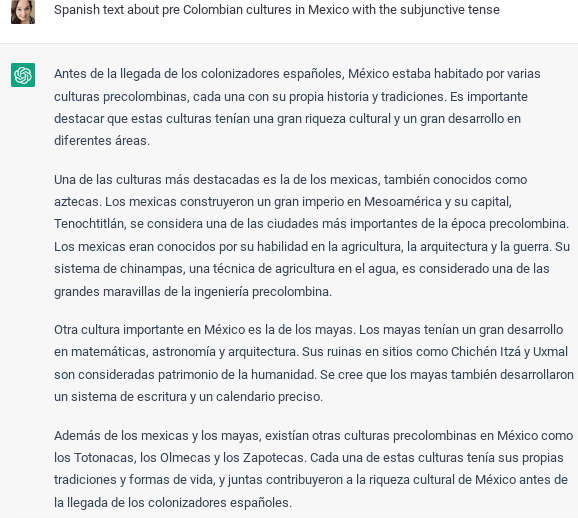
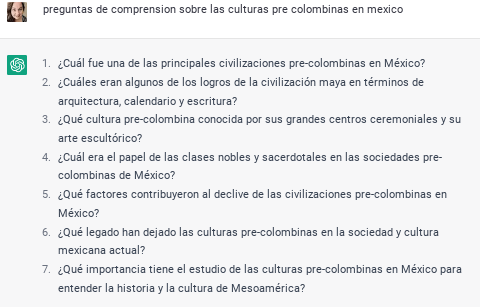
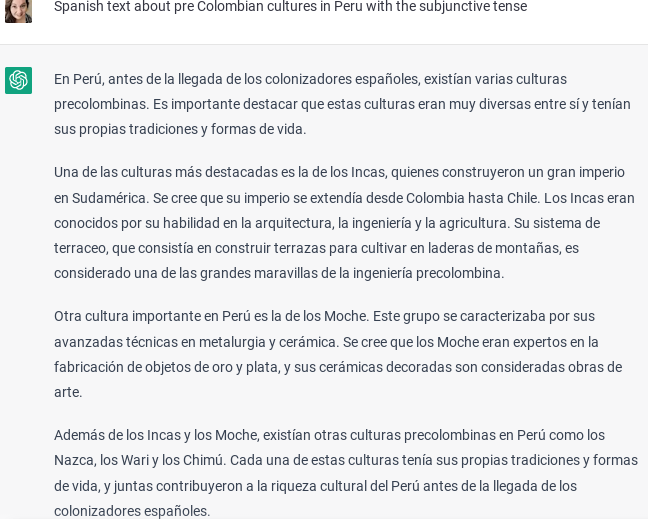
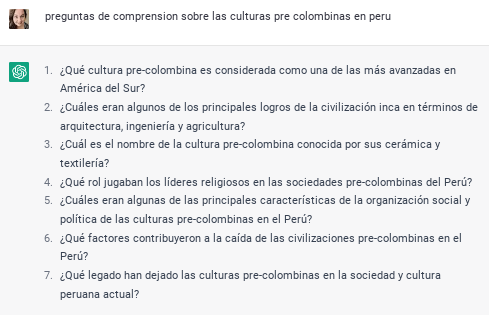
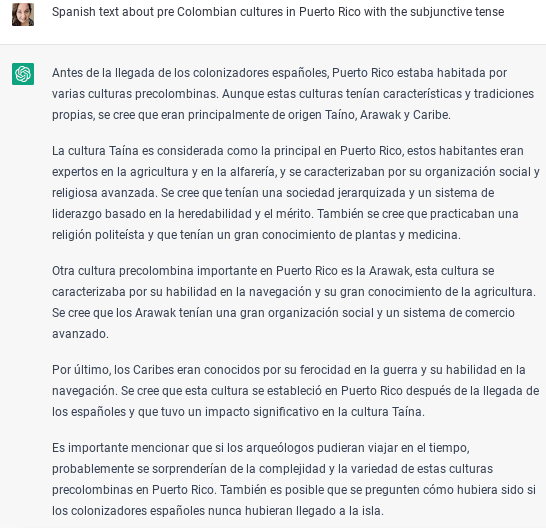
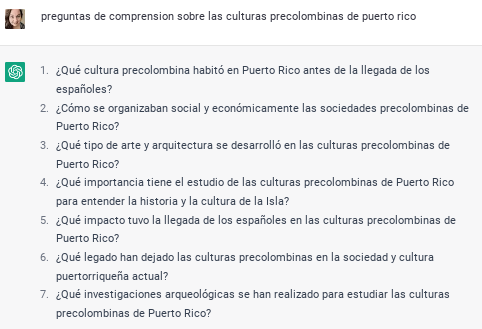
ChatGPT effortlessly generated texts about the pre-Columbian cultures of Peru, Mexico, and Puerto Rico respectively that used the subjunctive mood for my classes. Additionally, ChatGPT was kind enough to make comprehension questions for each reading as well. ¡Muy buen amigo indeed! All I had to do was type in “preguntas de comprensión sobre culturas pre colombinas de Perú” and I had seven great questions for each reading. Students learned about the products and practices of indigenous cultures of Latin America directly through these readings which could be used as an integral part of an endless list of interpretive, interpersonal, or presentational activities.
The possibilities for quickly generating texts about any aspect of culture using any grammatical structure with ChatGPT to address World-Readiness Standards for Learning Languages from the American Council of Foreign Language Teacher’s (ACTFL) are seemingly endless. As an example, students could use the texts below to form comparisons between pre-Columbian cultures and identify intercultural influences in an interpretive activity. In small groups they could engage in an interpersonal activity to support a subsequent presentational activity comparing and contrasting the indigenous cultures. Mi amigo ChatGPT kindly provided me with a list of prompts for students to use in guiding them with comparing and contrasting as well (ACTFL, 2022).
Engaging Grammar Instruction
With mi amigo ChatGPT I have access to texts and comprehension questions about almost any topic that highlights any grammatical structure in Spanish so my students have more frequent opportunities to use text to identify and explore the uses of grammar in context. Research shows that students are highly motivated to learn grammar through the tasks of reading, writing, speaking, and listening. While reading and learning about culture, students are exposed to the subtleties of the use of grammar and gain a better understanding of the nuances of the language (ACTFL, 2022).
ChatGPT’s Limitations
Interestingly, I was not able to ask ChatGPT to create an essay comparing and contrasting pre-Columbian cultures using the subjunctive tense because each time it wanted to compare and contrast the use of the subjunctive tense in the respective cultures. This is actually not even a valid discussion given that pre-Columbian cultures didn’t speak Spanish. The description of why the subjunctive would be used was accurate however the premise of the ChatGPT’s essay was that the Aztecs and the Mayan spoke Spanish.
“El subjuntivo es un tiempo verbal que se utiliza para expresar acciones inciertas o deseos. En las culturas precolombinas, el subjuntivo se utilizaba a menudo en los rituales religiosos para expresar deseos o peticiones a los dioses. Por ejemplo, en la cultura azteca, se utilizaba el subjuntivo en las oraciones de ofrenda a los dioses para pedirles prosperidad y buenas cosechas.”
“Otra cultura precolombina que utilizaba ampliamente el subjuntivo era la maya. En esta cultura, el subjuntivo se utilizaba en los textos jeroglíficos para describir eventos futuros o inciertos.”
This could be user error because I may not have known how to ask mi amigo ChatGPT the right way to elicit the correct response. However I think it’s safe to say that at a minimum it’s not easy to figure out how to create a cultural comparison with the subjunctive mood in Spanish – at least for now.
Cheating or Opportunity to Analyze Texts?
Only one kid so far tried to pass a paragraph written by ChatGPT by me and honestly I could tell even though I was not using any software to monitor his computer. I didn’t need Edward Tian’s GPTZero app either. I’ve been a teacher and a mom long enough to recognize vocabulary, verb conjugations, and style that is unusual for teenagers to use. Also he seemed to know a lot about the topic for someone who wrote the paragraph in about five minutes.
In the sample texts that ChatGPT generated for me about pre-Columbian cultures you’ll notice similarities in style and depth. First of all, the wording is very similar, as is the paragraph length, sentence structure, etc. Another noticeable attribute is how general the information is.
Since the likelihood of the student not using ChatGPT on another assignment again in any other class is pretty low, I decided to illustrate a point to him about the tool. I told him that the information lacked depth and sources. We looked over it and agreed on specific places where more information would be important to the reader and which insights it would provide in the overall cultural context of his topic.
When he finished finding sources and editing his work, he presented a much more robust discussion. We discussed the differences in the two writing pieces and he admitted to using ChatGPT for the first one. We then talked about the differences in his experience as a learner from writing the first to the second piece and also about how ChatGPT might change writing academically and professionally given its capabilities and limitations. As ChatGPT improves undoubtedly it will become harder to spot so easily but like everything about technology we’ll learn how to work with that as it comes.
Safety
Although there are benefits to the classroom, this tool can only be used in compliance with the law and its terms of use by teachers. There are legal issues with minors using ChatGPT so for at least the short term it’s best used by adults for the classroom. ChatGPT collects information such as users’ IP addresses, interactions, country, etc. that is prohibited under the Children’s Online Privacy Protection Act of 1998 for children under the age of 13. Although ChatGPT doesn’t allow minors to open accounts according to their terms of use; however it doesn’t verify the age of its users (Claybourn, 2023).
Spontaneous Classroom Connection & Fun
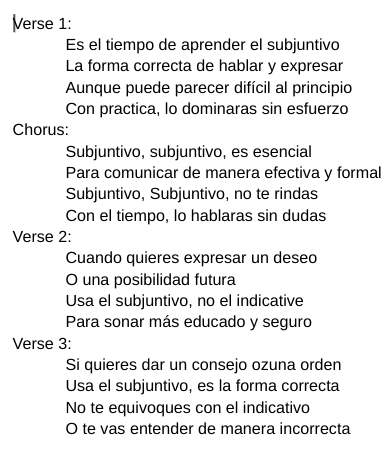
When one of my students wondered aloud what rap in Spanish sounded like I casually offered to write a rap about the subjunctive. That definitely got their attention and quickly became a challenge that I confidently accepted knowing that I had an amigo who could help. The rap was actually a really great explanation of the subjunctive and was pretty catchy. A comment from a student quickly turned into kids making beats and rapping about the subjunctive in Spanish. It was a great learning moment and maybe most poignantly, technology-facilitated spontaneous fun and connection in my classroom.
I’d love to hear how it’s going in your classroom with ChatGPT. Please comment below.
Kuo, M.-M., & Lai, C.-C. (2006). Linguistics across Cultures: The Impact of Culture on Second Language Learning. Journal of Foreign Language Instruction, 1(1).
Rost, M. (2002). New Technologies in Language Education: Opportunities for Professional Growth. Retrieved October 12, 2006 from http://www.longman.com/ ae/multimedia/pdf/MikeRost_PDF.pdf
Salaberry, R. (1999). CALL in the year 2000: still developing the research agenda’. Language learning and technology 3/1: 104-107
**Interested in writing a guest blog for my site? Would love to share your ideas! Submit your post here. Looking for a new book to read? Find these available at bit.ly/Pothbooks
************ Also check out my THRIVEinEDU PodcastHere!
Join my weekly show on Fridays at 6pm ET THRIVEinEDU on Facebook. Join the group here
Posted originally on DefinedSTEM: Ideas for some AR/VR for Blended Learning
Years ago when I started to use more technology in the classroom, I thought that by having students watch videos at home, rather than in class, I would be “flipping” the classroom. Fortunately, I learned quickly that I was not, and made some changes to implement blended learning instead. As part of my ongoing reflection, I continue to think about the many changes that I have made and the tools that have helped me to create a more authentic and engaging learning experience for my students. There are so many tools available, and we always want to first consider the “why” behind using them and also think about the purpose and how versatile the tools can be. Learning opportunities for students are everywhere and the best part of having so many choices is that it promotes student agency. Students can find something that meets their interests and needs, and that offer more meaningful ways to engage with the content. Choices will lead to purposeful learning experiences for students.
Sometimes it is fun and beneficial to try unconventional tools or methods, to immerse students more in learning and do things differently than what they have become accustomed to. Making a change to thttps://www.definedstem.com/blog/versatile-tools-for-blended-learning/he traditional style and structure of the classroom can feel uncomfortable at first, but giving students more control in designing their learning is worth it. The flexibility of these tools enables learning to happen anywhere and at any time, based on the student’s or school schedule, which help to foster a blended learning environment. Here are a few ideas to immerse students in learning.
Augmented/Virtual Reality
One of the biggest areas of growth in education has been the use of Augmented and Virtual Reality in the classroom. In my own classroom we have used a variety of tools and students have enjoyed the time exploring new tools and definitely different ways to learn. The idea of teaching by using tools for AR or VR can seem challenging, but it really can be quite simple to add it into the course and there are tons of resources available. I recommend exploring the resources shared by Jaime Donally on all things related to Augmented and Virtual Reality in education.
These tools can offer more powerful ways to immerse students in learning, to “travel” and “explore” places and things more closely. Students can create, problem solve, become more curious and experience something unique through the use of these tools, which enable learning to happen beyond the classroom walls and involve students in more collaborative experiences.
Tools to try:
3DBear: A newer platform that enables students to add objects into their space and then narrate a story in augmented reality. Teachers are able to create a class account and can choose from the lessons available for grades 1-6 and up, in content areas including ELA, Math, Social Studies, Science, and also STEAM-related topics. Each lesson includes links to reading materials, timelines, and also worksheets. Teachers can sign up for a free trial.
CoSpaces: A tool for creating “spaces” where students can tell a story, create a game to represent their learning in a more authentic and meaningful way. Students can work together on projects and design a more immersive story together. Working together helps students to develop their digital citizenship skills as well as promote social emotional learning skills. An engaging way to reinforce content by having students design spaces they can then “walk” through in virtual reality.
Metaverse: An augmented reality tool that teachers can use to create assessments with or have students design an interactive “experience” full of choices in characters, GIFS, 360 images, themed objects and more. There are “experiences” available and it is easy to get started by watching the tutorial videos from Metaverse. Students can create their own experiences and share them with classmates and teachers can create more engaging review activities for students.
Shapes 3D Geometry: An app that gives students and teachers a more interactive way to explore core concepts of geometry and that can help students discover 2D and 3D shapes in an augmented reality experience. Using a Merge cube, students can examine 3D shapes by holding the solids in their hands, manipulating them and being able to more closely understand the core concepts of geometry.
Learning beyond the classroom: Virtual Field Trips
It is important for students to experience learning and explore the world, beyond the limits of the classroom time and space. While we can’t easily take students to faraway places,there are different tools that make these “trips” possible. The right tools bring in a world of learning for our students, enabling them to closely look at a location rather than by simply watching videos or looking at pictures in a book. We can even connect students with other classrooms and experts around the world by using one of these options in our classes. Many of these tools are easy to get started with and some even have lessons available, which makes the lack of time factor, not an issue.
Tools to Try:
Google Expeditions: By using Google Expeditions, teachers can “guide” students in faraway lands or have them closely view an object in Augmented reality. All that is required is the App, and then students need to be on the same wifi as teachers in order to “explore” in the classroom. Teachers can choose from more than 100 objects in augmented reality and 800 virtual tours to travel around the world. Each tour includes a script with guiding questions and enrichment activities, all easily accessible by downloading them to a device.
Skype: Years ago, connecting with other classrooms took a lot of time to plan, working with different schedules and access to the right technology. Now through tools like Skype, students andteachers can connect with anyone in the world. By joining the Microsoft community, teachers can connect with other classrooms and create connections for students to communicate by using Skype or for more fun and pushing the critical thinking, collaboration and problem-solving skills, try using Mystery Skype.
Tools for anywhere learning
With blended learning, students have the online component as well as the traditional in-class instruction. One type of blended learning involves the use of stations. By using some of these tools, especially if access to devices is an issue, students can participate in station rotations and learn in multiple ways. The best part is that these tools are accessible when convenient for students as well.
Nearpod: A favorite because it is such a versatile tool that offers a lot of options for how to have students interact with the content, and even go on virtual reality tours and explore 3D shapes. Some of the activities you can include are polls, open-ended responses, matching pairs, for a few and also including content such as BBC videos, PhET simulations and more recently, a Desmos graphing calculator. A tool to enhance instruction whether in or out of the classroom, and one which students can use to create their own lessons to share.
Buncee: Students can create multimedia presentations that include a variety of items such as animations, emojis, 360 images, and web content including videos that can be embedded into the presentation. Teachers can create a lesson using Buncee by adding videos, audio, including hyperlinks and sharing one link with students, that leads to multiple other activities.
Quizizz: A game based learning tool that can be used for instruction, both in and out of class, or for students to create their own games as more authentic practice. Quizizz has thousands of games available in the library and recently added a student log-in that enables students to track their progress and gives them access to prior games played so they can always go back and review. Having this available to students makes it more personalized because students can get extra practice whenever they need it.
Kahoot!: Challenges with Kahoot have become quite popular. Teachers can “challenge” students to participate in a game as a way to practice the content or review for an assessment. Students can even challenge each other by sharing games and codes, which makes it good for peer collaboration and building the social emotional learning skills.
Synth: A podcasting tool that can be used to have students respond to questions, participate in a conversation by responding to a prompt or a “thread.” A thread is a string of responses in a conversation. Creating with Synth is easy and simply by recording a prompt that can also include a video, teachers can promote communication and student discussion beyond the school day. Teachers can then listen to all student responses as a podcast.
Finding new tools to explore is always fun, especially when we have students create with them and share their work with classmates. We learn more about their interests and needs and they have a more personalized experience.
These tools have made an impact on my students this year and I have seen a lot of benefits by offering students a variety of tools to choose from. Creating a more interactive classroom experience and expanding the where, when and how students learn, leads to more of a blended learning approach. It is important to show students that learning can happen anywhere and give them the tools to make that possible.
**Interested in writing a guest blog for my site? Would love to share your ideas! Submit your post here.
Looking for a new book to read? Many stories from educators, two student chapters, and a student-designed cover for In Other Words.
This post is sponsored by Socrates. All opinions are my own.
When I think about trying some new tech tool, I first consider my purpose when deciding which tool to try. As educators, our goal should be to leverage technology in a way that helps to empower students, promote personalized and student-driven learning, and amplify their learning potential.
As the school year winds down, I think we have a great opportunity to provide some new, authentic learning experiences for our students. We can use these last few weeks of school to do some really cool things. If you notice that students are kind of drained or their motivation or engagement seems to be lacking, then I think it’s the perfect opportunity to try something that you’ve had on your mind but never quite found the time, or to try something new that you recently learned about. Either way, in my own experience, I have seen improvements in these areas by providing access to different digital tools for students to choose from and that meet their needs and interests. Of course, finding something that enables students to have fun while learning is never a bad thing. I recently found something that will definitely help: Socrates
Why Socrates?
Socrates provides a unique game-based learning platform that is focused on differentiating instruction for students. By using Socrates, teachers have access to a wealth of resources and ways to better engage students in learning, helping them to build their skills in content areas such as math and English through the use of games. Because the platform uses artificial intelligence, it is able to adjust to student needs by creating an individualized learning path in real-time, which makes Socrates stand out from other learning platforms. It is easy for teachers to track student progress and quickly identify where students might need some extra help or instruction. It enables students to progress at a pace that meets their individual needs and provides them with the right supplemental resources they need when they need them.
Getting started with Socrates is easy!
Finding time is always a challenge with so much to do in our school days and prepping throughout the week. However, with Socrates, teachers can quickly set up an account, add students to classes and start assigning free practice, homework, and tests in no time at all. The Teacher and School Command Center Modules in Socrates provide a powerful teacher assistant that informs teachers when and where each student needs help. Being able to act on that information quickly is key for teachers, and this is where the AI makes an impact on student learning and growth. Get started today! (link)
Worried about having devices that are compatible? Socrates can be used on a PC, Mac, Chromebooks, Android, and iOS devices. Students can complete their work in class or on their own schedule wherever they have access to a device.
How to get students started
To add new students, simply follow these steps:
1. Go to your teacher Dashboard and select “Manage.”
2. Click the student icon to add a new student.
3. Enter student first and last name.
4. Add a student ID (at least 4 digits).
5. Select the grade level for the student.
6. Click “Create a student account and add to the roster.”
Making changes to student account information is easy using the Command Center. Teachers can specify a grade level, an active area of study, learning style, and gameplay (ranging from High gameplay to No games). Assessing student progress and making changes to their learning profile is easy to do within the Command Center.
Free practice, homework, and tests
It is easy to find the right activities for students and to start a class or set up activities for students to work on at a later time.
To get started:
On the dashboard, select “Assignments.”
Once assignment opens, select the Area of Study (K through 5th) and the content area (Math or Language Arts)
Select the topic, and continue making selections for the specific content material.
On the Assignment details, change the name, the number of questions, add a start and end date if applicable.
Choose to assign as Free Practice, Homework, or to Print.
Once selected, the assignment is added to the student____________ and a box prompts you with “OK” to signify the assignment has been created.
First impressions
Before getting students logged in, we discussed artificial intelligence and how it was used in the Socrates platform. Students were excited to get started. I was impressed by how quickly I could create accounts for my students and get them logged in. They were able to navigate the platform without my assistance and enjoyed having so many choices in which games to try first. Being able to track their progress and make adjustments so quickly is definitely a benefit of the Socrates platform.
If you have not yet tried it, I recommend getting started here. Socrates offers a 30-day free trial. I encourage you to try it out for the rest of the school year and see what students think and reflect on how it benefits learning now and through the summer.
For more information, see the blog, be sure to share your feedback and also follow Socrates on Twitter: @learnwithsocra1
This post is sponsored by NoteAffect. All opinions are my own.
The Future of Educational Technology Conference (FETC) held at the end of January has become one of my favorite conferences because of the diverse opportunities available to explore emerging technologies and to network. One of my favorite things about FETC is exploring the edtech startups to find out what new tools and trends are out there and to learn some of the stories behind the creation of these tools. It is a great opportunity to see the different start-ups in the Pitch Fest competition and hear their passions for education.
One that caught my attention this year was NoteAffect, an interactive learning platform aimed at promoting and understanding student engagement. The platform empowers educators by providing many options for delivering a lecture and includes live polling, questions, analytics and more, to enhance the learner experience. With time so limited at the conference, I explored the platform on my own and then contacted Jay Tokosch,Founder and CEO of NoteAffect, to set up a demo.
The story behind NoteAffect
When I spoke with Jay, I learned that he got started in this business by founding Core-apps, one of the leading event management systems in 2009. Core-apps was the first company to create a mobile app used for event management. So if you’ve been to conferences or trade shows, and used a conference app to build your schedule, you may have using Core-apps. Having ten years of experience with a highly engaging event management app, Jay has designed an equally powerful learning tool for education. When I asked Jay about how he came up with the idea for NoteAffect, he told me that he got the idea after observing his son preparing for an exam. Jay noticed his son pulling out a spiral notebook, some printed Powerpoint presentations and other documents to study for his college engineering exam. As he studied, his son was going back and forth between all of those materials, trying to match everything up to study. Jay decided to “fix that problem” by designing something that could store all of the information in one place and make it easier for students to study.
The design of NoteAffect is quite simple and easy to navigate, which makes it a great choice for all teachers, whether they are beginners or advanced users when it comes to implementing technology in the classroom. By using a robust tool like NoteAffect, teachers have immediate access to real-time data that enables them to provide the right instructional supports and make adjustments on the fly as the lecture continues. The goal of NoteAffect is to empower teachers to provide the best learning experience and options for students and to close the gap that happens when students are absent from class. While students can easily get the notes or look over a presentation, without the additional resources added in and the interactive piece that NoteAffect provides, students will be missing out and cannot reach their fullest potential.
What does NoteAffectoffer?
NoteAffect is more than simply a way to deliver a lecture. It offers digital interactive learning that is available to students whether live in class or for later viewing at a time that meets their schedule. It is a multi-purpose platform with capabilities to facilitate communication, collaboration and increase student engagement in learning. NoteAffect creates a virtual space for students to fully engage in the lesson, whether participating in class or viewing it at a later time.
When I first explored NoteAffect, what I immediately noticed was how easy it was to set up my courses, add students, locate my lectures, and navigate through the platform. Having time to explore NoteAffect closely, I thought about my own college experience years ago and how beneficial a tool like this would have been for some of the more challenging courses that I had. Although we had access to lecture notes made available after class, being able to interact with the content during class would have increased my understanding and helped with content retention.
Another benefit of Noteaffect is for increasing student engagement. For a long time, I struggled with student engagement and reached out to colleagues and tried different resources to see if I could engage students more. While the methods definitely improved student engagement, I needed more data to work from. Using NoteAffect enables you to focus more closely on student engagement by exploring the analytics available for each lecture and each student.
With NoteAffect, tracking student engagement is easier and it is also a great way to reflect on the teaching practices being used in the classroom.
I will continue exploring NoteAffect and gather some feedback from my students. Check into NoteAffect here and get started with a demo. My next post will highlight some of the features and offer some tips for getting started.