Digital Wellness: Helping Students Build Healthy Digital Habits

Digital Citizenship Week has often served as a starting point for conversations about safety, ethics, and responsible online engagement with others and with content. But an equally vital component, often overlooked, is digital wellness. Digital wellness refers to how technology impacts our emotional, social, and mental well-being. If digital citizenship is focused on how we act and interact online, then digital wellness is how we feel, think, and show up online.

With so much technology in our classrooms today, educators are no longer just teaching academic content. Now, they are guiding students through a new terrain of constant connectivity, algorithm-driven attention, and shaping their digital identities. Digital wellness offers a framework that can help students build balance, boundaries, and agency as they develop technology skills. It leads them to understand how tech supports, rather than replaces, their growth.

What Is Digital Wellness?

Digital wellness refers to the intentional and healthy use of technology in ways that support:

  • Emotional resilience
  • Focus and attention
  • Healthy relationships
  • Digital boundaries and self-regulation
  • Positive identity-building
  • Offline/online balance
  • Safe and restorative digital habits

Wellness is not about restricting technology; it’s about using it wisely and reflectively—something the ISTE Standards for Students emphasize under Digital Citizen (2a, 2b) and Empowered Learner (1c, 1d). Students need to understand how to leverage technology safely, ethically, and responsibly. Removing it completely is not the answer; they need guidance.

Why Students Need Digital Wellness Instruction

Students today are processing information faster than they can understand it emotionally. Many may experience:

  • Notification fatigue
  • Fear of missing out (FOMO)
  • Stress from “performing” online
  • Comparison culture
  • Late-night “doom” scrolling and sleep disruption
  • “Always on” communication pressure

When students learn mindful tech use, they gain emotional space for creativity, deep thinking, and well-being. Educators have a powerful role in helping students recognize how tech makes them feel, rather than just how to use it.

Classroom Activities for Teaching Digital Wellness (K–12)

These practices work during Digital Citizenship Week—or anytime you want to promote balance and meaningful tech habits.

ELEMENTARY (K–5)

1. “Feelings Before Screens” Routine (5 minutes)
Before using a device, students pause, breathe, and choose a feeling icon (happy, calm, tired, frustrated). After the activity, they reflect: “Do I feel better, the same, or worse?”
Purpose: Builds self-awareness + emotional literacy.

2. Tech vs. Together Time Sorting Game
Students sort cards showing daily activities—reading, gaming, playground time, FaceTime with a grandparent—into “screen” and “people” columns to discuss balance.
Purpose: Helps visualize healthy habits.

3. Brain Breaks for “Resetting”
Before transitions, practice 30–60 second mindfulness (breathing, quiet reflection, stretching).
Purpose: Digital stamina + self-regulation.

MIDDLE SCHOOL (6–8)

1. Attention Audit
Students list apps they check most often, rating how each one affects:
✅ mood
✅ focus
✅ relationships
✅ time
Discuss patterns: “Which apps energize you? Which drain you?”
ISTE Link: 1d Empowered Learner (setting personal learning goals).

2. The “Invisible Pressure” Conversation
Students anonymously answer: “What is something online that stresses you out?” Afterward, compare results to normalize healthy boundaries.
Well-being Lens: Emotional honesty builds agency.

3. Tech-Time Menu
Students design a personal plan using categories like “learning time,” “friends/social,” “rest time,” and “offline time.”
Purpose: Helps students self-regulate instead of default scrolling.

HIGH SCHOOL (9–12)

1. Digital Identity & Emotional Health Reflection
Students respond to prompts such as:

  • Who am I online vs. offline—and how does it differ? Why?
  • What parts of my persona do I curate, hide, or amplify digitally?
    This can bridge into healthy identity development.

2. “Attention Economics” Mini-Lesson
Teach students how platforms are intentionally designed to capture attention—streaks, infinite scroll, push alerts. I love to consider this question:
“If the product is free, what is being sold?” And the answer is often…our information.

3. Building a “Wellness Contract With Myself”
Students set personal wellness boundaries:

  • No doom-scrolling after midnight
  • Screens stay off during meals
  • Push notifications removed for nonessential apps
  • Reflex check: “Why am I opening this?”

This shifts digital wellness from theory into habits.

Digital Wellness Through the ISTE Lens

The ISTE Standards help frame wellness as a skill rather than a rule:

ISTE StandardDigital Wellness Skill
1d Empowered LearnerSelf-monitoring tech use
2b Digital CitizenManaging digital identity & reputation
3a Knowledge ConstructorDistinguishing distraction from meaningful use
7a Global CollaboratorRespecting others’ digital well-being

Digital wellness is not a side lesson—it fits into what ISTE calls “responsible, ethical, and healthy learner agency.”

Daily Mini-Practices Teachers Can Use Immediately

These require no prep and can be layered into any class.

StrategyWhat It Looks Like
Mindful StartA 60-second pause before screens come out
Offline FirstThink → speak → write → then tech
Tech + TalkEvery digital activity paired with peer discussion
App Impact Check“How did this tech help your learning today?”
Micro-reflectionsQuick exit tickets on wellness or focus level

Sample Prompts for Student Reflection

  • “Does this tool help you feel more connected or more overwhelmed?”
  • “When do you feel most in control of your technology use?”
  • “What’s one boundary you wish you could set but haven’t yet?”
  • “Where in your life could less screen time give you more peace?”

Partnering With Families

Home behaviors shape wellness as much as school experiences. Consider:
✅ Family Tech Talk Night
✅ One-page wellness guide in multiple languages
✅ Conversation starters (“when does tech feel too loud?”)
✅ Shared “screen-free zones” (dinner, car rides, bedtime)

When adults model healthy balance, students internalize it.


Shifting from One Week to a Wellness Culture

Digital wellness is not a unit—it is a skill for life. Schools can deepen impact by:

  • Including wellness language in advisory / SEL time
  • Embedding digital balance into classroom norms
  • Modeling tech off-ramps, not just on-ramps
  • Celebrating offline creativity with as much enthusiasm as digital work
  • Using AI thoughtfully—slowing down for reflective thinking

Digital wellness is really about helping students feel grounded, connected, and emotionally safe in digital spaces. When we teach students not just how to use technology but when to pause, reflect, and choose intentionally, we prepare them for a world where their humanity is not overshadowed by the pace of innovation.

About Rachelle

Dr. Rachelle Dené Poth is a Spanish and STEAM: What’s Next in Emerging Technology Teacher at Riverview High School in Oakmont, PA. Rachelle is also an attorney with a Juris Doctor degree from Duquesne University School of Law and a Master’s in Instructional Technology. Rachelle received her Doctorate in Instructional Technology, with a research focus on AI and Professional Development. In addition to teaching, she is a full-time consultant and works with companies and organizations to provide PD, speaking, and consulting services. Contact Rachelle for your event!

Rachelle is an ISTE-certified educator and community leader who served as president of the ISTE Teacher Education Network. By EdTech Digest, she was named the EdTech Trendsetter of 2024, one of 30 K-12 IT Influencers to follow in 2021, and one of 150 Women Global EdTech Thought Leaders in 2022.

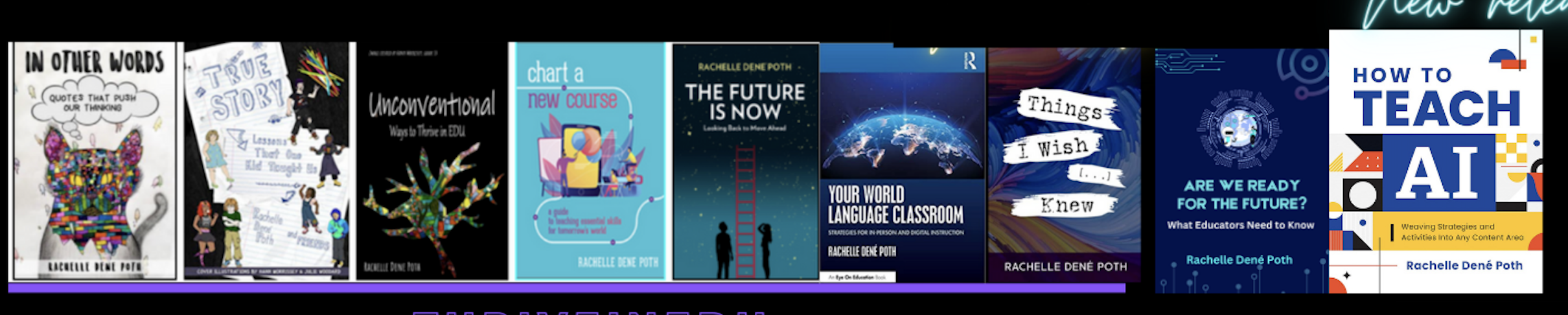
She is the author of ten books, including ‘What The Tech? An Educator’s Guide to AI, AR/VR, the Metaverse and More” and ‘How To Teach AI’. In addition, other books include, “In Other Words: Quotes That Push Our Thinking,” “Unconventional Ways to Thrive in EDU,” “The Future is Now: Looking Back to Move Ahead,” “Chart A New Course: A Guide to Teaching Essential Skills for Tomorrow’s World, “True Story: Lessons That One Kid Taught Us,” “Things I Wish […] Knew” and her newest “How To Teach AI” is available from ISTE or on Amazon.

Contact Rachelle to schedule sessions about Artificial Intelligence, AI and the Law, Coding, AR/VR, and more for your school or event! Submit the Contact Form.

Follow Rachelle on Bluesky, Instagram, and X at @Rdene915

**Interested in writing a guest blog for my site? Would love to share your ideas! Submit your post here. Looking for a new book to read? Find these available at bit.ly/Pothbooks
************ Also, check out my THRIVEinEDU Podcast Here!

Join my show on THRIVEinEDU on Facebook. Join the group here.

Celebrating Digital Citizenship Week with Purpose

Every October, schools around the world celebrate Digital Citizenship Week, a time to focus on educating others on how to engage responsibly, safely, and ethically in digital spaces. This week, events are happening to bring greater awareness to the importance of digital citizenship. There are activities and webinars provided by Common Sense and other organizations with resources for schools. However, we need to focus on it throughout the year. Digital citizenship has become an essential life skill. It is how we understand the connection between technology, ethics, communication, and well-being. Preparing students means helping them understand not just how to use technology, but how to use it well and for good.

Especially today, in a world surrounded by AI, students have access to so many tools that enable them to create, connect, and collaborate. With these opportunities comes greater responsibility, and as educators, providing guidance to our students is more important than ever. Digital citizenship is not just about “don’t click this” or “stay off of that site.” It is about student agency, empathy, discernment, digital well-being, and community-building.

The ISTE Standards for Students address this by highlighting the importance that students move beyond being simply consumers of technology, but creators and innovators. That they emerge as Digital Citizens who “recognize the rights, responsibilities and opportunities of living, learning and working in an interconnected digital world.” Digital citizenship is foundational to preparing students for both college and career readiness and future success.

Why Digital Citizenship Matters More Than Ever

Today’s students are growing up in a world where:

  • Communication happens across multiple platforms, immediately, and often publicly.
  • AI tools have tremendous power and can generate content in seconds, without a guarantee of being accurate or not.
  • Online actions leave permanent digital footprints.
  • Collaboration is global, instant, multilingual, and multimodal.
  • Well-being and identity formation are increasingly tied to online spaces.

In my work with some schools that are focused on digital wellness and innovation, they are rethinking their policies and shifting in thought. They are looking at digital citizenship as a mindset and skillset rather than a compliance checklist.

With the right support and learning opportunities in place, all students will learn to:
✔ evaluate credibility
✔ protect personal data
✔ engage with empathy
✔ think before they post
✔ advocate for themselves and others
✔ leverage technology for positive impact

They will gain confidence, agency, and voice in authentic, meaningful, and responsible ways.

Aligning with the ISTE Standards for Students

Digital Citizenship Week is a great time to explore the resources from ISTE that provide free lessons. Focus on the Core Competencies of Balanced, Informed, Inclusive, Engaged, and Alert.

It also offers an opportunity to connect instruction with key strands of the ISTE Standards, especially:

1. Digital Citizen
“Students recognize the responsibilities and opportunities for positively contributing to their digital communities.”

2. Knowledge Constructor
“Students critically curate a variety of resources using digital tools to construct knowledge, produce creative artifacts, and make meaningful learning experiences for themselves and others.”

3. Global Collaborator
“Students use digital tools to broaden their perspectives and enrich their learning by collaborating with others and working effectively in teams locally and globally.”

Activity Ideas

Here are a few adaptable activities for different grade levels. Each aligns with the ISTE Standards and can be completed within 15–45 minutes.

Elementary (K–5)

Activity 1: “Digital Footprints in the Sand”
Students trace a footprint on paper and fill it with icons or words representing safe things they can share online (favorite book, pet’s name) vs. things they should not (birthday, address, school name).
ISTE: Digital Citizen

Activity 2: Kindness Chain Reaction
Students write a positive digital message or example of an encouraging online interaction on a paper link. The class builds a kindness chain displayed throughout the week.
ISTE: Global Collaborator

Middle School (6–8)

Activity 1: “True or Fake?” Digital Source Investigation
Present students with three online “facts” or headlines. In pairs, they determine which is credible and why. They cite what signals helped them evaluate reliability (URL, author, publication, etc.).
ISTE: Knowledge Constructor

Activity 2: Digital Well-being Workshop
Students brainstorm behaviors that keep them emotionally healthy online. The class builds a wellness checklist (screen limits, muting apps, balance between offline and online activities).
ISTE: Digital Citizen

High School (9–12)

Activity 1: AI & Authorship Mini-Debate
In small teams, students debate: “Should AI-generated writing be considered original work?” Extend to ethics, attribution, and bias.
ISTE: Digital Citizen & Creative Communicator

Activity 2: “My Digital Legacy: Who Am I Online?”
Students reflect on how they are perceived digitally and create a personal statement describing how they choose to show up online as leaders.
ISTE: Empowered Learner

Student Leadership Opportunities

Bringing students into digital citizenship planning increases relevance and impact. Consider:

  • Student-created PSAs during morning announcements or posters displayed in the school
  • Peer digital mentors and mentoring activities
  • Student-led “digital wellness” club
  • TED-Ed club or TED-style talks on AI, privacy, or inclusivity

Digital Citizenship Week is meant to be the beginning of an ongoing learning journey for everyone in the school community. Schools can further support the development of these essential skills by:

Integrating media literacy in research projects
Encouraging the use of bilingual / multilingual tools for family communication (Check out School In One)
Practicing ethical generative AI use
Modeling digital well-being and boundaries
Hosting family nights or sharing family one-pagers

Digital Citizenship Week is a time to teach students to navigate digital spaces with care, empathy, responsibility, and discernment. By using the ISTE Standards as guidelines, we emphasize student agency, ethical engagement, and global connection. We are living in a world shaped by rapid innovation, where these skills are not optional, but rather they are foundational to the future of learning.

About Rachelle

Dr. Rachelle Dené Poth is a Spanish and STEAM: What’s Next in Emerging Technology Teacher at Riverview High School in Oakmont, PA. Rachelle is also an attorney with a Juris Doctor degree from Duquesne University School of Law and a Master’s in Instructional Technology. Rachelle received her Doctorate in Instructional Technology, and her research focus was on AI and Professional Development. In addition to teaching, she is a full-time consultant and works with companies and organizations to provide PD, speaking, and consulting services. Contact Rachelle for your event!

Rachelle is an ISTE-certified educator and community leader who served as president of the ISTE Teacher Education Network. By EdTech Digest, she was named the EdTech Trendsetter of 2024, one of 30 K-12 IT Influencers to follow in 2021, and one of 150 Women Global EdTech Thought Leaders in 2022.

She is the author of ten books, including ‘What The Tech? An Educator’s Guide to AI, AR/VR, the Metaverse and More” and ‘How To Teach AI’. In addition, other books include, “In Other Words: Quotes That Push Our Thinking,” “Unconventional Ways to Thrive in EDU,” “The Future is Now: Looking Back to Move Ahead,” “Chart A New Course: A Guide to Teaching Essential Skills for Tomorrow’s World, “True Story: Lessons That One Kid Taught Us,” “Things I Wish […] Knew” and her newest “How To Teach AI” is available from ISTE or on Amazon.

Contact Rachelle to schedule sessions about Artificial Intelligence, AI and the Law, Coding, AR/VR, and more for your school or event! Submit the Contact Form.

Follow Rachelle on Bluesky, Instagram, and X at @Rdene915

**Interested in writing a guest blog for my site? Would love to share your ideas! Submit your post here. Looking for a new book to read? Find these available at bit.ly/Pothbooks

************ Also, check out my THRIVEinEDU Podcast Here!

Join my show on THRIVEinEDU on Facebook. Join the group here.

Digital Citizenship

Digital Citizenship Week is celebrated in October each year. The focus is on building digital citizenship skills, and there is a designated digcit week with events planned for schools to join in and learn more. These are concepts that teachers and schools should focus on throughout the year as well. With the increased use of digital tools in our classrooms and the amount of technology used in everyday life and work, we must consistently provide learning opportunities for students to develop “digcit” skills.

Being a responsible digital citizen means that all individuals are able to use technology ethically, responsibly, and effectively. It is important to develop an understanding of the impact that one’s digital actions can have on other individuals and on society as a whole. Students and teachers must be able to keep themselves safe, know how to protect their privacy, learn how to critically analyze information, and engage in respectful interactions online.

Teaching digital citizenship skills

Privacy and security: With increased data collection and online tracking of websites we use and how our information is shared, understanding how to safeguard our privacy is key. With more students using digital tools and at a younger age, it is essential to build in activities that will help students to better understand how to protect themselves and to respect the privacy of others as well. For instance, teaching students how to create unique passwords is key for securing personal information. With the increase in cybersecurity attacks over the past few years, updating passwords and even using two-factor authentication (TFA) will help to keep everyone safer.

Communication: With the variety of social media platforms available and how quickly we can post and respond, providing opportunities for students to practice responsible posting is an area that we need to focus on regularly. Even with young students, simulating a Twitter (X) chat or other online discussion can be done using Post-it notes, for example. Depending on grade level, another option is to use a tool like Padlet to help students learn how to properly post and interact with one another.

Continue reading the original post on Edutopia.

About the Author:

Dr. Rachelle Dené Poth is a Spanish and STEAM: What’s Next in Emerging Technology Teacher at Riverview High School in Oakmont, PA. Rachelle is also an attorney with a Juris Doctor degree from Duquesne University School of Law and a Master’s in Instructional Technology. Rachelle received her Doctorate in Instructional Technology, and her research focus was on AI and Professional Development. In addition to teaching, she is a full-time consultant and works with companies and organizations to provide PD, speaking, and consulting services. Contact Rachelle for your event!

Rachelle is an ISTE-certified educator and community leader who served as president of the ISTE Teacher Education Network. By EdTech Digest, she was named the EdTech Trendsetter of 2024, one of 30 K-12 IT Influencers to follow in 2021, and one of 150 Women Global EdTech Thought Leaders in 2022.

She is the author of nine books including ‘In Other Words: Quotes That Push Our Thinking,” “Unconventional Ways to Thrive in EDU,” “The Future is Now: Looking Back to Move Ahead,” “Chart A New Course: A Guide to Teaching Essential Skills for Tomorrow’s World, “True Story: Lessons That One Kid Taught Us,” “Things I Wish […] Knew” and her newest “How To Teach AI” is available from ISTE or on Amazon.

Contact Rachelle to schedule sessions about Artificial Intelligence, Coding, AR/VR, and more for your school or event! Submit the Contact Form.

Follow Rachelle on Twitter(X) and Instagram at @Rdene915

**Interested in writing a guest blog for my site? Would love to share your ideas! Submit your post here. Looking for a new book to read? Find these available at bit.ly/Pothbooks

************ Also check out my THRIVEinEDU Podcast Here!

Join my show on THRIVEinEDU on Facebook. Join the group here.