A New Way of Looking At Student Created News

Guest post by Jason Clark, Innovation Specialist, Eagle Point School District 9, Eagle Point, Oregon     Twitter: @jpclark03    #Go3agles #epsd9 


Throughout my career as an educator and edtech enthusiast, one of my passions has been to use video to tell a story, or to deliver news. At every school that I have been at along my journey (elementary school), I have created a student news program. This started way back before digital video and personal devices, and that makes me feel like a fossil. I have created news programs that aired live through closed circuit cable every single day, and news programs that were pre-recorded and posted to our school webpage via youtube every day. It was always a huge hit with students and we found that it was a great way to reach our parents and community as well, once our shows were shared on youtube. That’s that magic of it, students reaching an audience to deliver a message in a fun creative way.

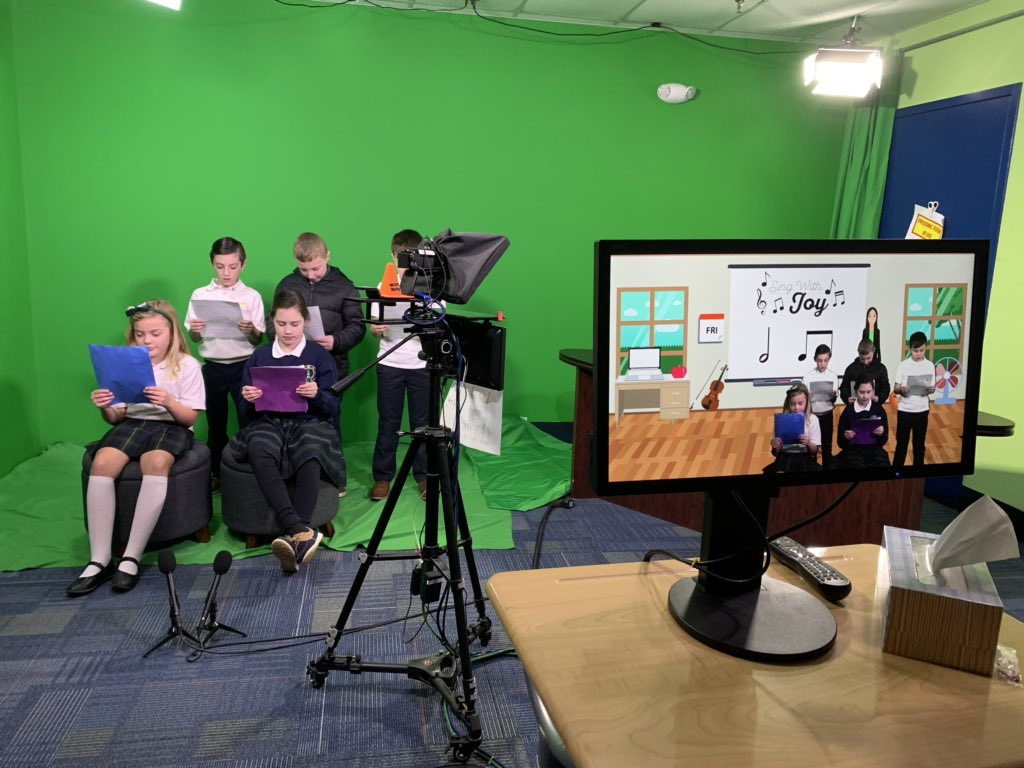
In my new role as an Innovation Specialist for my district, one of my goals is to begin student news programs in each school. Our district is a 1:1 iPad district which puts us in a very unique situation. Every single student from K-12 has a working studio in their hands, with the ability to reach a broad audience. That is powerful. Our high school just started a video production class this year and we’ve built a working studio that is based and focused on the iPad. We use Padcaster Studios along with our ipads to create two video news episodes a week that go out to students and the community. The episodes are fun and creative. However, it is very difficult for teachers to take time out of the day to watch the news with students. Time is always an issue.

One trend that I’ve noticed is that we aren’t generating the views that we had hoped to get.

How can we reach our high school students in a different way? The news and announcements are filled with important information that they need to know, but many are missing them because the don’t listen to the intercom announcements (I’m guilty as well) or get a chance, or the time to view our student video news (Eagle News) on youtube. Then it hit me.

There is a way to hit just about every student in our high school with the important news and information that they need to know. We are now taking a risk that many schools are not willing to take. We are using the platforms that the majority of high school aged students use regularly. We are pushing out our video news and announcements through Snapchat, Instagram, and Twitter. Our students are consumers of a constant bombardment of information, so watching a 3-4 minute news episode is unlikely to happen throughout their day. However, they check their Snap, Insta, and Twitter accounts between classes (never during class) and when they are away from school. We are meeting them where they are at. Our video students and leadership students are changing the way school news and announcements are sent and received. They are content creators of short bite-sized nuggets of news that will reach their peers and the community in multiple ways. We are evolving what school news can look like, and it’s exciting to see where it goes.

One thing to consider is building trust with students and the use of social media. They don’t necessarily want teachers to see what they are doing and posting on their social media accounts. The way that we build trust with our students is that our Eagle News accounts don’t follow anyone back. We are purely using the platforms to push out our content. All things said and done, our social media news does not replace our studio news. We still create our studio news episodes because even if we don’t have many viewers yet, the experience in a studio is vital to video production. What we have done is to mesh our created content together in multiple platforms to reach a greater audience.

Ask yourself this question: How do you get most of your news? Do you sit on your couch to watch the 6:00 pm news? Or do you get live updates from your local news station on Twitter or Facebook? As our world changes and technology changes, as educators, we need to pay careful attention to how our students view news so that we can adapt to meet them where they are. That place is usually one with a device close by.


**Interested in writing a guest blog for my site? Would love to share your ideas! Submit your post here.
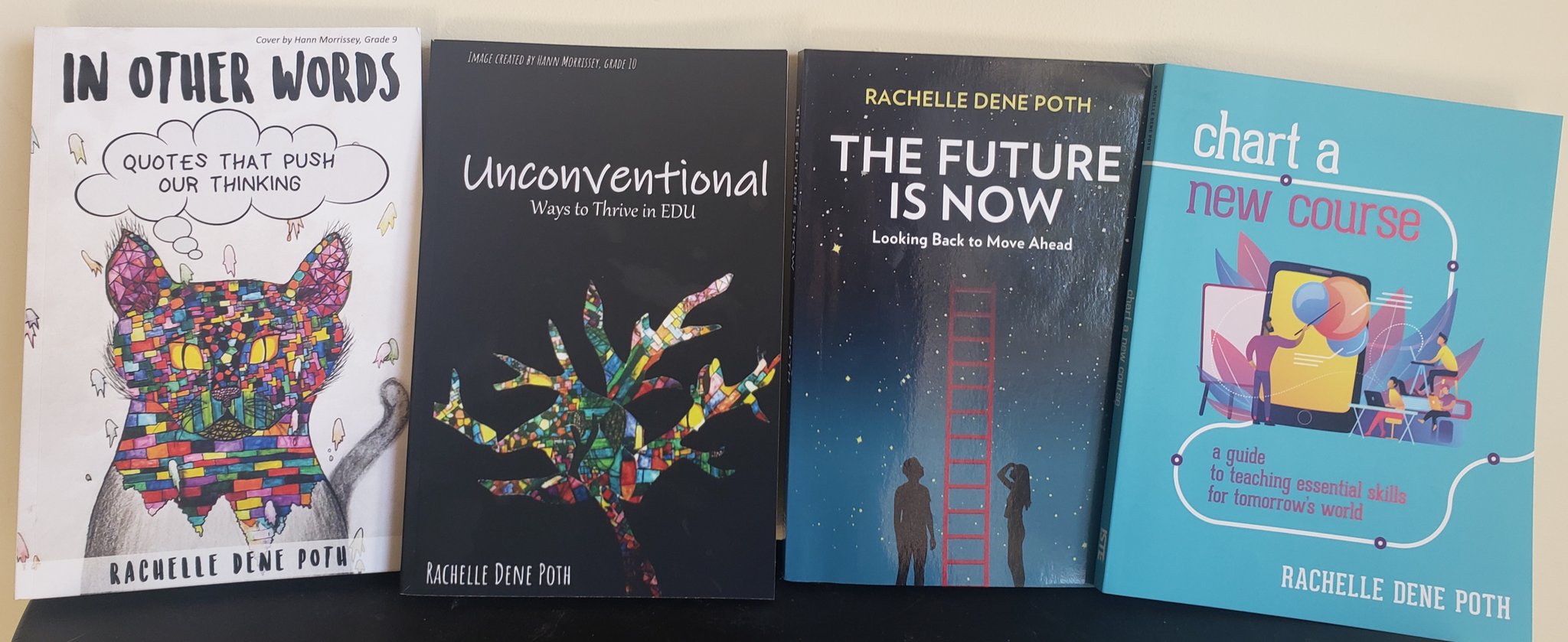
 

Looking for a new book to read? Many stories from educators, two student chapters, and a student-designed cover for In Other Words.

Find these available at bit.ly/Pothbooks  


Books available

Can iPad Pro (2018) Replace Teacher Laptops?


Guest Post by, Jeffrey Patrick, M.Ed, Computer Science Integration Teacher, Propel Homestead  @jeffreypatrick_

The worst thing happened. My MacBook Pro fell. It slipped right off of my lap. The black screen of death has arrived. I got this MacBook Pro to get me through graduate school. It did its job, and I taught with it everyday for over 5 years. Since switching to Mac in 2004, it was my second in over a decade. The Apple tax hits you hard at first, but honestly these devices seem to last way longer than PCs that I’ve owned. I realize that there are alternatives, but I’m in the Apple ecosystem, and for me it’s a good place to be. None of that mattered now, I needed a new device, and I went on the internet to research. There it was, the iPad Pro.

The new iPad Pro (2018) has been my daily driver for about 6 months. I’m not yet running iPad OS, but its “MacBook” features are promising. More on that a little later. The main eye catching specification on the new iPad Pro is the A12X bionic chip. Apple has been making huge strides with its SOC chips. The iPad Pro, the one I’m using, has a Geekbench score of 5000 and a multi core score of 18000. It’s fast. It’s really fast. My old 2012 MacBook Pro 15 inch with and I7 processor and 16GB of Ram maxes out at 13000. Yes, this iPad is faster than many entry level MacBooks and some of the pros, and all MacBook airs. In some situations, the 11 inch model can be had for bout 700.00 dollars. That’s easily 3 hundred cheaper than the cheapest air, and it’s more powerful.

This device does everything faster. Typing, with a Bluetooth keyboard, editing Doink videos with green screens, coding applications, social media, mirroring examples for students to Promethean boards, using external displays with usb-c, and taking great photos are a few of my favorites. I’ve even had a smoother experience using Apple Classroom when controlling student iPads. The blazing fast 120hz screen refresh rate makes for nearly zero latency for the Apple Pencil too.

This machine is almost the MacBook that I’ve forgot about. Here’s where the caveats come in. It is a mobile device. That means using mobile versions and apps for almost everything. I ran into several issues when editing google docs and sheets because of the mobile platform. This was exacerbated by the limited view of document settings and tool bar menus. I imagine that Google with eventually fix some of these issues, but I’m sure they are more concerned about developing for their own devices. There is also no SD card reader. I mainly use this to print from our classroom 3D printer, but it’s annoyingly very mobile when it comes to these little tasks. My MacBook Pro could handle these simple tasks without any issues at all. Oh, and no mouse. This is really frustrating when doing word processing or trying to select specific text. It’s more like a long press with a little menu that you get on iPhones. It’s not as fast as a mouse right click, and painfully awkward when editing and moving things around.

The future is bright with iPad OS though. iPad OS is set to be announced soon, and it is the first time that iPad will have its own version of Apple’s OS. Part of the main features are the ability to use external storage, like SD cards, and a native file management system. It will also feature a full version of Safari that will display and act the same as a browser on a full Mac OS platform. It also has a very color accurate display which Apple calls the Liquid Retina display. Text, videos, apps, and the camera look great. They look really good. I’m even typing on it right now. This is not going to replace desktop hardware, and it’s not meant to. However, as a busy teacher, I use the iPad Pro everyday to teach with. It’s a good choice if considering a new device or in the case you don’t want to pay Apple 600.00 dollars for a new display in an out of warranty 2012 MacBook Pro.

If you think this is a good transition for you or you already own and/or teach with iPads, I recommend becoming an Apple Teacher. I have earned all of their badges, and they do a great job at getting you oriented as an educator. In addition to this, Apple has started an Everyone can Create and an Everyone can Code program. You can download their free CS For all Scope and Sequence as well as easy to use lesson plans. Also visit their Apple Disguised Educator forum to get great ideas from teacher leaders from around the world.

So the MacBook isn’t entirely dead, and I like to tinker. I’ve decided to take the hinge off of my old MacBook, and its’ currently hooked up to my school Promethean board with a wireless keyboard and a mouse. When I have it at home, I use it in target display mode with an iMac. It still works really well as a desktop replacement. It’s also a great teaching tool when showing students different components of hardware.


**Interested in writing a guest blog for my site? Would love to share your ideas! Submit your post here.


Looking for a new book to read? Many stories from educators, two student chapters, and a student-designed cover for In Other Words.

Find these available at bit.ly/Pothbooks  


Books available


Core Solutions Provided through the Abre Platform

This post is sponsored by Abre, all opinions are my own.

Abre provides a set of solutions for schools looking to manage and consolidate the different software apps and websites used for student attendance, assessments, communication, student data and much more. Abre offers a robust platform that enables you to choose specific solution areas to get started and then add to it over time, continuing to build additional features of Abre into your school.

Communication

With Abre, you can facilitate faster and better communication within the district, schools, and between home and school. Abre offers a consistent and reliable way to streamline the numerous communications happening within the school and school district. Having a consolidated and reliable platform helps to foster and build home-to-school relationships, promote better communication, and student success.

Learning Management Solution

Abre provides one space where teachers can access the resources necessary for classroom instruction and teaching responsibilities. Included within the Learning Management solution are a group of web apps such as Class. A teacher uses Class to communicate and manage all classroom activity, do grading, post homework and generally manage instruction. The Assessment App allows for easy creation, delivery, and analysis of formative and summative assessments. Schools can organize the curriculum, including pacing guides, for all their classes with the Curriculum App. For tracking progress through a lesson, the Learn App delivers on that. To make sure students are staying on task with their devices, the Focus App ensures that the browser is only being used for teacher-defined websites and documents.

Data Management & Integrations

Abre is all about consolidating data to help administrators, teachers, and students improve. Abre integrates with a large and growing number of other software providers. They even integrate with products that provide competitive solutions to theirs. The Students App is the centerpiece of this solution and provides a clear view of student progress and makes it easy to find all relevant student data in one place. It also saves paper! Rather than students and parents having to fill out and exchange multiple papers, they access forms right from Abre. Some options such as an Acceptable Use Policy (AUP), medical forms, and athletic forms, which are easily accessible within the Abre platform. Individual student plans are also accessible in the Student app. Again, this provides a single place for staff and parents to easily find all their student’s information.

Administrators can access all student data and track growth over time, look at state and local assessments to analyze trends in academic performance. Parents can access student data which includes academic performance, behavior, forms completed, attendance, and state assessments. Access to this vital data is made simple with one platform!

Teacher Professional Learning Solution

For districts looking for better professional development options for teachers, through Abre, teachers can create their own staff and individualized professional development plan for use over an extended time. Abre offers a more flexible solution making it easier for administrators and teachers to create, deliver, and track professional development activities. Abre can integrate schools’ digital courseware and customized courses for delivering staff development.

For completing courses online or in face-to-face environments, districts can offer teachers opportunities to earn badges, micro-credentials, and engage in gamified professional development. This is great for building professional portfolios, as teachers can use these activities to receive CEU credits or hours awarded based on state requirements for continued professional development.

School Management Solution

Similar to Learning Management, Abre provides great functionality for staff to manage day-to-day school requirements. The Behavior App helps with the workflow, easy documentation and tracking student data when either positive or negative behavior needs to be documented. The workflow features are especially helpful for office referrals where other administrators are needing to get involved and having transparency for parents is important. Abre Behavior takes on a significant portion of this manual work.

  • Easy to understand graphs and plots for tracking student progress.
  • Teachers can see details in terms of specific consequences as a result of any behaviors and referrals. The bar graph represents conferences, detentions, in-school and out-of-school suspensions.
  • The behavior app links directly to the student information so everything is readily accessible which leads to a better understanding of each student and their needs.

Beyond behavior, the School Management Solution allows admins and teachers to easily create and manage individual student and teacher plans. Rather than students and parents having to fill out and exchange multiple papers with the school, they access forms right from Abre. Some options such as an Acceptable Use Policy (AUP), medical forms, and athletic forms, are easily accessible within the platform. Whether teachers need to create an IEP, a gifted education plan, behavior or Response to Intervention (RTI) plan, teachers can build exactly what they need and have it live in Abre. And Abre provides a clear view of student progress and makes it easy to find all relevant student data in one place.

Likewise, administrators can work with teachers to create professional development plans using the same solution. It makes sense to have one platform that provides all of these options. For teachers, students, parents and administrators, having access to student data and other information is vital for promoting and tracking student growth. This solution really saves a lot of paper.

Connected Community Solution

Abre sees connecting schools with the communities they serve as critical to student growth. The Connected Community solution facilitates the exchange of important information, data and communications between students and administrators and members of their community. Abre allows a school’s learning partners to register in the Abre platform, roster the students in their programs back to the school, and enable the safe exchange of student attendance and other data. This is critical for schools to evaluate all of the influences that are growing their students. And for learning partners, it is how they can better understand whether their programs are meeting the needs of the students.

As an example, looking toward the future of learning and work, it’s important that we provide options for our students to engage in real-world learning experiences. One outstanding feature coming from the Partners App is where districts can add local businesses into the platform and facilitate connections between students and members of the community. The goal is to manage, track and capture quality attendance data when students take advantage of opportunities for place-based learning, experiential learning, CTE, and service-based learning.

Abre also lets students and staff create digital portfolios based on the work they’ve done. These portfolios are a powerful way of demonstrating, beyond the test scores, what they have learned and the skills they have acquired. Schools can then choose to allow these portfolios to be shared with others such as businesses, other schools, or organizations.

Privacy

Abre is FERPA compliant. The student information is only released with parental permission.

Using Abre is quite simple and I find that it is easy to navigate, which makes it a great choice for all users, whether they are beginners or advanced when it comes to implementing technology. By using a robust tool like Abre, educators and parents have immediate access to a lot of data. Abre is a multi-purpose platform with capabilities to facilitate communication, collaboration, and much more. It provides benefits for teachers for tracking PD, administrators looking to provide a comprehensive and consolidated platform to meet the needs of their schools and students, parents looking to stay connected with student learning and be informed of important information regarding their child’s education.

What made me better

Guest post by Deidre Roemer,  Director of Leadership and Learning West Allis, WI, @deidre_roemer


When I reflect on my skills as a teacher throughout my career, I can think of examples of what I did well and a million things I would have done differently.  I am teaching a class at a local university this semester and know confidently that I am a better teacher now than I was when I was in the classroom. The opportunity to see other teachers in action in my leadership role for the last several years is what has made me better.  I get to speak to educators and learners all the time about what is working well in their classrooms and what they would like to see grow. It includes spending time in many classrooms where we and others are getting it right and learners can articulate the process of their learning in order to create great things.

Professional development that is connected to a vision of our work with meaningful processing time to reflect is how we push teachers to move from single projects to true learner driven practice.  We take a lot of teachers and teams on site visits to schools in our area and across our country who are already doing the kind of work we are trying to do to see it in action. It is hard to find a large comprehensive system that is there yet, so we are often at small charters of specialty programs that are offshoots of schools.  The visits are always amazing as we are able to interact with teachers and learners and see learner driven practice, but often the most important part of the time is the meal after the visit or the long trip home where we can talk about what we saw, process, and plan for what parts we can implement within our system. The goal is not to replicate but to figure out how to ask the right reflective questions of ourselves and one another to tie what we saw to our personal passions and interests and figure out how to bring all of that together to shift the learner experience.

We also spend a lot of our time talking about how this is the kind of learning experience ALL learners should have.  It should not be reserved for some kids in special programs or special schools. The visits with the deep discussions are often the leverage point that takes an educator from trying a few things to a true shift of practice that is more inclusive.  It helps them to be more collaborative as they are often on these visits with other staff from across our district that they might not already know having a shared experience . The power in seeing some things we are already doing well and celebrating those helps us to not be overwhelmed when looking for ways to grow.  The key is to make the time, take the staff who are ready to take some bold steps, and then follow up with them multiple times throughout the year so they have support to keep going with the work.

On a recent site visit, I took a chance and messaged some of the teachers to join us off-site after the formal conference to continue our learning.  Fortunately, they were willing to take the opportunity to discuss their work with us over dinner. It was an impactful experience to listen to teachers that have been doing this work for some time engage in professional discourse about grading, telling their story and standards.  The teachers were open about their own growth over time and how our staff could take pieces of what they saw back to our schools to create a more equitable opportunities for all learners through empowerment. We went back to the site the next day with a new lens on what to look for in learner and teacher observations that we could do instead of being lost in the surface things like the physical set-up.  Things that may have looked idealistic the day before now looked possible. The modeling of professional discourse created space for our team to do the same and ask some great questions about how we can do this work and how it does not have to look the same across all our schools.  Encouraging staff to push boundaries and challenge one another’s thinking is how we look at someone else’s professional practice and find a way to make it our own.

A few things we discover each time we do a site visit became apparent:

  • This work is messy.  It takes deep dialogue on what is right for learners and how to give up control in a way that is not always natural for teachers.
  • Change is uncomfortable and unpredictable, but easier with the proper support.  People tend to say, “Change is hard.” There was a great article from the Harvard Business Review in January of 2008 that explained why that phrase becomes a self-fulfilling prophecy that permits us not to try.  We have to be able to think bigger than that.
  • We need to get more comfortable with professional discourse and open discussion about where we are now and where we can go that may push our thinking.
  • Teachers have to connect their own passion to their work in schools.  When it is authentic to the teachers, it becomes authentic with the learners.
  • Our teachers need to see the work in action often and learn how to get and give productive feedback.
  • The standards are always embedded in innovative, learner driven work.  They just aren’t always owned solely by the teacher.
  • Many times, the teacher in a learner driven classroom finds joy in their work.

We have evolved our district wide professional development to hopefully reflect all of these.  Our teachers will have time in small groups to learn their standards well enough to empower learners to take ownership of mastery of those standards within cross-curricular projects.  Staff will then have the opportunity to sign up to see another teacher modeling classroom practice that is learner driven. They will be our own internal site visits. We will use structured protocols to get and give feedback at each site to ensure we are using the time for genuine collaboration as we know that is what drives teacher practice.  We can’t make more time than we have, so we use the protocols from The School Reform Initiative as a way to restructure the time and make sure it is used for purposeful feedback and collaboration.

Our teachers hosting visits that day have been invited to participate for the first round as they are already trying new things, having success with learner empowerment and finding joy in their work.  It is not expected that anything that is “perfect” or a “show”.  It is meant for one teacher to share their experience and encourage others to try new things with an open dialogue about how and what supports they will need. Our goal is that our teachers engage with one another to see what’s possible, work together to get there for every learner and find joy in the work.


**Interested in writing a guest blog for my site? Would love to share your ideas! Submit your post here.


Looking for a new book to read? Many stories from educators, two student chapters, and a student-designed cover for In Other Words.

Find these available at bit.ly/Pothbooks  


Books available

Building a Culture of Readers

Guest Post by Liz Janusz, Instructional Coach in SD113A in Lemont, IL. @mrs_janusz

I know the end of the school year is near, but I can’t seem to stop thinking about next year already! I have many goals for next school year: get into some coaching cycles with our amazing teachers, share more professional development books, but my number one goal for next year is to begin to build a culture of readers in our school.

Creating a reading culture in a school is essential if we want to encourage students to become engaged and motivated readers. Reading for fun should be celebrated and encouraged throughout the school day! Developing a strong culture of readers takes time and commitment from all involved, which is why I’ve already started planning for next year!

What do you need to begin to build a culture of readers?

  • Everyone should have a clear understanding of why building a culture of readers is so important. Reading for pleasure is the BEST way to develop and strengthen literacy skills and improve academic achievement.
  • A shared vision of what your school’s reading culture means in real words.
  • Full support of all staff in the building, including custodians, PE teachers, paraprofessionals, etc.
  • Books, books, and more books!

What are some things I can do to start building a culture of readers?

  • Encourage students to book talk the book they just finished reading to the rest of the class. Most of the time, they will be able to hook their peers on a book better that we could! Peer recommendations are one of the most powerful ways we can get more books into the hands of students!
  • Offer book clubs during the lunch periods. Pick a few books from an award list (Caudill, Newbery, Monarch, etc) and offer the chance for students to come in during their lunchtime to discuss the book that everyone is reading. Picking a book from an award list, will more than likely will leave them wanting to read the rest of on the list!
  • Set up an area in the school library where teachers can leave book recommendations for students.
  • As you are walking around the hallways, try simply carrying a book with you. I’m shocked at how many kids stop me in the hallway when I am carrying a book! They want to either tell me that they are reading it too or want me to tell them what they book is about.
  • Make your classroom library and sacred and inviting space. Don’t just throw random books in tubs and be done with it. Get your students involved and be thoughtful about how you arrange your library so it would be most accessible for your class.
  • Make books available all throughout the building! Put some shelves in the hallways and make displays based on what grade levels are teaching about or highlight a certain genre.

How can I get ALL staff members involved?

  • Over the summer have students and staff take pictures of themselves reading and post them with a school hashtag. When school begins in the fall create a slidedeck with all the all different pictures so we can celebrate all of the summer reading!
  • Create “What I’m Currently Reading” signs for EVERY SINGLE staff member in your building. These can hang outside their classroom, office, lunchroom, gym etc. Staff members can update these every time they read a new book. Students can see that all staff members value reading for fun and will hopefully get them excited about their own reading.
  • Set up a book swap! Have all teachers look through their classroom libraries and select books that they would put in the swap. Other teachers and students could then come look through the books and decide which “new” books they would like in their library. Everyone gets “new” books for their library, without spending money!
  • Make sure your school has a wide variety of books! For example, there are a lot of great math books out there. Buy some for your math teachers to have in the classroom that they can read aloud or reference while teaching.


**Interested in writing a guest blog for my site? I would love to share your ideas! Submit your post here.


Looking for a new book to read? Many stories from educators, two student chapters, and a student-designed cover for In Other Words.

Find these available at bit.ly/Pothbooks  


Books available

Buncee: Getting to know our students

One of the things that I love the most about Buncee is that it can be used in so many different ways, not only for instruction in our classrooms but also in life. I have used Buncee to create cards for family and friends, personal business cards, graphics for Twitter chats and webinars, quote graphics for my books, invitations, and more. When I decide to use digital tools in my classroom, I want students to practice the content in a more authentic and engaging way, while developing skills such as collaboration, critical thinking, problem-solving, and creativity that can be transferred to their future. In using digital tools like Buncee, my hope is that they will also use them in other classes, for personal use, and will share them with family too.

Each year, I continue to explore new ideas to have students create with the content, rather than doing the exact same project or using traditional worksheets or other assessment methods. For years, I assigned students to complete very rigid projects in the same format and left little up to student choice. Now, after seeing the benefits of being more flexible with my instructional methods, I’d rather open it up more to student choice and see what students come up with.

Finding time to explore new resources can be a challenge because our lives as educators becomes quite busy and we may find ourselves lacking in time to really explore a variety of options for use in our classroom. This is another one of the reasons that I choose Buncee and appreciate the team’s investment in offering more than just one way for students to create. It truly has become a go to multi-purpose platform that can do so much, that I feel pretty comfortable in saying that the possibilities really are endless when it comes to creation with Buncee.

Learning about students and pushing them to explore

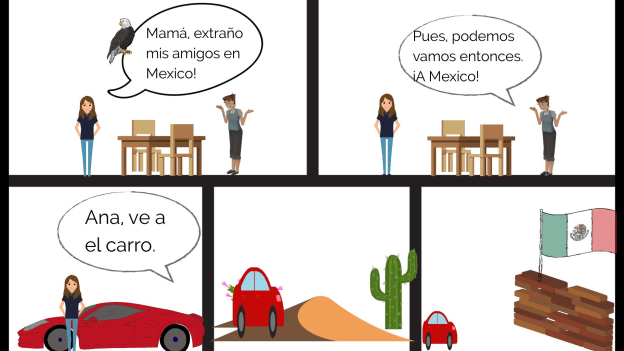
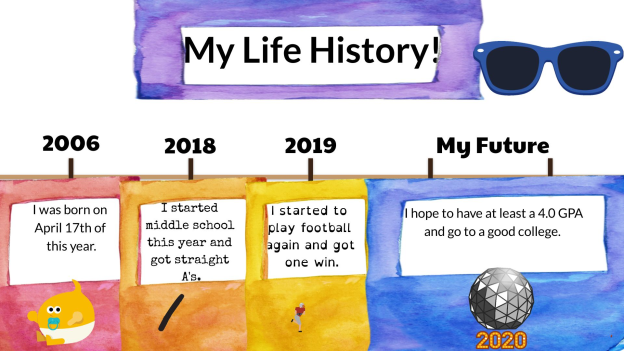
At the start of each school year, I focus my efforts on student relationships, learning about my students and also providing opportunities for them to learn about one another. In the past I have done this by using activities in our classroom such as ice breakers or having students work together on different review games and other in class collaborations like that. But this year I decided to do something a little bit differently to not only engage students in learning about the Spanish language and culture but to engage more in learning about one another. I came up with a project focused on using the “About Me” template in Buncee. I wanted students to share who they were and create one slide to show this using words, animations, stickers, and other add-ins. My hope was that by looking at each student’s slide, we would understand one another better and relate to each other based on similarities and differences.

I also thought this would be a good opportunity for them to choose and learn a little about a place where Spanish is spoken and create an “About_(country)_____” to share that information with the rest of the class. But I also realize that there are many students who are visual learners like me and I wanted to encourage students to be able to quickly look at and process information and represent it in a different way. Rather than simply restating the same content, push them to apply it at a higher level or find a different way to demonstrate an understanding of a concept.

I also wanted students to choose a Spanish speaking country and I placed a limit on the number of actual words they could use because I wanted them to represent what they had learned about the place that had chosen using the Buncee features. The topics they had to include were: languages spoken, school subjects, foods, activities, and other information like that that they could display using Buncee.

How did it go?

It was a fun activity and I learned so much about them and they learned about each other and what life is like in countries where Spanish is spoken. We shared them on a Buncee board which made it easy to access and created a colorful display of students and their creativity. Students shared their slides and gave a brief description in Spanish about themselves and made connections with their classmates. We had good conversations exchanging our likes, dislikes, and learning about our backgrounds. For the second slide, students

were able to get a quick glimpse of different Spanish-speaking countries and begin to understand the culture of some of the places they would be studying. It was fun that they could only include 3D objects, animations, stickers or emojis, to represent the information for each country. So for visual learners, being able to choose the right object to use to share this information made the learning stick a little bit more. Students who enjoy creating but not drawing really enjoyed the activity.

One other feature that I thought was important to share with students was the new Immersive Reader and how it works. We enjoyed looking at all of the capabilities with it and using Buncee for learning!


**Interested in writing a guest blog for my site? I would love to share your ideas! Submit your post here.


Looking for a new book to read? Many stories from educators, two student chapters, and a student-designed cover for In Other Words.

Find these available at bit.ly/Pothbooks  


Books available

How Teachers Can Develop Computational Thinkers

Guest Post by 

Get students computer science ready by teaching them how to think with computational thinking.

The demand for computer science (CS) in schools has many teachers wondering which components of CS they should implement first.

A couple of years ago, I asked myself the very same question, and I had to remind myself that creating a computer scientist could take up to 25 years! I was relieved that I wasn’t responsible for developing middle school computer scientists in only one semester.

I realized that what I needed to do was build the capacity of my students for deeper learning of the right skills — so they could experience success, which would inspire them to continue studying CS after leaving my class.

Advanced expertise in computer science requires knowledge in mathematics (namely discrete math and linear algebra) and problem-solving, and there are plenty of CS fundamentals to choose from.

In my previous position with Richmond Public Schools, we chose to dive in with computational thinking, programming and coding (yes, in that order). Because computational thinking (CT) is the highest order of problem-solving, is a cross-curricular skill, and is understandable to both machines and humans, I recommend building student CT competency by developing their versatility for recognizing and applying the four elements of CT to familiar problems/situations.

Video by JULES discussing the 4 elements of ‘Computational Thinking’

The Difference Between Computer Science and Computational Thinking

CS is part of computing education and it’s the foundation for ALL computing. So, in essence, CS is the study of computers and the algorithmic design processes in both hardware and software — their application and overall impact on society.

On the other hand, CT is a problem-solving skill(s) that involves decomposition, abstraction, pattern recognition and algorithm design.

Element 1: Decomposition

Facing large, complex problems will often discourage and disengage the students who aren’t fully equipped to begin the deconstructing process. Decomposition (like factorization) develops the skill of breaking down complex problems into smaller and more manageable parts, thus making even the most complicated task or problem easier to understand and solve.

To introduce your students to decomposition, begin by having them break down a simple task they do all the time, like brushing their teeth, baking a cake, making a sandwich or tying shoelaces. This will help them focus more on their ability to analyze and synthesize familiar information.

Next, introduce them to more complex problems/scenarios that are both unfamiliar and engaging enough to compel them to decompose them, such as investigating a crime scene, coping with the aftermath of natural disasters or planting a school garden.

Teachers who aren’t teaching traditional CS classes can help learners build their decomposition skills in their own subject areas by having them apply the concept to improving their writingcreating timelinesfactoring quadratics or understanding living organisms. CS teachers can start building student capacity for decomposition with this CT lesson by Code.org. In this lesson, students assume the role of imaginary players and figure out how to play a game with no given instructions.

Element 2: Pattern recognition

Pattern recognition is a skill that involves mapping similarities and differences or patterns among small (decomposed) problems, and is essential for helping solve complex problems. Students who are able to recognize patterns can make predictions, work more efficiently and establish a strong foundation for designing algorithms.

You can introduce pattern recognition by presenting a slide with pictures of similar types of animals or foods, such as pizza or desserts.

Next, have learners map and explain the similarities/differences or patterns. The beauty of this technique is that once students can describe one category (animal or dessert), they will be able to explain the others by following patterns.

For example, the general characteristics of desserts are that they are all sweet; they can be fruit, custard, puddings or frozen; and usually are served at the end of a meal. One or more dessert may be pink, have fruit and served cold, while another type may be yellow, have sprinkles and not use fruit.

Then task students with either drawing or making a collage of their favorite desserts using the patterns they identified (like in the examples above) to help them. Also, have them reflect on how they’d have to start from scratch with either creating or finding each instance of a dessert if they hadn’t first identified essential patterns (classification, color, texture, ingredients).

The primary goal here is to get them to understand that finding patterns helps simplify tasks because the same problem-solving techniques can be applied when the problems share patterns (pattern recognition is also used in mathmusic and literaturehuman intelligencehistoryweather, etc.).

Class projects can be more authentic by focusing application of pattern recognition in forensics, medical sciences, photo identification or behavioral patterns like web browsing and credit card spending.

Once students know what to do, have them map the patterns in some of the decomposed problems described above in Element 1. CS teachers will need to help students comprehend how computers use pattern recognition by numbers, text and pictures. Students using visual programming languages should also learn how the use of pattern recognition helps to find the commonalities of repetition in code for avoiding redundancy, and they can begin doing so with this Code.org lesson.

Element 3: Abstraction

Abstraction involves filtering out — or ignoring — unimportant details, which essentially makes a problem easier to understand and solve. This enables students to develop their models, equations, an image and/or simulations to represent only the important variables.

As the values of variables often change and can be dependent upon another, it’s important for students to be introduced to abstraction in relation to patterns. In the previous element, we noted common characteristics of desserts. Have students make a simple drawing of a dessert focusing on the important/common features (like classifications) and abstracting the rest (texture, fruit, sprinkles). The abstraction process will help them create a general idea of what a problem is and how to solve it by removing all irrelevant details and patterns (abstraction is also used in math and when creating models — the water cycle, the nitrogen cycle, the rock cycle, etc.).

CS teachers will need to help students focus on the layers (or levels) of abstraction they will want in the models they develop, along with correlations between abstraction and pattern generalization to figure out the right relationships between abstracted variables to accurately represent a problem. They also need to understand how abstractions are built with purpose and can represent an entire class of similar objects. CS students can become excellent coders using abstraction. Use this lesson to help them get started.

Element 4: Algorithm design

Algorithm design is determining appropriate steps to take and organizing them into a series of instructions (a plan) for solving a problem or completing a task correctly. Algorithms are important because they take the knowledge derived from the previous three elements for execution.

Keep it simple when teaching algorithms to students and have them create small plans using their newly learned CT skills, again using simple functions like brushing teeth, baking a cake, making a sandwich, tying shoelaces. Each algorithm must have a starting point, a finishing point and a set of well-defined instructions in between.

CS teachers will also need to help students understand that algorithm design builds upon the previous three elements — which moves a problem from the modeling phase to the operation stage. Students will also need to learn to design algorithms that are both efficient and allow for automation through the use of computers.

Also, by learning discrete math and how to create flowcharts, students can practice and build expertise in algorithmic thinking and design over time. Here is a great compilation of lessons for helping students bridge the gap between understanding basic algorithms to actual programming.

Resources to get started

Here are a number of resources to turn to for help:

Remember, learning has no finish line!

Take a moment to reflect on the words of Dr. Stephen R. Covey, “Though you may find some of it to be simple common sense, remember, common sense is not common practice, and I guarantee that if you will focus your efforts in these areas, you will find that great peace and power will come into your life.”

I believe these words can be applied to learning CT (and any new concepts or practices) as we help our students use what they already know to develop their CS superpowers!

Coding is a superpower video by Code.org

This article is adapted from an original post on this link.

If you like this work, please give it some claps, follow our publication and share this with your friends and colleagues.

Jorge Valenzuela is a teacher at Old Dominion University and the lead coach at Lifelong Learning Defined. Additionally, he is a national faculty of PBLWorks and a lead educator for littleBits. His work is aimed at helping educators understand and implement computational thinking, computer science, STEM, and project-based learning.

You can connect with Jorge @JorgeDoesPBL via Twitter and Instagram to continue the conversation.

**Interested in writing a guest blog for my site? Would love to share your ideas! Submit your post here.

Looking for a new book to read? Many stories from educators, two student chapters, and a student-designed cover for In Other Words.

Find these available at bit.ly/Pothbooks  

Books available

EDIT THIS

Abre

This post is sponsored by Abre. Opinions expressed are my own.

The story behind Abre

Beyond knowing what a particular tool does or how a platform works and the benefit for educators, families, and schools, I enjoy getting to know the people behind the tools. Understanding their story and motivation for creating their product helps to make a more authentic connection with them. I had the chance to speak with Damon Ragusa, CEO of Abre and Don Aicklen, VP of Sales, to learn more about the platform and what it offers for education.

What is Abre?

Abre is a platform that grew out of a need to help schools provide more for educators, students and the school community at large. Chris Rose and Zach Vander Veen, co-founders of Abre, noticed that there were so many different apps and tools being used in education that it was becoming challenging to keep everyone informed consistently. The concern was that staff, students and parents were using multiple tools which led to an increase in confusion and the amount of time needed to manage them. Chris and Zach then created this platform for use within school districts.

Why Abre?

Parents, educators, administrators, and students need to be able to exchange important school information, access school data, track student progress, and facilitate communication between home and school efficiently. The challenge with multiple apps and tools being used throughout one school system is that it becomes more difficult to keep everyone connected as they need to be. Now school districts have a better way to solve the disconnect and provide more streamlined communication, school news, access to critical information like student data and software solutions to carry out the daily work. The answer is Abre.

How does Abre help?

Abre offers so much within one platform that it resolves many of those challenges initially identified by the founders and that are still faced by many schools and districts. Without having to manage multiple logins and learn a variety of single-purpose systems, Abre helps educators to save time, reduce paper, create digital workflows and offer a highly efficient way to exchange information. The value in Abre is through the connected software apps, which makes it easier for teachers to use tools that will positively benefit students and learning. In addition to the teacher, there are many other benefits for school- and district-based usage. Abre provides easy access to a wide variety of student data in one place for staff and parents to obtain information directly from school, without the need for multiple tools and extra time. It also provides students and parents with exactly what they need to feel connected to the school community via announcements and headline features. Administrators can explore how Abre promotes a better workflow and enhances collaboration within the school community for a typical school day.

Comprehensive and Consolidated

Abre provides a single hub for all school and school-home related communication for staff, students and parents. It streamlines many of the important and required tasks that need to happen in schools and helps to reduce the number of apps being pushed out and the time required to become familiar with a new system. Using Abre, parents will be more connected to the school and have access to information when they need it. With one consolidated platform, it resolves the problem of knowing where to find information or keeping up with multiple apps used in different classes and by the school.

Single Sign-On and Integrations

It is easy to sign-in to the Abre platform whether using Google or Microsoft or even Facebook for parents. Once logged in, Abre users are automatically signed into many of the apps provided to them via the Abre platform.

Privacy

When deciding on a digital tool or a platform to use in our schools, it is important to first verify that it is in compliance with COPPA and FERPA. Abre is compliant with both.

Teacher Benefits

There are many integrations available within the platform to enhance student learning. As a classroom teacher, several of these apps caught my attention and are tools that I use in my class such as Duolingo, Flipgrid, and Quizlet. Being able to use these within one platform would save time and I believe encourage other teachers to implement more digital tools in the classroom. For schools using Learning Management systems like Moodle or Schoology, Abre can connect to and enhance these tools as well as replace functionality. Teachers have access to everything they need to enhance workflow for curriculum planning and instruction as well as professional learning and much more.

Consistency is important

Personally, I have used anywhere between four and six different apps and websites to complete a variety of tasks for attendance, grading, assessments, communication, and student projects. Abre provides solutions with all of this functionality. My next post will speak to the main solutions, beyond the hub, that Abre provides.

To learn more, check into Abre and get started with a demo today!

Three Strategies to Try Rather than Taking Away the Tech

Guest Post by Kim Weber, LINC Transformation Agent,@mskimbaweb 


Throughout my work in schools as a LINC Coach, there is a concern consistently expressed by teachers; one that results in the biggest deterrent for those who are beginning to transform their teaching practice by leveraging technology: What do I do when students misuse or break the rules for technology?

Just about any teacher who is using technology has encountered this in one form or another. For those of us at the early stages of implementing blended learning, this can be the roadblock that stops us in our tracks. We spend hours (at home) finding and figuring out the perfect digital tool that will enhance students’ learning. We introduce it with so much gusto, it sounds like we’re about to announce the winner of the lottery. We are well-prepared: all devices are charged, apps loaded, logins created, and we even have an offline back-up plan. We get the kids up and running, and are all set to work with a small group on targeted instruction, and you hear it…the giggling. You see it…the repeated covert glances at you. And you immediately know, they’ve broken the trust and digital contract that you and the students thoughtfully created to be the foundation of this type of learning. Most likely they’ve gone to an inappropriate website, broken a cell phone rule, vandalized classmates’ work on a shared document, or any other creative, disruptive shenanigans they’ve concocted. (Student innovation in this department is legendary.)

What comes next varies, but it often goes like this:

  • Stop the entire class.
  • Lecture everyone about the rules that were broken.
  • Close and collect all devices.
  • Switch to that offline (probably traditional) activity you had planned but didn’t really want to use.
  • Divvy out appropriate punishment to those who committed the transgression.

It is no surprise that many teachers feel uncertain about how to address these types of issues. According to a recent ISTE article,New OECD Report Shows Major Gap in Preparing Teachers to Use Technology Effectively, “In the U.S., only 45% of teachers stated that they were ‘well prepared’ or ‘very well prepared’ for the use of information and communication technology for teaching, the lowest rating of all dimensions ranked.”

I’ve developed some alternative approaches for addressing these difficult technology-related issues in our classrooms to help teachers feel more prepared:

First – View this as a teachable moment for the student(s) involved and the entire class. These are often the same kids who would find some other way to disrupt the learning in a traditional lesson. I once heard an educator explain it this way:

In the past, when a student would throw a pencil, a teacher would take the child aside and sternly explain that he/she could have poked someone’s eye out. Then, with the rise of a cautionary eyebrow, the teacher hands back the pencil back with a directive to get back to work. Conversely, our common reaction when students make poor choices with technology is to immediately confiscate the device and have the student “do something else.” Chances are that “something else” does not afford this student access to the same rich, personalized, engaging work you had planned. 

I suggest you consider alternatives to removing technology as it may not be the most effective response. These transgressions are moments that lend themselves to restorative practices and require patience, flexibility, and thoughtful actions on our part. At the heart of a restorative practice approach, the person who makes the mistake has the opportunity to be held accountable for their actions and repair the harm. By using restorative practices, you create a safe space for students to develop critical life skills and learn from their mistakes. This is often more productive than a response that is punitive in nature and stops the student from having access to learning.

Second – It’s never too late to revisit the contract and shared visioning work you did before you introduced technology into your lessons. If you didn’t start your digital instruction with these student onboarding lessons, then now is the perfect time to hit the stop button and do this essential mindset work with students. The key is to first help them understand “the why” of blended learning and second to co-create rules and expectations that help them view technology as a tool and not a toy. LINCspring, our online professional development platform for educators, provides ideas, resources and lesson plan templates that will help you structure this important work. This might also be a good time to show students the technology features that allow you, the teacher, to monitor behaviors such as revision history in Google Docs or how an LMS identifies user names on posts.

Third – In these moments of frustration, I suggest you remember our commitment to preparing students for the world they are entering. Why did we begin blended learning in the first place? Is it something that we can stop doing and still meet our students’ needs? From my observations and personal experiences as a teacher, I have seen blended learning work in ALL learning environments for ALL students. I’ve seen students who were grade levels behind catch up and students who were completely disengaged, engage. Changing the way we teach is challenging work, and the stakes feel higher with technology. It is easy to revert back to methods we are more comfortable with due to fear and loss of control. For inspiration through the rough spots, look to places like Twitter or follow podcasts such as “Cult of Pedagogy.”  Better yet, find someone in your school who can collaborate with you in this work. You can begin by creating PLCs to support one another. Just today, I was observing a blended learning classroom and another teacher walked in and proclaimed, “I want to do this too!”

If you have other strategies for addressing student mistakes with technology, please send me a note at kimweber@linc.education.

Kim Weber, LINC Transformation AgentKim Weber is a Transformation Agent for LINC, the Learning Innovation Catalyst. Before joining LINC, Kim worked for 20 years as a public and private school teacher in California and New York City. She is a presenter and coach for schools across the country who are embarking on school transformation projects that focus on creating classrooms that put students at the center of learning and help teachers become pedagogical problem solvers.

***Interested in writing a guest blog for my site? Would love to share your ideas! Submit your post here.


Looking for a new book to read? Many stories from educators, two student chapters, and a student-designed cover for In Other Words.

Find these available at bit.ly/Pothbooks  


Books available

Buncee and Immersive Reader

Buncee and Immersive Reader: A Winning Combination for Assistive Learning

For several years, Buncee has been one of my favorite creation tools; both for personal creation needs and for classroom instruction. While there are many digital tools to choose from when it comes to teaching and having our students create, Buncee’s versatility, ease-of-use, and recent integration with Microsoft’s Immersive Reader make it a go-to tool for all creative needs and accessible for students of diverse ages and abilities to learn 21st-Century Skills and express themselves. What my students love the most is that Buncee offers something for everyone, and I love that they love it.

Always keeping their finger on the pulse of their community’s needs, Buncee listens to educators about the needs for our students and takes action to find solutions! Their integration with Immersive Reader is a perfect example of this.

Immersive Reader: It’s About Opportunities to for ALL Students

This summer, Buncee added Microsoft’s Immersive Reader to its platform, increasing accessibility for students and offering more robust ways to learn. Immersive Reader is full-screen accessibility tool, supporting the readability of text in a Buncee for students with dyslexia, visual impairments, and for language learners and their families. Any text added into a Buncee can be translated and read aloud in over 60 + languages.

There are many ways Immersive Reader can enhance the learning opportunities for all students, build their confidence, and create an inclusive classroom environment. The use of Immersive Reader in Buncee will enable students to do more than just create Buncees, it will help them improve reading and language learning skills, while engaging more with the content in authentic and meaningful ways.

Imagine the possibilities for reaching and engaging students and their families who are just learning to read, who may be struggling with identifying parts of speech or word recognition, or who may be coming from non-native English speaking homes. Educators can use Immersive Reader to create lessons, make interactive flashcards for students and also for communicating with families. Being able to provide for students and their families of different backgrounds and learning styles is something that the Buncee team is definitely passionate about and does well!

How Does Immersive Reader Work in Buncee?

There are several ways to help students to build their skills through the different options available within Buncee and using Immersive Reader.

Getting started with Immersive Reader in Buncee is easy. By clicking on the Immersive Reader icon when viewing a Buncee, options pop up that you can work with to help further personalize the learning experience for students. Immersive Reader can then access the text in a Buncee. For example, it is easy to adjust the reading speed and make changes to the font spacing to help students who might need some adjustments in the visual appearance. You can also choose to display the text in shorter lines, or break down the syllables, to help students process the information in ways that meet their needs.

Navigating the Options

I decided to create a Buncee using some of the new 3D objects and also explore the options available through Immersive Reader. When viewing my finished Buncee, clicking the Immersive Reader symbol takes me to a new screen where I have additional options to further personalize the appearance of the creation. For first time users, it is easy to figure out how to adjust the settings. In preview mode, I clicked on the speaker symbol to listen to the text. Students could use this as a way to practice their own pronunciation, especially when using it for language learning, by repeating after the speaker. Students can also build listening comprehension skills by focusing on the written words and making connections with the audio.

By clicking on text preferences, I can choose the text size, increase spacing, and select from three choices in font style. These are great options to help with readability for students. There are also 21 color choices for the background on the screen. I find this to be very useful, especially as someone who can be sensitive to certain colors when reading. I’ve also had students experience difficulty with reading on certain colored backgrounds, so this is a definite plus.

The grammar options enable you to turn the syllables on or off and also color code the different parts of speech. Being able to use the color codes to help with the identification of nouns, verbs, adjectives, and adverbs will help students to build their grammar skills. These labels can be turned on or off, which means that families can work with their children and use it as a teaching tool for review.

Just to experiment, I turned everything off except for the verbs. Displayed on the screen were the two verbs in the sentence both highlighted in red. I then selected a different color for each part of speech, I chose purple to identify nouns and green for the adjectives. I was amazed at how quickly this could be set up and the possibilities for helping students with reading comprehension and language skills. Using this as a way to further engage students with identifying parts of speech and making the visual connection is another option for more interactive learning.

Under reading preferences you can focus on one line or on the entire text.

When you focus on a line, it closes the screen down to that one specific sentence, which you can also make narrower or thicker depending on your choice.

There are more than 60 languages available for translation. I decided to try French first, and when I clicked on a word, it showed me the word in French and in English. I also explored other languages, including Spanish and was impressed with how much it offered to reinforce the content and to provide a more personalized learning experience for students. You can choose the voice and speed of reading, so it provides a great way to reinforce speaking skills as well as listening, reading and writing.

In his book, Digital Leadership, Eric Sheninger talks about the critical competencies needed by learners to be successful in today’s world. These competencies are in alignment with the ISTE standards for students and teachers, and can be addressed through the use of Buncee. Now with Immersive Reader integrated, the possibilities to address these standards is open to all learners. Beyond the potential for creativity, collaboration, critical thinking, and communication, using Buncee, students can build skills in digital media literacy, entrepreneurship, technological proficiency, and digital citizenship. Students have the opportunity to use technology as a tool for solving real-world problems or making real-world connections. We have to look beyond simply using digital tools to engage students in learning and instead, empower them through opportunities to apply what they have learned in unique ways.

TeacherCast Educational Network | Developing Standards-Based Instructional Technology Integration

Technology Integration - Instructional Coaching - Productivity Secrets for Educators

Leadership Liner Notes: Sean Gaillard

Built on Connection. Tuned for Impact.

Stories by Thomas Oppong on Medium

Dr. Rachelle Dené Poth @Rdene915 Educator, Consultant & Keynote Speaker, Author, Attorney #THRIVEinEDU

Hooked On Innovation

When Innovation slaps you in the face, we slap back.

Teach Better

Dr. Rachelle Dené Poth @Rdene915 Educator, Consultant & Keynote Speaker, Author, Attorney #THRIVEinEDU

BrianKulak.com

Dr. Rachelle Dené Poth @Rdene915 Educator, Consultant & Keynote Speaker, Author, Attorney #THRIVEinEDU

The Principal of Change

Stories of learning and leading

Mandy Froehlich

Dr. Rachelle Dené Poth @Rdene915 Educator, Consultant & Keynote Speaker, Author, Attorney #THRIVEinEDU

Katie Martin

Informed by research, refined by practice

#RocknTheBoat

Rocking today's classrooms, one teacher, student, and class at a time.

User Generated Education

Education as it should be - passion-based.

Learning as I go: Reflections & lessons learned

Dr. Rachelle Dené Poth @Rdene915 Educator, Consultant & Keynote Speaker, Author, Attorney #THRIVEinEDU

Serendipity in Education

Join me, Allyson Apsey, as I stumble upon the fortunes of learning, laughing, and celebrating alongside incredible people.