CoSpaces Edu for Out of This World Learning!

In collaboration with CoSpaces EDU

The start of a new school year or calendar year is always a great time to explore some new ideas, especially with all of the amazing tools and technologies available to us. There are many exciting options available to educators and students to choose from, and sometimes, making the choice is a challenge. Personally, one of my favorites is bringing augmented and virtual reality into my classroom through CoSpaces Edu.

Initially, I used CoSpaces in my STEAM emerging technology course for several years, having students work on a variety of projects in my class and for some cross-curricular collaboration. One day, I was challenged by a few of my students in a Spanish II course who had seen the projects being created, and they wondered why they were not able to do something similar. I was speechless, and I didn’t have an answer for them. Honestly, I had not thought about bringing AR/VR into my Spanish classes. Fortunately, I knew about all of the benefits and great features of CoSpaces that foster collaboration, creativity, and many other essential skills. I also loved that students have the ability to create independently or to work together on the same project from wherever they are. So I thought to myself, why not?

If you are not familiar with CoSpaces Edu, it is a truly versatile, user-friendly platform that enables students and teachers to create virtual spaces full of animals, people, objects, and more. It is a great way to focus on developing many skills in schools, from SEL to STEAM and more. It is also a great option for helping students develop an interest in STEM, especially coding, a highly in-demand skill.

From coding and language learning to STEAM and collaboration, CoSpaces Edu offers so many ways for students (and teachers, we need to learn, too!) to create their own AR and VR experiences. An alternative to traditional tools that might be used for digital storytelling, explaining and exploring complex topics, or for creating virtual field trips through a moment in history, for example.

So, with all of the options available, why choose CoSpaces Edu? It has been a game-changer in my classroom. It provides an intuitive, user-friendly platform that educators, students, and families supporting students can easily navigate. It offers a different way to share and show learning as students can create, explore, and interact with 3D virtual worlds, which not only engages students but also provides more for different student interests. It also provides lesson plans and activity ideas for teachers to explore!

Most importantly, CoSpaces Edu encourages creativity, collaboration, and problem-solving — skills that are essential for today’s learners. It also gives students the chance to learn about coding, which is not something just for those studying computer science or teaching a STEM-related course. The best part of CoSpaces Edu is that it introduces students to the basics of coding in a truly engaging and meaningful way. As students explore independently while designing their virtual worlds, they learn how to create by selecting and manipulating different characters and objects and can start coding either with block-based coding or a scripting language like JavaScript.

Over the years, I have seen hesitancy when it comes to coding, and with CoSpaces, students build confidence as they create and enjoy working together with classmates in their virtual space. The variety of options available and with coding helps students understand what can be abstract concepts, develop logical thinking, and hopefully and ideally, lead to the development of an interest in computer science!

5 ideas to try in 2024!

  1. Take a tour!  First, When I get started in my own classroom with my students, I always give them time to explore all of the different projects that are available in the gallery. What types of projects do they see, which ones do they like, and what might they like to create? I think it’s a good way to get them thinking about the different possibilities and also give them time to explore on their own and see what clicks with them. So when I say take a tour, I tell them to just choose a topic, whether it’s STEM or if they see some games to play, and then I ask them to share with their classmates what they found, why they liked it, and any other ideas that they come up with for what they could do that is similar or how they would make it different or improve it. But it’s a fun way to get students talking and brainstorming to help them prepare to make their own projects. 

2) About Me: I love using the templates or giving students the option to create their own to design an About Me space. CoSpaces offers a great template to get students started and comfortable with learning how to navigate, change text, add, and animate characters by using this as a starter. 
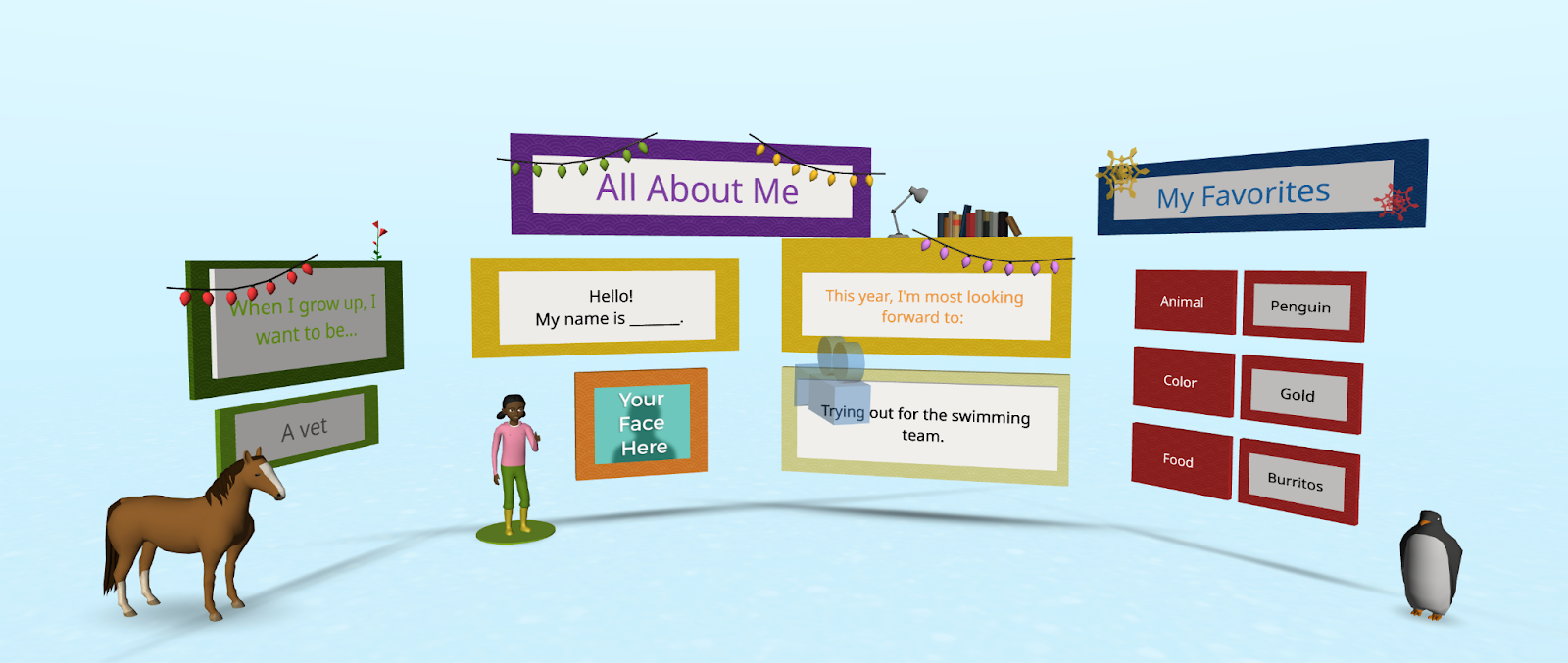
It leads to more excitement and creativity and is also a fantastic way to learn about our students and for them to learn about each other.  

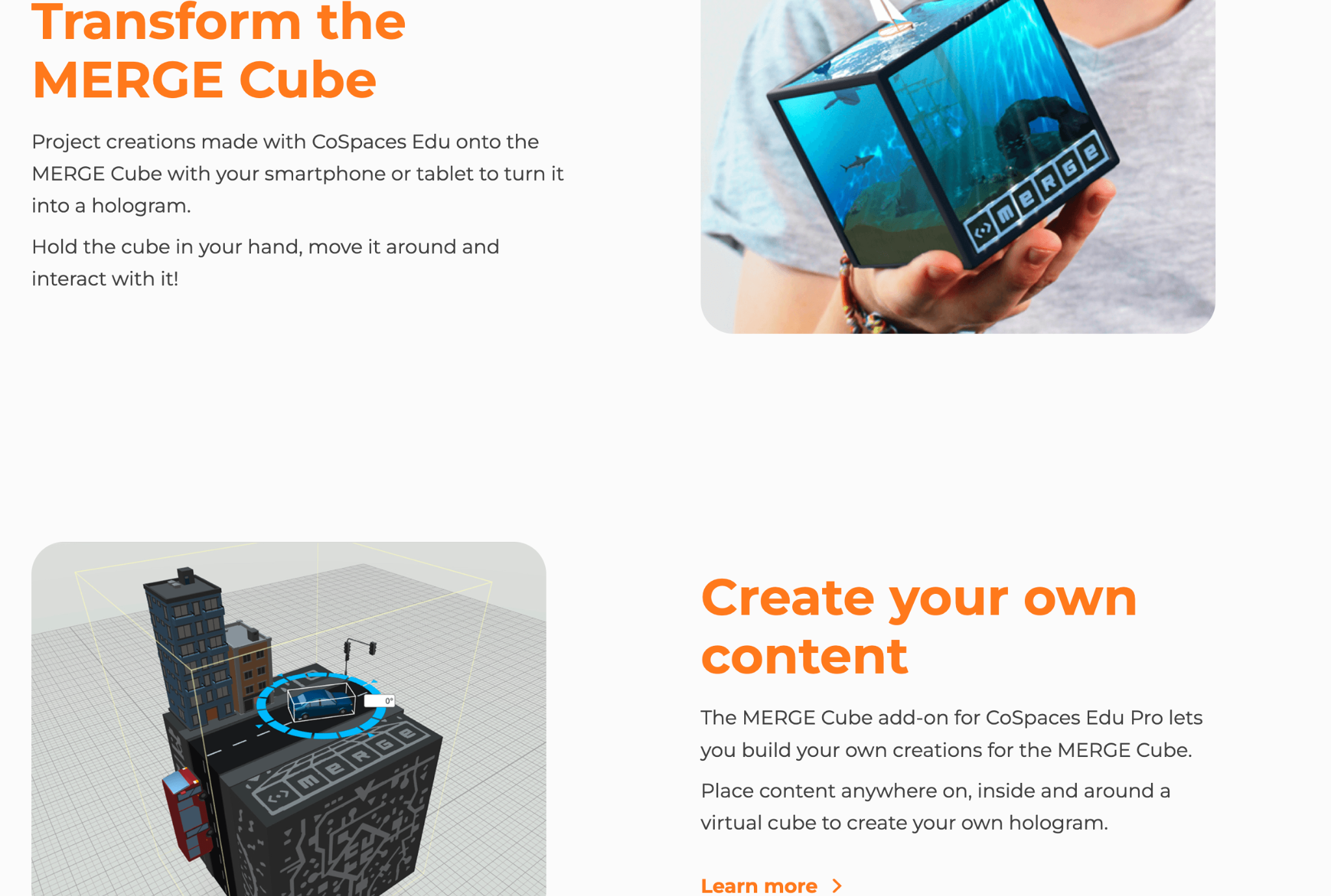
3) Interactive Storytelling: My students loved exploring the different projects in the gallery, and one way for students to use CoSpaces is to have them create an interactive experience. They can retell a story with a different ending or summarize something they have learned in class. To demonstrate, they can then include a variety of characters and other props to bring it to life. By diving into coding, they can really make it an interactive experience with animated characters and animals! Students can even create scenarios where they script and act out dialogues, recording their voices directly in the space. Also, give students the option to create on the Merge Cube, which makes interactive storytelling a real hands-on, fun learning experience!
4) Language Learning: A complete game changer for that Spanish class that pushed me to realize that I needed to bring in some new opportunities for them. Through a more immersive and collaborative learning experience with classmates, what a difference it made for language learning, student engagement, and increasing motivation! CoSpaces Edu offered all of that, and it was so much fun for them and for me! I was nervous at first, but it was a risk worth taking and one that paid off for them and their retention of the language.  It also led to building relationships with classmates as students worked together to create their projects. Students had a different and more authentic way to practice vocabulary, build grammar skills, and engage in conversation in the virtual environment. And, they retained the content, which typically is a bit challenging because of the grammar, far beyond prior years!

5) Collaborate: Think about the grade level you teach and the content area. There are many ways to incorporate projects for students to create virtual models, or design prototypes, or bring a story to life! When CoSpaces Edu added the ability for students to work in groups, what a difference that made! Fostering collaboration is so important as we prepare students for the future. The ability to work effectively in teams is one of the most in-demand skills on the Job Skills Outlook from the World Economic Forum

With the collaborative features of CoSpaces Edu, multiple students can work on the same project from different devices and from wherever they are!  Not only can they learn about augmented and virtual reality and build essential skills, but it also boosts digital citizenship skills in the process.  For collaborating, we can teach them how to manage a group project, assign roles, and problem-solve. 

One of my other favorites is for a class project where all students are involved in a complex project where each student is responsible for a part of the virtual world. Think of a topic or a theme. Each student can create their space and then design one comprehensive experience that everyone can learn from and reinforce their content area skills through.

As educators, our primary goal is to prepare students for the future. CoSpaces Edu is not just another tech tool; it’s a platform that fosters the essential skills needed in the 21st century. It encourages creativity, critical thinking, collaboration, and digital literacy. By integrating CoSpaces Edu into your curriculum, you’re enhancing your students’ learning experiences and equipping them with the skills to thrive in an increasingly digital world. And, for extra fun, check out the goodies available, such as classroom posters, badges, and more! Use my code: COSRACHELLED or COSPromoRDP24.

About the Author:

Rachelle Dené is a Spanish and STEAM: What’s Next in Emerging Technology Teacher at Riverview High School in Oakmont, PA. Rachelle is also an attorney with a Juris Doctor degree from Duquesne University School of Law and a Master’s in Instructional Technology. Rachelle is an ISTE-certified educator and community leader and served as president of the ISTE Teacher Education Network. She was named one of 30 12 IT Influencers to follow in 2021 and one of 150 Women Global EdTech Thought Leaders in 2022.

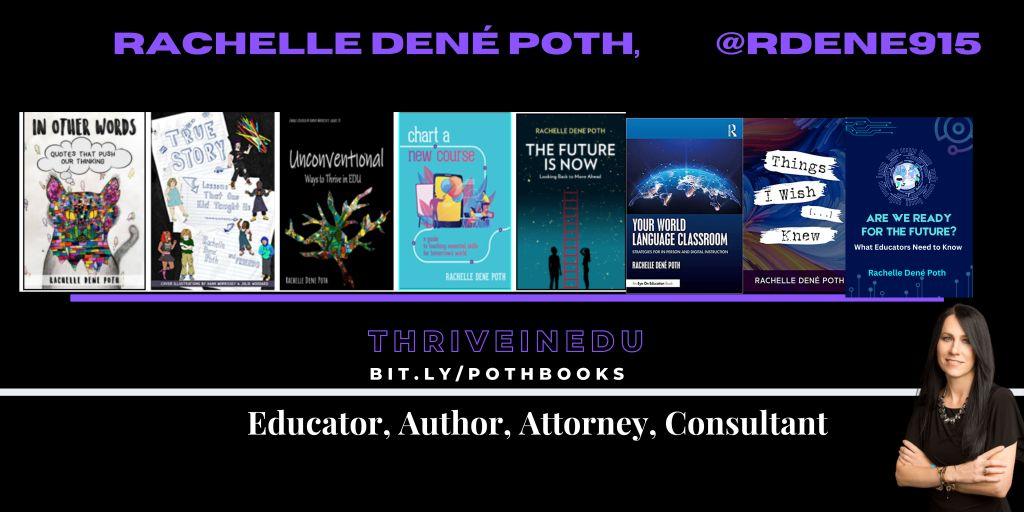
She is the author of eight books including ‘In Other Words: Quotes That Push Our Thinking,” “Unconventional Ways to Thrive in EDU,” “The Future is Now: Looking Back to Move Ahead,” “Chart A New Course: A Guide to Teaching Essential Skills for Tomorrow’s World, “True Story: Lessons That One Kid Taught Us,” and her newest book “Things I Wish […] Knew” is now available at bit.ly/thingsiwishedu.

Contact Rachelle to schedule sessions about Artificial Intelligence, Coding, AR/VR, and more for your school or event! Submit the Contact Form.

Follow Rachelle on Twitter(X) and Instagram at @Rdene915

**Interested in writing a guest blog for my site? Would love to share your ideas! Submit your post here. Looking for a new book to read? Find these available at bit.ly/Pothbooks
************ Also check out my THRIVEinEDU Podcast Here!

Join my show on THRIVEinEDU on Facebook. Join the group here

More Ideas to Try in 2024: Reflection

Part II: Getting students to think about their learning journey

Throughout the year, engaging students in ongoing reflection on what they are learning is essential. One of the five core competencies of social-emotional learning (SEL) is for students to develop self-awareness. It’s also vital for them to build self-management skills to work through challenges that can come with learning, reflect on their growth, and set new goals.

Whether students engage in discussions with classmates or use digital tools to share ideas in a comfortable virtual space, there are many options. We need to get our students to share what they are thinking and take time to reflect on their learning. We also need to model this reflective practice for them. This is essential for academic, personal, and future professional growth. To best prepare students for the future, ongoing reflection is vital.

With an opportunity to reflect, students are able to better understand their thought processes and interests. It helps them to identify areas where they can improve and recognize areas that they are strong in. Creating opportunities for students to share their learning with classmates and with us promotes collaboration, fostering a stronger sense of community in our classrooms. Together, we can create a supportive learning community.

Through the five competencies of SEL, we can help students focus on developing skills of social awareness and building relationships. Students will better understand their own thought processes and deepen their understanding of the content they are learning. However, getting students to share their thoughts and reflect on their learning can be challenging. Here are five ideas for encouraging students to reflect on their learning and share their thoughts.

1.Think-Pair-Share is an activity that doesn’t require much time at all to use and can be very effective. It encourages students to share their ideas, learning experiences, and thoughts with one another. The teacher can provide a short prompt or topic for discussion and then give students time to think individually before pairing up with a partner. Those one-on-one conversations can help students become more comfortable expressing themselves in class. After a certain period of time, each pair can share their thoughts with the class. This strategy will work well without digital tools; however, there are some options to explore.

2. Peer-pairing: To randomly place students in pairs, use a random name generator so students build relationships with their classmates. It is fun to have the names on the big wheel and place students into groups. I have used this also as a way to select the order of presentations. It helps to reduce a bit of the stress with wondering when you have to present and makes it a fun experience.

3. Class sharing: To help students build confidence, use a tool such as Padlet or Flip to have students post ideas on a collaborative board or create audio or video responses. Whatever way we have students “share,” it encourages them to engage in conversation and more active listening. Students learn about different perspectives on a given topic, which promotes the development of social awareness skills.

4. Snorkl is a new AI-powered tool that I found, and I really love the possibilities. Teachers assign an activity and it enables students to record their screen and speak about the work they have done. For example, how they solved a math problem, writing and reading in the language they are learning, describe an image, and so much more. It can be set to provide AI feedback with or without teacher approval. It was fun to try for the first time in my class. Look for more information in an upcoming post.

With the tools that offer audio or video options, it is a more authentic way to learn about the student. Teachers see and hear their students’ thought processes and can then offer more personalized and meaningful feedback to each student.

One extra is for teacher and student reflection. Learning about students’ thoughts about our methods, their comfort in the classroom, and more is important. Last year, I started exploring LessonLoop, which provides anonymous surveys that teachers can issue to students. It provides a rating with explanations based on student engagement, SEL, and comfort in the learning space and provides additional insights. Teachers can then take the information and use it to reflect on their practice and involve students by showing their input is valued through the use of these surveys. LessonLoop also has educators who will prepare some tips for teachers to try!

Whatever method or tools we choose to bring into our classrooms, the goal is still the same: Prepare students for the future with skills that enable them to be flexible and adapt to the changing look of education and work. Reflective practice is a key component of this future preparation!

Author

About the Author:

Rachelle Dené is a Spanish and STEAM: What’s Next in Emerging Technology Teacher at Riverview High School in Oakmont, PA. Rachelle is also an attorney with a Juris Doctor degree from Duquesne University School of Law and a Master’s in Instructional Technology. Rachelle is an ISTE-certified educator and community leader and served as president of the ISTE Teacher Education Network. She was named one of 30 12 IT Influencers to follow in 2021 and one of 150 Women Global EdTech Thought Leaders in 2022.

She is the author of eight books including ‘In Other Words: Quotes That Push Our Thinking,” “Unconventional Ways to Thrive in EDU,” “The Future is Now: Looking Back to Move Ahead,” “Chart A New Course: A Guide to Teaching Essential Skills for Tomorrow’s World, “True Story: Lessons That One Kid Taught Us,” and her newest book “Things I Wish […] Knew” is now available at bit.ly/thingsiwishedu.

Contact Rachelle to schedule sessions about Artificial Intelligence, Coding, AR/VR, and more for your school or your event! Submit the Contact Form.

Follow Rachelle on Twitter(X) and Instagram at @Rdene915

**Interested in writing a guest blog for my site? Would love to share your ideas! Submit your post here. Looking for a new book to read? Find these available at bit.ly/Pothbooks

************ Also check out my THRIVEinEDU Podcast Here!

Join my show on THRIVEinEDU on Facebook. Join the group here
Six Resources To Try in 2024

Image by Rawpixel.

This will be the first post where I will share some different tools or resources to explore!

Each year, I like to take time and think about the digital tools we use in our classroom, the benefits, and how I might find new ways to use them. When I look to use technology in my classroom, I always start with the “purpose”Why” behind it. What will it help me to do better as a teacher? How can it help students to learn in more personalized or authentic ways? And what skills will students build as a result that traditional non-technology methods might not afford?

There are tools that I continue to use each year because they have added new features or they have integrated with other tools that we are using in our classroom. Here are six tools to check out as we start 2024! And one that is highly recommended to dive into AI in your classroom!

  • CoSpaces EDU is a virtual reality platform that became a favorite for some of my 8th-grade students this year. Whether creating a space in 360, designing a game, an interactive story, or an experiment, students will enjoy creating in VR and developing coding skills too. Another benefit is the Merge Cube add-on, which enables students to hold the space they have created in their hands! Students can even collaborate by working in teams to create a space together. With MergeEDU, educators can use the cube as an interactive tool to further engage students in learning about the earth, dissecting a frog, exploring a volcano, and more.
  • Gimkit, a game-based learning tool, has continued to be a favorite with my students because of the potential for increased content retention through repetitive questions and because of the different ways it can be played in the classroom. It enables students to develop strategies and have fun while learning. There are multiple ways to look at the student data and provide authentic and timely feedback. And there are always new modes to play, which helps to boost student engagement and gives us some laughter, too! Check out Blastball!
  • ISTE’s AI and STEM Explorations Network has created four free hands-on AI projects for the classroom guides, which are available for download from ISTE and GM. For elementary, secondary, electives, computer science courses, and a new guide on ethics, these guides offer various topics relevant to all content areas. The guides are available in English, Spanish, and Arabic.
  • Nearpod is a multimedia, interactive presentation tool that enables teachers to create engaging lessons that can include virtual trips and 3D objects. It offers lessons on topics such as digital citizenship, social-emotional learning, career exploration, English learner lessons, and professional development resources for teachers. Educators can create lessons with many options, including quizzes, polls, drawings, matching pairs, audio, video, and content from PhET Simulations, Desmos, BBC, YouTube, and more. Nearpod lessons can be done live in class or student-paced, and there is also the option for use as sub plans.
  • Wakelet is a content curation tool and so much more. I use it to curate blogs, videos, and other resources I want to access quickly to be a powerful tool for student learning. With Wakelet, teachers can provide blended learning experiences, use it for station rotations, have students create a digital portfolio, share class projects, create a scavenger hunt, and many other possibilities. It even offers the ability to record a Flip short video within the Wakelet collection. Educators and students can collaborate in a Wakelet collection and so much more!

Think about some of the tasks that might be taking up a lot of your time, or consider some issues or challenges you might be having. A few years ago, I noticed a decrease in student engagement and looked for ways to open up more choices for students to share their learning. Any of these tools can be suitable for addressing those concerns.

My Advice? Start thinking about your own personal goals and start with one thing. Try it and see how it goes, ask students or colleagues for feedback, and then make adjustments as needed.

About Rachelle

Follow Rachelle on Twitter @Rdene915 and on Instagram @Rdene915. Rachelle has a podcast, ThriveinEDU available at https://anchor.fm/rdene915.

Looking for PD for your school or keynotes for your conference? I provide in-person and virtual training on the following topics. If you want to learn more about and explore AI and ChatGPT, contact me to schedule! Rdene915@gmail.com or use the Book Me form on my website. bit.ly/thriveineduPD

**Interested in writing a guest blog or submitting a sponsored post for my site? Would love to share your ideas! Submit your post here. Looking for a new book to read? Find these available at bit.ly/Pothbooks

Saving Time and Learning About AI

*AI is one of my favorite areas to work in and I love sharing ideas!

As a classroom teacher with almost six years of experience integrating AI into my teaching practice and training other educators, I have enjoyed exploring the possibilities through AI and engaging in conversations with students and teachers. Every educator needs to learn about AI and how we can leverage this technology to benefit our students and enhance our work. To best provide for our students, we need to understand how this technology will impact them and us.

Especially as we see such as increase in technology in education, it is essential that we embrace and understand emerging technologies, especially AI and how it can impact not only our work but the benefits it can offer for student learning. In my work as a classroom teacher and consultant, I enjoy helping other educators get started with AI.

Why Educators Need to Understand the AI Tools Available

Our roles as educators have continued to change over the years. Not only do we teach the content, but we serve as mentors, facilitators of learning, and co-learners with our students, especially as we embrace these emerging technologies. It is important that we explore the benefits and how it can help us to “work smarter, not harder” so that we have more time to work with students, build relationships and support them in their learning journey.

AI, ChatGPT, and other forms of generative AI have become some of the most talked about topics in education this past year. But with all technology comes some hesitancy, especially with something as powerful as AI. Schools need to provide opportunities for students to learn about this changing technology because of its impact on their future. Not only can AI tools enhance creativity and productivity, they can also provide educators with valuable insights into student learning and assist with some of the time-consuming tasks that educators have.

How to leverage some tools with benefits

I like to think of three key areas where AI can make an impact for educators and for students.

1. Personalized Learning: Through AI, educators can provide tailored learning experiences based on AI-driven analytics that provide valuable insights into student performance and learning trends. It can adapt to each student’s strengths, weaknesses, and learning pace.

2.Efficiency and Productivity: Another benefit of AI is greater efficiency. Educators may spend more time on clerical tasks that takes time away from working directly with students. The right AI tools can help to automate or streamline tasks uch as grading assignments or providing feedback, giving teachers more time with their students.

3. Creating and supplementing the content: Through AI-powered platforms, teachers can curate various educational resources for their students and their own professional learning. With generative AI in particular, quickly being able to create lessons, activities, assessments, prompts for discussion, and presentations by providing a short prompt with keywords, educators can create engaging lessons for students in far less time.

But how do we know where to begin?

Tools to Explore

With so many different tools becoming available or integrating AI into them, it can be hard to keep up. My recommendation is to select one or two to start with. Explore how they work and the content that is created. Take time to evaluate the accuracy of the information and even involve students in discussions about the benefits for their learning.

Here are five AI-powered tools that will help teachers with personalized learning, efficiency, and saving time. I have created and experimented with so many tools, and my students’ responses have always been positive. Embracing these tools also sparks curiosity for learning. Creating and sharing these resources with our students leads to rich conversations about AI’s benefits and the proper use of this technology for creating and learning. See below for an additional article link and my contact form to bring me to your school or provide coaching.

  • Curipod: Enables teachers to create interactive lessons in minutes using AI. Teachers simply type in a topic, and a ready-to-run lesson is generated with text, images, and activities such as polls, open-ended responses, word clouds, and more. There are even activities to build in that focus on SEL check-ins. Use my code CURIRACHELLE
  • Eduaide.Ai: An AI-assisted lesson development tool that provides educators with more than 100 resource types to choose from. It offers the ability to translate the generated content into more than 15 languages instantly. Educators can generate a syllabus and discussion prompts, use the Teaching Assistant to help with creating IEP plans, write emails, or even create a list of accommodations for students in addition to many other options. I enjoy using Eduaide for a variety of tasks, especially creating lesson and project outlines and testing out the feedback bot! Try some and then tag @eduaideAI and @Rdene915 in a tweet and win a book!
  • Quizizz: With Quizizz, teachers can design quizzes that create a personalized learning path in response to each student’s responses and based on their needs. Teachers can also create lessons with Quizizz, which now has AI enhancements that can adjust question difficulty, check grammar, redesign questions to reflect real-world scenarios, create a quiz from a URL or PDF, and more features on the way.
  • Slidesgo: Provides access to free templates via Google Slides and now has the AI Presentation Maker. With this new functionality, presentations can be created within minutes. Start by choosing a topic, selecting a tone such as casual, creative, or professional, making changes, and downloading your presentation. A time saver, for sure! I really enjoyed testing it out and creating some amazing presentations! Want to learn more? Be sure to check out their recent survey, which has great insights into AI and tools for education! Dive into exploring more today!

Also, head to my additional post via Edutopia for more AI tools to try here: 7 Tools

Do you want to learn more about AI and how to bring it into your classroom? I have six years of experience working with students and teachers and would love to work with your school, at your conference or individual coaching: bit.ly/thriveineduPD

About Rachelle

Follow Rachelle on Twitter @Rdene915 and on Instagram @Rdene915. Rachelle has a podcast, ThriveinEDU, available at https://anchor.fm/rdene915.

Looking for PD for your school or keynotes for your conference? I provide in-person and virtual training on the following topics. If you want to learn more about and explore AI and ChatGPT, contact me to schedule! Rdene915@gmail.com or use the Book Me form on my website.

**Interested in writing a guest blog or submitting a sponsored post for my site? Would love to share your ideas! Submit your post here. Looking for a new book to read? Find these available at bit.ly/Pothbooks

7 AI Tools That Help Teachers Work More Efficiently

These apps and websites can help teachers boost their productivity, personalize learning, and create lesson content.

Over the past five years, I’ve explored ways to integrate AI into my teaching practice—even before ChatGPT and other generative AI became some of the most talked-about topics in education. Every educator needs to learn about AI and how we can leverage this technology to benefit our students and enhance our own work. To best provide for our students, we need to understand how this technology will impact them and us. What better way than to explore new tools via AI in our teaching practice?

Continue reading this post on Edutopia here.

About the Author:

Rachelle Dené is a Spanish and STEAM: What’s Next in Emerging Technology Teacher at Riverview High School in Oakmont, PA. Rachelle is also an attorney with a Juris Doctor degree from Duquesne University School of Law and a Master’s in Instructional Technology. Rachelle is an ISTE-certified educator and community leader and served as president of the ISTE Teacher Education Network. She was named one of 30 12 IT Influencers to follow in 2021 and one of 150 Women Global EdTech Thought Leaders in 2022.

She is the author of eight books including ‘In Other Words: Quotes That Push Our Thinking,” “Unconventional Ways to Thrive in EDU,” “The Future is Now: Looking Back to Move Ahead,” “Chart A New Course: A Guide to Teaching Essential Skills for Tomorrow’s World, “True Story: Lessons That One Kid Taught Us,” and her newest book “Things I Wish […] Knew” is now available at bit.ly/thingsiwishedu.

Contact Rachelle to schedule sessions for your school about Artificial Intelligence, Coding, AR/VR, and more! Contact Form

Follow her on Twitter and Instagram at @Rdene915

**Interested in writing a guest blog for my site? Would love to share your ideas! Submit your post here. Looking for a new book to read? Find these available at bit.ly/Pothbooks

************ Also check out my THRIVEinEDU Podcast Here!

Join my show on THRIVEinEDU on Facebook. Join the group here

B

Data-driven decision-making in Classrooms and Schools is Easier Than Ever Before with GPT-4 Code Interpreter

Guest post by Matthew Rhoads, Ed.D.

Time and the capacity to use data and understand it are at the essence of making data-driven decisions in classrooms and schools (Rhoads, 2019; Mandinach 2012, U.S Department of Education, 2010). In my research focusing on data literacy for educators, time has always been the number one issue for educators to use data to make decisions as well as learn and practice data literacy skills. Yet, with what we are going to talk about today, I believe that this can change by leaps and bounds.

Ultimately, as the world of education becomes increasingly data-driven, teachers and school leaders face the daunting task of learning how to effectively analyze and apply this data. The role of technology software in gathering, transforming, and visualizing data is no longer optional—it’s a necessity as our classrooms and schools are collecting immense amounts of data that can be utilized to support student learning. But how can we bridge the gap between the data we have and the insights we need in a quick and efficient manner? Enter Code Interpreter, a revolutionary tool that’s changing the way we approach data in education. Let’s discuss how it can be utilized to support data-driven decision-making as I believe it can solve many of the time and capacity issues facing teachers and school leaders in using data to make important decisions for students and school systems.

Note: For information related to my research into data literacy, please check out my study and its summary found here.

Data is Everywhere in Classrooms and Schools

Data for teachers and school leaders can be drawn from various avenues such as the school’s Student Information System, Learning Management System, and EdTech tools. Many of these tools provide opportunities within themselves to review the data they collect in the form of visualizations and dashboards. Yet, these tools do not provide in-depth analysis that can help teachers and school leaders make data and evidence-informed decisions to the best of their abilities. As a result, the data will need to be extracted, and cleaned, and further analysis will need to take place to see deeper insights as to what the data is telling us as well as how it may relate to other strands of data we’ve collected. For example, take test scores, student SEL surveys, and attendance data from a period of time. What we can now do is easily place those data points onto a single Excel file to be analyzed by Code Interpreter to see if any relationships may exist. With this said the goal of this blog is to demonstrate how this can be done by teachers and school leaders as they begin harnessing this tool to support them in their data-driven decision-making.

Step-by-Step Process of Using Code Interpreter

Now, we will discuss its major features in supporting educators in making data-driven decisions. First, we will discuss the process of how it can be used. Secondly, we will outline how it can conduct important data preparation and analysis steps for us in order for the results to be computed in a way that is understandable during analysis as well as to stakeholders. Third, we will go into further applications of Code Interpreter that can be utilized by teachers and school leaders. Let’s get started!

Important Facets Code Interpreter Can Do Essential to the Data-Driven Process

Before discussing how to use Code Interpreter in a step-by-step process, we want to cover some important facets it can do in the data-driven process: Clean Data, Statistical Analysis, Visualizations, and Articulate Data Findings to Stakeholders. All of these facets are critical when utilizing Code Interpreter and conducting any form of data analysis.

Cleans Data

One of the major hurdles in data analysis is data cleaning, a time-consuming but critical process to ensure accurate results. Code Interpreter can automate this process, identifying errors, inconsistencies, and outliers in raw data. With its robust data cleansing capabilities, Code Interpreter can streamline this often laborious task, leaving more time for interpretation and decision-making.

Note: This video illustrates how Code Interpreter cleans data. Cleaning data is super important in order to have valid results from a data set you are working with.

Conducts Detailed Statistical Analysis with a High Degree of Accuracy

Beyond cleaning data, Code Interpreter shines in its ability to conduct detailed statistical analysis. It can handle a wide variety of statistical techniques and tests, delivering a high degree of accuracy. Even complex data practices, often daunting for non-expert users, become more accessible and understandable with GPT-4’s intelligent interpretation and simplification of statistical outputs.

Visualizes the Data Based On the Statistical Outputs You Desire

Visualizing data is a key element in understanding and communicating complex information. GPT-4 Code Interpreter can assist in creating visually engaging and informative graphs, charts, and dashboards based on the statistical outputs you need. This automated visual representation of data can support data-driven decision-making by making the findings more tangible and accessible.

Note: Below is an example of a visualization of data produced by Code Interpreter

Articulates the Data to be Presented to Stakeholders

Another challenge that Code Interpreter addresses is the communication of data insights. Often, complex statistical analyses can be difficult to convey to stakeholders in a clear, understandable manner. Code Interpreter can summarize complex findings, generate reports, and even make predictions based on the data, making it easier for stakeholders to understand and apply these insights in decision-making.

Example in Action – Using Code Interpreter for Educational Data Analysis

Let’s focus on the example we provided at the beginning of this blog post. It focuses on reviewing test scores, student SEL surveys, and attendance data. We will now walk you through the steps of how to use Code Interpreter to dive into this data and analyze it. This will be a four-step process, which can take between five and ten minutes to complete.

Step 1: Gathering the Data

Your first task involves gathering your data from various sources – this could be test scores, student Social-Emotional Learning (SEL) surveys, and attendance data. Let’s say for this example that the test scores, the SEL survey, and attendance data are for the entire 2022-2023 school year. The assessment scores for an elementary school are from the most recent state-wide summative assessment given. Data can be collected from the student information system, the state’s assessment database, and the survey provided to students on a local Google Form. This may be the most time-consuming step of the process as sometimes data extraction features are hard to find and selecting data to extract may also take time as well.

Note: Below is a video example demonstrating how to export data from I-Ready Onto an Excel File.

Step 2: Organizing the Data in an Excel File

Once collected, arrange all these data points on a single Excel spreadsheet. You might have columns for the grade levels, test scores, survey responses, and attendance records. Make sure your data is clean, accurate, and organized coherently for the best results. What an educator can do is copy and paste the columns from each of the extracted data sources onto a single spreadsheet. Then, they can prompt after uploading the data to Code Interpreter to clean the data (more on that later).

Note: This video demonstrates how to combine data from multiple data sets in four ways using Excel.

Step 3: Importing Your Data into Code Interpreter

Now it’s time to engage with the Code Interpreter. To do this, you’ll need to import your Excel file into the platform. In most cases, this is as simple as clicking the “Upload” button and selecting your file.

Step 4: Prompting the Code Interpreter to Conduct Descriptive Statistics

Start with some basic analysis. For descriptive statistics, you might instruct the Code Interpreter to compute measures such as the mean, median, or standard deviation for your various data columns.

Note: Before moving into statistical prompts to ask Code Interpreter, be sure to prompt Code Interpreter to Clean the Data. For example, prompt Code Interpreter to clean the data and organize it for analysis, which it will then conduct for you.

To do this, you could input something like:

“Compute the mean, median, and standard deviation for the ‘Test Scores’ column.”

The Code Interpreter will then return the requested statistical measures.

What’s great is that it can provide easy-to-understand results. You can further review and question the results as well. Additionally, in this same instance, prompting it to visualize these results into graphs is another important feature, which can help in the data articulation piece for when it’s presented formally to other educators and stakeholders.

Step 5: Conducting Multivariate Analysis

For a more in-depth understanding, you can instruct the Code Interpreter to conduct multivariate statistical analyses. For example, you might want to find out if there’s a correlation between attendance and test scores.

To do this, you could input something like:

“Calculate the correlation between ‘Attendance’ and ‘Test Scores’ columns.”

The Code Interpreter will return the correlation coefficient, providing insight into the relationship between these variables.

Step 6: Interpreting the Results

Code Interpreter not only conducts the analysis but also provides a simplified interpretation of the results. This is a vital step to help you understand and apply the insights from the data to your decision-making process. As with descriptive statistics, you can further prompt it to dive deeper into the analysis or ask it to provide graphs to visualize the data.

Note: Below is a video demoing Code Interpreter a wide variety of ways that follow this protocol.

Further Applications

Code Interpreter isn’t limited to basic data analysis—it’s a versatile tool with a multitude of applications that can revolutionize the way we engage with data in education. Let’s explore some of the ways in which this advanced tool can assist teachers and school leaders beyond basic statistical analysis:

  1. Facilitating Data Dialogues: The Code Interpreter can serve as a valuable assistant in data dialogues, aiding in both data cleaning and providing alternate perspectives in analysis. It can efficiently present various statistical outputs, offering multiple ways to interpret the data and stimulate insightful conversations among educators.
  2. Developing Action Plans: With its ability to produce comprehensive reports and detailed analyses, the Code Interpreter can facilitate the development of data-driven action plans. By linking analyzed data to practical steps, it can help formulate action plans tailored to improve student outcomes.
  3. Improving Instruction: The Interpreter’s analysis can uncover patterns and trends that are invaluable for informing instructional strategies. By linking data findings with recommendations for instruction, it allows educators to make data-informed decisions that directly impact classroom practices.
  4. Enhancing Processes: Beyond the classroom, the Code Interpreter can also support the optimization of broader school processes. For instance, patterns in attendance data can inform changes in scheduling or student support services.
  5. Predictive Analysis: The Code Interpreter’s predictive analysis capabilities can help forecast future trends, enabling proactive planning. For instance, it could predict future test scores based on current student performance and engagement metrics.
  6. Personalized Learning: The Code Interpreter can help tailor educational experiences to individual student needs. By analyzing data at the student level, it can inform personalized learning plans to cater to each student’s unique strengths and areas for improvement.

Conclusion and Data Literacy Skills Needed to Be Effective Using Code Interpreter

We’ve embarked on a journey today, exploring the potential of the Code Interpreter in transforming educational practices through effective data analysis within classrooms and schools. By harnessing the power of this tool, we can redefine how we approach data, decision-making, and action in our educational spaces to improve our instruction and school systems for our students, faculty, and community.

However, as we navigate this digital landscape, it’s important to remember that tools like the Code Interpreter are most effective when coupled with our own data literacy skills. As teachers and school leaders, enhancing our understanding of data management and analysis will be instrumental in maximizing the benefits of these technological advancements.

This includes the ability to merge and transform data on spreadsheets, and the knowledge of single and multivariate statistical analysis. A strong foundation in these areas not only amplifies our ability to use tools like the Code Interpreter but also empowers us to question, interpret, and apply data insights in meaningful and impactful ways.

While this may seem like a daunting task, take heart in the knowledge that the digital age brings with it a wealth of resources to help build these skills. Online courses, webinars, workshops, and even integrated tutorials within tools like the Code Interpreter are at your fingertips, ready to help you embark on this exciting learning journey. For those who want to practice, Kaggle provides datasets from many different industries. It’s a great way to practice as the datasets come pre-packaged and are easy to work with as you get started with using Code Interpreter.

So, let’s take this as a hopeful invitation to embrace the future of data in education. The road ahead is full of opportunities for growth, innovation, and enhanced understanding, all aimed at one noble goal – the betterment of our educational environments. Together, equipped with our growing data literacy skills and the powerful Code Interpreter, let’s step forward into this exciting future.

References

Rhoads, M. (2019). Educational Leadership Efficacy: The relationship between data use, data use confidence, leadership efficacy, and student achievement. ProQuest Dissertation Publishing, 2308259304.

Mandinach, E. B. (2012). A perfect time for data use: Using data-driven decision-making to
inform practice. Educational psychologist, 47(2), 71-85.

U.S. Department of Education. (2010). Use of education data at the local level: From
accountability to instructional improvement. Office of Planning, Evaluation, and Policy
Development. Washington, DC: U.S. Retrieved from https://www2.ed.gov/rschstat/eval/tech/use-of-education-data/use-of-education-data.pdf


Contact Rachelle to schedule sessions for your school about Artificial Intelligence, Coding, AR/VR, and more!

Follow her on Twitter and Instagram at @Rdene915

**Interested in writing a guest blog for my site? Would love to share your ideas! Submit your post here. Looking for a new book to read? Find these available at bit.ly/Pothbooks

************ Also check out my THRIVEinEDU Podcast Here!

Join my show on THRIVEinEDU on Facebook. Join the group here

How to Boost Student Engagement

During the fall, educators may notice a decrease in student engagement and also, that students are not retaining the content as well. With a few ideas to explore that get students more involved, we can hopefully also spark interest and excitement for learning to help students value the process of learning itself.

I always say that the beginning of the school year and throughout the fall are great times to try something new. To best provide for all students, opportunities that empower them to set their pace for learning, to choose areas of interest or the “how” to show learning, and to collaborate with classmates, make a difference. They will invest more in learning and become more curious.

So what are some ways that educators can do this? By choosing versatile methods that are not specific to the content area whether through choice boards or class playlists, STEM-related learning opportunities, or diving into PBL, we can help students in many ways. With these options, we can build content knowledge while also developing SEL skills to prepare students for the future and boost engagement in learning.

Boosting Engagement and Curiosity

When we create learning experiences that will more meaningfully engage students with the content, while also aiming to move them from being simply consumers to creators, it increases their interest and amplifies student achievement.

When students have the opportunity to provide input into the lesson brainstorm ideas and plan with us will also boost engagement and build a learning community in our classrooms.

As educators, it is important to continue to reflect on our practice and make time to learn about student interests so that we can better provide for them. With a variety of ways for students to show what they have learned, we will foster student agency, boost engagement, and increase student motivation in learning. Here are some ideas to explore:

  • Choice boards are a great way to include a variety of options for students to explore and practice the content in a meaningful and authentic way. It also helps teachers to differentiate instruction by providing students with multiple ways to process information and build their knowledge. A choice board can be created on paper or digitally.
  • Creativity tools: Buncee is a great option for multimedia presentations and interactive lessons. Another benefit is it offers Immersive Reader which promotes language accessibility for students and there are so many options to choose from for creating a visually engaging presentation! Another choice is Book Creator is a multimedia creativity tool to create books that can include audio, video, text, and images, and more. It also has features such as captions, translation in 120+ languages, and improved screen readers. Students can also collaborate on a book with a partner or as part of a class. Genially is a versatile option that can be used to create presentations or even make a class website, choice boards, newsletters, escape rooms, storybooks, and more.
  • Game-based learning: Students enjoy playing a variety of games whether traditional games, ones they make up, or participating in the many digital options available. These are great for teachers to gather feedback and be able to provide additional support for students. Some of our favorites include Blooket, Gimkit, Kahoot!, Quizizz, and Quizlet Live!
  • Interactive lessons: Formative has been a great option in my classroom for many years. It has a variety of options for students to complete quick activities or assessments or do a self-paced lesson. It helps teachers to track student progress, better understand the questions that students might have, and use it as a way to reflect on their own teaching practice.
  • Fun activities: Skribbl.io is a fun drawing game that I used in my Spanish classes and added my own list of vocabulary words. Students then have a code to join the game and then try to guess the word as it is drawn. Gimkit has a similar feature. Another favorite is Bingo Baker where you can generate bingo cards and print unique cards or have students use their devices. Bingo is always a fun way to review vocabulary and content!
  • Student input: Learning from students about their interests and gathering feedback is important. I have used LessonLoop, which enables educators to share anonymous student engagement surveys to gather feedback from students. The students’ responses help educators guide their next steps and better plan for instruction by valuing the input of every student.
  • STEM activities and problem-solving: Engaging students in STEM activities doesn’t need to only happen in a STEM-specific course or grade level. My students used Hummingbird robots from Birdbrain Technologies to create design challenges. CoSpacesEDU is an augmented and virtual reality platform that can be used with any grade level or content area. There are some easy-to-try STEM challenges that help students to build many essential skills. I recommend trying the Cup Tower Challenge, and the Straw Challenge. I recently learned about ImaginGO which is an instructional software that spurs creative and imaginative thinking. It engages students to invest and incorporate their own innovative ideas to solve complex problems and gets students up and moving more!

As teachers wrap up the content material or look for ways to review, perhaps for final exams in some courses or simply to take a break and try something different, these ideas have worked well to boost engagement in my classroom. And because these tools are not specific to one area of focus or grade level, hopefully, they provide new ideas for the end of the year that will lead to more meaningful and engaging learning experiences for all students!

Another key part of these types of activities or leveraging these tools is that they also help students to develop social-emotional learning (SEL) skills and promote more active learning. Students will enjoy and become excited about the learning process.

Continue exploring ways to create unique, authentic, and meaningful opportunities for students. Start class with a fun hook, try a new method, do something completely unconventional from what you might normally do or just ask students for their ideas. By cultivating a learning environment where students feel valued, it will have a positive impact on student learning and foster the development of many essential skills.

Taking risks with new methods is a great model to set for students and will better equip students with the essential skills that they will need moving forward.

About the Author

Rachelle Dené Poth is a Spanish and STEAM Educator at Riverview High School in Oakmont, PA. She is also an Attorney, Edtech Consultant, Speaker, and the Author of eight books about education and edtech. Rachelle is available to provide PD on Artificial Intelligence, Augmented and Virtual Reality, Coding, SEL and STEM. 

Contact Rachelle to schedule sessions for your school about Artificial Intelligence, Coding, AR/VR, and more!

Follow her on Twitter and Instagram at @Rdene915

**Interested in writing a guest blog for my site? Would love to share your ideas! Submit your post here. Looking for a new book to read? Find these available at bit.ly/Pothbooks

************ Also check out my THRIVEinEDU Podcast Here!

Join my show on THRIVEinEDU on Facebook. Join the group here

Upholding Academic Integrity in the Age of AI

Guest post by Micah Miner, Ed.S.

Introduction:

Imagine a classroom where every essay, every homework assignment springs from the well of individual thought and effort. This is the academic ideal, but as AI technologies become ubiquitous classroom companions, the lines defining academic integrity are being redrawn. How do we uphold the honor of independent scholarship when students have access to tools that can generate a polished essay in seconds?

As we navigate the era of digital transformation, AI emerges as both a beacon of innovation and a test of our educational principles. The White House’s executive order recognizes AI’s “extraordinary potential for both promise and peril” (Executive Office of the President, 2023, p. 1), while the Department of Education’s report cautions us at this “inflection point” where we must choose to either diminish or bridge educational disparities (Department of Education, 2023, p. 6). In this climate, the academic integrity of our classrooms hangs in the balance, necessitating a nuanced approach to integrating AI in education.

The Call for Ethical AI:

In a unified call for ethical AI, both the executive order and the Department of Education’s report emphasize the necessity of human oversight and equitable use of AI technologies. These documents compel us to create AI policies that not only comply with ethical standards but also reflect a shared vision for high-quality, equitable education (Executive Office of the President, 2023, p. 2; Department of Education, 2023, p. 10). We must forge policies that are adaptable to the rapid advancements in AI, ensuring they remain relevant and effective.

To navigate this terrain, the following steps can serve as a compass for schools:

Assessment of Current GenAI Usage:

Begin by evaluating how students and teachers are currently engaging with generative AI tools. Understand the ethical, academic integrity, and privacy concerns that arise with their usage.

AI Literacy and Understanding:

Invest in building a comprehensive AI literacy program. Ensure that every member of the school community, from students to educators, understands the capabilities and limitations of GenAI.

Designing Clear Guidelines:

Devise clear, actionable guidelines for how students and teachers can use GenAI tools responsibly. These guidelines should encourage the ethical use of AI while also fostering academic integrity.

Stakeholder Partnerships:

Collaborate with a broad range of stakeholders—including students, parents, teachers, and tech experts—to create a policy that is inclusive and representative of the community’s values and needs.

Policy as a Living Document:

Recognize that an AI policy is not set in stone but is a living document that will evolve as new multimodal technologies come, and where insights and challenges emerge.

Stakeholder-Specific Examples:

Provide concrete examples that resonate with various stakeholders, illustrating the appropriate use of AI in a way that is relevant and understandable to each group.

The policy should explicitly address:

  • Appropriate Use Cases: Clearly define scenarios where generative AI can be used to assist with assignments, ensuring that the use enhances learning without compromising on integrity.
  • Citation and Tracking of Generative AI Use: Establish norms for how students should cite and track their use of GenAI, promoting transparency and accountability.
  • Data Privacy and Security: Set firm boundaries to safeguard the data privacy and security of students and teachers, aligning with the best practices in digital safety.

By considering common issues such as generative AI grading challenges, the proliferation of misinformation, and the risks of overreliance on AI, policies can be designed to preempt and address these concerns effectively.

Introducing the Policy:

Implementing the policy can be done through varied educational strategies. Engage the school community in faculty meetings, workshops, debates, and peer learning sessions to foster a deep understanding of the policy. Also, include student voice in the process and find ways to creatively communicate to parents and community members. This multi-faceted approach ensures that as AI tools become more integrated into the educational fabric, they are used in a manner that is safe, secure, and aligned with the ethos of academic excellence.

Drawing from the four foundations suggested by the Department of Education—centering people, advancing equity, ensuring safety and effectiveness, and promoting transparency—we can outline strategies that educators can implement to develop AI policies that foster integrity and inclusivity (Department of Education, 2023, p. 10).

The Double-Edged Sword of AI in Academic Honesty:

AI can be a powerful ally in education, offering personalized learning experiences and support. However, it can also inadvertently encourage shortcuts. AI-powered platforms that complete math problems or auto-generate essays can detract from the learning process. Conversely, AI that supports students in research, data analysis, and the exploration of multiple perspectives can enhance critical thinking and original work.

AI holds the power to both enhance personalized learning and inadvertently encourage academic shortcuts. The Department of Education underscores the need to ensure safety and effectiveness of AI tools (Department of Education, 2023, p. 10), aligning with the executive order’s directive for rigorous evaluations of AI systems (Executive Office of the President, 2023, p. 2).

Balancing Act: Case Studies and Hypothetical Scenarios:

Consider the use case of a school district that implemented an AI tool designed to help students learn how to structure essays. The tool was effective, but teachers noticed an uptick in nearly identical essay outlines. The district responded by updating their policy to specify that while AI can be used for learning and practice, all submitted work must be uniquely crafted by the student, ensuring the final product demonstrates individual learning and critical thinking. This approach aligns with the administration’s emphasis on equity, as articulated in the executive order: “My Administration cannot — and will not — tolerate the use of AI to disadvantage those who are already too often denied equal opportunity and justice.” (Executive Office of the President, p. 3)

A district’s use of AI for essays can help lead to policy updates ensuring student work remains original, mirroring the White House’s stand on equitable AI use (Executive Office of the President, p. 3). AI in assessments should aid educators, not supplant them, providing a detailed look at student performance across various tasks. Feedback on drafts and support for authentic, real-world tasks are where AI shines, but human judgment remains the most important aspect of assessment, and is crucial to the student-teacher relationship. This balanced approach to AI leverages its strengths while upholding academic integrity and educational values.

Conclusion:

As we stand at the intersection of innovation and tradition, the path forward requires a delicate balance. We must embrace the tools that propel our students toward a bright future while instilling the timeless values of honesty and effort. It is not just about teaching students how to use AI responsibly; it’s about nurturing a mindset that values the learning journey as much as the destination. Ensuring AI systems “function as intended, are resilient against misuse or dangerous modifications” (Executive Office of the President, p. 3) is paramount in this endeavor.

Engagement Poll:

What is your biggest concern regarding AI and academic integrity? Share your thoughts and let’s address these challenges together.

References:

AI for Education. (n.d.). AI Resources for Educators and Schools. Retrieved from https://www.aiforeducation.io/ai-resources/ai-policy-guide-school

Biden, J.R. (2023). Executive order on the safe, secure, and trustworthy development and use of artificial intelligence. White House. https://www.whitehouse.gov/briefing-room/presidential-actions/2023/10/30/executive-order-on-the-safe-secure-and-trustworthy-development-and-use-of-artificial-intelligence/

U.S. Department of Education, Office of Educational Technology. (2023). Artificial intelligence and the future of teaching and learning: Insights and recommendations. https://tech.ed.gov/ai-future-of-teaching-and-learning/

About Micah

District Administrator Instructional Technology & Social Studies at Maywood, Melrose Park, Broadview School District 89, American Consortium for Equity in Education Contributing Writer, Times 10 Publications Author

https://www.linkedin.com/in/micah-j-miner/

http://www.micahminer.com/

https://twitter.com/minerclass

About Rachelle

Contact Rachelle to schedule sessions for your school about Artificial Intelligence, Coding, AR/VR, and more!

Follow her on Twitter and Instagram at @Rdene915

**Interested in writing a guest blog for my site? Would love to share your ideas! Submit your post here. Looking for a new book to read? Find these available at bit.ly/Pothbooks

************ Also check out my THRIVEinEDU Podcast Here!

Join my show on THRIVEinEDU on Facebook. Join the group here

Fishing Essay Graphic Organizer

Guest post by laura steinbrink,

This post may seem primarily for those who teach writing, as opposed to my usual posts that work for most content areas or teaching in general. However, even if you don’t teach writing, you might get a nugget by looking into how the analogy of fishing, coupled with some brain science (dual coding) or researched-based strategy (graphic organizer) can aid you in a way to present your content that makes sense to students when traditional ways may be failing. While graphic organizers can tap into the power of dual-coding merely by having shapes to which students then add words or text, when teachers (or students) also add images or clipart, it boosts the power of the learning so that it has a better chance of going from a student’s working memory to their long-term memory. I approach most of my activity creations with that in mind when students need something new from me to help them master the content.

DON’T YOU KNOW I’M STILL STANDIN’ BETTER THAN I EVER DID?

Recently, my last-period class of freshmen was struggling with creating an introductory paragraph as we dove head-first into our blended essay writing unit. It’s still early in the school year, so students are still getting into the learning mode as opposed to summer mode. As we discussed the parts of an introductory paragraph, we reminded them of the hook sentence, the bridge sentences, and then the thesis. Students generally understand and remember the hook, and they know they have to have a thesis, but generally speaking, students in several grade levels struggle with those bridge sentences. As mine struggled, I mentioned to the class that I needed a better word for them than bridge. Something that we could use in class that made more sense. A student in the back of the class responded, “Well, you have a hook, what about fish? A hook needs fish.” Okay, in my 28 years of teaching, why didn’t I ever think of that? The rest of the class period, we successfully had students writing hooks, fish sentences, and thesis statements.

LOOKIN’ LIKE A TRUE SURVIVOR, FEELIN’ LIKE A LITTLE KID

During my prep period the next day, I considered the analogy and modified it a bit as I created a graphic organizer for writing introductory paragraphs. While we have used outlines in the past, and those are great too, this class needed the information chunked, and I wanted to use research-based graphic organizers along with the learning or brain science of dual coding. I created a Google Slide that could be printed or used digitally to help students write good introductory paragraphs.

AND I’M STILL STANDIN’ AFTER ALL THIS TIME

That worked so well that I decided to carry the analogy further and do the entire essay. A quick, but possibly not super thorough, turned up nothing like my Fishing strategy for essay writing, so here you go. I asked ChatGPT for help on the title page so that educators know they can use it for free but should not sell it or take credit for it, and ChatGPT not only told me how to word it, but that I should get a Creative Commons (CC) or other license for it too, so I did. (PESA-Public Educator Service Announcement: ChatGPT can help you with areas outside of lesson planning and grading papers.)

I’M STILL STANDIN’ (YEAH, YEAH, YEAH)

Adapt it to fit your student’s needs. Instructions are in the gray non-printing areas for students completing it digitally. If you are using sheet protectors as whiteboards like I am, then these are great to print as a class set and put inside your DIY whiteboards to practice different parts of the essay. It works hand in hand with having students read a variety of texts too, without having to grade a lot of essays, in part or in whole, constantly. The practice and repetition with the essay structure will help students write organized essays, and these can be used throughout the year with any reading material, as long as you have or can create a question or prompt from the text. Use them for write/pair/shares (like think/pair/share but writing the thinking on the whiteboards or printed graphic organizers) too, and just like that, you have a valuable formative tool.

Feel free to grab the Fishing Essay Graphic Organizer template below. Specific permissions on how you can use it is explained on the first slide of the presentation.

Fishing Essay Graphic Organizer Template (Google Slides)

HEADINGS ARE PARTIAL LYRICS FROM ELTON JOHN’S SONG, I’M STILL STANDING.

Want to guest blog for my site? Contact me!

Contact Rachelle to schedule sessions for your school about Artificial Intelligence, Coding, AR/VR, and more!

Follow her on Twitter and Instagram at @Rdene915

**Interested in writing a guest blog for my site? Would love to share your ideas! Submit your post here. Looking for a new book to read? Find these available at bit.ly/Pothbooks

************ Also check out my THRIVEinEDU Podcast Here!

Join my show on THRIVEinEDU on Facebook. Join the group here

Tonies Toniebox: A Game-Changer for Early Childhood Education

In collaboration with Drew Vernon

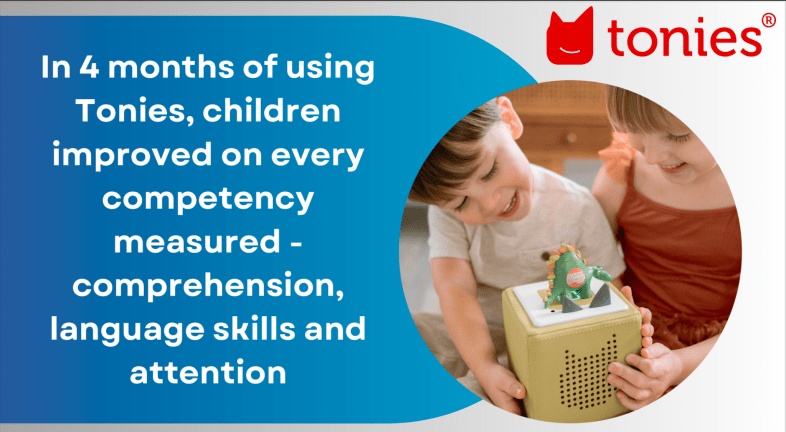
In a world where technology often competes with traditional learning methods, educators are always on the lookout for innovative tools that can genuinely impact children’s development. The Toniebox, a revolutionary audio device, has recently released the results of a study conducted between January and June 2023. The study explored how this creative tool can influence young learners’ comprehension, language skills, and attention.

Unlocking the Potential of the Toniebox

We should first understand what makes the Toniebox stand out. It’s an audio storytelling device that combines the magic of bedtime stories with captivating learning content. It makes it an excellent addition to the early childhood education toolkit and the best part is that kids are independent in their learning and can use it without much help at all.

A recent study

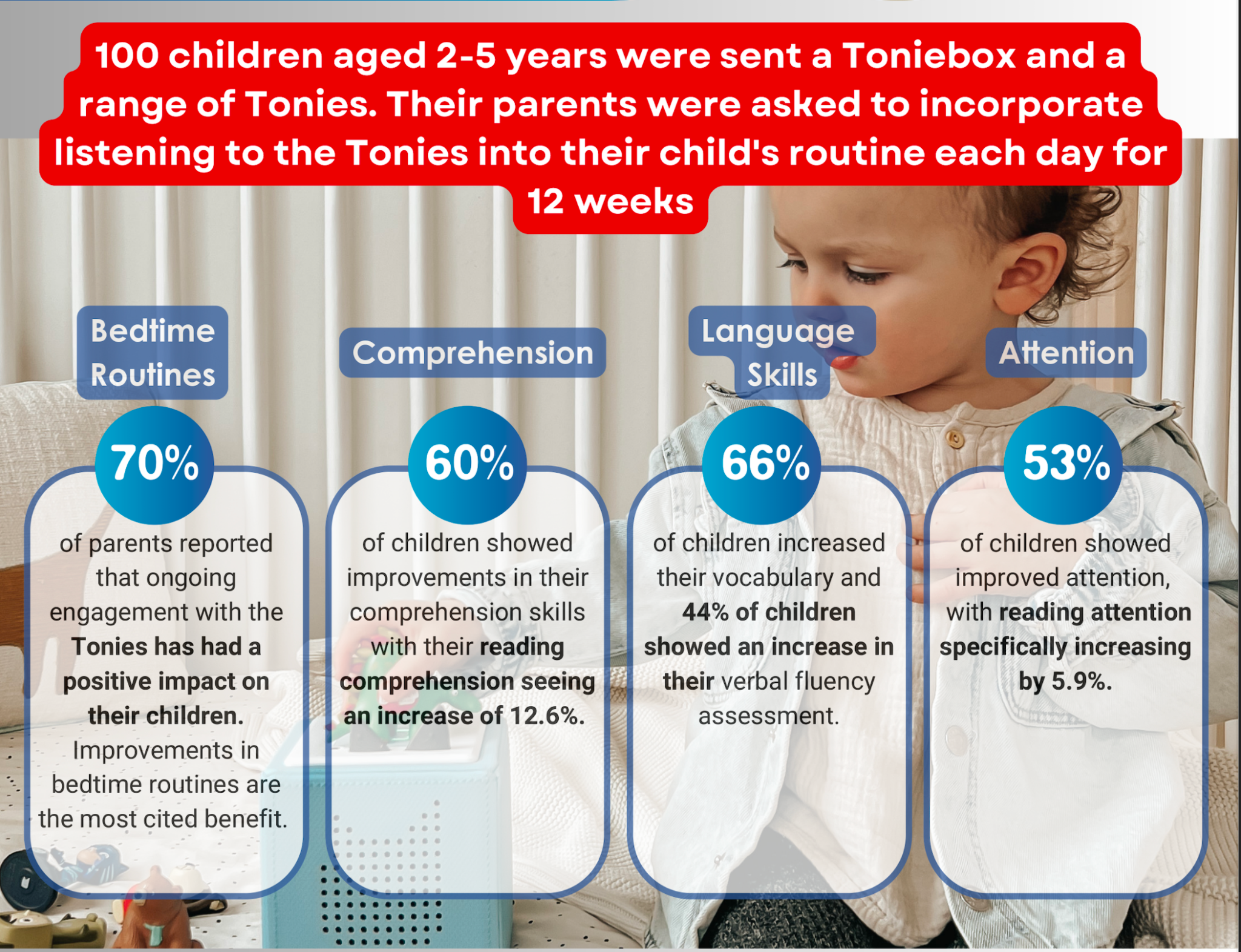
Imagine a learning tool that cultivates comprehension, language skills, and attention in young children. The recent study included 100 families from the UK and the United States, and involved children of ages 2 through 5. The research began with interviews to establish baseline measurements for each child’s development. Families were then provided with a Toniebox and bedtime Tonies, along with instructions to integrate them into their bedtime routines. After a period of 2-3 weeks, there were follow-up interviews that assessed the impact of Tonies on each child. Families were then provided with additional Tonies from the 4 Learning Centers: Discovery, Reading, Mindfulness, and Independent Play. After at least 12 weeks, there was another round of interviews which evaluated the effects of the Toniebox on children’s learning.

The Impact

1. Bedtime Routine Improvement:

– For parents who initially struggled with bedtime, using the Toniebox improved the situation for a remarkable 92% of them.

– Even if routines took longer, parents noted less resistance from their children, a welcome relief for many.

– Satisfaction scores increased significantly, from 6.6 to 7.4 out of 10, indicating happier bedtime experiences.

2. Comprehension and Language Skills:

– 60% of children’s comprehension scores increased

– Researcher-assessed comprehension levels improved by an impressive 6.3%.

– Reading comprehension scores saw a substantial increase of 12.6%.

– Verbal fluency jumped by over 10%, with 44% of children demonstrating improved verbal fluency.

– Vocabulary scores increased by 13.2%, with 66% of children scoring higher.

3. Enhanced Attention and Engagement:

– 53% of children’s general attention scores improved.

– For reading-specific attention, there was a 5.9% average increase.

– Engagement with stories increased by 7%, indicating greater interest.

Educators’ Takeaway: Tonies Toniebox

What makes the Toniebox an invaluable addition to early childhood education? It’s the perfect blend of entertainment and education. Here’s why educators should consider integrating it into their teaching strategies:

1. Promotes Literacy and Learning: The Toniebox enhances comprehension, language skills, and attention, crucial for early childhood education. The significant boost in reading comprehension is especially noteworthy.

2. Bedtime Routine Improvement: Better bedtime routines mean well-rested, alert learners in the classroom. Educators can appreciate the positive impact on children’s behavior and readiness to learn.

3. Screen-Free Learning: In a world dominated by screens, the Toniebox offers a refreshing screen-free alternative, promoting auditory learning and imaginative thinking.

4. Parent and Child Collaboration: The Toniebox encourages parent-child interaction, fostering a love for storytelling and learning from an early age.

Feedback from parents

The feedback offered by parents provides some valuable insights into the unique experiences they had with the Toniebox in their home.

1. Vocabulary Development and Screen-Free Engagement: A parent highlighted how Tonies significantly contributed to her child’s vocabulary development while serving as a screen-free alternative. The child’s enthusiasm for their Toniebox was so profound that he even listened to them for extended periods during road trips, showcasing the potential of this audio-based medium.

2. Design and Quality: Parents appreciated the figurine design of Tonies, which differentiated it from other devices. Many found Tonies ideal for storytelling, while other devices were preferred for music. The Toniebox engaged a child’s mind safely and offered high-quality manufacturing.

3. Innovative Possibilities: Parents associated reduced screen time with improved behavior in their children, emphasizing Tonies’ role in promoting a healthy balance.

The Toniebox is a valuable addition to childhood The feedback from parents underscores the versatility and potential of the Toniebox. While the study’s quantitative findings reveal its substantial impact on bedtime routines, comprehension, language skills, and attention, the individual comments paint a more comprehensive picture of its role in children’s lives. The Toniebox offers not only educational benefits but also a unique opportunity for children to engage with audio-based content in a screen-free and imaginative manner.

Toniebox is more than just a device; it’s a tool that empowers educators and parents to inspire young minds while nurturing positive habits and fostering a lifelong love for learning. As we navigate the ever-changing landscape of early education, the Toniebox supports the development of young learners in a dynamic and enriching way.

It is more than just a storytelling device; it’s a game-changer for early childhood education. Its potential to transform bedtime routines, enhance comprehension, language skills, and attention makes it a tool that educators should bring to their classroom. This innovative approach to learning is not only effective but also a whole lot of fun for young learners.

Contact Rachelle to schedule sessions for your school or keynotes for your conference about Artificial Intelligence, Coding, AR/VR, SEL, STEM and more!

Follow her on Twitter and Instagram at @Rdene915

**Interested in writing a guest blog for my site? Would love to share your ideas! Submit your post here. Looking for a new book to read? Find these available at bit.ly/Pothbooks

************ Also check out my THRIVEinEDU Podcast Here!

Join my show on THRIVEinEDU on Facebook. Join the group here