Rubicon Summit: Classroom’s Journey To Student-Led, Interactive Lessons

A Classroom’s Journey To Student-Led, Interactive Lessons

Written for the RUBICON SUMMIT

About two years ago, I found myself struggling to find ways to keep my students engaged in the lesson. I tried to get them involved more in class activities by offering more choices and providing opportunities for them to be part of the decisions made about what we were doing in the classroom. Why did I do this? Partially because I saw – and could feel – a decrease in student motivation and engagement. It was approaching the end of the school year, and the focus had shifted more to “when does summer begin?”

So I tried to do things a bit differently, think creatively, and take some risks. I wanted to keep us all moving, to finish strong at the end of the school year and begin summer vacation with a sense of accomplishment, to celebrate all that we had learned throughout the year and also what we had gained from these new experiences.

Educational Technology and Digital Tools with Purpose
Educational Technology provides so many resources that enable students to learn anywhere and at any time, and at a pace that is comfortable for each student. We can instruct from inside the traditional classroom, ​”​the brick-and-mortar​” ​as it is called, or from anywhere around the world. Using digital tools provides more differentiation and personalized learning, and provides opportunities for the students to move from consumers to creators. When students have choices in how to show what they have learned, they are more likely to be engaged and excited for learning. They will feel valued​,​ and the lesson and learning will be more meaningful because it has been made perso​n​al to them.

Creating Interactive Lessons
What did I change? I started by having my students create some interactive lessons using educational technology tools like Formative, Nearpod, and EDPuzzle, or even games with Kahoot! and Quizizz. It proved to be a very beneficial learning experience for all of us. By doing this, we had extra resources available that could be shared with students who might need some extra practice. I thought it went so well that I decided to take it a step further and start a “teacher for a day” activity during which the students create a lesson based on a grammar topic or vocabulary.

I stepped back and had the students lead our classroom. It was a really good way to learn a lot more about the students, to better understand what their needs were in terms of the content material, and for the students to learn about each other. Giving students the control and the opportunity to become the creators and leaders in the class has tremendous benefits and it has been something that we have enjoyed.

Giving Students the Control
At first when students created interactive lessons, I would launch the lesson and control it on the SmartBoard, but find ways to involve the student who created it during the presentation. I eventually decided to move aside, and took a seat in the back of the room, having the student lead the lesson, give explanations, answer questions, call upon students for answers, and provide feedback. Having the opportunity to sit back and experience this was tremendous. The students enjoyed the activity, supported each other, collaborated, and provided some positive feedback to each of their classmates. I was very impressed with how well they taught, led, and learned during each of the “teacher for a day” lessons.

Empowering Students in Learning
The use of these digital tools means ​that ​the “time and place for learning” is no​ longer​ confined to the ​traditional time and setting of the physical ​classroom​. It opens up the learning environment ​to​ anywhere​, at any time and at a pace that is comfortable for the students as well. Learning and having timely, purposeful and authentic feedback is critical ​for growth to happen. When we shift our focus to creating opportunities, giving students the control, leaving the decision making to students to choose ​how t​o show what they have learned, or ​letting them​ design their own assessments, they are more empowered in their learning.

What are the Next Steps?
Have a conversation with your students and ask for their honest feedback. What did they like? What did they not like? Which lesson or format seemed to help the most? What did it feel like to be in control, decide how to deliver the lesson, and experience being the teacher? You can have this as a face to face conversation, students can respond on paper, or use one of the many digital tools available for communication. No matter which way you choose, look to your students for the valuable feedback to decide your next steps. Be sure to ask yourself these same questions and continue to reflect on steps taken and progress made!

For more strategies about integrating technology into instruction, read Overcome

EdTech’s Problems With Blended Learning!

Globally Connecting Learners through Project Based Learning

Published on Getting Smart, November 15, 2017

In honor of International Education Week, we’re bringing you a series of blogs that celebrate the benefits of global competencies, international education and cultural exchanges. Stay tuned for more like this throughout the week!

Project-Based​ Learning​ (PBL)​ offers tremendous benefits for students to become engaged in more authentic and purposeful learning. Providing opportunities in which students have choices in what to explore, where to seek information, and ultimately how to share their learning, will lead to higher student engagement and more meaningful learning experiences. By giving students the chance to be curious in exploring a concept which is of personal interest, or working together to tackle a problem or engage in some challenge-based learning, we foster more student-driven classrooms and promote curiosity in learning.

As educators, we need to strive to open up opportunities for students to broaden their perspectives, to engage in collaboration with their peers, and more importantly, to become globally connected learners. PBL is a way to connect our students globally and it also addresses the 4 C’s: critical thinking, collaboration, communication, and creativity. Opportunities like this, in which students can become more independent and have choices for where their search leads them will amplify the learning potential of all students in the classroom as well as for the new connections made.

Entering my second year of project-based learning I wanted to take it to another level with my Spanish classes, after attending and presenting at EdmodoCon. I was  amazed at the power of technology to unite educators from around the world and I wanted to do more in my classroom. Learning from such diverse perspectives, and fascinated by the ability to communicate with my new colleagues, at any time from around the world further solidified my belief that this was something that must be done in my classroom. I wanted my students to have as many diverse, authentic opportunities to explore the world as they could.

Setting up a process to connect students with the world can take some time to plan as you must decide what is the best method and structure to use, but getting the connections started is really quite simple. There are many different learning communities available depending on what is used for a classroom website. I use Edmodo, but there are also professional learning communities available through ISTE or Google+. Getting started simply takes posting a message in the community and awaiting responses from other educators interested in making new connections.

Here is the process I followed to get started with my class:

Screen Shot 2017-10-28 at 9.48.24 PM.png1. Shared the idea: I told students the idea for making global connections and the “why” behind this newexperience. While doing PBL, it is essential to have the students connect with real-world experiences in authentic ways. Once I explained to my students how I had planned to do this, I then posted a message in a few of the Edmodo communities. In my message, I explained what my students would be doing, the types of topics they would be learning about and how we could collaborate.

2. Collected responses: I received several responses to my message and replied to each to gather more details about the age group of the students, the location of the classroom and options for connecting our classes.

3. Created groups on Edmodo: Once several educators were interested, I created a separate group on Edmodo and shared the join code with my students as well as the students from the other classrooms. Edmodo provides a safe place to interact to not only help students become globally connected and share their perspective, but is also an opportunity to learn and connect with other educators.

4. Got started: We started by simply making introductions and then the students started to ask questions related to their project-based learning and essential questions. The students were amazed and excited about how quickly responses were received and how willing the other students were to share information, provide resources and interact with one another. It has been tremendous to see how much the students have learned in such a short amount of time. This type of learning could not occur without technology, it provides authentic and personalized learning because the students are connecting globally and broadening their perspectives in a more engaging and personalized way.

5. Expanded the project: In order to take it even further, once the conversations and connections had been established, we wanted to interact through audio and video. Due to the difference in time zones and schedules, we needed to find a more convenient way to interact. Flipgrid presented the perfect solution for setting up an online space for students to introduce themselves, show their schools, and have some fun interacting in a moderated and safe environment. It was very exciting to receive the notifications that a new Flipgrid response had been posted, and watching it immediately in class was fantastic for the students. Students can learn by looking at pictures, reading books and watching videos but to be able to interact in this way and this quickly is truly an amazing experience. The best part was when the students were finally able to see the students they had been interacting with. We also used Padlet as another virtual space to interact through photos and conversations.

Screen Shot 2017-10-28 at 9.45.12 PM.png

Being an educator does not mean that you are an expert. We are constantly learning and should be seeking new ways to bring knowledge and different learning experiences into our classrooms. In just a few short weeks of working with these global connections and setting aside the time to open up and increase the learning potential for my students, I have learned so much. For the four teachers in our group, this is the first time that any of us are doing anything like this and we are learning and growing together. We are enjoying the experience with our students and the best part for me, is learning more about my own students through their interactions online and I believe that the students are learning more about themselves as well.

Why Students should learn to code and how to get started

Published originally on Getting Smart December 15, 2017

Coding is one of the topics that has received greater attention in education over the past couple of years. With a greater emphasis on computer science and coding and the demand for knowledge in these areas, there has been an increase in the variety of resources available to encourage schools to provide opportunities for students to learn about coding. The “Hour of Code” takes place annually during “Computer Science Education Week”. The week is in recognition of the birthday of Admiral Grace Murray Hopper, a computing pioneer. To see some of the events and activities from this year’s “Hour of Code” week, go to the Code.org site or check out the hashtags on Twitter for #HourofCode and #CSweek.

The goal of participating in an “Hour of Code”, is to show that anyone can code and to highlight how vital computer science knowledge is for today’s students, as it helps them to develop the skills they need to be prepared for their future. Data provided on Code.Org provide statistics which support the growing need for students to have opportunities to learn about and develop skills in coding and computer science. According to the site, the majority of schools do not teach computer science, with only 40% reported as having courses available for students. For careers in STEM, 71% of the jobs available are in computing, however, only 8% of STEM graduates are in Computer Science. As for future employment, computing jobs are the #1 source of new wages in the United States, a number that is expected to increase. In addition to the future benefits for employment, what are the other benefits of coding for students?

Why should students learn to code?

Coding is something that each student can do and is a more engaging way for students to work on their collaboration, critical thinking and problem-solving skills. Coding can help to promote SEL (Social and Emotional Learning) skills as well. For example, in working through the various modules available on Code.org or through other coding programs, students develop their self-awareness as they work through the challenges of coding and they develop a greater understanding of their strengths and being able to set goals for oneself based on this self-awareness. Students will become more confident as they problem solve and experience success along the way and by helping peers as well. Students build relationship skills through the collaboration during activities, seeking and offering help when needed and learning to cooperate with one another to solve a coding challenge.

Students can also experience more inquiry-based learning, where they are exploring on their own, problem solving and discovering how to make a program work, where the steps fit in and then being able to share the experience with one another. Personally, I enjoy trying to work through the activities on my own, to experience the challenges and be better equipped to anticipate student questions, but also to be more familiar with areas of struggle.

Getting Started

The idea of coding can be a bit overwhelming, at least that is how I felt when I first started a few years ago with the game Hopscotch. It was challenging to create a game and it took a lot of patience to push through. However, back in the early 1980s, as a 7th-grade student, I had my first experience in writing lines of code with the Apple computers. Once you learn the basic structure and the commands, it is a gradual process that does not seem to take too long to master. Even nearly 35 years later, the concept of coding really is quite the same, except that we can create more visually engaging games and programs. There are so many resources and websites available to help educators and students get started, making it less intimidating than it may initially seem.

When trying some of the resources below, be sure to engage students in discussions about their experience with coding. Encourage students to share with their peers and talk about professions which require coding skills or to brainstorm areas where knowledge of coding will prove to be beneficial. Providing this time for students to interact will help them to develop their SEL skills, by building peer relationships and supporting the classroom culture.

Working with students

Be ready for students to express some frustrations when trying to work through the activities. Even if you don’t have experience coding, it’s a great opportunity to learn right along with the students and in many cases to learn from them. How do you prepare? I recommend trying each of the activities on your own, so you are familiar with the set-up and the types of tasks that the students will be completing. As a Star Wars fan, I started with the basics and did encounter some difficulty mid-way. As it turns out, a few of my students had the exact same problem with it and asked for help. Although I did figure out how to work through it, I wanted them to work through it on their own as well. We need to give students time and space to problem solve, to ask for peer support and to experience the frustration that comes with solving problems and the joy that replaces it when the solution is reached.

Seeing the students begin to collaborate and step in to help their peers, demonstrated the benefits beyond just learning to code, it promotes their SEL skills. A lot of what is involved in coding is critical thinking, problem-solving and definitely collaboration and with all this comes an amount of frustration perhaps when the code does not work as one expects. This is when we see the students start to connect and help one another and I have also seen students become very frustrated, understandably but it is what we do with that frustration, pushing through even in the face of challenges, knowing that there is support available amongst peers and the “teacher” in the room. There is always an identifiable teacher, but as we have learned in our classes, we all have something to learn and something to teach.

Ten resources to try

  1. Code Studio: A part of the Code.org, there are full courses available for learning different types of code, for different grade levels, as well as one-hour tutorials on themes such as Minecraft and Star Wars. Teachers can also use the “App Lab” and “Game Lab” to help students learn how to create using Javascript. Also available are more than 20 million projects created by students.
  2. Scratch: Created by MIT, Scratch is a website for more than just programming. Scratch provides an online community for sharing projects and for learning from the library of resources available on the site.
  3. Code Academy:  Through Code Academy, you can enroll in courses to learn how to program, or search the catalog to find a specific language to learn, such as Java, Javascript, HTML and CSS, for example.
  4. BrainPOP: Teachers can engage students in the “Creative Coding” module, in which students create stop-motion animation movies, memes and newscasts. Students follow the instructions to write their own lines of code and see how each line changes the program. Working through the module leads students to create their own codes and publish a movie or create a meme. The Creative Coding module is free for Teachers through the end of the year.  There are also lessons available which focus on Computer Science and Coding and offer a variety of activities for students to develop their skills.
  5. Hopscotch: an iPad app in which students can learn to make their own games and apps, available for students ages 8 and older. There are tutorials which include videos and lessons plans, making it easy to get started with this in class.
  6. Swift Playground: An iPad app that enables students to get started with coding quickly, without any coding knowledge. Students can start by solving puzzles in order to learn the basics, and then continue through challenges to do more advanced coding.
  7. Pencil Code: A collaborative programming site which provides resources for teachers, student project samples, and choices of creating games, playing music, drawing art, and working with mathematical equations and graphing.
  8. TeachersFirst: There is a rather extensive list of different types of websites for coding based on theme and grade level for getting students involved.
  9. Girls Who Code: A non-profit organization which focuses on closing the gender gap in technology. Girls Who Code offers information for creating after-school clubs for girls in grades six through 12 to learn about coding, as well as two-week-long summer courses and a seven-week-long specialized summer program for 10th and 11th grade girls to learn about coding and job opportunities.
  10. Khan Academy: A non-profit organization which offers free educational resources including practice activities and videos, which enable you to learn at your own pace. Khan Academy provides lessons on Computing, with options including computer animation, hour of code, computer programming and computer science. It is easy to get started by either choosing the basics and working through a whole lesson, or selecting a specific concept.

Coding is not just about learning to write a program, it’s about connecting with the learning and building relationships in the process. Learning to problem solve, collaborate and work together to build skills for the future. Developing our interpersonal skills and fostering the development of meaningful and supportive relationships in the classroom will empower students in learning.

7 Tips to Get The Most Out of Blogging This Year

Originally Published on Kidblog,

Getting ready for the start of a new school year – new students, new curriculum, and new tools – means teachers have a lot of preparation ahead of them. Whether new to Kidblog or a veteran classroom blogger, these tips will help you get the most out of your class blog this year.1) There is no better way to start the year than by way of introductions. Blogging can be a great way to get your students comfortable with you as their new teacher, as well as, their new classmates. In my classroom, I also use this time to cover expectations in the classroom. This is all done in a “Welcome back to school” blog post. Choose a fun theme for the class, add some links and include helpful information. Share information about you, including some fun facts, and encourage students to then respond to your post. You can begin to develop those vital relationships for your classroom.

2) Get parents connected. Make the decision to use blogs as a way to keep parents informed about what is going on in the classroom. Set a goal to write a blog post with a weekly update and share what is going on in the classroom, give highlights of upcoming events and activities the students will be participating in. Also, use the blog as a way to share student work with parents, which will really connect the home and the classroom, and involve all members of the learning community.

3) Involve students in planning for blog posts. Encourage students to come up with their own ideas or to work with peers to brainstorm some writing prompts to use throughout the year. Gather their ideas and then draw from their prompts. Involving students in the decision making process in the classroom helps to provide more authentic and meaningful learning experiences. It promotes student voice and choice in the classroom and helps students feel more valued and empowered. By actively engaging them in classroom decisions, students will feel more connected to the content and their peers.

4) Create a bridge between content areas by doing some cross-curricular blog posts. Find time to talk with and encourage other teachers who may not be using blogs, to work with you to create some cross-curricular opportunities. The blog can be a way for students to complete some writing assignments or projects for communicating their ideas and showing their learning. Students create their own personal space to share ideas and really have an opportunity to practice their skills for multiple content areas in a comfortable manner.

5) Try adding some other tech tools to app smash with Kidblog or use Kidblog as the means to share student work! Implementing other tools will help students develop their technology skills and digital literacy. For example, have students create a Buncee and write about what they’ve created, or, they may share it with a peer to create a story. These apps can be easily embed into Kidblog for their classmates to comment.

6) Have a routine for sharing student blog posts and set aside time in class for the students to work together to share their blogs, offer feedback and learn to reflect on their work. Making time for students to work with peers will build those positive classroom relationships and help students to become more confident in their learning. Their confidence will increase through the writing process and also by communicating and collaborating in the classroom.

7) Be sure to have resources available for students so they understand how to use the blog, how to write a post and to properly cite any images or other information they add to their posts. A great way to do this is by screen-casting a tutorial available to students, as well as, creating a “guide post” that gives students pointers on how to publish a post, the required format, and other information related to your expectations. By providing all the information in a place which is accessible, the process will be much easier for students throughout the year to have the support they need when they need it.

Engaging Students: Movement through games and music

Published on Getting Smart, November 5, 2017

What image comes to mind when you think of classrooms today? Where is the teacher and where are the students? Who is leading the discussion and doing most of the talking and moving in the classroom? For many, the image that comes to mind is that of a room of students, lined up in rows, with their attention directed to the teacher at the front of the room or involved in some activity at their desks. In this scenario, students are passively learning. Their involvement in class, in some cases, has them seated for the entire class period, while the teacher does most of the talking and moving around the room.

In the past, this may represent the typical format of classroom instruction, however today, with a greater focus on flexible learning environments, and educators looking to promote student choice and voice, this image or perception of “what classrooms look like”, has changed and continues to evolve into a more active learning space, a place where students are empowered. A space in which students take a more active role, transform students from consumers to creators and the former teacher-centered classroom into a student-centered and student-driven space.

Because students have typically spent so much of their school day seated, taking information in and do not always have time to ask questions, interact with peers, or do more than consume, they may become more passive learners. I started to notice this in my own classes. There was a decrease in student engagement, and reflecting on my methods I realized that I was spending so much time talking, that it was me making the decisions and leading all of our activities. There were not many opportunities for the students to work with peers, to move around, to really take control of their learning.

In an effort to encourage students to become more active learners as well as to be more involved in the types of activities and instruction in the classroom, I started to implement some teaching strategies involving music and games. There are many benefits to getting students more actively involved in learning and this can be done quite simply through a variety of teaching strategies. It can be a challenge to change over from the traditional classroom lecture model, however, there are some easy ways to change to a more active, engaging space.

IMG_20171025_115723178.jpg

How to design more active learning experiences:

1. Game-Based Learning (GBL): GBL is a great way to add fun into the classroom and help build student excitement for learning. The use of gaming offers different ways for students to practice and develop their skills in more active learning environments. Games encourage students to learn and master content by problem-solving, collaborating, creating and engaging in more authentic and meaningful learning. It is a way to promote independent learning as well as by offering students choices in games to play and the means to work toward individual goals.

2. Tech: Students can create a game as a way to help themselves and their peers practice concepts and gain mastery. It can be a game created using one of the many digital tools available like KahootQuizlet or Quizizz. Students enjoy the opportunity to create a game, which leads to a more authentic learning experience when students select the specific vocabulary they need to practice, thus leading to more personalized learning opportunities. Students add to their skills by choosing how to leverage technology for the purpose of more self-directed learning.

3. No-tech: Students are very creative and offering them a chance to design a game to practice new content can lead to better retention and increase motivation. To get started, a few examples that can be used are to create a chart which includes 4 or 5 different categories or topics related to the content and grade level being taught. After deciding on categories, perhaps select 5 or 6 letters of the alphabet, or use numbers, which students must use to come up with a word, topic or date, that relates to each category. For example, in teaching Spanish, selecting categories such as classroom objects, verbs, colors, family and then deciding on the starting letter, students can brainstorm words and review in unique ways. Students can then randomly be assigned to small groups and then share the words their group came up with. An activity like this will promote communication between peers and provide an opportunity for collaboration and some fun as well. It can also be a good way to have students review, be creative and brainstorm new ideas. This creates time for teachers to assess student needs and decide the next steps in the lesson.

4. Music: Music livens up the classroom and is useful for helping students retain their learning. There are many ways to include music in learning, one just as simple as playing music when students enter the room, or while they work in small groups, to add to the culture of the classroom. As instructional materials, one idea is to have students create rhymes or a song using a vocabulary list, names of famous people, state or world capitals, monuments or anything related to the content area. Students can work in pairs or a small group and create a song which can be used as a mnemonic device, to help them retain the information in a more meaningful way. Students can then present live in class or use a tool like Flipgrid or Recap to record and share with classmates. These student creations add to the authentic classroom resources and engage students more in learning.

In trying one or all of these activities, students have an opportunity to be more active in the classroom, work together, build relationships, collaborate and engage in more authentic learning experiences. Placing students in the lead provides the teacher with an opportunity to step aside and become a facilitator and use time in class as an opportunity to not only assess student learning but to interact more and provide feedback for students.

IMG_20170925_105644849_HDR.jpg

There are many ways to build students skills in the classroom, and these are just a few of the ideas that we have been trying and they are a work in progress. Knowing that something works takes reflection and student input. With students creating more and working in small groups, I have more time to move around and work with every student and group and provide more individualized instruction.

Students are asking more questions like, “Can we…?, What if…?, Is it okay to…?” and adding their creativity into our activities. Students suggest improvements, “Maybe we could… It might be better if we and This has helped me to remember…can we keep doing these activities?” And my answer to all of these has been “Yes, I think we should try it. If it works, then great. And if not, we will try again!”

Students need to be moving in the classroom and have opportunities to learn in different formats using a variety of instructional strategies and tools, and it’s okay if they are not in the traditional format.

New features to our favorite tools: Part III

I have really enjoyed getting to know the creators of Quizizz and being able to try some of the new features and learn about how they got started with this great learning tool. I am impressed with their dedication to creating a learning tool that will engage students in learning and offer more ways for students to engage in more authentic experiences. There is more to come from them, stay tuned!

Quizizz has continued to improve and add new features over the past two years,  especially with the option to assign games for practice, which students can do wherever they are, at any time. There is so much discussion and debate about the value of homework, and the “value” in having students complete the exact same assignment. Quizizz offers a better way to engage students in more authentic practice and be able to receive feedback available instantly. It is of great benefit for students to then be able to review their responses after completing the game. Learning opportunities like this are much more authentic than having students complete a traditional worksheet.

Joining a game of Quizizz simply requires sharing a join code with students, whether it be during a live session or assigned as a practice game. Teachers can set up a practice game for students and extend the time period that the game is open, for up to 15 days, and if students start the game, they can resume at a later time by using the same login information.

In addition to these ways of sharing the game, I was absolutely thrilled to find that I can assign the games directly to my students through Edmodo which is our base for our class.  I had been sharing games by posting the join code on our class pages in Edmodo, and I had no idea that this option existed until I created the game for practice, and it showed up as an option. Let me just say that my students in the room wondered what happened because I jumped up and yelled “YES!”  I really was excited to see this available. 

How does it work? When assigning a game for practice, you now have the option for sharing to Edmodo. When this is done, it creates an assignment where you can choose which class to assign it to, and you can also provide additional instructions. Once completed,  it posts the game directly to Edmodo for students to access. This addition makes it a lot easier to share games rather than having to remember the join code or going back to search through the reports to find it. Quizizz also integrates with Google Classroom.

Earlier this fall, Quizizz also launched their app, ZipQuiz, full of games to challenge friends in different content areas. Read about it in my prior post here.


Stay tuned for some new things coming from Quizizz, not going to give any details yet, but let’s just say, they’ve got some really great updates and features coming out very soon. Stay tuned!!


These are just a few of the newer updates to some very popular digital tools. If you have not tried them, choose one and start there. See what your students think, and see how adding just one of these in can increase student engagement and provide more meaningful practice for students.

Next up, taking a lot at the AR and VR tools available! Metaverse, Merge VR, CoSpaces, ARKit

IMG_20170628_111914745.jpg

EdmodoCon 2017

Honored and Amazed: EdmodoCon 2017


I have been a huge fan of Edmodo the last four years and it has really brought about tremendous, positive changes in my classroom, for my students and opened up a lot of new opportunities for me as well  Edmodocon, an online conference, takes place in August and is held at Edmodo headquarters in San Mateo, California. Each spring, Edmodo accepts proposals from educators to be selected as one of the featured speakers during this event. The last two years I had submitted a proposal to speak at EdmodoCon, not fully understanding the magnitude of it even though I had watched it each year, and definitely not expecting that I would be one of those selected to present.  I took a chance again this past year and submitted a proposal and definitely put some extra time into what I wanted to say and decided to just go for it. Honestly, I did not think that I would be selected.

​Finding out I was one of the educators selected to speak at ​EdmodoCon was really an emotional moment where I felt a little bit overwhelmed, very surprised, tremendously honored, and definitely scared. There was also ongoing disbelief that I had been chosen.

I had watched ​EdmodoCon the last two years and knew how it was set up​,​ where the people were speaking from​,​ and also that many thousands of people were watching from around the world while the event was ​streaming live. All of these images passed through my mind a​t​ a glimpse when I found out I was selected but the excitement ​was sometimes exchanged for nerves. I​ just could not believe that I was chosen and could not wait to attend.
I have been using Edmodo ​since 2015 and it truly has made a huge impact in my classroom. I found it almost accidentally, looking to find a way to open up more access for my students and to help solve some problems in communication, and availability. Over the years, the way​s​ that we have used Edmodo has changed and many new features have been added, making it even better than it already was. Having the opportunity to see the people working behind the scenes at Edmodo and to talk with ​each person was phenomenal.

How does one prepare for ​EdmodoCon?

Unlike any other presentation you have prepared for! While I have given many presentations in the form of Professional Development sessions, speaking at conferences and online learning ​events, preparing for something like this was a much greater feat. My session would be a ​2​​0 to ​30 minute presentation, speaking ​live from​ Edmodo. I needed to craft a message that would inform the participants or “Edmodians”, who were​ ​already familiar with Edmodo and knew so much about it. My goal was to convey my message of why and how it has made such an impact ​in​ my classroom.
Countless hours spent crafting the presentation​,​ re​-​working the images​,​ thinking through what I would say on August 1st, and lots of communication between myself and N​iccolina and ​Claire. The support I received was fantastic. The team was always readily available to give guidance and feedback, to do practice run​s​ ​or​ whatever was needed. They were there to support me and all of the speakers and definitely made the whole experience phenomenal, and always found ways to calm those nerves with reassurances and positive encouragement.


Prepping for EdmodoCon

I think I lucked out because I had the benefit of a little preparation when I was asked to speak about Edmodo during the Microsoft Hack the Classroom in San Antonio​ while at ISTE​ this summer. I prepared a​ ​5 minute “Ignite” talk on the integration of Microsoft Office with Edmodo and this experience definitely help​ed​ me to better prepare for EdmodoCon, but then again it was unlike any other experience I have had. It gave me some practice speaking in a studio setting with a live audience, microphone and cameras, but it didn’t quite prepare me for the full experience since it was only a five minute talk. But nevertheless, I am grateful for having had that opportunity to connect and to get a little bit of practice in before heading to the main event. Being able to step out of my comfort zone, and do something like this for the first time, was a challenge and I was very nervous about it, but having this experience definitely helped.

Heading to EdmodoCon

Going ​to San Francisco, arriving at Edmodo Headquarters, and meeting the other educators was tremendous. I was very excited about the day, getting to spend time at Edmodo, practicing a little and just being in the same space with educators from around the world, and having time to sit down with them and share how we use Edmodo was awesome. Being there and having the support and generosity of the whole Edmodo team, becoming connected with these other educators, really added so much more to what I already love about Edmodo. The whole team of Edmodo is people focus​ed,​ they work ​​for the students, they are a family and they are there to be a constant source of  support and encouragement to one another.

The way that we were all welcomed by the team was unlike anything I have ever experienced. We were greeted at check-in with welcome bags full of Edmodo gear, picked up by members of the team and driven to Edmodo headquarters where we had time to tour the office and also to ask questions of all of the team members working hard to make Edmodo what it is. We had catered meals, access to anything we could possibly want to make our time there more comfortable and most of all, we experienced a true sense of belonging and being part of the Edmodo family. Being able to meet for the first time people who have done nothing but work to make Edmodo a better platform for students and for education and who truly value the input from educators and the connections made, was an honor. Edmodo is how I made changes to my classroom that enabled me to open up more access to the resources the students need and also access to a world full of learning opportunities. Being selected to speak there and to share my experience with so many educators around the world was very humbling.

It is probably the most nervous I have ever been before a presentation and waiting for it to be my turn to speak was definitely a challenge for me to stay calm and focused.  But hearing Jennifer’s presentation before mine helped and once I entered into the room and put the headset on, my nerves pushed aside and I was ready to go. Of course I was still nervous but I felt like I could get through it, I was ready to share our story.  And I think the one thing that really helped to break the ice for me was when my slide deck would not load correctly and I just had to go on and start talking with fingers crossed that it would actually work. It’s really not much of a surprise that I would have some kind of a technical difficulty because I often joke that the technology cloud of darkness follows me at times. But the show must go on and if my slides did not work well then I was just going to have to talk my way through it as best as I could. Fortunately it only took a few minutes for everything to reload and so I was able to carry on through the presentation.

How did it go? I think for the most part I am pleased with how it went and I caught myself getting a little emotional at the start because it really hit me that I was speaking there and I have been so thankful for what Edmodo has provided for me to make things available for my students in my classroom. But standing there and having that chance to speak and share our experience with my own personal learning revelations about my teaching methods and why I needed to change was bittersweet.

Because I’m a reflective person and I did want to evaluate my speaking and be mindful of words or mannerisms that catch my attention, I watch the replay of the video. I first noticed the look on my face when told that my slides weren’t loading and then I should just start, it was a look of wait what? And as for my overall presentation, of course I did come up with a few things  that I would change. But that’s how we learn and grow and move forward. We have to reflect, we will make mistakes, we will face challenges and while it is important to acknowledge these, the most important thing is that we share our message and that we also share our learning and reflections in the process.


Edmodocon was amazing and it gave me a lot of new ideas for this school year and ways we can use Edmodo to knock down those classroom walls and to bring in opportunities for students to learn more about the world and to provide a safe space for them to connect with other students in the world. We can empower our connected learners.

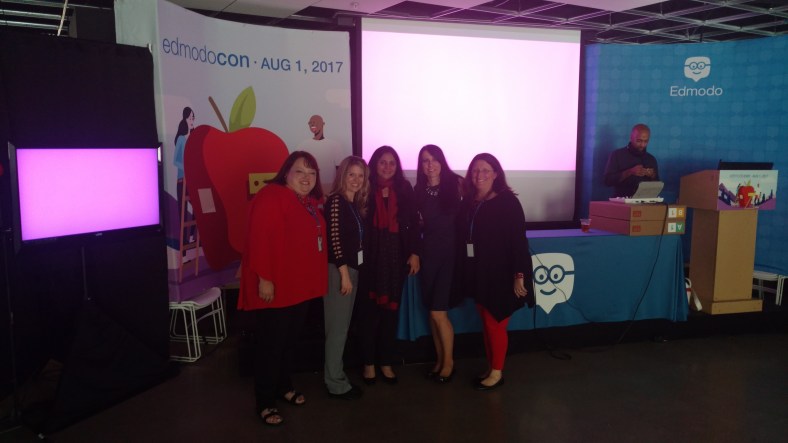
Celebrating together after EdmodoCon 2017

IMG_20170801_184215600.jpg


New features to our favorite tools: Part II

Kahoot!

Over the past couple of years, there have been a lot of new features added to make Kahoot even more engaging for students and teachers. Some of my favorite features are the questions automatically going through to the next one, the podium feature, its method for kicking out inappropriate names, the new Kahoot! app and other subtle changes to layout and options of the platform.  This year has brought two new things, that may be my favorites so far.

The first one I learned about while at ISTE in San Antonio, when I had the opportunity to spend some time with the team of Kahoot and learned about the “challenges” that they were creating. If you haven’t had the chance, you can “challenge” students to complete one of your games by sharing a code with them, just as you do for the live games but students can log into it within the app on their phones. Students can even challenge one another on different topics that they find in the app and so it’s a good way to provide practice for students outside of the classroom, where they don’t have to rely on the Smartboard to see the questions but rather have everything available on their device.

Screen Shot 2017-12-04 at 10.25.45 PM

Photo from Kahoot! Blog

RockstarPanda, EpicFox, Friendly Moose and StellarCheetah?

But the most fun that I’ve noticed is unexpectedly was about 2 weeks ago, I created a game for my students to play and at the top of the options, I noticed the option for “generating creative usernames”. So I figured why not, selected it and couldn’t wait for the students’ responses. The generating of creative student names resulted in my students saying that I was taking away their creativity. Kind of funny but these generated names were much more original than the names that they had commonly used when joining our games. I’m not going to lie, it was quite fun to yell out who is “Mystery Panda”, “Fantastic Bat”, “Daring Dog” rather than the usual names. Plus I think it’s a nice way to have anonymity in the game so that students feel more comfortable answering and not so worried about what their score is in front of everyone else.(Even though the often yell out what their score is).

The “Nickname Generator” has a list of 800 unique two word name combinations and using it is a great idea, because it saves the time lost while students try to come up with their own “Creative” names.

Games for the Hour of Code

In recognition of the week of December 4th through the 10th, being Computer Science Education Week, and the “Hour of Code”, Kahoot has added some games to help students understand some basics of coding. Try these out for some fun ways to get the students involved with coding and use the game as a starting point for some class discussion.

Screen Shot 2017-12-04 at 10.24.44 PM.png

From Kahoot!

New Look for the Kahoot details page

 I noticed something different when I launched a Kahoot game and that was the appearance of the page once I clicked on the game we wanted to play. It has a much clearer appearance, easy to navigate and a nicer layout. Here is how it looks:

Screen Shot 2017-12-04 at 10.17.26 PM.png

The “Play” and “Challenge” buttons are easy to find. You can see the questions and timers for each. By selecting the “Show Answer”, you are then able to see the choices for each and the correct response for each question.

Screen Shot 2017-12-04 at 10.20.48 PM

New features to our Favorite tools! Part I

Here is the first part of a series focused on some of the latest updates to four of the digital tools that we regularly use in our classroom. I admit that I may have been more excited than the students, when I came across these updates, but once we tried them in class, the students were just as excited for these new features.

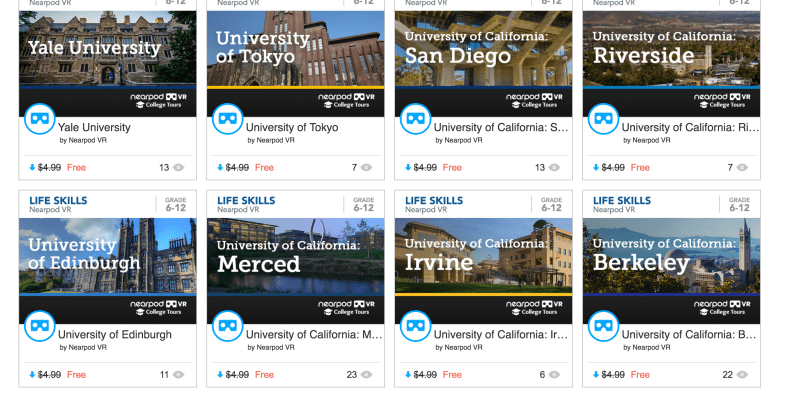
First is Nearpod. Nearpod + VR College Tours and Remind! Nearpod has been a game changer in my classroom. Students have engaged more in learning when we do lessons in class and they are interested in creating their own lessons, and taking on more of a leadership role by running the lessons on their own. Nearpod continues to add new features, making it a versatile tool that provides an immense library of lessons to choose from and a wide selection of activities, content and other resources to include into each lesson. Over the past few months, Nearpod has made some updates and integrated new features into the already extensive platform. Some of the new features  launched include: having more than 50 video lessons available through the BBC, option to view in “Student Mode” on the Teacher Dashboard, PheT Sims interactive Math and Science Lessons, and  making lessons with these resources available for immediate implementation into class. It is easy to find lessons that pertain to different content areas and grade levels, and which include a variety of tools for assessment and for engaging students more in learning.

Nearpod provides a very user friendly interface, which makes it easier for teachers to start using Nearpod and to build comfort when designing their own lessons. It is also highly beneficial for keeping the students actively learning on days when teachers have to be away from the classroom, through the use of Nearpod for Subs.
Launching lessons can be done live, with a join code in class, or shared through
a link, social connections, or through Google Classroom. But there is a new
update that makes it even easier to share, and that is Nearpod’s integration of
Remind as a way to share lessons. By integrating with Remind, educators send
the link through Remind, enabling students to start the lesson whenever they can
and wherever they are.
Another recent addition to the vast Nearpod library are the College Tours,
available in VR. What a great way to have students take a look at different
schools, without having to travel the distance, and to be able to immerse in the
campus and look around. There are currently 27 different colleges represented in
the collection, which include Universities such as Cambridge, Oxford, UNAM and
Taiwan and Tokyo, to name a few. A really great addition to the Nearpod collection and I recommend checking out the tours, and you can even use these as a way to create a scavenger hunt for students.

7 Tips to Get The Most Out of Blogging This Year

Getting ready for the start of a new school year – new students, new curriculum, and new tools – means teachers have a lot of preparation ahead of them. Whether new to Kidblog or a veteran classroom blogger, these tips will help you get the most out of your class blog this year.

1) There is no better way to start the year than by way of introductions. Blogging can be a great way to get your students comfortable with you as their new teacher, as well as, their new classmates. In my classroom, I also use this time to cover expectations in the classroom. This is all done in a “Welcome back to school” blog post. Choose a fun theme for the class, add some links and include helpful information. Share information about you, including some fun facts, and encourage students to then respond to your post. You can begin to develop those vital relationships for your classroom.

2) Get parents connected. Make the decision to use blogs as a way to keep parents informed about what is going on in the classroom. Set a goal to write a blog post with a weekly update and share what is going on in the classroom, give highlights of upcoming events and activities the students will be participating in. Also, use the blog as a way to share student work with parents, which will really connect the home and the classroom, and involve all members of the learning community.

3) Involve students in planning for blog posts. Encourage students to come up with their own ideas or to work with peers to brainstorm some writing prompts to use throughout the year. Gather their ideas and then draw from their prompts. Involving students in the decision making process in the classroom helps to provide more authentic and meaningful learning experiences. It promotes student voice and choice in the classroom and helps students feel more valued and empowered. By actively engaging them in classroom decisions, students will feel more connected to the content and their peers.

4) Create a bridge between content areas by doing some cross-curricular blog posts. Find time to talk with and encourage other teachers who may not be using blogs, to work with you to create some cross-curricular opportunities. The blog can be a way for students to complete some writing assignments or projects for communicating their ideas and showing their learning. Students create their own personal space to share ideas and really have an opportunity to practice their skills for multiple content areas in a comfortable manner.

5) Try adding some other tech tools to app smash with Kidblog or use Kidblog as the means to share student work! Implementing other tools will help students develop their technology skills and digital literacy. For example, have students create a Buncee and write about what they’ve created, or, they may share it with a peer to create a story. These apps can be easily embed into Kidblog for their classmates to comment.

6) Have a routine for sharing student blog posts and set aside time in class for the students to work together to share their blogs, offer feedback and learn to reflect on their work. Making time for students to work with peers will build those positive classroom relationships and help students to become more confident in their learning. Their confidence will increase through the writing process and also by communicating and collaborating in the classroom.

7) Be sure to have resources available for students so they understand how to use the blog, how to write a post and to properly cite any images or other information they add to their posts. A great way to do this is by screen-casting a tutorial available to students, as well as, creating a “guide post” that gives students pointers on how to publish a post, the required format, and other information related to your expectations. By providing all the information in a place which is accessible, the process will be much easier for students throughout the year to have the support they need when they need it.

Kidblog