Interactive Lessons: Let Students Create & Lead

After recent technology showcases, finishing up an independent study focused on Student engagement, motivation and social presence, I wanted to learn more about what students want and what they need to do well.  Taking the digital tools we had used, with me leading the lesson, I put it in their hands to create and lead.  It was an exciting opportunity, as the year was winding down, to keep motivated and try new things, but to give choices for all.  Here is the second part of a series of stories, with student reflections.


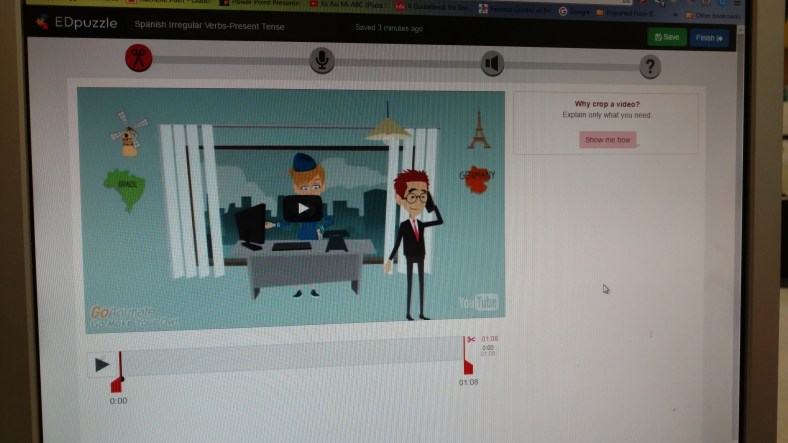
Interactive Video Lessons:  EDpuzzle

Rachelle Dene Poth: I am a Spanish and French Teacher and I look for ways to include student voice, choice, and leadership when finding the right materials for every student. With the help of some students, we worked with EDpuzzle as part of a new learning adventure, I wanted to empower students to become more than learners in the classroom. I wanted them to lead the class and develop these critical skills and have choices.

Choosing EDpuzzle

EDpuzzle is a tool that I have been increasingly interested in using with my students, to add to our video experiences and find new ways to engage them more in and out of class.  As the school year started to wind down, I found myself wanting to try some new methods of instruction with my students.  We have used a variety of digital tools to complete assessments, have discussions, create projects, collaborate on class wikis and more.  The benefits have been tremendous.  Students have improved their Spanish language skills by creating a more authentic and meaningful representation of what they know and can do with the material by having a choice in tools. This personalization  meets their interests and needs and helps to motivate them.  

Motivation for trying new things in the classroom

One of my main goals is to work to find creative and innovative ways to introduce content in my classroom and above all, to make sure that students have choices and feel valued and supported in the classroom.  Giving choices for how to show their learning, leads to a more beneficial and personalized experience for all students and even myself.  If each student chooses something different, this promotes more meaningful and unique learning experiences, and builds vital technology skills in the process. Opportunities like this lead to many benefits.   

So who benefits from these new, interactive and flipped experiences?

IMG_20160531_131429391

We all do. Teachers and students benefit because not only have we all reinforced our knowledge of the content material, (Spanish language and culture in our case), we are learning about new tools, and maybe even more importantly, about each other.  

Giving choices is a risk.  With so many options available, it is not possible to know everything about each tool and its benefits.  So as teachers, we have to learn as much as we can, and then relinquish some control to our students.  They need to have the chance to explore, create, and share.  Give them the opportunity to do more than simply produce the same product as the other students, because they are not the same.  Let them become the “creators” and the leaders in the classroom.  Let them take on a more active role and see how this promotes engagement, curiosity and motivation within them.

Putting the plan into action

With these new reflective thoughts, I began a new venture into having students select from diverse tools, which are typically used by teachers for delivering content, and had them create and teach a lesson.  I thought this could be a bit risky, but would also be beneficial for many reasons.  It seemed like an interesting twist to try, especially at the end of the year, and I wanted to see if and how it was of benefit.

Why make the change to student created lessons

Accountability.  In education, there is a lot of accountability.   Both teachers and students are accountable for learning and classroom involvement, as well as many other responsibilities.  In my classroom, I use a variety of learning activities and offer choices of tools to help the students to learn.  I often tell the students that it is like having a room full of toys, find one and try it, if you like it, keep it.  If you don’t then select something else, because the idea is for it to be something that is beneficial and meaningful to you. No matter what you do, use each as a learning opportunity and a chance to reflect and grow.

Videos for learning

One area I rely on for helping students is the use of videos. In the past, I would assign the videos to be viewed outside of class, flipping the learning environment, and hope the students watched the videos as instructed, but without any real way to know.  Sometimes we would discuss the video or I would have them complete an in class activity, ways to hold students accountable for watching the video.  But students could skip through the video, gathering only the highlights, and get by with just enough information to complete the activity, or without watching the video, could learn the information elsewhere.  So the problem remained student accountability.


That is before tools like EDpuzzle which enable the creation of interactive video lessons with analytics to show who watched, analyzing their responses to questions and much more. Without having tools like EDpuzzle, assigning students to watch a video alone does not promote accountability and is not quite as engaging, nor is it interactive.  Students are less likely to really focus on the material.  

How else can videos be used?

We use a variety of videos to enhance our learning in the classroom and I have spent time this year, creating more interactive lessons, to hold the students accountable.  I also started wondering how the students would like being the creators, more active and interactive, rather than passive in their learning, and using these traditionally considered “teacher” resources to produce an assessment or a project and let them lead in the classroom.  

I am thrilled with how this new approach has gone. While I may think that it went well and was very helpful, what matters more to me is what do the students think?  I make it clear that I do not want to waste their time and would not assign something that I did not truly believe was beneficial. This is my hope, but I rely on the honest feedback of students, to reflect and move forward.


So what do the students have to say?   

Three of my 10th grade, Spanish III students reflect on their experience with EDpuzzle.

Adam: I had been struggling to find a good web source to meet my needs for entertainment as well as my education in the classroom and EDpuzzle is a great way to meet both of these needs.  When I faced the challenge of preparing a lesson to teach to my Spanish 3 class, I honestly didn’t know where to start.  I first tried some other resources that we had used but they really weren’t getting the message across like I wanted. Then Mrs. Poth recommended a new tool by the name of EDpuzzle to me and my reaction was

“Edpuzzle? Mrs. Poth this is a Spanish project, not a puzzle!”
“Just try it out!” She said.
So I went home that night, and after thinking it through, I again began my Spanish project.  I started with another source and was still disappointed in my product.  Finally I decided to give EDPuzzle a chance. By the time the loading bar hit 100 percent and that page loaded up I knew I found the perfect tool for not only this project but many more to come!

EDpuzzle was a fantastic way for me to use my sports video and transform it into something completely unique with a few easy changes. And for future projects, I will never have the issue of handing out papers with the questions. I can simply tell my “class” to pull out their mobile devices and answer the questions that I have integrated into my video. There are so many options for a user to enjoy and learn from the features that EDpuzzle has to offer! Thank you for providing the tool to not only teach my Spanish 3 class but to have them enjoy  as well.

BEN: I used EDpuzzle for a class project. The first time I saw EDpuzzle was in class and I thought it had a pretty interesting concept. So, when we were assigned a project for the camping unit, I decided to try EDpuzzle.

I created a lesson for my classmates by adding comments and questions to a camping video I found online. I found that EDpuzzle was easy to use and that it was a new fun way to make a class project that could be used as an interactive lesson. I especially enjoyed the many features EDpuzzle offers such as the being able to crop the video, make an audio recording over the video, and being able to make different types of questions. I felt that EDpuzzle impacted me in that it gave me a new way to present a topic and a more fun way to create projects and relay information. EDpuzzle is a fun and different digital tool to use that can be a great tool for learning.

EDpuzzle


A student who participated in the lessons of Adam and Ben said: “ By having all of the different choices of tools to use for our project made it easier to find something that I was interested in and comfortable with.  The activities included in their video lessons were educational and fun,  and made learning more enjoyable for the students. It provides more than just watching a video and not really being held accountable for paying attention. You had to pay attention in order to answer the questions.   I would recommend EDpuzzle to anyone looking for a new way to present information, in any setting.”


In the end

It is all about giving the students choices and allowing them the opportunity to try new things, lead the class and develop their content area skills, as well as many other critical 21st century skills.  EDpuzzle and the other tools,  provided an opportunity for students to take on a new role, to build their comfort level, and to learn new ways of integrating technology and having fun in the process.  They were the teachers and we all were the learners. 

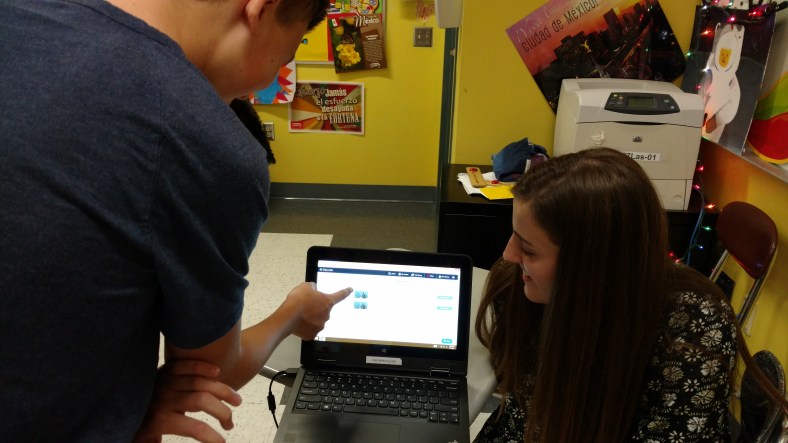
Showing how to use EDpuzzle in class.  IMG_20160601_105253829
Trying to Keep Students Involved: What Can We Do About Homework?

 Toward the end of this past school year, I noticed a quick decline in homework completion, student progress and motivation. I knew that it had been a very busy final few weeks full of testing, athletic events, and much more, and thought that I should work on ways to engage the students more, try some new things in class, and finish the year strong. So I used that time to test out some new tools, offer some new opportunities and different choices to the students. I found myself allowing for more spontaneity in our learning, taking a few more risks, and asking the students for more input into what they wanted to do and how they wanted to learn. It became part of my “staying strong till the finish” experiment, which included mixing up the seating arrangements, giving students opportunities to teach class, choosing how to show what they had learned and more. With positive responses, I then shifted to another area which concerned me and that was homework.
Do we need to assign homework?
As a student, I always had homework and it was always the same as everyone else. We did worksheets, or outlined chapters, or had some other task. When I first started teaching, I found myself teaching similar to how I had been taught. Homework was assigned to my students on most days, and on most days it was the same. For a very long time I did not see any problem with this, I was using the homework to assess the students and give them the practice they needed to master the content. But as part of my professional development and interest in trying new methods and focusing more on student needs, I realized that it does not have to be the same. So I shifted my focus to evaluating the types and the frequency of homework assignments that I was giving to my students.
Over the past few years, I have changed my thinking, looking for ways to move away from those “one size fits all” assignments and aim toward providing more personalized, authentic assignments for my students. Some other reasons are that students can possibly find answers online, or worse, copy the homework. And as a language teacher, I also wanted to find ways to discourage students from using online translators. These experiences, along with feeling a bit frustrated about the homework not being completed, led me to really try some new methods at the end of the year. And have led me to really think about what types of homework I will have for the upcoming year. It is an ongoing learning process. Some areas that I have been reflecting on are: the types of assessments used in my classroom, my different groups of students, the frequency of their homework completion, and even more closely, a look at the individual students within each of the classes. My goal is to continue to reflect on whether or not the type of instruction and the strategies I am using, are beneficial to them and if what I am assigning truly has value and is helping to build their skills, or is it simply busy work.
Questions I asked myself I have been thinking about a few areas of my teaching. What are the types of materials use in class? Have I been using the same resources each year with each class? Was I assigning the same homework to each class? There are times when I had used the same worksheet, or a test over the years. Not because I was lazy, but rather, because it was a quick assessment to use or I believed it was the best way to provide the students with practice. But I have been working to find something that would work best for and help the students. And I have realized that it is more than taking a look at each individual class, it means really developing an understanding of the needs of each individual student. What helps them to learn the best? What do our students want and need from us?
An experiment
I do believe in the value of homework and I know that students today have a lot of homework each day. Homework is one of the ways to help students to practice and evaluate what they know, what they don’t know and how they can improve. It is one of many ways teachers can assess students and learn about their needs, provide instruction and valuable feedback. To change things a bit, I decided to make things more personal and have the students decide what they could do for homework.
I assigned each student to be the teacher for the next class period. The students were working in pairs and their homework was to come to class the next day with a lesson to teach. It could be something tangible such as a worksheet or could be a website, a video, a game, or any other resource. I was fine with whatever they chose as long as they could use it in class and more importantly, that they could teach their partner. I thought this would be a great way for the students to have more meaningful learning and also build relationships and collaborative learning skills. And in the process, also see there was more than one teacher in the room.
The results
During the lessons, I interacted with each group to see the lessons they prepared. Students had created worksheets, written notes, brought flashcards, had games and videos and more. A few even created a game for their partner to play. But what was most important was that they sought out resources, they had an opportunity to teach someone else and their homework was personalized not only for them, but also for other students. It went well and they were enjoying it and learning. I was nervous about doing this, about not having clear expectations, and leaving it up to the students. It was a risk. But it went very well and I was impressed with how creative they were, their level of engagement, and the variety of “homework” that had been done.
The student responses
I value student input and regularly engage them in informal conversations because I want to know their thoughts. Did they learn? Was this an effective way to practice? It was a very positive experience and the end result was that the students became teachers, the learning was more personal, they felt valued, and it was meaningful and beneficial to their learning experiences. It is a risk and when you don’t necessarily have the whole plan set out, and you just kind of go with it, you might be surprised at the results. Giving up some control to the students is not always easy, but in doing this, it opened up more opportunities for facilitating their learning, providing more individualized instruction and continuing to build those relationships which are the foundation of education. I still have some time before the new school year and I am looking forward to trying more ideas like this, which give students more control and provide diverse learning opportunities.
There are a lot of great tools out there and students really like having choices in the classroom and learning new ways to use technology that helps them to develop their language skills.

New challenge in my classroom: Interactive Lessons

A New Challenge For My Classroom: Creating Interactive Video Lessons

 IMG_20160425_133159414
A New Challenge For My Classroom: Creating Interactive Video Lessons

Thank you Terry Heick and TeachThought for posting this on June 27, 2016

In my prior blog posts, I talked a lot about taking steps into integrating some type of technology into your classroom. I started with some general ideas about what you might consider and questions you might ask yourself to determine what might benefit your classroom.  Thinking about the best ways to help your students is the first step, and also an important way to focus on what you can do that will also benefit your practice as a teacher.

The underlying premise is that all involved have to take some sort of a risk. The teacher has to risk trying something different and new that perhaps is way off from the traditional practice of their classroom or perhaps it’s just a minor change in how they deliver instruction, with a learning target in mind. The students have to take a risk because they are the ones that will be using this new technology.  They will be trying a new tool, creating a project with a new presentation style, communicating and collaborating outside of the traditional classroom. And maybe even more importantly, stepping outside their comfort zone.

So it comes down to not only a change in thinking but also a willingness to expand one’s comfort zone and through collaboration, work on building something that can lead to many benefits for students and teachers in the learning environment.

The reason I decided on this topic is that while I have been talking about things I’ve been using in my classroom and how I got started, I also decided that I needed to branch out and try some new methods of delivering instruction. And even more important than my own risk in trying these things was the risk in getting the feedback from the students and learning what the impact was on them as well.

One of the things I love most about Twitter chats and reading blogs is that you get a lot of great ideas and feedback and I very much value the perspective of others.  So when trying something new in my classroom, I truly want to know what the students think about it. Did they like it? Did they have problems accessing it? Did it enhance their learning or did it take away from something that would have been more beneficial? In other words,  could it have been considered a total waste of valuable learning time.

Getting Started

A few months ago I decided to try Educanon (now Playposit). I have wanted to try it for a while, and since it was available as an app with Edmodo, I definitely wanted to try it with a group of my students. Over the past few years, I have been using some tools to flip my classroom and provide more blended learning experiences for my students.

In doing this, I also wanted a way to make them accountable for the activities that I was having them do outside of class. Without specific interactive tools, it can be difficult, aside from actually giving students a test or other assessment, to have proof that they watched a video; this was a risk for me.

I’m fortunate that my students are interested in learning new things and tolerant of the fact that I like to try new tools in our classroom and work to find a variety of engaging ways to help them learn. Playposit is integrated with several different Learning Management Systems, making that part easier.

I decided to take a small step and have Spanish II try it out first,  chose a YouTube video and created a lesson. There were some initial glitches, most of which occurred because students did not follow my instructions and I had to troubleshoot, however the feedback was very positive and the students really enjoyed it. Another area which was challenging for me was that I would not necessarily be able to answer their questions, because it was new to me as well.

I had researched and learned as much as I could before assigning the first “bulb” which is a lesson.  Other concerns I had were whether it would it be accessible to the students, would it indeed benefit their learning and how would they respond to yet another new tool.  My goal was to find another way to connect the learning and engage students, and even more, transform their roles from learners to leaders in the classroom.

How Does It Work?

It is very user friendly to create your own “bulb.”  You can select your video from YouTube, Vimeo, SchoolTube, TeacherTube, and Google Drive, and simply paste the URL into your lesson.  You then can add a variety of questions, discussion, audio, images, equations and more for your lesson, even explanations and descriptions. Once you are finished, assign the lesson and the students can begin.

There are a lot of choices for analytics to see how the students are progressing, their answer selections, see if any questions were skipped or that students found confusing, and look for trends across the class. Several ways to share the lesson, either by having students sign up, upload a roster, or have it integrated with your LMS.  There are diverse ways to create the lessons that will help to engage your students more and deliver lessons which provide more personalized learning experiences and give you the means to provide feedback to the students.

I have encouraged students to create presentations using tools like this, because I think it really helps them to learn the material, they can personalize it, it is interactive, they build on their technology skills, and they can see what it is like to be the teacher, to have the power to drive the learning in the classroom. Feeling valued and having input into the classroom, engages students more and enhances the learning opportunities for all.

As the teacher, I take part in their lesson and enjoy learning from them as well.


Conclusion

The nice thing about Playposit is that there are premade “bulbs” or public lessons already available, so if you don’t have a lot of time right now to build your own, take a look at what is already made and try it in your classroom. Talk to your students and see how they like it and how it impacts your learning environment.

There is nothing wrong with trying it out and seeing what others have done. Sharing leads to new ideas and it is all part of the growth process. The important thing is to just start somewhere, start small, and work your way up.  It may go really well and it may not go as hoped, but it is an opportunity to learn, expand skills and involve students in the process.

Using Technology To Help Students Lead Their Own Learning

IMG_20160504_111504184

Using Technology To Help Students Lead Their Own Learning


by Rachelle Dene Poth

Technology provides ways for students to learn anywhere and at any time, and affords the possibility of providing learning at a pace that is comfortable for each student.

Teachers can teach students from inside the traditional classroom, “the brick-and-mortar” as it is called, or from other places anywhere around the world. Lessons can be pre-recorded and shared or streamed live, and students can access these types of tools at any time and refer back to them as needed. The availability of tools which lend themselves to more interaction between the teacher and the students–and the content can continue, in the mind of the student, to grow.

There are many options available and the best part is that with so many choices, it is possible to find something that meets the needs of each class and each student. Using digital tools provides more differentiation and personalized learning, and can provide opportunities for the students to take on the role of teachers and to create their own lesson and lead. Students can create with these tools and share lessons with the class, thereby increasing the resources available to all students. Or simply use the opportunity to become the creator, as a way to help them learn the material in a more meaningful and authentic way.

They Can Learn Anytime, Anywhere

The use of technology can mean that learning is no longer confined to the traditional time and setting of the classroom. In this way, it opens up the learning environment to anytime, anywhere–and at a pace that is comfortable for the students as well.

Teachers and students can access so many resources to teach the content and to help understand and then apply the knowledge they have gained. And when students are given choices in how to show what they have learned, they are more likely to be engaged and excited for learning. They will feel valued, and the lesson and learning will be more meaningful because it has been made personal to them. Given support, students can find resources that meet their needs, and teachers can also use these resources to find out what the student needs are.

With the multiple ways to assess students using digital tools today, teachers can have the data instantly, through live results, and can provide feedback to students when they need it the most. Students can take this information and then build on their own skills, and when they can’t or choose not to, you know where to start when helping them and their families growing as master learners.

It Give Them Choices

The timing and quality of learning feedback is critical for growth to happen. Students can also make choices about what types of activities they want to use and therefore are more empowered in their learning and can self-direct. If you give some of the control and leave the decision making to students to choose how to show what they have learned, or let them design their own homework assignment, they have the chance to be more empowered, and build momentum that can endure after the unit is over.

Giving students opportunities to work with each other and take on a new role, such as that of a teacher, enables you to also provide more one-on-one feedback. Teachers can become more of a facilitator and move around the classroom and learn more about the students and their needs, and also build relationships in the process. Relationships are key to student growth, and choice can be a significant boost here.

It Can Help Them Find Resources More Relevant To Them

One of the advantages of digital tools is that it can make some things more accessible; anytime, anywhere access to information, past work, groups, experts, and more are not the only benefit of technology. The resources and materials have more of an opportunity to stay up-to-date, and there are many so choices that each student can find something that is relevant to them.


Using Technology To Help Students Lead Their Own Learning; adapted image attribution flickr user sparkfunelectronics

Blendspace: How it can benefit your classroom

What Is Blendspace?

 Thanks to Terry Heick and TeachThought for publishing this today.

What Is Blendspace? Using Blendspace In The Classroom

by Rachelle Dene Poth

In my prior two posts, I talked about the way I started to gradually work toward integrating more technology into my classroom.

I focused on what I thought was an area that could use some improvement, and found that there was a disconnect occurring.  I needed a better way to communicate and collaborate with my students and for them to access help when they needed it and the resources that would help them to be successful.  So for me I started with Celly (a messaging app) and once I felt comfortable, integrated Edmodo as our classroom LMS.

BLEND

Once I felt like these were having a positive impact on my classroom, which came in the form of solving problems of lost papers, forgotten assignments, and missed learning opportunities due to class absences.  I began searching for another way to make some improvements and found a tool called Blendspace.

Change takes time, there is no doubt, but we must persist when we take on any new venture. Sometimes it can take longer than we like because we run into difficulties and roadblocks.  In the search for answers to your initial questions, new questions arise, And that is the nature of the game. it becomes an ongoing cycle which helps in the promotion of goal setting and growth as teachers.

How Does Blendspace Fit?

Blendspace is a tool that provides many possibilities and initially I used it as a method of curating resources and flipping my classroom. There are similar tools available, and regardless of which you choose, having one place to keep your resources is a really great idea. So how do you make the decision of which to rely on?

Looking at sites such as Graphite or EdShelf can help. Reading blogs and participating in Twitter chats are also great ways to find out what others are using and their thoughts.  For example, using something like Graphite or EdShelf, you can get a summary of the uses of a web tool, read the reviews and stories about user experiences. Hearing about how other educators are using tools like Blendspace is tremendously helpful when deciding on what tool to integrate into your classroom.

3 Ways To Use Blendspace In The Classroom

1. Flip Your Classroom

I like Blendspace because it really does provide a variety of benefits to me both personally and professionally.  It can be used as a way to flip the classroom and to save that vital classroom time for student interactions, engaging activities, or having students work independently while teachers facilitate their activities and provide feedback one-on-one.

Blendspace can be used to create a lesson using the TES Resources tab, then shared with students through their class account or through a direct link. Regardless of how the lesson is shared, students have access to many resources and can learn asynchronously outside of the classroom, on their own schedule, using whatever device they choose.

This means that, in ideal circumstances, learning can take place anywhere at any time. The choice is the students’ and that’s the great thing about technology and the usefulness of tools like Blendspace. It can also be used to store favorite web tools, presentations, or one’s personal work. It makes it easier to share ideas with colleagues, and organized teaching and learning materials with students.

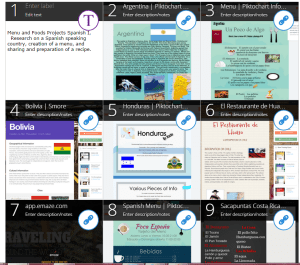
BlendspacesSpanish5A

2. Present Student Work In Class

Blendspace is a way to avoid fumbling with flash drives, losing valuable class time opening emails and attachments.  All of the student projects can be added by their URL or uploaded into one lesson, given it a title, and in class, only one lesson has to be opened to display the student work for the class to enjoy.

FOODSImage

3. Build A Lesson

Building a lesson for any level or discipline is easy with Blendspace. Simply choose your topic and by using the TES Resource tools provided such as Google Search, Educreations, Google Drive, Dropbox, uploads from your computer, and more, you can quickly build a lesson.  All it takes is finding the resource and dragging it into place in your lesson.

You can add boxes, move items around, and no matter what you do it is done quickly. It really is a great way to share information, keep track of projects, and so much more. These are just some of the reasons why I am really happy that I found Blendspace and how its use has benefited my classroom. I recommend checking it out if you have not, and letting me know in the comments below what your experience was!

BlendspaceLessonCreation