Time for new ideas


null

The end of the school year is the perfect time to try the tools or explore new ideas that perhaps you did not get to throughout the year. We can also use this as a time to prep for the next school year. By trying different tools and platforms during the last few weeks, we can then take the summer break to reflect on their impact on student learning. During the spring, I notice a drop in student engagement and an increase in the number of students missing classes due to testing, sporting events, or regular absences. Finding a way to keep students connected and engaged in the lesson is critical.

To resolve these challenges, I try to find something that will benefit students, resolve any disconnect or gaps in learning that might be happening and increase engagement. A new tool that caught my attention recently is NoteAffect. It is a platform focused on enhancing and understanding student engagement and empowering teachers with a powerful tool to better understand student learning.

Why NoteAffect?

NoteAffect provides a unique platform for personalizing the learning experience for students. Using NoteAffect, teachers can deliver lessons in a more interactive way that empowers students to be more involved in the lesson and have access to all of the course materials within one platform. Whether or not students are present in class, they can log in to their account at any time and either view the lesson they missed, or review a lesson in preparation for an exam or for continued review.

NoteAffect offers the right resources and methods to better engage students in learning and helps teachers to track student progress, better understand the questions that students might have and use it as a way to reflect on their own teaching practice. Worried about having devices that are compatible with? No worries as NoteAffect can be used on a PC, Mac, Chromebooks, Android, and iOS devices, so students can interact in class or on their own schedule.
null

Getting started with NoteAffect is easy!

Finding time is always a challenge with so much to do in our school days and prepping throughout the week. However, with NoteAffect, teachers can quickly set up an account, invite students to join classes and begin sharing a lecture. The dashboard is easy to navigate and it provides access to the materials that empower teachers to better understand student needs and learning trends.

Once you have created your courses in NoteAffect, it is easy to have students join in the course and participate in minutes.

To invite students, simply follow these steps:

  1. Go to your Dashboard and select “Instructor Tools” and then “Course Management.”
  2. Select the appropriate course from the menu on the left.
  3. Select “Participants” and then select “Add participant” from the top right corner.
  4. Enter the student’s email address and click “Add.”
  5. Students will receive an email with a  prompt to join the course.

Once students are participants in your course, they will be able to see any prior lectures and participate in the current lecture being delivered.

To start a lecture:

  1. Click “Start new lecture” and you will be prompted to open the Broadcaster.
  2. Once the Broadcaster window opens, use the drop-down menu to determine which application to display or if you have other files that you want to use for your lecture.
  3. Once you select the app, it starts to share your screen with your students and it will record the audio as well.
  4. When finished, simply End Lecture and it will be available to students.

Features of NoteAffect

  • Students can take notes, highlight important points, make annotations on the lecture notes and even submit an anonymous question during class. Classmates can see the questions and upvote a classmate’s question, making it more interactive.
  • It’s a great way to have everything accessible in one place as opposed to writing on pieces of paper or having to pull from different presentations. By using notes, students have access to everything within one platform, making it even easier for students to manage.
  • Teachers can deliver their lessons and add in or embed live polling, and further engage students in the lesson.
  • Using the analytics, teachers can see the level of participation and engagement with the material.
  • Analytics provide information including the views, notes taken, words per note and annotations made by students, providing a clearer picture of the level of understanding and engagement of students.

null

It will be easy to get started with NoteAffect in your classroom or to recommend to colleagues and administrators for use in their classrooms and schools. To learn more, check into NoteAffect here and get started with a demo today! Be sure to follow them on Twitter 


For my prior post on NoteAffect, click here


NoteAffect: A better way to engage

NoteAffect: A better way to engage

This post is sponsored by NoteAffect. All opinions are my own.

The Future of Educational Technology Conference (FETC) held at the end of January has become one of my favorite conferences because of the diverse opportunities available to explore emerging technologies and to network. One of my favorite things about FETC is exploring the edtech startups to find out what new tools and trends are out there and to learn some of the stories behind the creation of these tools. It is a great opportunity to see the different start-ups in the Pitch Fest competition and hear their passions for education.

One that caught my attention this year was NoteAffect, an interactive learning platform aimed at promoting and understanding student engagement. The platform empowers educators by providing many options for delivering a lecture and includes live polling, questions, analytics and more, to enhance the learner experience. With time so limited at the conference, I explored the platform on my own and then contacted Jay Tokosch,Founder and CEO of NoteAffect, to set up a demo.

The story behind NoteAffect

When I spoke with Jay, I learned that he got started in this business by founding Core-apps, one of the leading event management systems in 2009. Core-apps was the first company to create a mobile app used for event management. So if you’ve been to conferences or trade shows, and used a conference app to build your schedule, you may have using Core-apps. Having ten years of experience with a highly engaging event management app, Jay has designed an equally powerful learning tool for education. When I asked Jay about how he came up with the idea for NoteAffect, he told me that he got the idea after observing his son preparing for an exam. Jay noticed his son pulling out a spiral notebook, some printed Powerpoint presentations and other documents to study for his college engineering exam. As he studied, his son was going back and forth between all of those materials, trying to match everything up to study. Jay decided to “fix that problem” by designing something that could store all of the information in one place and make it easier for students to study.

The design of NoteAffect is quite simple and easy to navigate, which makes it a great choice for all teachers, whether they are beginners or advanced users when it comes to implementing technology in the classroom. By using a robust tool like NoteAffect, teachers have immediate access to real-time data that enables them to provide the right instructional supports and make adjustments on the fly as the lecture continues. The goal of NoteAffect is to empower teachers to provide the best learning experience and options for students and to close the gap that happens when students are absent from class. While students can easily get the notes or look over a presentation, without the additional resources added in and the interactive piece that NoteAffect provides, students will be missing out and cannot reach their fullest potential.

What does NoteAffect offer?

NoteAffect is more than simply a way to deliver a lecture. It offers digital interactive learning that is available to students whether live in class or for later viewing at a time that meets their schedule. It is a multi-purpose platform with capabilities to facilitate communication, collaboration and increase student engagement in learning. NoteAffect creates a virtual space for students to fully engage in the lesson, whether participating in class or viewing it at a later time.

When I first explored NoteAffect, what I immediately noticed was how easy it was to set up my courses, add students, locate my lectures, and navigate through the platform. Having time to explore NoteAffect closely, I thought about my own college experience years ago and how beneficial a tool like this would have been for some of the more challenging courses that I had. Although we had access to lecture notes made available after class, being able to interact with the content during class would have increased my understanding and helped with content retention.

Another benefit of Noteaffect is for increasing student engagement. For a long time, I struggled with student engagement and reached out to colleagues and tried different resources to see if I could engage students more. While the methods definitely improved student engagement, I needed more data to work from. Using NoteAffect enables you to focus more closely on student engagement by exploring the analytics available for each lecture and each student.

With NoteAffect, tracking student engagement is easier and it is also a great way to reflect on the teaching practices being used in the classroom.

I will continue exploring NoteAffect and gather some feedback from my students. Check into NoteAffect here and get started with a demo. My next post will highlight some of the features and offer some tips for getting started.

In Other Words: Quotes that Push Our Thinking

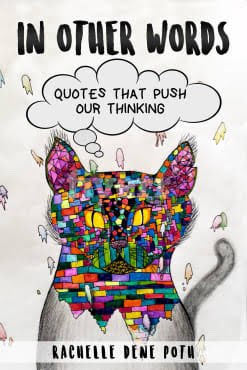
Teddy Roosevelt once said, “I am a part of everything I have read.” When I read his quote, it greatly resonated with me because of my love of quotes and the impact they can have in our lives. In Other Words is a book full of inspirational and thought-provoking quotes that have pushed my thinking, inspired me and given me strength when I needed it. The book shares stories around the importance of growing ourselves as educators, knowing our why, as well as learning from and embracing failures and taking risks with learning so we can become our best selves for those we lead and learn with.

Get your signed copy here: bit.ly/Inotherwordsbook

1553983585916_0601087574_47b12722

There are stories shared by educators with different backgrounds and different perspectives. My own experiences and interpretations and the educator vignettes shared by my PLN (Personal or Professional Learning Network) will hopefully push your thinking, inspire you, and provide whatever it is that you need. My hope is that by sharing our stories, it will inspire you to share yours.


There were many people involved throughout this journey. I reached out to members of my PLN and friends to include as many educators and students as possible. I  wanted to share more than just my story, but rather many stories and experiences.   This book is one that can be read by anyone, not just people in education. There are many quotes, unique personal experiences, beautiful graphics and more.

About the book #Quotes4EDU

In this book, I share some of my experiences and reflections based on quotes. I have included the stories of different educators in the form of vignettes or guest chapters. One chapter was written by two of my students and my book cover was drawn by one of my 9th-grade students. The story behind the book cover is included at the beginning of the book.  The book is available on Kindle or in paperback: bit.ly/Inotherwords  A few of the stories are available for listening on Synth. gosynth.com/p/s/pyzbnm  

Chapter Authors
Dennis Griffin
Maureen Hayes
Holly King
Elizabeth Merce
Melissa Pilakowski
Laura Steinbrink
Amy Storer
Donald Sturm
Cassy DeBacco
Celaine Hornsby
Vignettes
Marialice B.F.X. Curran
Jon Craig

Kristi  Daws

Sarah Fromhold
Jeff Kubiak
Matthew Larson
Jennifer Ledford
Kristen Nan
Toutoule Ntoya
Paul O’Neill
Zee Ann Poerio
Rodney Turner
Heather Young
Graphics 
Michael Mordechai Cohen
Dene Gainey
Manuel Herrera
Shelby  Krevokuch
Amber McCormick
Dana Ladenburger
Heather Lippert
Scott Nunes
Chris Spalton
Tisha Richmond
Monica Spillman
Laura Steinbrink
Kitty Tripp
Julie Woodard
Animated GIF-downsized_large (5)

Thank you Kristi Daws for creating these images!!


This slideshow requires JavaScript.

Class Updates: Communication and Collaboration made easy!

Sign up for free here for iOS and here for Android.

Why having a way to connect is important

One of the most important tasks for educators today is to find ways to be accessible to students. We want to build and foster a community of support, share information, and be available to our students. Developing a reliable way to communicate is critical for student success. While there are many traditional options available, ranging from posts on a class website, an email or even making a phone call home, educators need to be more accessible and have a way to exchange information in a timely manner.

With so many digital options available to choose from, those traditional methods of communicating have been converted into a much faster means of sharing information. Depending on the type of communication that you want to have for your classroom and parents, there are many possibilities to choose from. It simply takes figuring out what you hope to accomplish and to do better through this new method of communicating.

Why use Class Updates?

A few years ago, I started noticing what I refer to as a “disconnect.” When students were absent from class, had forgotten assignments at school, or did not understand the homework, it negatively impacted their opportunities for learning. I did not want the opportunity for learning to be lost due to a lack of communication and availability. I held myself responsible for finding a way to remedy the disconnect and find a way to be more available for students and for students to access class resources when they needed.

Class Updates, a student and teacher communication tool, offers a lot of ways to create more of a connection between students and teachers. When I first started using a messaging app, I only used it to send reminders to students and for students to be able to ask me a question. However, with Class Updates, there are some great features that enhance the learning experience and facilitate a better connection and method of communicating.

Some of the unique features of Class Updates include:

  1. User Profiles — include a profile pic, bio, and social media links
  2. Class/Teaching Schedule — set up your daily schedule, including start and end times
  3. Class/Group Calendar for important reminders/events/meetings — easy to set up a calendar to share with students
  4. Group Chat/Communication — message the entire class and facilitate conversations beyond the class period,
  5. In-app Messaging/Chat (individual to individual),
  6. Access to help when students need it — Teachers can be emailed directly from the app.

Sign up for free here for iOS and here for Android.

Students have shared how beneficial having tools like Class Updates is for asking questions, receiving reminders, and knowing when tests, homework and other events are coming up in class. You know something is working when the students tell you how helpful something is, especially by having the ability to ask questions and receive help when they need, which is often beyond the class period.

Some ideas for using Class Updates

-Field Trips are easier with a messaging tool

– Send reminders of assignments and upcoming tests and quizzes

– Announce a change in schedule

– Engage students in a group conversation after class ends

Questions?

Feel free to contact me at rdene915@gmail.com or connect with me on Twitter @rdene915. Remember to sign up and try it, Class Updates is free for everyone. Sign up for free here for iOS and here for Android.