Project Based Learning: Essential questions and Many Uses of Recap

Posted on December 7, 2016

Posted in Guest Post, User Stories, Why Recap

Excited for the upcoming school year, I decided to start with some new ideas, teaching methods and digital tools. I wanted to continue using some digital tools from last year, but hoped to find different and more creative ways to implement them into the classroom. My motivation for this developed as a combination of time spent over the summer reflecting on the previous year, learning new things at summer conferences and through webinars, and engaging with groups on Voxer. But possibly the most impactful for me, was by obtaining feedback directly from my students. I used Recap over the summer to ask them what they enjoyed in class, what helped or didn’t help, and what they were looking forward to in the new school year. Student voice matters.

A New Experience

The biggest change for my classes this year, was starting PBL (Project Based Learning) with my Spanish 3 and 4 students. When taking on PBL, educators need to have some guidelines set as to how to begin and what the process entails. Students will be taking on a challenging new experience, one which provides opportunities for choices, independent and inquiry based learning. It is a different experience, because the students are in charge of their learning. They are studying something of a personal interest, or a passion to themselves. It is quite liberating and can lead to tremendous, authentic, meaningful learning opportunities, which will be highly beneficial for the students. It can also be a bit scary, because of the amount of independence involved in this method. So there are guidelines and resources available to educators that can help with implementing PBL in the classroom, and guiding students to develop their “Essential Questions.”

Getting Started

There are many great resources available for educators to learn more about and implement PBL (Project based learning) in the classroom. To begin this with my students, I first did some research to prepare myself for this new learning experience. I started with the Bucks Institute for Education (BIE, http://www.bie.org) for guidance before implementing it in my classes. I wanted to be prepared so that I could help to guide the students, even though I knew that I would also need some support along the way.

I carefully read over and took notes from the “8 Essentials for PBL” from BIE and also referred to several publications from ISTE for PBL. Other helpful resources were the weekly blog posts by Ross Cooper and Erin Murphy, offering advice focused on #HackingPBL, to be included in their upcoming publication, “Hacking Project Based Learning”, which will be published this month.

Another helpful book was “Dive Into Inquiry” by Trevor MacKenzie, through which I enjoyed hearing his experience and sharing the helpful images of rubrics with my students. During this process, I was also fortunate to have conversations with these educators, and early on, Don Wettrick, author of “Pure Genius”  spoke to my students about PBL and how to get started, giving them great information and asking thought-provoking questions to challenge them. We had a Skype call with Ross Cooper, who listened to and offered advice to several of my students on crafting their Essential Questions. The students even later got to meet Ross and Erin and talk about the Hacking PBL book.

Next Steps

Taking all of this information in, I guided my students through each step in the process, with focus on the beginning stages of PBL. The first step is to decide upon the Essential Question. What is an Essential Question? From my research, I have learned that it is not something that can easily be answered by conducting a quick Google search or with a Yes or a No. An essential question requires more. It leads students to research and critical thinking, problem solving, independent learning, progress checks and reflection along the way. When focusing on the Essential Question, it is not readily apparent what the end result of the student learning experience will be. My students initially struggled with not knowing where their research would lead. An essential question requires more, leads to more student inquiry and should be something that will sustain student interest along the way.

img_20160926_104209100

Using Recap to focus on the Essential Question and PBL

Rather than have students write their Essential Questions, I asked them to think about what they wanted to study and to share their responses through Recap. I found this was beneficial because they could think through and explain their thoughts, and I could provide feedback directly to them. Having the opportunity to see and listen to the students as they shared their interests enabled me to understand the motivation behind their Essential Question. This method was very beneficial for me.

When we started our PBL, we decided to set aside Fridays as their “PBL” day, and they worked on it independently for the first 9 weeks. We had regular check-ins for updates and at the end, each student shared the product of their PBL experience, which could have taken any form, depending on where their research led them.

One very unique way that one of my students decided to share the information was by using Recap. Recap is a great tool for having students respond or reflect and gives them a comfortable method for sharing information with their teacher and also peers if they choose. One particular student suggesting using Recap to record separate videos of the results of her PBL study on Argentina and the tango. Using Recap for this purpose was a really great way for her to not only share her information and the reasoning of how she crafted her Essential Question, but also her thoughts and steps taken along the way.  Using Recap made  it very obvious to the audience how excited and engaged she was as a result of having the choice to pursue learning  about an area of interest and passion. Even without the video component, the audio itself was enough to inform and engage the listeners in her topic. I could tell that she had chosen an Essential Question which led her through a tremendous learning experience,with sustained inquiry and engagement, and had truly gone through the Project Based Learning process. Selecting this as the “public product” was a great idea, and it also provided her with something to reflect upon as well.

***********************

Using Recap to share the results of PBL

Marina: For my recent Spanish PBL project I decided to use Recap! PBL stands for Project Based Learning which means we come up with a topic that we are interested in learning more about. The first step is to state our essential question, the focus of our research and then being to explore and expand our knowledge. Along the way we might have more questions come up that we may not know how to answer, so we keep searching, learning and expanding our knowledge to find answers  to them. At the end of the PBL project we are basically an “expert” and we can share our findings with our class, in any way that we choose.

image

For my presentation, I decided to use Recap. Recap is like no other tool we have ever used in our classroom and it is by far one of my favorites. Recap is a tool that allows you to record a two minute long video, to answer a prompt, share information, or anything you want. It allows you, as the student, to answer questions that your teacher or professor sends you and you can record yourself, with as many tries as you want and then send it right to your teacher. As a teacher you can create questions and send them through Recap to your students, allowing them to respond in the comfort of their home or anywhere to answer your questions and have a continuous chat with feedback. Or like I did with my PBL, you can just make videos by yourself,  you don’t even need a question to be sent to you to be able to make one.

I love using Recap because I feel comfortable at my house recording my thoughts and then having them on my account to show and share with my whole class.

For my Spanish PBL product, I used Recap and recorded myself at home. I spent the time studying the Argentine tango and I was able to research my topic and prepare to make a couple of two minute videos to talk about and share what I had learned during our PBL. I didn’t have to worry about having to talk in front of the whole class and forget what I was going to say. With Recap it was stress free to present in front of my class because I pre-recorded it.

My class absolutely loved it because it was so different than just using Powerpoint or some other web tool that they had seen before. So not only did they learn about the Argentine Tango, they saw they could use Recap in a different way.

Recap is an amazing tool that can bring a whole new element to classrooms everywhere, at any time, because it is so simple and easy and not to mention a lot of fun! I really suggest it to students and teachers because trust me, they will love it!


Check out Rachelle’s Pioneer Page

Kidblog Post:How to Use Blogging with Project Based Learning

How to Use Blogging with Project Based Learning

pexels-photo-58457

Over the past few years, I have looked for more ways—especially creative ways—to use blogging in my classroom. What initially started as a way to have my students practice their writing skills in a digital format (rather than the traditional “Daily Journal” writing), has taken different forms over the past year.

Blogging brings students’ work into a digital learning space, where they can feel free to share their ideas, to express themselves without so much worry on grammatical accuracy, and build their confidence in the process. It enabled me as the teacher to not only focus on what they were sharing, and assess them as needed, but also to learn about them in the process. It provided me with a way to further personalize my instruction and to be able to give the needed feedback in a more direct way.

I also use student blogs, in addition to my own, as a means to reflect on what I have been doing the classroom. Giving this information to the students affords them an opportunity for that critical reflection as well. So through blogging, many skills are enhanced and many things are possible besides the initial use of writing in response to a prompt.

Blogging with #PBL

Approaching this school year, I had many new ideas in mind, one of which was the implementation of PBL (Project-based learning) in my upper-level Spanish courses. A big part of the undertaking of PBL is for students to have an “essential question,” to think about what they wish to explore further in their studies.  We discuss how it will work, plan to have progress checks throughout, and once they have completed their cycle of research, they prepare to share their information. An important part of PBL is the reflection element.

I chose to use Kidblog as a way for students to take time to reflect on what they have uncovered in their research and to give others an opportunity to learn from them. I can give feedback, and we both have access to that information and refer back to it as often as needed. We can also continue to comment on it moving forward. I can write comments to offer suggestions and provide support. More importantly, a private digital learning space gives students a way to be more independent in their learning. For our PBL, students use their blog as a way to create a guide for themselves during the process. After posting of their initial “Essential Question,” students are reminded of where they started and how far they have come.

All of this valuable information can then be used during the next phase of PBL. It is a great way to track growth, increase communication skills, and collaborate. The use of blogging aids in the building of relationships. It is rewarding to read what students have written, to understand how they worked through their project-based learning experience, and to have that element of reflection as a result of their blogging. For me, it is great to hear directly from students as they share what they have learned, but better to hear them acknowledge how much they have grown.  Being able to review and reflect aids students in planning new goals and continuing their path toward lifelong learning.


********************************************************************

As an addition to this, it is helpful as a teacher to reflect on our practices, in what ways can we improve, how is PBL working in our classroom, what are the thoughts of the students.  Using this information can be quite helpful, as well as referring to the many resources available through BIE, and recent books including Hacking Project Based Learning by Ross Cooper and Erin Murphy, Dive Into Inquiry by Trevor MacKenzie, and Pure Genius by Don Wettrick.  The #pblchat is also a great place to learn on Twitter.

Piktochart: An edtech interview

This is a post by Jacqueline Jensen, following our Blab interview talking edtech in the classroom.  Thanks for this post and the opportunity Jacqueline and Piktochart!

Talking EdTech with Teachers

As Piktochart’s Community Evangelist, fostering community among our 5-million-strong user base is one of my primary goals. As I wrote after first joining, my role here on the Piktochart team focuses on interacting with our users at every level — from live events around the world and conference talks to jumping onto the latest up and coming social platform to chat with Piktochart users.

So far, we’ve tried a number of new initiatives. We think it’s important to share valuable content with not only our user community, but with startups, designers, educators, and marketers all across the globe. When we tried out Blab, we picked an awesome guest and gathered community questions to chat about.

Back in June, we went looking for educators to join us to discuss more about how to bring technology into the classroom. Education technology, also known simply as EdTech, refers to the creation and use of software and hardware intended to bring technology to education.

This segment of the technology world has heated up thanks to investment from organizations like the Bill and Melinda Gates Foundation, the United States government, and even tech venture capital investment firms like Andreessen Horowitz. In fact, in just the first half of 2015, private investors alone poured $2.5 billion into EdTech companies — leading to the creation of countless technologies for classrooms around the world.

Here at Piktochart, our team was thrilled to hear we were recently honored in the American Association of School Librarian’s 2016 Best Websites for Teaching and Learning. Educators have been using Piktochart in their classrooms since we launched in 2012, and we couldn’t be more pleased to know we are making a difference in the minds of students around the world.

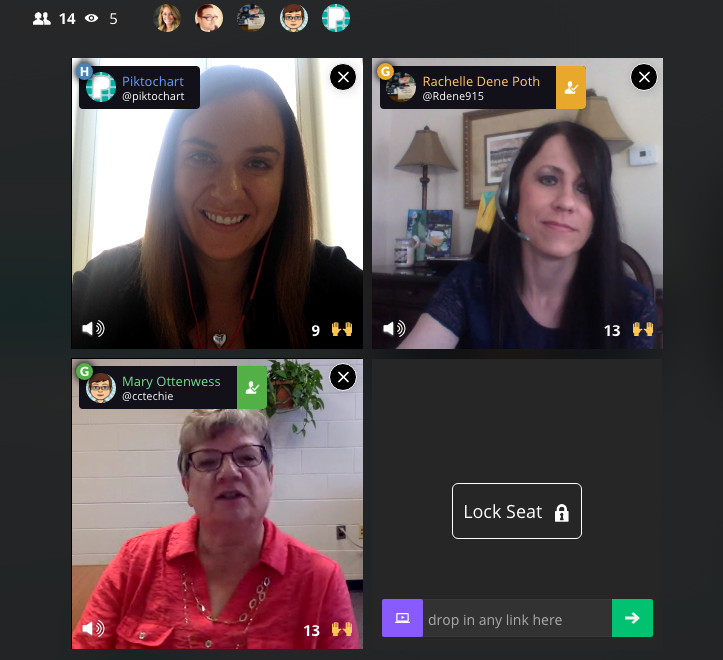
To get the skinny on what’s going on in classrooms when it comes to EdTech — from best practices and challenges to favorite tools and privacy policies — we brought in two Piktochart users who are making a big impact by bringing technology into their school. For the first time, we had two guests on our Blab,Rachelle Poth and Mary Ottenwess.

Rachelle is a foreign language teacher at Riverview Junior-Senior High School in Oakmont, PA. She enjoys using technology in the classroom and finding ways for students to have more choices in their learning. She has presented at several technology conferences in Pennsylvania and at ISTE in Denver this past June.

Mary has been in education for 25 years. She started out in a public high school library and is now the Instructional Technology Specialist at Catholic Central High School in Grand Rapids, MI. She was the one that didn’t step back when they asked for volunteers to run the computer lab and thus her adventures in EdTech began!


What is your biggest pain point with your school’s current EdTech setup?

Rachelle said her biggest complaint when it comes to EdTech tools, which is shared by other teachers she talks to, is the fact that things sometimes don’t go as planned with technology.

“Best case scenario doesn’t always happen when it comes to technology,” she said. “You have to be prepared for the little bumps that come along the way.”

Mary echoed Rachelle’s thoughts about technology being unpredictable. She also added that limited professional development time for teachers is another hurdle when it comes to her school’s EdTech setup.

“An hour once a month just isn’t enough time,” said Mary. “Students come in an hour late and we have a meeting with all teachers at the school. Teachers will go around and talk about what they are using in their classrooms, discuss a particular tool, or discuss a method. Because we are trying to cover so much in a single hour, hitting everyone’s skill and comfort level as well as giving them time to try the tool often means a lot of 1:1 follow-up.”

“As a workaround for time, we have teachers create tutorials to view prior to the professional development sessions,” noted K-12 EdTech coordinatorCourtney Kofeldt in the chat.

What opportunities are given to kids through EdTech and how can teachers learn to embrace them?

Mary said EdTech really expands a student’s world. They can collaborate and share with not only each other, but with experts in the field. Students can use project-based learning and inquiry-learning, and they can use and develop real-world skills for college or a career. For teachers, Mary thinks technology makes things simpler.

Rachelle agreed. She believes the opportunities provided by technology are tremendous.

“Technology provides opportunities to students to allow them to show what they have learned and to use a tool that is meaningful to them. Without the technology, they wouldn’t have been as engaged,” she said. “I don’t use technology for the sake of using it, but rather as a way to increase opportunities.”

When given a choice of tools to utilize on their projects, Rachelle finds students talk to their friends about the learning curve of each software. Students work together, collaborate, and learn from each other about how to use technology.

What’s the best thing technology has allowed you to do in your school that you couldn’t have done otherwise?

Mary shared an example from her school, Catholic Central High School in Grand Rapids, MI. Using technology, a French teacher was able to bring in a video feed from a classroom in Canada. The American students communicate in French to sharpen their skills, and they’re also able to learn more about the other students culturally.

“Students are not only collaborating with the students in another country, but those next to them in their classroom too,” explained Mary. “It’s fun to watch the collaboration.”

Rachelle says that technology has allowed her to continue the conversation with students after class time ends. She found more and more that her students had questions once they got home and started working on their homework or projects, and technology allowed her to be available to them during those key moments.

“It really bothered me that when class ended, that would stop their learning process in a sense,” she said. “I use technology to bridge that disconnect. I use messaging to help.”

Do you as the teacher (or your school) assess the privacy and security of a tool before letting students try it?

Rachelle said she pays close attention to privacy and security settings before bringing a tool into the classroom. She does this by creating an account on her own and reviewing the settings herself. Rachelle also sends home a notice to parents at the beginning of the year informing them of the tools that will be used in the classroom.

She also relies on the thoughts of other teachers, and she noted these sites and communities as her go-to sources:

  • Common Sense Graphite, a community of educators who take the guesswork out of finding innovative ways to use technology in the classroom;
  • EdShelf, a socially-curated discovery engine of websites, mobile apps, desktop programs, and electronic products for teaching and learning;
  • EdCamp, an organic, participant-driven professional learning experience led by a community created by educators, for educators.

Mary added that her school has a tech team on staff who will verify security before launching a new tool in the classroom. First, they start with a pilot program and monitor progress while the new EdTech tool is being tested in the classroom. During that pilot, they will be on the lookout for glitches or security holes.

Which tool/platform/methodology has been the biggest hit in your classroom and why?

Rachelle, Mary, and participants in the chat were excited to share their favorite EdTech tools! Check out the list below:

What are 3 most important skills kids have gained in your classroom thanks to technology?

Everyone agreed that more collaboration and creativity is taking place in the classroom thanks to technology.

“I have noticed students really develop the 6C’s — Communication, Collaboration, Critical Thinking, Creativity, Character, and Citizenship — when tech is integrated,” said Courtney Kofeldt in the chat.

Rachelle added she often notices that projects from her students go above and beyond her expectations. “Technology gives them that voice to speak out and be part of something when otherwise they wouldn’t have been,” she said.

Mary says teachers have benefitted from technology as a way to improve their skills, too. She notices more collaboration happening between teachers and growth of their professional networks thanks to technology making it easier to work together.

Thanks to technology, both students and teachers alike are building up their confidence. “It’s ok to have something not work,” explained Mary. “Technology allows students to take the lead. Teachers aren’t always the one with all the knowledge.”

Mary also touched on her school’s Digital Citizenship Course, which is an ever-changing movement to educate students on the proper use of technology — when to use it (or leave it behind) and best practices.

“I teach motion graphics at UCLA, and it is wonderful to see what the students create once they understand the tools,” added Eric Rosner in the chat.

How can teachers improve their tech skills in order to make classes more interactive and multimedia oriented?

Rachelle’s advice is simple:

“Just pick something and start it!” she said. “Really. You don’t know if it’ll work for you until you try it. Pick something small and give it a try.”

She suggested teachers consider learning new tools alongside students. Rather than a teacher-driven project, why not try a student-driven project? She found her students enjoy it, and as a teacher, it keeps her fresh. Use the challenge of a new tool as a learning lesson for both the students and the educator.

“Not everything is going to work, and that’s ok,” added Mary. “We teach our kids to learn from failure, and we need to do the same.”

Mary advised teachers to expand their professional network to get to know other educators. Social channels are a great way to do this — and Mary specifically suggested getting involved in Twitter chats. For a comprehensive list of Twitter chats all about education, check out this list Mary shared with us on the Blab!

What are your recommendations for someone who is just starting to use technology in the classroom, and may be a bit hesitant?

Rachelle suggested focusing on one area in your classroom you can try to improve using technology. Give a new EdTech tool a shot, use it minimally, and be patient with getting comfortable with it.

Mary suggested finding another educator who is using technology you’d like to try and simply watching them use the tool in their classroom. Finding a tech mentor is key to getting comfortable!

How can tech help all students to be engaged, to reach each student?

If students are on different levels, Mary said EdTech tools can help bridge that gap. She particularly likes Khan Academy for this purpose. She also suggested putting up a rubric for an assignment, but allowing students to choose their technology tool to complete the project.

“Students are not all the same,” added Rachelle. “By giving them choice with technology tools, you’ll see they can create anything they desire, and you learn more about them as individuals. When the choices are given and nothing is set in stone, it pays off.”


The team at Piktochart had a blast during our Blab with Rachelle Poth and Mary Ottenwess! Thanks to both of them for stopping by! If you’re interested in learning more about how Piktochart can help out in your classroom, check out a few more of our EdTech posts!

This post originally appeared on Piktochart’s blog here.

Integrating Technology: Try Creating an Infographic

Posted in the Edutopia Community Discussion

If you are looking for new ways to share information, or create a new sign for your classroom, or have students work on a project, then perhaps infographics is what you need.

Infographics are one of many options for presenting information in a vibrant, engaging way. There are many digital tools out there that can be used to create an infographic, and you may know of a few of these tools. If you have not heard of an infographic or you have not yet created one, then I hope I can provide some new information or ideas. And if you have been looking for a way to integrate technology into your classroom, or a quick and easy way to make a slight change in your classroom, then perhaps using one of the great web tools for creating an infographic is just what you need.

An infographic is something that I learned about two summers ago while participating in a weeklong technology conference. I had seen infographics before, but did not know the term and had no knowledge of any of the tools available for creating one. I was anxious to create my own and decided to start the new school year, by creating infographics for each class in place of printing a course syllabus. I used three different tools to create an infographic for each course and then posted them on our class website.

Creating an infographic is quite easy and there are so many templates and options available to include in your work. Making the change from a paper syllabus to an infographic is easy. Simply take the file that you already have and copy and paste your content into one of the many templates that are available, and then have some fun with it. Depending on which web tool you use,  I have used Piktochart, Canva and Smore, you have a variety of choices for the additional icons, images, and more that you can add into your infographic. The possibilities are endless for creating a diverse, vibrant, multi-media, engaging presentation for any kind of use.

So changing from my paper formatted syllabus over into an infographic was the first step that I took. I then decided to take it a few steps further and have my Spanish I students create an infographic to describe themselves. This was something I had them do each year, to practice the beginning vocabulary and to learn about them,  but it was a project usually done on paper. I gave them the choice of a few different tools, and provided my infographics as a model. But I left it up to the students to decide and to explore the options within each of these choices. There were no limits on what they could add into the presentation, nor requirements about which tool they should use. Some students even added some audio and video into their projects, something that cannot be done using the traditional paper format. The best part was how their individuality, interests, and creativity were expressed using infographics.

On a personal level, I enjoy using infographics for creating presentations for graduate course work, book studies, moderating Twitter chats, and even birthday cards and more. It’s a lot of fun to work with these tools and to see what you can create, and even better, what the students create.

** I always give my students choices as to which tool to use, they all have benefits and unique features.  It depends on what works best for our needs.

Suggestions: Piktochart, Visme, Canva, Smore    @piktochart @canva @smorepages

Pikto1