

By Dr. Rachelle Dené Poth, JD
Artificial intelligence (AI) is rapidly transforming education. From lesson planning support to personalized learning pathways and administrative efficiencies, AI tools are a more common part of everyday classroom practices. At the same time, the speed at which this technology has advanced and been adopted into classrooms has led to understandable uncertainty among educators, leaders, and families who are asking important questions. These groups are concerned with the data that is being collected, who owns AI-generated work, and what responsibilities schools have when students and educators use these tools.
As both an attorney and educator who has spent more than eight years researching, teaching, presenting, and writing about AI, I have worked with schools across K–12 and higher education that are navigating these exact questions. The legal implications of AI are not barriers to innovation, but I consider them to serve as guardrails that assist schools with adopting technology responsibly. The key is protecting students, educators, and institutions and staying informed. Understanding the legal landscape and any potential legal implications as a result of the use of AI in classrooms helps schools move forward with confidence rather than hesitation.
Why AI and the Law Matter in Education
AI relies on data in order to function effectively. When it comes to schools, this means having access to student information, classroom artifacts, writing samples, images, and even data related to physical or behavioral information. Intent is not the deciding factor. Even if educators believe they are only sharing minimal information, that does not clearly identify a student, family member, or colleague, even seemingly harmless details can qualify as personally identifiable information (PII).
I’ve often spoken about some examples like referencing a favorite restaurant, a local landmark, a pet’s name, or an extracurricular activity, all of which could make a student identifiable when combined with other data points. Last year, an educator in one of my sessions said, “Enough stars to still form a constellation,” and that has stuck with me and I have shared it in each AI and the Law session I have done. That is why evaluating tools carefully and teaching students to do the same are essential. I often reference scavenger hunts, in that educators should not feel like they are on a scavenger hunt when trying to find out what happens to their information. We need transparency from vendors so that educators are aware and informed.
AI is also changing how decisions are made in schools. With many advances, there are recommendation systems, automated feedback tools, and predictive analytics that can influence learning pathways, grading practices, and student support services. Having an understanding of how these systems work and how they should be used responsibly is becoming part of educators’ and school leaders’ professional responsibilities.
Key Laws That Shape AI Use in Schools
There are several important laws that guide how schools must approach AI.
FERPA (Family Educational Rights and Privacy Act) protects the privacy of student education records. When schools use AI-powered platforms that process student work or store learning data, they must ensure that these tools comply with FERPA requirements and clearly define how student information is handled.
COPPA (Children’s Online Privacy Protection Act) applies to students under the age of 13 and requires parental consent before collecting personal information through online services. Because many AI tools rely on user-generated input, COPPA compliance becomes especially important in elementary and middle school settings.
GDPR (General Data Protection Regulation), although it is a European Union law, is relevant to U.S. schools that use tools developed by companies that operate internationally. There are many platforms created outside of the United States that educators may be unaware of, and so understanding GDPR is essential. Many platforms now include cookie permissions and data-use customization features in response to GDPR requirements. These protections often benefit schools globally.
Schools should also consider state-level student data privacy laws, which are increasingly changing the expectations for vendor contracts, third-party integrations, and data retention timelines. District leaders and IT teams play an essential role in ensuring these requirements are addressed before tools are introduced into classrooms.
Data Privacy and Vendor Responsibility
AI tools require large amounts of data to function effectively. That data may be used to improve the tool itself, train additional models, or support integrations across connected platforms. Even when a tool states that it does not share user data, connected services or embedded features may still interact with stored information. I was asked two years ago, when speaking at LACOE in California during my AI and the Law session, if someone should “trust the platform when it says they do not share or store the data.” My instant answer was “No.” And it was for this exact reason.
Before introducing any AI platform in schools, educators and school leaders should review terms of service, privacy policies, and compliance documentation. Look for references to FERPA, COPPA, and additional privacy protections. Look for the date that the privacy policy was most recently updated. Districts should also confirm whether vendors use student information to train future AI models and whether contracts clearly define ownership and storage expectations.
This is where collaboration with district technology teams becomes essential. Responsible adoption is not an individual teacher’s decision. It is a system-level responsibility supported by leadership, policy teams, and instructional staff working together. Collaboration is key.
Transparency Builds Trust With Students and Families
Responsible AI adoption depends on communication. Families deserve clear explanations of the tools being used, the data being collected, and how that data is protected.
When working with students under age 13, written parental consent may be required. Even when it is not legally necessary, providing families with opportunities to ask questions strengthens trust and partnership. Transparency also empowers students. When students understand how AI systems work and the risks they may pose, they become more thoughtful digital citizens and more informed users of technology.
Schools that proactively communicate expectations for AI use are more likely to build families’ confidence and reduce misunderstandings about how these tools support learning.
Accessibility, Equity, and Emerging Legal Considerations
As schools adopt AI tools, accessibility and equity must remain part of the conversation. Laws such as Section 504 of the Rehabilitation Act and the Americans with Disabilities Act (ADA) require that digital learning tools be accessible to all students. If AI-powered platforms create barriers rather than support access, schools may face compliance concerns. We need to consistently audit the tools we are using. It must be an ongoing process.
Schools must also consider how AI intersects with Title IX responsibilities, especially with the rise of deepfake technology, which leads to new risks related to harassment and impacts student safety. Policies must be in place for addressing the misuse of generative AI tools and clearly define expectations and response procedures.
Algorithmic bias and fairness are important parts of the conversation. Schools should evaluate whether AI systems produce equitable outcomes across student groups and whether automated recommendations influence learning opportunities in unintended ways. Responsible implementation includes ongoing evaluation, not just initial approval.
Teaching Digital Citizenship With AI Literacy
Legal compliance alone is not enough. Students must also develop the skills needed to evaluate AI responsibly.
Developing skills in these areas means recognizing risks such as deepfakes and misinformation, bias in generated content, and cyberbullying that is supported by emerging technologies. Schools that integrate digital citizenship with AI literacy will guide students to become thoughtful participants in technology-rich environments rather than passive users who lack true understanding and AI literacy skills.
Clear expectations around appropriate use and academic integrity help students develop ethical decision-making skills that extend beyond the classroom.
Supporting Schools and Organizations Through AI and Legal Guidance
As AI adoption accelerates, schools will benefit from having a structured support system in place that connects legal awareness with thoughtful and purposeful classroom practice. Through my work with educators in K–12 and higher education, I provide professional learning experiences that help schools understand privacy requirements, implement responsible AI strategies, and align classroom applications with policy expectations.
My work includes keynote presentations, workshops, district leadership sessions, curriculum planning support, and customized training focused on data privacy, academic integrity, digital citizenship, accessibility considerations, vendor evaluation, and responsible AI adoption. Each training is tailored to address specific needs, ranging from introductory awareness sessions to deeper implementation planning and leadership strategy development.
In addition to supporting schools and universities, I work with organizations across other sectors to explore how to implement AI responsibly while remaining aligned with legal expectations and organizational values. Many industries face the same challenges that educators do, surrounding uncertainty about data privacy, questions about intellectual property ownership, concerns about transparency in decision-making systems, and the need to develop policies that support ethical innovation. My work helps organizations evaluate tools thoughtfully, identify potential risks early, and create practical guardrails that support responsible adoption rather than reactive compliance.
Organizations in healthcare, legal services, workforce development, nonprofit leadership, and corporate training environments are increasingly recognizing the importance of AI literacy for employees at every level. Through workshops, leadership sessions, and strategy conversations, I help teams understand how AI systems work, the legal considerations that may be applicable to them, and how to build cultures of responsible use that prioritize trust, security, and human judgment.
Moving Forward With Confidence
Artificial intelligence is already shaping how students learn, communicate, and prepare for future careers. The goal is not simply to adopt AI tools, but to adopt them responsibly. And this is where our work as educators comes in and why we need to dive in and learn with and guide our students.
When educators understand the legal landscape of privacy, accessibility, intellectual property, and ethical use, they can make informed decisions that support innovation and student protection. With thoughtful planning, collaboration, and transparency, schools will create learning environments where AI enhances opportunities while maintaining trust, safety, and integrity across the entire school community.
I work with schools and organizations, both in person and virtually, to support thoughtful and responsible AI implementation through professional learning, curriculum design, and resource development specific to educators, students, and families, using a common language. I have also collaborated with leadership teams to develop AI guidance frameworks, classroom-ready activities, and policies that reflect legal considerations.
The resources created help districts communicate clearly and consistently with families about AI use, support educators in building AI literacy, and provide students with age-appropriate strategies for using AI safely, ethically, and responsibly. By combining legal insight with classroom experience, I help schools move beyond uncertainty toward sustainable systems that include clear expectations, transparency, and actionable guardrails for responsible use.
About Rachelle
Dr. Rachelle Dené Poth is a Spanish and STEAM: What’s Next in Emerging Technology Teacher. Rachelle is also an attorney with a Juris Doctor degree from Duquesne University School of Law and a Master’s in Instructional Technology. Rachelle received her Doctorate in Instructional Technology, with a research focus on AI and Professional Development. In addition to teaching, she is a full-time consultant and works with companies and organizations to provide PD, speaking, and consulting services. Contact Rachelle for your event!
Rachelle is an ISTE-certified educator and community leader who served as president of the ISTE Teacher Education Network. By EdTech Digest, she was named the EdTech Trendsetter of 2024, one of 30 K-12 IT Influencers to follow in 2021, and one of 150 Women Global EdTech Thought Leaders in 2022.
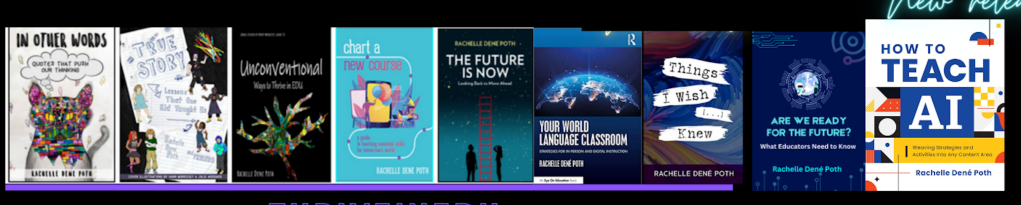
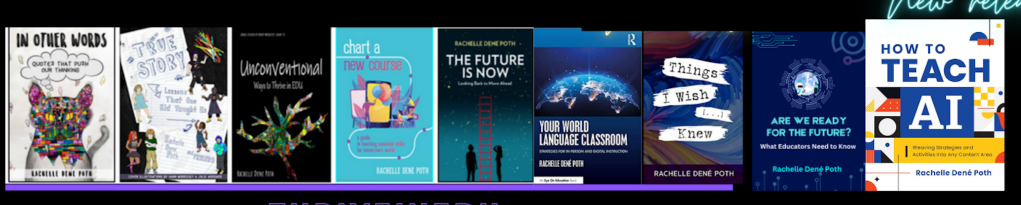
She is the author of ten books, including ‘What The Tech? An Educator’s Guide to AI, AR/VR, the Metaverse and More” and ‘How To Teach AI’. In addition, other books include, “In Other Words: Quotes That Push Our Thinking,” “Unconventional Ways to Thrive in EDU,” “The Future is Now: Looking Back to Move Ahead,” “Chart A New Course: A Guide to Teaching Essential Skills for Tomorrow’s World, “True Story: Lessons That One Kid Taught Us,” “Things I Wish […] Knew” and her newest “How To Teach AI” is available from ISTE or on Amazon.
Contact Rachelle to schedule sessions about Artificial Intelligence, AI and the Law, Coding, AR/VR, and more for your school or event! Submit the Contact Form.
Follow Rachelle on Bluesky, Instagram, and X at @Rdene915
**Interested in writing a guest blog for my site? Would love to share your ideas! Submit your post here. Looking for a new book to read? Find these available at bit.ly/Pothbooks
************ Also, check out my THRIVEinEDU Podcast Here!
Join my show on THRIVEinEDU on Facebook. Join the group here.






 Learning as I go: Reflections & lessons learned