Shapes 3D: AR Drawing App

Shapes 3D: AR Drawing App

An area of focus at FETC, TCEA, and PETE&C: Bringing Augmented Reality to Every Classroom

Rachelle Dene Poth

February 22, 2019

This is post is sponsored by Shapes 3D. All opinions expressed are my own.

Over the past few weeks, I have been fortunate to attend and present at several educational technology conferences. First was FETC (Future of Education Technology Conference) in Orlando, then TCEA (Texas Computer Education Association) in San Antonio, and the most recent, PETE&C (Pennsylvania Educational Technology Expo and Conference) held in Hershey, PA. A large part of my experience at each of these conferences involved presenting on and attending sessions about Augmented and Virtual Reality. There has been more discussion and a lot of excitement recently surrounding the AR/VR tools and exploring how these tools can be used for education. In my own classroom experiences with students, I have seen tremendous benefits for students by implementing some tools for augmented and virtual reality as part of their learning experience. The tools we have used give students an opportunity to engage in a completely different kind of learning which gives them more control in the classroom, and an immersive and authentic experience.

Learning Potential with Shapes 3D Augmented Reality

The terms “augmented and virtual reality,” might seem to be complex concepts that require a big investment of time or come with a steep learning curve. However, with tools like Shapes 3D, this is not the case at all. Shapes 3D provides the perfect opportunity for students and teachers to explore core concepts of geometry and help students to discover 2D and 3D shapes by engaging with these shapes in an augmented reality experience. Using a Merge cube, students can now examine 3D shapes in Augmented Reality. Imagine learning geometry by holding the solids in your hands, manipulating them and being able to more closely understand the core concepts of geometry. In personal experience, having this app available during my ninth grade year would have made a huge difference in how I was learning and the way that I could build on my knowledge! Preview it here!

Getting Started

Whether you have experimented with AR/VR or not, getting started with Shapes 3D is quite easy to do. If you prefer to have a tutorial, Shapes 3D has videos to help you get started. Often the number one answer given when educators are asked why they are not using technology or even a specific tool in the classroom is due to a lack of time. There are so many components to teaching today that can make it a challenge to find extra time to try new tools or implement new methods. Fortunately, Shapes 3D makes it easy to get started with the availability of bundles to use for instruction, access to lesson plans and tutorial videos that can help any educator get started quickly. You can gather a lot of ideas by searching through Twitter looking at tweets related to Shapes 3D, especially when it comes to edtech conferences, which can provide new ideas and new connections. There are also publications and other helpful resources shared and updated on the Shapes 3D site. You will love Shapes 3D applications, get started by grabbing a bundle at the price of $ 5.99, Shapes 3D Bundle!

If you are like me and prefer to just get started without tutorials, start by exploring the tool and the options available, and then dive right in! Use Shapes 3D as a way to introduce a concept or shapes to students, to act as a “hook” for the lesson. Once students begin engaging with Shapes 3D, give them the opportunity to create and explore on their own and run with it. They will likely exceed your own knowledge of the possibilities that exist with Shapes 3D and that is okay. You will notice that students catch on rather quickly and will become immersed in more authentic and meaningful learning, right in their hands. It is a lot of fun to use the Merge cube and really look closely at the shapes!

Merge and Shapes 3D

Students can easily explore the object by using their device or a classroom iPad for example, if accessibility is an issue consider using stations in your classroom, where students can work in small groups. But if you want to take it to another level and really put the learning in the students’ hands, why not get a few Merge cubes to use with shapes 3D. What is so unique about this possibility is that students will be able to interact with the object and even draw lines and manipulate the shapes in their own ways, which will provide a more personalized learning experience for them.

Learning from others

Shapes 3D is great for teachers to use as a way to engage students, but also to provide opportunities for students to become the teachers in the classroom. Like presenting at conferences, getting to share what you are doing in the classroom, to brainstorm ideas with classmates, and maybe more importantly, have the opportunity to learn from one another builds more confidence in learning. The great thing about tools like Shapes 3D is that educators will not have to spend a lot of time trying to figure it out on their own or come up with ways to use it in the classroom. Leave it to our students. We need to push for more opportunities for our students to do more than consume, but instead, to create, to explore and to become curious for learning. Using technology in classes today should be focused more on creation rather than consumption.

So why use Shapes 3D?

As educators, our purpose is to help our students to develop a wide range of skills that will not only engage them in learning which is authentic and meaningful but also provide skills that will We want to put tools that can engage them and more authentic and meaningful learning in their hands. Students learn more by doing and having opportunities to engage in hands-on activities, where they control the direction their learning takes. We need for students to design their own problems, to ask more questions, and even at times to experience some struggles in learning. Preparing them for the future means giving time for them to problem solve, collaborate, communicate and even create on their own as they are preparing for the future and life in general.

Before adding technology into the classroom, be sure to focus on the “why” behind using a specific tool or method. What is it going to do differently for students, that will enhance learning and go beyond the traditional methods t being used in the classroom? What sets it apart from other options? I think the answer is clear. Tools like Shapes 3D will enable teachers to move students to a more active role in the classroom, become the creators and immerse themselves in a new learning environment. Students can do so much with Shapes 3D to really understand geometry concepts that might otherwise be difficult to understand, in a 1D format. Draw lines, rotate solids, check the properties of the solids and more. Hands-on learning takes math to a new level.

Options and getting started

By having a Shapes 3D bundle, students in grades K through 12 have access to a wide variety of ways to interact with different structures and to really understand math concepts at a deeper level. When we can place tools like this in the hands of our students, we amplify their potential for learning, because of the accessibility to explore on their own and build their skills as they manipulate the objects in the 3D space. It pushes student curiosity even more and leads them to ask questions and to develop their understanding at a deeper and more meaningful level.

As teachers, there are so many things that we are responsible for and need to keep up with, that it can be difficult to stay current and relevant with all of the emerging trends when it comes to technology. Fortunately, there are tools like Shapes 3D that make it easier to get started and that provide innovative ways for students to learn. It just takes a few minutes to get started and then encouraging the students to explore on their own and with peers. Join in the Geometry learning fun with Shapes 3D Geometry Drawing on iOs today! Enjoy the app (for free) on Google Play, there is a beta version of Shapes 3D Geometry Drawing, and it works with Merge cube!

Don’t wait, sign up today! Get started with Shapes 3D applications by grabbing a bundle at the promotional price of $ 5.99, bit.ly/Shapes3Dbundle !


Metaverse: Scavenger Hunts, Interactive Stories, Immersive Learning and now Collections

Sponsored Content, All opinions are my own

February 18, 2019

Learning and sharing through the world of AR

When I started creating with Metaverse, an augmented reality tool, a few years ago, I was immediately impressed with the potential for learning and the many possibilities for engaging students more in authentic learning “experiences.” More ways to move students from consumers to being the creators which is what we should strive to do in our classrooms. The first “experience” that I created took a bit longer than most because I chose to not explore any of the tutorials or the helpful resources available and instead opted to dive right in. Why? I thought it was better to experience possible struggles with figuring out how to create with Metaverse, similar to what students might face when they got started. As a teacher, I wanted to prepare myself to help them if and when they needed. What I noticed is that students were more than ready to create!

Over the past two years, students in my 8th grade STEAM classes have enjoyed creating with Metaverse and definitely figured it out much faster than I did. Being able to see their work, their creativity and then to enjoy testing their “experiences” has been very rewarding for several reasons. I have learned so much from them, it led to conversations about the importance of sharing struggles that we experience and to not be afraid to ask others (especially students) to help you. It even led to the addition of student tech assistants in my classes. There is so much to learn from students, and in addition to building technology skills and providing more immersive and engaging learning experiences for them, we empower students to become the leaders in our classroom. Developing their skills of problem solving, collaboration, critical thinking and pushing their curiosity will benefit them as they move through school and head into the future!

How does Metaverse promote student driven learning and choice?

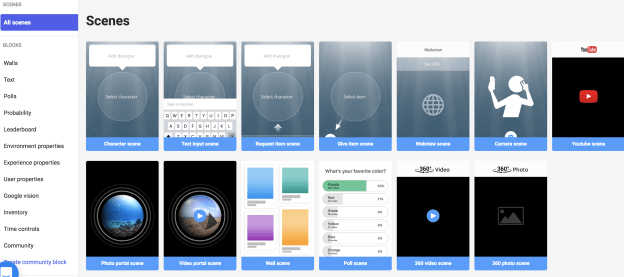
It is important to offer students choices in learning and to step aside and encourage them to pursue knowledge on their own. With Metaverse, students can create fun experiences to share with their peers and have so many choices available to really make it an engaging way to learn. Regardless of content area or grade level, or even one’s role in education (why not create for teacher PD), there are thousands of new items to choose from and new features being added frequently. Students can spend a long time creating their storyboard or they can design an experience quickly, as Metaverse is user friendly, especially with the recent updates and addition of new features!

So many possibilities!

Students can find exactly what they need, create something meaningful and share their work with students in their class and even connect globally with other peers. Testing their experiences in class by scanning a QR code is quick, but what about if you want to keep all of the student projects in one space? Or even collaborate with other classrooms, either as part of project based learning or to connect globally? Students need to create for a purpose and sharing their work with others is very important. Sharing experiences can be overwhelming if you have the number of experiences being created like I do.(Students were so excited that they created extras on the weekends and sent them to me, to keep me from being bored while away from school! This is when you know that the tool is making a difference).

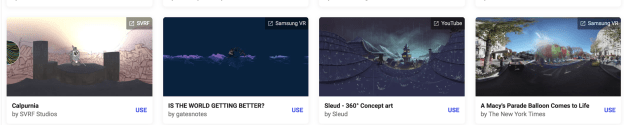
An important of student work is the ability to share it with others, to learn about one’s peers and enjoy learning together. Access to student work can be an issue, which is where Padlet helped initially, as a way to have students post their projects. But even this took time. I wanted to keep track of their work and have it accessible by students and teachers, as we collaborate by using Metaverse to engage all students in learning. Creating experiences with videos, 360 images and even portals, to immerse students in a world of learning right in their hands.

Explore the new Collections, now in beta release!

Wanting to be able to share and display the experiences created by students was very important and now, it is easier than ever for teachers to do. With the new “Collections,” now released in beta, teachers can manage student experiences, edit student work and easily share all of the experiences created in class! Why? Because it is easier to manage student work and save the experiences to use with other classes and even collaborate beyond your school.

To get started, simply create a “Collection” for your class and you can share the join code with students, or quickly add them from the experiences you have in your account.

Metaverse has so much potential as an instructional tool for teachers.

Why use Augmented Reality?

A popular topic at both FETC and TCEA was Augmented and Virtual Reality. Tools like Metaverse have tremendous potential to immerse students in a more authentic and purposeful learning adventure, by giving them more control in how they show learning and a hands-on experience. It is a fun platform to use in the classroom and benefits students by promoting student agency and increasing engagement in learning.

Collections create more opportunities for Interactive Learning Adventures

As educators, we want our students to have a learning “experience,” more than what the traditional methods of classroom instruction might offer. Finding time to create and explore can be a factor in deciding where to begin, but with Metaverse, it is easy to get started, especially when we let students take more control. We need to help students to embrace an opportunity to drive their learning. In doing this, we guide them toward a learning journey that will attach more meaning to the content, in a personalized and exciting way to learn, and above all, a more authentic experience. Teachers have access to collections where they can see, edit and share student work, track progress and help students as they create. Creating a collection is easy. Check it out here!

Many students learn more by doing, and when they have opportunities to engage in hands-on activities, it leads to more personalized experiences and student-driven learning. A world of learning that they create is right in their hands.

Some ideas to create with Metaverse

  1. A tour and a survey: Have students create an experience to introduce visitors to a town, retell a part of history, ask for input and preferences for travel. With all of the choices in items to add into Metaverse, thousands of unique possibilities exist.
  2. Just for fun: Sometimes the best way to get students involved is by only offering a few guidelines. Provide a number of scenes, type of questions to include, different features including GIFS, Google vision, polls and more. Each student can create something unique and meaningful to them, and then using collections, share it with the class. If access to devices is an issue, set up learning stations in the room.
  3. Book review and tales: Why not have students explain key parts of a book, or make up a story, and include images, videos, portals and more as part of the experience. Share it with other students, maybe even add in a poll, and then use the results to brainstorm new ideas and keep the discussion going. I

Technology tools for education provide enhanced ways to learn, to engage students and to empower them in learning. As teachers, we always want to focus on the “why” when making our decisions, and with Metaverse, the “why” is clear: student driven learning and the power of creating. Start your collections today and share student work!

Exploring and Creating with 3D Bear Poth

Sponsored Content, All opinions are my own

Sign up for your free one month trial! https://3dbear.io/freetrial

Exploring the world in AR: 3DBear brings your environment to life

Ever since learning about 3DBear a few months ago, I have continued to be impressed with the platform and the company’s focus on meeting the needs and interests of educators and students. At both FETC and TCEA, I had the opportunity to spend time speaking with the 3DBear team and was able to get a better understanding of their vision for 3DBear and learn more about the newer features and ways to use it in the classroom. Even when I first started creating with 3DBear, I immediately saw a lot of benefits for classroom use regardless of content area or grade level, or even one’s role in education. With a library full of icons to choose from, animations, music, options for changing colors and sizes, moving object positions, and other functions like adding audio and student voice, it is possible to engage students in truly unique ways to learn. It did not take long to see the potential for using 3DBear not only as a tool for students as the creators but also as an instructional tool for teachers as a way to engage students more in learning by “hooking” them in with the use of augmented reality. 3DBear can be a game changer for students, acting as a catalyst to draw students in and let them go on a creative adventure. Get started today with a free teacher trial here!

Why use Augmented Reality?

A popular topic at both FETC and TCEA was Augmented and Virtual Reality. Often questions are asked whether the use of AR and VR has sustainability in education and I believe that there is. Each day I receive numerous email alerts sharing news from around the world about how teachers are using augmented and virtual reality to amplify student learning. Tools like 3DBear have tremendous potential to immerse students in a meaningful learning adventure, giving them more control of how, when and where they learn. Besides being fun to use, it offers students time to build their skills in critical thinking, problem-solving, collaboration and fosters creativity. It lets students make decisions and leads to a more student-driven classroom. This is what we want for our students, choices, agency, and engagement.

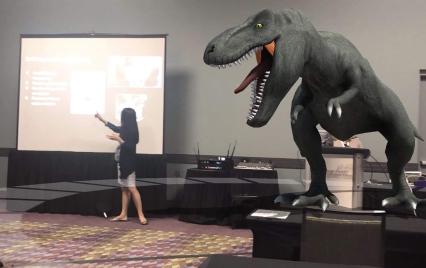
(photo credit to Mitch Weisburgh)

Walking among or narrowly escaping the dinosaurs

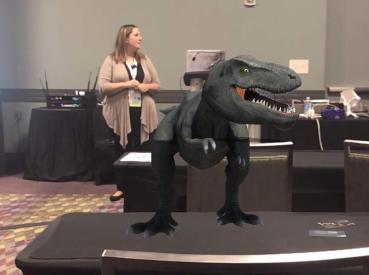
While presenting several sessions at both of these conferences this month, I noticed a lot of people starting to use 3DBear in unique ways. During sessions, attendees chose to be more active, and rather than simply listening in to how these augmented reality tools can be used, instead began quickly creating with them and even sharing them out socially. Completely unaware of the danger that I was in until seeing the tweet, I was surprised and thankful that I escaped the dinosaur lurking behind me as I presented at FETC! But I was concerned about the attendees when I saw the dinosaur that was lurking in the front of the room near Jaime. The excitement behind using these tools is evident when people begin creating and sharing them during your session, just minutes after you’ve introduced and only minimally demonstrated the tool. The learning curve of 3DBear? Not much at all! It’s very easy to navigate and dive right in to create your own world in your physical environment. Get started today!

(photo credit Mitch Weisburgh)

Why 3DBear

Students can use it to create 3D objects in different spaces and can then record a story to go along with it. The potential and power of storytelling in AR is awesome. What better way to have students represent their learning than to design their own world, decide what 3D objects to place in their environment and then create a narration to go along with it. Students can even upload items from their device or from Thingiverse. Student-driven learning and possible for students in grades K and up. More than just listening to teachers and how it benefits students, ask students for feedback. (See a video from a school in Medford and how students responded to 3DBear). Also seek feedback from educators, whether on social media or in my experience from attendees in the different sessions presented at FETC and TCEA.

Potential for Storytelling and Adventure

As educators, we want our students to have a learning “experience,” more than the traditional methods of learning and classroom instruction can offer. We need to empower students to become more than consumers of content, and instead help them to embrace the opportunity to become the creators and driving their own learning. By doing this, we start them on a learning journey that will serve to attach more meaning to the content, in a personalized and exciting way to learn, and above all, a more authentic experience.

There are many possibilities for using 3DBear and because time can be a deciding factor when it comes to exploring new tools and methods for classroom use, this is where 3DBear offers a lot for educators. Teachers have access to a teacher dashboard where they can see student work, track progress and explore the worlds that students are creating. There are lesson plans for Coding, Design Thinking, ELA, Math, Science, Social Studies, STEM, and STEAM-related themes available for different grade levels which include pacing guidelines. While the lessons are drafted for certain grade levels or range of grades, slight adjustments in the content enables teachers to implement these lessons into their classroom.

One of the best things about 3DBear is that teachers won’t have to spend a lot of time trying to figure out how to get started using it in the classroom. We can learn just enough and then put it in the hands of our students and let them run with it. Many students learn more by doing, and when they have opportunities to engage in hands-on activities, it leads to more personalized experiences and student-driven learning. A world of learning that they create is right in their hands.

When thinking about adding some new technology into the classroom, we really need to focus on the why behind choosing a specific tool or method. Ask ourselves what makes it different and what can it do differently for students that can enhance the learning process and go beyond the traditional methods that are already being used in the classroom. What sets it apart from other options or methods you have been using? I think the answer is clear. Students are the designers.

A Few Ideas to Try

  1. My town: Sharing where we live, describing a location or any lesson where students need to narrate a story, they can create an environment using 3DBear and add characters and more into their project. Once created, students can tell a story about the scene or even narrate in a foreign language. Why not have students create a “welcome to our town” project, adding in 3D objects and telling a story that can be shared with the community? A good way to share student work and give more meaning to the work they are doing.

(Alamo photo credit Jaime Donally)

  1. A book summary: One idea is to have students review a book, summarize something they read in class by bringing it to life with 3DBear. If the number of devices is an issue, use stations and have students work in pairs or small groups, each adding to the story.
  2. Let me teach you: Give students an opportunity to be the teacher. Choose a theme or have students select a topic and then come up with a way to use 3DBear to explain it to classmates. There are many options available for students to choose from, and it will reinforce their problem-solving, critical thinking, and collaboration skills, as well as boost creativity as they decide how to best visualize their lesson for others.
  3. Actors in a scene: Give students the chance to interact with a 3D character and maybe even sing together or dance together (who doesn’t love doing the floss with a 3D character?).
  4. Random objects: To really push their thinking, why not create a scene with a variety of characters, objects and more, and then ask students to write a story about it. A task like this can be applied to so many content areas, and grade levels and will definitely be a more authentic way to practice and learn. For students in Spanish classes, it is fun to add random objects into the classroom and have students write a story to describe it. Or, another possibility is to provide students with a narration in the target language and have them create a scene to represent the story.

So many ways for students to leverage technology for learning. They need our guidance to find a starting point sometimes, but then we need to just let them go with it and explore and create on their own. Besides building technology skills and learning about emerging trends, they will engage in powerful learning that not only reinforces the content area but also promotes the development of social emotional learning skills in the process. Augmented Reality has many benefits, the key is staying focused on your “why” for wanting to use it, and then finding the right task to get started. And remember, let the students take charge and learn from and teach one another, including you. Sign up for your teacher trial at 3DBear!

And share how you are using 3DBear in your classroom! @Rdene915