Rubicon Summit: Classroom’s Journey To Student-Led, Interactive Lessons

A Classroom’s Journey To Student-Led, Interactive Lessons

Written for the RUBICON SUMMIT

About two years ago, I found myself struggling to find ways to keep my students engaged in the lesson. I tried to get them involved more in class activities by offering more choices and providing opportunities for them to be part of the decisions made about what we were doing in the classroom. Why did I do this? Partially because I saw – and could feel – a decrease in student motivation and engagement. It was approaching the end of the school year, and the focus had shifted more to “when does summer begin?”

So I tried to do things a bit differently, think creatively, and take some risks. I wanted to keep us all moving, to finish strong at the end of the school year and begin summer vacation with a sense of accomplishment, to celebrate all that we had learned throughout the year and also what we had gained from these new experiences.

Educational Technology and Digital Tools with Purpose
Educational Technology provides so many resources that enable students to learn anywhere and at any time, and at a pace that is comfortable for each student. We can instruct from inside the traditional classroom, ​”​the brick-and-mortar​” ​as it is called, or from anywhere around the world. Using digital tools provides more differentiation and personalized learning, and provides opportunities for the students to move from consumers to creators. When students have choices in how to show what they have learned, they are more likely to be engaged and excited for learning. They will feel valued​,​ and the lesson and learning will be more meaningful because it has been made perso​n​al to them.

Creating Interactive Lessons
What did I change? I started by having my students create some interactive lessons using educational technology tools like Formative, Nearpod, and EDPuzzle, or even games with Kahoot! and Quizizz. It proved to be a very beneficial learning experience for all of us. By doing this, we had extra resources available that could be shared with students who might need some extra practice. I thought it went so well that I decided to take it a step further and start a “teacher for a day” activity during which the students create a lesson based on a grammar topic or vocabulary.

I stepped back and had the students lead our classroom. It was a really good way to learn a lot more about the students, to better understand what their needs were in terms of the content material, and for the students to learn about each other. Giving students the control and the opportunity to become the creators and leaders in the class has tremendous benefits and it has been something that we have enjoyed.

Giving Students the Control
At first when students created interactive lessons, I would launch the lesson and control it on the SmartBoard, but find ways to involve the student who created it during the presentation. I eventually decided to move aside, and took a seat in the back of the room, having the student lead the lesson, give explanations, answer questions, call upon students for answers, and provide feedback. Having the opportunity to sit back and experience this was tremendous. The students enjoyed the activity, supported each other, collaborated, and provided some positive feedback to each of their classmates. I was very impressed with how well they taught, led, and learned during each of the “teacher for a day” lessons.

Empowering Students in Learning
The use of these digital tools means ​that ​the “time and place for learning” is no​ longer​ confined to the ​traditional time and setting of the physical ​classroom​. It opens up the learning environment ​to​ anywhere​, at any time and at a pace that is comfortable for the students as well. Learning and having timely, purposeful and authentic feedback is critical ​for growth to happen. When we shift our focus to creating opportunities, giving students the control, leaving the decision making to students to choose ​how t​o show what they have learned, or ​letting them​ design their own assessments, they are more empowered in their learning.

What are the Next Steps?
Have a conversation with your students and ask for their honest feedback. What did they like? What did they not like? Which lesson or format seemed to help the most? What did it feel like to be in control, decide how to deliver the lesson, and experience being the teacher? You can have this as a face to face conversation, students can respond on paper, or use one of the many digital tools available for communication. No matter which way you choose, look to your students for the valuable feedback to decide your next steps. Be sure to ask yourself these same questions and continue to reflect on steps taken and progress made!

For more strategies about integrating technology into instruction, read Overcome

EdTech’s Problems With Blended Learning!

For This Lesson, I Stepped Aside To Become A Facilitator Of Learning


Posted on TeachThought, August 29th, 2017  (Thank you Terry Heick)

It started with a cross-class collaboration idea.

I was not sure the idea would work, but was willing to give it a try and it had captured the interest of students. I connected four levels of Spanish and created a team project using Google and Padlet so students could collaborate and share their work.

The experience went so well that it led me to think about other ways to engage students more in a collaborative online learning space. Students need to be connected with authentic learning experiences and develop digital citizenship skills, and to be given choices in learning. Trying to build on the prior project collaboration, I wanted to explore possibilities of using Google slides to have students work simultaneously on a whole-class project.

I asked the students if they had done any type of collaboration online like this before, and I was surprised that they had not. Knowing this pushed me more to decide that I should definitely create this learning experience with them.

Connecting students

I decided to try something more collaborative by using Google Slides. We are a Microsoft Office school, but many students use Google Drive on their own. I also use Edmodo in my classes and like the students to have experience with different kinds of tools. I like that students can work on a document or a presentation at the same time, as this substantively changes the methods and frequency with with students share ideas.

By having students create a class presentation simultaneously, the teacher can then take that extra time to facilitate their learning and interact with students to do something more specific, like assessing their content knowledge. Giving students the opportunity to work as a team toward one whole class project rather than completing individual projects opens up new and more engaging ways for the students to learn not only content or technology skills, or even ‘soft skills’ like collaboration, but also get to know one another more as well.

Connecting students with their peers promotes a friendlier and more cohesive class culture, and I think makes learning more authentic and meaningful for students. To be able to see what they are each working on and to be part of the whole class presentation in real-time requires constant interfacing of different personalities and skill levels.

The divergent interests, backgrounds, and experiences of the students in each class are emphasized in whole-class projects like this, which both strengthens the learning experience while also being more demanding of the technology.

When doing individual projects, it’s not always the case that each student has the opportunity to see the work of the other students. Doing this can be quite time-consuming and feel ‘wasteful,’ but the long-term momentum of successful projects that are as highly-visible as a whole-class collaboration are worth the time taken, and hiccups along the way, especially early in the year.

Our Presentation

To have the students practice the new chapter material on clothing and shopping preferences, I created a Google Slides template for a Fashion Show.

I set up a presentation for each class and shared it with the students. I provided instructions for what was expected for their slide, and reminded them to only work on their slide and respect the work of the other students.

For the fashion show, they were to choose a celebrity, find a picture and write a description in Spanish of the clothing that the person was wearing. They also had to write a few statements about where the clothing could be purchased as well as the cost for the items.

In doing this I thought it would be a great reference because the students could refer back to each slide, read the descriptions, and reinforce and review their content knowledge. Plus, depending on the types of clothing pictures the students chose, it could be a lot more fun–definitely more engaging and an interesting experience for all students than individual study.

This ‘real-world topic meets real-world technology meets whole-class collaboration’ ended up being a more authentic way to practice the content than even I had hoped, increasing the language and content retention for the students as well as teaching them new technology skills.

The students really liked seeing the Fashion Show displayed on the Smartboard, which was another opportunity to reinforce the vocabulary by asking students questions about each slide, reviewing the verb forms, and more.

For the most part, they did respect the work of their classmates. A few students enjoyed adding pictures of some celebrities onto the slides of their peers, which resulted in peers responding instantly and removing them–I didn’t even have to say anything!

A risk in giving open access to the editing of the presentation ended up being worth the risk taken, and was a way to teach lessons about digital citizenship as well.

Next Time

Always thinking of the next thing, I decided that perhaps another opportunity to work collaboratively would be to create a class review presentation for final exams. This might take more planning, but I think the long-term effect will be worth it.

This approach is a great way for the students to prepare for final exams and have a reference to review the material covered in the level 1 Spanish course. The idea is that each student will be assigned a slide and given a verb or grammar topic as well as some vocabulary to include.

For their slide, the goal is to teach a mini-lesson, provide references, include a video or link to a game and some sample sentences. Though I’m taking this approach to teach a foreign language, it could be used to teach, learn, or review almost anything, from math definitions and historical trends to literacy devices, phonics, word parts, and more.

I also hope that it will end up being a good way for students to have some personal instruction as well as a choice in what they are creating–and another opportunity for students to collaborate with their peers as the teacher shifts roles from leader to facilitator of learning.

PBLTT

Why we need to reflect: Learning from our Mistakes

Reading the words of John Dewey: “We do not learn from experience…We learn from reflecting on experience.”, I give myself constant reminders to be reflective in my practice. Reflecting led me to really evaluate some things in my classroom.

A few weeks ago, I had a challenging week. Probably the most challenging week as far as behaviors, in several years. It came in the form of disrespectful behaviors, classroom disruptions whether it was students talking out loudly, exchanging words, or other similar interruptions.  I really tried to work through these, with the students, patiently and with every possibly method I could think of. I wanted to push forward and in another post, I explain what happened, but for now, these are the lessons that I have learned. And this is how I reflected and did what I needed to do, to restore balance in my classroom.

I am not one to yell in class, in fact, over the 21 years teaching in my current school, maybe there have been 7 or 8 times that I have really yelled. Whether that is good or bad, not going to decide, but I can say these were not the best reactions  in my years of teaching. However they have led me to take time to really reflect and remember a couple of things.

1) I am the adult and my role is to provide a supportive, engaging place for students to learn, to feel welcome and to thrive.

2) I don’t always know what’s going on in the lives of the students beyond my classroom and so their behaviors may be a result of something happening throughout the day or in their home or social life.

3) I cannot know everything but if I don’t take the time to get to know something about them, that is doing them a disservice.


So I did yell. It felt awful.  I myself further disrupted the learning environment, and for this, I also apologized. I shared this experience with some friends and was asked several times, “why” and “to whom?”


I apologized to my class and to each of the students to whom I yelled, because I did not handle it well. I myself further disrupted the learning and had an effect or impact on not just that student, but on everyone in the classroom. So it was a trying week because I had to really take a hard look at myself and my responses to some situations that I could have handled differently. I could have handled them better. I should have. But I am very open about the fact that I am a work in progress, that I make mistakes and I will own my mistakes and grow from them.

It took a few days for me to really shake off that negative energy and that is an awful feeling. But I did that myself, it was my choice to act, how to handle it and I definitely could have handled it better. I should have handled it better. A lesson learned, a new focus and a new reminder to think before acting and speaking.

Practice patience, use kind words and show empathy.


Teaching is hard sometimes. We can have lesson plans ready, very detailed objectives on the board, every material and activity ready for the students for the day, but one slight ripple ,one small interruption, can completely change the course of even the most perfect plans.

Rita Pierson said “Every kid needs a champion” and even in her math class, when one of her students had missed 18 out of 20 questions on a test, she wrote a plus two. Why? She said because that looks better than a -18 and it tells the student “you got two right and are on your way”.  It sends a positive message. We need to be the positive for the students. We may be the only positive they have each day. 

CHAMPIONSYLVIA

So avoid the negative, focus on relationships, reflection and constant growth. It starts with us and we make an impact, and we may never know how large of an impact we make,  from the smallest interaction.

So make every moment matter, because the students matter, and we need to be their champion. Even when they push back, push back harder with kindness.


Thanks to Sylvia Duckworth for this amazing image.


Building Skills with App Smashing: Buncee, Padlet and now new Buncee Boards!!

Buncee

There are a lot of great digital tools that promote student creativity and choice and give students an opportunity to learn about each other in the process. Two tools that have worked well together for this purpose are Buncee and Padlet. Using these together promotes student creativity, provides more authentic and meaningful ways for students to share backgrounds and introduce themselves to classmates. It builds digital citizenship and technology skills by teaching students how to interact in a virtual space. It promotes communication and collaboration through the sharing of projects and opens the ability to engage in conversation through the commenting feature on Padlet.


When students start the school year, learning about classroom procedures and becoming familiar with their peers are important activities. Teachers go about these procedures in different ways, some even choosing to dive right into the content material and to open up opportunities for these typical procedures on a daily basis. The past few years I have tried to get students to interact more at the start of the year, share who they are, their experiences, their interests and have them set some goals as well. I try to do so with variety of icebreakers or other activities like surveys or classroom games to get the conversations started. However, this year I plan to have students share their information by creating a visual representation. Students will be able to choose from the library of thousands of images, props, icons, animations and more in Buncee to tell their story. The requirement will be that they use very little in terms of text and rather choose the images, animations and even videos to tell their story. I also hope that it creates a way for students to share some learning goals they may have or things they wish their teacher knew.

BunceeJenna

Before the advancements in technology and the increase in types and number of tools available, sharing these creations required either printing or sending through email or storing on a flash drive. But with collaborative tools such as Padlet, it has been very simple to not only share the information quickly but to embed a Buncee project right onto the Padlet so it is fully visible to everyone instantly. By doing this, students have gained new knowledge of technology, developed peer relationships, teachers learn about the students, the students will learn about each other, and it will start the conversations going. By using imagery rather than so many words, students will be able to see some commonalities in the classroom which will help to drive the development of a classroom culture.

Besides the learning potential in this, I think it is a lot of fun and highly engaging for students to create and to see what their classmates have created. I would not be setting a good example if I myself did not create a Buncee and add it into the group. Students need to learn about their teachers as much as the teachers need to learn about the students. I’ve heard the quote and read the quote of Teddy Roosevelt many times “Children do not care how much you know until they know how much you care.”  This couldn’t be truer, so we need to learn about our students and show that we care about them and their success.

BunceeSpain

Combining Buncee and Padlet

Throughout this app smashing (when two tools are used in conjunction to create and present a product), students enhance their skills in many areas. In terms of the ISTE Student Standards, all seven are addressed in completing these activities. The main one addressed is 6, Creative Communicator. Students have a choice and their voice is represented in creating their Buncee. But in the process of creating, they become Global Collaborators because by posting it on Padlet, others can view their work and comment. They are Empowered Learners because they have choice and voice in their learning experiences. Computational Thinkers because they are deciding how to present the information in the Buncee, Innovative designers choosing from the thousands of features available in the library to put into their own creation. Digital Citizens because they are learning to respect others’ work and to publish and post responsibly. For some students, this will be the first time they are really interacting with digital tools and so it will be perhaps a big learning curve. However, everyone will be doing the same thing and there will be comfort in this which will help student confidence to increase. I promote student empowerment and it will be a good way to set up the classroom culture and to help students gain some new skills moving forward.

FETCpresentation

New Buncee Boards! Announced today!

Today is an exciting day for Buncee and the many users of Buncee. The newest feature, Buncee boards, provide a great way to gather resources in one place, open up communication and collaboration, and share ideas with others in and out of the classroom. There are a lot of great ideas for using #BunceeBoards in the classroom, so be sure to check out this post: 10 ways to use Buncee Boards to see some of the ways Buncee Boards can be used in the classroom. There are a lof of great ways to use these in the classroom, and even better, students can have fun sharing, commenting and posting reactions to the boards.

There are many possibilities for using Buncee in the classroom and the nice thing about it, the best thing about it, is that it promotes choice and authentic creations for students and teachers and anyone. It is a skill that students can learn and can share with their families which will open up more learning opportunities beyond the school setting and move it into the community and beyond.


Kidblog: Don’t Let the Learning Stop: How to keep students engaged over extended breaks

Don’t Let the Learning Stop: How to keep students engaged over extended breaks

stocksnap_c91r095cw5

The “Slide”

Throughout the school year, extended breaks provide both teachers and students the opportunity to give their mind a chance to reboot. However, learning opportunities do not have to stop while we take a break from the classroom to devote time to family, friends, and relaxation. Without opportunities for active learning during these extended breaks, some loss of knowledge is inevitable.  Similar to what has been termed the “summer slide”, this phenomenon also occurs during shorter breaks throughout the course of the school year.

There are many opportunities available to avoid this “slide”; teachers can help students engage in learning in fun ways that do not feel like “learning” at all. For my students, this means  blogging. Thanks to the availability of technology and platforms like Kidblog, students can stay connected, while still working on building skills over the break.

From “assignment” to “activity”

So, what turns a blog post from “an assignment by the teacher” over break to a fun student activity? It’s all about the content. For example, students may be asked to write a blog surrounding their time over break. Perhaps they describe what activities they participated in; writing a review of a book or movie they experienced, sharing how they spent time with friends or family, or even posting a new recipe they learned over break. These open-ended prompts enable students to work on their writing and literacy skills in a low-key and fun way. Additionally, it gives teachers the chance to stay connected with their students and provide any necessary feedback.

For more reflection, students may be given prompts which ask them to take a look back at some of the work that they have done prior to the break. They can focus on a few specific skills they have gained as well as their strengths or weaknesses throughout the year. Using blogging as a journal, they may then write a personal blog to themselves addressing these areas.  The blog can be shared with the teacher as a reflection, to explain how they perceive their progress in class and offer some ideas for personal goals or describe areas where improvement can be made. This prompt can be a great way for students to prepare for the year ahead of them.

It’s about staying connected

Blogging enables the students and teachers to communicate through a comfortable medium. It gives students an opportunity to write, read, and practice any critical skills they have learned leading up to the break as well as some reflective writing.  Students are encouraged to be creative while they are engaged in the practice of reflection, setting them up for future growth and helping you as the teacher develop a better understanding of student needs.

Post on Storyboard That

Encouraging Creativity and Innovative Designs

Students Share Their Stories

By Rachelle Dene Poth


Thank you Storyboard That for the opportunity to share our story!
Find this and other great teacher resources in our Education Blog!

Storyboard That is a tool which offers many opportunities, not only for education, but for anyone looking to share information, tell a story, or produce a product in a more visually engaging way. It is a very authentic tool that promotes critical thinking, communication, and creativity. It fosters innovation in designing and empowers students in the learning process. Students take control of how they show what they have learned and can now do with the material, in their own personal way. Each of these opportunities help to promote the integration of the new ISTE Student Standards.

By using Storyboard That, students are able to select from so many templates with diverse options for themes, backgrounds, characters, text, props, and more. The tool applies to any level and any content area quite easily. It offers so much, that providing students with opportunities to express themselves and apply their learning in a unique way that is more meaningful, is easily done.

Some Options for Classroom Use of Storyboard That

There are so many possibilities for having students complete a project with Storyboard That. Teachers can use one of the many lesson plans available to implement with their classes. Whether you teach History, English, Foreign Languages and more, Storyboard That is a great option to provide to students, it will appeal to students because of the variety of options available to express creativity and promote student choice and voice.

Deciding how to best use digital tools can be challenging at times, but a good place to start is to hear directly from the students. Involving the students in the classroom decisions and then asking for reflections on their experience with using the tool helps educators to understand if and how technology is enhancing their learning process. Asking students to share the ease of creating with it, how it enhances or amplifies their learning and in general, what their perspective is about this particular tool, are important to include in teaching practice.

Students as Advocates

Several of my students have used and become advocates for the use of Storyboard That and share the impact it has had on providing more meaningful learning for them and their classmates. Celaine and Emma have created with it and produced visually engaging projects that have enhanced their learning.

Celaine has used this tool for many projects as well as for conference presentations over the past few years. She has become an advocate for its use, for teaching others how to use it at conferences and at school, and serving as a role model for other students with a positive message of the benefits of technology for learning. Here are her thoughts on why you should try Storyboard That and what you can expect from its for learning in your classroom:

Before I started using Storyboard That, my school assignments were rather dull. I tried to put my own personal touches into every slideshow presentation that I made, but after a while it got boring just typing text onto a slide, adding photos and animations etc. When I found Storyboard That, my educational mindset flipped 180 degrees. Now I could finally have some say in my assignments and showcase my personality by creating something that showed exactly what I pictured in my mind. Plus, I actually enjoyed doing my school work again because there were so many ways that I could personalize my assignment. I could choose characters and make them look any way I wanted them to. I could even choose from a variety of backgrounds that date from medieval times to mythical times to the present. That is what I love about Storyboard That: it allows anyone to create a visually appealing presentation in a unique format that will engage students in their learning and allow teachers to learn about/from their students.

In Spanish 3, students were to create a project using chapter vocabulary related to the medical field and had the task of telling a story, using any tool for their project creation. Emma has also participated in several technology showcases and is an advocate for having choices in project tools and how beneficial these tools can be for learning. Emma decided to use Storyboard That to create her medical story, selecting from the diverse backgrounds to really bring her story to life. Emma shares her thoughts on Storyboard That:

Storyboard That has given me the opportunity to truly personalize and create projects exactly the way I would like. It has endless possibilities for creativity and imagination. I really enjoyed using Storyboard That because it enabled me to put so many different things into the medical project. I was able to type anything into the search box and get back some great options, that were exactly what I was looking for. For example, I searched the word “pumpkin” and I got back multiple pictures of pumpkins and jack-o-lanterns so I was able to have choices and find the perfect picture. I found Storyboard That to be the perfect choice for the medical project because, as with most of our projects, this one did not require too many specifics. The requirements were mostly just to be creative and have fun as long as we use the proper vocabulary and verb conjugations.

I have noticed that other web tools do not offer the same amount of options that Storyboard That does for project and presentation making. Some other web tools seem to be limited in the offerings for backgrounds and templates that you can use. Also, I have noticed that it can be a little confusing and difficult to understand some of these other tools. With Storyboard That, it is very easy and simple to figure out how to put in your own backgrounds, characters, images, animations, etc. Storyboard That has made project making a lot more fun.

Piktochart: An edtech interview

This is a post by Jacqueline Jensen, following our Blab interview talking edtech in the classroom.  Thanks for this post and the opportunity Jacqueline and Piktochart!

Talking EdTech with Teachers

As Piktochart’s Community Evangelist, fostering community among our 5-million-strong user base is one of my primary goals. As I wrote after first joining, my role here on the Piktochart team focuses on interacting with our users at every level — from live events around the world and conference talks to jumping onto the latest up and coming social platform to chat with Piktochart users.

So far, we’ve tried a number of new initiatives. We think it’s important to share valuable content with not only our user community, but with startups, designers, educators, and marketers all across the globe. When we tried out Blab, we picked an awesome guest and gathered community questions to chat about.

Back in June, we went looking for educators to join us to discuss more about how to bring technology into the classroom. Education technology, also known simply as EdTech, refers to the creation and use of software and hardware intended to bring technology to education.

This segment of the technology world has heated up thanks to investment from organizations like the Bill and Melinda Gates Foundation, the United States government, and even tech venture capital investment firms like Andreessen Horowitz. In fact, in just the first half of 2015, private investors alone poured $2.5 billion into EdTech companies — leading to the creation of countless technologies for classrooms around the world.

Here at Piktochart, our team was thrilled to hear we were recently honored in the American Association of School Librarian’s 2016 Best Websites for Teaching and Learning. Educators have been using Piktochart in their classrooms since we launched in 2012, and we couldn’t be more pleased to know we are making a difference in the minds of students around the world.

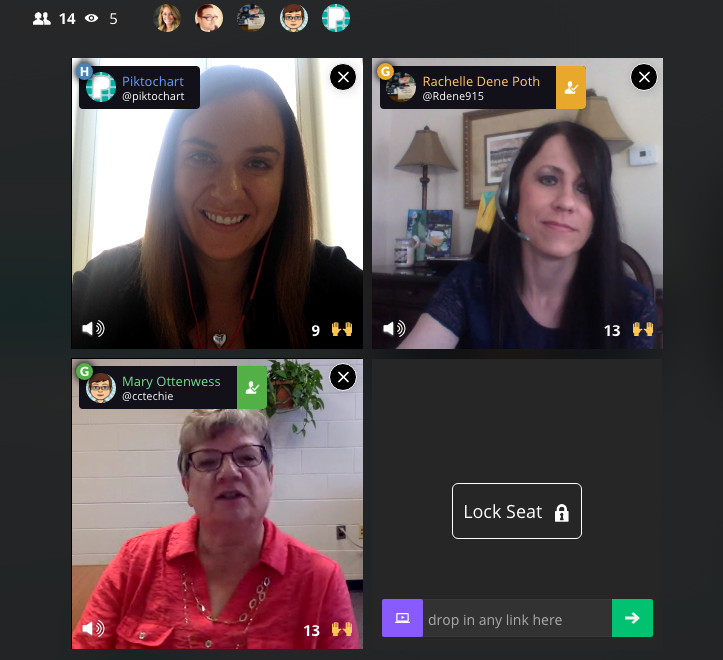
To get the skinny on what’s going on in classrooms when it comes to EdTech — from best practices and challenges to favorite tools and privacy policies — we brought in two Piktochart users who are making a big impact by bringing technology into their school. For the first time, we had two guests on our Blab,Rachelle Poth and Mary Ottenwess.

Rachelle is a foreign language teacher at Riverview Junior-Senior High School in Oakmont, PA. She enjoys using technology in the classroom and finding ways for students to have more choices in their learning. She has presented at several technology conferences in Pennsylvania and at ISTE in Denver this past June.

Mary has been in education for 25 years. She started out in a public high school library and is now the Instructional Technology Specialist at Catholic Central High School in Grand Rapids, MI. She was the one that didn’t step back when they asked for volunteers to run the computer lab and thus her adventures in EdTech began!


What is your biggest pain point with your school’s current EdTech setup?

Rachelle said her biggest complaint when it comes to EdTech tools, which is shared by other teachers she talks to, is the fact that things sometimes don’t go as planned with technology.

“Best case scenario doesn’t always happen when it comes to technology,” she said. “You have to be prepared for the little bumps that come along the way.”

Mary echoed Rachelle’s thoughts about technology being unpredictable. She also added that limited professional development time for teachers is another hurdle when it comes to her school’s EdTech setup.

“An hour once a month just isn’t enough time,” said Mary. “Students come in an hour late and we have a meeting with all teachers at the school. Teachers will go around and talk about what they are using in their classrooms, discuss a particular tool, or discuss a method. Because we are trying to cover so much in a single hour, hitting everyone’s skill and comfort level as well as giving them time to try the tool often means a lot of 1:1 follow-up.”

“As a workaround for time, we have teachers create tutorials to view prior to the professional development sessions,” noted K-12 EdTech coordinatorCourtney Kofeldt in the chat.

What opportunities are given to kids through EdTech and how can teachers learn to embrace them?

Mary said EdTech really expands a student’s world. They can collaborate and share with not only each other, but with experts in the field. Students can use project-based learning and inquiry-learning, and they can use and develop real-world skills for college or a career. For teachers, Mary thinks technology makes things simpler.

Rachelle agreed. She believes the opportunities provided by technology are tremendous.

“Technology provides opportunities to students to allow them to show what they have learned and to use a tool that is meaningful to them. Without the technology, they wouldn’t have been as engaged,” she said. “I don’t use technology for the sake of using it, but rather as a way to increase opportunities.”

When given a choice of tools to utilize on their projects, Rachelle finds students talk to their friends about the learning curve of each software. Students work together, collaborate, and learn from each other about how to use technology.

What’s the best thing technology has allowed you to do in your school that you couldn’t have done otherwise?

Mary shared an example from her school, Catholic Central High School in Grand Rapids, MI. Using technology, a French teacher was able to bring in a video feed from a classroom in Canada. The American students communicate in French to sharpen their skills, and they’re also able to learn more about the other students culturally.

“Students are not only collaborating with the students in another country, but those next to them in their classroom too,” explained Mary. “It’s fun to watch the collaboration.”

Rachelle says that technology has allowed her to continue the conversation with students after class time ends. She found more and more that her students had questions once they got home and started working on their homework or projects, and technology allowed her to be available to them during those key moments.

“It really bothered me that when class ended, that would stop their learning process in a sense,” she said. “I use technology to bridge that disconnect. I use messaging to help.”

Do you as the teacher (or your school) assess the privacy and security of a tool before letting students try it?

Rachelle said she pays close attention to privacy and security settings before bringing a tool into the classroom. She does this by creating an account on her own and reviewing the settings herself. Rachelle also sends home a notice to parents at the beginning of the year informing them of the tools that will be used in the classroom.

She also relies on the thoughts of other teachers, and she noted these sites and communities as her go-to sources:

  • Common Sense Graphite, a community of educators who take the guesswork out of finding innovative ways to use technology in the classroom;
  • EdShelf, a socially-curated discovery engine of websites, mobile apps, desktop programs, and electronic products for teaching and learning;
  • EdCamp, an organic, participant-driven professional learning experience led by a community created by educators, for educators.

Mary added that her school has a tech team on staff who will verify security before launching a new tool in the classroom. First, they start with a pilot program and monitor progress while the new EdTech tool is being tested in the classroom. During that pilot, they will be on the lookout for glitches or security holes.

Which tool/platform/methodology has been the biggest hit in your classroom and why?

Rachelle, Mary, and participants in the chat were excited to share their favorite EdTech tools! Check out the list below:

What are 3 most important skills kids have gained in your classroom thanks to technology?

Everyone agreed that more collaboration and creativity is taking place in the classroom thanks to technology.

“I have noticed students really develop the 6C’s — Communication, Collaboration, Critical Thinking, Creativity, Character, and Citizenship — when tech is integrated,” said Courtney Kofeldt in the chat.

Rachelle added she often notices that projects from her students go above and beyond her expectations. “Technology gives them that voice to speak out and be part of something when otherwise they wouldn’t have been,” she said.

Mary says teachers have benefitted from technology as a way to improve their skills, too. She notices more collaboration happening between teachers and growth of their professional networks thanks to technology making it easier to work together.

Thanks to technology, both students and teachers alike are building up their confidence. “It’s ok to have something not work,” explained Mary. “Technology allows students to take the lead. Teachers aren’t always the one with all the knowledge.”

Mary also touched on her school’s Digital Citizenship Course, which is an ever-changing movement to educate students on the proper use of technology — when to use it (or leave it behind) and best practices.

“I teach motion graphics at UCLA, and it is wonderful to see what the students create once they understand the tools,” added Eric Rosner in the chat.

How can teachers improve their tech skills in order to make classes more interactive and multimedia oriented?

Rachelle’s advice is simple:

“Just pick something and start it!” she said. “Really. You don’t know if it’ll work for you until you try it. Pick something small and give it a try.”

She suggested teachers consider learning new tools alongside students. Rather than a teacher-driven project, why not try a student-driven project? She found her students enjoy it, and as a teacher, it keeps her fresh. Use the challenge of a new tool as a learning lesson for both the students and the educator.

“Not everything is going to work, and that’s ok,” added Mary. “We teach our kids to learn from failure, and we need to do the same.”

Mary advised teachers to expand their professional network to get to know other educators. Social channels are a great way to do this — and Mary specifically suggested getting involved in Twitter chats. For a comprehensive list of Twitter chats all about education, check out this list Mary shared with us on the Blab!

What are your recommendations for someone who is just starting to use technology in the classroom, and may be a bit hesitant?

Rachelle suggested focusing on one area in your classroom you can try to improve using technology. Give a new EdTech tool a shot, use it minimally, and be patient with getting comfortable with it.

Mary suggested finding another educator who is using technology you’d like to try and simply watching them use the tool in their classroom. Finding a tech mentor is key to getting comfortable!

How can tech help all students to be engaged, to reach each student?

If students are on different levels, Mary said EdTech tools can help bridge that gap. She particularly likes Khan Academy for this purpose. She also suggested putting up a rubric for an assignment, but allowing students to choose their technology tool to complete the project.

“Students are not all the same,” added Rachelle. “By giving them choice with technology tools, you’ll see they can create anything they desire, and you learn more about them as individuals. When the choices are given and nothing is set in stone, it pays off.”


The team at Piktochart had a blast during our Blab with Rachelle Poth and Mary Ottenwess! Thanks to both of them for stopping by! If you’re interested in learning more about how Piktochart can help out in your classroom, check out a few more of our EdTech posts!

This post originally appeared on Piktochart’s blog here.

Technology Can Make The Learning Process More Transparent

TeachThought: Thanks to Terry Heick for publishing part two of this post.

Technology Can Make The Learning Process More Transparentby Rachelle Dene Poth

In my last post, Finding Out What Students Are Thinking: 10 Tools To Get Them Talking, I shared tools that can help promote student communication.

The additional benefit for using tools like these is that you can take what you hear and learn and the next day in class anonymously share some ideas to get the discussion going.

Even if you try to keep things anonymous, you will have the students who immediately fess up and say “yeah that’s mine,” because that’s just what the students do, which is okay because they are willingly sharing what they said.

And if it does come down to a right or wrong kind of question and that student is in fact incorrect, that’s an even better lesson–a better example for the other students in the classroom to show that it’s okay to answer something and to be wrong.

These are the experiences that build character and growth mindset and help students become more involved in their own learning path.

A Few More Tools: Communication Through Collaboration

If you’re looking for a way to have students speak more regularly about different topics, share their ideas, or be more involved in class discussions, you may want to consider some other format for “talking.”

Having students write in their own blog, where they can keep their responses private and you can respond directly, is a great way to learn about the students and what they are thinking. Having this communication format is also helpful with relationship building.

Through blogging, you can give feedback which helps to provide support for students and can help them to gain confidence. By building confidence in this way, they have a chance to become more open to and comfortable with sharing their ideas in class.

As teachers, any opportunity to share our own experiences, especially when we share experiences that reflect our fears of making mistakes and taking risks, is helpful to our students.  Showing that we are sometimes wrong is okay, because we are all are constantly growing.

Writing Spaces

So what about some tools?

Wikispaces is a social writing platform for creating an online space for collaboration. Creating a wiki might be a great way to have students collaborate together on a topic if they are working in small groups. Some options for collaboration are creating a page for a discussion, set up a pro/con debate, or a even class website. Students can build confidence and comfort by collaborating in this way.

Padlet is a virtual wall for posting thoughts, discussion, and more. It could also be another way for students to work together and build some of these skills for collaborating any time and anywhere.

Tools For Reflection & Feedback

Choosing the right tool comes down to what type of conversation you looking to involve students in.

Is it open-ended?

Do you want the students to speak out in class or do you want them to think about something, have time to process it and answer after class?

That’s the benefit of offering blended or flipped learning experiences. The conversations don’t have to end when class ends. The questions don’t have to be asked during class because teachers can set up questions after class using tools like these I’ve shared, or Let’s Recap.

Let’s Recap is a way to record a prompt, ask questions, and then have students respond through video. Teachers can then view the response or see the daily reel, and provide feedback to each student.

A tool such as TodaysMeet can be useful for a “backchannel” chat in class, or to open up discussion after the school day ends. Either way, it is another quick option to get the conversation going or to use as a way for students to ask questions.

The goal of all of these tools is to get them talking–to know what their thoughts are–so that we can help them grow.

Why Does Student Feedback Matter?

Teachers need student feedback to help guide our next steps and provide learning experiences which are meaningful.  We want our students to feel comfortable. Depending on the age group being taught, the content being covered, and whether the technology is available and accessible to the students, you can determine which of these tools might facilitate learning the best.

Using technology just to use it doesn’t make sense. But using it to help students find their voice, learn more about what they want to do, what they can do, and what they are having trouble understanding does.

These tools and others like them, can help to connect those ends. And since learning feedback is critical to student growth, sometimes we need other methods for connecting with the students; this is when technology has a purpose.

Technology can expedite the feedback process and gives us real live results. We can give feedback to the students, the information is saved, and we can use it as a way to give a voice to those who would not necessarily be willing to use their voice in the classroom.

For now, maybe keep it simple. Start with the question, “What do I need to know about my students?”

Then look at these tools and others like them and start experimenting.