If you have never considered how tech can make your class more inclusive, I encourage you to do so. If you have considered ways to meet the needs of your students in more diverse ways while helping to build a positive culture in your class, then this post may be just a refresher for you. I will briefly feature Pear Deck, Buncee, Microsoft tools, Wakelet, and Flipgrid to show how these tech tools can help you create that inclusive classroom we all need.
THE INCLUSIVE POWER OF TECH
In my classroom, one way I allow all voices to be heard is through the use of the Google Chrome add-on for Pear Deck. I have been using this tool, Pear Deck, since 2015 to facilitate classroom discussions because it allows me to make Google Slides interactive so that students see my presentation and then can respond to questions with short answers, draggables, multiple-choice, and drawings. When I have them respond with short text or long text answers, I can show student answers on my projector screen and it also displays them on all student devices. We can examine all responses one at a time, and all student names are automatically hidden so that we can discuss answers anonymously. This allows students to take risks and respond without fear of not sounding smart, sounding “too smart,” or of being wrong. If an answer is wrong, I love to have students look at it and justify to me why someone might have put that as a response. I pay for Pear Deck premium service monthly in order for me to see the student names with the responses, because I have to have some accountability when teaching high school, and I can use it as a formative also. When students know I won’t “out them” for their answers as long as they are appropriate, they feel safe taking those risks and respond with a deeper answer more often than not.
I display responses and students discuss with me what is good and what needs to be rethought. Having students take on the perspective of the author for weaker answers and then justify the why behind those answers helps build a safe classroom.
(WHEN THIS BEGAN)
I also explore educational technology (edtech) companies that build inclusion within the tools they offer, such as Buncee, a tool in which students can create presentations, graphics, videos, audio creations, and so much more. Students like to see representations of themselves and their families in the clipart tools use, and Buncee does an amazing job at this. Their clipart, which they call ‘stickers,’ has students in wheelchairs, blind students, and students of various nationalities, races, and religions. Family stickers include those with two moms, two dads, a mom and dad, as well as grandparents. The company is used by educators internationally with elementary through high school students to create presentations, audio or video recordings, graphics, cards, and more. Students can even customize an avatar to make it look more like them instead of just a general representation of themselves. The amount of care that Buncee puts into making their users feel included is a big reason why I began to use their tool in the first place.
I HAD NOTHING TO SAY
Buncee adds multiple versions of the same student sticker so that students can find what fits their needs.
As for making special education students feel included, Microsoft tools and those within the Microsoft partner family, such as Buncee, Flipgrid, and Wakelet all help me achieve this goal. Microsoft’s Immersive Reader is a free tool that is embedded directly into Microsoft products and in many of their partner products, such as the three I previously mentioned. This amazing tool adds a sound icon by any text which students can play to have the text read to them. It also has over 30 languages that it can translate the text into, and it can highlight words as it reads the text to the student. The text highlight can even be color-coded to help those with dyslexia. The features it has will depend on which program is using it. With native Microsoft tools having more options than their Microsoft family partner counterparts.
AND I’D GET LOST IN THE NOTHINGNESS INSIDE OF ME
To access Immersive Reader (on a MacBook) in a Microsoft Word document, on the toolbar where you see “Home, Insert, Draw, Design, Layout, References, Mailings, Review, and View,” choose View. You should then see it as an option.
(I WAS CONFUSED)
Wakelet and Buncee have the Immersive Reader tool plus the Flipgrid integration (Wakelet) or native video integration (Buncee), among other integrations. Flipgrid and Buncee both have options for students to create a video or audio response, which can be used for differentiation, as well as for an alternative form of assessment. Flipgrid uses their video response without activating the camera (a blacked-out screen effect) which is also a great option for students who have to provide a response but don’t want to be on camera. Buncee’s audio option works a bit differently. After adding a “sticker” to the page, then you get the option to add audio to that sticker. Students can choose or design a clipart version of themselves, add it to a slide, then add audio which they record in app. It is a fabulous way to bring their creations and learning to life, and allow their voices to be heard.
Flipgrid has the Immersive Reader built in also!
AND I LET IT ALL OUT TO FIND
Once you add an element to a Buncee, you can then add audio.
Flipgrid’s options, like mic only and screen recording, have really amped up the ways for students can share their voices.
THAT I’M NOT THE ONLY PERSON WITH THESE THINGS IN MIND
I encourage you to look at these tools with inclusion in mind. You may find a new way to use them that fits your students’ needs and provides inclusion in ways you didn’t expect. When you decide on the “why,” you are using tech, the how becomes much simpler to discover.
HEADINGS ARE PARTICAL LYRICS FROM LINKIN PARK’S SOMEWHERE I BELONG.
**Interested in writing a guest blog for my site? Would love to share your ideas! Submit your post here. Looking for a new book to read? Find these available at bit.ly/Pothbooks
************ Also check out my THRIVEinEDU PodcastHere!
Join my weekly show on Mondays and Fridays at 6pm or 6:30 pm ET THRIVEinEDU on Facebook. Join the group here
It is hard to believe that it has been two years since I was in Miami for FETC (Future of Educational Technology Conference). This year, the event was held in Orlando at the Orange County Convention Center. It was the 42nd year of the conference and my sixth time attending and presenting.
The biggest highlight was being back in person, connecting with friends and learning together to continue to improve ourselves for our students. If you’ve never been, FETC provides a space for educators to gather to share innovative ideas and best practices for schools and Conference Chair Jennifer Womble always delivers a fantastic and welcoming space for educators every single year.
A personalized professional learning experience
One of my favorite things about FETC is that it offers tracks and theaters specific to different roles in education focused on topics that attendees want to learn about. Navigating the conference schedule is easy whether you’re online or you use the FETC app. Being able to search for and quickly find a session connected to a specific role or a certain area of Interest, makes it possible to personalize your learning experience while at a conference so full of choices.
The conference tracks
FETC offers five tracks to help attendees focus on their area of learning: Administrators, Coaches, Educators, Information Technology, and Library Media Specialists. Within each track, there are concurrent sessions and workshops on a range of topics from cybersecurity, inclusivity, interoperability, emerging technologies like AR/VR and AI, social emotional learning (SEL), STEM, and best practices for online and personalized learning environments.
The theaters and expo
The expo hall provided a great opportunity for attendees to connect with more than 400 companies to learn more about their products and to engage in meaningful conversations. FETC also offered five content-focused theaters. In the Information Technology Theater, presenters spoke about cybersecurity and wireless technologies, and how to create a solid and secure infrastructure for our schools focusing on innovation and emerging technologies. There were sessions with live demos about how these technologies are improving the learning experiences for students.
The Thought Leadership Theater had speakers focusing on equity, school management and social emotional learning. Attendees could ask questions and have one-on-one conversations to learn how to provide more opportunities for professional development in their schools.
The Esports Theater had product demos and people available to answer questions about Esports clubs and the benefits for students in areas such as digital citizenship and social emotional learning. The STEM theater offered sessions about the benefits of STEM and methods and tools shared that will help students to build these skills in preparation for the future.
Keynote speaker and Best-selling Author, Shawn Anchor.
The keynote speakers always leave me inspired. Shawn Anchor, a best-selling author, spoke about rethinking the formula for success. He shared some personal experiences and said “Happiness is the precursor of success. Our support system is an integral part of our happiness, we can’t do it alone! Lean on your friends, mentors, and those that are there for YOU!!” A good message to kick off the conference, especially since for many it was the first time being in-person at a conference and two years since FETC took place.
De Filippi, a Faculty Associate & Researcher at Harvard Law School and National Center of Scientific Research, spoke on leveraging blockchain technology in education. Focused on what the impact of blockchain might be for our schools, she said “Blockchain creates a world of interconnected academic credentials & curriculum.”
Tech Share Live!
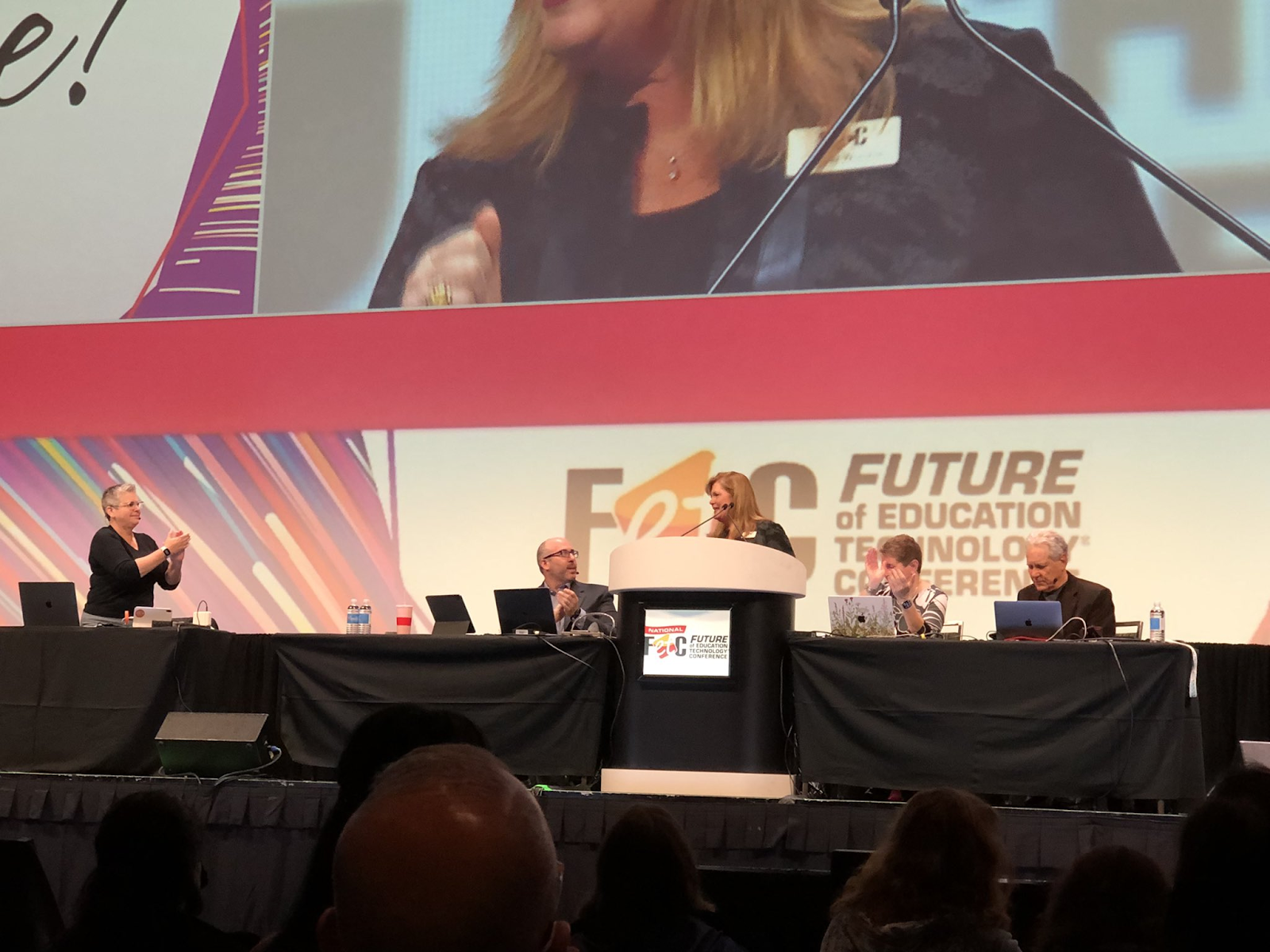
An annual favorite is the Tech Share Live! with Adam Bellow, Hall Davidson, Leslie Fisher, and Kathy Schrock. This is a session for anyone to learn about apps, exciting gadgets, and focus on topics like AI, Esports, augmented reality and more. It’s always a fast-paced and fun session to join for engaging ideas. Adam Bellow was a hit with his “Piano Man” song this year!
There were also five Mega Sessions during the event with speakers including Jenni Buccos and Kari Byron who spoke about STEM. Robert Kennedy III spoke about upgrading virtual teaching strategies. Ken Shelton inspired with his focus on Techquity and creating learning environments for equity, sustainability and access. Joe Sanfelippo shared his vision of transforming “Moments to Movements,” and Thomas Murray shared how to create a culture of innovation in our schools.
Hearing the stories
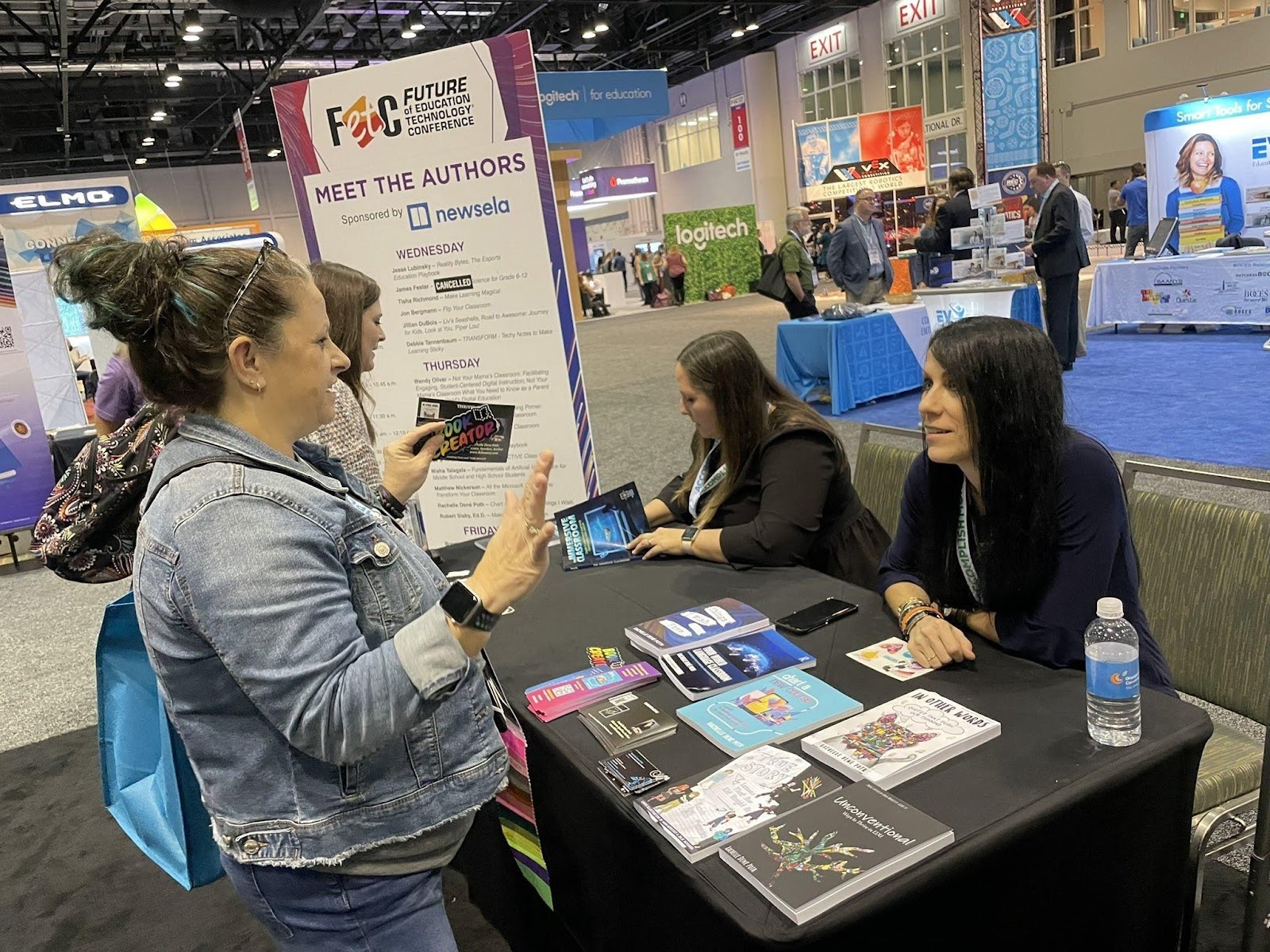
The Edtech Startup Pavilion is a space to meet some of the people behind these emerging products, learn about their entrepreneurial journeys and explore some new technologies that might be coming into our schools. The Meet The Authors event is a place to connect with friends, talk to each author, and learn about their journey to writing a book and exchange stories has always been a great part of the conference.
Jon Spike
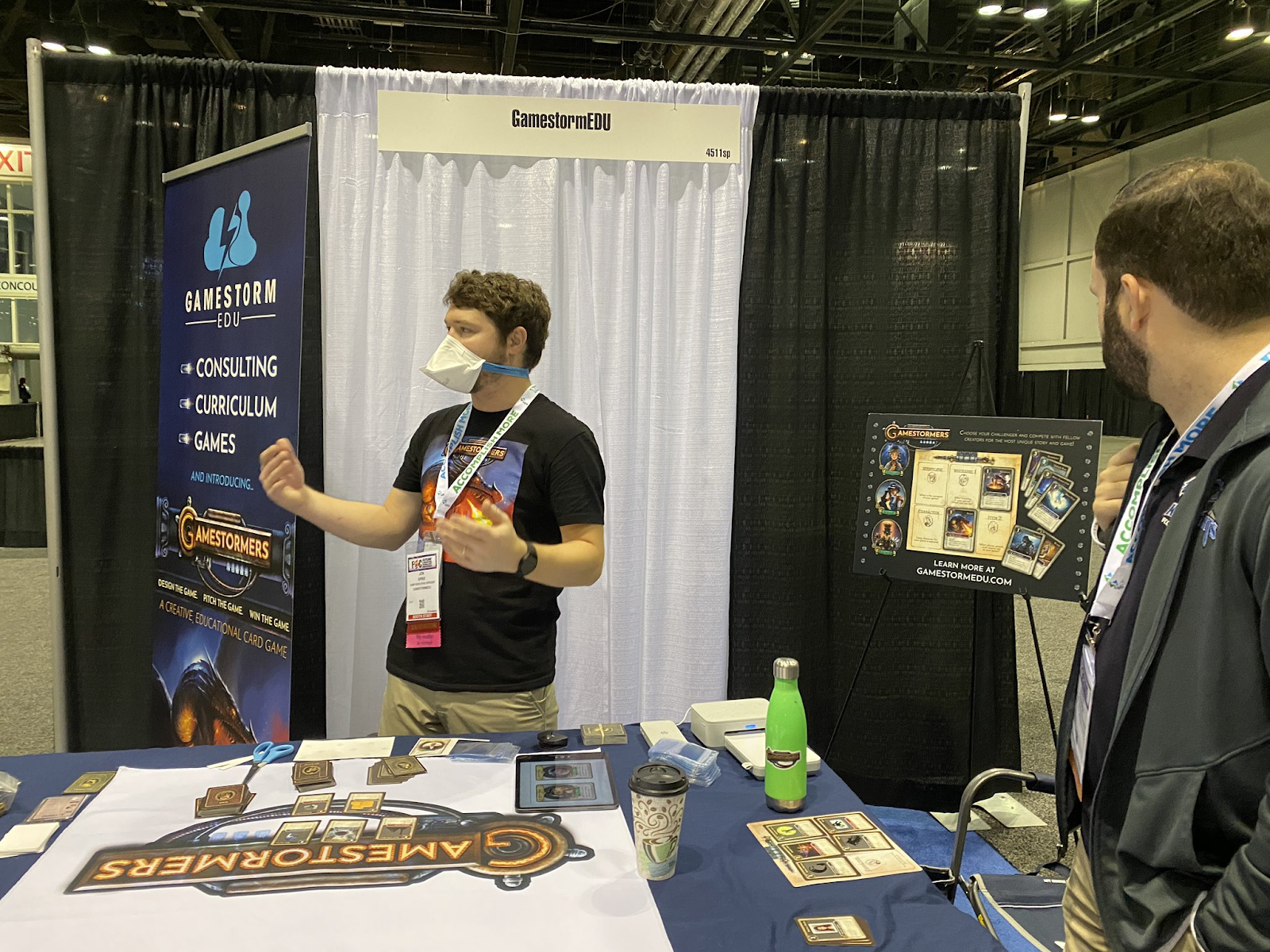
Jonathan Spike, creator of GamestormEDU, explaining his game concept to attendees.
Gamestorm specializes in designing educational games, providing engaging curriculum, and facilitating engaging professional development. Jon showed me how to play the game and there are so many possibilities for students and teachers. He even made a custom Gamestormers card for many attendees!
Don’t miss out!
The variety of sessions and scheduling each year enable attendees to customize their FETC experience and select focus areas and sessions that resonate the most. I would recommend educators add FETC to the list of must-attend events. The conference will be held January 23-26, 2023 in New Orleans, LA next year and proposals to present a session will open soon.
**Interested in writing a guest blog for my site? Would love to share your ideas! Submit your post here. Looking for a new book to read? Find these available at bit.ly/Pothbooks
************ Also check out my THRIVEinEDU PodcastHere!
Join my weekly show on Mondays and Fridays at 6pm EST THRIVEinEDU on Facebook. Join the group here
In education, NFTs have become a topic of conversation.
Students are interested in learning about NFTs and discussing what it means for the future and for education, and even brainstorming what they would create.
We can expand access to careers in human expression while leveraging the emerging technologies in our future.
NFTs (or non-fungible tokens) have become a hot topic in conversations when it comes to emerging trends in technology. Even though it feels like they are something new, the first NFT was actually launched in 2017 by CryptoPunks. Now, NFTs are now being used at an increasing rate and value every day. In one year, the value of NFTs in the market has increased from $340 million to $14 billion dollars. There are many areas of work where people are starting to use NFTs and one question many are asking is, “What role could NFTs play in education in the future?
What are NFTs?
According to the Merriam-Webster definition, a nonfungible token (NFT) is a unique digital identifier which cannot be copied, substituted or subdivided. Once created, the NFT is then recorded in a blockchain which is used to certify its authenticity and ownership. An NFT is not a tangible object but rather a form of proof that shows ownership and purchase. These blockchain-based tokens can represent artwork, digital content, media or even event tickets. An NFT is an irrevocable digital certificate of ownership and authenticity for a digital or physical asset.
NFTs have unique digital identifiers and are stored on a blockchain, a system that is used to keep a record of transactions made in bitcoin or some type of cryptocurrency. NFT records are kept across multiple computers that are linked in a network and through the blockchain, can be sold or traded. NFTs are created through a process called “minting,” in which they convert digital files into a cryptocurrency collectible. The process of minting is how NFTs are uploaded to the blockchain.
A difference between bitcoin and NFTs is that bitcoin can be traded for another bitcoin, whereas NFTs are unique and cannot be traded as an equal value. In my eighth grade STEAM class, I shared this video explainer which provides some examples to help students and teachers better understand NFTs. One example shows how a $100 bill can be divided up into different amounts but keeps the same value. However, when it comes to NFTs, in art for example, you cannot take a painting like the Mona Lisa, divide it up, and equally distribute it because there is only one original Mona Lisa. That’s where the value of NFTs comes in, especially in areas like music and art. While you may be able to print a copy or take a picture of it, the value will not be the same as the original. Because of the ability to forge works of art or music, which makes it difficult to identify whether or not it is an authentic piece, this is where NFTs can be highly beneficial.
How are NFTs created?
NFTs are created by artists, designers or license holders through a process referred to as “minting.” Minting involves signing a blockchain transaction that provides the specifics or outline of the fundamental token details. NFTs can take various forms whether it is a photo, video, or even a GIF. The information is then sent to the blockchain to trigger a smart contract function which creates the token and assigns it to its owner. Each NFT has a unique identifier which is then stored on the blockchain. Once it is on the blockchain, it sets the authenticity and the ownership.
Where are NFTs being used in education?
In education, NFTs have become a topic of conversation. Over the past few months in my STEAM course on emerging technology, we have explored bitcoin, cryptocurrency, blockchain, and NFTs. Students are interested in learning about NFTs and discussing what it means for the future and for education, and even brainstorming what they would create. There are several universities that are using NFTs for credentialing and also for working in remote learning environments. One example is Duke University which has provided educational credentials in the form of NFTs for its Master of Engineering in Financial Technology degree.
Other universities are exploring some unique uses of NFTs. Seton Hall University held an Annual Entrepreneur Hall of Fame Dinner in February and alumni were presented with NFT awards. At Pepperdine University, one educator has been using NFTs in a personal finance course to award NFTs to the students. The NFTs represent academic tokens, without monetary value, that represents when a student has passed the course. The NFT contains unique details about student performance. MIT has done research and has been advocating for the use of blockchain for authenticating college certificates and transcripts.
Students are interested in learning about NFTs and discussing what it means for the future and for education, and even brainstorming what they would create.
Rachelle Dené Poth
NFT’s may also be used in the future in order to give people permission to events and to better manage which parts of the event people have access to. Over time, this may even become some kind of alumni status, i.e. special rewards or privileges to those who have attended SXSW EDU 5 years in a row, etc.
What does this look like in K-12?
At a high school level, think about times when we use assessments for learning or we share evidence of work that students have done whether that comes in the form of a certificate, maintaining student records, accessing results from a standardized test, or recording other academic achievements. These require time to obtain and to store and in some cases, can easily be forged. With so much technology available, we can make certificates and other documents look authentic. However, with NFTs and the inability to forge them, schools are likely going to consider using NFTs for a variety of reasons.
When a student or teacher does well, to make it memorable, the academic sector can now create and design an NFT. The use of NFTs as diplomas and resumes could help better track and access what students have earned throughout their school careers. By using NFTs, it serves to stop students from falsifying their academic certifications because the token serves as a permanent, unchangeable and unique “transcript.” There are many ways NFTs are being used now and which can benefit various areas of work and life. Rabbi Michael Cohen, educator and author, has been doing a lot of work in the area of NFTs and even holds a Twitter Spaces chat on Tuesday nights about it. He sees the potential for using NFTs for creativity and in the arts.
Mark Cuban, a billionaire and investor on NFT platforms, believes that textbooks will become part of the NFT experience. Digital textbooks can be resold and royalties can be collected for each resale.
Preply, a global language learning platform founded in 2012, minted three NFTs on Open Sea as a way to reward tutors in 2021. Amy Pritchett, the Student Success Manager of Preply says: “We wanted to experiment with NFTs as a way to reward Preply tutors and the great education they provide our students. Once you have one of these tokens you can keep it or sell them. Pritchett added some ideas for using NFTs such as creating online ‘trophy cases’ of their NFTs as artifacts or perhaps creating digital portfolios, which can be shared with prospective employers or even college admissions. Teachers can also issue NFTs to represent when students successfully demonstrate learning the class material. Pritchett added, “We are only starting to see the beginning of how NFTs and education can come together. They are an emerging trend that we all continue to be curious about.”
What is the difference between NFTs and Verifiable Credentials?
Both NFTs and verifiable credentials (VC) offer ways to uniquely identify something in the digital space. NFTs are publicly displayed and VCs are a privately held digital fact, however, each of these spaces provides more security and authenticity, and are capable of being monetized. Each proves that something, whether a token or a piece of art, belongs to someone. However, there are differences. A VC uses link key infrastructure and has three entities: the issuer, the holder, and the verifier of the credential. Each party signs the license and gives it the authentication. An example would be a driver’s license. An NFT can only exist on the blockchain and as soon as it is created, everything is time-stamped which makes it easier to verify ownership. NFTs can be monetized by creating something new and then selling it whereas a VC cannot be tampered with and all information is verified cryptographically to prove the identity of the individual or entity. NFTs can be transferred, but VCs cannot, which means that the original owner remains the same.
The value of NFTs
The value of NFTs are determined by the availability of a digital asset or what it represents. If few are in existence then the value will be greater. Earlier last year, digital artist Beeple sold Everydays, a collage of 5,000 images for $69.3 million and Jack Dorsey, Twitter CEO sold the first tweet he made as an NFT for $2.9 million. Podcast Host has launched the “world’s first-ever generative podcast NFT collection” under the branding of “The Curious Companion” introducing a new medium into the world of NFTs.
NFTs create a unique way for artists and creators to express themselves by making digital art and artifacts that are collectible, sellable and authentic. When it comes to human expression and preparing students for the future, Tom Vander Ark says “We can no longer teach the expressive arts without introducing new modes of expression, new market platforms, and new business models with the opportunity to make a career in the arts sustainable. It’s time to teach creativity not just in the arts but in audience development and entrepreneurship.”
With NFTs and the potential for infusing creativity in the design and developing a plan for distribution, we are fostering essential skills such as entrepreneurship and agency in learning. Students are now creating artwork and maintaining ownership of their work as an NFT or they can develop entrepreneurial skills to build a business and make a profit.
As we seek to prepare students for the future, Vander Ark believes that schools and colleges can help by “Integrating the expressive arts with emerging technology and new business models so that more young people graduate ready for sustainable arts impact.” We can expand access to careers in human expression while leveraging the emerging technologies in our future.
**Interested in writing a guest blog for my site? Would love to share your ideas! Submit your post here. Looking for a new book to read? Find these available at bit.ly/Pothbooks
************ Also check out my THRIVEinEDU PodcastHere!
Join my weekly show on Mondays and Fridays at 6pm EST THRIVEinEDU on Facebook. Join the group here
Over the past year, we’ve had to adjust so much of our personal and professional lives. People who may not have used a lot of technology have found themselves using it for nearly every part of their day for work and personal life. With limits placed on so much of our daily lives, we had to adapt, grow and persist throughout the many changes we experienced in how we communicate and connect with others. Technology already played such a big part in our everyday lives and in the past year, through technology we have been able to keep schools going, to keep working, to access essential items that we need for our homes, and probably the most important, to stay connected with family and friends.
We saw and experienced an increase in familiarity with using video conferencing tools like Google Meet, Microsoft Teams, Zoom, or the many other options that are out there for connecting us with others in the same virtual space. We relied on these tools during our sudden shift to remote work and learning to be able to teach, learn, work, and connect. Businesses found new ways to survive and thrive in what was definitely a challenging time and have emerged with new ways to work, creating even more opportunities for collaboration and the knowledge that we can persist when met with challenges, we need to simply explore new ideas and innovate in our practice, regardless of our work.
These spaces were not only beneficial to educators and the world of work. Thinking about the activities that we enjoy like spending time with family and friends, traveling, engaging in activities from conferences to concerts, these technologies created a means to find some normalcy amidst uncertainties.
Impact on education
Last year, there were a lot of missed opportunities. We saw high school graduations, academic ceremonies and sporting events carried out through unconventional means. Schools held graduations at drive-in theaters, held band and chorus concerts through live streaming or meeting platforms so that families could join in.
When schools first closed last year, my school was not using a specific platform like Microsoft Teams, and so I used Zoom to connect with my students and try to keep some consistency in what was a very inconsistent time. This year, we are using Teams which works well for creating a space where students feel more connected and can collaborate. But even with tools like Zoom or Teams, we don’t truly get the feeling of being in the same “space.” This is where I believe that the web VR tools can make an impact.
Web VR makes it possible to experience virtual reality from right within our internet browser. With Web VR, everyone can experience virtual reality without needing a specific device or even a headset. My initial experience with Web VR was through some experiments for playing games that I tried with my eighth-grade students in my STEAM course. There are many Web VR options out there that can be used for education, work, or even to explore a different way to connect with families and friends. For anyone looking to explore virtual reality meeting spaces, depending on your role or the grade level that you might teach, several of these might work. While not all of these might be a good fit for your specific purpose, it’s good to know that there are several options out there that we can try, if only to explore something a little, and promote a discussion with our students about the potential impact of these technologies.
Here are four options that I have been exploring. Some of them are easy to get started with and the ones that I used with students didn’t require much instruction from me at all. I was learning from them faster than I probably could have taught them how to interact in the spaces.
1. InSpace Chat. The most recent one that I tried was InSpace, which I learned about after joining in a conversation about the future of education. Thinking about the future, I’m always interested to learn what opportunities these tools might bring and what we can provide for our students. With InSpace Chat, you can sign up for a free 2-week trial and set it up to use it with one class with breakout rooms or set up an event that has four different rooms. You can set different backgrounds in the rooms, screen share, play a YouTube video, have a chat, and more. As you move closer to people in groups or in the room, you can actually have a conversation, which I think this takes it to a higher and more impactful level than using some of the traditional conferencing tools. I created an account, got started very quickly, and was impressed with what it offered.
2. Mozilla Hubs. With Mozilla, you create a virtual meeting room. You have an avatar to represent you and can interact with students or with other educators, in a way that is different from being in our standard class or school meetings. It is a space where 3D objects and other content like PDFs and videos can be shared. What I like about this also is that for anyone who prefers to not have the camera on, they can be represented by an avatar and be involved in a class but in a more visually engaging way. You can even upload images or take photos with you and the other “people” in the space. It was a fun experience with my eighth graders.
3. Kumospace. I’ve heard about a lot and dove into trying Kumospace as well. With this, it’s not specific to education but you can create a customized space for use as a library space, for businesses, for gatherings in places such as a rooftop restaurant, and other spaces that enable you to feel like you are meeting in a more authentic way because of the background. Choose from the different backgrounds available and be able to feel like you are meeting in a real classroom or in an office, it just gives it a different experience With spatial audio, you can have clear conversations with others, and with the live video feed through your avatar, be able to see and interact with others in a more engaging way.
4. Frame VR. Probably the most complex but again as with the other options, it does not take too long to get started or at the very least, to experience what it offers. My first time exploring this was with my friend Jaime Donally. Frame VR enables you to design a more immersive space for collaboration that can be experienced through your web browser, desktop computer, mobile devices, or using a VR headset. In “Frame”, you don’t need to download any app and you can simply share a link with others to join, and do a presentation which includes sharing a whiteboard or screen sharing, engaging in conversations, and more. With the photospheres, you can provide virtual field trips or tours. You can also import and play audio files that those who join in can hear.
With each of these options, you want to learn more about the options and of course, make sure you can use these depending on the grade level you teach. The best we can do is inform our students about these tools because they may need to learn or interact in one of these web VR spaces. To best prepare students for the future, we need to give them experiences that will likely be part of their future in education or in the workforce.
**Interested in writing a guest blog for my site? Would love to share your ideas! Submit your post here. Looking for a new book to read? Find these available at bit.ly/Pothbooks
************ Also check out my THRIVEinEDU PodcastHere!
Join my weekly show on Mondays and Fridays at 5pm EST THRIVEinEDU on Facebook. Join the group here
“Forgive yourself for not having the foresight to know what now seems so obvious in hindsight.”
—Judy Belmont
Over the past couple of years, as I’ve become more reflective in my teaching practice and grown my learning network, I’ve really tried to think about how I’ve changed as an educator since I started teaching. From my first few years of substitute teaching to the first couple of years in my current school, fast forward to the last few years, I have definitely grown personally and professionally. How often have you thought to yourself… I wish I knew…. then?
It’s easy to look back at when we started our careers, and think about how we could have or should have done something differently. If only we had known… If only we could go back and try again. If only I knew…. What an impact that could have been made in our lives or more importantly, in the lives of our students, and those we lead and learn with.
But we all know it’s easy to look back and think about how we might change things. We can beat ourselves up about not having the knowledge when it would have made a difference, but there’s still something that we can do with that knowledge. We should take what we now know, all of those things that we wish we knew, and share our experiences with others. Use our experiences to help others to push through challenges, to take risks, ask for help when they need it, avoid isolation and connect with others. We can use what we now know to do better.
I have always been a fan of quotes because they help me to process my experiences and push my thinking. Other times they lift me up or I use them to lift others up. A quote by Maya Angelou, “When we know better, we do better” is what I keep in mind when I have those “I wish I knew” moments.
So why write this book?
When I started to think about things I wish I knew when I started teaching that would have made a difference in those first few years, I realized how much I have learned since then. The challenges and those experiences helped to shape the educator I am and have led me to help others who are starting on their own teaching journey. I started thinking about things that I wish students knew, like how to overcome the fear of failure, to understand the importance of learning, to know that it’s okay to struggle.
What started as a book where I would share all of the things I wish I knew about teaching became a book about things that many educators wish others knew.
Like several of my other books, I sought stories from educators around the world, some within my network and others who I might have just met. I provided the open-ended prompt “Things I wish… knew” and asked them to share a story.
As the stories came in, I thought about how to best organize the book into sections because there were so many stories with great advice. I decided to separate the types of stories into advice for first year teachers, all teachers, advice for and from administrators, for parents, and everyone within and beyond the school community. It was not an easy task at first because the lessons shared are applicable to so many areas of education and life and work in general.
Why choose this book
My hope is that this book will be read by educators and even those who are not in education. When we hear from others, it leads us to share these stories and through our own reflection, to then share our own. We all have things that we wish we knew, that would have helped at another time in our life, something that would have made a difference or led us down another path. The best that we can do is to reflect and improve each day and to remember to share our experiences with others.
I am most proud of being able to share stories from 50 educators around the world. There is so much power in sharing our story and while it opens us up to being vulnerable, there is tremendous strength in vulnerability. As Brené Brown said, “When we deny the story, it defines us. When we own the story we can write a brave new ending.”
It’s so important that we continue to tell our stories so that we can learn from one another and continue to grow personally and professionally, to be the best that we can be for our students, our family, and our friends. My hope is that this book and the many stories within will offer inspiration and push us all to reflect and to grow in our practice each day. We can always look back and wish that we could change something, but the key is to use that knowledge and make a difference now.
About the Author
Bio
Rachelle Dené Poth is an edtech consultant, presenter, attorney, author, and teacher. Rachelle teaches Spanish and STEAM: What’s nExT in Emerging Technology at Riverview Junior Senior High School in Oakmont, PA. Rachelle has a Juris Doctor degree from Duquesne University School of Law and a Master’s in Instructional Technology. She is a Consultant and Speaker, owner of ThriveinEDU LLC Consulting. She is an ISTE Certified Educator and currently serves as the past -president of the ISTE Teacher Education Network and on the Leadership team of the Mobile Learning Network. At ISTE19, she received the Making IT Happen Award and a Presidential Gold Award for volunteer service to education. She is also a Buncee Ambassador, Nearpod PioNear and Microsoft Innovative Educator Expert.
Rachelle is the author of seven books and is a blogger for Getting Smart, Defined Learning, and NEO LMS. Books are available at bit.ly/pothbooks
Follow Rachelle on Twitter @Rdene915 and on Instagram @Rdene915. Rachelle has a podcast, ThriveinEDU https://anchor.fm/rdene915.
**Interested in writing a guest blog for my site? Would love to share your ideas! Submit your post here. Looking for a new book to read? Find these available at bit.ly/Pothbooks
************ Also check out my THRIVEinEDU PodcastHere!
In collaboration with Inez Moutarde of Luchs Technology Group
VRfree® System Description
The Sensoryx VRfree® system uses a fusion of different sensor types, the data from which is processed using our proprietary software and algorithms to provide highly accurate and precise hand and finger tracking with multiple training use cases in VR/AR applications. VRfree® consists of Gloves, Wrist modules and a Head Module (see Figure 1.) that can be easily mounted on almost all VR HMDs and also has the potential to be attached to AR headsets or, with additional development, to be integrated completely into the headset form factor. Check out videos here!
Figure 1. – VRfree® System
System Components
Gloves
The VRfree® gloves can be produced to multiple fabric and material specifications, in accordance with customer requirements.
Each glove is fitted with thirteen (13) Inertial Measurement Units (IMUs); two (2) for each finger, three (3) for the thumb, one (1) for the center-back of the hand and (1) inside the Wrist Module. The IMUs allow for the precise measurement of finger movements, including bending, spreading and rotation. The IMUs are connected to the center of the hand and then to the Wrist Module, from where the data is communicated to the Head Module.
Wrist Module
Each glove has a removable Wrist Module attached. The Wrist Module contains a rechargeable, commercially available, Li-On battery with a running time of approximately six (6) hours per charge. Each Wrist Module contains an LED in the IR frequency band and an ultrasonic transmitter. It also contains an RF transmitter that currently operates in the Industrial, Scientific and Medical (ISM) band to communicate data back to the Head Module.
Head Module
The VRfree® Head Module is the brain of the system. As well as containing a camera (to detect the IR LEDs), receivers (for the ultrasound) and an RF receiver (to receive IMU data from the gloves), it is also a computation device that contains the required electronic hardware and software/firmware to enable processing of the wrist, hand and finger data using our proprietary software and algorithms.
Tracking Solution
IR and Ultrasound
The fusion of optical data with ultrasonic range measurements allows for submillimeter accurate positioning of the Wrist Module relative to the Head Module. The field of view of more than 190 degrees of the fused position reconstruction removes any constraints on the interactions of a VR/AR user, i.e. with VRfree® users can enjoy realistic and intuitive AR and VR interactions.
IMUs
Positioned in the fingers, thumbs, hands and Wrist Modules, the IMUs allow very accurate tracking of finger, hand and wrist movements. Due to the measurement principle applied, hand configuration can be measured even when the glove is outside the field of view of the Head Module or even completely covered by real world objects. For setups not requiring accurate positioning the system can be modified to transmit data reliably to 20 meters. VRfree® incorporates proprietary algorithms, which calculate the attitude (orientation in space) of the more than 25 IMUs. The algorithms also compensate for environmental influences due to metallic objects, so that interacting with real-world ferromagnetic objects is feasible without deterioration of the attitude estimation.
Software and Algorithms
VRfree® is a complex system, as it relies on low-latency communication between Trackers (e.g. Wrist Modules etc.) and the Head Module, features a high number of IMUs to be processed and filtered in real time and needs to be robust against external influences, e.g. changing light conditions and external electro-magnetic fields. A unique hardware design combined with proprietary algorithms unleash the full potential of the system. The Head Module is an autonomous unit not requiring external infrastructure. It will calculate the measurements and communicate a stream of position and orientation entities to an attached display device, e.g. computer, VR system etc. The API on the back-end side is intentionally very lightweight as we focus on limiting the computational load on any attached device to a minimum.
System Features
Up to 120Hz sampling rate.
High refresh rate (~10ms) ensures low latency and real-time tracking.
Beyond Field of View (FOV) tracking. Current FOV is 190°, but the IMUs ensure we can continue to track position and movement outside the FOV. Measuring the configuration of the hand is independent of the positional tracking. Thus, outside the field of view the positional tracking of the hand position has to fall back to inverse kinematic approaches. Since the system does not measure the hand/finger configuration optically, occlusions do not impact the reconstruction of hand poses at all.
Full degrees of freedom of hands and fingers.
Multi-user capability currently allows seven (7) users to train simultaneously in the same physical space. This number can be increased if required.
Small size and lightweight design ensure the system is unobtrusive and comfortable to wear.
Tracking Unit (Object Tracker & 3D Stylus)
Using the same baseline tracking technology, Sensoryx is now conducting prototype testing of a small, lightweight, accurate and cost-effective Tracking Unit that can be easily integrated into the VRfree® ecosystem. The Tracking Unit can be used to accurately and precisely track real-world objects (including weapons, other equipment and body parts) and represent them in VR/AR applications. The Tracking Unit design is fully modular, meaning that if specific sensor types are not required for certain use cases, they can be easily removed to further reduce the size of the Tracking Unit.
Figure 2. – Object Tracker and 3D Stylus Advanced Prototypes
The data from the Tracking Unit is communicated to the Head Module of the individual interacting with the tracked object/body part and processed in the same way as the hand and finger data. Each Head Module can communicate with multiple Tracking Units, in addition to the hands of the individual trainee. As with the hands, the position of the Tracking Unit can be accurately reconstructed within the field of view of the Head Module. Outside that or beyond the maximal distance and up to 30 meters, only orientation data of the Tracking Unit will be reported back to the Head Module. Therefore, a simulation environment should take measures to update the position of a Tracking Unit whilst it is in the range of a Head Module and it should fall back on relative positioning to a mobile headset while outside the field of view.
Specifically for weapons, trigger pulls could also be detected and reported, if some additional development work was completed. This could be achieved using small pressure sensors, either located on the trigger finger of the VRfree® gloves or on the trigger itself, whichever might best meet the requirements.
**Are you an educator interested in writing a guest blog for Rachelle’s site? Would love to share your ideas! Submit your post here. Looking for a new book to read? Find these available at bit.ly/Pothbooks
************ Also check out my THRIVEinEDU PodcastHere!
Join my weekly show on Mondays and Fridays at 6pm EST THRIVEinEDU on Facebook, Twitter, LinkedIn and YouTube. Join the group here
The world continues to live with the pandemic. Health professionals are saying it may evolve into an endemic similar to the flu and colds, yet there are still questions. Schools have opened thinking that things can go back to somewhat of a “normal” by wearing masks. It’s difficult to consider what will be our “normal.” I’m sure teachers and parents are wondering how safe are our schools? There is talk about “learning loss” but, really, there are deeper issues since the whole world is impacted. Teachers have reached out to me and each other asking for help. They need support, flexible time, and strategies on how to meet each learner who might have experienced trauma or mental health issues. Teachers need help to manage their own stress. With everything on their plates, teachers are overwhelmed and burning out. Families are confused and are concerned about their children and if they will be going to school the next day.
When kids are struggling, families are probably struggling also. What if we pause and take time to focus on “relationships” first?
Let’s do the HEART work before the HARD work. ~Dr. Basil Marin
All learners including teachers are unique and have stories and experiences to share. Let’s learn about each other and how resilient we have become through the pandemic. Let’s do the HEART work and “whatever it takes” for our kids. Here are several ways to begin:
Morning Meetings
A compassionate classroom builds a responsive community. A morning meeting is an engaging way to start each day and foster a sense of belonging and caring.
The teacher can start off the year by defining empathy and modeling how to do active listening.
Invite learners to volunteer to lead a mindfulness activity on different mornings to calm thoughts. One idea is to breathe deeply while tracing the fingers on one hand.
Each morning learners can sit or stand in a circle and greet each other.
The teacher can invite learners to pair with another especially any they haven’t shared with before.
Have pairs listen deeply to each other for two minutes each about something that happened to them recently.
Ask the learners to be kind when the other person is talking and listen without judgment.
The teacher then brings everyone back and asks if someone would like to share the story of their partner if they have permission to share their story.
After the morning meeting, consider asking a question for learners to think about during the day. One question could be…
“How will you reflect on your learning today?”
About You Prompts
Ask learners to choose a prompt to write about themselves and then to share it with another learner. Invite them to listen to each other and then give feedback using “I notice, I wonder” to each other. Here are a few prompts to possibly use:
What makes you feel like you have a sense of belonging here?
What’s one thing you wish people knew about you?
What’s your biggest dream in life?
What’s the best book you’ve ever read? Why did you like it?
Describe something that you learned when times were difficult.
What makes you feel happy?
All About Me
All of us have stories. Each story is unique. Younger children can tell their stories through pictures.
Ask learners to draw pictures of themselves, their names, their families, what they are interested in if they have siblings and pets, favorite food, colors, how they play, and anything else they would love to share.
Invite them to pair with another child and share their stories by explaining why they chose the pictures they drew.
Save what they drew to come back to later and update.
When they are ready, invite them to post their stories with pictures to the sharing wall which could be in the classroom or on a website.
Portfolios
All learners can tell their stories by capturing moments of their lives through pictures, videos, reflections, examples, and evidence of learning.
Encourage them to start a page as an overview of their background, journey, and story.
Empower them to believe that any picture, video, or media they create is part of their story and to add to a folder.
Model how a portfolio can represent who you are and how you are learning by creating your own portfolio as an example.
Demonstrate how learners can create a website or page on your website to share their portfolios.
Have learners create a passion project and share the process and evidence in the portfolio with others.
Reflecting on the purpose of the lesson/activity with learners builds ownership of the learning. Encourage reflections throughout the learning process.
Ask learners to notice the learning as they learn by reflecting on these questions:
Did I understand what I was asked to do?
How did I figure out what to do to learn?
What emotions did I feel during learning?
What questions do I still have about this lesson/activity?
Invite learners to reflect on the learning process with another student on what worked, what didn’t work for them, and why.
Reflect with the class to share their reflections with the class using any of these prompts.
How did you take a risk in your learning today?
Were there any new skills that you learned today?
What did you learn that you want to do differently next lesson/activity?
****
Above are just a few ideas to get to know your learners while building relationships. Consider how the pandemic has impacted learners? Think about yourself and how the pandemic has impacted you. We have to talk authentically with our kids, parents, and colleagues. The pandemic is still here so there continues to be anxiety, increasing levels of self-doubt, and with many of us, a lack of self-confidence.
Now is the time to do “whatever it takes” to get to know your kids, who they really are, what concerns they might have, and how they are coping with adversity. We need to be there for our kids and each other. We need to model what it means to be kind, positive, caring, and a collaborative team player. We are better together.
******
Barbara writes more about “whatever it takes” in her book, Define Your WHY. Check what is in each chapter on this page or click on the image of the book for resources, questions, and links.
Barbara Bray is a Creative Learning Strategist and owner/founder of Computer Strategies, LLC with its divisions, Rethinking Learning and My eCoach (my-ecoach.com) where she shares her resources, stories, and more about learning and life. Barbara is the host of the Rethinking Learning Podcast where she has conversations on learning and reflections with inspirational educators, thought leaders, and influencers! She is the co-author of Make Learning Personal and How to Personalize Learning. Barbara is the author is Define Your WHY that is all about owning your story so you live and learn on purpose.
**Interested in writing a guest blog for my site? Would love to share your ideas! Submit your post here. Looking for a new book to read? Find these available at bit.ly/Pothbooks
************ Also check out my THRIVEinEDU PodcastHere!
Join my weekly show on Mondays and Fridays at 6pm EST THRIVEinEDU on Facebook. Join the group here
Black History Month: Learning with Buncee and PebbleGo!
Since 1976, we have recognized and celebrated Black History Month in February. For the past forty-six years, February has been the month that celebrates the achievements and contributions of Black Americans. In 1915, Carter G. Woodson, a historian along with Jesse E. Moorland founded the Association for the Study of African American Life and History (ASALH) to promote the inclusion of Black Americans in discussions and in society.
Initially celebrated as Black History week during the second week of February, it was later changed by President Gerald Ford in 1976 to be recognized as Black History month.
Each year there is a theme chosen and for 2022, the theme is “Black Health and Wellness.” The focus is on learning about practices, initiatives and methods that Black communities have used for staying well and recognizing the impact of the leaders and changemakers in fields such as education and science.
As educators, it is important that we find resources that will help students to understand its importance, along with the importance of Black history and culture. Once students have time to explore and learn, they need opportunities to create and share that learning. Buncee and PebbleGo Create make this a more meaningful and engaging learning experience for students.
Ideas for Black History Month
With Buncee, there are so many templates available and lessons to choose from in the Ideas Lab to get started. When it comes to tech, having resources like this that enable educators to create and share materials with students makes it easier to get started and is also a fun learning experience with students.
Depending on the grade level or specific content area, there are a lot of options to choose from. Perhaps with older students, implementing something like inquiry or project-based learning (PBL) will foster the development of higher order thinking skills and the power of choice in what to research and learn more about. By giving them the chance to explore a topic of interest, it not only builds their content knowledge, but promotes the development of essential SEL skills too. As they work through the process, they can either choose from the templates available for Black History Month or start from a blank template and create something more authentic and personalized to their specific interests and needs.
Guide students as they begin their research:
Identify their topic of interest
Conduct research
Decide on and begin creating a Buncee
Leverage the multimedia options in Buncee to share their learning
Publish and share their Buncee with classmates
Younger students using PebbleGo can explore the resources to read biographies about African American history makers and then create a Buncee to share their learning. PebbleGo provides all of the materials that teachers need to get started using their lesson plans.
When it comes to creating, students can select from the templates available and create a Buncee representing a person or event and share to a class Buncee Board, which takes learning to a new level. Being able to share your creations and see what classmates are creating builds social awareness and understanding of different perspectives. Using the Buncee Board promotes collaboration in a digital space, helping students to develop many of the essential skills for the future and also to feel connected, especially if we are in virtual learning environments. Here is a sample Buncee Board with a few ideas!
Ideas to bring to your classroom
Some ideas are to focus on specific events or people who have played an important role in history. Choose individuals that represent different areas of interest for students such as activists, artists, musicians, politicians, scientists, writers or have them select key events in history. For example, students can choose the template for the Underground Railroad where students can learn about what it was, who traveled on it, and important people like Harriet Tubman who were involved.
Another idea is to have students select a famous African American based on their personal interests and create a Buncee to highlight key facts about their life and impact. Students can then reflect on what they have learned and share their thoughts using audio or a video right within their Buncee.
For promoting the development of writing and critical thinking skills, using a template such as the Harlem Renaissance one will provide students with guidance to learn about it in their own way, to reflect on what they learned while building communication and literacy skills in more authentic ways through Buncee. Students can then select a writer that they learn about and continue to explore. An added idea is to push their thinking by adding another component to the lesson such as changing the time period, or asking what they think the writer would choose as a topic today. There are a lot of possibilities for sparking curiosity and engaging students in truly meaningful and purposeful learning.
There are many more options. Students can create a timeline and provide details, images, audio or even video to recreate the events that happened. Designing an About Me and portraying a person they choose to study. Another idea is to study the work and accomplishments of famous historical figures and design a digital`portfolio to represent this person’s contributions to society.
To best prepare our students, it is important to provide them with opportunities to share their ideas, engage in inquiry based learning, and explore different resources as they build their self- and social-awareness. By sharing their work with others, they focus on building social awareness and relationship skills during the learning process and develop a greater cultural understanding of others and their experiences. With Buncee, we have more choices available that will engage students in meaningful learning during Black History Month.
**Interested in writing a guest blog for my site? Would love to share your ideas! Submit your post here. Looking for a new book to read? Find these available at bit.ly/Pothbooks
************ Also check out my THRIVEinEDU PodcastHere!
Join my weekly show on Mondays and Fridays at 6pm EST THRIVEinEDU on Facebook. Join the group here
Just about when the pandemic hit, Scena 360 founders Danilo Joksimovic and Anshuman Banka realised that meeting up online is nowhere as immersive and natural as it could be. Because of their love for engineering, they decided to get their hands dirty and go on a mission to make meeting up online truly delightful for everyone.
Scena 360 is an online platform that intends to create more immersive online gatherings in 3D spaces, particularly focusing efforts on easy onboarding, realistic & professional avatars, and spatial audio. Scena 360 initially tested out their product with friends and coworkers in various settings, both professional and casual and eventually found a very appealing use case in online education. Right after their beta launch, they were approached by several professors and teachers from different grade levels around the world who wished to make online learning more engaging and productive. Danilo and Anshuman learned from these educators through dozens of interviews and collected their feedback to make Scena 360 what it is today.
How does it work?
To use Scena 360, you start by creating a private 3D space, which can be as simple as selecting one of the provided scene designs and optionally a custom name for your space. This generates a link that you can then send to invite attendees who can join your space from their desktop or mobile device.
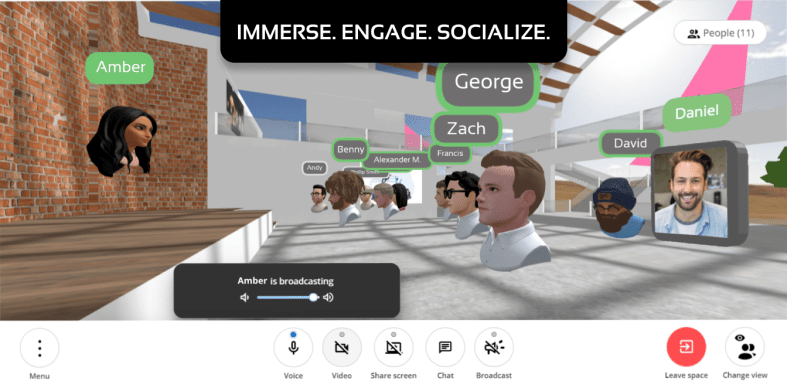
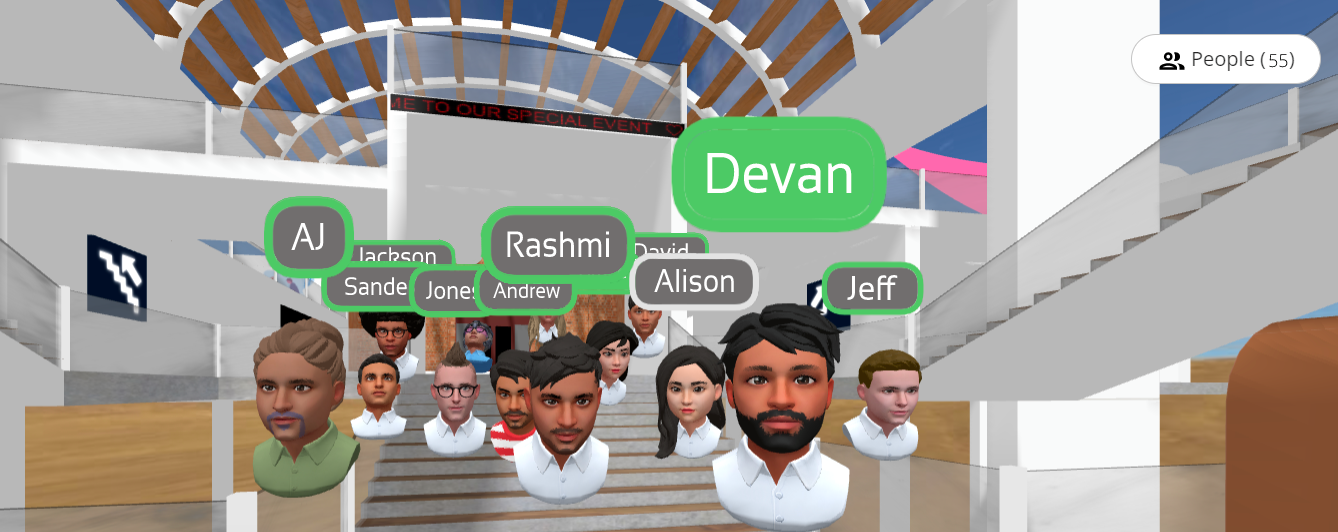
While joining the space, attendees can either join with their video turned on or optionally create a realistic 3D avatar to appear as in the space. They can then interact with students or with other educators, somewhat similar to how they would in real-life gatherings – this includes walking around, making eye contact, forming huddles, and much more.
Solving online learning challenges with Scena 360
Through the course of the pandemic, educators have been forced to adopt various virtual meeting apps, often running into issues that have made online learning a rather dull experience; the most important issues being the following:
Lack of natural interactions, engagement, and co-presence
Forcing students into awkward breakout rooms, often making moderation and monitoring of said breakout sessions much more difficult
Difficulty tracking student engagement and attentiveness due to cameras being turned off
Scena 360 decidedly focuses its efforts to solve these key issues through their platform. For instance, students and teachers can face each other in 3D space, and walk in and out of different conversations by moving around the space – just as they would in real life. Educators can see everyone in the space, which allows them to monitor which students are participating in group activities/discussions – without having to jump between different breakout rooms.
Unlike most alternatives, Scena 360 provides a suite of built-in integrations available directly within spaces to help make online classes more engaging and effective, such as:
A more collaborative and powerful whiteboard that lets you write and draw on a whiteboard.
A guessing and drawing game that stimulates the imagination and agility of the brain
A shared instrument that lets students and educators make and play music together in real-time
(no credit-card required, cancel at any time, offer expires in April, 2022).
**Interested in writing a guest blog for my site? Would love to share your ideas! Submit your post here. Looking for a new book to read? Find these available at bit.ly/Pothbooks
************ Also check out my THRIVEinEDU PodcastHere!
Join my weekly show on Mondays and Fridays at 6pm EST THRIVEinEDU on Facebook. Join the group here
Since March of 2020, educators around the world have been working to improve their practices when it comes to staying connected with families. A big concern during school closures was effectively and consistently communicating with students and families and finding the right tools without overwhelming everyone.
So why does consistent communication matter? When it comes to family engagement, research shows that it is the most accurate predictor of student success. During the past school year, as we experienced transitioning learning environments, fostering a home-to-school connection was essential. With students shifting between virtual, hybrid, and in-person instruction, having a consistent way to communicate and provide support for our learners was critical. As a result of these learning environment transitions, students experienced varying degrees of what has been referred to as “learning loss.” Finding ways to address learning loss or gaps in learning have become highly popular topics in education. In a study released by Mackenzie, it was estimated that an average student lost nine months of math instruction, with other content areas also seeing an impact on students’ overall academic achievement. While student learning was adversely impacted in some ways, we need to focus on the positives that we experienced as a result. What did we gain?
Importance of family engagement
Because of heightened awareness of the need for consistent communication and having a consistent and reliable space to obtain information and resources, educators and families connected and supported one another during this challenging time. Educators found a variety of tools to facilitate communications, provide information, and share class resources with families. As a way to prevent learning loss / support the learning process, educators can select the right tools to engage families in learning and help them to support their students at home, and to strengthen the home to school community. Research shared talked about learning gaps as a result of school closures and the changes in instructional space and time. So the question is “how can teachers help students with areas where they need extra support? Using a tool that can help foster the home to school connection is essential so that teachers can share learning as it’s happening, provide families with information about student progress, identify students that may need some additional support, and focus on promoting student wellness and setting students up for success.
Choosing the right tool
To connect home to school, there were many apps being used by teachers and the use of so many technology tools is amplified with multiple school-aged children in the family. Apps that helped to support students as they learned while at home, to exchange information with families, to complete clerical tasks such as attendance, grading, and more. In some cases, educators were using a different app for each task. Some schools use an attendance tool, an online gradebook, a messaging app, various assessment tools, and perhaps even an LMS or class website. In addition to these school-wide uses, there are many other ways that teachers are using technology. With so much information being exchanged, it’s important to have a reliable, consistent, and centralized space for families and educators to connect. An all-in-one space that enables many of these different tasks to be done helps to reduce the feeling of being overwhelmed that can happen with the use of so much technology.
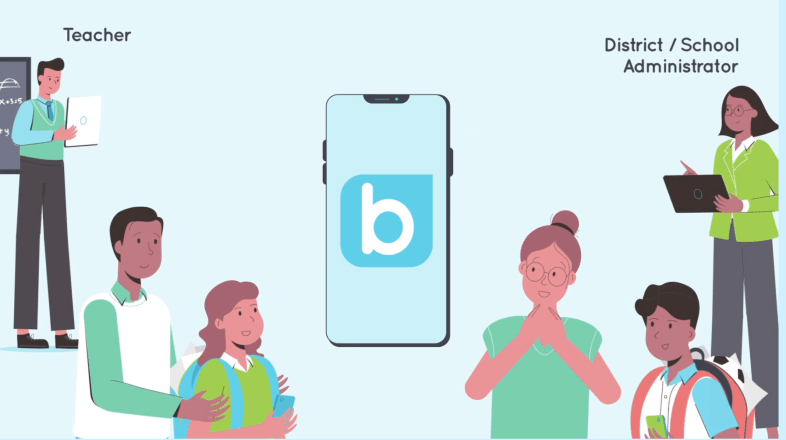
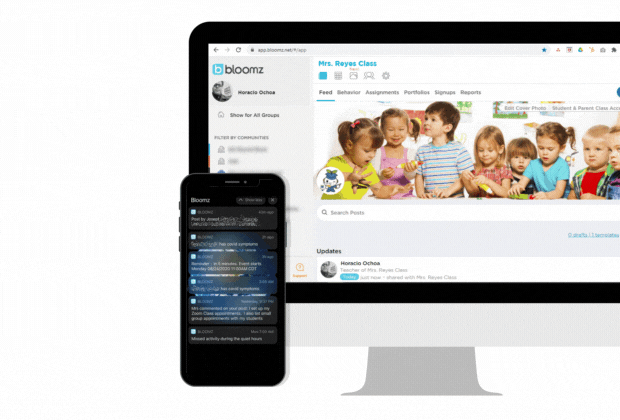
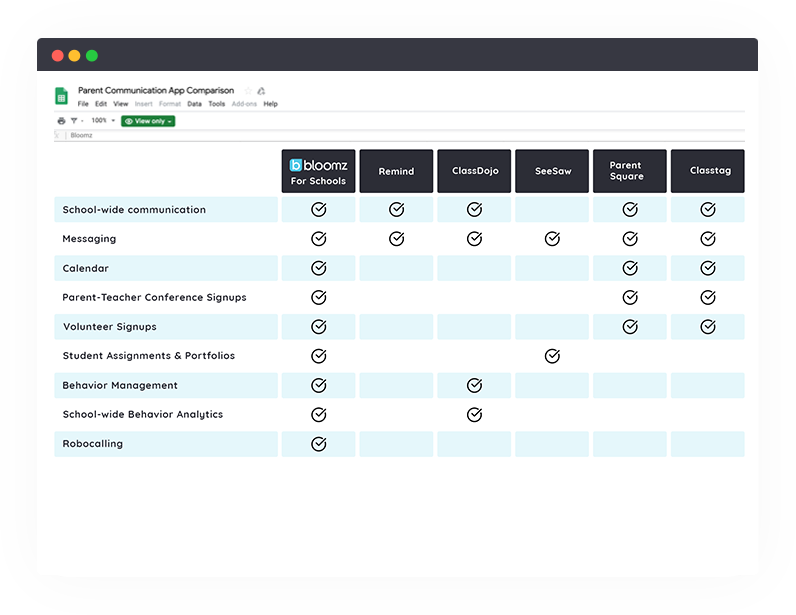
When used with schools, Bloomz facilitates district and schoolwide communication. Bloomz is an easy-to-use, modern, social-like, unified School-to-Home communication system to reach all stakeholders in one place providing the control, security, oversight and configurability you need! It enables schools to streamline a lot of the other apps and tools they might be using. Research from Project Tomorrow reported that 88% of administrators saw a positive impact from communicating with families via social media, while 66% of parents preferred emails or phone messages as communication. With Bloomz, schools and families can communicate in ways that meet their preferences. Bloomz is focused on individual parent needs and provides a choice for how they get their information (SMS text, email, and voice) in an easy-to-navigate platform that is fully available on any device.
What makes Bloomz different
Bloomz is a parent communication app that provides multiple school apps in an all-in-one centralized platform which helps to improve communication, engage parents and families, and save time by using less to achieve more. With features such as messaging, student assignments and portfolios, behavior management, a calendar, parent-teacher conference sign-ups and volunteer signups, families can be fully engaged in the learning experience of their child. To further engage families in daily learning, teachers can send photos and videos of activities and school events as they are happening which keeps parents informed in real-time. Bloomz also offers language translation in more than 100 languages. Teachers can use the calendar to quickly create an event that includes permission slips, sign-up sheets, and have the ability to track RSVPs or force smart reminders.
So why should schools choose Bloomz?
Bloomz is a teacher tool that integrates features such as a messaging app, calendar, event planner, and more into one safe and user-friendly platform. Bloomz enables educators and parents to communicate through messaging instantly, privately, and as often as needed. It can be used at the classroom level and by administrators at the school or district level to facilitate communication with teachers, staff, and parents, whether individually, in groups or to the entire school/district. The Bloomz administrator dashboard centralizes essential information such as contactability, deliverability, attendance, and behavior with reports to focus on what matters most.
At the school and district level, being able to provide everything that students and families need through a comprehensive program and in a manner that parents and families choose is important. The entire school community benefits by having a consistent and efficient program in place that meets the needs and preferences of each of its members. Check out Bloomz to build your home-to-school community.
**Interested in writing a guest blog for my site? Would love to share your ideas! Submit your post here. Looking for a new book to read? Find these available at bit.ly/Pothbooks
************ Also check out my THRIVEinEDU PodcastHere!
Join my weekly show on Mondays and Fridays at 6pm EST THRIVEinEDU on Facebook. Join the group here














 Learning as I go: Reflections & lessons learned