18 Resources to Get Students Coding This Year

Each year during December, there’s a focus on coding and computational thinking. Computer Science Education Week is happening December 9th-15th this year and there are a lot of great ways to get involved. A few years ago I first learned about the Hour of Code, and immediately referred to the Code.org website to find activities for my eighth grade STEAM class. Just getting started, I didn’t know much about the resources available and thought this was the best way to provide some activities for my students to join in during the week. It was fun to sign up to participate in the events of the day and see from where around the world other classrooms were joining in from. But beyond that one day, and actually, that one hour, we didn’t really do much more in my class. I asked colleagues and members of my PLN about their activities for the Hour of Code and coding throughout the year, and many stated that they didn’t know how to implement more in their classrooms. It was then that I recognized the need to provide more ways for students to learn about coding and computational thinking, and that as educators, we must actively look for opportunities for our students. We need to push past an Hour of Code and do more in our classrooms.

Preparing Ourselves

For some educators, topics like coding and computational thinking can seem challenging to bring into the classroom and for them to know enough to feel confident in teaching students about these topics. I was one of those educators. My comfort level changed when I had to create a game using Hopscotch for a master’s course and I struggled a lot. It was uncomfortable to not be able to fully understand the coding process, but it pushed me to keep learning and to start using Hopscotch with my eighth graders. I learned a lot from my students and it was a great opportunity to put myself in their place as they learn something new. Realizing that it is okay to not know all of the answers is a valuable lesson.

Another hurdle was to learn more about computational thinking, a topic that I had avoided because of a fear of not understanding it enough and thinking it did not apply to my role as a Spanish teacher. It was an area that intimidated me because I believed it to be so complex.

However, I recently took a Computational Thinking (CT) course provided by ISTE U, which definitely stretched me professionally and provided a solid foundation full of resources for doing more with these topics in my classroom. We need to find ways to give our students and ourselves an opportunity to learn about topics like coding and computational thinking and how they apply in our daily lives and how it could possibly benefit us in the future.

Where to Begin

There are so many resources out there that sometimes knowing exactly where to start presents the challenge. It is easy to get started by referring to the Code.org site or checking out CS First from Google and resources for educators. There are some apps and websites to get started with coding and computational thinking. Some of these can be used specifically with elementary students in grade bands pre-reader through two, three through five, and six plus, and others that are specific to middle school or high school. Several of these options offer ways to search based on topic, level or type of activity. What I like the most is that they are fun ways for educators to get started with coding and CT, with the ability to decide how to apply them to our own work.

Start with Code.org or CS First from Google, and then explore these 18 resources to check out what specifically to use during the Hour of Code and Computer Science Week, or take the time and try each of these out over the course of a couple of weeks. Have your students explore and continue learning right along with your students.

18 Sites to Explore

Artist. Use this as a way to have students begin coding with blocks to complete tasks to build their coding skills.

Code.org. Explore this link to find a list of resources and different activities and to sign up to participate in the Hour of Code. There are more than 500 one hour tutorials that are available in more than 45 languages.

Code Combat is a game based computer program for older students who want to learn about Javascript or Python. In Code Combat, students type in their code and see their characters respond in real-time.

Code Monster is an easy way to get younger students to learn more about code. Two boxes on the screen show the code and what the code does, with explanations popping up to show students what happens with each command.

CoSpacesEDU Robot Rattle. Students learn to operate a robot and the activity includes a tutorial video. Using blocks and drag and drops, students can write the instructions for the robot and then if devices are available, the robot can be seen performing the tasks as written in the code in virtual reality (VR).

Hopscotch is for use with iPads and has specific activities available for the Hour of Code but offers many options for students to create their own games or to remix games that are available.

Turtle Art. Students use block coding like Scratch but through the use of one turtle and mathematics to do the programming.  Students can create their own work of art or remix someone else’s painting.

Science

Explore Mars with Scratch. Students in grades three through eight can create a Mars exploration game using Scratch. Through this lesson, students work through activities and build their math, computational thinking, and problem-solving skills. There is also the option for an extension activity for students in grades K-12 to do an independent project.

Multi-topics

Code-it studio is for use with grades two and up and offers students the chance to program art and designs.

CodeSpark. Students up to grade five can design and code a video game using the self-paced activity available through this site.

Code an Unusual Discovery. Using Scratch and CS First from Google, students can work through on their own and create a story using code.

Khan Academy Code. For grades six and up students can watch an interactive talk-through, work through challenges or decide to do their own project. Everything that students need for coding is available directly through the website. Students can also learn to code by making a website in HTML tags and CSS.

Kodable. Activities for students in grades two through five, offering Javascript for students in upper elementary grades. There are activities for social studies, science, ELA, math and more with levels from beginning to advanced. Students can even choose their own adventure.

Minecraft Hour of Code. A free Hour of Code lesson was developed by Microsoft’s AI for Earth team. In the lesson, students in grades two and up use code to prevent forest fires. There is also a free online course for educators to learn how to run an Hour of Code lesson in their school.

Robo-Restaurant Decorator. Students in grade two and up can program a robot to paint a restaurant and the algorithms must be done correctly

Star Wars. The first activity we tried was working through the activities provided using the Star Wars theme. Activities are available for students in grades two and up. Learn to code with Blocks and Javascript.

Tynker offers a lot of activities for students to participate and learn about coding, specially curated for the Hour of Code. Activities are grouped for students in the ranges of K-two, three-five and six plus. Options available include text coding, STEM activities, and the new UN+ which is focused on ecological issues such as life on land, responsible consumption and affordable and clean energy.

VidCode is an online platform that offers opportunities for teachers to explore computer science curriculum or individual lessons related to coding. For the Hour of Code, explore the Climate Science coding activity.

Another option is to have students learn about the Hour of Code, its origin and different terms related to coding and then use some of the game-based learning tools out there like Kahoot! To help students develop a better understanding of the basics of coding. Try one of these ideas out for some fun ways to get students involved with coding and use the game as a starting point for class discussion.

**Interested in writing a guest blog for my site? Would love to share your ideas! Submit your post here.

Looking for a new book to read? Many stories from educators, two student chapters, and a student-designed cover for In Other Words.

Find these available at bit.ly/Pothbooks  

When they are empowered!

DeidreroemerUncategorized  April 10, 2021 6 Minutes

Guest post by @deidre_roemer DeidreroemerUncategorized  April 10, 2021 6 Minutes

One of the many things I have really missed in the last year is my time in schools talking to our learners. I typically spend about sixty percent of my time in classrooms with teachers and students in a “normal” year. I have missed that chance to hear about their learning and see the learner experience through their eyes. While we were still virtual, I was able to join some online classes, but it wasn’t quite the same as the connections I could make face-to-face. Now that we have been back in our physical schools for a few months, I am cautious not to go into too many classrooms in person each week as that would be tough to contact trace. I am affectionately known as “that lady” in many of our schools. I hear kids say things like, “That lady is back. Get ready; she’s going to ask you a lot of questions.” They all learn my name while I am there and then usually forget it between visits. I miss being “that lady”!

I was lucky enough to get the chance to be the substitute for one of our amazing teachers recently. It was a learning community of eighteen five and six-year-olds who were having their first day of in-person learning on the day I was there. It was the first time all year they had been together as an entire class. It was such an honor to get to welcome them and attempt to follow the beautifully written lesson plans from the teacher. As we did an opening community circle and moved in to do some opinion writing, a sense of incredible pride overwhelmed me. Although these learners had been virtual for most of the year and then hybrid for a few weeks, they had such a strong sense of community. Two students were new to the class that day, and the others were anxious to welcome them and show them the ropes. With a stranger in the room, they were comfortable sharing what they know and talking through challenges. They were excited to show what they had learned and made sure they included everyone. I watched what an empowered five or six-year-old could do and was blown away. They had a sense of belonging and a desire to work through anything. They were vocal when they got stuck and exactly what help they needed to be successful.

I sent this to the teacher at the end of the day:

Thank you for allowing me to be a guest in your beautiful learning community today. You have obviously done some amazing work to create a space where your learners feel confident and included.  

They ranked themselves, and 10 gave the class a thumbs up on the day, 6 gave themselves a thumbs medium, and 2 were at speech when we took the poll. We collected some evidence of why we really should get a thumbs-up:

  • We welcomed new friends kindly into our learning community.
  • We did a great job on our reading.
  • We did a great job on our opinion writing.
  • We listened right away when we needed to come in from recess.
  • We were flexible in our thinking as so much was new today.

I was so impressed with their ability to advocate for themselves, support each other when things got tough, and be reflective in their work. They were joyful and curious all day long and yet not afraid to challenge things at the same time. I also asked them for feedback throughout the day on how I was doing. They fired me twice in the morning but then hired me back to be the substitute again at the end of the day. 

A few weeks ago, I also had the opportunity to host an open meeting with some of our high school students. I asked them about what was going well for them this year and what else they need from school. They were as articulate and honest as the five and six-year-olds. We talked openly about how they felt about virtual and hybrid learning, where this year was challenging in and out of school, and how they felt about our curriculum. Many of them were happy to be back in school and some were anxious to know if we would have a virtual option next year because that has worked better for them. They had many positive things to say about their teachers and their opportunities in our schools.  

They also gave me some things to work on. They asked that we incorporate more Mindfulness lessons throughout the day. They do Mindfulness activities in their homerooms, but not often enough to be really useful. They asked for classes in mental wellness to find balance and better understand mental health issues. A few of the learners in the meeting are on our Hope Squad at their school and shared how powerful it is to really understand mental health needs as well as how to look out for their peers.  

I asked if they felt prepared for life after high school and, for the most part, they felt confident except in the area of financial literacy. One of our graduation requirements is to take a financial literacy course, but they didn’t feel like the course goes far enough. We will be asking students to join us in curriculum writing for the course going forward as they know exactly what they need. Many of them talked about project-based learning experiences that empower them to find their voices in school and learn what they want to do after high school.  

There were about forty students in the online meeting from our three high schools who were participating in a variety of opportunities at school. Almost every student spoke up and shared something. The confidence I could hear in their responses was impressive especially given that it was a very mixed group of students with different interests, aptitudes, and school experiences. No matter where they were coming from and how successful they were by traditional measures, they were all able to speak up for real and honest things that they need from school. I will be hosting a few more before the end of the school year and will continue it next year. Hearing truly empowered learners advocate for themselves and recognize success was incredible. 

Each year, we go to our community to share what has been happening in our schools with our finances, learning, and upcoming developments in our district. Last year, I invited groups of learners to attend the sessions to speak about our work. If we are working to empower them, then they should be the ones sharing their own progress. This year, the meetings were virtual, so it was even easier to facilitate learners’ attendance to discuss their learner experience. In one presentation, a ten-year-old asked to share his screen to show the community a video game he created in math class to demonstrate his knowledge. Teachers shared videos of learners creating and making things who could articulate the standards they had mastered or the content knowledge they had gained through what they built. We saw art projects that demonstrated knowledge of literature and learners talking about using new technology tools to create podcasts to create a dystopian universe. All of the examples demonstrated rigorous learning tied to the interest of our learners. It was so powerful! 

We didn’t tell the teachers which students to choose, just that we wanted a group from elementary, intermediate, and high school at each of the three meetings. Our staff choose a wonderfully diverse group of learners. We had learners with special needs, some choosing virtual learning, learners in our advanced placement classes, and learners who have needed additional support in school. It was so incredible that no matter which student I asked, they could all share how they feel inspired and supported at school. They talked about what Deeper Learning means to them and how their learning is about trying, getting feedback, and iterating until they get an artifact that shows what they know. They were confident and articulate and so excited to present to an audience. You could hear the pride they felt in their work and themselves.  

Our empowered learners are also starting to challenge us more, which I love! They send emails to our Superintendent and me advocating for what they want to see in our schools. They come to our school board meeting and speak in open comment about how they think we should do something. Watching them feel the confidence to speak up, ask for what they need, and challenge ideas they disagree with is inspiring. We aren’t always able to grant what they are asking for when they ask for it, but they are helping us shape how we allocate some resources and write curriculum in new ways.  

I love the quote from AJ Juliani, “Our job is not to prepare students for something. Our job is to help students prepare themselves for anything.” Our learners, at all ages and learning formats, are starting to demonstrate that they are ready for anything, and that we’ve helped prepare them to do it all with confidence and grace. 

**Interested in writing a guest blog for my site? Would love to share your ideas! Submit your post here.

Looking for a new book to read? Many stories from educators, two student chapters, and a student-designed cover for In Other Words.

Find these available at bit.ly/Pothbooks  

EdLight

Sponsored post, All Opinions are my own

In the past year, we have seen the use of digital tools increase as many schools transitioned from in-person to fully virtual and hybrid learning environments. Educators have sought new ideas, whether tools or methods, in particular for assessing students in these digital spaces.

A few months ago I learned about​ EdLight, a​ digital tool that enables teachers to get a closer look at student work and provide authentic, meaningful and timely feedback to students in a variety of ways.

How does EdLight Work?

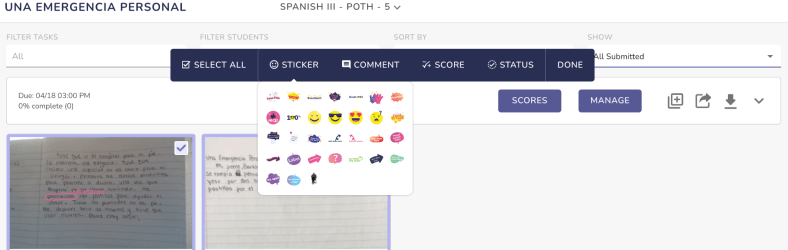
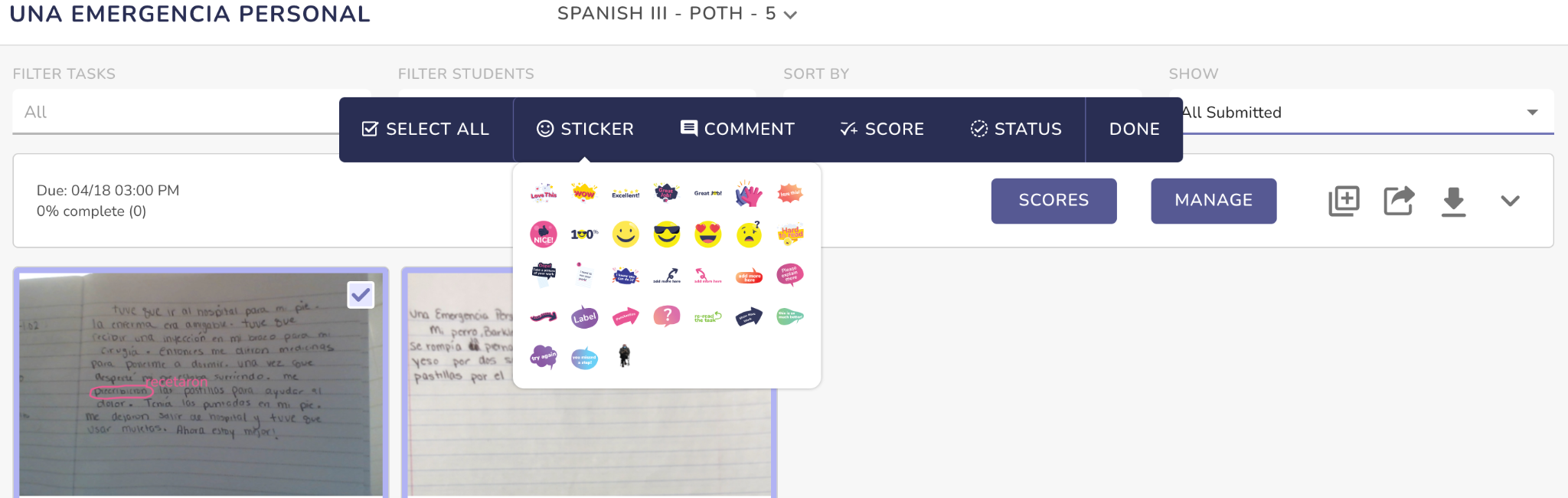
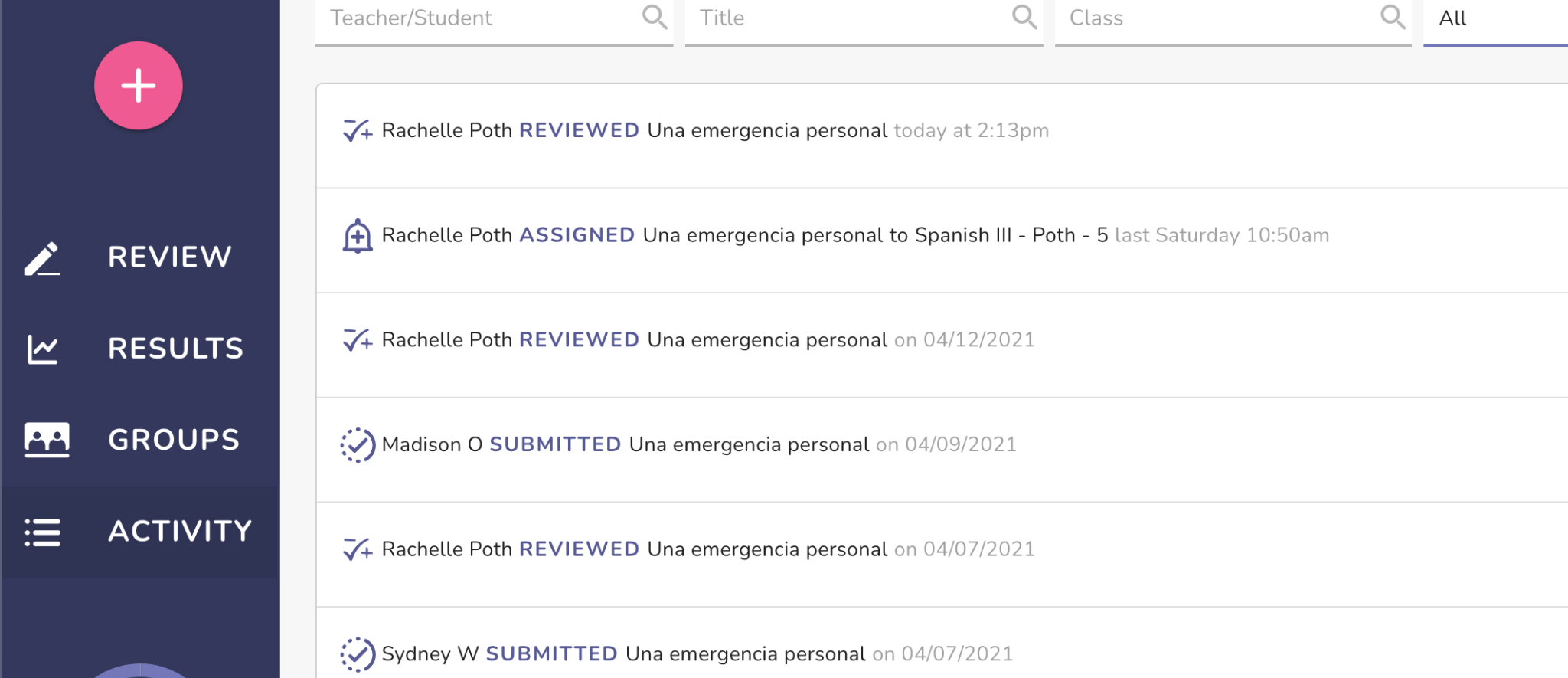
EdLight is a web-based app that gives teachers the chance to see student work as it is submitted. What I love about EdLight is that students can write or draw simply using paper and pencils, and submit their work directly to teachers. All student work can be viewed in the teacher dashboard. For each student’s submission, teachers can provide feedback using some of the different tools available within the platform. Students are able to use any device to submit work. EdLight integrates with Google Classroom and Clever which makes it easier to get started with, and you can also share a link with students to upload their assignment.

As students submit their work, it appears in the teacher dashboard where teachers can view student responses and provide targeted feedback. You can draw or write onto the student work, add stickers, or provide audio feedback which is something that I really appreciate about EdLight. Being able to explain or provide additional insight to students, especially when working in hybrid or fully virtual learning environments, makes a big difference.

Having taught in hybrid learning for half of the school year, finding tools that enable students to work on the same task and for us to be able to access their work and provide immediate and personalized feedback regardless of where they are learning from is essential.

I first used EdLight with my Spanish III class and they enjoyed using it. I provided a writing prompt for them to submit in Spanish. It was easy to see their work and use the different tools available to provide more specific feedback. I could underline or draw charts, and provide audio feedback as well. EdLight works on multiple devices so students don’t have to worry about having a specific device to be able to respond.

Teachers can also ask students to revise their work and resubmit it for further evaluation, which helps to complete the learning cycle.

It is easy to get started with and navigate the EdLight website, and teacher dashboard to create assignments, find student work, and track student progress. I love being able to see student work whether they are writing a response or illustrating a concept.

Benefits of EdLight

EdLight helps to promote greater awareness of student learning and facilitates better communication between students and teachers through the tools available within the platform to provide feedback.

It provides students with a way to look back at their work and see the feedback that they received, and plan their next steps in their learning journey. For teachers, being able to see student work in real time and be able to provide that feedback, especially for those students who are not present in the classroom makes a big difference.

You can also set this up to be used as a digital portfolio for students and explore some of the other ideas available in the blog on EdLight.

Here are a few options:

  • Have students do a drawing to express learning.
  • Take a picture of something they are reading and annotate or summarize it
  • Have students show the process of learning or solving problems for example in math or science classes.
  • Create student portfolios using EdLight

EdLight is a wonderful option for formative assessments, whether that means an entrance or an exit ticket or simply to use during class, especially if working in a hybrid environment. As we think about the next school year, wondering what tools we might keep that made a difference for us this year, I think this is the perfect opportunity to try some new tools to see what a difference they make for our students in our classroom.

Teachers can sign up to try EdLight for free and there are different types of accounts available for individual teachers or school or district licenses. Click here for a walkthrough and be sure to follow them on social! Twitter, Instagram Facebook

About the Author

Rachelle Dene Poth is an edtech consultant, presenter, attorney, author, and teacher. Rachelle teaches Spanish and STEAM: What’s nExT in Emerging Technology at Riverview High School in Oakmont, PA. Rachelle has a Juris Doctor degree from Duquesne University School of Law and a Master’s in Instructional Technology. She is a Consultant and Speaker, owner of ThriveinEDU LLC Consulting. She is an ISTE Certified Educator and currently serves as the past-president of the ISTE Teacher Education Network and on the Leadership team of the Mobile Learning Network. At ISTE19, she received the Making IT Happen Award and has received several Presidential Gold Awards for volunteer service to education.

Rachelle is the author of five books, ‘In Other Words: Quotes That Push Our Thinking,” “Unconventional Ways to Thrive in EDU” (EduMatch) and “The Future is Now: Looking Back to Move Ahead,” “Chart A New Course: A Guide to Teaching Essential Skills for Tomorrow’s World” and her newest book, “True Story Lessons That One Kid Taught Us.”

She is also a Buncee Ambassador, Nearpod PioNear and Microsoft Innovative Educator Expert.

Rachelle is a blogger for Getting Smart, Defined Learning, District Administration, NEO LMS, and the STEM Informer with Newsweek.

Follow Rachelle on Twitter @Rdene915 and on Instagram @Rdene915. Rachelle has a podcast, ThriveinEDU https://anchor.fm/rdene915.

**Interested in writing a guest blog for my site? Would love to share your ideas! Submit your post here.

Looking for a new book to read?

Find these available at bit.ly/Pothbooks

************ Also check out my THRIVEinEDU Podcast Here!

Join my weekly show on Mondays and Fridays at 5pm EST THRIVEinEDU on Facebook.  Join the group here

Flipped Classroom

Guest post by Michael Lutz @LutzEducation

Aditya Chinchure on Unsplash

The idea behind it

In the classical classroom, as the students are used to it, the elaboration takes place or the theory is explained in the lesson and then at home the tasks are solved, strengthened and consolidated. Depending on the teacher, the knowledge transfer is often done with teacher-centered teaching. In the flipped classroom, the elaboration/preparation is done at home and the tasks and exercises are solved together in class. The input at home is often given in the form of an explanatory video.

Procedure

First, I explained the concept of flipped classrooms to my students and highlighted the advantages: short preparation time at home, collaborative working and solving the tasks in class. 

In my chemistry classes, I have found that the class time of 45 min is often not enough: the students leave my classroom and go to the science lab together with me. There is a theory part and then practical experimentation: Reading and understanding the experimental set-up, getting material from the cupboards, setting up the experiment, performing it, evaluating it and documenting it. And now it’s already time to tidy up again. This situation is unsatisfactory for me and my students! That’s why I chose to have a go with the flipped classroom concept. My students read the experimental setups at home and watch the theory and experiments through video clips. They prepare the lesson at home. 

As soon as the class arrived in the chemistry room, 15 out of 20 students immediately started setting up the experiments. 5 stood around awkwardly, not knowing what to do. They had not prepared the lesson. I presented them with the chemistry book and they had to work out the knowledge theoretically with the books, while their classmates were full of joy experimenting. A week later: everyone was prepared and the time in class could be spent experimenting.

I applied this concept to some of my math lessons as well. As an assignment, I gave them an educational video that I peppered with questions on the topic of solving equations with one variable: Fast-forwarding or skipping was not possible. Multiplechoice and short-text questions explained two equation transformations, and I quizzed their knowledge 9 times. Before my classes came to the math lessons, I studied the answers and data. This way, even before the first person entered my classroom, I knew about the stumbling blocks and what had been successful.

One class was immediately able to begin solving the problems in partnership, and I clarified comprehension questions with two students. Afterwards, they also started working with their classmates. With the other class there were bigger gaps and at the beginning of the lesson I had to discuss the difficulties and build up understanding in a teacher-centered way. Afterwards, the work on the tasks was done collaboratively.

After 20 min of intensive and concentrated work in partnership, I then conducted a learning review. A new, still unknown equation, which was a bit more difficult than the two in the explanatory videos, had to be worked on. Out of 43 students, 41 solved it correctly and one student declared with shining eyes, ” Mr. Lutz, now I finally understand. Thank you so much!”

Advantages and disadvantages of flipped classroom

In a normal lesson, the teacher sets the pace. For some students, the pace is too slow, for others, too fast. In addition, some students would need a little more time or repetition. They leave the lesson and first have to process what they have heard at home or teach themselves again; parents know what I am talking about ;-). The teacher then asks them to solve tasks where they would need support. However, no one is there (except maybe the class chat where the solutions are posted). That’s not how I understand the learning process.

In the flipped classroom concept, the input is done at home. It can be paused and repeated. When working on the tasks in class, classmates are present in the classroom as experts and I as the teacher can intervene and support. If students do not prepare for the lesson, their knowledge gap will increase as the weeks go by. Watching a video at home is not enough, because it is not possible to check the level of knowledge and understanding. This data is important to me as a teacher because I want to build my teaching on it. That’s why I use video tools, which I can combine with my digital formative learning assessments. Also, I have designated a digital place where my students can put questions and things they don’t understand. These things serve as lesson starters and help me have insight into my students’ learning. Introverted students enjoy this way of working because it allows them to participate in the lesson in a safe environment.

**Interested in writing a guest blog for my site? Would love to share your ideas! Submit your post here.

Looking for a new book to read? Many stories from educators, two student chapters, and a student-designed cover for In Other Words.

Find these available at bit.ly/Pothbooks  
************ Also check out my THRIVEinEDU Podcast Here!

Join my weekly show on Mondays and Fridays at 5pm EST THRIVEinEDU on Facebook.  Join the group here

Spaces: Planning a Learning Journey

When we bring in learning opportunities that help students to reflect on their individual work and growth while also collaborating with peers to support one another, we will better prepare them for the future. There are endless learning opportunities that we can provide for our students, however with the use of digital portfolios, we help students focus on their own learning journey as they develop these other essential skills.

As we look for the right tools, finding a robust platform that is easy to navigate and that fosters collaboration and communication throughout the learning journey is key. Sharing student work and growth through the use of digital portfolios like Spaces, is a great choice for educators, students, and parents. We empower students to compile artifacts of their work, their experiences, and build their self-awareness as they navigate their high school career. Digital portfolios enable students to self-assess, set new goals and track their growth over time as they build their narrative. With versatile tools available like Spaces, students can add work quickly which can include links, audio, photos, and videos. Students can reflect on the work that they have done and be able to instantly share with teachers, family and potential employers or colleges.

Benefits of portfolios

As students continue to build digital portfolios, for use in the same class or across grade levels, educators better understand students and their interests and it helps with building those vital teacher-student relationships. A key part of this is that it helps us to focus on the development of social-emotional learning (SEL) skills for students to build their self-awareness and self-management skills, when they look at the work that they’ve done and set new goals for their continued learning journey.

[Default class space where teachers can engage all students in a class-wide discussion, share files and more]

With Spaces, there are three possibilities: individual spaces, class spaces or group spaces. The default space is a class space where all students can participate in a class-wide discussion, sharing files and media. Having these different options for spaces makes it easy for teachers to provide authentic and meaningful opportunities for students to demonstrate learning and provide evidence of their work while reflecting on their own progress. Students are able to record their daily work and reflect on their learning experiences and express their thoughts, which is a beneficial way to promote the continued development of SEL Skills. Teachers can assess students and provide real-time feedback. It also helps students to share their work publicly and build confidence in learning.

What do teachers think?

I reached out to a good friend of mine, Bonnie Nieves, a high school biology teacher in Massachusetts, to find out how she has been using Spaces with her students. She loves the opportunities that it provides for students to focus more on the learning process, their work and improvements they make along the way. Bonnie appreciates how it creates a “gallery walk” style where students can explore the work of their peers and promotes the development of additional SEL skills such as relationship building. With Spaces, students can share it with family which helps them to feel more connected to the learning that is happening in and out of the classroom.

In my own classroom, I have started to use Spaces with my eighth grade STEAM students as they work on independent projects. We are using Spaces to share progress on the projects, to ask questions, to post ideas and be able to interact in a collaborative space. Especially helpful in hybrid, virtual or asynchronous learning environments, the real-time feedback and interactions will make a difference for students and promote more engagement in learning.

Ideas for using Spaces

  • Individual Spaces for project-based learning
  • Group Spaces for students to work together on projects and to be able to provide feedback and showcase their work.
  • Class Space for promoting conversations between students, especially when not all students are together in the same space.
  • Check-ins and quick assessments with students

There are many ways to use Spaces in the classroom. Get started for free today and see what ideas your students come up with too! Spaces is also available through the iOS app store or Google Play.

**Interested in writing a guest blog for my site? Would love to share your ideas! Submit your post here.

Looking for a new book to read? Many stories from educators, two student chapters, and a student-designed cover for In Other Words.

Find these available at bit.ly/Pothbooks  
************ Also check out my THRIVEinEDU Podcast Here!

Join my weekly show on Mondays and Fridays at 5pm EST THRIVEinEDU on Facebook.  Join the group here

Computational thinking and scientific exam problems

Guest post by Dr. Michael Harvey

As part of preparing students for external examinations, I have been asking them about how they approach answering exam-style questions. It is something that we as educators sometimes take for granted that approaching the solving of these types of questions is actually a skill all in itself. From the student’s feedback, it was clear they were lacking a clear strategy in tackling these types of questions. 

One approach that I have been introducing the students to the use of computational thinking to develop a strategy to solve long answer style questions, especially those involving calculations. Before a problem can be tackled, the problem itself and the ways in which it could be solved need to be understood. Computational thinking allows us to do this. Computational thinking allows us to take a complex problem, understand what the problem is and develop possible solutions.  

There are four key techniques to computational thinking: 

Decomposition – breaking down a problem into small more manageable parts.

Pattern recognition – looking for similarities within or among problems

Abstraction – focusing on important information only, ignoring irrelevant detail.

Algorithms – developing a step-by-step solution to the problem or the rules to follow to solve the problem.

Each technique is as important as the others. They are like legs on a table – if one leg is missing, the table will probably collapse. Correctly applying all four techniques will help when solving exam-style questions.

A complex problem is one that, at first glance, we don’t know how to solve easily. Students tend to try to solve the problem in one step and become frustrated when this approach fails.

So in summary, computational thinking involves taking that complex problem and breaking it down into a series of small, more manageable problems (decomposition). Each of these smaller problems can then be looked at individually, considering how similar problems have been solved previously (pattern recognition) and focusing only on the important details while ignoring irrelevant information (abstraction). Next, simple steps or rules to solve each of the smaller problems can be designed (algorithms). Finally, these simple steps or rules are used to help solve the complex problem in the best way.

So let us look at an example of how this approach can be used to solve a Physics problem.

Step 1: Break down into simpler steps. We are looking for the power, but we have been given information on the specific heat capacity, so it involves two concepts, electrical power, and specific heat capacity. So let us break the question into two.

Step 2: Pattern recognition. Write down the formulae involved in the two concepts. P = E/t and Q = mcΔT 
Also that the electrical energy used to heat the heater is equivalent to the heat energy released by the aluminum block so Q = E.
With this in mind, we can start working through the problem by focusing on step 3.
Step 3: Abstract the important points from the question by highlighting them on the paper.

The metal block has a mass of 2.7 kg. The metal of the block has a specific heat capacity of 900 J/kg/°C. In 2 min 30s, the temperature of the block increases from 21°C

 to 39 

°C.
So we have a mass, a specific heat capacity, a time, and a change in temperature. Looking at our equations, what part of the problem can we solve first? The thermal heat capacity as we can solve this with Q = mcΔT as we have all the variables.
This leaves us to the last step – working through the calculations stepwise. We solve for Q as we can input the mass, specific heat capacity, and change in temperature. Once we have found Q, we know E = Q, so this can be imputed into the power equation P = E/t and the question can be solved by using the time information provided in the question (remembering to convert to seconds).

The use of computational thinking approaches is an effective way to help students work through questions so that the process is not too overwhelming and helps them develop strategies to deal with complex problems which can arise. Through supporting and scaffolding students with these types of strategies it reduces extraneous cognitive load and allows students to maintain focus and succeed at these style of questions.

**Interested in writing a guest blog for my site? Would love to share your ideas! Submit your post here.

Looking for a new book to read? Many stories from educators, two student chapters, and a student-designed cover for In Other Words.

Find these available at bit.ly/Pothbooks  
Toniebox: An amazing addition to classrooms

Toniebox: An amazing addition to classrooms!

After seeing an ad for the Toniebox on Instagram, I couldn’t wait to get my own! I always love exploring edtech tools and the Toniebox with its colorful character on top piqued my curiosity immediately.

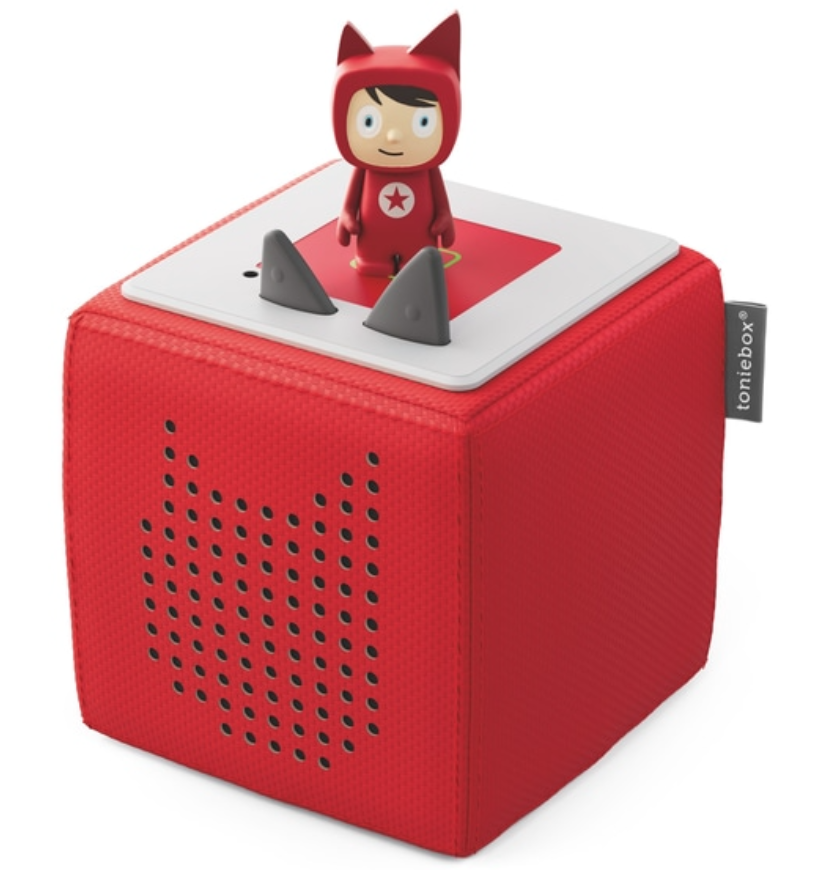
For those who have not heard of a Toniebox, it is a screen free digital speaker system, originally intended for use in the home, however it makes a fantastic addition to any classroom! My students were quite curious when I set mine up and I have been sharing it with many of my educator friends.

Getting started: How does it work?

Setting up my Toniebox was easy and I couldn’t wait to hear the story that each individual character would tell. Each Toniebox starter kit comes with one creative-Tonie. The content Tonies (stories and songs) are purchased separately or bundled with starter kits. Each Tonie has magnets which keep it steady on top of the box. It is fun to have a few different Tonies to be able to quickly swap out the stories for students!

The functionality of the box is easy to use. Simply place the Tonie on top and the story begins. The volume is controlled by pressing on the ears and you can move forward or backward in the story by tapping on the side of the box. Having these features means that even the youngest students can navigate their own listening experiences, which is great for personalized learning experiences! With so many Tonies to choose from, students can simply replace the Tonie on the box and pick up with a new story in no time at all.

Choosing a Tonie might be tough since there are so many figures to choose from. Children may find that they have a favorite because of the look of the Tonie or because of the story that it tells. Shifting from being something specific for use in the home, now there is “Tonies for Teachers,” a wonderful program for educators interested in using Tonies in the classroom. A Toniebox is a great way to help students to have less screen time and to focus on listening and having a more creative interactive learning experience.

Some ideas to try with your Toniebox

Toniebox makes a great option for storytelling and promoting creativity. Whether teachers create their own stories to share with students or have students create their own story together as a class, the options are endless. With the creative Tonies, you can record up to 90 minutes of audio and there are many possibilities for using them in the classroom.

Try these ideas:

  • Teachers can tell a story based on the content or grade level that they are teaching.
  • As a language teacher, I might narrate using the vocabulary or the verb tenses that we are working on in class, to make it a more authentic story for my students.
  • Students can write stories or create skits and then read them with classmates. Creating and then recording them for all students to listen to and learn from.
  • Encourage students to continue telling the story or to make an alternate ending to a story that they heard.
  • Use it for art classes by having students draw an illustration of the story that they are listening to or create a drawing and then work with classmates to record a story.

So many possibilities! Talk about fostering collaboration and creativity and providing for SEL skills development too!

There are a lot of ways that you can personalize learning for our students when using the Tonie box, but what I love is that it is ready to go with a story to be told and students have no problem in getting started with it. While it is designed for younger students, it can definitely be used in other classes.

Using the Toniebox and giving students a chance to listen to the story narrated by the character, will engage them more in learning. We can of course use this at home, telling stories with family members, recording in a funny voice, sharing memories or just having some fun. You use the app and then simply upload your content through the app.

A screen free digital listening experience that includes songs and stories and can promote some creativity for students to write and then narrate their own story to share! It can be used at home and at school, and is another wonderful choice for teachers to bring into the classroom and choose from the many Tonies available for storytelling. The content is stored on the Tonie cloud which can be accessed through the app. Once content is downloaded to the Toniebox, no further internet connection is needed until you want to update it. Also through the app, parents can control some of the settings and also the volume level for the Tonie box.

A very visually engaging, curiosity sparking tool that everyone will enjoy listening to and creating with! Get your Toniebox today and start exploring the possibilities. There are different Tonies and content partners to choose from for sparking curiosity and boosting imagination.

Get your Toniebox today and explore the possibilities for your classroom!

**Interested in writing a guest blog for my site? Would love to share your ideas! Submit your post here.

Looking for a new book to read?

Find these available at bit.ly/Pothbooks

Spaces for Digital Portfolios

As we work to prepare students for the future, it is important that we find ways to help students focus more on the learning process rather than the end product. When we bring in learning opportunities that help students to reflect on their individual work and growth and collaborate with peers by giving feedback to one another, we will better prepare them for the future.

Spaces provides a great choice for creating digital portfolios and more. Digital portfolios enable students to compile artifacts of the work that they have done, including projects, sharing career explorations or community service activities that they engaged in during their high school career. Portfolios are a great way for students to display and reflect on their learning journey. Creating portfolios in a digital space gives students the opportunity to self-assess and track their growth over time as they build their narrative.

My start with using digital portfolios in my classroom began with my Spanish II and III students. They initially created a wikispace for their Spanish projects but we shifted to Google sites, and they added to it by including their other classes, sharing their interests, and designed evidence of their growth during each academic year. Now with versatile tools available like Spaces, it is easier to add work quickly which can include links, or audio, photos, and videos. Students can reflect on the work that they have done and be able to instantly share with teachers, family and potential employers or colleges.

Benefits of digital portfolios

As students continue to build digital portfolios, for use in the same class or across grade levels, educators better understand students and their interests and it helps with building those vital teacher-student relationships. A key part of this is that it helps to focus on the social-emotional learning (SEL) skills as students build their self-awareness and also self-management skills, when they look at the work that they’ve done and set new goals for their continued learning journey.

Spaces offers an opportunity to bring digital portfolios into your classroom and it is available for free! It is easy to get started with Spaces. By default, teachers’ first space is the ‘Class’ space; a place for classwide sharing, discussion and review. Teachers can also create “Group” spaces where certain groups of students can work together asynchronously while outside of the view from the rest of the class. Lastly, “Individual” spaces create a one-to-one teacher to student environment for students who might want to keep their portfolio work outside of the view of others but still want all the benefits Spaces has to offer.”

With Spaces, students can access and share their work from wherever they are. It promotes collaboration as students and teachers work together throughout the learning process. It also fosters better connections between home and school. Students can quickly share their work with teachers and engage in a conversation, which promotes real-time feedback and the opportunity to message, and discuss progress.

For educators, the use of portfolios better enables us to give authentic, meaningful feedback to students and develop a greater understanding of each student’s strengths and needs. These “spaces” also help to build relationships as we get to know our students, their learning needs and strengths more. Get started with Spaces today!

About the Author

Rachelle Dene Poth is an edtech consultant, presenter, attorney, author, and teacher. Rachelle teaches Spanish and STEAM: What’s nExT in Emerging Technology at Riverview High School in Oakmont, PA. Rachelle has a Juris Doctor degree from Duquesne University School of Law and a Master’s in Instructional Technology. She is a Consultant and Speaker, owner of ThriveinEDU LLC Consulting. She is an ISTE Certified Educator and currently serves as the past-president of the ISTE Teacher Education Network and on the Leadership team of the Mobile Learning Network. At ISTE19, she received the Making IT Happen Award and has received several Presidential Gold Awards for volunteer service to education.

Rachelle is the author of five books, ‘In Other Words: Quotes That Push Our Thinking,” “Unconventional Ways to Thrive in EDU” (EduMatch) and “The Future is Now: Looking Back to Move Ahead,” “Chart A New Course: A Guide to Teaching Essential Skills for Tomorrow’s World” and her newest book, “True Story Lessons That One Kid Taught Us.”

She is also a Buncee Ambassador, Nearpod PioNear and Microsoft Innovative Educator Expert.

Rachelle is a blogger for Getting Smart, Defined Learning, District Administration, NEO LMS, and the STEM Informer with Newsweek.

Follow Rachelle on Twitter @Rdene915 and on Instagram @Rdene915. Rachelle has a podcast, ThriveinEDU https://anchor.fm/rdene915.

**Interested in writing a guest blog for my site? Would love to share your ideas! Submit your post here.

Looking for a new book to read? Many stories from educators, two student chapters, and a student-designed cover for In Other Words.

Find these available at bit.ly/Pothbooks  

Rear-view mirror: reflecting about practice through the lens of UDL principles and practices to inform learning design

Looking through the rear-view mirror

Guest post by Virna Rossi, @VirnaRossi

Months of pandemic teaching and learning have highlighted issues of access and accessibility, which have disproportionally affected some under-served student populations. Students and teachers are experiencing the literal meaning of the word ‘distraction’, from the Latin dis (apart) + trahere (to drag): we are all being dragged apart, pulled in many different directions . Hence, intentionally designing inclusive learning experiences is crucial to support our students at this time. But we also need the students’ help to evaluate the effectiveness of our learning design.

Universal Design for Learning (UDL) helps us design more inclusive learning experiences. It is an approach to curriculum design that minimises barriers and maximises learning for all students.

The 3 UDL principles are based on 3 primary neurological networks: UDL is based on brain science. The 3 networks are: affective, recognition and strategic ‘which refer to the why, what and how’ of learning. Based on these, there are 3 UDL principles: Engagement, Representation and Action & Expression. More on this below.

3 UDL principles: Engagement, Representation and Action & Expression

UDL should particularly be used at the start of the learning design process, to intentionally drive the process, ideally in collaboration with students. However, UDL principles and practices can also be used as a professional reflection and evaluation tool during and after the learning event. Once more, this would ideally involve the students.

A metaphor to illustrate the use of UDL principles as a tool for reflection is to see them as rear-view and side mirrors. The universal use of rear-view and side mirrors has changed the status of humans from a species only capable of perceiving the field of vision ahead, to one which can understand in a single glance two opposing visual fields. In cars, the inner rear-view mirror and the two side ones provide different angles of the same ‘scene’ behind, virtually eliminating blind spots. Each of the 3 mirrors informs the driver’s driving decisions, with very little effort, on the go.

Rear-view mirror

The 3 rear/side mirrors can be seen as the 3 UDL principles against which to gauge how inclusive our learning design is. The 3 mirrors provide 3 perspectives to evaluate our practice.

Why do we glance?


We glance at the rear and side-view mirrors to inform our driving, to avoid accidents, to check the state of the road, to situate ourselves, to change our trajectory. These are the same reasons why we should reflect ‘on’ and evaluate our teaching, in particular our learning design. This reflective and evaluative exercise provides us with a series of dynamic snapshots about our practice and the learning we are prompting.

Side-view mirror

At times there is a safety warning on the side mirrors: ‘objects in mirror are closer than they appear’. In our metaphor this also has an equivalent: some situations may need attention as a priority because we might underestimate the closeness and relative importance of some aspects of our learning design. For instance if we have dyslexic students – Have we provided judicious output choices? How well equipped are they for their upcoming assessment? What study support systems are in place?

When do we glance?


We do it while we drive. So we can reflect on and evaluate our learning design while the learning experience is happening, we can indeed make it part of the learning experience itself. The 3 UDL rear/side-mirrors can be used as a quick evaluative checkpoint, like a brief ‘glance’ while driving.

End-point course reviews are common practice, but as teachers we will not be able to action any feedback for that same cohort on that course at that point. In a way, it is like checking the rear-view mirror after a collision from behind which we could have avoided by checking earlier.

For this reason, at least one mid-term or mid-course evaluation point is much more valuable in terms of informing our practice for that cohort.

Using our metaphor, as we drive and check the scene behind, some of the vehicles behind us at times overtake us or come alongside us (with thanks to David Baume for mentioning this point in a live event). So, in our metaphor, the reflection and evaluation exercise is not of a still image, but is one of a dynamic nature because we are dealing with a moving scene, with a living learning process. It is  a learning journey in the making.  

How do we glance? A case study


I used UDL as the main learning design framework for our internal staff development course (PGCert) from the outset. I articulated this to the students even before the start of the course. But I also used the 3 lenses of UDL principles for mid-term review (the 3 rear/side mirrors), during one of our live lessons on the PGCert to elicit evaluative feedback comments about my PGCert course design, from the users themselves. I wanted to spark dialogue and to gain the student perspective. This was part of a 360 degree feedback approach, which invites the literature input, our own reflections and students’ views as part of a wider-angle feedback view.

The literature view


I started by discussing the theory underpinning UDL principles and guidelines, by means of this visual aid:

UDL networks, principles and guidelines

This provided the theoretical and best practices grounding.

The students’ view


We used Ketsoto represent our reflection and evaluation. This is a hands-on learning aid and workshop tool. It has been adapted for remote teaching, with each learner sent their own pack to develop their ideas in their learning space.

Students used the reusable, moveable pieces to represent their ideas, then arranged them on the felt workspace. The white shapes were used to label the UDL principles, and ideas for each principle were developed on the 3 different colour leaves (a colour for each principle).

Students discussed their ideas in their study sets, in breakout rooms, and uploaded images of their Ketso representations onto this Padlet. The main question was: How are the 3 UDL principles evident on our PGCert course? How can UDL practices be enhanced on a PGCert?

UDL on PGCert: Padlet with students' Ketso representations

My self-feedback


I also made a Ketso representation to highlight some of the ways I intentionally used UDL principles to drive my PGCert learning design process.

My own Ketso about UDL principles and practices on PGCert

The outcomes of the exercise for me was gaining much needed insight into how the students were experiencing UDL on the course and where to improve.

For instance, for Engagement many mentioned that using Ketso was a very good way to be engaged on the course. For Action & Expression some mentioned that they would welcome more ‘debates’ during the live lessons.

How do students benefit from glancing?


What are the benefits for students in using the 3 rear/side view UDL lens as a reflective and evaluative mid-course review?

Firstly, this enhances students’ meta-cognition and their ability to articulate their learning about learning.

Secondly, understanding UDL principles can equip students with ideas and vocabulary to provide more meaningful feedback on any course design, not just on the PGCert.

Thirdly, this exercise should inform immediate enhancements in course design and delivery. In our case, we discussed some of the suggested enhancements mentioned on the students’ Ketsos, and I immediately implemented needed changes.

Conclusion: adjust/clean the mirrors


The 3 UDL rear/side mirrors help us adjust our practice.

If we already are UDL champions, can we keep growing in our understanding of UDL principles and practices? Can students and colleagues suggest further ways to enhance our practice? This would be like adjusting or cleaning the mirrors so that we can better see how to evaluate our practice.

Polishing the side-view mirror

Finally: Keep calm, keep traveling, keep checking the ‘rear-mirrors’

Find out more


About UDL:
https://udlguidelines.cast.org/binaries/content/assets/udlguidelines/udlg-v2-2/udlg_graphicorganizer_v2-2_numbers-yes.pdf
@CAST_UDL

About Ketso:
https://ketso.com/
@KetsoLtd

Sharing Our Passions

Guest post Deidreroemer

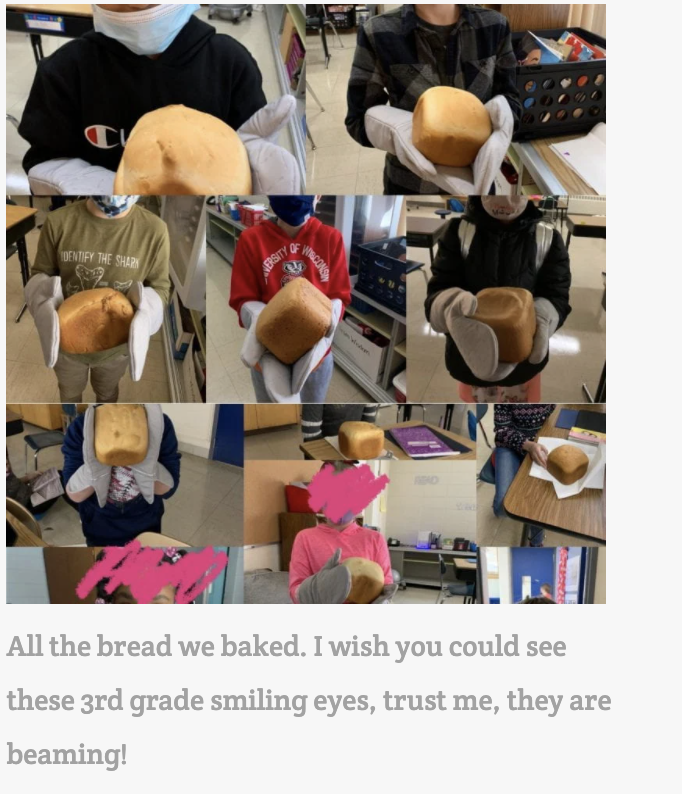
Something I have really missed over the last year has been gatherings at the table. I love to cook and bake for family and friends. I love long lingering meals in the backyard and big family dinners. I love family-style meals with my work family in our office. I have been thinking a lot about why I miss those so much. It the sense of community that I feel in those moments. It means something that people take the time to gather, take the time to prepare food for each other, and pause whatever else is going on to sit and listen to one another. A shared meal is a community experience that brings people together in a beautiful way. I had the honor of being invited to a bake-off with a class of third graders a few weeks ago. I couldn’t stay the whole time, but I was able to be there at the start. I watched almost fifty young people in an online session that were so excited to be there. Nearly every student had their camera on and enthusiastically asked questions, mostly all at once as third graders do when they are excited.  

Two classes started doing bake-offs together during emergency remote teaching to continue to build community no matter what the circumstances. They have continued doing shared activities around food or other common interests that are amazing. As we moved to a hybrid model, one of the teachers wanted to continue that work, so she asked if she could get bread machines for their classroom. She wrote this wonderful blog post about the experience of baking together as a community with a focus on the skills the learners are gaining through the process.  

What stuck out to me the most was how it all started. Last spring, I was watching our families post things online about how they were teaching their young children to cook, doing home repair projects, building and making things, and participating in the #epictomatochallenge with the extra time at home. We wanted to find a way to take everything our teachers, learners, and families were doing from home and tie it to their school experience. Our teachers found new passions and spent time doing the things they were already passionate about. Our learners were developing new interests or perfecting things that they were already passionate about. We wanted to find a way to live our strategic plan, empower our learners to share their interests with us, and engage some learners who were starting to disconnect.  

We have been working for the last several years on embedding the Deeper Learning competencies into every single classroom as our way to prepare our learners to live life on their own terms after graduation. The competencies focus on the skills needed for life success- content mastery, communication, problem-solving, collaboration, self-direction, and most importantly, having an academic mindset, which means feeling such a strong sense of belonging that you want to push yourself to try new things and work hard to achieve your goals. We always look for ways to move that work forward and have seen pockets of unbelievable success over the last few years. Watching the way our community united around the tomato challenge and watching what was happening at home on social media prompted us to move to a four-year-old kindergarten through twelfth-grade passion project. 

It was amazing to see the increase in school attendance, the incredible things our learners and families worked on together, and the shared experience across an entire community. We had learners gardening, making movies, participating in online challenges, doing home repair projects, cooking, learning about broadcasting, and many, many more. While our learners were investing their own interests, they were also learning to start with an idea, get feedback from the teachers and other experts, ask probing questions, iterate again and again, write lengthy reflections, use new technology tools to share their knowledge, and produce artifacts about what they had learned that they were very proud to share with an authentic audience. It is that learning experience, tied to academic standards, that we want them to have every day. Watching the momentum of that project carry over into this school year has been inspiring.  

Our staff started sending me copies of their own passion projects last spring. They were doing some new things and some things that they have always loved. Watching adults articulate their learning process with reflections while they learned how to use new technology tools to share what they had learned was fantastic. It became a shared process for learners and staff. It pushed all staff, including teachers, educational assistants, school leaders, and our facilities staff, to share parts of themselves with our learners and invite our learners to do the same. We are always looking for access points to move our Deeper Learning work forward. This became an amazing window for staff and learners to see the power of authentic, learner-driven work.  

I received a lot of feedback on the projects and the whole process and still do almost a year later. Some of the families’ feedback was that their learner needed a more structured learning method, and therefore this was not working for them. Some shared that they were worried about the level of rigor involved. Some were concerned that our teachers had not had enough training in project-based learning to ensure standards were embedded. Many families and learners thanked us for taking a step that helped their child feel empowered. One parent shared that she started the project concerned about rigor and ended up watching her child learn many new skills, build his confidence, stretch himself to do more and more, and connect to his father through common interests. She saw the academic success he experienced in many different ways by the time his first project was done.  He went on to do several more throughout the summer and fall. That learner started something at school that inspired him to connect and go deeper- so powerful.   

Staff also shared some equally thought-provoking reflections. Many of them started the process being frustrated that they were asked to make a shift during such an uncertain time but ended up inspired by what our learners could do. They started to talk about how the strategies they would use to empower our students identified as gifted and talented were the same ones they should be using with our learners identified as having special education needs. One teacher wanted to learn about digital storytelling to engage and deepen the learning for “advanced” students and discovered that she would use the same method to create innovative ways to engage reluctant readers. Another teacher shared she felt overwhelmed at the start of the project but watched her learners come alive as it moved along. She shared that one learner wanted to learn about broadcasting. This led to a new connection with the band teacher, who also knows a lot about sound engineering. He worked collaboratively with the learner and teacher to share what he knows and connected the learner to a local expert who does a professional podcast for the GreenBay Packers for an online meeting to learn more. This kind of cross-curricular, authentic learning was happening for thousands of learners across our community.  

One of our leaders, who was new to us last year, had such inspiring reflection as he was reviewing the learners’ projects and writing about them for his own blog. He chose to review the projects from one of our Advanced Placement courses.  He shared:

That is when I had my a-ha moment. It didn’t matter what student I picked. I didn’t have to think hard and critically about what students would or wouldn’t look good on the blog. They all had a helpful, reflective, communicative project that they did with fidelity. You couldn’t tell a “5” student on their exam to “1”, or an “A” student to a “B”.

This is what the vision should be not for 70 students, but 1000. This is what Central should strive for. I should be able to go into any classroom, any period, and I wouldn’t notice SPED, remedial, or different opportunities. All students would have access and output that would be equitable. It was a powerful feeling for myself.”

All feedback is important as it informs our practice.  Our goal is never to make sure every learner has the same experience. It is that we find a way for the right learning experience for each learner at every moment we can. As we create more access points for our learners to become empowered, we will find the right ones for each learner over time.  It will always mean balancing structured activities, lectures, and a more traditional approach to teaching combined with multiple ways to investigate, explore, try, fail, and try again with opportunities to share what they know and get feedback.  Finding the right balance, being patient with the time it may take, and ensuring the learners have the skills needed to create their own pathway with our support is what creates an empowered learner experience.    

The number of staff members who sent us videos, reflections, and samples of learner projects was impressive. They were so proud of their learning communities that they sent emails, posted things on social media, and have used what they had learned in planning instruction for the future. That community of bakers grew out of some of the moments we shared as a community last spring that they will remember for a lifetime. The power in that is immeasurable.  

**Interested in writing a guest blog for my site? Would love to share your ideas! Submit your post here.

Looking for a new book to read? Many stories from educators, two student chapters, and a student-designed cover for In Other Words.

Find these available at bit.ly/Pothbooks  

TeacherCast Educational Network | Developing Standards-Based Instructional Technology Integration

Technology Integration - Instructional Coaching - Productivity Secrets for Educators

Leadership Liner Notes: Sean Gaillard

Built on Connection. Tuned for Impact.

Stories by Thomas Oppong on Medium

Dr. Rachelle Dené Poth @Rdene915 Educator, Consultant & Keynote Speaker, Author, Attorney #THRIVEinEDU

Hooked On Innovation

When Innovation slaps you in the face, we slap back.

Teach Better

Dr. Rachelle Dené Poth @Rdene915 Educator, Consultant & Keynote Speaker, Author, Attorney #THRIVEinEDU

BrianKulak.com

Dr. Rachelle Dené Poth @Rdene915 Educator, Consultant & Keynote Speaker, Author, Attorney #THRIVEinEDU

The Principal of Change

Stories of learning and leading

Mandy Froehlich

Dr. Rachelle Dené Poth @Rdene915 Educator, Consultant & Keynote Speaker, Author, Attorney #THRIVEinEDU

Katie Martin

Informed by research, refined by practice

#RocknTheBoat

Rocking today's classrooms, one teacher, student, and class at a time.

User Generated Education

Education as it should be - passion-based.

Learning as I go: Reflections & lessons learned

Dr. Rachelle Dené Poth @Rdene915 Educator, Consultant & Keynote Speaker, Author, Attorney #THRIVEinEDU

Serendipity in Education

Join me, Allyson Apsey, as I stumble upon the fortunes of learning, laughing, and celebrating alongside incredible people.