The Science of Learning and Implementation

Guest post by Cherry-Anne Gildharry

Change Agent I Designer I Coach I Educator of 33 Years I

“In all my years as a professor of this Postgraduate Teaching Program, I have never had someone use knowledge gained from this course and the related professional development (PD) sessions offered at the university level in such meaningful, innovative, and excellent ways to create a teaching portfolio and lesson plans with ongoing reflective implementation structures. Cherry-Anne, I am extremely impressed by your excellent learning portfolio and the meaningful lessons that you implemented throughout this course” – this is a summary of my professor’s message to me in 2001 when I pursued my Post Graduate Diploma.

Whether I am designing learning for students, teachers, and leaders or engaging in professional learning, my creations and implementations have always been aligned with the four powerful elements of the science of learning and implementation: neurodesign, plasticity, connectivity, and continuity. These elements have guided my effectiveness and success as a teacher, department chair, teacher mentor, school-based and district- level coach, a virtual instructional coach, and a professional learning designer, developer, facilitator, and change agent.

I received an A in Teaching Practice in 2001 for my designs and implementation; a grade that numerous colleagues said I would never get because my professor had not given an A in many years to Post Graduate Diploma in Education (DIPED) students. My professor was extremely impressed by my work and encouraged me to attend professional learning workshops in the U.S. to gain additional strategies because of my passion for learning and implementing at extremely high levels.

My first visit to the U.S. was in 1988, when I went to New York on a one-month vacation, but even at that time, the exchange rate was high, which increased in 2001, making professional learning workshops in the U.S. extremely expensive for me to attend. However, I sent my dream out into the universe and willed it into reality, as advised in the book, The Secret, which I was introduced to in 2006.

With 15 years of teaching experience in Trinidad and Tobago and a track record of success, I applied to teach in the U.S. in April 2007. After meeting many criteria to become a teacher in the U.S.and attending an interview scheduled in the Bahamas, where I taught a full lesson that incorporated strategies gained from my postgraduate professional learning opportunities, I was offered a teaching job the next day. So, bet your bottom dollar, I was ready to gain ideas and excel at implementing strategies attained from professional learning.

My very first professional development session in the U.S. was in August 2007, when I attended a district math workshop that shared how to connect the use of Texas Instruments calculators to math concepts. A birthday candle lab was referenced for collecting data when teaching the topic of Scatter Plot. Of course, I took extensive notes and documented my implementation action plans, which materialized into a final for now learning products using assessment techniques that I am accustomed to from my country of origin. I have attended numerous professional learning sessions since then, and I have had numerous opportunities to individually facilitate professional learning, with an ongoing focus on growth in each design I develop.

I am immensely thankful for the opportunities to attend and facilitate workshops in the U.S. So, to pay it forward, the following parts of this article provide a deeper dive into the Science of Learning and Implementation strategies I learned and used, specifically connected to the four powerful elements: neurodesign, plasticity, connectivity, and continuity.
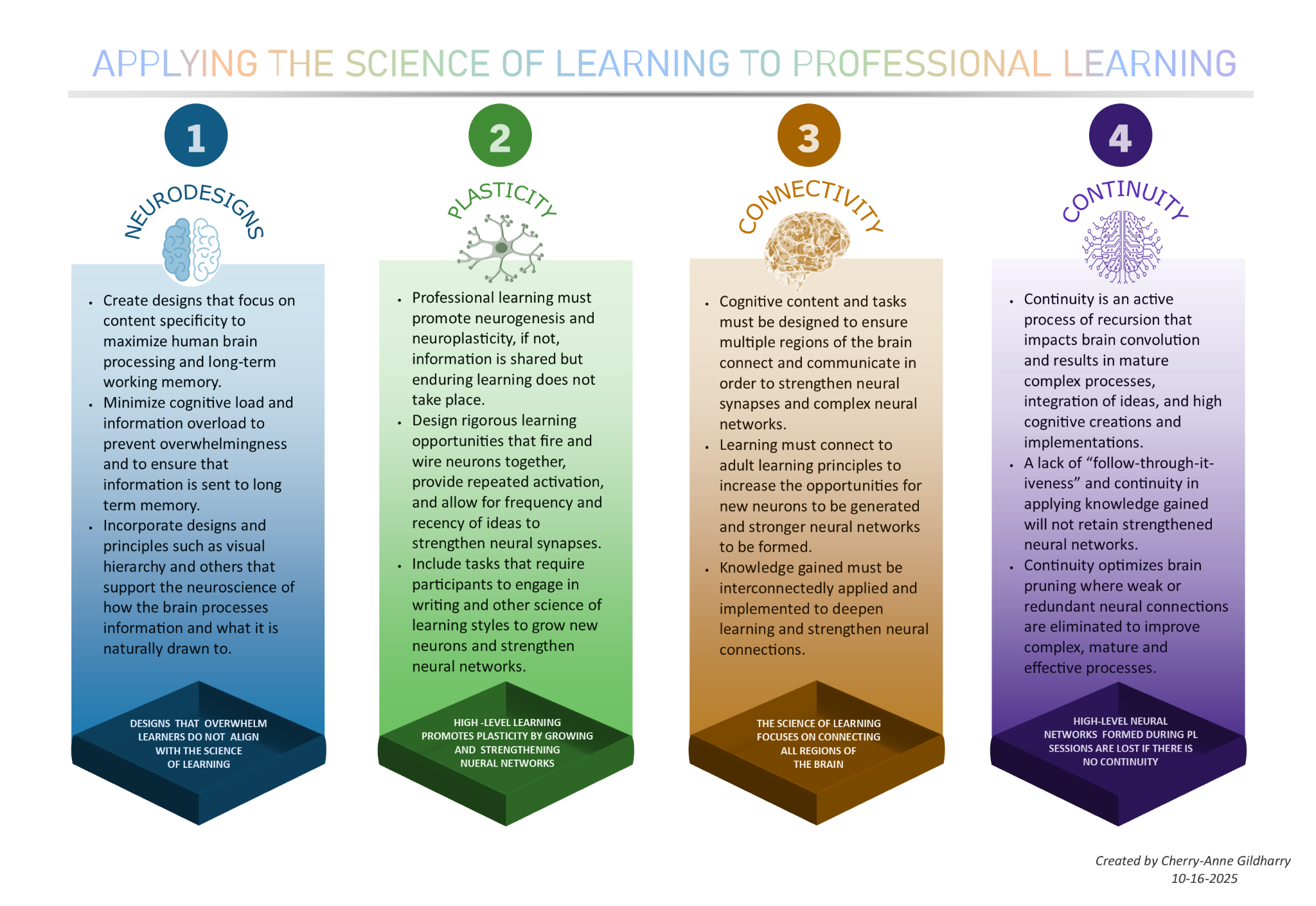
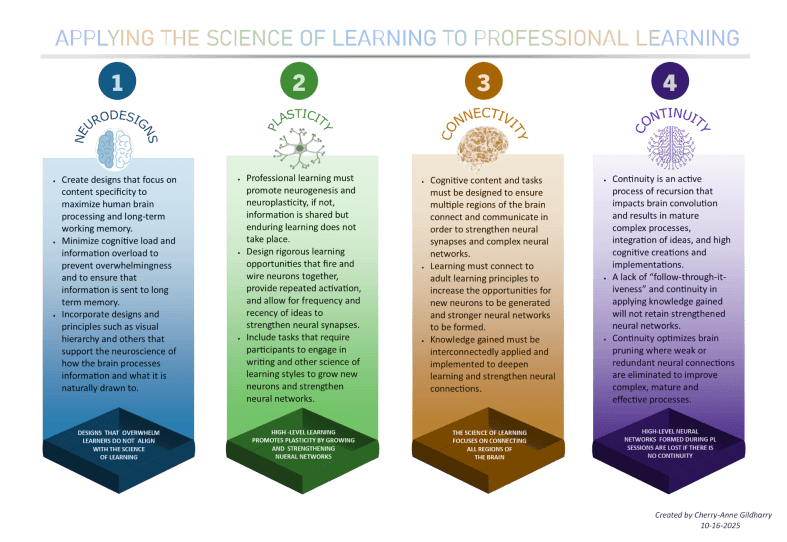
Infographic titled 'Applying the Science of Learning to Professional Learning' with four sections: Neurodesigns, Plasticity, Connectivity, and Continuity, each outlining principles for enhancing professional learning based on neuroscience.

Neurodesign- Minimize Cognitive Load and Maximize the Working Memory

It is important to focus on the elements of neurodesign to minimize cognitive load and ensure that learners are not overwhelmed or burned out when designing and implementing professional learning.

  • Create designs that focus on content specificity to maximize human brain processing and long-term working memory.
  • Minimize cognitive load and information overload to prevent overwhelmingness and ensure that information is sent to long-term memory.
  • Incorporate designs and principles such as visual hierarchy and others that support the neuroscience of how the brain processes information and what it is naturally drawn to.

When content is overwhelming, the amygdala, the system responsible for routing information based on your emotional state, takes over and sends information to the reactive brain, thus blocking it from entering the prefrontal cortex. The reactive brain responds to information instinctively instead of through thinking.

Professional learning designs and implementations must ensure that information is channeled to the prefrontal cortex (PFC) instead of the reactive brain, because the PFC is responsible for cellular changes that produce long-term neural networks. Unfortunately, “the prefrontal cortex is actually only 17 percent of your brain; the rest makes up the reactive brain” (Willis, 2009).

Designs that tightly pack content onto slides and have too many slides make learners overwhelmed and burned out. We must use profound neurodesign principles that focus on:

  • Organizing and delivering content to provide specificity, clarity, precision, connectivity, simplicity of design, consistency, and calmness for learning.
  • Including elements that the brain is naturally drawn to, such as:
    • Varying sizes of shapes and text.
    • Consistent fonts, themes, colors, and style.
    • Distinct guiding titles and guiding arrows.
    • Contrasting colors and icons.
    • Chunked and well-spaced text.
    • Clutter-free slides with white space that improve readability.
  • Adding relevant pictures and images and allowing them to profoundly communicate a thousand words.
  • Using visual hierarchy or infographics in which content is prioritized, and the importance is shown to guide users through a seamless and aesthetically appealing flow that hooks and deepens learning.

Is your professional learning design using neurodesign principles to ensure that information is sent to the prefrontal cortex, which is only 17 percent of the brain?

Plasticity- Heighten Neurogenesis and Neuroplasticity to Promote Enduring Learning

The Science of Learning and Implementation places significant emphasis on plasticity, more specifically, neurogenesis and neuroplasticity, when designing professional learning. To grow new neurons, strengthen neural connections, and develop high-level executive functioning skills, we must implement the following essential practices and ideas:

  • Create professional learning that promotes neurogenesis and neuroplasticity. If not, information is shared, but enduring learning does not take place.
  • Design rigorous learning opportunities that fire and wire neurons together, provide repeated activation, and allow for frequency and recency of ideas to strengthen neural synapses.
  • Include tasks that require participants to engage in writing and other science of learning styles to grow new neurons and strengthen neural networks.

It was once believed that the brain did not have the ability to grow new neurons, but this belief was disproven in 1960 by Joseph Altman and replaced with the belief of neurogenesis, the birth of new neurons. Neurogenesis is understood to be a lifelong process; adults can grow new neurons. The concept of neuroplasticity, or brain plasticity is the brain’s ability to develop stronger structures and networks; it dates back to 1890.

Once information enters the prefrontal cortex, it is transmitted to short-term memory by synapses and neurons. If the information is deemed important, then and only then is it sent to the hippocampus and afterwards to the neocortex for long-term storage. It is not at all automatic that information is transferred to long-term storage.

So, how do we develop new neurons and fire and wire neurons together to strengthen neural networks for long-term storage when we design professional learning?

  • Neurodesign components explored in the neurodesign section must be a number one priority to ensure content is sent to the pre-frontal cortex and the process of neuroplasticity is heightened.
  • Use it or lose it: Repetition is key in strengthening neural networks. Repetition here does not relate to rote memory and step-by-step memorization, but to repetition of in-depth and profound ideas that help learners generate long-term connections for retrieval and application. Active engagement is critical!
  • Create larger and stronger networks of neurons by seamlessly incorporating and blending multiple research-based strategies that connect ideas from slide to slide and within slides.
  • Ensure that learners are not passive recipients but instead are given numerous and extensive opportunities to be active participants. Learners must be given time to work on high-level tasks and create high-level learning products.

Is your professional learning design firing and wiring neurons together and developing strong neural networks so that information is deemed important and sent to the neocortex?

Connectivity – Connect to Different Regions of the Brain, Pedagogy, and Andragogy

A focus on the power of connectivity when creating professional learning designs is extremely crucial if we want learners to generate excellent learning artifacts and continuously apply learning at a high level. Connectivity strengthens neural connections and heightens learning.

  • Cognitive content and tasks must be designed to ensure multiple regions of the brain connect and communicate in order to strengthen neural synapses and complex neural networks.
  • Learning must connect to adult learning principles to increase the opportunities for new neurons to be generated and stronger neural networks to be formed.
  • Knowledge gained must be interconnectedly applied and implemented to deepen learning and strengthen neural connections.

To significantly improve connectivity, it is essential to ensure the implementation of the following science of learning practices.

  • Personalize learning by focusing on goals. Your learners have prioritized goals and learning outcomes, so learning designs must provide opportunities for learners to focus on their goals during the learning session and create learning artifacts that align with them.
  • Include brain-related learning styles and multiple sensory designs that the brain is naturally drawn to (not the myth of fixed learning styles). Some of these are visual, auditory, reading/writing, and kinesthetic. Ensure that both the left and right hemispheres are involved in learning to strengthen neural connections.
  • Provide learners with choice to meet their needs and have relevance for learning. Both adults and young learners need to see the relevance for learning and choose tasks that are relevant to their needs, goals, and experiences.
  • Incorporate writing into learning sessions. Writing deepens connectivity; “the process of creative formulation and physical writing lights up a whole lot of the human brain. Language, cognition, memory, visual processing, planning and control, and the ability to make associations between unrelated concepts all come into play” (This Is Your Brain on Writing, n.d.).
  • Learning designs must incorporate the connectedness of all pedagogical strategies to show how these can be used concurrently. Use flowcharts or infographics to communicate the big picture. Too often, strategies are shared in isolation, but this goes against the science of learning and implementation theories.

Do your learning designs use pedagogical and andragogical principles that connect both regions of the brain to develop long-lasting neural connections?

Continuity – Optimize Brain Pruning and Mature Complex Processes

Excellence in designing professional learning is not a one-time situation. Instead, it is a dedicated journey of ongoing creations, metacognition, and revisions. Learning does not stop at a PL session; it has only just begun. Continuity is key in the science of learning and implementation.

  • Continuity is an active process of recursion that impacts brain convolution and results in mature complex processes, integration of ideas, and high cognitive creations and implementations.

The science of learning and implementation stresses the importance and need for continuity for brain functions such as pruning, recursion, and brain convolution to take place to impact excellent and enduring learning. How can we promote continuity of learning after the professional learning session?

  • Time must be carved into the learning design for participants to reflect on their goals and learning artifacts and develop an implementation timeline with steps for ongoing revision.
  • Young and adult learners need to understand the principles behind having a growth mindset. Develop a simple framework for learners to complete and focus on ways to deal with setbacks during implementation. Here are two examples of growth mindset initiatives I developed from scratch and spearheaded: SAGE Growth Conversations and the GROW Growth Mindset Framework. Teachers were asked to collaborate with me after I created a framework, timeline, and artifact.
  • Incorporate self-learning activities that develop self-directed and autonomous learners.
  • It is said that emotions are closely related to the brain and learning. How can you tap into your participants’ emotions to make a lasting impact for high-level continuity? I have used images, questions, videos, stories, and more to promote connectivity.

Knowledge gained from professional learning can easily be forgotten or lost if we do not incorporate strategies that ensure continuity.

How are you designing professional learning to guarantee continuity?

As a unique autodidactic learner from the age of three and a half years old, I have always been riveted in my purpose, goals, and my innate passion for learning and continuously applying knowledge gained. My wife, Melanie Gildharry, an educator turned business analyst, is blazing trails and creating excellent products at extremely high levels in the business world. Like me, she is also an autodidactic learner who follows a heutagogy learning model and has a deep-seated passion for learning and creating.

When I analyze the common principles, traits, and mindsets we share from attending and presenting professional development, it narrows down to the four science of learning principles of neurodesign, plasticity, connectivity, and continuity. For us, even when these elements were not incorporated into PL sessions we attended, we ensured that our learning products included them. No professional learning session is ever wasted for us!

Professional learning attendees, the onus is also on you. Your learning artifacts and implementation steps must focus on neurodesign, plasticity, connectivity, and continuity, even if these are not present in your professional learning sessions.

It is important to remember that “Knowledge is not power until it is applied” ~ Dale Carnegie. However, know that there will be failures in the journey of applying the science of learning and implementation to design excellent professional learning and create learning artifacts, but always remember the profound and inspiring words of Albert Einstein:

  • “Failure is success in progress”
  • “You never fail until you stop trying”
  • “The only sure way to avoid making mistakes is to have no new ideas”
  • “We cannot solve our problems with the same thinking we used to create them”

Keep in mind, professional learning designs in the U.S. are used as exemplars for learners around the world. Therefore, it is extremely important to ensure that we continue to incorporate the science of learning and implementation principles into professional learning designs to generate exceptional learning sessions.

Let’s lead professional learning designs that focus on The Science of Learning and Implementation elements.

References

Ford, D. J. (2011, July 20). How the Brain Learns – Training Industry. Training Industry. https://trainingindustry.com/articles/content-development/how-the-brain-learns/

Neurogenesis and Neuroplasticity: Similarities and Differences. (n.d.). http://Www.re-Origin.com. https://www.re-origin.com/articles/neurogenesis-and-neuroplasticity

Understanding Brain Connectivity: How Our Minds Develop and Adapt. (2020). Brainbalancecenters.com. https://www.brainbalancecenters.com/blog/understanding-brain-connectivity-how-our-minds-develop-and-adapt

What Is Neurodesign? | Built In. (2024). Built In. https://builtin.com/articles/neurodesign

About the Author Cherry-Anne Gildharry

I have a Bachelor of Science in Mathematics, a Master of Science in Education, and a Graduate Certificate in Instructional Coaching. I have 33 years of experience in education, and counting, and I have taught math in Trinidad and Tobago, North Carolina, Iowa, and Texas.

Throughout my career, I have held numerous roles, such as a High School and Middle School Math Teacher, Department Chair, and Teacher Leader. I have also served as an Algebra 1 and Geometry Lead Teacher, Workshop Creator and Facilitator, and Marzano’s Demonstration Teacher. Additionally, I served as a School-Based and District Coach, Leadership Coach and Collaborator, Learning Design Strategist, Virtual Instructional Coach, Professional Development Auditor, and Professional Development Content Creator.

I have a track record of success both as a teacher, curriculum designer, school-based and district-level coach, and virtual instructional coach. In North Carolina, 100% of my Algebra 1 and Geometry students achieved passing scores for consecutive years using tasks I designed from scratch. As an instructional coach, consultant, and change agent, I have coached teachers in North Carolina, Iowa, Texas, and Teach for America teachers to attain similar track records. I currently help develop courses for teachers and coach teachers in various states across the United States.

I am a lifelong and self-driven learner and educator with a growth mindset and an undeniable passion for education. I am beyond blessed to be married to the woman of my dreams; a former Chemistry teacher, technology coach, E-Learning Designer, and Curriculum Manager turned Business Analyst, and a lifelong learner and educator. Together, our energies drive our success, philosophies, dedication, career, and family goals even more. We are work-life balance advocates. We believe in working extremely hard but intentionally setting time aside to recharge and rejuvenate!

About Rachelle

Dr. Rachelle Dené Poth is a Spanish and STEAM: What’s Next in Emerging Technology Teacher. Dr. Rachelle Dené Poth is an edtech consultant, presenter, attorney, author, and teacher of Spanish and STEAM: Emerging Technology. Rachelle has a Juris Doctor degree from Duquesne University School of Law and a Doctorate in Instructional Technology. Rachelle’s focus was on the need for professional development for educators, specific to Artificial Intelligence. Rachelle specializes in Artificial Intelligence, AI and the Law, AI and Healthcare, Cybersecurity, and STEM. She has more than 8 years of experience teaching and presenting on AI in her classroom, as well as working with educators worldwide.

Rachelle is currently serving as the Grant Coach for an initiative through ISTE+ASCD and Pinterest. Rachelle works with a Task Force from 12 districts in the United States and assists with policy revision, professional development, and the design of digital wellness resources for students, educators, and families.

Rachelle provides professional development related to AI policy and implementation to school districts, universities, and organizations. She also presents and provides keynotes on AI at state, national, and international events and in schools. Rachelle also provides AI training for other industries, including business, healthcare, and legal fields.
Rachelle is an ISTE-certified educator and recipient of the ISTE Making IT Happen Award and several Presidential Awards for volunteer service to education. Rachelle received the EdTech Trendsetter Award from EdTech Digest in 2024 and 2026.

She is the author of ten books, including “What the Tech? An Educator’s Guide to AI, AR/VR, the Metaverse and More! and “How to Teach AI: Weaving Strategies and Activities Into Any Content Area.” She has written curricula and courses on AI for all levels.

She is also a blogger for Defined Learning, EdTech K12, Edutopia, Getting Smart, and Tech & Learning. She is the host of the ThriveinEDU podcast, ISTE’s Learning Unleashed podcast, and The Lift by Amazon on BAM Radio Network. Contact Rachelle for your event!

Image featuring Dr. Rachelle Dené Poth with her name, social media handle, and a selection of her book covers displayed along with a brief description of her roles as an educator, author, attorney, and consultant.

How Curriculum Genie Helps Students Thrive

In collaboration with Learning Genie

Education is evolving faster than ever. Artificial intelligence, personalized learning, and competency-based models are transforming the way educators determine the most effective ways to prepare students for the future. Even with so many options available, in my own experience and for others, the same curriculum may be used each year, in more of a one-size-fits-all format, rather than reflecting the diversity, creativity, and individual needs of our students today.

Each student brings their unique abilities, background experiences, and identities into the classroom. To continue engaging and empowering students in learning, educators need tools that provide robust options and possibilities. We need tools that help us design learning that is relevant, inclusive, and connected. An extra bonus is finding tools that save time, allowing us to spend more time with students.

I have enjoyed using Curriculum Genie, developed by Learning Genie. This innovative platform helps educators transition from traditional instruction to personalized and UDL-aligned learning, supporting the whole learner and also the competencies outlined in the Portrait of a Graduate.

Why Curriculum Needs An Update

A standardized curriculum was initially developed to promote fairness, ensuring that all students had access to the same information. But equal content doesn’t mean equitable learning. If lessons are not adjusted to meet student needs and are not more personalized, then they will fail to:

  • Reflect students’ local cultures or communities, and authentic learning is lost.
  • Connect abstract concepts to real-world experiences, reducing comprehension.
  • Maintain student engagement when lessons feel irrelevant or disconnected.

As educators, we know the need for personalization, but creating differentiated lessons can be time-consuming and, at times, even overwhelming, as we worry about meeting each learner’s needs. Curriculum Genie removes that barrier by making relevance, accessibility, and inclusion achievable and in a platform that is easy to navigate and user-friendly.

Curriculum Genie: AI Meets Authentic Learning

Curriculum Genie is not just another planning tool—it’s an AI-powered educational design partner. It helps teachers build or adapt a curriculum that authentically and meaningfully connects to students’ needs and experiences.

✨ Key Features

1. Location-Based Unit Generation Educators can select a location (state, city, or region), and generate unit planners tailored to that specific place in no time at all. The examples, activities, and cultural connections align with the local environment, which makes the lessons more authentic and relatable.

2. AI Lesson Assistant Teachers can:

  • Create new lessons in a short amount of time that reflect a specific location or cultural context.
  • Transform existing lessons without rewriting them from scratch.
  • Have a thought partner to build out a truly impactful lesson for students.

This flexibility empowers teachers to make any lesson more meaningful while saving hours of preparation time. The time saved can then be spent with students and colleagues, continuing to learn and grow together.

Generates interactive slides!

3. UDL-Embedded Supports Curriculum Genie doesn’t just create lessons; it also aligns them with Universal Design for Learning (UDL) principles, helping educators plan for accessibility and inclusion from the start. UDL is a focus area for many educators, and making sure to provide the right supports and activities is key. Curriculum Genie helps with this. Why UDL?

UDL ensures multiple means of:

  • Engagement: Connecting to student interests and motivation.
  • Representation: Presenting information in diverse ways (visual, auditory, tactile).
  • Action & Expression: Giving students options to show what they know.

For example, when designing a science lesson, Curriculum Genie might suggest hands-on experiments, visual diagrams, or video explanations to make sure that every learner can engage and succeed. For my STEAM course, I can create robust lessons focused on digital citizenship and wellness or other important topics that boost student engagement and make truly interactive lessons to amplify learning. How? Curriculum Genie provides all of the resources that I need to make a lesson successful, meaningful, and personalized to my students.

4. IEP and ELL Integration
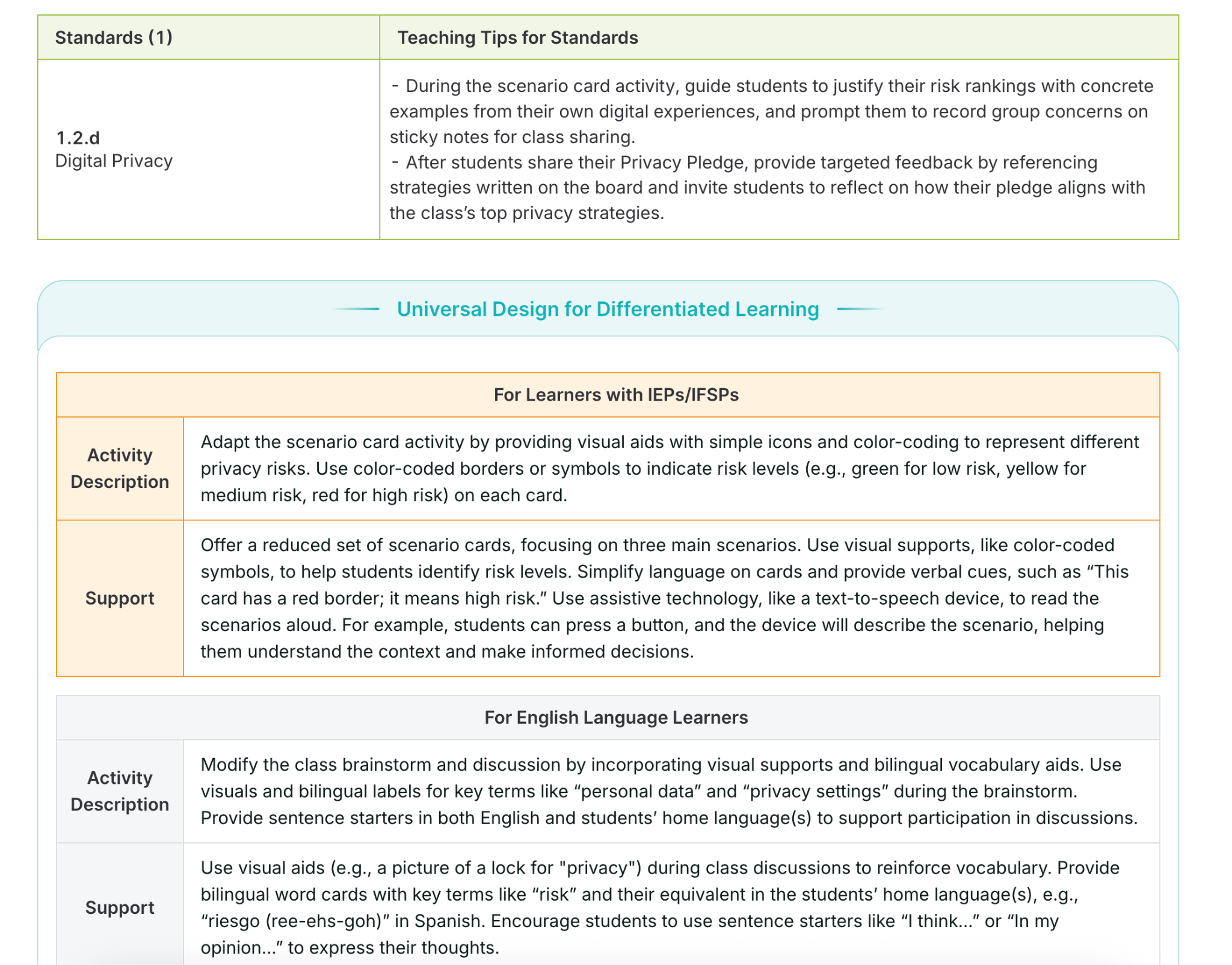
Supporting diverse learners is a key aspect of Curriculum Genie’s design. It automatically weaves strategies for students with IEPs and English Language Learners, helping educators to build their instructional practices, too.

5. Portrait of a Graduate Alignment Many districts are focusing on the Portrait of a Graduate, and also, Portrait of an AI Graduate, which outline the essential skills our students need to be successful in the future. They develop skills such as critical thinking, communication, creativity, collaboration, and global citizenship.

Curriculum Genie helps educators design lessons that cultivate these competencies through:

  • Real-world, problem-based learning grounded in local and global contexts.
  • Collaborative and inquiry-driven activities that foster communication and creativity.
  • Culturally responsive projects that honor diverse perspectives and promote empathy.

Using Curriculum Genie enables educators to connect academic standards with the Portrait of a Graduate competencies, which ensures that students learn more than the content; it helps them to build the mindset and skills needed for their future.

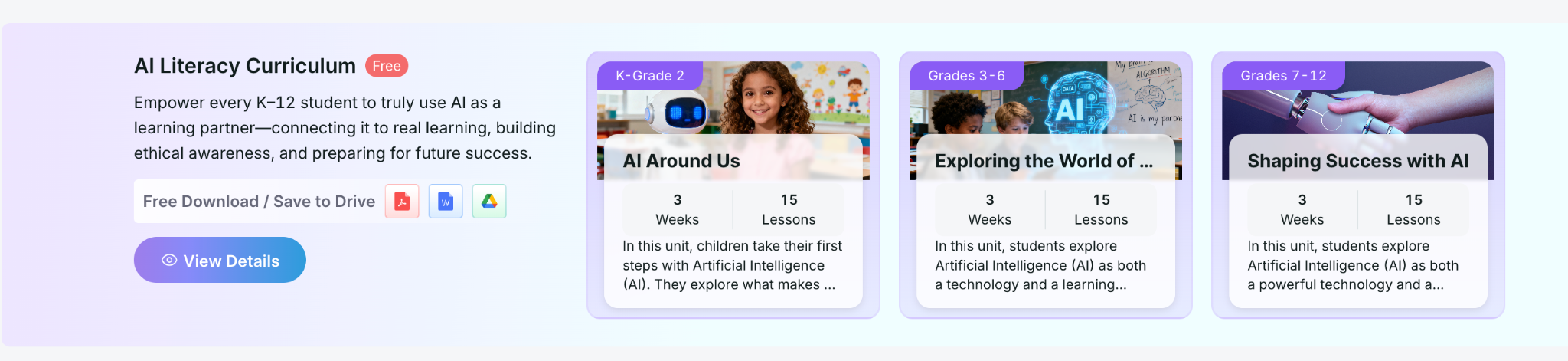
They also offer FREE K-12 Lessons on AI Literacy!

Free AI Literacy Courses for K–12 Educators

Another great feature offered by Learning Genie is that it provides free AI Literacy Courses for K–12 educators.

The courses are self-paced and help teachers and school leaders:

  • Understand how AI works and how it’s shaping learning.
  • Explore classroom-ready strategies for AI integration.
  • Learn to design lessons that teach students to think critically about AI.

You can access these courses and learn more about Curriculum Genie at https://www.learning-genie.com/.

Transforming Education, Together

The future of learning depends on our ability as educators to make education more personal, purposeful, and powerful. Curriculum Genie offers guidance that helps educators move beyond traditional and one-size-fits-all instruction to learning that is inclusive, authentic, and future-focused.

More than just a platform with limited capabilities, through its integration of AI, UDL, Portrait of a Graduate competencies, plus the great and free AI literacy courses, Curriculum Genie supports educators with the tools to make it a reality.

If you’re looking for a new platform that will save you hours of time by addressing many important areas, then I definitely recommend that you dive into Learning Genie and explore creating with Curriculum Genie. I have been amazed at how quickly it creates, how responsive it is, and the quality of resources and materials that it shares for teachers. Learn more and request a demo at https://www.learning-genie.com/

About Rachelle

Dr. Rachelle Dené Poth is a Spanish and STEAM: What’s Next in Emerging Technology Teacher at Riverview High School in Oakmont, PA. Rachelle is also an attorney with a Juris Doctor degree from Duquesne University School of Law and a Master’s in Instructional Technology. Rachelle received her Doctorate in Instructional Technology, and her research focus was on AI and Professional Development. In addition to teaching, she is a full-time consultant and works with companies and organizations to provide PD, speaking, and consulting services. Contact Rachelle for your event!
Rachelle is an ISTE-certified educator and community leader who served as president of the ISTE Teacher Education Network. By EdTech Digest, she was named the EdTech Trendsetter of 2024, one of 30 K-12 IT Influencers to follow in 2021, and one of 150 Women Global EdTech Thought Leaders in 2022.

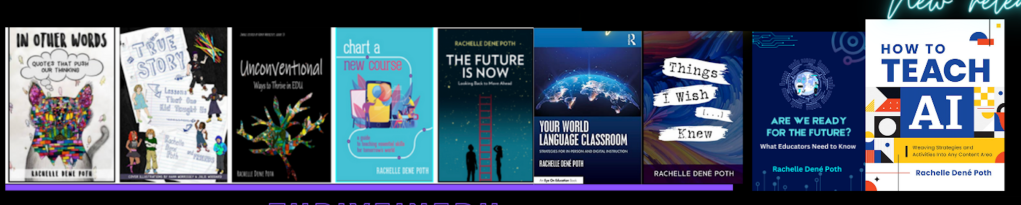
She is the author of ten books, including ‘What The Tech? An Educator’s Guide to AI, AR/VR, the Metaverse and More” and ‘How To Teach AI’. In addition, other books include, “In Other Words: Quotes That Push Our Thinking,” “Unconventional Ways to Thrive in EDU,” “The Future is Now: Looking Back to Move Ahead,” “Chart A New Course: A Guide to Teaching Essential Skills for Tomorrow’s World, “True Story: Lessons That One Kid Taught Us,” “Things I Wish […] Knew” and her newest “How To Teach AI” is available from ISTE or on Amazon.

Contact Rachelle to schedule sessions about Artificial Intelligence, AI and the Law, Coding, AR/VR, and more for your school or event! Submit the Contact Form.

Follow Rachelle on Bluesky, Instagram, and X at @Rdene915

**Interested in writing a guest blog for my site? Would love to share your ideas! Submit your post here. Looking for a new book to read? Find these available at bit.ly/Pothbooks

************ Also, check out my THRIVEinEDU Podcast Here!

Join my show on THRIVEinEDU on Facebook. Join the group here.

Screenleap for Education: Learn From Anywhere at Anytime

This post is sponsored by Screenleap. Opinions expressed are my own.

At the end of January, I attended the Future of Educational Technology Conference (FETC) in Orlando. FETC has become one of my favorite conferences to attend and each year I return to my school with a lot of new ideas and tools that I’m excited to try in my classroom and share with colleagues and educator friends. This year was no exception. After reading about the 31 start-up companies that would be participating in the “Pitch Fest” competition happening in the expo hall, I decided that I wanted to start there. These companies—the “best-of-the-best startups”—would be pitching their products and services to a panel of judges. I find this to be one of the “musts” for me each year to learn about the new ideas and products available to educators. I enjoy getting to talk with the companies to understand their tools and how it benefits educators and students.

null

Before arriving, I had received a flyer from Screenleap. I took a quick look, but decided to set it aside and instead make time to meet with Tuyen Truong, the CEO and Founder of Screenleap, at the conference. We had a great conversation and I was immediately impressed with what I learned about Screenleap from Tuyen and from the reactions of other attendees who had stopped by the booth to learn more about Screenleap.

Not long after speaking with Tuyen, I presented my own poster session on designing “Creative, Personalized, and Productive Classrooms.” A common interest of the attendees was that they wanted to know options that would enable them to share lessons, to work with schedule changes that interrupted the normal class periods, and to provide access to learning opportunities for their students when their students needed them. Screenleap immediately popped into my mind and so I gave them a brief overview and pointed them in the direction of Screenleap’s booth in the EdTech Startup area.  

null

Tools with Purpose: Getting Started Quickly

Common issues for teachers regarding education tools are knowing where to start and whether something will have a big learning curve. These are both important factors, but we should also consider the WHY behind adding the technology. Based on the interests of the educators that I spoke with, thinking through it and trying it out on my own, Screenleap definitely addresses these concerns by making it easy for teachers to set up and start using with students and by saving valuable time for teachers who use it.

So How Does It Work?

null

Screenleap for Education allows teachers to share their screen with students and record it for later viewing. Whether the students are in the classroom or absent from class on a given day, they can watch the screen share live from wherever they are or access the lesson afterward when it is convenient for them. You can learn more about Screenleap for Education here. If you would like to try it out, you can start a free trial here!

Why Use Screenleap for Education?

When thinking about adding some new technology into the classroom, we really need to focus on the why behind choosing a specific tool or method. What difference will adding this tool make and how can it enhance the learning process and go beyond the traditional methods that are being used? What sets it apart from other tools you are currently using?

I think the benefits are clear with Screenleap for Education:

  1. Teachers can share from any device (including Chromebooks, iPads, Android, PCs, and Macs).
  2. Students don’t need to install any software to view their teacher’s screen, which makes it easily accessible to all students and saves time on IT administration.
  3. Everything is automatically recorded on the cloud for later playback. Teachers don’t need to manually upload the recording after the screen share.
  4. It saves teachers a lot of time because now they do not need to reteach lessons to students who miss a class since the recorded lessons are available for students to watch on their schedule. In addition, when it comes to re-teaching, you don’t always present the information the same way, so having a solid lesson that can quickly be shared with students to view and learn from is a real benefit for you.

Ideas for Using the Recording Feature

Depending on the content area you teach, or even if you have a different role than a classroom teacher, creating these recordings is easy and of great benefit. Having recordings available that you can share with colleagues, offer as extra instruction for students needing review, or even as a way to get feedback from colleagues about how you delivered a lesson, are just a few of the great ways to use the recording feature of Screenleap for Education. There are a lot of other possibilities for teachers, students, and administrators when the recording feature is used as part of a teacher’s daily instruction.

Getting Started

I found Screenleap for Education very intuitive and easy to get started with:

  1. After creating your account, there is an initial setup step where you can create your classes and add students to them.
  2. Once your classes are set up, it is easy to start sharing your screen with your students: all you need to do is click on the button for the class you want to share when your class starts. If it’s your first time sharing your screen, you will be walked through a one-time app installation before your screen share begins. null
  3. Once your screen share has started, your students can watch your screen share by signing into their accounts and clicking on the “View live class” button for your class.
  4. While you are sharing your screen, it is automatically recorded in the cloud.
  5. When you stop your screen share and have recording enabled, your recording will be processed and made available to you from the “Recordings” page. If you have automatic sharing configured, the recording will also be made available for your students to review.

null

Additional Features That I Like

  • If you want to remove something from your class recording, you can do so and then upload the updated version.
  • You can share the same recording with multiple classes.
  • You can track student engagement in real-time by clicking on “engagement” or after the recording has been processed. You will see a snapshot of the engagement graph at the bottom of every recording.

Conclusion

Screenleap for Education offers a lot of benefits for teachers, students, and administrators: students can easily follow along in the classroom or from home, teachers do not have to reteach lessons that students miss, students can review lessons before tests, and administrators have resources available  that can help to improve test scores for their schools through better learning. In addition, being able to stay connected and keep up with class—even when not in the classroom—and having information available to share with other teachers and administrators really makes Screenleap stand out when it comes to tools that benefit student learning.

Let me know what you think of Screenleap for Education. Again, you can start a free trial here! 

Why Students should learn to code and how to get started

Published originally on Getting Smart December 15, 2017

Coding is one of the topics that has received greater attention in education over the past couple of years. With a greater emphasis on computer science and coding and the demand for knowledge in these areas, there has been an increase in the variety of resources available to encourage schools to provide opportunities for students to learn about coding. The “Hour of Code” takes place annually during “Computer Science Education Week”. The week is in recognition of the birthday of Admiral Grace Murray Hopper, a computing pioneer. To see some of the events and activities from this year’s “Hour of Code” week, go to the Code.org site or check out the hashtags on Twitter for #HourofCode and #CSweek.

The goal of participating in an “Hour of Code”, is to show that anyone can code and to highlight how vital computer science knowledge is for today’s students, as it helps them to develop the skills they need to be prepared for their future. Data provided on Code.Org provide statistics which support the growing need for students to have opportunities to learn about and develop skills in coding and computer science. According to the site, the majority of schools do not teach computer science, with only 40% reported as having courses available for students. For careers in STEM, 71% of the jobs available are in computing, however, only 8% of STEM graduates are in Computer Science. As for future employment, computing jobs are the #1 source of new wages in the United States, a number that is expected to increase. In addition to the future benefits for employment, what are the other benefits of coding for students?

Why should students learn to code?

Coding is something that each student can do and is a more engaging way for students to work on their collaboration, critical thinking and problem-solving skills. Coding can help to promote SEL (Social and Emotional Learning) skills as well. For example, in working through the various modules available on Code.org or through other coding programs, students develop their self-awareness as they work through the challenges of coding and they develop a greater understanding of their strengths and being able to set goals for oneself based on this self-awareness. Students will become more confident as they problem solve and experience success along the way and by helping peers as well. Students build relationship skills through the collaboration during activities, seeking and offering help when needed and learning to cooperate with one another to solve a coding challenge.

Students can also experience more inquiry-based learning, where they are exploring on their own, problem solving and discovering how to make a program work, where the steps fit in and then being able to share the experience with one another. Personally, I enjoy trying to work through the activities on my own, to experience the challenges and be better equipped to anticipate student questions, but also to be more familiar with areas of struggle.

Getting Started

The idea of coding can be a bit overwhelming, at least that is how I felt when I first started a few years ago with the game Hopscotch. It was challenging to create a game and it took a lot of patience to push through. However, back in the early 1980s, as a 7th-grade student, I had my first experience in writing lines of code with the Apple computers. Once you learn the basic structure and the commands, it is a gradual process that does not seem to take too long to master. Even nearly 35 years later, the concept of coding really is quite the same, except that we can create more visually engaging games and programs. There are so many resources and websites available to help educators and students get started, making it less intimidating than it may initially seem.

When trying some of the resources below, be sure to engage students in discussions about their experience with coding. Encourage students to share with their peers and talk about professions which require coding skills or to brainstorm areas where knowledge of coding will prove to be beneficial. Providing this time for students to interact will help them to develop their SEL skills, by building peer relationships and supporting the classroom culture.

Working with students

Be ready for students to express some frustrations when trying to work through the activities. Even if you don’t have experience coding, it’s a great opportunity to learn right along with the students and in many cases to learn from them. How do you prepare? I recommend trying each of the activities on your own, so you are familiar with the set-up and the types of tasks that the students will be completing. As a Star Wars fan, I started with the basics and did encounter some difficulty mid-way. As it turns out, a few of my students had the exact same problem with it and asked for help. Although I did figure out how to work through it, I wanted them to work through it on their own as well. We need to give students time and space to problem solve, to ask for peer support and to experience the frustration that comes with solving problems and the joy that replaces it when the solution is reached.

Seeing the students begin to collaborate and step in to help their peers, demonstrated the benefits beyond just learning to code, it promotes their SEL skills. A lot of what is involved in coding is critical thinking, problem-solving and definitely collaboration and with all this comes an amount of frustration perhaps when the code does not work as one expects. This is when we see the students start to connect and help one another and I have also seen students become very frustrated, understandably but it is what we do with that frustration, pushing through even in the face of challenges, knowing that there is support available amongst peers and the “teacher” in the room. There is always an identifiable teacher, but as we have learned in our classes, we all have something to learn and something to teach.

Ten resources to try

  1. Code Studio: A part of the Code.org, there are full courses available for learning different types of code, for different grade levels, as well as one-hour tutorials on themes such as Minecraft and Star Wars. Teachers can also use the “App Lab” and “Game Lab” to help students learn how to create using Javascript. Also available are more than 20 million projects created by students.
  2. Scratch: Created by MIT, Scratch is a website for more than just programming. Scratch provides an online community for sharing projects and for learning from the library of resources available on the site.
  3. Code Academy:  Through Code Academy, you can enroll in courses to learn how to program, or search the catalog to find a specific language to learn, such as Java, Javascript, HTML and CSS, for example.
  4. BrainPOP: Teachers can engage students in the “Creative Coding” module, in which students create stop-motion animation movies, memes and newscasts. Students follow the instructions to write their own lines of code and see how each line changes the program. Working through the module leads students to create their own codes and publish a movie or create a meme. The Creative Coding module is free for Teachers through the end of the year.  There are also lessons available which focus on Computer Science and Coding and offer a variety of activities for students to develop their skills.
  5. Hopscotch: an iPad app in which students can learn to make their own games and apps, available for students ages 8 and older. There are tutorials which include videos and lessons plans, making it easy to get started with this in class.
  6. Swift Playground: An iPad app that enables students to get started with coding quickly, without any coding knowledge. Students can start by solving puzzles in order to learn the basics, and then continue through challenges to do more advanced coding.
  7. Pencil Code: A collaborative programming site which provides resources for teachers, student project samples, and choices of creating games, playing music, drawing art, and working with mathematical equations and graphing.
  8. TeachersFirst: There is a rather extensive list of different types of websites for coding based on theme and grade level for getting students involved.
  9. Girls Who Code: A non-profit organization which focuses on closing the gender gap in technology. Girls Who Code offers information for creating after-school clubs for girls in grades six through 12 to learn about coding, as well as two-week-long summer courses and a seven-week-long specialized summer program for 10th and 11th grade girls to learn about coding and job opportunities.
  10. Khan Academy: A non-profit organization which offers free educational resources including practice activities and videos, which enable you to learn at your own pace. Khan Academy provides lessons on Computing, with options including computer animation, hour of code, computer programming and computer science. It is easy to get started by either choosing the basics and working through a whole lesson, or selecting a specific concept.

Coding is not just about learning to write a program, it’s about connecting with the learning and building relationships in the process. Learning to problem solve, collaborate and work together to build skills for the future. Developing our interpersonal skills and fostering the development of meaningful and supportive relationships in the classroom will empower students in learning.

For This Lesson, I Stepped Aside To Become A Facilitator Of Learning


Posted on TeachThought, August 29th, 2017  (Thank you Terry Heick)

It started with a cross-class collaboration idea.

I was not sure the idea would work, but was willing to give it a try and it had captured the interest of students. I connected four levels of Spanish and created a team project using Google and Padlet so students could collaborate and share their work.

The experience went so well that it led me to think about other ways to engage students more in a collaborative online learning space. Students need to be connected with authentic learning experiences and develop digital citizenship skills, and to be given choices in learning. Trying to build on the prior project collaboration, I wanted to explore possibilities of using Google slides to have students work simultaneously on a whole-class project.

I asked the students if they had done any type of collaboration online like this before, and I was surprised that they had not. Knowing this pushed me more to decide that I should definitely create this learning experience with them.

Connecting students

I decided to try something more collaborative by using Google Slides. We are a Microsoft Office school, but many students use Google Drive on their own. I also use Edmodo in my classes and like the students to have experience with different kinds of tools. I like that students can work on a document or a presentation at the same time, as this substantively changes the methods and frequency with with students share ideas.

By having students create a class presentation simultaneously, the teacher can then take that extra time to facilitate their learning and interact with students to do something more specific, like assessing their content knowledge. Giving students the opportunity to work as a team toward one whole class project rather than completing individual projects opens up new and more engaging ways for the students to learn not only content or technology skills, or even ‘soft skills’ like collaboration, but also get to know one another more as well.

Connecting students with their peers promotes a friendlier and more cohesive class culture, and I think makes learning more authentic and meaningful for students. To be able to see what they are each working on and to be part of the whole class presentation in real-time requires constant interfacing of different personalities and skill levels.

The divergent interests, backgrounds, and experiences of the students in each class are emphasized in whole-class projects like this, which both strengthens the learning experience while also being more demanding of the technology.

When doing individual projects, it’s not always the case that each student has the opportunity to see the work of the other students. Doing this can be quite time-consuming and feel ‘wasteful,’ but the long-term momentum of successful projects that are as highly-visible as a whole-class collaboration are worth the time taken, and hiccups along the way, especially early in the year.

Our Presentation

To have the students practice the new chapter material on clothing and shopping preferences, I created a Google Slides template for a Fashion Show.

I set up a presentation for each class and shared it with the students. I provided instructions for what was expected for their slide, and reminded them to only work on their slide and respect the work of the other students.

For the fashion show, they were to choose a celebrity, find a picture and write a description in Spanish of the clothing that the person was wearing. They also had to write a few statements about where the clothing could be purchased as well as the cost for the items.

In doing this I thought it would be a great reference because the students could refer back to each slide, read the descriptions, and reinforce and review their content knowledge. Plus, depending on the types of clothing pictures the students chose, it could be a lot more fun–definitely more engaging and an interesting experience for all students than individual study.

This ‘real-world topic meets real-world technology meets whole-class collaboration’ ended up being a more authentic way to practice the content than even I had hoped, increasing the language and content retention for the students as well as teaching them new technology skills.

The students really liked seeing the Fashion Show displayed on the Smartboard, which was another opportunity to reinforce the vocabulary by asking students questions about each slide, reviewing the verb forms, and more.

For the most part, they did respect the work of their classmates. A few students enjoyed adding pictures of some celebrities onto the slides of their peers, which resulted in peers responding instantly and removing them–I didn’t even have to say anything!

A risk in giving open access to the editing of the presentation ended up being worth the risk taken, and was a way to teach lessons about digital citizenship as well.

Next Time

Always thinking of the next thing, I decided that perhaps another opportunity to work collaboratively would be to create a class review presentation for final exams. This might take more planning, but I think the long-term effect will be worth it.

This approach is a great way for the students to prepare for final exams and have a reference to review the material covered in the level 1 Spanish course. The idea is that each student will be assigned a slide and given a verb or grammar topic as well as some vocabulary to include.

For their slide, the goal is to teach a mini-lesson, provide references, include a video or link to a game and some sample sentences. Though I’m taking this approach to teach a foreign language, it could be used to teach, learn, or review almost anything, from math definitions and historical trends to literacy devices, phonics, word parts, and more.

I also hope that it will end up being a good way for students to have some personal instruction as well as a choice in what they are creating–and another opportunity for students to collaborate with their peers as the teacher shifts roles from leader to facilitator of learning.

PBLTT