Guest Post by Liz Janusz, Instructional Coach in SD113A in Lemont, IL. @mrs_janusz
I know the end of the school year is near, but I can’t seem to stop thinking about next year already! I have many goals for next school year: get into some coaching cycles with our amazing teachers, share more professional development books, but my number one goal for next year is to begin to build a culture of readers in our school.
Creating a reading culture in a school is essential if we want to encourage students to become engaged and motivated readers. Reading for fun should be celebrated and encouraged throughout the school day! Developing a strong culture of readers takes time and commitment from all involved, which is why I’ve already started planning for next year!
What do you need to begin to build a culture of readers?
Everyone should have a clear understanding of why building a culture of readers is so important. Reading for pleasure is the BEST way to develop and strengthen literacy skills and improve academic achievement.
A shared vision of what your school’s reading culture means in real words.
Full support of all staff in the building, including custodians, PE teachers, paraprofessionals, etc.
Books, books, and more books!
What are some things I can do to start building a culture of readers?
Encourage students to book talk the book they just finished reading to the rest of the class. Most of the time, they will be able to hook their peers on a book better that we could! Peer recommendations are one of the most powerful ways we can get more books into the hands of students!
Offer book clubs during the lunch periods. Pick a few books from an award list (Caudill, Newbery, Monarch, etc) and offer the chance for students to come in during their lunchtime to discuss the book that everyone is reading. Picking a book from an award list, will more than likely will leave them wanting to read the rest of on the list!
Set up an area in the school library where teachers can leave book recommendations for students.
As you are walking around the hallways, try simply carrying a book with you. I’m shocked at how many kids stop me in the hallway when I am carrying a book! They want to either tell me that they are reading it too or want me to tell them what they book is about.
Make your classroom library and sacred and inviting space. Don’t just throw random books in tubs and be done with it. Get your students involved and be thoughtful about how you arrange your library so it would be most accessible for your class.
Make books available all throughout the building! Put some shelves in the hallways and make displays based on what grade levels are teaching about or highlight a certain genre.
How can I get ALL staff members involved?
Over the summer have students and staff take pictures of themselves reading and post them with a school hashtag. When school begins in the fall create a slidedeck with all the all different pictures so we can celebrate all of the summer reading!
Create “What I’m Currently Reading” signs for EVERY SINGLE staff member in your building. These can hang outside their classroom, office, lunchroom, gym etc. Staff members can update these every time they read a new book. Students can see that all staff members value reading for fun and will hopefully get them excited about their own reading.
Set up a book swap! Have all teachers look through their classroom libraries and select books that they would put in the swap. Other teachers and students could then come look through the books and decide which “new” books they would like in their library. Everyone gets “new” books for their library, without spending money!
Make sure your school has a wide variety of books! For example, there are a lot of great math books out there. Buy some for your math teachers to have in the classroom that they can read aloud or reference while teaching.
**Interested in writing a guest blog for my site? I would love to share your ideas! Submit your post here.
Looking for a new book to read? Many stories from educators, two student chapters, and a student-designed cover for In Other Words.
One of the things that I love the most about Buncee is that it can be used in so many different ways, not only for instruction in our classrooms but also in life. I have used Buncee to create cards for family and friends, personal business cards, graphics for Twitter chats and webinars, quote graphics for my books, invitations, and more. When I decide to use digital tools in my classroom, I want students to practice the content in a more authentic and engaging way, while developing skills such as collaboration, critical thinking, problem-solving, and creativity that can be transferred to their future. In using digital tools like Buncee, my hope is that they will also use them in other classes, for personal use, and will share them with family too.
Each year, I continue to explore new ideas to have students create with the content, rather than doing the exact same project or using traditional worksheets or other assessment methods. For years, I assigned students to complete very rigid projects in the same format and left little up to student choice. Now, after seeing the benefits of being more flexible with my instructional methods, I’d rather open it up more to student choice and see what students come up with.
Finding time to explore new resources can be a challenge because our lives as educators becomes quite busy and we may find ourselves lacking in time to really explore a variety of options for use in our classroom. This is another one of the reasons that I choose Buncee and appreciate the team’s investment in offering more than just one way for students to create. It truly has become a go to multi-purpose platform that can do so much, that I feel pretty comfortable in saying that the possibilities really are endless when it comes to creation with Buncee.
Learning about students and pushing them to explore
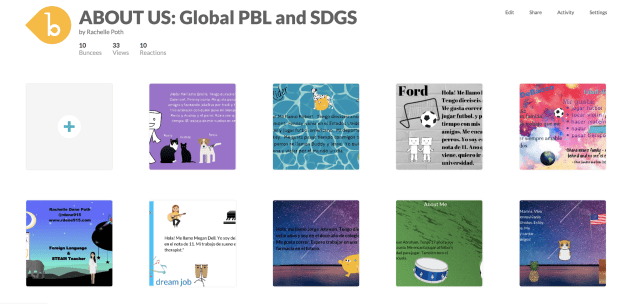
At the start of each school year, I focus my efforts on student relationships, learning about my students and also providing opportunities for them to learn about one another. In the past I have done this by using activities in our classroom such as ice breakers or having students work together on different review games and other in class collaborations like that. But this year I decided to do something a little bit differently to not only engage students in learning about the Spanish language and culture but to engage more in learning about one another. I came up with a project focused on using the “About Me” template in Buncee. I wanted students to share who they were and create one slide to show this using words, animations, stickers, and other add-ins. My hope was that by looking at each student’s slide, we would understand one another better and relate to each other based on similarities and differences.
I also thought this would be a good opportunity for them to choose and learn a little about a place where Spanish is spoken and create an “About_(country)_____” to share that information with the rest of the class. But I also realize that there are many students who are visual learners like me and I wanted to encourage students to be able to quickly look at and process information and represent it in a different way. Rather than simply restating the same content, push them to apply it at a higher level or find a different way to demonstrate an understanding of a concept.
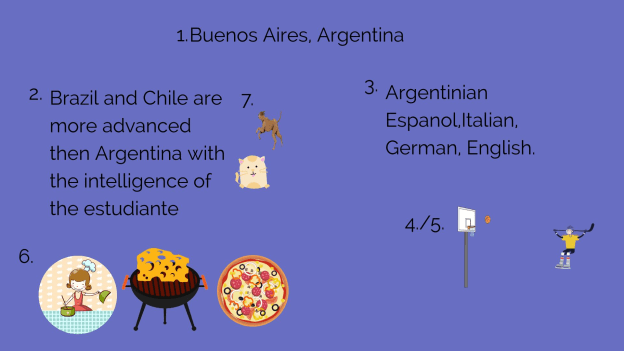
I also wanted students to choose a Spanish speaking country and I placed a limit on the number of actual words they could use because I wanted them to represent what they had learned about the place that had chosen using the Buncee features. The topics they had to include were: languages spoken, school subjects, foods, activities, and other information like that that they could display using Buncee.
How did it go?
It was a fun activity and I learned so much about them and they learned about each other and what life is like in countries where Spanish is spoken. We shared them on a Buncee board which made it easy to access and created a colorful display of students and their creativity. Students shared their slides and gave a brief description in Spanish about themselves and made connections with their classmates. We had good conversations exchanging our likes, dislikes, and learning about our backgrounds. For the second slide, students
were able to get a quick glimpse of different Spanish-speaking countries and begin to understand the culture of some of the places they would be studying. It was fun that they could only include 3D objects, animations, stickers or emojis, to represent the information for each country. So for visual learners, being able to choose the right object to use to share this information made the learning stick a little bit more. Students who enjoy creating but not drawing really enjoyed the activity.
One other feature that I thought was important to share with students was the new Immersive Reader and how it works. We enjoyed looking at all of the capabilities with it and using Buncee for learning!
**Interested in writing a guest blog for my site? I would love to share your ideas! Submit your post here.
Looking for a new book to read? Many stories from educators, two student chapters, and a student-designed cover for In Other Words.
Get students computer science ready by teaching them how to think with computational thinking.
The demand for computer science (CS) in schools has many teachers wondering which components of CS they should implement first.
A couple of years ago, I asked myself the very same question, and I had to remind myself that creating a computer scientist could take up to 25 years! I was relieved that I wasn’t responsible for developing middle school computer scientists in only one semester.
I realized that what I needed to do was build the capacity of my students for deeper learning of the right skills — so they could experience success, which would inspire them to continue studying CS after leaving my class.
Video by JULES discussing the 4 elements of ‘Computational Thinking’
The Difference Between Computer Science and Computational Thinking
CS is part of computing education and it’s the foundation for ALL computing. So, in essence, CS is the study of computers and the algorithmic design processes in both hardware and software — their application and overall impact on society.
On the other hand, CT is a problem-solving skill(s) that involves decomposition, abstraction, pattern recognition and algorithm design.
Element 1: Decomposition
Facing large, complex problems will often discourage and disengage the students who aren’t fully equipped to begin the deconstructing process. Decomposition (like factorization) develops the skill of breaking down complex problems into smaller and more manageable parts, thus making even the most complicated task or problem easier to understand and solve.
To introduce your students to decomposition, begin by having them break down a simple task they do all the time, like brushing their teeth, baking a cake, making a sandwich or tying shoelaces. This will help them focus more on their ability to analyze and synthesize familiar information.
Next, introduce them to more complex problems/scenarios that are both unfamiliar and engaging enough to compel them to decompose them, such as investigating a crime scene, coping with the aftermath of natural disasters or planting a school garden.
Teachers who aren’t teaching traditional CS classes can help learners build their decomposition skills in their own subject areas by having them apply the concept to improving their writing, creating timelines, factoring quadratics or understanding living organisms. CS teachers can start building student capacity for decomposition with this CT lesson by Code.org. In this lesson, students assume the role of imaginary players and figure out how to play a game with no given instructions.
Element 2: Pattern recognition
Pattern recognition is a skill that involves mapping similarities and differences or patterns among small (decomposed) problems, and is essential for helping solve complex problems. Students who are able to recognize patterns can make predictions, work more efficiently and establish a strong foundation for designing algorithms.
Next, have learners map and explain the similarities/differences or patterns. The beauty of this technique is that once students can describe one category (animal or dessert), they will be able to explain the others by following patterns.
For example, the general characteristics of desserts are that they are all sweet; they can be fruit, custard, puddings or frozen; and usually are served at the end of a meal. One or more dessert may be pink, have fruit and served cold, while another type may be yellow, have sprinkles and not use fruit.
Then task students with either drawing or making a collage of their favorite desserts using the patterns they identified (like in the examples above) to help them. Also, have them reflect on how they’d have to start from scratch with either creating or finding each instance of a dessert if they hadn’t first identified essential patterns (classification, color, texture, ingredients).
The primary goal here is to get them to understand that finding patterns helps simplify tasks because the same problem-solving techniques can be applied when the problems share patterns (pattern recognition is also used in math, music and literature, human intelligence, history, weather, etc.).
Class projects can be more authentic by focusing application of pattern recognition in forensics, medical sciences, photo identification or behavioral patterns like web browsing and credit card spending.
Once students know what to do, have them map the patterns in some of the decomposed problems described above in Element 1. CS teachers will need to help students comprehend how computers use pattern recognition by numbers, text and pictures. Students using visual programming languages should also learn how the use of pattern recognition helps to find the commonalities of repetition in code for avoiding redundancy, and they can begin doing so with this Code.org lesson.
Element 3: Abstraction
Abstraction involves filtering out — or ignoring — unimportant details, which essentially makes a problem easier to understand and solve. This enables students to develop their models, equations, an image and/or simulations to represent only the important variables.
As the values of variables often change and can be dependent upon another, it’s important for students to be introduced to abstraction in relation to patterns. In the previous element, we noted common characteristics of desserts. Have students make a simple drawing of a dessert focusing on the important/common features (like classifications) and abstracting the rest (texture, fruit, sprinkles). The abstraction process will help them create a general idea of what a problem is and how to solve it by removing all irrelevant details and patterns (abstraction is also used in math and when creating models — the water cycle, the nitrogen cycle, the rock cycle, etc.).
CS teachers will need to help students focus on the layers (or levels) of abstraction they will want in the models they develop, along with correlations between abstraction and pattern generalization to figure out the right relationships between abstracted variables to accurately represent a problem. They also need to understand how abstractions are built with purpose and can represent an entire class of similar objects. CS students can become excellent coders using abstraction. Use this lesson to help them get started.
Element 4: Algorithm design
Algorithm design is determining appropriate steps to take and organizing them into a series of instructions (a plan) for solving a problem or completing a task correctly. Algorithms are important because they take the knowledge derived from the previous three elements for execution.
Keep it simple when teaching algorithms to students and have them create small plans using their newly learned CT skills, again using simple functions like brushing teeth, baking a cake, making a sandwich, tying shoelaces. Each algorithm must have a starting point, a finishing point and a set of well-defined instructions in between.
CS teachers will also need to help students understand that algorithm design builds upon the previous three elements — which moves a problem from the modeling phase to the operation stage. Students will also need to learn to design algorithms that are both efficient and allow for automation through the use of computers.
Also, by learning discrete math and how to create flowcharts, students can practice and build expertise in algorithmic thinking and design over time. Here is a great compilation of lessons for helping students bridge the gap between understanding basic algorithms to actual programming.
Resources to get started
Here are a number of resources to turn to for help:
The K-12 Computer Science Framework offers an extensive overview of computational thinking — along with resources and in-depth explanation of the correlations between computer science, science and engineering, and math practices.
Take a moment to reflect on the words of Dr. Stephen R. Covey, “Though you may find some of it to be simple common sense, remember, common sense is not common practice, and I guarantee that if you will focus your efforts in these areas, you will find that great peace and power will come into your life.”
I believe these words can be applied to learning CT (and any new concepts or practices) as we help our students use what they already know to develop their CS superpowers!
Coding is a superpower video by Code.org
This article is adapted from an original post on this link.
If you like this work, please give it some claps, follow our publication and share this with your friends and colleagues.
Jorge Valenzuela is a teacher at Old Dominion University and the lead coach at Lifelong Learning Defined. Additionally, he is a national faculty of PBLWorks and a lead educator for littleBits. His work is aimed at helping educators understand and implement computational thinking, computer science, STEM, and project-based learning.
You can connect with Jorge @JorgeDoesPBL via Twitter and Instagram to continue the conversation.
**Interested in writing a guest blog for my site? Would love to share your ideas! Submit your post here.
Looking for a new book to read? Many stories from educators, two student chapters, and a student-designed cover for In Other Words.
This post is sponsored by Abre. Opinions expressed are my own.
The story behind Abre
Beyond knowing what a particular tool does or how a platform works and the benefit for educators, families, and schools, I enjoy getting to know the people behind the tools. Understanding their story and motivation for creating their product helps to make a more authentic connection with them. I had the chance to speak with Damon Ragusa, CEO of Abre and Don Aicklen, VP of Sales, to learn more about the platform and what it offers for education.
Abre is a platform that grew out of a need to help schools provide more for educators, students and the school community at large. Chris Rose and Zach Vander Veen, co-founders of Abre, noticed that there were so many different apps and tools being used in education that it was becoming challenging to keep everyone informed consistently. The concern was that staff, students and parents were using multiple tools which led to an increase in confusion and the amount of time needed to manage them. Chris and Zach then created this platform for use within school districts.
Why Abre?
Parents, educators, administrators, and students need to be able to exchange important school information, access school data, track student progress, and facilitate communication between home and school efficiently. The challenge with multiple apps and tools being used throughout one school system is that it becomes more difficult to keep everyone connected as they need to be. Now school districts have a better way to solve the disconnect and provide more streamlined communication, school news, access to critical information like student data and software solutions to carry out the daily work. The answer is Abre.
How does Abre help?
Abre offers so much within one platform that it resolves many of those challenges initially identified by the founders and that are still faced by many schools and districts. Without having to manage multiple logins and learn a variety of single-purpose systems, Abre helps educators to save time, reduce paper, create digital workflows and offer a highly efficient way to exchange information. The value in Abre is through the connected software apps, which makes it easier for teachers to use tools that will positively benefit students and learning. In addition to the teacher, there are many other benefits for school- and district-based usage. Abre provides easy access to a wide variety of student data in one place for staff and parents to obtain information directly from school, without the need for multiple tools and extra time. It also provides students and parents with exactly what they need to feel connected to the school community via announcements and headline features. Administrators can explore how Abre promotes a better workflow and enhances collaboration within the school community for a typical school day.
Comprehensive and Consolidated
Abre provides a single hub for all school and school-home related communication for staff, students and parents. It streamlines many of the important and required tasks that need to happen in schools and helps to reduce the number of apps being pushed out and the time required to become familiar with a new system. Using Abre, parents will be more connected to the school and have access to information when they need it. With one consolidated platform, it resolves the problem of knowing where to find information or keeping up with multiple apps used in different classes and by the school.
Single Sign-On and Integrations
It is easy to sign-in to the Abre platform whether using Google or Microsoft or even Facebook for parents. Once logged in, Abre users are automatically signed into many of the apps provided to them via the Abre platform.
Privacy
When deciding on a digital tool or a platform to use in our schools, it is important to first verify that it is in compliance with COPPA and FERPA. Abre is compliant with both.
Teacher Benefits
There are many integrations available within the platform to enhance student learning. As a classroom teacher, several of these apps caught my attention and are tools that I use in my class such as Duolingo, Flipgrid, and Quizlet. Being able to use these within one platform would save time and I believe encourage other teachers to implement more digital tools in the classroom. For schools using Learning Management systems like Moodle or Schoology, Abre can connect to and enhance these tools as well as replace functionality. Teachers have access to everything they need to enhance workflow for curriculum planning and instruction as well as professional learning and much more.
Consistency is important
Personally, I have used anywhere between four and six different apps and websites to complete a variety of tasks for attendance, grading, assessments, communication, and student projects. Abre provides solutions with all of this functionality. My next post will speak to the main solutions, beyond the hub, that Abre provides.
To learn more, check into Abre and get started with a demo today!
Guest Post by Kim Weber, LINC Transformation Agent,@mskimbaweb
Throughout my work in schools as a LINC Coach, there is a concern consistently expressed by teachers; one that results in the biggest deterrent for those who are beginning to transform their teaching practice by leveraging technology: What do I do when students misuse or break the rules for technology?
Just about any teacher who is using technology has encountered this in one form or another. For those of us at the early stages of implementing blended learning, this can be the roadblock that stops us in our tracks. We spend hours (at home) finding and figuring out the perfect digital tool that will enhance students’ learning. We introduce it with so much gusto, it sounds like we’re about to announce the winner of the lottery. We are well-prepared: all devices are charged, apps loaded, logins created, and we even have an offline back-up plan. We get the kids up and running, and are all set to work with a small group on targeted instruction, and you hear it…the giggling. You see it…the repeated covert glances at you. And you immediately know, they’ve broken the trust and digital contract that you and the students thoughtfully created to be the foundation of this type of learning. Most likely they’ve gone to an inappropriate website, broken a cell phone rule, vandalized classmates’ work on a shared document, or any other creative, disruptive shenanigans they’ve concocted. (Student innovation in this department is legendary.)
What comes next varies, but it often goes like this:
Stop the entire class.
Lecture everyone about the rules that were broken.
Close and collect all devices.
Switch to that offline (probably traditional) activity you had planned but didn’t really want to use.
Divvy out appropriate punishment to those who committed the transgression.
It is no surprise that many teachers feel uncertain about how to address these types of issues. According to a recent ISTE article,New OECD Report Shows Major Gap in Preparing Teachers to Use Technology Effectively, “In the U.S., only 45% of teachers stated that they were ‘well prepared’ or ‘very well prepared’ for the use of information and communication technology for teaching, the lowest rating of all dimensions ranked.”
I’ve developed some alternative approaches for addressing these difficult technology-related issues in our classrooms to help teachers feel more prepared:
First – View this as a teachable moment for the student(s) involved and the entire class. These are often the same kids who would find some other way to disrupt the learning in a traditional lesson. I once heard an educator explain it this way:
In the past, when a student would throw a pencil, a teacher would take the child aside and sternly explain that he/she could have poked someone’s eye out. Then, with the rise of a cautionary eyebrow, the teacher hands back the pencil back with a directive to get back to work. Conversely, our common reaction when students make poor choices with technology is to immediately confiscate the device and have the student “do something else.” Chances are that “something else” does not afford this student access to the same rich, personalized, engaging work you had planned.
I suggest you consider alternatives to removing technology as it may not be the most effective response. These transgressions are moments that lend themselves to restorative practices and require patience, flexibility, and thoughtful actions on our part. At the heart of a restorative practice approach, the person who makes the mistake has the opportunity to be held accountable for their actions and repair the harm. By using restorative practices, you create a safe space for students to develop critical life skills and learn from their mistakes. This is often more productive than a response that is punitive in nature and stops the student from having access to learning.
Second – It’s never too late to revisit the contract and shared visioning work you did before you introduced technology into your lessons. If you didn’t start your digital instruction with these student onboarding lessons, then now is the perfect time to hit the stop button and do this essential mindset work with students. The key is to first help them understand “the why” of blended learning and second to co-create rules and expectations that help them view technology as a tool and not a toy. LINCspring, our online professional development platform for educators, provides ideas, resources and lesson plan templates that will help you structure this important work. This might also be a good time to show students the technology features that allow you, the teacher, to monitor behaviors such as revision history in Google Docs or how an LMS identifies user names on posts.
Third – In these moments of frustration, I suggest you remember our commitment to preparing students for the world they are entering. Why did we begin blended learning in the first place? Is it something that we can stop doing and still meet our students’ needs? From my observations and personal experiences as a teacher, I have seen blended learning work in ALL learning environments for ALL students. I’ve seen students who were grade levels behind catch up and students who were completely disengaged, engage. Changing the way we teach is challenging work, and the stakes feel higher with technology. It is easy to revert back to methods we are more comfortable with due to fear and loss of control. For inspiration through the rough spots, look to places like Twitter or follow podcasts such as “Cult of Pedagogy.” Better yet, find someone in your school who can collaborate with you in this work. You can begin by creating PLCs to support one another. Just today, I was observing a blended learning classroom and another teacher walked in and proclaimed, “I want to do this too!”
If you have other strategies for addressing student mistakes with technology, please send me a note at kimweber@linc.education.
Kim Weber is a Transformation Agent for LINC, the Learning Innovation Catalyst. Before joining LINC, Kim worked for 20 years as a public and private school teacher in California and New York City. She is a presenter and coach for schools across the country who are embarking on school transformation projects that focus on creating classrooms that put students at the center of learning and help teachers become pedagogical problem solvers.
***Interested in writing a guest blog for my site? Would love to share your ideas! Submit your post here.
Looking for a new book to read? Many stories from educators, two student chapters, and a student-designed cover for In Other Words.
If you have met me at a conference, a workshop, or in a school, you would consider me an extrovert. I’m friendly, always smiling, and comfortable talking to anyone. Even as a self-proclaimed chatterbox, I get anxious in certain social situations. One on one conversations makes me nervous. My mind reels with thoughts like “will I talk too much” or “will I overshare” or “will I say something stupid” or “what if there is a lapse in the conversation’. These thoughts have caused me to avoid what might have been a wonderful conversation. I try to step outside my comfort zone and engage in these moments more often. I know that these thoughts and ‘what ifs’ are part of being human.
“I restore myself when I am alone.” – Marilyn Monroe
While reflecting on these moments, I thought about my teenage daughter. She is a self-proclaimed introvert. Her anxiety in social settings is completely the opposite of mine. She is fine one on one, but crowds get her inner thinkings reeling. She hates public speaking and will avoid group situations whenever possible. She once told me that my teaching style would give her hives because I like a loud and active classroom. She prefers quiet and independent work. In our classrooms, we have students with all different communication abilities and fears. How do we foster an environment that can support all learners and communicators?
In the TED talk about introverts bySusan Cain, she defines shyness as fear of social judgment. She states that introversion is more about how you respond to stimulation. In the classroom, there is a multitude of stimulation. These can be visual noise, people, and expectations. How each of our students responds to this stimulation tells us if they are comfortable or not. We may even discipline students based on their behaviors. But, what if we are pushing students outside of their social norms?
Bob Dillon and Rebecca Louise Hare ask educators to make sure that there are spaces for all learners in their book, “The Space: A Guide for Educators”. They mention creating areas that give students a chance to learn and work so they can thrive. When I taught 6th grade, I created a variety of learning spaces. I then asked my students to choose the spots in the room where they feel they could learn best. I learned so much about my students by giving them the agency to choose. I utilized choice boards to give students autonomy. Students were more likely to create quality work when given a choice on how they would showcase what they learned.
Have you ever gone to a presentation or a workshop and the presenter asks you to do something you don’t want to do? For example, I was in one recently where they asked us to do charades. I am not a fan of playing that game for a variety of reasons, but we had to. I did everything I could to be the guesser and never have to act it out. Then, at ISTE I lead a mini engagement session with the amazing MCE Melody McAllister and Nearpod. In the session, we had to lead the participants in a rousing game of charades. Once again, I was outside of my comfort zone. The energy of Melody, the Nearpod team, and engaged educators allowed me to participate in the activity. It was the support and encouragement that allowed me to be successful.
“The greatest art is to sit, wait and let it come.” – Yogi Bhajan
To reach all learners, we need to think about our learning spaces. We need to think about the amount of agency we give our students and give them a chance to be inside their own heads. We also need to encourage them to try and do what may not be in their wheelhouse. We can support them with encouragement and time to build on their comfort level.
We want to maximize talent and success for all our students. This does not need to always be group work and active activities. Sometimes, the best activity is in speaking softly or to work alone in silence. But sometimes, it’s using our talents as part of a community that can make us successful. Finding this balance is what will help us reach all learners.
Interested in writing a guest blog for my site? Would love to share your ideas! Submit your post here.
This post is sponsored by Listenwise, all opinions are my own.
Back to School with Listenwise
The start of the new school year brings excitement for new opportunities and is often a time when educators are looking for new ideas and digital tools for enhancing student learning. For many educators, having extra time in the summer is great for reflecting on the prior school year and exploring digital tools and their benefits for students. Simply using technology because it is available without a true purpose will not benefit student learning much at all. However, when we implement versatile digital tools that provide students with innovative, more personalized and real-world learning experiences, we empower our students with amazing opportunities. Listenwise is a listening skills program that offers more than 1800 podcasts for students in grades 5 through 12 (with plans to expand further into Elementary content in 2020). The content is updated every day with new stories including daily current events from NPR.
Improve Listening Comprehension Skills With Listenwise
Listenwise is a multi-purpose platform with capabilities to foster improved listening skills, reading comprehension, and create a more personalized learning experience for students. Listenwise is beneficial for increasing participation in discussions and promoting student engagement. It creates a virtual space where students can build listening and reading comprehension skills, confidence, as well as develop their own creativity and storytelling skills. Using Listenwise, teachers can better differentiate learning for students and promote more cultural and global awareness through access to more meaningful, real-world stories.
What makes Listenwise stand out?
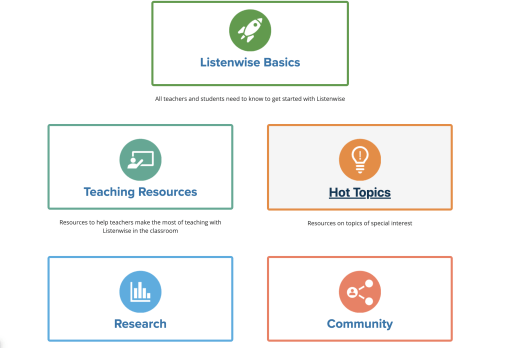
The first thing that I noticed about Listenwise is how easy it is to navigate in the platform. There is also a robust teacher support center which offers the basics for getting started, teaching resources, hot topics, and more support to get started with Listenwise.
When making decisions about which digital tools to use, especially those that offer as many features as Listenwise, there may be a concern about the learning curve. However, a key feature of Listenwise is in its simplicity and visual design.
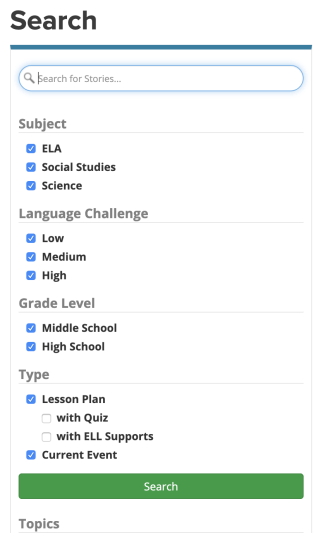
It is easy to locate Lessons, whether by selecting a content area, exploring all of the lessons available, or searching based on a specific word or current event. A great feature of Listenwise is that teachers can also search for lessons based on grade level, the level of language challenge, and even the type of resources (lesson plan or current event). Being able to locate resources quickly enables teachers to find something more personalized for students and their specific interests and needs.
Enhance Collaboration Through Digital Learning Spaces
Teachers can provide students with access to current and relevant resources and news, create more authentic assignments, and promote student agency through the Listenwise platform. There are a variety of teacher materials available to enhance each lesson including comprehension questions, prompts, lesson plans, graphic organizers, tiered vocabulary and more. Finding time to create class activities and provide enrichment can be a challenge, however, Listenwise helps teachers to reduce planning time and instead have extra time for interacting with students. It is a platform that can be used in multiple ways for different forms of instruction. It is a great option for using a blended learning model with station rotations in class. Whether used for individual students or an entire class, or at home as a way to promote more family engagement, Listenwise offers many options for amplifying student learning potential.
Using the different lessons and current events available, we can extend learning, reinforce the content that we are teaching and in the process spark new discussions. We will then build upon student skills of critical thinking, problem-solving, communication, and promote creativity.
It is easy to navigate the site and set students and create classes. Listenwise provides an excellent way to help students stay informed of what is happening in the world around them and to connect with content that they are interested in and to take more control in their learning.
Foster Better Class Discussions
Listenwise provides a way for students to build skills and become more confident as they explore real-world topics and interact more with the content. Students also build digital citizenship skills as they navigate in the digital world, exploring global issues and making connections with their own community.
Key Features of Listenwise
Content: Listenwise offers more than 1800 podcasts from NPR and other podcast providers. Students have access to the audio as well as an interactive transcript, vocabulary resources and an opportunity to work at their own pace.
Teacher resources: There are many resources available through the Teacher’s Guide. Within each lesson, there are listening comprehension questions, discussion themes, vocabulary words, Socrative integration, additional related lessons, and multiple graphic organizers. There are also external materials provided which may include resources such as interviews, drawings, maps.
Interactive transcript: A great feature where students can listen to the audio while reading along with it, and if needed, pause to take notes or to process the information. While the audio plays, the text changes color and moves at the pace of the audio. Students can replay sections by clicking a word in the story, and the audio will re-start on the word they select. This is a great way to have students focus on listening more closely and also being able to make a visual connection with the text and build their reading skills.
Auto-scored quizzes: Each lesson offers listening comprehension quizzes which are embedded in the lesson. Students have the option to replay the audio and listen more closely, helping them to continue to build their skills at their own pace. Students receive their results and if needed, can retake a quiz once the teacher clicks “reset” on the report.
Progress monitoring: There are eight types of listening comprehension skills that are assessed such as main idea, inference, and vocabulary. Teachers have a detailed view of student results, can download the class report and see schoolwide data. Having access to this data
ELL and Scaffolding: Through tiered vocabulary and the option to play audio at a slower speed, students can work at their own pace through the lesson. Students also have the texthelp toolbar which offers options such as Spanish translation, word definition through text or picture, and the ability to read aloud any text from the page.
Standards-aligned: Lessons are aligned to state standards for ELA, science, and social studies. Through the Teacher’s Guide, each grade level band contains the related standards and explanations, making it easy to refer to the standards.
Custom assignments: Teachers can create custom assignments for students, which works very well for a blended learning environment or for schools which are 1:1. Assignments can be customized to include listening comprehension questions, interactive transcripts, short responses, graphic organizers and more depending on the needs of each student.
Listenwise helps to promote better communication, student success, and family engagement. Implementing digital tools like Listenwise promotes learning that can take place regardless of the time and place, also helping to globally connect students with authentic, real-world resources. Providing these learning tools for students makes a big difference in student growth and engagement.
Ready to get started?
Here are a few ideas:
Choose one of the lessons for a new way to introduce a unit.
Select a theme for Project-based learning (PBL) based on one of the lessons.
Teach students about global issues by informing them about the SDGs (Sustainable Development Goals) and task them with finding events related to these goals. Opportunities like this promote student inquiry and lead students to more meaningful, personalized learning journeys.
Search for a recent current event and use it as a conversation starter!
I don’t mean scared in the traditional sense. Yes, sometimes there are heart-stopping moments for one reason or another, but teachers aren’t scared of their climate.
Teachers became scared of today.
As long as we can remember, teaching has been about this technique or that in the classroom. We are sent to learn about different methods and spend hours of professional development learning about different ways to help our students be successful. Some teachers take this in stride while others sit back and roll their eyes, knowing that when they go back to the classroom, they’ll just stick to “what works”.
It always has, right?
But what happens when an entire generational shift occurs? What happens when an entire generation doesn’t know what life was like before September 11th? That landlines used to be the only way to call somebody? That “likes” and “follows” used to be a phenomenon that was done in person?
Folks, that generation is here…and “what works” doesn’t work for them.
Generation Z has entered our classrooms and they are different than any other group that has been taught in traditional education before. They are hands-on, tech-savvy, and need to know that what they are learning will help them make a difference. Simply put, traditional methods of instruction will not allow them to perform at their best.
Let me say it again, “Traditional methods of instruction will not allow Generation Z to perform at their best.”
I’m not saying they can’t learn with traditional instruction. Sure, by osmosis they may learn by sitting and listening to a lecture or taking notes from a PowerPoint…but this is not how they will learn best. As educators, we don’t want to simply go through the motions. We don’t want to know our students learned the bare minimum to pass and move along. We want them to have a thirst for knowledge, to want to know more, learn more, do more. Yes, they may “learn” in a traditional classroom, but there will be multiple layers of potential that simply does not get tapped.
The world our students are entering is so competitive, but not in the ways we remember. Jobs used to be industrial, but now they’re turning entrepreneurial. We need to give our students the power to head into that world with confidence. We need to help give them an edge so when the going gets tough, they know what to do. We are preparing our students for jobs that don’t yet exist, which is a scary thought. (Don’t believe me? How many of you recall friends who wanted to be social media managers while you were in school? That’s just one example). The only way we can ensure their success is if we train them now to think outside of the box and to be willing (sometimes quite literally) to get their hands dirty and think like no one else.
This is the scary part for teachers.
Yes, throughout the years, life has changed. Every generation of students who have come to school has had different needs and interests than the ones before them. However, the birth of the information age and the worldwide connections that are now made in an instant are things that have never been seen before. We can debate for days whether or not this is good for society…whether or not “these kids” are being helped or harmed because they know how to function a Smart Phone by the time they’re 2. While those debates are fine, they’re not changing anything regarding what clientele we have in our classrooms right now. These changes to society aren’t going anywhere…at least not for a long time…and it’s our job…our duty…to make sure we are adapting in the classroom so these kids are learning in a proactive way for the world that awaits them, not the way it’s always been done in a world that no longer exists.
Change is scary for everyone. It takes us out of our comfort zone and makes us dabble in ideas that may be foreign to us…but remember, those ideas are not foreign to our students. If we want them to be as successful as possible in life, we need to help prepare them for the world that awaits them, not the world that awaited us.
One of the things that I enjoy the most about the summer is having more time to reflect on the different tools and resources that I am using in my classroom and to explore new ones. Summer is also the perfect time to participate in professional learning, whether by attending conferences, taking classes, or meeting with other educators. This summer, I have been involved in several presentations and conversations that are focused on finding a way to enhance better communication between home and school. It is critical for classrooms today that we find a way to increase family engagement in the learning experiences of their children and make sure that everyone has access to the school information and resources, especially those that are time-sensitive.
Finding the right tools
There is no shortage of tools that we can use to form a connection between home and school, whether we want simply to send messages and class updates to students, or we want to focus more on including parents. Because teachers have so many different responsibilities, finding the time to explore tools can be a little challenging at times. This is why it’s beneficial to share what we are doing in our classrooms to help other teachers get started and to make those connections that we know are so important for student success today.
Several years ago I noticed a disconnect and I resolved that by finding a digital tool (Celly, then Remind) to connect with my students so I could share resources and class updates with them. But I soon realized that I needed to go beyond simply connecting my students with the class, I needed to include parents. That’s when I moved to using an LMS, Edmodo, which enabled students to get the materials that they needed, and also keep parents informed about our class.
The benefits of one platform
Although these tools worked just fine, the concern was that teachers were using multiple tools. This meant that parents had to keep up with multiple apps, some of which may not have been accessible on their devices. When I was using the messaging app and the LMS, I had to keep a good routine of posting on both platforms and keep reminding myself that I needed to do so for each class that I was teaching. After a short period of time, I realized that there were too many being used. Being able to effectively communicate and collaborate is easier when everyone uses the same platform. There is consistency and parents won’t have to worry about which teacher uses which app, or whether or not their device is compatible with the apps being used.
Making the shift
Thinking about the different communication tools available to teachers, moving to something that offers more than two-way communication and the sharing of photos, videos, and files, makes sense. We have many responsibilities that could require multiple apps or forms of communication. However, notifying parents about student attendance, scheduling conferences, asking for volunteer sign-ups, or coordinating class fundraisers, are a few added benefits when teachers use a platform that provides all of these options housed within one.
Enter ParentSquare
As teachers adopt free communication tools, districts are looking at alternatives. One such tool is ParentSquare. What does it have to offer for teachers and how does it compare to Remind and other teacher-adopted tools?
Teachers use ParentSquare for:
Communicating with families and students
sharing pictures
scheduling conferences
sharing class calendar
asking for class and project supplies/class party items and food
requesting chaperones and volunteers
collecting payments for field trips
Providing/Collecting forms and permission slips
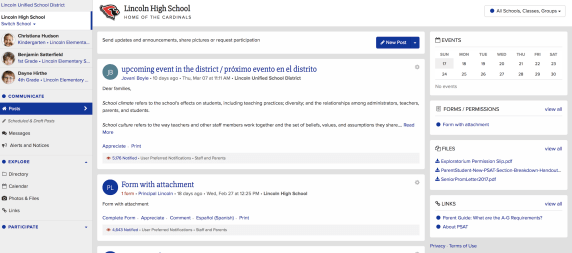
In addition to the teacher uses, there are many other benefits for school- and district-based usage such as attendance and lunch balance notifications, bus delays, sharing grades and assignments, delivering progress reports securely, and emergency notifications. Having these capabilities makes ParentSquare a single hub for all school-home related communication for parents.
I have had the opportunity to explore ParentSquare over the last six months, to get feedback from other educators and to compare the ways that I used other messaging tools and apps in my own classroom. Besides the time factor, sometimes educators get pushback because there is just too much technology. Too many things to worry about, too big of a learning curve, and too much to figure out to get started, so it’s easier to stay with the tools that have been used for years and that are more comfortable.
Easy to join
When using a platform like ParentSquare, teachers have a lot less to worry about when it comes to sending messages and inviting parents to become part of the group. ParentSquare automatically integrates with the SIS, making it easy for parents to join because it’s done automatically for them, without the need for a join code like with Remind. Parents who don’t register will still receive messages because their information is pulled from within the school rostering system.
Comprehensive and consolidated
Parents will feel more connected to the school by having one consolidated platform, which resolves the problem of knowing where to find information or keeping up with multiple apps for different classes and yet more apps and tools used by the school and the PTA. ParentSquare combines all into one. With tools like Remind, the options are limited as to the types of information that can be shared.
Privacy
It is important to first guarantee that any tool or platform used is in compliance with COPPA and FERPA. Compliant with both, ParentSquare takes all precautions when it comes to the safety and security of students and their families. ParentSquare is a signatory of the Student Privacy Pledge and the company signs a contract with the district to ensure student privacy. While Remind is also compliant with COPPA and FERPA, it has not signed contracts with the district or school in most cases.
Delivery of messages
At times I also heard that some parents were not receiving my messages. When I used Remind, I could see that messages were delivered, however, the students or parents were not necessarily reading them, which presented another problem. Perhaps because of the use of multiple tools, which is why it makes more sense to have one comprehensive platform. ParentSquare automatically delivers messages using the right modality – email, text or app notification and the right language as is in the school records. Reports show reach and deliverability of messages, making it easy to identify who has or has not been contacted.
Consistency is important
Personally, I have used anywhere between four and six different apps and websites to complete these tasks. However, with ParentSquare, you can facilitate faster and better communication and collaboration between home and school. ParentSquare enables schools and families to engage more in conversations by providing multiple options for communicating in less time through direct messages, polls, and the option to post comments all in one platform. It offers a consistent and reliable way to communicate within the school and school district, fostering and building the relationships that promote better communication, student success, and family engagement.
In many schools, administrators are potentially asking teachers to use platforms that are a paid platform rather than selecting the tools that they feel most comfortable with or prefer to use based on their role or content area. Making the transition from a tool like Remind to that of ParentSquare does not require any extra time, in fact, it is very user-friendly and easy to navigate. And if there are any questions there are many resources available including online self-paced training modules, extensive knowledge base, 24*7 support for teachers and parents.
There are a lot of great digital tools out there for educators to bring into their classrooms. When it comes to deciding on a specific tool to use, we must always think about our purpose and perhaps ask ourselves a few questions, such as: why are we looking for a digital tool, what are we hoping to accomplish by using it and how will it benefit students and learning? I’m often asked by colleagues either to recommend a new tool or direct them to something specific based on their requirements, such as video, audio, text and more. Because Buncee is such a versatile tool and offers so many options all-in-one, I find myself recommending it a lot. It is easy to get started with and full of choices for teachers and students.
Educators want to use tools that promote student choice and student voice and offer more than just one purpose. The reason I recommend Buncee is because it offers much more than simply being a way to create presentations. In addition to all of the wonderful things that can be created using Buncee, there are additional benefits for educators and students that might be overlooked or simply not thought of when getting started. For example, educators can meet the ISTE Standards for Students and Educators. By having students create with Buncee, students become empowered learners, creative communicators, innovative designers, knowledge constructors and engage in learning that meets each of the ISTE standards. With technology, we want to make sure that it is being used in a way that amplifies student voice and choice in learning.
However, Buncee does more than that. Beyond addressing the ISTE standards and providing students with more authentic and personalized learning experiences when creating with Buncee, there are other skills that are being addressed. In my own classroom, we have used Buncee for many different projects and even for project-based learning (PBL). My students created Buncees to share with their global peers in Argentina and Spain. Creating an “About Me” Buncee enabled all students to develop a more global understanding and become aware of cultural differences, as well as to develop empathy in the process.
Students enjoy creating with Buncee and even more than seeing their own creations, they really enjoy seeing what their classmates create. I have noticed that students become more comfortable with one another in class and start to build closer connections while working on their Buncees. Even the quietest students begin to ask questions, interact more and have been more engaged in creating when using Buncee than they had with other tools before. Students tell me that they enjoy teaching one another, learning about their classmates in unique ways, and feel like they are part of a classroom community.
Knowing that students are picking up on this has been a great way to foster the social-emotional skills (SEL) students need now and in the future. Buncee is so invested in providing a lot of options and opportunities for students and educators to enjoy learning, creating and growing together. Now Buncee has templates available to address SEL.
What is Social-emotional learning?
CASEL (The Collaborative for Academic, Social, and Emotional Learning), formed in 1994, is an organization which actively works toward promoting the importance of developing SEL skills in education. SEL is focused on five competencies: self-awareness, self-management, social awareness, relationship skills, and responsible decision making. The development of these skills can benefit the level of student engagement as well, leading to higher academic achievement and reduce discipline issues in the classroom.
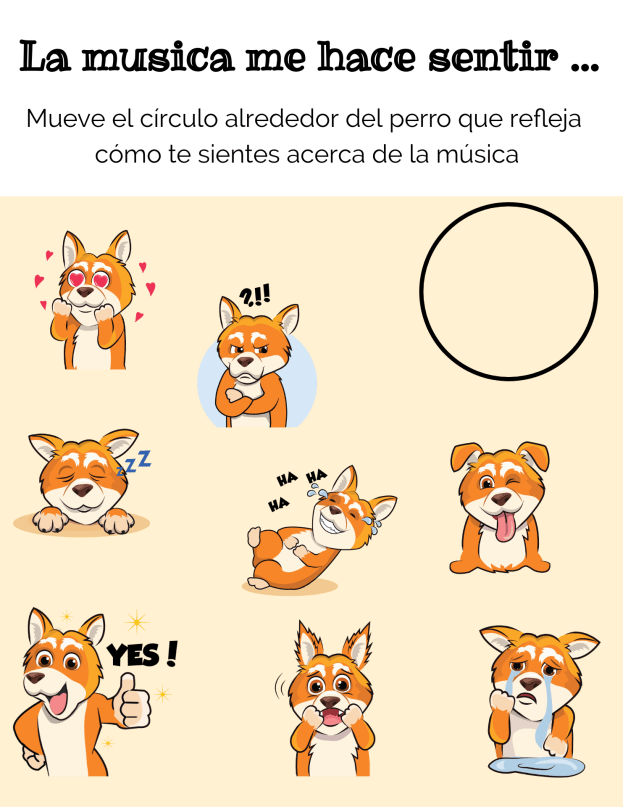
Providing opportunities for students to interact through the use of digital tools and activities in the classroom promotes the development of social-emotional learning skills. Using some of the Buncee templates and emojis, students can comfortably express how they are feeling, provide a quick check-in based on their level of understanding, share personality characteristics or likes and dislikes, or respond to questions in class, for a few options. Buncee is “giving a voice to the voiceless.”
In my own experience, I have seen students who have preferred to not speak out in class or who voiced that they were not creative or would not be able to do a presentation, design amazing Buncees and be excited to share with their classmates. Students build confidence while creating and the benefit is that they become more engaged in and excited to share their learning and interact with classmates. It helps to foster the development of skills such as problem-solving, working with different layouts, visualizing and displaying student learning.
It is always a good idea to ask students for feedback. I want to know what their thoughts are, if the tool or strategy is making a difference for them and if so, how. Here are some student thoughts about Buncee.
“It helps me to express my ideas more easily and make presentations which are much more interactive for myself and for my classmates.”
It is made in a way that allows students to make it really personal and specific to what they need. If students are enjoying their work and are able to make it their own, then they will be more willing to learn and will improve because of using Buncee.”
Hearing from students is important and making sure that all students feel comfortable expressing themselves is even more important. With Buncee, students have many choices to find what interests them and to express themselves in a way that is authentic, meaningful and personalized.



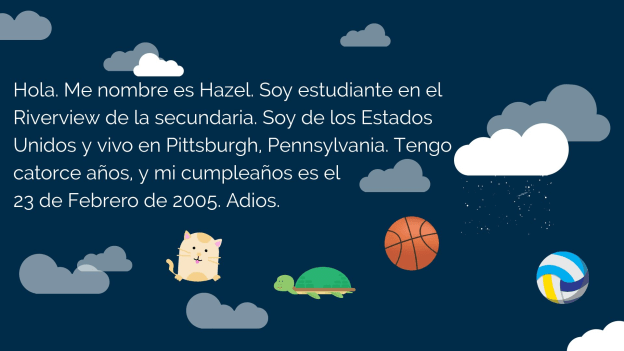
 I also thought this would be a good opportunity for them to choose and learn a little about a place where Spanish is spoken and create an “About_(country)_____” to share that information with the rest of the class. But I also realize that there are many students who are visual learners like me and I wanted to encourage students to be able to quickly look at and process information and represent it in a different way. Rather than simply restating the same content, push them to apply it at a higher level or find a different way to demonstrate an understanding of a concept.


 Kim Weber is a Transformation Agent for LINC, the Learning Innovation Catalyst. Before joining LINC, Kim worked for 20 years as a public and private school teacher in California and New York City. She is a presenter and coach for schools across the country who are embarking on school transformation projects that focus on creating classrooms that put students at the center of learning and help teachers become pedagogical problem solvers.







 Learning as I go: Reflections & lessons learned