The Impact

The Impact
Guest Post by Megan Reinke, Student at Iowa State University, @MissMeganR

Last spring I took CI 245. It’s a class focusing on classroom management and lesson plans. That isn’t why I loved it though.

 I loved it because my teacher was one of the most supportive, knowledgeable, caring, fun teachers. People say, “You don’t get that in teachers at big universities,” but oh no, I definitely did. She is such a role model to me as I continue into the field of education. She didn’t just share her successes and high points of teaching, but she also shared her lowest points and failures. I loved this about her because it taught me that it is okay to mess up. Teaching and life is hard. We are all going to make mistakes.

 In her final thoughts on the last day, she had our class calculate the number of students we would touch the lives of throughout our teaching careers.

 There were 24 students in our class, and if we each thought for roughly 42 years, and had 20 students in our class then…

 (24 times 42 times 20)

 20,160.

 20,160 students. Wow.

 She started crying. I started crying. My class started crying. She went on to express how much she loved us, is proud of us, is excited for us, and going to miss this class.

 Point is, we all get the chance to make a big impact. HUGE in fact. I don’t mean this in regarding to the size of group or number of lives we get to impact. That number could have came out to be way smaller and it still would give me a reason to be purposeful in the ways I am impacting lives. Whether you get the chance to impact 20,000 lives or 2 lives, you get the opportunity to leave a HUGE impact on someone in this world. GET EXCITED FOR THIS! What are you doing now to prepare for this? How are you treating people everyday?

 Be that positive light, that positive influence, that supportive role model. Just how my teacher did to me.

Can iPad Pro (2018) Replace Teacher Laptops?


Guest Post by, Jeffrey Patrick, M.Ed, Computer Science Integration Teacher, Propel Homestead  @jeffreypatrick_

The worst thing happened. My MacBook Pro fell. It slipped right off of my lap. The black screen of death has arrived. I got this MacBook Pro to get me through graduate school. It did its job, and I taught with it everyday for over 5 years. Since switching to Mac in 2004, it was my second in over a decade. The Apple tax hits you hard at first, but honestly these devices seem to last way longer than PCs that I’ve owned. I realize that there are alternatives, but I’m in the Apple ecosystem, and for me it’s a good place to be. None of that mattered now, I needed a new device, and I went on the internet to research. There it was, the iPad Pro.

The new iPad Pro (2018) has been my daily driver for about 6 months. I’m not yet running iPad OS, but its “MacBook” features are promising. More on that a little later. The main eye catching specification on the new iPad Pro is the A12X bionic chip. Apple has been making huge strides with its SOC chips. The iPad Pro, the one I’m using, has a Geekbench score of 5000 and a multi core score of 18000. It’s fast. It’s really fast. My old 2012 MacBook Pro 15 inch with and I7 processor and 16GB of Ram maxes out at 13000. Yes, this iPad is faster than many entry level MacBooks and some of the pros, and all MacBook airs. In some situations, the 11 inch model can be had for bout 700.00 dollars. That’s easily 3 hundred cheaper than the cheapest air, and it’s more powerful.

This device does everything faster. Typing, with a Bluetooth keyboard, editing Doink videos with green screens, coding applications, social media, mirroring examples for students to Promethean boards, using external displays with usb-c, and taking great photos are a few of my favorites. I’ve even had a smoother experience using Apple Classroom when controlling student iPads. The blazing fast 120hz screen refresh rate makes for nearly zero latency for the Apple Pencil too.

This machine is almost the MacBook that I’ve forgot about. Here’s where the caveats come in. It is a mobile device. That means using mobile versions and apps for almost everything. I ran into several issues when editing google docs and sheets because of the mobile platform. This was exacerbated by the limited view of document settings and tool bar menus. I imagine that Google with eventually fix some of these issues, but I’m sure they are more concerned about developing for their own devices. There is also no SD card reader. I mainly use this to print from our classroom 3D printer, but it’s annoyingly very mobile when it comes to these little tasks. My MacBook Pro could handle these simple tasks without any issues at all. Oh, and no mouse. This is really frustrating when doing word processing or trying to select specific text. It’s more like a long press with a little menu that you get on iPhones. It’s not as fast as a mouse right click, and painfully awkward when editing and moving things around.

The future is bright with iPad OS though. iPad OS is set to be announced soon, and it is the first time that iPad will have its own version of Apple’s OS. Part of the main features are the ability to use external storage, like SD cards, and a native file management system. It will also feature a full version of Safari that will display and act the same as a browser on a full Mac OS platform. It also has a very color accurate display which Apple calls the Liquid Retina display. Text, videos, apps, and the camera look great. They look really good. I’m even typing on it right now. This is not going to replace desktop hardware, and it’s not meant to. However, as a busy teacher, I use the iPad Pro everyday to teach with. It’s a good choice if considering a new device or in the case you don’t want to pay Apple 600.00 dollars for a new display in an out of warranty 2012 MacBook Pro.

If you think this is a good transition for you or you already own and/or teach with iPads, I recommend becoming an Apple Teacher. I have earned all of their badges, and they do a great job at getting you oriented as an educator. In addition to this, Apple has started an Everyone can Create and an Everyone can Code program. You can download their free CS For all Scope and Sequence as well as easy to use lesson plans. Also visit their Apple Disguised Educator forum to get great ideas from teacher leaders from around the world.

So the MacBook isn’t entirely dead, and I like to tinker. I’ve decided to take the hinge off of my old MacBook, and its’ currently hooked up to my school Promethean board with a wireless keyboard and a mouse. When I have it at home, I use it in target display mode with an iMac. It still works really well as a desktop replacement. It’s also a great teaching tool when showing students different components of hardware.


**Interested in writing a guest blog for my site? Would love to share your ideas! Submit your post here.


Looking for a new book to read? Many stories from educators, two student chapters, and a student-designed cover for In Other Words.

Find these available at bit.ly/Pothbooks  


Books available


Its 2019, and now I actually have a calculator (app) everywhere I go. Why do I need to learn math again?

Guest Post by Dan Haiem, @danclasscalcco1 

“But teacher, why do I need to learn this math stuff if I can just use my calculator app?”

Every teacher has heard this at some point. Most students have asked this at some point. Up until around 2007, teachers had a great answer that kinda-sorta worked, which went something like “You’re not going to always have a calculator everywhere you go, are you?”

The opposite of that, of course, became a reality when the iPhone became the most common tool found in any student’s pocket, and gave them access to powerful calculators like Desmos, Geogebra and our very own ClassCalc.

Here’s my opinion though – the old answer was never a good answer, and the ubiquity of iPhones has given us a golden opportunity to re-evaluate a very valid question. What’s the point of learning math if we have calculators that do math for us?

In the words of NYC’s (possibly) most high-energy math teacher, José Vilson, “Math shouldn’t be limited to a disconnected set of rules and jargon that doesn’t seem to mean much of anything.” If math really was about the rules and jargon, then a calculator could truly replace the need for learning it. Fortunately (for humans), it’s not.

For the sake of simplicity, and because this is my first blog post ever, here’s a short roadmap of this post’s approach to this topic:

  1. First, we’ll discuss how math helps students build tools and skills, and define the difference between the two:
    1. Tools: Spreadsheets, running an analysis, doing taxes.
    2. Skills: Good communication, emotional intelligence, problem-solving.
  2. Next, we’ll discuss how math has shifted from serving us as a tool, to helping us sharpen our skills – most important of which is problem-solving.
  3. Finally, we’ll take a look at an example of how a specific math problem helps us build a specific problem-solving skill called mental-triage, and how we might help students make that connection as well.

Onwards.

Math serves two primary purposes in education: it gives students the tools to play with numbers, and it serves as practice to sharpen certain mental skills that are important in life. To define the two:

  • Tools: Concrete things a person “knows.” Examples include: spreadsheets, coding, writing blog posts (a tool I clearly lack), social media advertisements, taxes, etc.

  • Skills: More abstract, broad abilities that are not particularly associated with executing a specific task – the kinds you always see in leadership charts. Examples include: Hard working, communicative, optimistic, honesty with self, problem-solving, etc.

*Credits to Business Simulations

In this sense, math falls into an interesting crossroads as both 1) part of the abstract skillset a person has, (ie: “problem-solving”) and 2) a tool that can be put to work (ie: part of your “toolkit” – like running a statistical analysis on two data sets).

It’s important to keep in mind though that:

Math will play a fundamentally different role for different students, and we need to bring that understanding into the classroom.

An engineer will likely benefit from math as both 1) an exercise in problem-solving (skill) and 2) a tool to accomplish certain tasks.

An artist might use the abstract side of problem-solving (skill) but – and this is especially applicable today, with all the calculators in our pockets – they probably will not have much use for math as a tool

Here’s a screenshot I grabbed off the might internet that summarizes the point (albeit, aggressively):

*drops mic*

I believe it’s important and ok to tell our students that not all of them will be using math as a tool. At this point, most people don’t need math to do taxes (here’s a calculator for that), split a tab (here’s a calculator for that) or accomplish any of the other tasks that might have required math as a “tool” before calculators were built.

To recap:

  • Math confers two types of skills: Abstract problem solving (skill) and an actual tool in your toolkit (tool)
  • Everyone can (probably) benefit from the problem-solving (skill) aspect. While some people (engineers, some scientists) benefit from having math in their toolkit (tool), most can get by with their super powerful pocket calculator.
  • So, for students not interested in pursuing a career that would require a math toolkit, we must focus on the abstract problem-solving (skill) aspect of math.

As brilliantly stated by Baltimore Ravens lineman and MIT mathematician John Urschel, we need “students to see that math extends far past the confines of the classroom and into everyday life.” What’s more “everyday life” in the 21st century than problem-solving?

Now the questions shifts to: How do we show students the relationship between learning math and developing this abstract ability to “problem-solve”?

I have two thoughts on this:

  1. One thing to consider is that skills and tools are actually mutually conducive. Google is a tool you learn to use. Being able to learn stuff on your own is a very important skill in today’s workforce. Knowing how to use the Google tool will help you build the learn-stuff-on-you-own skill. I think the same applies to math.

Although students may never use calculus directly, the mental exercises they go through in solving calculus problems might help improve the mental muscles required for peripherally related skills.

  1. We need to find good examples to demonstrate the above. I mean good examples. Not the “Well, don’t you want to know how to do this without your calculator?” type of answer and not the “Being able to do your taxes is very important” type of answer and not the “here’s an example of Timmy calculating the volume of the Earth by standing on a ladder and looking at the horizon (although that’s super cool)” type of example. These examples all focus on the tool aspect of math, which we know won’t be as relevant to all students. We need to focus on the skill aspect of mathematics.

So now the challenge becomes being able to demonstrate to students a link between learning math and learning how to problem-solve. A good approach might be to 1) Have your students break down what sub-skills are required to succeed in math 2) Have your students break down what sub-skills are required to problem-solve 3) Discuss the cross-overs.

One of my favorite examples is mental triage: the abstract skill of quickly finding the most efficient path through a challenge given a limited toolkit.

Here’s an example of a math problem that helps sharpen the sub-skill of mental triage:

  1. Math itself is a limited toolkit. You learn how to move numbers around. How to draw graphs etc. Each time you learn one of these new tools, you’re essentially learning a new way to play with numbers. When we approach a math problem, we subconsciously run an analysis that goes something like this: What do I want to make these numbers do? What tools do I have to move these numbers around? What tools am I not allowed to use? What is the most efficient tool path to an answer?
  2. As an example, let’s take the following problem, a favorite of the SAT:

  1. Here’s how my brain runs through my math toolkit.
    1. I gotta solve for x.
    2. Problem: x is in the exponent.
    3. Do I have any tools to get rid of an exponent?
    4. I can raise both sides to ^(1/4x) which would lead to:
      1. No good. Back to step c.
    5. How else can I get rid of the exponent? Logarithms, let’s try that:
      1. which simplifies to:
    6. Great, we got rid of x in the exponent. Onwards! Divide both sides by 4log(2):
    7. Plug into by handy dandy ClassCalc Calculator to get:
      1. x=1

There we have it: mental triage in math.

Finally, we’ll bring it full circle with a real-world example of mental-triage as a sub-skill of problem solving.

Teaching my high school students how to pick a college

It was the last day of my physics class last year, and my students were just about done with school. They had already taken the AP test and were ready for summer. Instead of squeezing in another physics lesson, I decided to tackle a more pressing concern of theirs – choosing a university.

In retrospect, my method for picking a university was suboptimal – I just asked my good friends where they were going and what they thought a good college was, and ended up at UCLA. Lucky for me, I met good people there and had an awesome experience, but many others who take the same approach are not. I wanted to teach my students how to be proactive and problem-solving-oriented in making life choices.

Rather than start with “I want to go to college” I wanted to help each one of them hear their inner voice, and begin a dialogue with it. Start for the bottom. Here was my approach:

Student: *Says something*

Me:

And this is what the conversation ended up sounding like:

  • Student: What college should I go to?
  • Me: Why do you want to go to college?
  • Student: I need to get an edu-
  • Me: Yes, but why do you need an education? What’s your goal?
  • Student: I want to make money. Goal number 1: Make money!
  • Me: Honest, but fair. What else? A lot of jobs will make you money.
  • Student: I want to become a doctor.
  • Me: Do you for sure 100% want to become a doctor? Have you had real exposure to medicine? Or is it alluring to you for other reasons?
  • Student: I’m not sure. I want to figure out what I want to become. Goal number 2: Explore career options!
  • Me: Ok, what else?
  • Student: I want to make good friends and party. Goal number 3: Have fun
  • And so on..

By the end, we put together a list of priorities for each student. I could see their perspective change drastically. Rather than listen to a parent’s friend’s suggestion, they were determined to go online and research.

Now, I am not necessarily saying that a better mathematician is going to be better at selecting a college, but certainly, the tools we learn in math can inform our decision-making process for the important choices we must all make in life, especially if we are aware that there is a problem-solving oriented approach to making these decisions. Our jobs, as teachers, is to help students form that awareness.

A good method for cultivating that awareness is with Miyagi Moment every so often. What’s a Miyagi Moment moment, you ask?

It’s a metaphor for when a teacher (or sensei) helps a student develop a crucial skill by practicing adjacently related skills that at first do not seem connected.

In the first gif below, we see the legendary Mr. Miyagi teaching Daniel San how to…wax a car. Not really relevant to fighting karate.

In a later scene, Daniel san gets angry, accusing Mr. Miyagi of wasting his time with chores, when he should be learning super cool action moves to take down the big bully Johnny. Right then and there, Mr. Miyagi throws a couple of HYAH punches and BAM. Daniel san blocks them – all the while shocked in disbelief that he had developed the skills to do so. That moment of disbelief in the newly developed skill is the Miyagi Moment!

In math, students will often be practicing skills that seem almost irrelevant to them in life. It is up to us teachers to remind our students every so often that that is not the case. The best way to show them that is with a Miyagi Moment. It is time away from teaching the next chapter or lesson, but it is time well-spent.

I think blogger and math teacher John Trout McCrann put it beautifully in writing “Deep understanding about the process of solving an equation helps everyone understand how to create systems to solve problems at work, in their families, in our world. The kinds of problem-solving strategies you might use to tackle a big project, develop a more efficient engine, or address an issue that’s arisen between you and your partner. Deep understandings about shapes help everyone understand how to reason spatially, a skill that you may one day apply as a designer or as you lay out the furniture in your first house or apartment.”

About Me (Daniel Haiem):

  • I love math and education.
  • I’m an ex-physics teacher
  • I founded and lead a company called ClassCalc – the lockdown calculator app that lets teachers lock students out of all outside distractions such as instagram, calls and texts, keeping students focused in class, and preventing cheating on tests. Our goal is 100% access to calculators for students across the planet by 2025.

**Interested in writing a guest blog for my site? Would love to share your ideas! Submit your post here.


Looking for a new book to read? Many stories from educators, two student chapters, and a student-designed cover for In Other Words.

Find these available at bit.ly/Pothbooks  


Books available

Digital Citizenship- Parents

Guest Post by Kimberly Tumambing Executive Assistant at Gorman Learning Charter Network

Digital Citizenship

Recently, I was visiting with my nine year old niece, when she proceeded to pull out her iPad and log into her Youtube account. She showed me the amazing little videos she is creating, editing and publishing. In the same evening, my twenty-six year old niece told me she just learned that she can open a .pdf on her phone. I laughed. The difference in digital presence and understanding is huge when you think about the fact that there is only a seventeen year gap between the two girls.

Today’s youth are faced with so many opportunities for success and achievement, but also with so many possibilities for failure and regret.

How can we help them to become better Digital Citizens, when so much of what they are experiencing is still new to us?

This is the question that has inspired me to help parents learn more about what it means to be a Digital Citizen and how you can help equip your children with the tools they need to navigate this new world.

Digital Citizenship is when a person utilizes Information Technology in order to engage in society, politics and government. Information Technology consists of computers, laptops, tablets, phones, and other devices.

So when I started this campaign, I asked myself, what would I tell my younger self, if I could send her a Facebook message. And what I came up with is this: once you put it on the internet, it is forever on the internet. Photos you wish had never existed, conversations you wish you hadn’t had, personal information, and so much more. So, younger me, how do you participate in this digital world without risking college scholarships, potential jobs, and possible legal ramifications? How do you keep yourself safe from predators, while engaging in social activities?

And I came up with this answer: by being well informed. We can’t shelter children from the dangers of being a Digital Citizen. But we can teach them what to share, and how to share, responsibly. But where can parents go for help? If I were to try and teach you everything I have learned, you would be reading this blog for the next three to four hours.

So instead, I’m going to share with you two of my greatest resources. My school has a go to website that we recommend for our families when parents call and ask about the dangers of certain websites or applications. The organization is called Common Sense Media. I recommend you start with the privacy and internet safety section for Parents. Did you know many of the applications your child is downloading will come with locations settings turned on? So everyone will know where your child is just by checking the background location indicator. But there is a way to turn this setting off and protect your child’s location. My hope is that this website will help you keep your students safe.

But what about their online etiquette? Everyone looks at a student’s online profile these days. Colleges and Universities are looking at possible athletic candidates and the photos they posted during their middle school and high school days. Future employers are looking to see what kind of language a person uses online, or what articles they favor, or if they fight over social media or maintain some kind of respectful dialogue. And they aren’t just looking at Facebook either. Twitter, LinkedIn, Twitch, Youtube, and personal blogs are great places for someone to learn everything they may want to know about your child.

To be a good digital citizen, your child also needs to realize they are not protected just because it wasn’t “said” in person. A student can be prosecuted in a court of law for digital threats, accusations, and “jokes.” Students who threaten to kill others, even if it is a “joke” on Twitter, can be prosecuted and face possible charges.

I also recommend the National Online Safety website. The resource section of this website has some great infographics describing websites and applications that students tend to favor. They even cover video games and chat rooms. They also have some helpful information about Social Media sites and the effect on your child’s mental health. And their infographics are updated regularly depending on what is trending amongst kids.

Parents, you don’t have it easy these days. You have to teach your children to be safe and polite in both the physical world and the digital one. You have to teach your children how to interact with people they are talking to face-to-face and people they are conversing with via instant messenger. My hope is that the websites I have provided to you will give you the information you need to train up strong, well informed, world changers who can travel between both worlds with ease.

Teaching Can Be Challenging


Guest Post by Andrew Easton, @EastonA1, Personalized Learning Collaborator and Consultant, Westside Community Schools in Omaha, Nebraska

*Future DBC Inc. author on Personalized Learning, Spring 2020

Now that we are into November, it’s likely that at some point this year you’ve been asked the question, “So, do you have a pretty good group this year?” In my time in education, I’ve heard a myriad of answers to this question – some that I don’t want to repeat. Whether it’s right or wrong or not even a thing worth discussing, I do find it interesting to hear what a teacher has to say. And actually, there is one word in particular hat comes up rather consistently when this question is asked. One that on its own doesn’t completely address the question. The word “challenging.”

This year, I am redesigning our high school’s English 4 course and am teaching that class for the first time. When the teacher who had previously taught that course retired, she politely used the word “challenging” when describing to me the group of students that she typically supported in that course. She quickly followed that up with a “Good luck!” that felt more like a warning than words of encouragement.

English 4 is an appealing option for students who are simply looking to pass an English class to graduate and pick up a few helpful life hacks along the way. Many of our students have had significant struggles with learning in the past for a variety of reasons. Those reasons have made it hard for them to find consistent academic success. For these students, senior year has brought both the liberating promise of change once they reach the end of May but along with it the stinging reality that they have navigated their K-12 education to the 12 end of that spectrum and the experience has left them feeling like they have not taken much from a system that has helped some of their peers to thrive. 

Planning over the summer was, well, challenging in its own right. I knew very little about this group that wasn’t second hand knowledge. But as I perused the gradebook and academic history for some of my students prior to the start of the year, I knew one thing: I had to give these learners the opportunity to feel what accomplishment feels like. There is a certain rhythm to success that has to be found and then felt before it starts to beat and almost swell from within. I guessed then and now know that many of these students have never heard, nor much less felt that beat, and I knew that I would be working against thirteen years of baggage if I tried to convince them, initially at least, to search for this experience in an academic setting. But I had an idea.

When I find myself feeling stagnant in my own motivation, I often start a #Five4Five Challenge. The #Five4Five challenge was created by Michael Matera, author of Explore Like a Pirate, in the spring of 2018. He posed this challenge through his Twitter and YouTube account, and I was immediately intrigued by the idea. The #Five4Five Challenge asks individuals to select one “thing to do” and do that thing each day for five days straight. What you decide to do is entirely up to you, but you have to do it once a day for each of the five days to succeed. I myself had done six #Five4Five Challenges before the school year began. I had created a vlog, done anonymous acts of kindness, set workout goals, even given up Starbucks for five days straight (that one was brutal). The goal itself doesn’t matter; it’s not about the goal. It’s about intentionality and filling your day with purpose and success. It seemed like the right fit for my learners, and so in the second week of school, I issued them all a challenge.

Now, if I’m being honest, I wasn’t exactly sure how they would respond to it. Would they laugh this off? Would they be into it for a week or two and then fade away as the grind of the semester progressed? Well, I’m happy to share that as I’m writing this, we just finished our fourth week of #Five4Fives (we go two weeks on, one week off), and the experience has not only gone well but it has exceeded all my expectations.

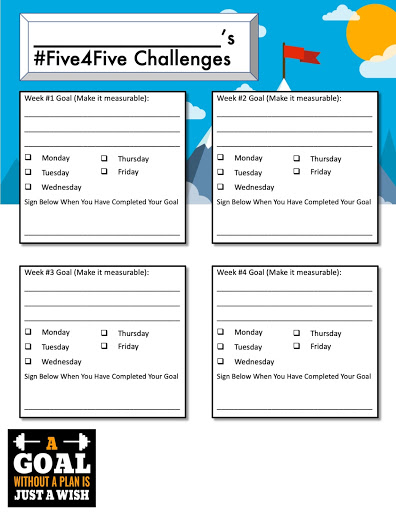
Our implementation has been pretty simple. We created a one-sided handout that has four boxes on it, one box for each of the first four weeks of the course. Each box contains a line for the learner to write out their goal for that week, the days of the week with a checkbox next to each day, and a place for the learner to sign their name if they complete the challenge by the end of the week. 

This is not for a grade and we try to keep our daily commitment to discussing these goals to five minutes or less each class period. We don’t always open class with our #Five4Fives, but when we do, I really enjoy it. It’s captivating and powerful for class to begin with students openly sharing their passions and accomplishments. It’s been such a positive culture piece. It’s also been encouraging to watch students fail for a day and then keep going for that week. I’ve noticed too a greater sense of resilience in the students; in the first week, most would hang their head if they had to share about missing their goal the previous day, but now they confidently share their failures too. In those moments, I try to ask, “So are you going to get back on track tomorrow?” Most answer yes and at least make that goal for another day or two that week.

One month in, I’m really glad that we don’t require that the #Five4Five goals be education related. It’s funny, despite having the freedom to set any goal they wish, several students each week still choose a goal that has something to do with school. The goals that they set often speak to their values, their challenges, and desires for change; by offering them the freedom to create the goal that they want they are more willing to follow through with it. The only stipulation we have set for the goals is that they must be measurable. 

Check out how we are doing! Here’s some of the data we have collected thus far…


#Five4Five Challenge: Number of Students Completing a Certain Number of Goals Per Week

Completed One Goal  Completed Two Goals Completed Three Goals  Completed Four Goals Completed All Five Goals 
Week One 4 Students 5 Students 4 Students 10 Students 25 Students
Week Two 5 Students 4 Students 4 Students 8 Students 27 Students
Week Three 1 Student 2 Students 7 Students 2 Students 36 Students


Though I’m not sure that I needed this data to have a sense that this practice was having a positive influence on our learners, I’m very happy with the story these numbers seem to tell. I’ll leave you to draw your own conclusions from it.

A final piece of evidence that I would like to share comes from our weekly Flipgrid video reflections that students have gotten into the habit of recording. Every two weeks, the students create a video in which they reflect on their efforts in the course and with their #Five4Five goals. This reflection comes from a student named Luis. In week two, Luis chose to set an academic goal for himself, and I’m proud to say that Luis met his goal that week. Afterward he reflected on his experience saying, “…my goal was to do my homework for every class, and I was surprisingly successful. I picked it because junior year I was not good with homework at all and I just had so many missing assignments. And for senior year I want to be able to do all my homework and get some good grades because my grades were terrible last year. I just want to be able to see what I can do, and this goal has really helped me this week.” 

Ugh, I love that! 

So, the next time someone asks me, “Do you have a pretty good group this year?” I’m looking forward to shooting them a smirk and answering, “Yes, they are definitely… challenging.” Challenging themselves, challenging me to be a better teacher and a better person, and challenging the way I think about my responsibility to help them grow both as people and learners.

Andrew is the Host of the Westside Personalized Podcast (bit.ly/WPPodcast)

WestsidePersonalized.com

httpslh4googleusercontentcomiqqmugjnikqwzg6btyvzwn8yfzsage9nrprlahpsorfcrl44eb5hzn2_pz8uaco2qnx61-0k67btfpht52z_t7oxezszosdt1zjtphib

**Interested in writing a guest blog for my site? Would love to share your ideas! Submit your post here.


Looking for a new book to read? Many stories from educators, two student chapters, and a student-designed cover for In Other Words.

Find these available at bit.ly/Pothbooks  


Books available

Core Solutions Provided through the Abre Platform

This post is sponsored by Abre, all opinions are my own.

Abre provides a set of solutions for schools looking to manage and consolidate the different software apps and websites used for student attendance, assessments, communication, student data and much more. Abre offers a robust platform that enables you to choose specific solution areas to get started and then add to it over time, continuing to build additional features of Abre into your school.

Communication

With Abre, you can facilitate faster and better communication within the district, schools, and between home and school. Abre offers a consistent and reliable way to streamline the numerous communications happening within the school and school district. Having a consolidated and reliable platform helps to foster and build home-to-school relationships, promote better communication, and student success.

Learning Management Solution

Abre provides one space where teachers can access the resources necessary for classroom instruction and teaching responsibilities. Included within the Learning Management solution are a group of web apps such as Class. A teacher uses Class to communicate and manage all classroom activity, do grading, post homework and generally manage instruction. The Assessment App allows for easy creation, delivery, and analysis of formative and summative assessments. Schools can organize the curriculum, including pacing guides, for all their classes with the Curriculum App. For tracking progress through a lesson, the Learn App delivers on that. To make sure students are staying on task with their devices, the Focus App ensures that the browser is only being used for teacher-defined websites and documents.

Data Management & Integrations

Abre is all about consolidating data to help administrators, teachers, and students improve. Abre integrates with a large and growing number of other software providers. They even integrate with products that provide competitive solutions to theirs. The Students App is the centerpiece of this solution and provides a clear view of student progress and makes it easy to find all relevant student data in one place. It also saves paper! Rather than students and parents having to fill out and exchange multiple papers, they access forms right from Abre. Some options such as an Acceptable Use Policy (AUP), medical forms, and athletic forms, which are easily accessible within the Abre platform. Individual student plans are also accessible in the Student app. Again, this provides a single place for staff and parents to easily find all their student’s information.

Administrators can access all student data and track growth over time, look at state and local assessments to analyze trends in academic performance. Parents can access student data which includes academic performance, behavior, forms completed, attendance, and state assessments. Access to this vital data is made simple with one platform!

Teacher Professional Learning Solution

For districts looking for better professional development options for teachers, through Abre, teachers can create their own staff and individualized professional development plan for use over an extended time. Abre offers a more flexible solution making it easier for administrators and teachers to create, deliver, and track professional development activities. Abre can integrate schools’ digital courseware and customized courses for delivering staff development.

For completing courses online or in face-to-face environments, districts can offer teachers opportunities to earn badges, micro-credentials, and engage in gamified professional development. This is great for building professional portfolios, as teachers can use these activities to receive CEU credits or hours awarded based on state requirements for continued professional development.

School Management Solution

Similar to Learning Management, Abre provides great functionality for staff to manage day-to-day school requirements. The Behavior App helps with the workflow, easy documentation and tracking student data when either positive or negative behavior needs to be documented. The workflow features are especially helpful for office referrals where other administrators are needing to get involved and having transparency for parents is important. Abre Behavior takes on a significant portion of this manual work.

  • Easy to understand graphs and plots for tracking student progress.
  • Teachers can see details in terms of specific consequences as a result of any behaviors and referrals. The bar graph represents conferences, detentions, in-school and out-of-school suspensions.
  • The behavior app links directly to the student information so everything is readily accessible which leads to a better understanding of each student and their needs.

Beyond behavior, the School Management Solution allows admins and teachers to easily create and manage individual student and teacher plans. Rather than students and parents having to fill out and exchange multiple papers with the school, they access forms right from Abre. Some options such as an Acceptable Use Policy (AUP), medical forms, and athletic forms, are easily accessible within the platform. Whether teachers need to create an IEP, a gifted education plan, behavior or Response to Intervention (RTI) plan, teachers can build exactly what they need and have it live in Abre. And Abre provides a clear view of student progress and makes it easy to find all relevant student data in one place.

Likewise, administrators can work with teachers to create professional development plans using the same solution. It makes sense to have one platform that provides all of these options. For teachers, students, parents and administrators, having access to student data and other information is vital for promoting and tracking student growth. This solution really saves a lot of paper.

Connected Community Solution

Abre sees connecting schools with the communities they serve as critical to student growth. The Connected Community solution facilitates the exchange of important information, data and communications between students and administrators and members of their community. Abre allows a school’s learning partners to register in the Abre platform, roster the students in their programs back to the school, and enable the safe exchange of student attendance and other data. This is critical for schools to evaluate all of the influences that are growing their students. And for learning partners, it is how they can better understand whether their programs are meeting the needs of the students.

As an example, looking toward the future of learning and work, it’s important that we provide options for our students to engage in real-world learning experiences. One outstanding feature coming from the Partners App is where districts can add local businesses into the platform and facilitate connections between students and members of the community. The goal is to manage, track and capture quality attendance data when students take advantage of opportunities for place-based learning, experiential learning, CTE, and service-based learning.

Abre also lets students and staff create digital portfolios based on the work they’ve done. These portfolios are a powerful way of demonstrating, beyond the test scores, what they have learned and the skills they have acquired. Schools can then choose to allow these portfolios to be shared with others such as businesses, other schools, or organizations.

Privacy

Abre is FERPA compliant. The student information is only released with parental permission.

Using Abre is quite simple and I find that it is easy to navigate, which makes it a great choice for all users, whether they are beginners or advanced when it comes to implementing technology. By using a robust tool like Abre, educators and parents have immediate access to a lot of data. Abre is a multi-purpose platform with capabilities to facilitate communication, collaboration, and much more. It provides benefits for teachers for tracking PD, administrators looking to provide a comprehensive and consolidated platform to meet the needs of their schools and students, parents looking to stay connected with student learning and be informed of important information regarding their child’s education.

What made me better

Guest post by Deidre Roemer,  Director of Leadership and Learning West Allis, WI, @deidre_roemer


When I reflect on my skills as a teacher throughout my career, I can think of examples of what I did well and a million things I would have done differently.  I am teaching a class at a local university this semester and know confidently that I am a better teacher now than I was when I was in the classroom. The opportunity to see other teachers in action in my leadership role for the last several years is what has made me better.  I get to speak to educators and learners all the time about what is working well in their classrooms and what they would like to see grow. It includes spending time in many classrooms where we and others are getting it right and learners can articulate the process of their learning in order to create great things.

Professional development that is connected to a vision of our work with meaningful processing time to reflect is how we push teachers to move from single projects to true learner driven practice.  We take a lot of teachers and teams on site visits to schools in our area and across our country who are already doing the kind of work we are trying to do to see it in action. It is hard to find a large comprehensive system that is there yet, so we are often at small charters of specialty programs that are offshoots of schools.  The visits are always amazing as we are able to interact with teachers and learners and see learner driven practice, but often the most important part of the time is the meal after the visit or the long trip home where we can talk about what we saw, process, and plan for what parts we can implement within our system. The goal is not to replicate but to figure out how to ask the right reflective questions of ourselves and one another to tie what we saw to our personal passions and interests and figure out how to bring all of that together to shift the learner experience.

We also spend a lot of our time talking about how this is the kind of learning experience ALL learners should have.  It should not be reserved for some kids in special programs or special schools. The visits with the deep discussions are often the leverage point that takes an educator from trying a few things to a true shift of practice that is more inclusive.  It helps them to be more collaborative as they are often on these visits with other staff from across our district that they might not already know having a shared experience . The power in seeing some things we are already doing well and celebrating those helps us to not be overwhelmed when looking for ways to grow.  The key is to make the time, take the staff who are ready to take some bold steps, and then follow up with them multiple times throughout the year so they have support to keep going with the work.

On a recent site visit, I took a chance and messaged some of the teachers to join us off-site after the formal conference to continue our learning.  Fortunately, they were willing to take the opportunity to discuss their work with us over dinner. It was an impactful experience to listen to teachers that have been doing this work for some time engage in professional discourse about grading, telling their story and standards.  The teachers were open about their own growth over time and how our staff could take pieces of what they saw back to our schools to create a more equitable opportunities for all learners through empowerment. We went back to the site the next day with a new lens on what to look for in learner and teacher observations that we could do instead of being lost in the surface things like the physical set-up.  Things that may have looked idealistic the day before now looked possible. The modeling of professional discourse created space for our team to do the same and ask some great questions about how we can do this work and how it does not have to look the same across all our schools.  Encouraging staff to push boundaries and challenge one another’s thinking is how we look at someone else’s professional practice and find a way to make it our own.

A few things we discover each time we do a site visit became apparent:

  • This work is messy.  It takes deep dialogue on what is right for learners and how to give up control in a way that is not always natural for teachers.
  • Change is uncomfortable and unpredictable, but easier with the proper support.  People tend to say, “Change is hard.” There was a great article from the Harvard Business Review in January of 2008 that explained why that phrase becomes a self-fulfilling prophecy that permits us not to try.  We have to be able to think bigger than that.
  • We need to get more comfortable with professional discourse and open discussion about where we are now and where we can go that may push our thinking.
  • Teachers have to connect their own passion to their work in schools.  When it is authentic to the teachers, it becomes authentic with the learners.
  • Our teachers need to see the work in action often and learn how to get and give productive feedback.
  • The standards are always embedded in innovative, learner driven work.  They just aren’t always owned solely by the teacher.
  • Many times, the teacher in a learner driven classroom finds joy in their work.

We have evolved our district wide professional development to hopefully reflect all of these.  Our teachers will have time in small groups to learn their standards well enough to empower learners to take ownership of mastery of those standards within cross-curricular projects.  Staff will then have the opportunity to sign up to see another teacher modeling classroom practice that is learner driven. They will be our own internal site visits. We will use structured protocols to get and give feedback at each site to ensure we are using the time for genuine collaboration as we know that is what drives teacher practice.  We can’t make more time than we have, so we use the protocols from The School Reform Initiative as a way to restructure the time and make sure it is used for purposeful feedback and collaboration.

Our teachers hosting visits that day have been invited to participate for the first round as they are already trying new things, having success with learner empowerment and finding joy in their work.  It is not expected that anything that is “perfect” or a “show”.  It is meant for one teacher to share their experience and encourage others to try new things with an open dialogue about how and what supports they will need. Our goal is that our teachers engage with one another to see what’s possible, work together to get there for every learner and find joy in the work.


**Interested in writing a guest blog for my site? Would love to share your ideas! Submit your post here.


Looking for a new book to read? Many stories from educators, two student chapters, and a student-designed cover for In Other Words.

Find these available at bit.ly/Pothbooks  


Books available

Buncee: Getting to know our students

One of the things that I love the most about Buncee is that it can be used in so many different ways, not only for instruction in our classrooms but also in life. I have used Buncee to create cards for family and friends, personal business cards, graphics for Twitter chats and webinars, quote graphics for my books, invitations, and more. When I decide to use digital tools in my classroom, I want students to practice the content in a more authentic and engaging way, while developing skills such as collaboration, critical thinking, problem-solving, and creativity that can be transferred to their future. In using digital tools like Buncee, my hope is that they will also use them in other classes, for personal use, and will share them with family too.

Each year, I continue to explore new ideas to have students create with the content, rather than doing the exact same project or using traditional worksheets or other assessment methods. For years, I assigned students to complete very rigid projects in the same format and left little up to student choice. Now, after seeing the benefits of being more flexible with my instructional methods, I’d rather open it up more to student choice and see what students come up with.

Finding time to explore new resources can be a challenge because our lives as educators becomes quite busy and we may find ourselves lacking in time to really explore a variety of options for use in our classroom. This is another one of the reasons that I choose Buncee and appreciate the team’s investment in offering more than just one way for students to create. It truly has become a go to multi-purpose platform that can do so much, that I feel pretty comfortable in saying that the possibilities really are endless when it comes to creation with Buncee.

Learning about students and pushing them to explore

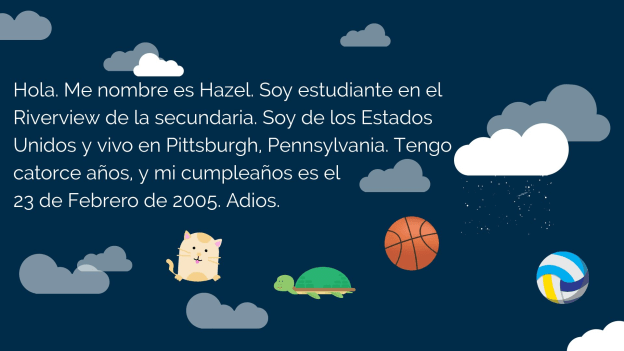
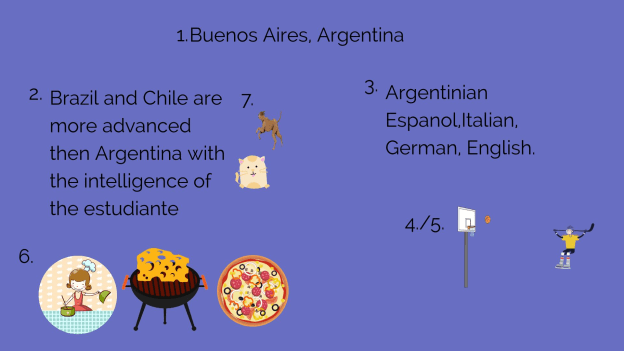
At the start of each school year, I focus my efforts on student relationships, learning about my students and also providing opportunities for them to learn about one another. In the past I have done this by using activities in our classroom such as ice breakers or having students work together on different review games and other in class collaborations like that. But this year I decided to do something a little bit differently to not only engage students in learning about the Spanish language and culture but to engage more in learning about one another. I came up with a project focused on using the “About Me” template in Buncee. I wanted students to share who they were and create one slide to show this using words, animations, stickers, and other add-ins. My hope was that by looking at each student’s slide, we would understand one another better and relate to each other based on similarities and differences.

I also thought this would be a good opportunity for them to choose and learn a little about a place where Spanish is spoken and create an “About_(country)_____” to share that information with the rest of the class. But I also realize that there are many students who are visual learners like me and I wanted to encourage students to be able to quickly look at and process information and represent it in a different way. Rather than simply restating the same content, push them to apply it at a higher level or find a different way to demonstrate an understanding of a concept.

I also wanted students to choose a Spanish speaking country and I placed a limit on the number of actual words they could use because I wanted them to represent what they had learned about the place that had chosen using the Buncee features. The topics they had to include were: languages spoken, school subjects, foods, activities, and other information like that that they could display using Buncee.

How did it go?

It was a fun activity and I learned so much about them and they learned about each other and what life is like in countries where Spanish is spoken. We shared them on a Buncee board which made it easy to access and created a colorful display of students and their creativity. Students shared their slides and gave a brief description in Spanish about themselves and made connections with their classmates. We had good conversations exchanging our likes, dislikes, and learning about our backgrounds. For the second slide, students

were able to get a quick glimpse of different Spanish-speaking countries and begin to understand the culture of some of the places they would be studying. It was fun that they could only include 3D objects, animations, stickers or emojis, to represent the information for each country. So for visual learners, being able to choose the right object to use to share this information made the learning stick a little bit more. Students who enjoy creating but not drawing really enjoyed the activity.

One other feature that I thought was important to share with students was the new Immersive Reader and how it works. We enjoyed looking at all of the capabilities with it and using Buncee for learning!


**Interested in writing a guest blog for my site? I would love to share your ideas! Submit your post here.


Looking for a new book to read? Many stories from educators, two student chapters, and a student-designed cover for In Other Words.

Find these available at bit.ly/Pothbooks  


Books available

Three Trauma-informed practices to implement today

Guest Post by Jethro Jones

Twitter: @jethrojones http://twitter.com/jethrojones

Web site: http://transformativeprincipal.org

My name is Jethro Jones, and I am a principal in Alaska. I have helped three schools become trauma informed as a principal and many others through my podcast and Trauma course. I have worked long and hard to figure out some strategies that all school personnel can implement effectively. I’ve gone through a lot of trial and a lot of errors where I have really messed up and I’m going to share some of those secrets here.

Whether your school has created or attended a trauma-informed practices training or not, there are three things you can do to respond to situations in your school in a trauma-sensitive way. Implementing these strategies is simple enough that you can start implementing them today. They are powerful enough that you will see results almost immediately.

1. Ask Questions

Anytime you’ve got a kid who’s acting out or who’s struggling or whatever, instead of saying, “You need to be doing X,” ask the student questions.

This is really simple.

“How are you doing?”

“What are you working on?”

“Where are you heading?”

“What’s going on over here?”

“Can you help me understand…?”

Asking questions gives the student an opportunity to express him or herself in a way that allows them to deal with whatever’s going on.

The challenging part about asking questions is sometimes we as teachers turn questions into statements of condemnation!

For example, “Why are you running in the hall when you know you should be walking?” is more of a condemnation than a question.

We need to ask questions and figure out what is actually happening. Give them an opportunity to express themselves and deal with it. This is a hard thing for us. Because we have rules, we have expectations, we have policies and procedures.

And we as adults are very comfortable in those shoes.

And if we’re not comfortable, then it’s easier for us to say, Stop running. Stop doing that. Stop this. Stop that.

And that’s just not helpful to a child experiencing trauma. Because they’re not thinking–they’re only acting. We need to get them to slow down and think!

When you ask questions, you require the student to stop and think about what they are doing. Your voice doesn’t sound like a teacher in Charlie Brown when you ask a question.

Don’t turn questions into accusations, but make them clear, inquiring concern for the student.

You’ll get great results.

2. Don’t Take Things Personally

Every educator works hard and takes her job seriously and personally, and teachers put so much into their work.

And I don’t mean don’t take your work personally. What I mean is, don’t take the students actions towards you personally.

They’re most likely not a personal attack.

Yes, they will hurt. Yes, it will be uncomfortable. But you can’t take what they do, and think they’re acting out towards you to hurt you personally, that’s just not what is happening. Even when we feel like it is.

Kids desire to please the adults around them. Kids desire to make good choices.

The number of reasons that they have acting out is probably innumerable.

It’s rare when a student wakes up and says, boy, Mrs. Jones really is going above and beyond and helping me at school, I should totally do something that hurts her today. That’s not what kids do.

Sometimes, kids don’t know how to react to someone giving them positive attention, and they attempt to push them away. I once had a student who found out she was moving away from the school, and proceeded to destroy all the hard work her teachers had been putting in. When we talked to her, she was finally able to articulate that it was easier to leave with people mad at her so she didn’t feel like she was missing them as much, because you don’t miss people who are mad at you.

So there are two things you can do. Number one, ask, why is this kid doing this?

Number two, what can you do to deal with this behavior?

We as educators have to recognize that we can’t change anybody, every person has to make that choice for him or herself. We can certainly put things in place to help them make good choices, which we do all the time.

But we cannot change anybody. They need to change themselves.

We need to be sure that we are making choices that allow us to not take it personally like they’re attacking us, because even if they do attack us, it’s not personal. Kids are naturally kind, nice, wonderful, sweet, thoughtful little human beings. It’s when they’ve had these adverse childhood experiences, that they start acting differently.

And what our role is, is to help them to be successful even when they’ve had those experiences.

3 Know Your Role
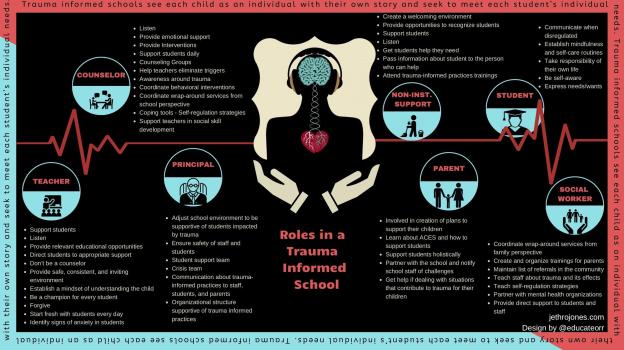
The image above is a powerful way to make sure that people know their role is in a school that is trauma informed. Get a printable version here that you can use as a handout.

You’re not a counselor or a social worker. You’re an educator. You shouldn’t try, and NOBODY should expect you to be anything you’re not.

Could you be a therapist, counselor, or social worker if you tried? Yes. Do you have what it takes? Absolutely!

When a student doesn’t know how to read, what do we do? We teach them.

When a student doesn’t know how to write, what do we do? We teach them.

When a student doesn’t know how to drive or swim, or do whatever, what do we do? We teach them,

When a student doesn’t know how to behave, what do we do? Usually we punish them, what we should do is teach them.

And so our role as educators is to teach and help kids learn.

Now, there are so many different ways to do this!

Our purpose here is not to discuss all the many ways we can teach them, but to emphasize that it is our role to teach them, regardless of how they come to us.

Now, I want to share an experience that is really powerful. In her book, Allison Apsey shares a very similar experience. There are certain students that take up all your time! You are constantly spending time with those students, recognizing that it is worth the time and effort to intentionally and proactively spend time with those students that take up all your time,

if you’re going to be spending time with them anyway, why not work with them to get support in advance, why not work with them to build that relationship?

I call this Proactive Teaching. Some call it check and connect, or check in check out.

These students that are really struggling need additional support. You’ve got to have good Tier 1 behavior expectations and practices in place, but you and I both know there are kids for whom that doesn’t work, and they are the kids that reside in Tier 3! They need the extra help.

Instead of waiting for this student to be sent down to the office, we proactively go teach this student how to make good choices. Don’t think you can do this with 100 kids! It won’t work.

Find those two (or maybe three) students and get with them before they cause the trouble. Take the initiative and connect with them before they can get into trouble. Get with them before they get overwhelmed and can’t perform. Get with them before they wreak havoc in your class!

I had one student who would have a meltdown nearly every day because he was so worried about his mom and young sister. Instead of waiting for his behavior to cause him to be taken out of class, I met up with him before he had a chance for that, and talked about how things were going and what I could do to help him. Then, when his meltdown would inevitably come, we already had a connection that day.

Did this take a lot of time? Yes.

Was it worth it? Yes, it was, because it was so much better to do that in a positive, preventive proactive way than it was to deal with the issues and problems that he was going to have after the fact. Because when he had a bad day, he wanted to get it out in an aggressive way that hurt other kids, and that just wasn’t going to work in our school.

So instead of spending the 30 minutes trying to calm him down after a problem out on the playground, we spent 20 minutes before and during recess to give him that support.

It wasn’t my role to help him deal with his issues at home. I needed to be a trusted adult who was teaching him how to deal with things at school. Of course, a counselor was involved to help him deal with the challenges he faced at home.

To recap:

1. Ask questions.

2. Don’t take it personally

3. Know your role.

These three strategies will help you out immediately with whatever challenges you are facing in your school. If you need additional help or support along the way, please reach out to me by email or at my web site: jethrojones.com/trauma


**Interested in writing a guest blog for my site? I would love to share your ideas! Submit your post here.


Looking for a new book to read? Many stories from educators, two student chapters, and a student-designed cover for In Other Words.


Find these available at bit.ly/Pothbooks  


Books available

How Teachers Can Develop Computational Thinkers

Guest Post by 

Get students computer science ready by teaching them how to think with computational thinking.

The demand for computer science (CS) in schools has many teachers wondering which components of CS they should implement first.

A couple of years ago, I asked myself the very same question, and I had to remind myself that creating a computer scientist could take up to 25 years! I was relieved that I wasn’t responsible for developing middle school computer scientists in only one semester.

I realized that what I needed to do was build the capacity of my students for deeper learning of the right skills — so they could experience success, which would inspire them to continue studying CS after leaving my class.

Advanced expertise in computer science requires knowledge in mathematics (namely discrete math and linear algebra) and problem-solving, and there are plenty of CS fundamentals to choose from.

In my previous position with Richmond Public Schools, we chose to dive in with computational thinking, programming and coding (yes, in that order). Because computational thinking (CT) is the highest order of problem-solving, is a cross-curricular skill, and is understandable to both machines and humans, I recommend building student CT competency by developing their versatility for recognizing and applying the four elements of CT to familiar problems/situations.

Video by JULES discussing the 4 elements of ‘Computational Thinking’

The Difference Between Computer Science and Computational Thinking

CS is part of computing education and it’s the foundation for ALL computing. So, in essence, CS is the study of computers and the algorithmic design processes in both hardware and software — their application and overall impact on society.

On the other hand, CT is a problem-solving skill(s) that involves decomposition, abstraction, pattern recognition and algorithm design.

Element 1: Decomposition

Facing large, complex problems will often discourage and disengage the students who aren’t fully equipped to begin the deconstructing process. Decomposition (like factorization) develops the skill of breaking down complex problems into smaller and more manageable parts, thus making even the most complicated task or problem easier to understand and solve.

To introduce your students to decomposition, begin by having them break down a simple task they do all the time, like brushing their teeth, baking a cake, making a sandwich or tying shoelaces. This will help them focus more on their ability to analyze and synthesize familiar information.

Next, introduce them to more complex problems/scenarios that are both unfamiliar and engaging enough to compel them to decompose them, such as investigating a crime scene, coping with the aftermath of natural disasters or planting a school garden.

Teachers who aren’t teaching traditional CS classes can help learners build their decomposition skills in their own subject areas by having them apply the concept to improving their writingcreating timelinesfactoring quadratics or understanding living organisms. CS teachers can start building student capacity for decomposition with this CT lesson by Code.org. In this lesson, students assume the role of imaginary players and figure out how to play a game with no given instructions.

Element 2: Pattern recognition

Pattern recognition is a skill that involves mapping similarities and differences or patterns among small (decomposed) problems, and is essential for helping solve complex problems. Students who are able to recognize patterns can make predictions, work more efficiently and establish a strong foundation for designing algorithms.

You can introduce pattern recognition by presenting a slide with pictures of similar types of animals or foods, such as pizza or desserts.

Next, have learners map and explain the similarities/differences or patterns. The beauty of this technique is that once students can describe one category (animal or dessert), they will be able to explain the others by following patterns.

For example, the general characteristics of desserts are that they are all sweet; they can be fruit, custard, puddings or frozen; and usually are served at the end of a meal. One or more dessert may be pink, have fruit and served cold, while another type may be yellow, have sprinkles and not use fruit.

Then task students with either drawing or making a collage of their favorite desserts using the patterns they identified (like in the examples above) to help them. Also, have them reflect on how they’d have to start from scratch with either creating or finding each instance of a dessert if they hadn’t first identified essential patterns (classification, color, texture, ingredients).

The primary goal here is to get them to understand that finding patterns helps simplify tasks because the same problem-solving techniques can be applied when the problems share patterns (pattern recognition is also used in mathmusic and literaturehuman intelligencehistoryweather, etc.).

Class projects can be more authentic by focusing application of pattern recognition in forensics, medical sciences, photo identification or behavioral patterns like web browsing and credit card spending.

Once students know what to do, have them map the patterns in some of the decomposed problems described above in Element 1. CS teachers will need to help students comprehend how computers use pattern recognition by numbers, text and pictures. Students using visual programming languages should also learn how the use of pattern recognition helps to find the commonalities of repetition in code for avoiding redundancy, and they can begin doing so with this Code.org lesson.

Element 3: Abstraction

Abstraction involves filtering out — or ignoring — unimportant details, which essentially makes a problem easier to understand and solve. This enables students to develop their models, equations, an image and/or simulations to represent only the important variables.

As the values of variables often change and can be dependent upon another, it’s important for students to be introduced to abstraction in relation to patterns. In the previous element, we noted common characteristics of desserts. Have students make a simple drawing of a dessert focusing on the important/common features (like classifications) and abstracting the rest (texture, fruit, sprinkles). The abstraction process will help them create a general idea of what a problem is and how to solve it by removing all irrelevant details and patterns (abstraction is also used in math and when creating models — the water cycle, the nitrogen cycle, the rock cycle, etc.).

CS teachers will need to help students focus on the layers (or levels) of abstraction they will want in the models they develop, along with correlations between abstraction and pattern generalization to figure out the right relationships between abstracted variables to accurately represent a problem. They also need to understand how abstractions are built with purpose and can represent an entire class of similar objects. CS students can become excellent coders using abstraction. Use this lesson to help them get started.

Element 4: Algorithm design

Algorithm design is determining appropriate steps to take and organizing them into a series of instructions (a plan) for solving a problem or completing a task correctly. Algorithms are important because they take the knowledge derived from the previous three elements for execution.

Keep it simple when teaching algorithms to students and have them create small plans using their newly learned CT skills, again using simple functions like brushing teeth, baking a cake, making a sandwich, tying shoelaces. Each algorithm must have a starting point, a finishing point and a set of well-defined instructions in between.

CS teachers will also need to help students understand that algorithm design builds upon the previous three elements — which moves a problem from the modeling phase to the operation stage. Students will also need to learn to design algorithms that are both efficient and allow for automation through the use of computers.

Also, by learning discrete math and how to create flowcharts, students can practice and build expertise in algorithmic thinking and design over time. Here is a great compilation of lessons for helping students bridge the gap between understanding basic algorithms to actual programming.

Resources to get started

Here are a number of resources to turn to for help:

Remember, learning has no finish line!

Take a moment to reflect on the words of Dr. Stephen R. Covey, “Though you may find some of it to be simple common sense, remember, common sense is not common practice, and I guarantee that if you will focus your efforts in these areas, you will find that great peace and power will come into your life.”

I believe these words can be applied to learning CT (and any new concepts or practices) as we help our students use what they already know to develop their CS superpowers!

Coding is a superpower video by Code.org

This article is adapted from an original post on this link.

If you like this work, please give it some claps, follow our publication and share this with your friends and colleagues.

Jorge Valenzuela is a teacher at Old Dominion University and the lead coach at Lifelong Learning Defined. Additionally, he is a national faculty of PBLWorks and a lead educator for littleBits. His work is aimed at helping educators understand and implement computational thinking, computer science, STEM, and project-based learning.

You can connect with Jorge @JorgeDoesPBL via Twitter and Instagram to continue the conversation.

**Interested in writing a guest blog for my site? Would love to share your ideas! Submit your post here.

Looking for a new book to read? Many stories from educators, two student chapters, and a student-designed cover for In Other Words.

Find these available at bit.ly/Pothbooks  

Books available

EDIT THIS

TeacherCast Educational Network | Developing Standards-Based Instructional Technology Integration

Technology Integration - Instructional Coaching - Productivity Secrets for Educators

Leadership Liner Notes: Sean Gaillard

Built on Connection. Tuned for Impact.

Stories by Thomas Oppong on Medium

Dr. Rachelle Dené Poth @Rdene915 Educator, Consultant & Keynote Speaker, Author, Attorney #THRIVEinEDU

Hooked On Innovation

When Innovation slaps you in the face, we slap back.

Teach Better

Dr. Rachelle Dené Poth @Rdene915 Educator, Consultant & Keynote Speaker, Author, Attorney #THRIVEinEDU

BrianKulak.com

Dr. Rachelle Dené Poth @Rdene915 Educator, Consultant & Keynote Speaker, Author, Attorney #THRIVEinEDU

The Principal of Change

Stories of learning and leading

Mandy Froehlich

Dr. Rachelle Dené Poth @Rdene915 Educator, Consultant & Keynote Speaker, Author, Attorney #THRIVEinEDU

Katie Martin

Informed by research, refined by practice

#RocknTheBoat

Rocking today's classrooms, one teacher, student, and class at a time.

User Generated Education

Education as it should be - passion-based.

Learning as I go: Reflections & lessons learned

Dr. Rachelle Dené Poth @Rdene915 Educator, Consultant & Keynote Speaker, Author, Attorney #THRIVEinEDU

Serendipity in Education

Join me, Allyson Apsey, as I stumble upon the fortunes of learning, laughing, and celebrating alongside incredible people.