Sponsored post in collaboration with Learnics. All opinions are my own
Digital literacy is a critical skill, and with access to so many resources, it is essential that educators work with students in all classrooms to help them develop their research skills. Especially with the rapidly advancing technology available to everyone, such as ChatGPT, we want to provide students with opportunities as crucial as reading and writing. Teachers are constantly seeking innovative tools to enhance their students’ research skills. Learnics offers a digital space for students to conduct their research and track time spent and resources found!
What is Learnics?
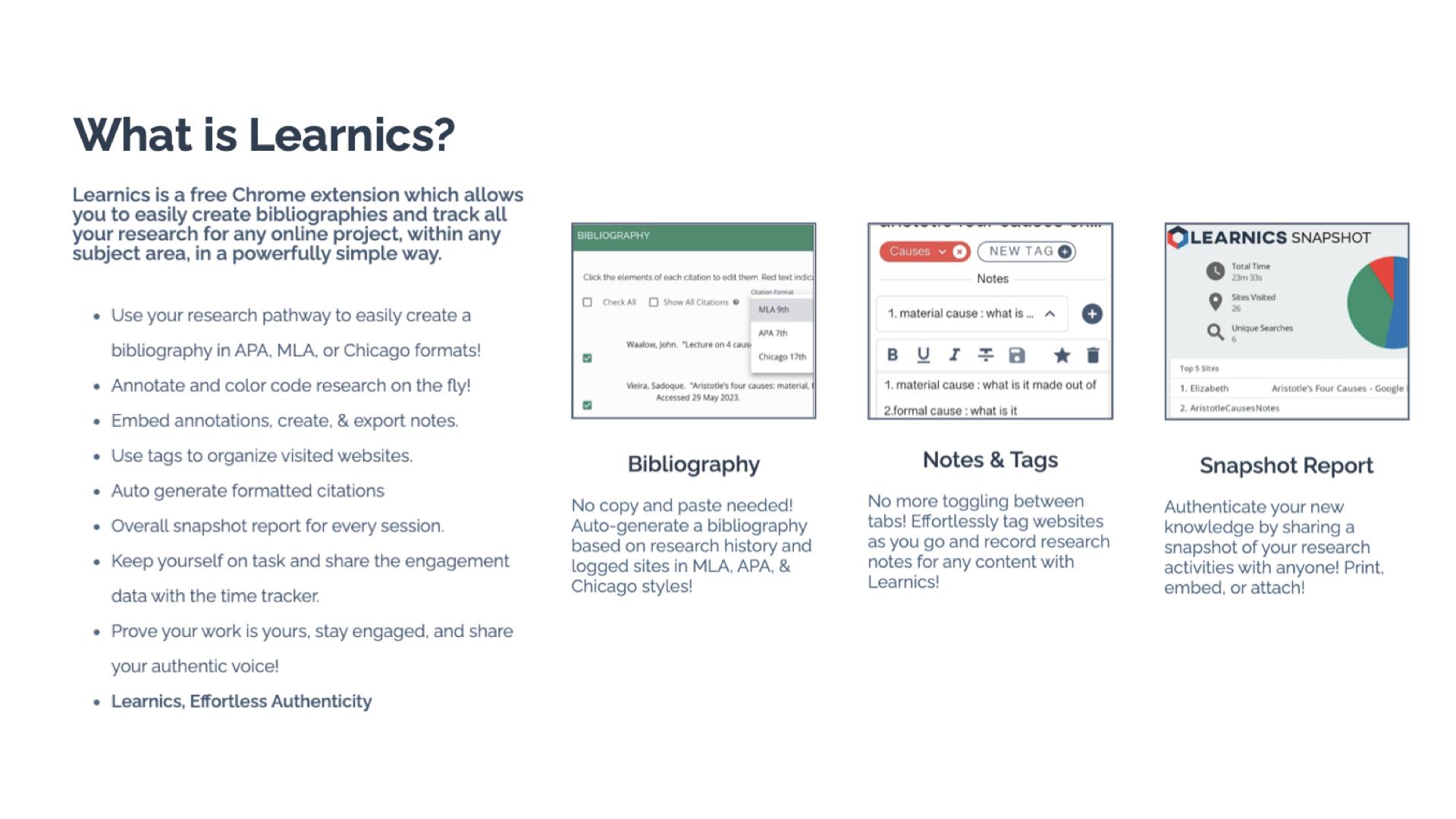
Learnics is a free Chrome Extension that helps students to streamline the research process. Through its robust platform, students conduct research, and Learnics will track the websites visited and the amount of time spent on each site, take notes, create tags, and even generate bibliographies automatically. It can assist with the process, but the main focus is on enhancing the quality of work and also helping students to focus on academic integrity as they work. By using Learnics, students are able to organize their research more effectively and also see a detailed overview of their research process. Learnics provides a space for nurturing responsible research practices and critical thinking skills among students.
Standout Features of Learnics
Website Capture and Time Tracking: Learnics automatically logs sites visited and the time spent on each, providing invaluable insights into students’ research habits.
Notes and Tags: Students are able to keep everything in one space. They can take notes and use tags to help them keep their research organized. Students can also download the record of their research.
Auto-generated Bibliography: Students learn how to properly cite resources used with the auto-generated bibliographies created in Learnics. Bibliographies based on students’ research history are created in alignment with APA, MLA, and Chicago formats.
Snapshot Report: One of my favorite features of Learnics is the snapshot report. When doing research, it is helpful to see the process, and with Snapshot, students have an overview of their entire research journey. The Snapshot report helps to promote reflection and critical thinking skills among students.
Learnics Classroom Pro
Diving into Classroom Pro, I immediately thought it was a game-changer. For educators, it is important to support students as they develop and refine their research skills. Teaching students how to conduct research and properly cite sources is key. With Learnics Classroom Pro, teachers can create a lesson for students and then review their students’ research process in real time. Teachers can monitor class progress, view sites visited, check search terms used, and assess notes, tags, and annotations made by students. Having access to this information also helps educators to better understand student needs during research and provide additional resources to help them with each task. Classroom Pro is an invaluable tool for ensuring the authenticity of student work and fostering a focused, engaged research environment.
Benefits of Using Learnics
For students, Learnics helps them to streamline the research process. With all of their research in one space, it eliminates the need to use multiple tools or toggle between different tabs. Learnics helps students develop better organization skills through the use of notes and tags, which makes their writing process more efficient.
And when it comes to citations, having assistance to learn from is quite helpful. With the auto-generated bibliography feature, students understand the importance of properly citing their sources and can further develop their skills.
For teachers, gaining insight into student research practices helps to provide better support. Through Classroom Pro, teachers can view each student’s research process and then use this to provide more targeted instruction and authentic and meaningful feedback. Understanding students’ research habits enables teachers to observe how and where students spend their time or if they are struggling to find reliable sources. With this insight, teachers can better provide targeted instruction to address individual and class-wide learning needs.
With the features of Learnics, teachers can check the originality of student work while also tracking the potential use of AI. Learnics also helps students to engage in peer review and collaboration and share resources and feedback, which better prepares them for future success in the workplace.
Get Started with Learnics
It is easy to get started with Learnics. Simply download the Chrome Extension from the Chrome Web Store and begin exploring the resources available. Students choose to enable the Chrome extension on their browser as they engage in research.
For teachers, check out the demo to learn more about Classroom Pro. The ability to conduct effective, efficient, and responsible research is essential. Learnics provides a space for students to enhance their academic skills and become digitally literate.
About the Author:
Rachelle Dené is a Spanish and STEAM: What’s Next in Emerging Technology Teacher at Riverview High School in Oakmont, PA. Rachelle is also an attorney with a Juris Doctor degree from Duquesne University School of Law and a Master’s in Instructional Technology. Rachelle is an ISTE Certified Educator and Community Leader and served as president of the ISTE Teacher Education Network. She was named one of 30 K-12 IT Influencers to follow in 2021.
Looking for PD for your school or keynotes for your conference? I provide in-person and virtual training on the following topics. If you want to learn more about and explore AI and ChatGPT, contact me to schedule! Rdene915@gmail.com or use the Book Me form on my website. bit.ly/thriveineduPD
**Interested in writing a guest blog or submitting a sponsored post for my site? Would love to share your ideas! Submit your post here. Looking for a new book to read? Find these available at bit.ly/Pothbooks
Regardless of our role in education or the grade levels that we work with, we all have a responsibility to bring in a variety of learning opportunities to prepare our students for successful careers. They need to engage in learning that will equip them with essential skills and the right knowledge so they can thrive after they leave our classrooms and our schools. Helping students to learn about potential future careers or options for continuing their education should not be limited to the high school years. By starting to focus on career and college readiness at the middle school level, we can help students learn about the many options available to them and spark their curiosity for learning.
There are many ways to get started, and there are a lot of benefits to creating college and career readiness opportunities for middle school students. Finding methods and tools or comprehensive resources will have a positive impact on student academic success, increase engagement in learning, and foster the development of essential future skills. Educators can offer an innovative and engaging approach to introduce students to various professions, ignite their passion, and empower them to shape their future.
In this post, I will share the benefits of focusing on career exploration with middle school and even younger students.
Early Exposure to Career Options
Introducing college and career readiness in middle school helps to inform students about a wide range of career options. Through career exploration activities and resources, students can explore job roles in various industries and professions. Defined Learning, offers comprehensive career exploration tools that provide K through 12 students with insights into different careers. With the K-5 program, this early exposure helps students gain a clearer understanding of their interests, passions, and the skills required for 16 different career clusters. For middle and high school students, interactive modules and videos give students the chance to explore diverse career options, such as engineering, entrepreneurship, healthcare, or even art. By learning more about a variety of careers, we can help students to discover their interests and passions, allowing them to make informed decisions about their educational and career paths.
Defined Learning Careers offers resources to help students develop these skills through career courses. Each Career Course focuses on providing students with relevant career experiences and skills needed for a specific career. Once students explore a career, schools can then invite guest speakers from various professions to share their experiences and insights can inspire students to explore different career options and set meaningful goals. By incorporating technology and interactive learning, students can access these materials at any time and experience a dynamic and engaging learning environment. Students learn about careers they may not have ever heard of and it might just be something that really piques their interest!
Hands-On Learning:
There are a lot of opportunities available in STEM-related careers. When it comes to STEM, we have many ways to implement STEM activities, even through PBL. By exploring the careers that are highlighted through Defined Careers, students become aware of the different fields that require STEM-related skills. By connecting this learning with hands-on activities that simulate real-world scenarios, we can spark curiosity and help students to think about where their interests may lie. For example, with grades K through 5, students can learn about a specific career and then engage in PBL experiences that mimic tasks typically performed by professionals in different fields. These experiences provide a glimpse into various careers’ daily responsibilities and challenges, helping students develop a deeper understanding of their interests and potential career paths.
Mentorship and Networking Opportunities
It is important for students to learn about different types of work and what might be expected of them in a potential career of interest. With the options available through place-based learning or project-based learning (PBL), students can connect with professionals in related fields. With the Defined Careers, students can explore careers of interest and then work with teachers and the community to find a mentorship program or seek opportunities to connect with and learn from professionals in different industries. In my experience, we have taken students on field trips to job sites to see firsthand the type of work that is done in a factory or a corporation, for example.
Building these connections early, primarily through opportunities at the middle-school level, helps students gain valuable insights, learn the importance of expanding their learning network, and offers them a connection to receive valuable advice for their future endeavors. Educators can also offer their own guidance by providing one-on-one meetings with students to discuss their career goals and help them create a plan for achieving those goals. Another excellent option is bringing in community members to talk to students as part of a career day. When students explore some of the careers in the Defined Careers resources, we can find local community members to create a real-world learning experience for them.
Online career learning programs offer a transformative educational experience that prepares all students for the challenges and opportunities of the future. By exploring diverse professions, engaging in hands-on activities, connecting with mentors, developing future skills, and through the flexibility of personalized learning, students become excited and motivated about their future careers.
Building a knowledge base early on will help students to think about their interests, reflect on their growth and set goals. We want students to see learning as a process and to be aware of the many opportunities that exist for them in the future.
About the Author:
Rachelle Dené is a Spanish and STEAM: What’s Next in Emerging Technology Teacher at Riverview High School in Oakmont, PA. Rachelle is also an attorney with a Juris Doctor degree from Duquesne University School of Law and a Master’s in Instructional Technology. Rachelle is an ISTE Certified Educator and Community Leader and served as president of the ISTE Teacher Education Network. She was named one of 30 K-12 IT Influencers to follow in 2021.
Looking for PD for your school or keynotes for your conference? I provide in-person and virtual training on the following topics. If you want to learn more about and explore AI and ChatGPT, contact me to schedule! Rdene915@gmail.com or use the Book Me form on my website. bit.ly/thriveineduPD
**Interested in writing a guest blog or submitting a sponsored post for my site? Would love to share your ideas! Submit your post here. Looking for a new book to read? Find these available at bit.ly/Pothbooks
Getting students to talk about your content and share their thinking Is often a struggle, and having lots of strategies in your tool belt is a must. Overusing a strategy can diminish its effectiveness, so having a variety that you can use with planning or on the fly is a must. Many of you have probably heard of or have used the researched-based think pair share strategy, so my addition to that to create “Think Pair Group Share” will be easy to adopt, adapt, and apply to your teaching repertoire.
Key Takeaways:
* Collaborative learning is essential and has many benefits.
* Students need to discuss and share their learning.
* New addition to the Think Pair Share activity helps students in many ways and is easy to implement.
IF YOU EVER FIND YOURSELF STUCK IN THE MIDDLE OF THE SEA
There are several things I like about this activity. After reading Frank Smith’s book, Learning and Forgetting, I became more conscientious about adding collaboration to the activities I use. As Smith points out repeatedly, paraphrased in summary here by Goodreads, learning is a social process that can occur naturally, effortlessly, and continually through collaborative activities (Goodreads 2024). Students do love to talk with each other, generally speaking, and Smith also points out that “Anything that stimulates our imagination and promotes our enjoyment of an activity is a green light for learning” (Smith 89). While talking to each other is enjoyable, students aren’t as eager for academic discussion, so that is where activities like this, when done thoughtfully, can be so successful for student learning.
I’LL SAIL THE WORLD TO FIND YOU
Anytime I plan lesson activities, I consider ways to add collaboration. Knowing what I do about how we learn is the most natural way to help students move my content from their working memory to their long-term memory. Whatever question, problem, hypothesis, etc., that I want students to think about and discuss during the class period, they can greatly benefit from this activity. Often students aren’t excited about sharing their thinking with the class and teacher seconds after being presented with the question/problem.
IF YOU EVER FIND YOURSELF LOST IN THE DARK AND YOU CAN’T SEE
After the students have independent thinking/solving/writing time, they still might need some collaboration with a peer and/or peers before sharing their thinking with the teacher and class for various reasons. This allows them to refine their thinking, receive validation, or help them come closer to the right answer if all students are struggling. The beauty of this activity is that you also have the flexibility to structure it so that the share-out time is in the small group instead of the whole class if that suits your needs or the needs of a particular student or students.
I’LL BE THE LIGHT TO GUIDE YOU
Here’s how I run this activity (adjust as needed for your age level and students):
1️⃣ THINK: Give students a question, prompt, or problem that covers what you are working on that day or in that lesson. Allow a set amount of time for students to complete the task on their own. It is important to time it. Time is an effective and creative constraint to motivate students. While students process content at different rates, those students who are slower at processing will still have time during the pair and group time to refine their thinking on the content before sharing it with the whole class.
2️⃣ PAIR: Time this as well. Assign students to work in pairs or allow them to select a partner. Instruct them that they first need to decide who will be Partner A and Partner B. Tell the class that your partner (A or B, you pick) will share first, and then the other partner will share. TIP: It is important to monitor that both partners are actually sharing their thinking. After both students have shared, they can adjust their own responses based on their partner’s suggestions or responses. If we are honest with each other and ourselves, this is how much of the assigned homework gets done, or some version of “I got this for number 12. What did you get?” By incorporating this into the activity, it becomes a natural flow for students, but it does need monitoring, so make your rounds through the pairs to ensure the sharing is actually by both and is your content, not what event they are attending after school, what video game they’re currently playing, etc.
WE’LL FIND OUT WHAT WE’RE MADE OF
3️⃣ GROUP: Next, put students into triads or a group of four. It’s like a repeat of the process from step 2, but now you add in Partner C and or D. It is important to remember that students cannot be with their original partner. Changing up the partnerships into new and slightly larger groups adds an additional layer of benefits, too. All students will need to share individually. If you keep partners together, then one of them will end up not talking or sharing during the group round, and that leads to the opportunity for off-task behavior. This addition to the Think, Pair, Share activity also adds a buffer for students who aren’t sure that either their partner, themselves, or both understood the content or problem/prompt, so this is their chance to find out if they are on the right track or have gone off the rails in the wrong direction.
4️⃣ SHARE: At this stage, you can have each group volunteer to have one student share their responses. I use a blend of the following:
Randomly call on non-volunteers (I use an online spinning name wheel, popsicle sticks, or shuffled index cards with student names).
Allow individuals to share a classmate’s response that they liked better from their discussions, etc.
Call on individuals to share their partner’s or a classmate’s response.
Call on individuals randomly to share their own responses.
To save time or achieve better results, have students share directly with you (and the group, but not the whole class) as you circulate with the small groups, using the same options from #4.
5️⃣ ASSESS: I don’t generally enter grades for this because I use it as formative assessments to adjust my teaching or to see what misconceptions need to be corrected. However, if you need to enter a grade, have an exit ticket reflection prompt ready in your LMS or preferred platform.
WHEN WE ARE CALLED TO HELP OUR FRIENDS IN NEED
I have used this strategy with all levels of high schoolers, but since Think Pair Share works at all levels, this variation will too. We know the benefits of students having academic conversations, discussing the content, and working independently and collaboratively. Adding the Group activity to the Think Pair Share strategy also breaks up the normal routine, which makes it interesting. By layering the conversations from pairs to small groups to potentially the whole class, student anxiety levels are lowered as well. Adjust this strategy as needed and prepare for engaged learners who will grow better at sharing their learning.
Chi, M. T.H., & Wylie, R, (2014). The ICAP framework: Linking cognitive engagement to active learning outcomes. Educational Psychologist, 49(4), 219-243, 2014. https://doi.org/10.1080/00461520.2014.965823
Parker, R. E. (1985). Small-Group Cooperative Learning—Improving Academic, Social Gains in The Classroom. NASSP Bulletin, 69(479), 48-57. https://doi.org/10.1177/019263658506947908
HEADING TITLES ARE PARTIAL LYRICS FROM COUNT ON ME BY BRUNO MARS.
Be sure to follow Laura on twitter (X) @SteinbrinkLaura
Looking for PD for your school or keynotes for your conference? I provide in-person and virtual training on the following topics. If you want to learn more about and explore AI and ChatGPT, contact me to schedule! Rdene915@gmail.com or use the Book Me form on my website. bit.ly/thriveineduPD
**Interested in writing a guest blog or submitting a sponsored post for my site? Would love to share your ideas! Submit your post here. Looking for a new book to read? Find these available at bit.ly/Pothbooks
Part II: Getting students to think about their learning journey
Throughout the year, engaging students in ongoing reflection on what they are learning is essential. One of the five core competencies of social-emotional learning (SEL) is for students to develop self-awareness. It’s also vital for them to build self-management skills to work through challenges that can come with learning, reflect on their growth, and set new goals.
Whether students engage in discussions with classmates or use digital tools to share ideas in a comfortable virtual space, there are many options. We need to get our students to share what they are thinking and take time to reflect on their learning. We also need to model this reflective practice for them. This is essential for academic, personal, and future professional growth. To best prepare students for the future, ongoing reflection is vital.
With an opportunity to reflect, students are able to better understand their thought processes and interests. It helps them to identify areas where they can improve and recognize areas that they are strong in. Creating opportunities for students to share their learning with classmates and with us promotes collaboration, fostering a stronger sense of community in our classrooms. Together, we can create a supportive learning community.
Through the five competencies of SEL, we can help students focus on developing skills of social awareness and building relationships. Students will better understand their own thought processes and deepen their understanding of the content they are learning. However, getting students to share their thoughts and reflect on their learning can be challenging. Here are five ideas for encouraging students to reflect on their learning and share their thoughts.
1.Think-Pair-Share is an activity that doesn’t require much time at all to use and can be very effective. It encourages students to share their ideas, learning experiences, and thoughts with one another. The teacher can provide a short prompt or topic for discussion and then give students time to think individually before pairing up with a partner. Those one-on-one conversations can help students become more comfortable expressing themselves in class. After a certain period of time, each pair can share their thoughts with the class. This strategy will work well without digital tools; however, there are some options to explore.
2. Peer-pairing: To randomly place students in pairs, use a random name generator so students build relationships with their classmates. It is fun to have the names on the big wheel and place students into groups. I have used this also as a way to select the order of presentations. It helps to reduce a bit of the stress with wondering when you have to present and makes it a fun experience.
3. Class sharing: To help students build confidence, use a tool such as Padlet or Flip to have students post ideas on a collaborative board or create audio or video responses. Whatever way we have students “share,” it encourages them to engage in conversation and more active listening. Students learn about different perspectives on a given topic, which promotes the development of social awareness skills.
4. Snorkl is a new AI-powered tool that I found, and I really love the possibilities. Teachers assign an activity and it enables students to record their screen and speak about the work they have done. For example, how they solved a math problem, writing and reading in the language they are learning, describe an image, and so much more. It can be set to provide AI feedback with or without teacher approval. It was fun to try for the first time in my class. Look for more information in an upcoming post.
With the tools that offer audio or video options, it is a more authentic way to learn about the student. Teachers see and hear their students’ thought processes and can then offer more personalized and meaningful feedback to each student.
One extra is for teacher and student reflection. Learning about students’ thoughts about our methods, their comfort in the classroom, and more is important. Last year, I started exploring LessonLoop, which provides anonymous surveys that teachers can issue to students. It provides a rating with explanations based on student engagement, SEL, and comfort in the learning space and provides additional insights. Teachers can then take the information and use it to reflect on their practice and involve students by showing their input is valued through the use of these surveys. LessonLoop also has educators who will prepare some tips for teachers to try!
Whatever method or tools we choose to bring into our classrooms, the goal is still the same: Prepare students for the future with skills that enable them to be flexible and adapt to the changing look of education and work. Reflective practice is a key component of this future preparation!
Author
About the Author:
Rachelle Dené is a Spanish and STEAM: What’s Next in Emerging Technology Teacher at Riverview High School in Oakmont, PA. Rachelle is also an attorney with a Juris Doctor degree from Duquesne University School of Law and a Master’s in Instructional Technology. Rachelle is an ISTE-certified educator and community leader and served as president of the ISTE Teacher Education Network. She was named one of 30 12 IT Influencers to follow in 2021 and one of 150 Women Global EdTech Thought Leaders in 2022.
Contact Rachelle to schedule sessions about Artificial Intelligence, Coding, AR/VR, and more for your school or your event! Submit the Contact Form.
Follow Rachelle on Twitter(X) and Instagram at @Rdene915
**Interested in writing a guest blog for my site? Would love to share your ideas! Submit your post here. Looking for a new book to read? Find these available at bit.ly/Pothbooks
************ Also check out my THRIVEinEDU PodcastHere!
Join my show on THRIVEinEDU on Facebook. Join the group here
Guest post by Dr. Amy Mathews-Perez, member of the Board of Directors for the Texas Council of Administrators of Special Education (TCASE) & a Director of Special Programs in a public school in Central Texas. Connect with Amy on X (formerly Twitter) at @drgrowtoknow and on Facebook at DrAmy MP.
While I know a few ladies named Grace, and they are all great ladies, the grace this blog is about is the NOUN. Our friend Merriam-Webster has many definitions for this word, but I’m going to combine a few of them so we can all be on the same page: Grace: a temporary exemption, the disposition or act of kindness, the state of being considerate, thoughtful.
Hopefully, each person reading this has experienced grace in ways that you can remember and still appreciate. I want to touch base with you about what I call a “mini-epiphany”; an idea that comes to me out of nowhere and brings me relevant insight that impacts multiple areas of my life. Figuring out that I am grateful for grace was one of these mini-epiphanies. To be transparent, I have very limited attention, and I am constantly pinging between tasks, thoughts, ideas, reminders, reflections, planning, and “what if” in my mind. As a part of this messy thought process, I recently became disappointed about how many friends’ birthdays, anniversaries, and other celebrations I have missed. Why did I miss them? Tons of reasons, all of which could be justified, including reasons like this: it was too late in the evening to call or text, the embarrassment of being late to celebrate, the forgotten or ignored reminder to do it, the failure (again) to put it in my calendar as a recurring event, and the list could go on. I was feeling guilty and telling myself that I am a less-than-stellar friend/sibling/coworker. I decided that late is better than never; late is better than the risk of the other person thinking I’m ignoring them or don’t care, so I texted a friend and celebrated a Twitter/X post that I had missed commenting on….and while this friend would never be mean or negative, she had every right to not respond to my text, make a joke about my lack of timeliness or just say, “Thanks.” However, within just a few minutes, this friend replied with this: “Thank you! 💙” It may seem silly, but that blue heart was forgiveness, appreciation, and kindness all wrapped into one emoji. That blue heart was grace being provided to me; it was grace I could see and feel.
After I took a few deep breaths and reflected on the wonderful blessing of this friendship, it dawned on me: How much grace have I been given that I haven’t seen? I am grateful for the grace I am given, both seen and unseen, known and unknown. I am grateful for the grace of friends and family that accept me and encourage me to be my quirky, forgetful, high-energy, low-memory self. I am equally grateful for the grace of people I may never meet or even see; grace that can include their choice to not respond to gossip or negativity that may involve my name, their effort to not point out every error I make – especially on social media, or the grace of their intention to support me, my work and my vision.
Being grateful for what you have may or may not be easy, but we all have visual reminders of reasons to have gratitude, such as not being the person who got COVID this time, not getting pulled over even though we know we were speeding, or watching our Parents age. By taking the time to first realize what “could be” that would negatively impact me and then reflect on why I have not endured those things, I was awakened to the many forms of grace. Life gets busy, and it is easy (natural, sometimes automatic) to take grace for granted. In writing this, I wanted to share that the time, energy, effort, and intention that it takes to tap into gratitude for grace for things known and unknown, seen and unseen, is worth the positive change it can make in your heart and mind. I am grateful for grace.
About Amy
Texas-born & raised, Amy is in her 32nd year of serving public education. General Ed. Teacher, SLP, Diagnostician, SPED Supervisor, Principal, Assistant Principal, and a Director of Special Education are roles she’s held. She is the CEO of Making Education Special for All (M.E.S.A), an LLC dedicated to training, consultation, and speaking engagements that revolve around providing information, motivation, and insights on why and how to make education special for all stakeholders.
Her passions are communication, joy, authenticity, and empowerment. “Life is short but our influence is never-ending,” and Amy is committed to connecting with others through service and collaboration. You can connect with Amy on X (formerly Twitter) at @drgrowtoknow and on Facebook at DrAmy MP.
Looking for PD for your school or keynotes for your conference? I provide in-person and virtual training on the following topics. If you want to learn more about and explore AI and ChatGPT, contact me to schedule! Rdene915@gmail.com or use the Book Me form on my website. bit.ly/thriveineduPD
**Interested in writing a guest blog or submitting a sponsored post for my site? Would love to share your ideas! Submit your post here. Looking for a new book to read? Find these available at bit.ly/Pothbooks
*AI is one of my favorite areas to work in and I love sharing ideas!
As a classroom teacher with almost six years of experience integrating AI into my teaching practice and training other educators, I have enjoyed exploring the possibilities through AI and engaging in conversations with students and teachers. Every educator needs to learn about AI and how we can leverage this technology to benefit our students and enhance our work. To best provide for our students, we need to understand how this technology will impact them and us.
Especially as we see such as increase in technology in education, it is essential that we embrace and understand emerging technologies, especially AI and how it can impact not only our work but the benefits it can offer for student learning. In my work as a classroom teacher and consultant, I enjoy helping other educators get started with AI.
Why Educators Need to Understand the AI Tools Available
Our roles as educators have continued to change over the years. Not only do we teach the content, but we serve as mentors, facilitators of learning, and co-learners with our students, especially as we embrace these emerging technologies. It is important that we explore the benefits and how it can help us to “work smarter, not harder” so that we have more time to work with students, build relationships and support them in their learning journey.
AI, ChatGPT, and other forms of generative AI have become some of the most talked about topics in education this past year. But with all technology comes some hesitancy, especially with something as powerful as AI. Schools need to provide opportunities for students to learn about this changing technology because of its impact on their future. Not only can AI tools enhance creativity and productivity, they can also provide educators with valuable insights into student learning and assist with some of the time-consuming tasks that educators have.
How to leverage some tools with benefits
I like to think of three key areas where AI can make an impact for educators and for students.
1. Personalized Learning: Through AI, educators can provide tailored learning experiences based on AI-driven analytics that provide valuable insights into student performance and learning trends. It can adapt to each student’s strengths, weaknesses, and learning pace.
2.Efficiency and Productivity: Another benefit of AI is greater efficiency. Educators may spend more time on clerical tasks that takes time away from working directly with students. The right AI tools can help to automate or streamline tasks uch as grading assignments or providing feedback, giving teachers more time with their students.
3. Creating and supplementing the content: Through AI-powered platforms, teachers can curate various educational resources for their students and their own professional learning. With generative AI in particular, quickly being able to create lessons, activities, assessments, prompts for discussion, and presentations by providing a short prompt with keywords, educators can create engaging lessons for students in far less time.
But how do we know where to begin?
Tools to Explore
With so many different tools becoming available or integrating AI into them, it can be hard to keep up. My recommendation is to select one or two to start with. Explore how they work and the content that is created. Take time to evaluate the accuracy of the information and even involve students in discussions about the benefits for their learning.
Here are five AI-powered tools that will help teachers with personalized learning, efficiency, and saving time. I have created and experimented with so many tools, and my students’ responses have always been positive. Embracing these tools also sparks curiosity for learning. Creating and sharing these resources with our students leads to rich conversations about AI’s benefits and the proper use of this technology for creating and learning. See below for an additional article link and my contact form to bring me to your school or provide coaching.
Curipod: Enables teachers to create interactive lessons in minutes using AI. Teachers simply type in a topic, and a ready-to-run lesson is generated with text, images, and activities such as polls, open-ended responses, word clouds, and more. There are even activities to build in that focus on SEL check-ins. Use my code CURIRACHELLE
Eduaide.Ai: An AI-assisted lesson development tool that provides educators with more than 100 resource types to choose from. It offers the ability to translate the generated content into more than 15 languages instantly. Educators can generate a syllabus and discussion prompts, use the Teaching Assistant to help with creating IEP plans, write emails, or even create a list of accommodations for students in addition to many other options. I enjoy using Eduaide for a variety of tasks, especially creating lesson and project outlines and testing out the feedback bot! Try some and then tag @eduaideAI and @Rdene915 in a tweet and win a book!
Quizizz: With Quizizz, teachers can design quizzes that create a personalized learning path in response to each student’s responses and based on their needs. Teachers can also create lessons with Quizizz, which now has AI enhancements that can adjust question difficulty, check grammar, redesign questions to reflect real-world scenarios, create a quiz from a URL or PDF, and more features on the way.
Slidesgo: Provides access to free templates via Google Slides and now has the AI Presentation Maker. With this new functionality, presentations can be created within minutes. Start by choosing a topic, selecting a tone such as casual, creative, or professional, making changes, and downloading your presentation. A time saver, for sure! I really enjoyed testing it out and creating some amazing presentations! Want to learn more? Be sure to check out their recent survey, which has great insights into AI and tools for education! Dive into exploring more today!
Also, head to my additional post via Edutopia for more AI tools to try here: 7 Tools
Do you want to learn more about AI and how to bring it into your classroom? I have six years of experience working with students and teachers and would love to work with your school, at your conference or individual coaching:bit.ly/thriveineduPD
Looking for PD for your school or keynotes for your conference? I provide in-person and virtual training on the following topics. If you want to learn more about and explore AI and ChatGPT, contact me to schedule! Rdene915@gmail.com or use the Book Me form on my website.
**Interested in writing a guest blog or submitting a sponsored post for my site? Would love to share your ideas! Submit your post here. Looking for a new book to read? Find these available at bit.ly/Pothbooks
These apps and websites can help teachers boost their productivity, personalize learning, and create lesson content.
Over the past five years, I’ve explored ways to integrate AI into my teaching practice—even before ChatGPT and other generative AI became some of the most talked-about topics in education. Every educator needs to learn about AI and how we can leverage this technology to benefit our students and enhance our own work. To best provide for our students, we need to understand how this technology will impact them and us. What better way than to explore new tools via AI in our teaching practice?
Rachelle Dené is a Spanish and STEAM: What’s Next in Emerging Technology Teacher at Riverview High School in Oakmont, PA. Rachelle is also an attorney with a Juris Doctor degree from Duquesne University School of Law and a Master’s in Instructional Technology. Rachelle is an ISTE-certified educator and community leader and served as president of the ISTE Teacher Education Network. She was named one of 30 12 IT Influencers to follow in 2021 and one of 150 Women Global EdTech Thought Leaders in 2022.
**Interested in writing a guest blog for my site? Would love to share your ideas! Submit your post here. Looking for a new book to read? Find these available at bit.ly/Pothbooks
************ Also check out my THRIVEinEDU PodcastHere!
Join my show on THRIVEinEDU on Facebook. Join the group here
During the fall, educators may notice a decrease in student engagement and also, that students are not retaining the content as well. With a few ideas to explore that get students more involved, we can hopefully also spark interest and excitement for learning to help students value the process of learning itself.
I always say that the beginning of the school year and throughout the fall are great times to try something new. To best provide for all students, opportunities that empower them to set their pace for learning, to choose areas of interest or the “how” to show learning, and to collaborate with classmates, make a difference. They will invest more in learning and become more curious.
So what are some ways that educators can do this? By choosing versatile methods that are not specific to the content area whether through choice boards or class playlists, STEM-related learning opportunities, or diving into PBL, we can help students in many ways. With these options, we can build content knowledge while also developing SEL skills to prepare students for the future and boost engagement in learning.
Boosting Engagement and Curiosity
When we create learning experiences that will more meaningfully engage students with the content, while also aiming to move them from being simply consumers to creators, it increases their interest and amplifies student achievement.
When students have the opportunity to provide input into the lesson brainstorm ideas and plan with us will also boost engagement and build a learning community in our classrooms.
As educators, it is important to continue to reflect on our practice and make time to learn about student interests so that we can better provide for them. With a variety of ways for students to show what they have learned, we will foster student agency, boost engagement, and increase student motivation in learning. Here are some ideas to explore:
Choice boards are a great way to include a variety of options for students to explore and practice the content in a meaningful and authentic way. It also helps teachers to differentiate instruction by providing students with multiple ways to process information and build their knowledge. A choice board can be created on paper or digitally.
Creativity tools:Buncee is a great option for multimedia presentations and interactive lessons. Another benefit is it offers Immersive Reader which promotes language accessibility for students and there are so many options to choose from for creating a visually engaging presentation! Another choice is Book Creator is a multimedia creativity tool to create books that can include audio, video, text, and images, and more. It also has features such as captions, translation in 120+ languages, and improved screen readers. Students can also collaborate on a book with a partner or as part of a class. Genially is a versatile option that can be used to create presentations or even make a class website, choice boards, newsletters, escape rooms, storybooks, and more.
Game-based learning: Students enjoy playing a variety of games whether traditional games, ones they make up, or participating in the many digital options available. These are great for teachers to gather feedback and be able to provide additional support for students. Some of our favorites include Blooket, Gimkit, Kahoot!, Quizizz, and Quizlet Live!
Interactive lessons:Formative has been a great option in my classroom for many years. It has a variety of options for students to complete quick activities or assessments or do a self-paced lesson. It helps teachers to track student progress, better understand the questions that students might have, and use it as a way to reflect on their own teaching practice.
Fun activities:Skribbl.io is a fun drawing game that I used in my Spanish classes and added my own list of vocabulary words. Students then have a code to join the game and then try to guess the word as it is drawn. Gimkit has a similar feature. Another favorite is Bingo Baker where you can generate bingo cards and print unique cards or have students use their devices. Bingo is always a fun way to review vocabulary and content!
Student input: Learning from students about their interests and gathering feedback is important. I have used LessonLoop, which enables educators to share anonymous student engagement surveys to gather feedback from students. The students’ responses help educators guide their next steps and better plan for instruction by valuing the input of every student.
STEM activities and problem-solving: Engaging students in STEM activities doesn’t need to only happen in a STEM-specific course or grade level. My students used Hummingbird robots from Birdbrain Technologies to create design challenges. CoSpacesEDU is an augmented and virtual reality platform that can be used with any grade level or content area. There are some easy-to-try STEM challenges that help students to build many essential skills. I recommend trying the Cup Tower Challenge, and the Straw Challenge. I recently learned about ImaginGO which is an instructional software that spurs creative and imaginative thinking. It engages students to invest and incorporate their own innovative ideas to solve complex problems and gets students up and moving more!
As teachers wrap up the content material or look for ways to review, perhaps for final exams in some courses or simply to take a break and try something different, these ideas have worked well to boost engagement in my classroom. And because these tools are not specific to one area of focus or grade level, hopefully, they provide new ideas for the end of the year that will lead to more meaningful and engaging learning experiences for all students!
Another key part of these types of activities or leveraging these tools is that they also help students to develop social-emotional learning (SEL) skills and promote more active learning. Students will enjoy and become excited about the learning process.
Continue exploring ways to create unique, authentic, and meaningful opportunities for students. Start class with a fun hook, try a new method, do something completely unconventional from what you might normally do or just ask students for their ideas. By cultivating a learning environment where students feel valued, it will have a positive impact on student learning and foster the development of many essential skills.
Taking risks with new methods is a great model to set for students and will better equip students with the essential skills that they will need moving forward.
About the Author
Rachelle Dené Poth is a Spanish and STEAM Educator at Riverview High School in Oakmont, PA. She is also an Attorney, Edtech Consultant, Speaker, and the Author of eight books about education and edtech. Rachelle is available to provide PD on Artificial Intelligence, Augmented and Virtual Reality, Coding, SEL and STEM.
Contact Rachelle to schedule sessions for your school about Artificial Intelligence, Coding, AR/VR, and more!
**Interested in writing a guest blog for my site? Would love to share your ideas! Submit your post here. Looking for a new book to read? Find these available at bit.ly/Pothbooks
************ Also check out my THRIVEinEDU PodcastHere!
Join my show on THRIVEinEDU on Facebook. Join the group here
What is Artificial Intelligence (AI) Literacy? It is comprised of five major components that require us to teach students a wide variety of skills that are integrated with the very technology that has AI embedded in it. AI literacy and its themes encompass perception, representation and reason, learning, natural interaction, and societal impact. All of these factors relate to how computers collect data, interact with that data, and how we as humans can interact with it. These components of AI Literacy are described below as we discuss how AI is impacting our work as educators. From understanding what AI entails to how it impacts our workflow and our practice as educators, it is and will change how we operate.
Via AIK12 Five Big Ideas in AI
Note: AI Literacy still is being further defined by the greater community as it is an emerging technology that is now being scaled.
The goal of this article is to describe how AI works, and how it is used in industry, in our own personal workflows, and in education. Additionally, the goal is to provide foundational information in each of these areas. Last, as you progress through this article, think about the five themes discussed above in relation to AI Literacy. Think about how this may look in practical examples in your daily life as well as your students. Additionally, think about how you can teach about AI and how to use it in your content area and industry.
How AI Works?
AI encompasses a number of tools and mechanisms that analyze data to solve problems through algorithms. Tools and mechanisms such as machine learning, deep learning, neural networks, computer vision, and natural language processing can be utilized as a pathway to AI. For example, machine learning is a pathway that uses algorithms to learn insights and recognize patterns in data automatically. Then, it applies to learning to make better decisions over time based on the number of data processed and data available. Another example is deep learning, which is a more advanced method than machine learning that acts as large neural networks that function like the human brain to analyze data in a logical manner to find and learn complex patterns. Ultimately, its goal is to make logical predictions without the need for human input.
To see how AI works in your daily life, an example you see every day is text prediction. Using data inputted from users based on the words and phrases utilized over time, while writing a sentence the AI makes an informed prediction of what text may follow thereafter. Another example of this in action is predicting our favorite websites, Netflix show preferences, and advertisements we see. Based on the data we’ve provided over time along with users with similar preferences, through the nature of the algorithm, it can predict our preferences and even our behavior. For example, you will see your top preferences immediately in front of you to select. More often than not, someone will select that top preference reinforcing the prediction made.
Have you ever noticed how one preference or advertisement may be larger than the other? Developers can use what we call A/B testing to see user patterns over time, which amasses large data sets to see which preference users are more likely to press. This then reinforces the predictions the algorithms make and you will see how those same preferences are visible throughout your interactions on a variety of platforms (i.e., YouTube, Instagram, Netflix, Google Search).
AI in Industry
AI now has a presence in every industry. For many industries, the goal of utilizing AI is to improve efficiency, profitability, and productivity. For example, in banking AI can use machine learning algorithms to prevent fraud and cybersecurity attacks. Additionally, it can use biometrics and computer vision AI-based algorithms to authenticate users and their identity. For example, think about when you last logged into your online bank. Usually, you must first provide a biometric identification such as your fingerprint or face. Then, through what we call dual authentication, we are sent a text message to our phones with a randomized password, which then allows us to log in. Another example is in Healthcare, which can use our biometric data and historical biometric data to make predictions about our current and future health by taking vast amounts of data sets that appear to have similarities to ours. Through these predictions, doctors can see a number of prognostics they can then work towards with the treatment or preventative care.
Understanding AI Bias
AI has bias’ and is not entirely accurate. It is only as accurate as the data it utilizes to make ongoing predictions. Also, note that the data it may have in its database may also be biased. For example, when we use Google Search, our own searches have our own human biases, which Google then stores in its database. While algorithms may have rules built into them that try to filter biases within the data, it is imperfect as the biases may manifest themselves as the data is making these predictions are inherently biased. Ultimately, this same principle also applies to the accuracy of the data it is pulling for its algorithms. Misinformation can easily be placed within a database that can be pulled by AI. Thus, bias and misinformation can be easily pulled into AI, which can then be scaled to meet mass audiences (i.e., social media newsfeeds).
With this said, we need to discuss how bias can be filtered, but as discussed, we must have filters and safeguards in place for when the data is collected and then when it is pulled by the algorithms powering AI. While in many cases AI can reduce our own human subjective interpretations, it can scale them quite easily due to our own subjectivity found in the data that we are feeding it. Thus, we must determine how to measure fairness in terms of the data we are collecting and utilizing as well as pre-process data to counterfactual data to filter sensitive attributes.
In the meantime, we must be judicious and skeptical of all information we see. We must triangulate our conclusions by synthesizing the information we process as the accuracy of the information we encounter each day is subject to many biases’ and can contain misinformation. Therefore, a key skill to build is digital and multimedia literacy, which is also based on having a higher degree of literacy to process language and understand it. When thinking about any education program, we must keep these skills central to what we are doing.
Integrating AI into Workflow
We now live in a world where we have a personal secretary embedded into many tools we use every day. From text prediction, the impressive language and code applications of ChatGPT, formulas in Excel and Sheets, and predictive content to edit in tools like Canva, Adobe, etc, to the search capabilities of search engines, this is only the tip of the iceberg. How this can impact your workflow is astounding. Below are a number of examples of how AI can help improve workflow.
Create templates of content to be used for email, newsletters, communication, marketing, and more.
Revise writing to make it more engaging and grammatically correct.
Providing code templates in a variety of different languages such as Python, Java, HTML, etc.
Search content and provide basic information on topics
Provide resources
Generate multiple drafts of content
AI in Education
In our classrooms, we are collecting vast amounts of data on our students when they engage with our EdTech tools. From basic quizzes, time on task, and content they have created, to the number of clicks and the locations of those clicks in relation to the problem they may be solving, a plethora of data is being collected. Currently, AI is embedded in various tools, which predict student performance based on their current performance. For example, on tools like iReady, MobyMax, ReadTheory, and even state tests, adaptive AI can review large amounts of data based on present and student performance and provide a student with a question/problem at their current ability level. It can even provide lessons and tutorials based on student performance levels and determine which areas students need to make progress in before learning various skills that may be more difficult.
The implications of this go far beyond what was described above. AI can be harnessed by teachers to make real-time data-driven decisions for individual students, groups of students, and entire classes of students. We can then make decisions about our students progress and utilize assistive AI such as ChatGPT to support us in making personalized learning opportunities for our students.
Additionally, AI can improve the workflow of teachers by providing opportunities for them to optimize their workflow and instruction in their classroom through the following means:
Brainstorming Ideas.
Revising Writing and Providing Feedback on Thinking
Checking student work and providing insightful feedback using embedded rubrics assessing their work.
Creating Rubrics.
Creating Lesson Content For Students.
Developing Lesson Sequences and Units.
Creating Assessments Based on Learning Objectives.
Writing Student Progress Reports Based on Collected Data.
Creating Personalized Student Learning Plans.
Project-Based Learning Lessons and Summative Projects.
Developing Assessments and Differentiated Assessments
AI is Changing the World
AI is changing the way we interact with the world, each other, and how we conduct our work. There’s a large opportunity for educators to help students and our communities adjust to these technologies and navigate how they can learn how to use them in a way that benefits themselves and the community. Many new professions and jobs will arise from AI, but much will have to be done to ethically develop AI to ensure it is being used responsibly. Thus, our job as educators will be to further study and learn how we can teach this technology as it evolves over the next few years.
Another version of this Article: The ChatGPT Version of this Article – I inputted the article into ChatGPT to see if I can make it more fun and engaging to read. What do you think?
Are you curious about AI and its impact on various aspects of our lives? In this article, we will explore the five big ideas in AI literacy and how AI works. AI encompasses a variety of tools and mechanisms, such as machine learning, deep learning, neural networks, computer vision, and natural language processing, that use algorithms to analyze data and solve problems. AI is present in almost every industry today, such as banking, healthcare, and cybersecurity, where it is used to improve efficiency, productivity, and profitability. However, AI is not entirely accurate and has biases that must be filtered out through safeguards and filters that need to be put in place when data is collected and utilized by the algorithms powering AI.
AI has an impact on our daily lives in various ways, and one example is text prediction. The algorithm uses the data we provide, such as the words and phrases we use while writing, to predict the text that will follow. Another example is the predictions made for favorite websites, Netflix show preferences, and advertisements. Based on the data we have provided over time, AI can predict our preferences and even our behavior. AI can also be used to prevent fraud and cybersecurity attacks in banking through machine learning algorithms and in healthcare by using our biometric data and historical data to make predictions about our current and future health.
However, AI is only as accurate as the data it utilizes to make ongoing predictions. Therefore, the data it may have in its database may also be biased, and misinformation can easily be placed within a database that can be pulled by AI. Bias and misinformation can be easily pulled into AI, which can then be scaled to meet mass audiences (i.e., social media newsfeeds).
To filter out bias, filters, and safeguards need to be put in place when the data is collected and utilized by the algorithms powering AI. We must also be judicious and skeptical of all information we see, triangulating our conclusions by synthesizing the information we process, and putting counterfactual data to filter sensitive attributes. In the end, AI literacy and its themes are essential for teaching students a variety of skills integrated with technology that has AI embedded in it.
How AI is Impacting Education
AI is having a significant impact on education. In recent years, there has been a growing interest in how AI can be used to improve the educational process. One example of this is adaptive learning, where AI algorithms are used to personalize learning experiences for individual students. By analyzing data about a student’s progress, the AI can determine their strengths and weaknesses and adapt the curriculum to meet their needs. This has the potential to improve student engagement and increase academic performance.
Another way AI is impacting education is through chatbots. Chatbots are AI-powered tools that can answer student questions, provide personalized feedback, and even grade assignments. This can help reduce the workload for teachers and increase efficiency in the classroom.
However, it is important to note that there are also potential downsides to the use of AI in education. For example, there is a risk that the use of AI may perpetuate existing biases and inequalities. Additionally, some educators are concerned that the use of AI may lead to a loss of human connection and empathy in the learning process.
Teaching AI Literacy
Given the increasing impact of AI on our lives, it is important that we teach AI literacy to students. AI literacy involves not just an understanding of how AI works, but also an understanding of its societal impact and ethical considerations.
One way to teach AI literacy is through interdisciplinary projects that incorporate AI concepts into a variety of subjects. For example, students could use machine learning algorithms to analyze data in a science project or use natural language processing to create a chatbot in a language arts class.
Another way to teach AI literacy is through dedicated courses and workshops that focus specifically on AI concepts and their applications. This could involve hands-on coding projects, guest speakers from industry experts, and discussions of ethical considerations related to AI.
Conclusion
AI literacy is an essential skill for students in the 21st century. With AI playing an increasingly important role in our lives, it is important that we not only understand how it works but also its potential impact on society. By teaching AI literacy, we can prepare students to be responsible and informed users of AI technology and to be critical thinkers who can recognize and challenge bias and ethical issues related to AI.
Contact Rachelle to schedule sessions for your school about Artificial Intelligence, Coding, AR/VR, and more!
**Interested in writing a guest blog for my site? Would love to share your ideas! Submit your post here. Looking for a new book to read? Find these available at bit.ly/Pothbooks
************ Also check out my THRIVEinEDU PodcastHere!
Join my show on THRIVEinEDU on Facebook. Join the group here
This post may seem primarily for those who teach writing, as opposed to my usual posts that work for most content areas or teaching in general. However, even if you don’t teach writing, you might get a nugget by looking into how the analogy of fishing, coupled with some brain science (dual coding) or researched-based strategy (graphic organizer) can aid you in a way to present your content that makes sense to students when traditional ways may be failing. While graphic organizers can tap into the power of dual-coding merely by having shapes to which students then add words or text, when teachers (or students) also add images or clipart, it boosts the power of the learning so that it has a better chance of going from a student’s working memory to their long-term memory. I approach most of my activity creations with that in mind when students need something new from me to help them master the content.
DON’T YOU KNOW I’M STILL STANDIN’ BETTER THAN I EVER DID?
Recently, my last-period class of freshmen was struggling with creating an introductory paragraph as we dove head-first into our blended essay writing unit. It’s still early in the school year, so students are still getting into the learning mode as opposed to summer mode. As we discussed the parts of an introductory paragraph, we reminded them of the hook sentence, the bridge sentences, and then the thesis. Students generally understand and remember the hook, and they know they have to have a thesis, but generally speaking, students in several grade levels struggle with those bridge sentences. As mine struggled, I mentioned to the class that I needed a better word for them than bridge. Something that we could use in class that made more sense. A student in the back of the class responded, “Well, you have a hook, what about fish? A hook needs fish.” Okay, in my 28 years of teaching, why didn’t I ever think of that? The rest of the class period, we successfully had students writing hooks, fish sentences, and thesis statements.
LOOKIN’ LIKE A TRUE SURVIVOR, FEELIN’ LIKE A LITTLE KID
During my prep period the next day, I considered the analogy and modified it a bit as I created a graphic organizer for writing introductory paragraphs. While we have used outlines in the past, and those are great too, this class needed the information chunked, and I wanted to use research-based graphic organizers along with the learning or brain science of dual coding. I created a Google Slide that could be printed or used digitally to help students write good introductory paragraphs.
AND I’M STILL STANDIN’ AFTER ALL THIS TIME
That worked so well that I decided to carry the analogy further and do the entire essay. A quick, but possibly not super thorough, turned up nothing like my Fishing strategy for essay writing, so here you go. I asked ChatGPT for help on the title page so that educators know they can use it for free but should not sell it or take credit for it, and ChatGPT not only told me how to word it, but that I should get a Creative Commons (CC) or other license for it too, so I did. (PESA-Public Educator Service Announcement: ChatGPT can help you with areas outside of lesson planning and grading papers.)
I’M STILL STANDIN’ (YEAH, YEAH, YEAH)
Adapt it to fit your student’s needs. Instructions are in the gray non-printing areas for students completing it digitally. If you are using sheet protectors as whiteboards like I am, then these are great to print as a class set and put inside your DIY whiteboards to practice different parts of the essay. It works hand in hand with having students read a variety of texts too, without having to grade a lot of essays, in part or in whole, constantly. The practice and repetition with the essay structure will help students write organized essays, and these can be used throughout the year with any reading material, as long as you have or can create a question or prompt from the text. Use them for write/pair/shares (like think/pair/share but writing the thinking on the whiteboards or printed graphic organizers) too, and just like that, you have a valuable formative tool.
Feel free to grab the Fishing Essay Graphic Organizer template below. Specific permissions on how you can use it is explained on the first slide of the presentation.
**Interested in writing a guest blog for my site? Would love to share your ideas! Submit your post here. Looking for a new book to read? Find these available at bit.ly/Pothbooks
************ Also check out my THRIVEinEDU PodcastHere!
Join my show on THRIVEinEDU on Facebook. Join the group here















 Learning as I go: Reflections & lessons learned