Let me start off by saying when I tried this activity with my students this past week, they have been asking me every day to give them MORE Math practice… I thought I was dreaming. I heard that using pixel art motivates students to practice their skills, but I did not realize how quickly it worked. I tried this activity with my remote and in-person sixth-grade Math students and realized that this was an activity that could also be used for skill differentiation and classroom management. You will need to log in to your Google account and go to Google Sheets to see how this works. The free template can be found at the end of this post. See what the activity looks like in action in the video below!
For a differentiated activity, create a Google sheet with three tabs at the bottom. Label each tab “level 1,” “level 2,” and “EXPERT level”. Students will want to find the mystery picture for each level to reach expert level.
To help with your classroom management, tell your students that each week you will be picking a student of the week. When they complete the pixel art activity, you could use the student of the week’s name as the mystery picture!
If you want to create your very own mystery pixel art activity from scratch in less than ten minutes, watch the video below. Before learning how to create this activity, I had hardly any experience with conditional formatting on sheets. At first, I thought making this activity would be too overwhelming, but I quickly realized you only had to know use one “formula” on Google Sheets.
Do not forget when you are adding your own questions and you are using words as answers you will have to put quotations around the words in the formula. If your answer is just a number, you will not have to use quotations in the formula.
If you would like the free template for this activity click here!
Have you made any mystery pixel art for your students? Show me what you have made! I would love to see what you have made!
As educators, we must provide a variety of options for students to develop their content area knowledge and skills in ways that meet their interests and needs. When choosing methods and tools to use, it is also important to create opportunities for students to develop social-emotional learning (SEL) skills, as they are essential for personal and professional growth.
Our decisions need to focus on helping students by designing assessments and ways to show what they have learned while also promoting voice and choice in learning. Depending on the types of methods and tools we use for our assessments, they must help students identify where they are on their learning journey and provide us with evidence of student learning that we can use to further give feedback and additional resources for our students.
Some questions to consider when deciding on methods or tools can be:
How can we promote more interactive and collaborative experiences for students?
Which tools assist us by providing access to real-time feedback?
What are some ways to promote more student choice in learning?
In addition to the traditional homework assignments, projects, and tests that we use to determine where students are in the learning process, we have access to more tools and methods than ever before.
For several years, I have enjoyed doing project-based learning (PBL) with my students and recently learned about Tract (use code RACHELLE to try), which offers so much for educators and students exploring PBL in their classrooms.
Read more: 10 DOs and DON’Ts in Project-Based Learning I recommended PBL often during the past school year, as it could withstand transitions between learning spaces. As educators had to seek new ways to assess students and provide opportunities for them to share what they were learning, ask questions, interact, and feel connected to a classroom community, many sought digital tools. Technology has provided many options for learning and enables educators to find something that meets each student’s needs and interests, and sometimes even their comfort level.
It is important to convey to students why we choose a certain method or digital tool for use in our classroom, and doing this helps us stay focused on our purpose. Consider how the method or tool will enhance learning or provide more benefits for students beyond being a way to practice the content or take an assessment.
5 Ways that edtech can help students to demonstrate learning
The use of digital tools promotes collaboration, communication, creativity, and many more essential skills while also boosting student engagement in learning as they have the power of choice in how to share what they have learned.
Here are five ways for students to demonstrate learning.
Blogging has been effective in my Spanish classes for years. The digital tools available make it easier for students to have a space to build their writing skills as they share ideas with their teacher and possibly their peers. Having students engage in blog writing also helps promote the development of digital citizenship skills, especially if they have the opportunity to respond to classmates and provide feedback. One option that has been great to try with my students is Spaces. Using Spaces promotes communication and collaboration between teacher and student, or it can also be between students and include audio. Read more: Digital reflection tools your students can use in class
Data visualization. being able to process information and create a representation of new concepts helps students better retain what they have learned. For visual learners, using tools to create a concept map or an infographic can help process a lot of information. With tools like Canva or Piktochart, students can choose from templates available to help them get started with designing an infographic. These tools and others alike promote critical thinking skills and creativity as students decide how to best illustrate what they have learned. There are also options for students who prefer not to use technology, such as drawing a concept map or creating a sketchnote to capture what has been learned.
Digital storytelling. Whether at the beginning of a new unit or at the end, having students create something using one of the many available digital tools will help them share their learning in authentic and meaningful ways. For example, you can opt for the many uses of digital storytelling or encourage them to make a video. My students enjoy using tools that offer multimedia options and libraries full of choices in characters, backgrounds, animations, and more to tell their stories. Some of our favorites include Buncee, Book Creator, Genially, and Story Jumper. With several of these, students can even work together to create a presentation or a book to share with classmates. Read more: 6 Digital storytelling tools for hybrid learning environments
Game-based assessments. You can encourage practice and be able to provide feedback and more targeted lessons by using some of the digital tools available to do a pulse-check for where students are in the learning process. We can implement some hands-on games through flashcards, gestures, conversations, or leverage game-based learning tools, such as Blooket, Gimkit, Kahoot!, Quizizz, and Quizlet Live!. Each of these tools offers a variety of question types or modes of play that will connect students with the content and provide us with real-time data to help plan our next steps and give meaningful feedback to our students. Read more: 5 Awesome online tools for game-based learning
Interactive lessons. Using tools that promote student engagement through the variety of content and activities that can be added to the lesson helps educators better understand student progress and enables students to build self-awareness in learning. With tools like Edpuzzle, Formative, Nearpod, or Pear Deck, educators have many options for adding in content and activities to help students build their skills. What I really appreciate about tools like these is that we can provide students with a variety of ways to demonstrate their learning through open-ended responses, polls, multiple-choice questions, quizzes, and more, depending on the tool. Read more: Assessing with multiple choices instead of multiple-choiceFormative was a game-changer in our classroom last year because I could use it to create lessons with videos and audio instructions that students could work through at their own pace. I could also use it in class for assessments which enabled me to provide timely feedback directly to students and adjust my lessons as needed. These options enable us to differentiate our instruction while promoting student choice in voice and learning.
Wrapping up
These are just some of the many ways that we can have our students demonstrate what they are learning. Whether through technology and the many tools available that facilitate communication, collaboration, and creativity, or using traditional methods, it is important to offer choices to our students.
When we can provide options that promote agency in learning, it leads to more meaningful experiences that promote the development of essential skills for the future and empower students through self-driven learning.
**Interested in writing a guest blog for my site? Would love to share your ideas! Submit your post here. Looking for a new book to read? Find these available at bit.ly/Pothbooks
************ Also check out my THRIVEinEDU PodcastHere!
Join my weekly show on Mondays and Fridays at 6pm or 6:30 pm ET THRIVEinEDU on Facebook. Join the group here
Work-based learning, internships, Co-Ops, and other work-based school programs are becoming extremely popular optional programs for students to take advantage of. Along with participating in community service, being in a work-based learning or internship program is an excellent learning opportunity and provides diverse opportunities outside of the classroom that improves student outcomes.
The Increasing Popularity of Work-Based Programs
While work-based programs are rarely required, they are becoming increasingly encouraged within schools. As many students seek out work and internships for varying reasons, schools and districts offer class credit and additional recognition. States even offer incentives for students.
For example, in the state of Florida student work hours are now accepted as part of the Bright Futures scholarship program. Historically, the Bright Futures scholarship has been based on students participating in community service. However, Governor DeSantis recently announced that work hours can now count toward the requirement for the Bright Futures Scholarship that many Florida students take advantage of each year.
In Arizona, schools across the state saw increased graduation rates amongst students that were involved in a CTE work program. Career and Technical Education programs are an excellent option, especially for students exploring various trade careers. These programs are increasing in popularity and support improved student outcomes. In fact, one Arizona high school reports that 45% of their student body is enrolled in a CTE course.
College and Career Readiness Schools and districts often structure their programs a little bit differently, however, participating in work, internships, career, and technical education, Co-Op, work-study, or similar programs offer students opportunities to set them up for future success.
Whether a student chooses to pursue a four-year university after high school, attend a trade school, or move straight into the workforce, there are valuable skills a student needs to be successful. These skills are developed best when a student is actually utilizing and building those skills regularly – this can be done through work-based learning programs. Students gain real-world knowledge and skills that prepare them early on for what life after high school will look like.
Why Students Should Participate in WBL or Service
Community service and Work-based learning/internship programs often go hand in hand and are sometimes under the same umbrella in many schools and districts. While these programs or classes can have different criteria, they both have one thing in common: improved student outcomes.
In a work-based learning program students will:
Learn leadership skills and gain personal responsibility and accountability
Gain deeper knowledge around finances and the value of hard work
Learn basic skills that will serve them in future jobs
Explore various career paths that might have interest in
In school community service or service-learning programs students will:
See the direct personal impact of service to others
Discover new skills and talents through diverse service experiences
Learn vital leadership and communication skills
Widen their world-view and become more well-rounded individuals
Students emerge from these programs with a greater sense of self, valuable skills and tools, and experiences they can leverage on college, scholarship, and job applications.
While these programs are important offerings for students, managing the student data, hours, progress, etc. can be overwhelming and cumbersome. It’s important for students to have an easy way to log their service and work experience, see their progress toward goals, and have a location to write reflections about their experiences so they can leverage them in the future.
It’s also necessary for educators to have a streamlined way of managing these programs without adding to their daily burdens and tasks. An online tracking and reporting solution makes this easier on the student and educator.
Districts that implement work-based learning programs also have a need to report on student success. Through reports and data, district leaders are able to see where students are at, how these programs benefit students, see where to make adjustments, and report back to stakeholders.
x2VOL comes in to meet these needs at the student, educator, and district level to support all parties in executing a successful work-based learning program.
Hear from three school districts on how they’ve implemented successful service and WBL programs and how they use x2VOL to support the tracking and reporting of these programs.
If you’d like to learn more about x2VOL and how we can support you and your students you can watch our demo here or download our free e-guide – Supporting College & Career Readiness: The simple way to manage service, work-based learning, internships, and more.
**Interested in writing a guest blog for my site? Would love to share your ideas! Submit your post here. Looking for a new book to read? Find these available at bit.ly/Pothbooks
************ Also check out my THRIVEinEDU PodcastHere!
Join my weekly show on Mondays and Fridays at 6pm or 6:30 pm ET THRIVEinEDU on Facebook. Join the group here
Student choice and voice in learning are essential. It is important that we provide a variety of opportunities for our students to develop skills in ways that meet their specific interests and needs. We need activities and tools that will help students to develop content-area knowledge and skills, while also developing essential social-emotional learning (SEL) skills to best prepare them for their future.
As educators, when choosing learning activities and digital tools to use in our classroom, we must also be focused on how our choices will enable us to meaningfully assess our students. Assessments should help students to be able to identify where they are on their learning journey and offer a variety of ways for students to show what they have learned and can do. Assessments should enable us to gather evidence of student learning as they build skills in the content area, promote more engagement in learning and increase motivation for learning through the power of choice and voice. Assessment for learning helps us to keep students on track throughout our course and informs our instruction.
When planning for assessments, I ask myself a few questions such as:
What am I assessing and why?
Do my students understand how they are being assessed?
Which methods or tools will enhance my understanding of student progress and promote choice?
How will I effectively provide feedback to students?
How often do I assess and what comes next?
It is important that students understand the importance and value of assessments. Some questions that we should encourage students to ask themselves are:
What have I learned?
How did I learn it?
How do I know that I have learned?
How can I apply what I have learned to the real world?
These questions are beneficial for helping students to develop the SEL skills of self-awareness and self-management. Asking students to think through these questions encourages metacognition, which is an essential skill for student success. Through metacognition, students develop skills to connect with, evaluate and think about their learning.
Choosing a type of assessment
There are many possibilities when it comes to the format and frequency of assessments. We have traditional formats such as projects, quizzes, and tests which can be done using paper and hands-on materials. But we also have more possibilities than ever before through technology. Regardless of the type we choose, I have always believed it to be important for students to understand why I choose a particular method or tool. I always take time to talk to students about the reason behind using a certain method or tool, and also how I feel that it will help them to better understand the content or develop essential skills. When it comes to bringing in technology, consider how the technology enables us to enhance learning, provide more for students or how it empowers them to drive their own learning.
There are many ways to assess students at varying stages of the learning process. Here are five ideas to explore:
Brainstorm: Use a collaborative space to have students share ideas and questions that they have. Some options include using a Trello board to provide a collaborative space to brainstorm ideas or gather questions. Additional options include Lino which is similar to a Trello board, or Padlet where students could also add audio or video responses. For a simpler option, try Google Jamboard which is quite versatile and could be used for many purposes in our classrooms.
Learning pulse checks: Encourage practice and be able to provide feedback and more targeted lessons by using some of the digital tools available to do a pulse check for where students are in the learning process. We can implement some hands-on games through flashcards, gestures, and conversations or leverage some of the game-based learning tools, such as Blooket, Gimkit, Kahoot!, Quizizz, and Quizlet Live! Each of these offers a variety of question types or modes of play that will connect students with the content and provide us with real-time data to help plan our next steps and give meaningful feedback to our students.
Open-ended: Ask students to talk about what they have learned in a way that they choose. Some possible options could be using a tool like Synth or Flip which promote speaking skills as well as give students a chance to share their learning in a way that helps to build confidence. Students can also ask questions, respond to classmates and build communication skills.
Daily or weekly prompt: Give students a prompt or a sentence starter and ask them to compare or contrast, explain something specific that they have learned, and create a representation of it based on what interests them. Blogging is a great option because it creates a space for students to build their writing skills as they share ideas with their teacher and possibly their peers. It also promotes the development of digital citizenship skills. Using Spaces promotes communication and collaboration and enables teachers to give timely and meaningful feedback directly to students.
Creation: Have students design something visual to share what they have learned. There are many possibilities including the use of digital storytelling or making a video. Some tools such as Storybird, Story Jumper, or Buncee, offer many options for students to create a presentation. To represent data and information, students can create an infographic using tools like Piktochart or Canva. To promote collaborative creation, check out Book Creator. For an option without technology, encourage students to create a drawing or a sketchnote to share learning.
Beyond focusing on a specific digital tool, we can also use different methods such as choice boards, HyperDocs, or playlists, which promote students’ learning at their own pace, path, and place. These options enable us to differentiate our instruction while promoting student choice in voice and learning.
Ongoing assessments are essential for student learning. When we can provide options that promote learner agency in learning, it will lead to more meaningful experiences that promote the development of essential skills for the future and empower students through self-driven learning.
About the Author
Rachelle Dené Poth is a Foreign Language and STEAM Educator at Riverview High School in Oakmont, PA. She is also an Attorney, Edtech Consultant, and Speaker. Rachelle is the author of seven books about education and edtech and a blogger. Follow her on Twitter and Instagram at @Rdene915.
**Interested in writing a guest blog for my site? Would love to share your ideas! Submit your post here. Looking for a new book to read? Find these available at bit.ly/Pothbooks
************ Also check out my THRIVEinEDU PodcastHere!
Join my weekly show on Mondays and Fridays at 6pm or 6:30 pm ET THRIVEinEDU on Facebook. Join the group here
As we prepare our students for the future, we also need to make sure that we are focusing on the mental health and wellness of our students. To do this, we must be intentional about creating opportunities for students to build their social-emotional learning (SEL) skills in our classrooms. If you are interested in learning more about SEL, I would start with CASEL. CASEL provides a wealth of resources and it is where I started when I realized that I was not providing enough opportunities for the development of SEL in my classes.
I realized that although I had been creating opportunities for students to build their self-awareness, social awareness, and develop relationships, I needed to do more and be intentional about the choices that I was making. I had taken a course “Creative Expression and Social-Emotional Learning” with Buncee that is available through the Microsoft Educator Center. It is a one-hour course on using Buncee for SEL, that was co-created by Francesca Arturi and Laura Steinbrink.
Regardless of whether we are in-person, fully remote, or hybrid, there are ways to do this that don’t require a lot of time to get started. The benefit of having so many different technology tools available is that we can leverage them to create spaces where our students can feel more connected to us and to each other. We can help them to build academic skills as well as essential SEL skills. There are multiple ways to promote communication and collaboration while fostering a sense of community for students and for ourselves.
The new school year presents a great time to try new ideas or tools, especially as we look to build relationships and also boost student engagement in learning. Creating a variety of activities where students can interact with one another, engage in some purposeful learning, and have fun in the process while building essential SEL skills, will be highly beneficial.
Here are six ideas that can help with creating opportunities for students to collaborate, become self and socially aware, and stay engaged in learning. In my classroom, I quickly noticed that students were engaging more with the content, felt connected to one another even if not in the same physical or virtual classroom space. And for self-awareness, they are better able to track their growth in the language or specific content area.
1. Blooket has been a favorite every year. Students stay engaged because of the different modes to choose from. Gold Quest is their favorite because they can swap gold, and at varying points of the game, their items are reduced by a percentage. While students get a bit annoyed at this sometimes, it serves to keep them all in the game because they don’t have any idea who will end up being on the leaderboard. It promotes conversation between them and it’s fun for them to learn together.
2. Classkick. A versatile digital tool for teachers to create lessons, assessments, or for doing a quick check-in with students. Each slide in the lesson can include images, text, and uploaded documents for students to interact with. Using the tools, students can respond in audio, text, video, or share links. Classkick enables teachers to see student work and provide individual feedback in real-time. Students can also ask peers for help anonymously.
3. Google Jamboard. Using breakout rooms through Google Meet or Microsoft Teams with Google Jamboard offers a quick way to promote collaboration and conversations. With a Jamboard, students can work together in a collaborative space while communicating in a breakout room. Leveraging these together helps to create a greater sense of community especially if students are split between home and the classroom. In the classroom, it is still a great way to have students brainstorm and collaborate in one space!
4. Pear Deck. An interactive presentation tool that takes your Google Slides or Powerpoint online and enables you to add in activities to further engage students in the lesson. To launch PearDeck, you open your slides and choose the Pear Deck add-on, to begin adding activities to each slide. Students can respond in text, draw on the slide, select from a list, and more depending on your account. Lessons can be instructor-led or student-paced. For SEL, Pear Deck is a good way to check in with students and through the student-paced lessons, it promotes self-awareness and self-management as students track their learning.
5. Quizizz Another favorite has been Quizizz which offers many options for creating interactive lessons. Playing in “Team mode” promotes collaborative skills and individual play helps students to better understand their learning, further developing self-awareness. Quizizz is also great for doing a quick check-in using the poll or open-ended questions with students to find out how they are doing.
6. Spaces A digital portfolio platform where teachers can better understand students and their interests helps with building those vital teacher-student relationships. A key part of digital portfolios is that they help students to develop social-emotional learning (SEL) skills. As students build their self-awareness and self-management skills by reflecting on their growth through the work that they’ve done and setting new goals for their continued learning journey. Students also develop greater social awareness through their interactions and working collaboratively with others.
Finding ways to bring SEL into the classroom does not have to be something extra added on to what we are doing. With these options, we can weave in activities that engage students in learning the content while developing these essential SEL skills.
About the Author
Rachelle Dené Poth is a Foreign Language and STEAM Educator at Riverview High School in Oakmont, PA. She is also an Attorney, Edtech Consultant, and Speaker. Rachelle is the author of seven books about education and edtech and a blogger. Follow her on Twitter and Instagram at @Rdene915.
**Interested in writing a guest blog for my site? Would love to share your ideas! Submit your post here. Looking for a new book to read? Find these available at bit.ly/Pothbooks
************ Also check out my THRIVEinEDU PodcastHere!
Join my weekly show on Mondays and Fridays at 6pm or 6:30 pm ET THRIVEinEDU on Facebook. Join the group here
Over the past two years, we’ve had to adjust so much of our personal and professional lives. People who were not using a lot of technology found themselves using it for nearly every part of their day, whether for work and/or personal life. We had to adapt, grow and persist throughout the many changes we experienced in how we communicate and connect with others. Technology already played such a big part in our everyday lives and over the past two years, we kept schools going, kept working, we could access essential items that we needed for our homes, and probably most important, stayed connected with family and friends.
The use of video conferencing tools like Google Meet, Kaltura, Microsoft Teams, Zoom, and the many other options that are out there increased. We relied on these tools to be able to teach, learn, work, and connect. Businesses found new ways to survive and thrive in what was definitely a challenging time. Through it, new ways to work emerged, creating even more opportunities for collaboration and giving us the confidence and knowledge that we can persist when met with challenges. To do so, we need to simply explore new ideas and innovate in our practice, regardless of our work.
These spaces were not only beneficial to educators and the world of work. Thinking about the activities that we enjoy like spending time with family and friends, traveling, and engaging in activities from conferences to concerts, these technologies created a means to find some normalcy amidst uncertainties.
Impact on education
During virtual learning, so many traditional events were changed. However, schools leveraged the tech to keep them going. There were high school graduations, academic ceremonies and sporting events carried out through unconventional means. Some schools held graduations at drive-in theaters and held band and chorus concerts through live streaming or meeting platforms so that families and friends could participate.
However, even with tools like Zoom or Teams, we don’t truly get the feeling of being in the same “space.” This is where I believe that web VR tools can make an impact.
Web VR makes it possible to experience virtual reality from right within our internet browser. With Web VR, everyone can experience virtual reality without needing a specific device or even a headset. My initial experience with Web VR was through some experiments for playing games that I tried with my eighth-grade students in my STEAM course. There are many Web VR options out there that can be used for education, work, or even to explore a different way to connect with families and friends.
For anyone looking to explore virtual reality meeting spaces, depending on your role or the grade level that you might teach, several of these might work. While not all of these might be a good fit for your specific purpose, it’s good to know that there are several options out there that we can try, if only to explore something a little, and promote a discussion with our students about the potential impact of these technologies.
Here are four options that I have been exploring. Some of them are easy to get started with and the ones that I used with students didn’t require much instruction from me at all. I was learning from them faster than I probably could have taught them how to interact in the spaces.
1. InSpace Chat. The most recent one that I tried was InSpace, which I learned about after joining in a conversation about the future of education. Thinking about the future, I’m always interested to learn what opportunities these tools might bring and what we can provide for our students. With InSpace Chat, you can sign up for a free 2-week trial and set it up to use it with one class with breakout rooms or set up an event that has four different rooms. You can set different backgrounds in the rooms, screen share, play a YouTube video, have a chat, and more. As you move closer to people in groups or in the room, you can actually have a conversation, which I think takes it to a higher and more impactful level than using some of the traditional conferencing tools. I created an account, got started very quickly, and was impressed with what it offered.
2. Mozilla Hubs. With Mozilla, you create a virtual meeting room. You have an avatar to represent you and can interact with students or with other educators, in a way that is different from being in our standard class or school meetings. It is a space where 3D objects and other content like PDFs and videos can be shared. What I like about this also is that for anyone who prefers to not have the camera on, they can be represented by an avatar and be involved in a class but in a more visually engaging way. You can even upload images or take photos with you and the other “people” in the space. It was a fun experience with my eighth graders.
3. Kumospace. I’ve heard about it a lot and dove into trying Kumospace last year. Kumospace is not specific to education but you can create a customized space for use as a library space, for gatherings in places such as a rooftop restaurant, and other spaces that enable you to feel like you are meeting in a more authentic way. Choose from the different backgrounds available and be able to feel like you are meeting in a real classroom or in an office, it just gives it a different experience With spatial audio, you can have clear conversations with others, and with the live video feed through your avatar, be able to see and interact with others in a more engaging way.
4. Frame VR. Probably the most complex but again as with the other options, it does not take too long to get started or at the very least, to experience what it offers. My first time exploring this was with my friend Jaime Donally. Frame VR enables you to design a more immersive space for collaboration that can be experienced through your web browser, desktop computer, mobile devices, or using a VR headset. In “Frame”, you don’t need to download any app and you can simply share a link with others to join, and do a presentation which includes sharing a whiteboard or screen sharing, engaging in conversations, and more. With the photospheres, you can provide virtual field trips or tours. You can also import and play audio files that those who join in can hear.
With each of these options, you want to learn more about the options and of course, make sure you can use these depending on the grade level you teach. The best we can do is inform our students about these tools because they may need to learn or interact in one of these web VR spaces. To best prepare students for the future, we need to give them experiences that will likely be part of their future in education or in the workforce.
About the Author
Rachelle Dené Poth is a Foreign Language and STEAM Educator at Riverview High School in Oakmont, PA. She is also an Attorney, Edtech Consultant, and Speaker. Rachelle is the author of seven books about education and edtech and a blogger. Follow her on Twitter and Instagram at @Rdene915.
**Interested in writing a guest blog for my site? Would love to share your ideas! Submit your post here. Looking for a new book to read? Find these available at bit.ly/Pothbooks
************ Also check out my THRIVEinEDU PodcastHere!
Join my weekly show on Mondays and Fridays at 6pm or 6:30 pm ET THRIVEinEDU on Facebook. Join the group here
Thanks to NewEdTech Classroom for the opportunity to sit down and talk about virtual reality and the possibilities for education. Thanks Sam for a fun chat!
**Interested in writing a guest blog for my site? Would love to share your ideas! Submit your post here. Looking for a new book to read? Find these available at bit.ly/Pothbooks
************ Also check out my THRIVEinEDU PodcastHere!
As we all know, teacher collaboration has always been an essential part of our practice. However, collaboration has become even more essential during the past two school years as we faced new challenges. In transitioning learning environments, we had to stay flexible in our practice and open to new possibilities. For professional development, in the absence of being together in the physical space, we had to explore and learn what worked the best.
Leveraging the right digital tools and spaces, we were able to keep the learning going and continue to build our professional learning communities.
There is tremendous power in collaboration, especially when it comes to preparing our students with essential skills for the future. For teachers, collaboration means that we can continue to grow professionally, become better each day and also have the support that we need when we need it.
Benefits of teacher collaboration
Collaborating with other teachers does not just impact our growth; it also leads to more benefits and potential growth for our students. We often hear about the importance of building meaningful relationships, but teaching can become an isolating profession as we know and may have experienced. Because of this, it’s important that teachers have a community where they can work together in the same school or school district, or even on a global scale. With so much technology available today, there are many different ways to do this.
Over the past two years, we’ve all seen and experienced the benefits of being a connected educator and how collaboration makes a difference in our practice, helps us stay relevant and current with teaching methods and digital tools, and provides us with the feedback we need to grow. We know that we have to make it a priority so that we can provide the best learning experiences for our students. If teachers can select somebody to work with, aimed at a certain goal, share responsibility for creating a lesson or take turns observing one another, it can provide a lot of benefits for everyone involved, including:
Boosting student achievement
Research shows that teacher collaboration helps to raise student achievement. When teachers have more conversations focused on the content area, it helps provide more for students. So, we must build relationships and learn about our colleagues in order to understand our strengths and areas of need. The more resources we have and the more we can rely on one another, the better.
Continuous professional development
Additionally, professional development can be done by choice through teacher collaboration. We all need a way to continue learning. We need a support system in place that we can bounce ideas off of, provide us with feedback to help us grow, and provide our students with engaging learning opportunities for interdisciplinary collaboration.
Modeling desired behaviors for students
We should model collaboration for our students in our classroom because we know it is a skill they will need in the future. Through collaborating, we learn about our colleagues, understand their challenges and offer solutions, and build relationships that benefit our students and us. We can connect in different ways that also help us to build our skills, encourage us to take new risks, and benefit our own SEL skills, which are equally as important.
More opportunities for learning on the job
When we collaborate, we have a better view and understanding of what learning looks like in other classrooms. We can communicate about the methods that we are using and which ones are working and how it is helping our students to achieve more. Through collaboration, we build our own comfort and confidence by having a network to learn from which adds accountability to the work that we’re doing.
Where to begin with teacher collaboration?
Start by finding some colleagues to collaborate with. What happens is that you end up becoming a mentor to one another and share a safe space with what has often been called a “critical friend.” We all need feedback to grow and through collaboration, we promote the giving and receiving of feedback as we work together toward a common goal, to solve a problem, or figure out new methods to use in our classes.
In the absence of being together in the same physical space, finding a tool or tools that we can rely on whether it’s social media, a voice message, jumping on a quick video call, or having a collaborative space and posting a question, there are tons of options. Just find something that will work for both of you that is accessible and that will enable you to grow as an educator.
How to strengthen teacher collaboration in schools?
There is always so much happening during the school day that there can be challenges in finding the time to collaborate. Having options set up, especially with the technology tools that are available, helps us to facilitate collaboration in ways that were not available before.
For example, some schools may have Professional Learning Communities (PLCs) with special time set aside during the day for teachers to engage in a learning experience to build skills in a certain area, plan curriculum, or even do something like a book study and increase their awareness about a topic of interest.
Here are more ideas to help you find the time for teacher collaboration:
Having various meeting options. Since meeting during the school day or after school can be a challenge, relying on tools like Google Meet, Microsoft Teams or Zoom helps to facilitate the collaboration in real-time. Even teaching next door to someone doesn’t mean that you’re guaranteed to have time to have a conversation let alone collaborate. Using some of these tools opens up more opportunities that meet people’s different schedules and gives them an opportunity to really focus on the art of collaboration.
Use messaging tools. Using voice tools like Voxer, or messaging tools like Slack or even Microsoft Teams are great options for collaboration. Teachers can form small groups, ask questions, share resources and create a space for professional learning and networking to happen. However, using your learning platform is also a great way for teachers to share materials and be part of a community space. Read more: 4 Ways to promote collaboration in digital spaces
Social network communities. When we look at social media options, teachers can join groups on Facebook and LinkedIn or communities on Twitter. Finding a group to collaborate with is much easier today with so many ways to facilitate the exchange of ideas and more importantly, the building of relationships. You can even use a hashtag on Twitter to search for content or seek educators to set up a collaboration. Any of these options would make a positive impact on educators when it comes to collaboration. There are times we get stuck and wish we could just reach out and ask somebody for help. We can also use different digital tools as ways to collaborate asynchronously with a lot of additional options.
Collaborative spaces. We use a Google Jamboard, create a Padlet or start a Wakelet collection. These are available for everyone to contribute to and the best thing about some of these options is that you can include audio or video. Another tool that’s great for giving feedback and responding is using Mote. Having a few quick options like these to post in a space at your convenience makes a huge difference. Read more: How LMS groups enable student collaboration for better learning outcomes
Teacher collaboration equals outstanding results
“It takes collaboration across a community to develop better skills for better lives.” Jose Angel Gurria
When teachers collaborate and model that for their students, they see the benefits of working together on group projects or on cross-curricular lessons. Collaboration is essential and it helps us when we can share the work that we are doing in our classrooms, which I refer to as “sharing our teacher talent.” When we have time or space set aside to work with the same grade level or content area teachers, it brings so many more opportunities for our students.
Rachelle Dené Poth is a Foreign Language and STEAM Teacher at Riverview Junior/Senior High in Oakmont, PA. She is also an Attorney, Edtech Consultant, Keynote Speaker and the Author of seven books about education and edtech. Follow her on Twitter and Instagram at @rdene915
**Interested in writing a guest blog for my site? Would love to share your ideas! Submit your post here. Looking for a new book to read? Find these available at bit.ly/Pothbooks
************ Also check out my THRIVEinEDU PodcastHere!
Join my weekly show on Mondays and Fridays at 6pm or 6:30 pm ET THRIVEinEDU on Facebook. Join the group here
Guest post by Gina Ruffcorn, 5th-grade teacher, and author @gruffcorn13
One day while scooting around a teacher website, I encountered a request from another educator looking for a partner class for a mystery location session. The concept: our two classes would join on a video call. The teachers would know where each class was located. But the students would not. (Hence the mystery!) Once the call was connected, the students would ask each other yes/no questions back and forth about their geographic locations until they could guess them.
I thought it sounded like an interesting idea. I was excited by the idea of flattening the walls of my classroom and making connections with other classes and educators. I did some background research and prepared my students for the activity. The day of the session arrived and we eagerly launched into the mystery of locating the other class. We epically failed. My students really struggled to ask questions and guess where the other class was located. The other class didn’t have nearly as difficult a time as we did. In fact, it was the least fun I had ever experienced in a classroom. It seemed the call was never going to end. As we said goodbye to the other class, all I could think about was how much I never wanted to be in this position ever again. I felt completely ineffective. As far as I was concerned, this was the one and only mystery location activity we would ever do.
Once the kids were back in their seats, we began to talk about the session. I apologized for getting us involved in something I clearly didn’t know enough about. I explained how helpless I felt as we tried to work through the activity. I promised the students that we were not putting ourselves in that position again. Surprisingly, as I looked around the room at the students, they didn’t seem nearly as freaked out as I was. Instead, they talked excitedly about the fun and the challenge of the activity. In fact, they wanted to try another one. I wasn’t sure what to do. I openly admitted to the kids that if they wanted to try another session I’d have to think about it. It was truly that uncomfortable for me. I felt vulnerable and incompetent, both were new feelings for me in a school setting.
I went home that day haunted by the knowledge the mystery location activity had brought to my attention. My fifth graders had no critical thinking skills. They had struggled with analyzing and evaluating the information on their own. They lacked the problem-solving skills necessary to make independent decisions that could be supported by newly learned data. They had no idea how to collaboratively approach a large problem, assess it, and then work together as a team to systematically solve the problem. More importantly, I had no idea how to go about teaching those missing skills to them.
The students and I had an extensive discussion about our thoughts and feelings regarding the failed mystery location activity. They were eager to schedule another session. I was the one with a bruised ego. I had to openly admit that I had no idea what to do or how to help them learn the necessary skills to be competent opponents in a mystery location activity. I distinctly remember saying that I would have to learn right alongside them. They were determined to try again. The next attempt would genuinely be a student-driven activity. The kids would be completely in charge of all aspects of locating the mystery city. I had to learn to be comfortable with giving the session over to the kids and stepping back to the sidelines. Expressing my confidence in the students as they undertook the challenge would let them drive the activity. I put my faith in them and they began to make plans for the next mystery location call. Out of respect for their tenacity, I set up another session. With the students leading and me watching from the sidelines, we took the risk together.
The students’ skills got better with each session. They were developing characteristics that lead to resiliency and self-reliance. As my comfort level grew, I was also gaining a new appreciation for classroom activities that led to a stronger student-centered environment in order for children to become active participants in their own learning. The kids loved the challenge and as it turned out, so did I.
That first mystery location session was an eye-opening discovery for me as a teacher. Feeling inadequate and obtuse wasn’t a normal classroom experience for me. Being uncomfortable made me utterly vulnerable in front of my students and I didn’t like it. I wondered if this was how my kids were feeling in content areas when new concepts were being taught. If so, that was awful. I expected my students to take chances and risks as they learned new things. But, I wasn’t open to taking those same risks when it came to an activity that I didn’t understand. Suddenly it felt hypocritical to expect things from the kids that I couldn’t do myself. Reflecting caused me to begin to closely examine the way I was teaching.
As an educator, was I too scared of taking risks to make changes in my own classroom? Was I willing to give over the control of my classroom to the students in order for it to become a more student-driven learning environment?
I discovered that being open to changes and stepping out of my comfort zone was difficult. Implementing new and different ideas into the classroom required a shift in my attitude.
About the Author
Gina Ruffcorn
Author of “Our Class, Our Voice: Creating Choice and Amplifying Autonomy in the Elementary & Middle School Classroom”
5th-grade teacher, West Harrison Community School, Mondamin, Iowa
**Interested in writing a guest blog for my site? Would love to share your ideas! Submit your post here. Looking for a new book to read? Find these available at bit.ly/Pothbooks
************ Also check out my THRIVEinEDU PodcastHere!
Join my weekly show on Mondays and Fridays at 6pm or 6:30 pm ET THRIVEinEDU on Facebook. Join the group here
For families to be engaged in the learning experiences of their child and feel connected to their school, it is important to have an effective communication platform available that connects districts, schools, and homes. Knowing each family’s needs and preferences when it comes to communication and developing an understanding of any barriers to family engagement will help educators to better provide for each individual family’s needs. We can then proactively develop strategies and implement the right tool to better support families. When choosing a tool, focusing on how it will benefit families is essential. We know that families’ enjoyment and comfort in using the tool will be a deciding factor in whether the communication is successfully transmitted or not. Districts, administrators, and teachers need to reach families in a way that meets their specific preferences and also that makes them accessible. The Klassly app has over a 90% weekly engagement rate from parents’ accounts which shows that families appreciate all that it offers in one, unified and user-friendly space. According to a survey of Klassly users, 86% of the families surveyed preferred this app to any other previous system that they had used. Reaching out to families for feedback is important so that the best features are made available and that they have a choice that does not cause overwhelm because of the complexity or use of multiple tools.
Klassboard Master facilitates district-wide communication. It is an all-in-one communication platform that enables schools to streamline what normally requires many other apps and tools teachers and administrators might be using. In research from Project Tomorrow, it was reported that 88% of administrators saw a positive impact from communicating with families through the use of social media, while 66% of parents preferred emails or phone messages as communication. We know that families need to have a direct line of communication with schools. In the event of an emergency, or for updates about school news or class information, families need to be able to access what they need. Understanding the diverse needs of the families and students in our school system will enable us to provide a space where we can form a strong and collaborative home-to-school partnership. These strong connections have been shown to positively impact student performance and will empower families and further engage them in the learning experience of their children.
School districts enjoy the inclusive nature of social media and many are leveraging Twitter, Facebook, and even Instagram to foster more connections with their school community and share updates and information in a timely, accessible manner. While many families may engage in these posts, there are still many others who will miss important and time-sensitive information which can become lost in the noise and number of posts completely unrelated to school. With so much information, families will have to scroll through all of the posts to find the information. Although it is convenient, it is not the most effective or efficient way to connect the home to school. However, a platform that mimics the feel of social media, which is familiar, offers all the essential information from teachers, classes, schools, and the district that families are more interested in because it actually concerns their children will be more efficient. Elementary schools, for example, don’t need to receive messages about senior graduation events. However, the district might want to share photos of this and other special events with everyone so families can look forward to seeing their children grow up and be a part of this community.
With the Klassboard and Klassboard Master, leaders can broadcast photos, videos, voice memos, and important messages that can be automatically translated. District leaders can also send private, direct messages to specific classes or families, to specific grades or schools, or to every class in every school. It’s a highly effective and inclusive way to communicate information on a safe and private platform. Parents receive push notifications and email notifications to see new posts and stay informed. Digital privacy is respected and every single user knows their information and the childrens’ data will be kept private, never shared or sold, it never leaves the company servers. The Klassroom company has made digital privacy a priority in the design of the app. To foster a positive partnership, each party included must feel respected.
The partnership: Home and School
From what we have learned, we know that we must move beyond the parent-teacher connection and foster a “family to school” partnership to truly engage families, collaborate, and grow together. When families know exactly where to look to obtain class and school updates, and resources, ask questions, or learn about upcoming events, it offers a more structured framework for families and fosters a greater connection between the whole community. When teachers can use one space via Klassly, to share pictures, videos, voice memos, documents, events, polls, and more, it has a big impact on families to stay informed and connected.
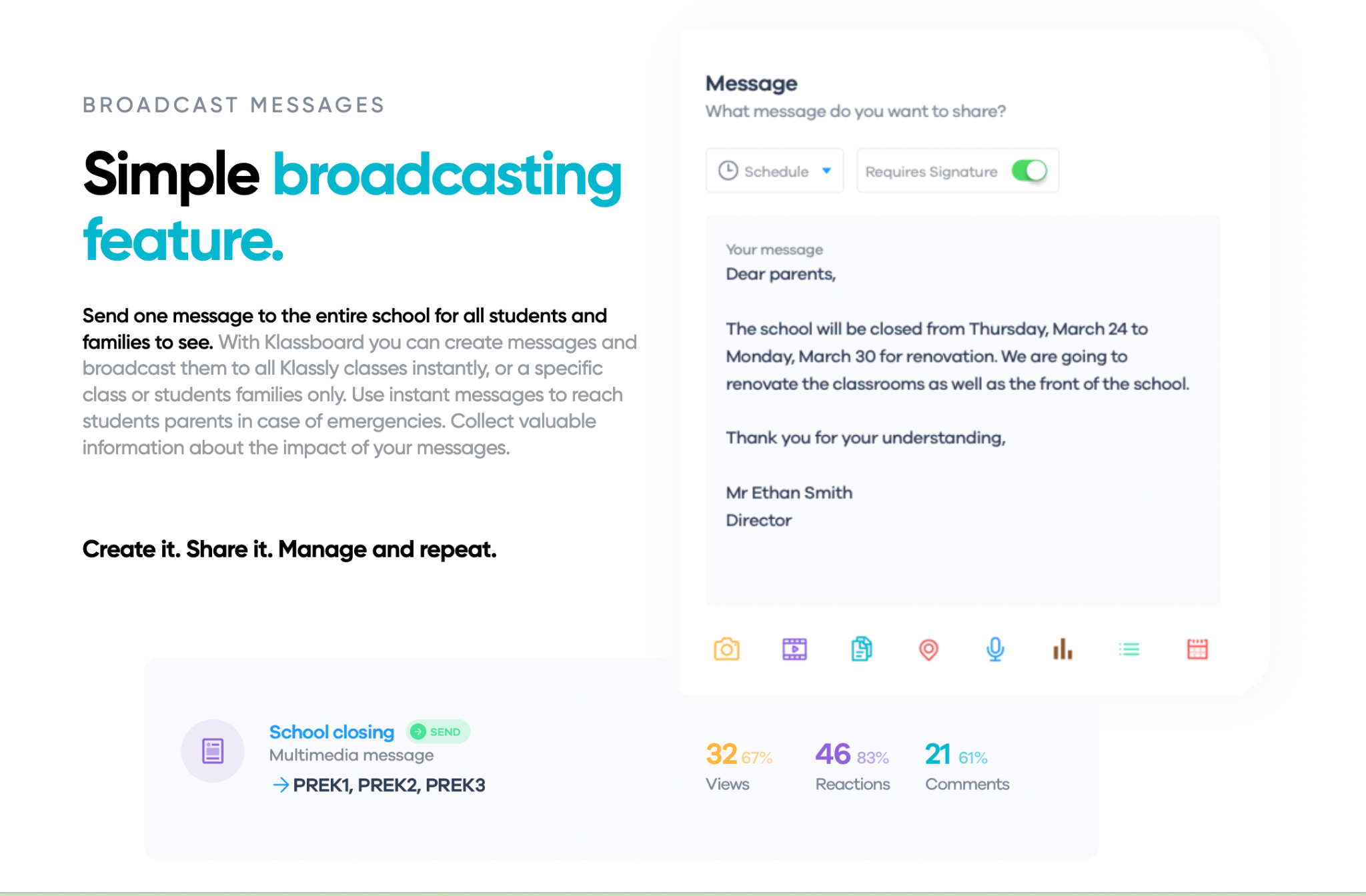
We know that sharing information is important, especially when it is time-sensitive. With Klassboard Master, school districts have access to a variety of features for sharing information with families and in an emergency, broadcasting text messages directly to families and schools, which bypasses the app. This feature is essential because although families have preferences for communication, they may choose to rely on text messages rather than the app. In an emergency situation, being able to reach all families immediately is critical. Districts and Schools can see engagement data for messages or posts in each class’s timeline, and know whether all families have been informed. It enables administrators to broadcast media and communicate in a transparent and inclusive way and also track important data from the schools’ Klassboards and each class’ Klassly for actionable insight.
With Klassboard Master (for districts) and Klassboard Pro (for Principals and school admin), messages can be broadcast to all Klassly classes (managed by teachers) instantly, or to a specific class or students’ families. Teachers and administrators can send instant messages to reach students’ parents in the event of an emergency. Through the dashboard, schools can collect valuable information about messages that have been sent, engagement data, comments, private responses, attendance records, and student information.
When district leaders use The Klassboard Master to link and access every school via their Klassboard in the community on which each Klassly class is linked, all communication becomes streamlined. They are better able to facilitate the management, organization and guidance of the school community by using one simple and free tool. It promotes clear communication from district to school to family, streamlining communication and in a centralized virtual space which helps everyone access the information they need clearly when they need it.
About the Author
Rachelle Dené Poth is a Foreign Language and STEAM Educator at Riverview High School in Oakmont, PA. She is also an Attorney, Edtech Consultant, and Speaker. Rachelle is the author of seven books about education and edtech and a blogger. Follow her on Twitter and Instagram at @Rdene915.
**Interested in writing a guest blog for my site? Would love to share your ideas! Submit your post here. Looking for a new book to read? Find these available at bit.ly/Pothbooks
************ Also check out my THRIVEinEDU PodcastHere!
Join my weekly show on Mondays and Fridays at 6pm or 6:30 pm ET THRIVEinEDU on Facebook. Join the group here