

Guest Post by Jethro Jones
Twitter: @jethrojones http://twitter.com/jethrojones
Web site: http://transformativeprincipal.org
My name is Jethro Jones, and I am a principal in Alaska. I have helped three schools become trauma informed as a principal and many others through my podcast and Trauma course. I have worked long and hard to figure out some strategies that all school personnel can implement effectively. I’ve gone through a lot of trial and a lot of errors where I have really messed up and I’m going to share some of those secrets here.
Whether your school has created or attended a trauma-informed practices training or not, there are three things you can do to respond to situations in your school in a trauma-sensitive way. Implementing these strategies is simple enough that you can start implementing them today. They are powerful enough that you will see results almost immediately.
1. Ask Questions
Anytime you’ve got a kid who’s acting out or who’s struggling or whatever, instead of saying, “You need to be doing X,” ask the student questions.
This is really simple.
“How are you doing?”
“What are you working on?”
“Where are you heading?”
“What’s going on over here?”
“Can you help me understand…?”
Asking questions gives the student an opportunity to express him or herself in a way that allows them to deal with whatever’s going on.
The challenging part about asking questions is sometimes we as teachers turn questions into statements of condemnation!
For example, “Why are you running in the hall when you know you should be walking?” is more of a condemnation than a question.
We need to ask questions and figure out what is actually happening. Give them an opportunity to express themselves and deal with it. This is a hard thing for us. Because we have rules, we have expectations, we have policies and procedures.
And we as adults are very comfortable in those shoes.
And if we’re not comfortable, then it’s easier for us to say, Stop running. Stop doing that. Stop this. Stop that.
And that’s just not helpful to a child experiencing trauma. Because they’re not thinking–they’re only acting. We need to get them to slow down and think!
When you ask questions, you require the student to stop and think about what they are doing. Your voice doesn’t sound like a teacher in Charlie Brown when you ask a question.
Don’t turn questions into accusations, but make them clear, inquiring concern for the student.
You’ll get great results.
2. Don’t Take Things Personally
Every educator works hard and takes her job seriously and personally, and teachers put so much into their work.
And I don’t mean don’t take your work personally. What I mean is, don’t take the students actions towards you personally.
They’re most likely not a personal attack.
Yes, they will hurt. Yes, it will be uncomfortable. But you can’t take what they do, and think they’re acting out towards you to hurt you personally, that’s just not what is happening. Even when we feel like it is.
Kids desire to please the adults around them. Kids desire to make good choices.
The number of reasons that they have acting out is probably innumerable.
It’s rare when a student wakes up and says, boy, Mrs. Jones really is going above and beyond and helping me at school, I should totally do something that hurts her today. That’s not what kids do.
Sometimes, kids don’t know how to react to someone giving them positive attention, and they attempt to push them away. I once had a student who found out she was moving away from the school, and proceeded to destroy all the hard work her teachers had been putting in. When we talked to her, she was finally able to articulate that it was easier to leave with people mad at her so she didn’t feel like she was missing them as much, because you don’t miss people who are mad at you.
So there are two things you can do. Number one, ask, why is this kid doing this?
Number two, what can you do to deal with this behavior?
We as educators have to recognize that we can’t change anybody, every person has to make that choice for him or herself. We can certainly put things in place to help them make good choices, which we do all the time.
But we cannot change anybody. They need to change themselves.
We need to be sure that we are making choices that allow us to not take it personally like they’re attacking us, because even if they do attack us, it’s not personal. Kids are naturally kind, nice, wonderful, sweet, thoughtful little human beings. It’s when they’ve had these adverse childhood experiences, that they start acting differently.
And what our role is, is to help them to be successful even when they’ve had those experiences.
3 Know Your Role
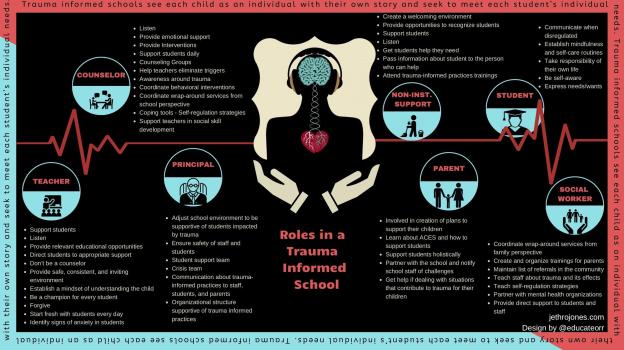
The image above is a powerful way to make sure that people know their role is in a school that is trauma informed. Get a printable version here that you can use as a handout.
You’re not a counselor or a social worker. You’re an educator. You shouldn’t try, and NOBODY should expect you to be anything you’re not.
Could you be a therapist, counselor, or social worker if you tried? Yes. Do you have what it takes? Absolutely!
When a student doesn’t know how to read, what do we do? We teach them.
When a student doesn’t know how to write, what do we do? We teach them.
When a student doesn’t know how to drive or swim, or do whatever, what do we do? We teach them,
When a student doesn’t know how to behave, what do we do? Usually we punish them, what we should do is teach them.
And so our role as educators is to teach and help kids learn.
Now, there are so many different ways to do this!
Our purpose here is not to discuss all the many ways we can teach them, but to emphasize that it is our role to teach them, regardless of how they come to us.
Now, I want to share an experience that is really powerful. In her book, Allison Apsey shares a very similar experience. There are certain students that take up all your time! You are constantly spending time with those students, recognizing that it is worth the time and effort to intentionally and proactively spend time with those students that take up all your time,
if you’re going to be spending time with them anyway, why not work with them to get support in advance, why not work with them to build that relationship?
I call this Proactive Teaching. Some call it check and connect, or check in check out.
These students that are really struggling need additional support. You’ve got to have good Tier 1 behavior expectations and practices in place, but you and I both know there are kids for whom that doesn’t work, and they are the kids that reside in Tier 3! They need the extra help.
Instead of waiting for this student to be sent down to the office, we proactively go teach this student how to make good choices. Don’t think you can do this with 100 kids! It won’t work.
Find those two (or maybe three) students and get with them before they cause the trouble. Take the initiative and connect with them before they can get into trouble. Get with them before they get overwhelmed and can’t perform. Get with them before they wreak havoc in your class!
I had one student who would have a meltdown nearly every day because he was so worried about his mom and young sister. Instead of waiting for his behavior to cause him to be taken out of class, I met up with him before he had a chance for that, and talked about how things were going and what I could do to help him. Then, when his meltdown would inevitably come, we already had a connection that day.
Did this take a lot of time? Yes.
Was it worth it? Yes, it was, because it was so much better to do that in a positive, preventive proactive way than it was to deal with the issues and problems that he was going to have after the fact. Because when he had a bad day, he wanted to get it out in an aggressive way that hurt other kids, and that just wasn’t going to work in our school.
So instead of spending the 30 minutes trying to calm him down after a problem out on the playground, we spent 20 minutes before and during recess to give him that support.
It wasn’t my role to help him deal with his issues at home. I needed to be a trusted adult who was teaching him how to deal with things at school. Of course, a counselor was involved to help him deal with the challenges he faced at home.
To recap:
1. Ask questions.
2. Don’t take it personally
3. Know your role.
These three strategies will help you out immediately with whatever challenges you are facing in your school. If you need additional help or support along the way, please reach out to me by email or at my web site: jethrojones.com/trauma
**Interested in writing a guest blog for my site? I would love to share your ideas! Submit your post here.
Looking for a new book to read? Many stories from educators, two student chapters, and a student-designed cover for In Other Words.
Find these available at bit.ly/Pothbooks






 When you focus on a line, it closes the screen down to that one specific sentence, which you can also make narrower or thicker depending on your choice.


 Libraries might seem dated, but they are in fact one of the best-kept secrets. We got library cards for our kids as soon as they could write their names. Today, cards can be used to check out everything from audiobooks to new release movies. Apps like Hoopla and Overdrive are amazing. With a library card, these two sites offer thousands of books, movies, and music. Giving kids the opportunity to borrow a stack of books without any cost is ideal for many families. Taking advantage of MEL, the state’s interlibrary loan program, allows people to request books from all over the state of Michigan and have them sent right to your local library. Showing someone how to use the library unlocks a world of possibility. Anything can be learned by using the public library. And, using the library saves a lot of money. Surrounding kids with books is one of the best things you can do to get them reading. The library makes reading an inexpensive activity. I am not alone when it comes to using the library. Several
  A few years ago one of my boys really got into hockey. We found all of the Matt Christopher books about hockey in the library, and he eagerly read each one cover to cover. Last summer my daughter was obsessed with learning about swimming. We raided the library for any nonfiction book we could find on the topic. During the winter it was graphic novels, and today she loves to dive into anything related to fairy tales. Even though I have a pretty good idea about what each of my kids likes to read, I had experiences where I selected a book or two I thought might be perfect, only to have them not show an interest in what I picked out. I do not take it personally, since there is no cost associated with it, and know that as a reader I don’t read every book I take home from the library.
 When I first started teaching, I would ask the parents of my really motivated readers who seemed to always be reading, “Tell me how you did it? What do you think has made the difference in getting your child excited about reading?” Almost every time I was given the same answer, “I suppose he just sees me reading all the time, and it just seemed like the thing to do. My nose is always in a book”.
 Exposure to good literature and authors is one of the best gifts we can give our readers. I absolutely love sharing some of my favorites with kids. Just as we could taste cheese, wine, sauces, desserts, or other menu items, book tastings are a great way to try new things. I typically put a book in front of each place setting. Each child will get a chart to list the title he or she tasted along with the author, genre, and the likelihood that he or she might read the book. The tasting is timed to keep it moving. And so after a total of several, ninety-second tastings, kids are able to walk away with several new titles that could be considerations for future reading. This activity can be adapted to any size (I have had great success with it in the classroom).
 There are times that I find my kids book hopping, and not finishing titles. I have also seen my kids plateau as readers. It is fun when we all work together and focus on completing a challenge that encourages reading and celebrating the success of others. It works well for us to keep a running list of books read on the refrigerator. We set a goal for a number of books to be read and immediately start brainstorming how to we will celebrate our success. It is nice to focus on working together and cheering each other on.












 Learning as I go: Reflections & lessons learned