Creating a School Community

This post is sponsored by ParentSquare. All opinions are my own.

Over the last few weeks, I have been exploring ParentSquare and considering how it can be used to promote family engagement, foster better communication and facilitate collaboration between home and school.

Choosing something that will give students, teachers, parents, and administrators equal access to the vital information, resources, school news, and alerts, in addition to many of the other communications that are exchanged on a daily basis is an important task. There are multiple tools that can be used, but this often requires remembering where to find specific information or parent and teacher preferences for communication. Having one platform that provides all of this and more makes sense. With ParentSquare, all of this is possible and it brings with it the potential for using it in different ways that meet the needs of school and home, making it highly beneficial.

What it offers

There are many features of ParentSquare that facilitate more consistent and reliable information sharing and access to resources. Consider the tools and methods you are currently using and then compare with ParentSquare to see how much easier it is to engage families in the education of our students. Think about a typical day and the ways you communicate, the tasks that you do, the information that you exchange and how much time is spent in the process. ParentSquare helps to streamline all of the necessary communications.

Here are 10 of the best features that I think make ParentSquare really stand out and why I recommend that school administrators and teachers take time to explore the platform.

10 features that make ParentSquare a standout

  1. Ease of navigation within the platform: A key feature of ParentSquare is in its simplicity. Available through the web or mobile devices, getting started and finding what you need is easy, without worry about a steep learning curve.
  2. Increases families engagement: Families choose their preferred methods of communication such as email, text, web portal, app notifications, voice calls, or mobile app. ParentSquare helps to create a closer home to school learning community full of ways to connect families.
  3. Facilitates timely and relevant communication between home and school: Messages can be sent immediately, with real-time interactions and reports to show the reach and deliverability, making it easy to identify who has or has not been contacted. Easier to share relevant updates of all school-related activities and groups within one platform.
  4. Promotes better two-way communication with parents: Keep the conversation going with multiple options for communicating in less time. Communicate through direct messages, create polls, and post comments all in one platform.
  5. Easier to plan and RSVP for upcoming events: With ParentSquare, creating events and tracking RSVPs is much easier. ParentSquare even sends reminders for you.
  6. Involves families through photo and file sharing: Share photos and files with families quickly and with private and secure access within the platform.
  7. Creates more opportunities for family involvement: Schools can create wish lists, manage volunteer sign-ups and launch fundraising campaigns, all in one platform.
  8. Language Features: ParentSquare offers direct language translation in real-time for two-way communication. Language translation can be specific to the school or based on family preferences.


9. “Pushes” vital information to families when needed: Immediate access to information such as emergency alerts, grades, absences, lunch balances, upcoming events, volunteer requests, parent-teacher conferences and more. Parents do not need to search for information, everything is easy to find.

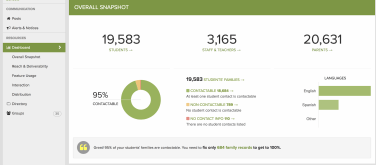
10. Analytics: With the reports, it’s easy to determine who received messages, how they obtained the information and how many people still need to be contacted. Access to the “Overall Snapshot” makes it easy to see how the information is being received and areas that need to be improved.


School to home communication and collaboration is at the heart of ParentSquare

Find out how ParentSquare can make a difference in your school. I recommend that you schedule a demo to learn more about the features and possibilities with ParentSquare. Personally, I like to get started by exploring the website, learning about the team and the platform as much as I can before the demo. It is helpful to consider the different methods or tools you currently use for communicating and collaborating with students and families. Perhaps even make a list to compare. You will see how ParentSquare unifies so many time-consuming tasks and streamlines the exchange of forms and correspondence, into one tool that provides it all.

ParentSquare provides a consistent and reliable way to communicate within the school and school district, fostering and building the relationships that promote better communication, student success, and family engagement. Sign up for a demo today!

_

E


Metaverse: Scavenger Hunts, Interactive Stories, Immersive Learning and now Collections

Sponsored Content, All opinions are my own

February 18, 2019

Learning and sharing through the world of AR

When I started creating with Metaverse, an augmented reality tool, a few years ago, I was immediately impressed with the potential for learning and the many possibilities for engaging students more in authentic learning “experiences.” More ways to move students from consumers to being the creators which is what we should strive to do in our classrooms. The first “experience” that I created took a bit longer than most because I chose to not explore any of the tutorials or the helpful resources available and instead opted to dive right in. Why? I thought it was better to experience possible struggles with figuring out how to create with Metaverse, similar to what students might face when they got started. As a teacher, I wanted to prepare myself to help them if and when they needed. What I noticed is that students were more than ready to create!

Over the past two years, students in my 8th grade STEAM classes have enjoyed creating with Metaverse and definitely figured it out much faster than I did. Being able to see their work, their creativity and then to enjoy testing their “experiences” has been very rewarding for several reasons. I have learned so much from them, it led to conversations about the importance of sharing struggles that we experience and to not be afraid to ask others (especially students) to help you. It even led to the addition of student tech assistants in my classes. There is so much to learn from students, and in addition to building technology skills and providing more immersive and engaging learning experiences for them, we empower students to become the leaders in our classroom. Developing their skills of problem solving, collaboration, critical thinking and pushing their curiosity will benefit them as they move through school and head into the future!

How does Metaverse promote student driven learning and choice?

It is important to offer students choices in learning and to step aside and encourage them to pursue knowledge on their own. With Metaverse, students can create fun experiences to share with their peers and have so many choices available to really make it an engaging way to learn. Regardless of content area or grade level, or even one’s role in education (why not create for teacher PD), there are thousands of new items to choose from and new features being added frequently. Students can spend a long time creating their storyboard or they can design an experience quickly, as Metaverse is user friendly, especially with the recent updates and addition of new features!

So many possibilities!

Students can find exactly what they need, create something meaningful and share their work with students in their class and even connect globally with other peers. Testing their experiences in class by scanning a QR code is quick, but what about if you want to keep all of the student projects in one space? Or even collaborate with other classrooms, either as part of project based learning or to connect globally? Students need to create for a purpose and sharing their work with others is very important. Sharing experiences can be overwhelming if you have the number of experiences being created like I do.(Students were so excited that they created extras on the weekends and sent them to me, to keep me from being bored while away from school! This is when you know that the tool is making a difference).

An important of student work is the ability to share it with others, to learn about one’s peers and enjoy learning together. Access to student work can be an issue, which is where Padlet helped initially, as a way to have students post their projects. But even this took time. I wanted to keep track of their work and have it accessible by students and teachers, as we collaborate by using Metaverse to engage all students in learning. Creating experiences with videos, 360 images and even portals, to immerse students in a world of learning right in their hands.

Explore the new Collections, now in beta release!

Wanting to be able to share and display the experiences created by students was very important and now, it is easier than ever for teachers to do. With the new “Collections,” now released in beta, teachers can manage student experiences, edit student work and easily share all of the experiences created in class! Why? Because it is easier to manage student work and save the experiences to use with other classes and even collaborate beyond your school.

To get started, simply create a “Collection” for your class and you can share the join code with students, or quickly add them from the experiences you have in your account.

Metaverse has so much potential as an instructional tool for teachers.

Why use Augmented Reality?

A popular topic at both FETC and TCEA was Augmented and Virtual Reality. Tools like Metaverse have tremendous potential to immerse students in a more authentic and purposeful learning adventure, by giving them more control in how they show learning and a hands-on experience. It is a fun platform to use in the classroom and benefits students by promoting student agency and increasing engagement in learning.

Collections create more opportunities for Interactive Learning Adventures

As educators, we want our students to have a learning “experience,” more than what the traditional methods of classroom instruction might offer. Finding time to create and explore can be a factor in deciding where to begin, but with Metaverse, it is easy to get started, especially when we let students take more control. We need to help students to embrace an opportunity to drive their learning. In doing this, we guide them toward a learning journey that will attach more meaning to the content, in a personalized and exciting way to learn, and above all, a more authentic experience. Teachers have access to collections where they can see, edit and share student work, track progress and help students as they create. Creating a collection is easy. Check it out here!

Many students learn more by doing, and when they have opportunities to engage in hands-on activities, it leads to more personalized experiences and student-driven learning. A world of learning that they create is right in their hands.

Some ideas to create with Metaverse

  1. A tour and a survey: Have students create an experience to introduce visitors to a town, retell a part of history, ask for input and preferences for travel. With all of the choices in items to add into Metaverse, thousands of unique possibilities exist.
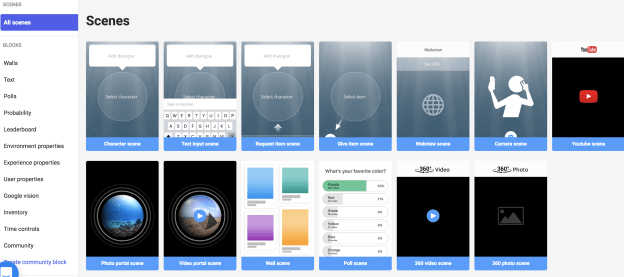
  2. Just for fun: Sometimes the best way to get students involved is by only offering a few guidelines. Provide a number of scenes, type of questions to include, different features including GIFS, Google vision, polls and more. Each student can create something unique and meaningful to them, and then using collections, share it with the class. If access to devices is an issue, set up learning stations in the room.
  3. Book review and tales: Why not have students explain key parts of a book, or make up a story, and include images, videos, portals and more as part of the experience. Share it with other students, maybe even add in a poll, and then use the results to brainstorm new ideas and keep the discussion going. I

Technology tools for education provide enhanced ways to learn, to engage students and to empower them in learning. As teachers, we always want to focus on the “why” when making our decisions, and with Metaverse, the “why” is clear: student driven learning and the power of creating. Start your collections today and share student work!