Leveraging Technology to Enhance the Learning Experience

Updated from an original post on DefinedSTEM.

Technology creates many opportunities for teachers to provide innovative learning experiences for students. An even greater benefit is that these learning experiences can take place regardless of the time and place, and offer students more personalized opportunities for interacting with their peers and the content. With so many choices now available, sometimes deciding on a specific digital tool or a type of tool can present a challenge.

I am often asked about where a teacher should start when either implementing technology for the first time or creating a blended learning environment. What I suggest is to first think about some of the learning activities that are already being used in the classroom. What has seemed to work the best and what are some that possibly either take a lot of time to create or that don’t offer students a lot in the way of choices.

Another consideration is focusing on your goals and what you are hoping to accomplish by using technology. Is it to create an access point where students can ask questions, obtain class resources or interact with their peers? Or is it to provide students with different methods to practice the content and also to apply their learning in more authentic ways?

Here are four strategies for helping students to communicate, collaborate and create in the traditional learning space as well as beyond the classroom setting. By trying some of these ideas, you will see some positive changes that promote student voice, create more time for you to interact with and support students in learning, and it will help students to build digital citizenship skills as they learn to leverage the technology and navigate in the digital world.
Improve Communication Through Effective Technology Use

One way that I have used technology that has had a big impact in my classroom is by using a messaging tool. A few years ago I noticed a disconnect with students and the class, either they were absent and could not get materials or they had questions after the school day had ended. By using messaging apps, I can send reminders, answer student questions and provide feedback when students need it. You can also use some of these apps to connect with families as an alternative to email. There are a lot of options available and your choices will depend on the level and area you teach and whether your goal is to set up communication between students and you or with parents. I use Remind with students and parents, and BloomzApp is another option for creating a space to interact with parents. Either of these is good for providing students and parents with live feedback. It is easy to sign up for either of these using any device, and privacy and security are provided.

However,  I was recently looking at communication tools and thinking about promoting family engagement and came across ParentSquare before attending FETC in January. ParentSquare is more than simply a one-way communication tool. It is a multi-purpose platform with capabilities to facilitate communication, collaboration and increase family engagement in schools. ParentSquare is for use in grades PreK-12, geared toward streamlining parent notifications, increasing participation and family engagement in the school community and more. It can be used by students, teachers, staff members, administrators, and parents, and it creates a virtual space where so many vital communications and interactions can be completed. 


ParentSquare provides a consistent and reliable way to communicate within the school and school district, fostering and building the relationships that promote better communication, student success, and family engagement.

Enhance Collaboration Through Digital Learning Spaces

By establishing a specific location for students to access class resources, find out about assignments, and to ask questions, we can provide the support that students need to be successful. Some of the ways that I have used Edmodo and Google Classroom are to curate and provide resources, post daily assignments or reminders, announce upcoming class events, and to be accessible for student questions. Depending on the platform you use, it is easy to update the site and it is also a good way to help parents stay informed of what is going on in the classroom. It can be a collaborative learning space for students to interact with their peers or to connect globally using additional digital tools that are all housed within one learning space.  Tools like Edmodo, a blogging site, Google Classroom or creating a standalone website will help to create a connection between you, the students, and their learning.

Foster Active Discussions

Sometimes you may want to have students brainstorm an idea, participate in a scavenger hunt, share a learning experience, or just respond to a question. While we can always use the traditional tools for this in class, sometimes we may want the discussion to go beyond the class time and space. I would recommend trying either Padlet or Synth. There are so many ways to use Padlet, that if you want students to post images, record audio, upload video, or simply respond to a question, it offers all of these options in one tool. Students have come up with some great ideas for using Padlet, such as building a digital portfolio, creating a multimedia presentation, or presenting their Project Based Learning. It is a versatile tool that many educators may already be using, but may not be aware of other innovative ways to use Padlet.

Also by using Synth, a tool for podcasting, educators can provide daily class updates, add links or resources to supplement what was done in class, and even interact with other students in classrooms around the world. It enables discussions to happen at any time and is an easy tool to use for promoting discussions and helping students to share ideas. There are many ways that these tools can also add to the organization in the classroom by providing written or verbal directions and ways to reinforce instruction.


This slideshow requires JavaScript.

Enhance Visualizations and Presentations

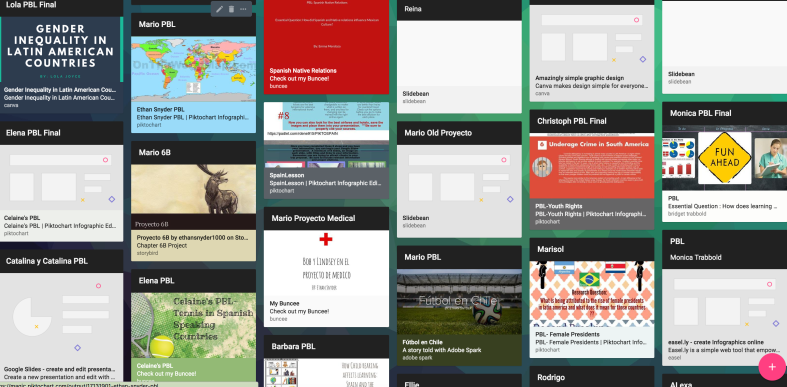
Some students are visual learners and having tools which enable them to display different types of information and content, they will be able to retain the content in a more authentic and meaningful way as they create. Infographics are useful for so many class assignments and projects that are student created, but they are beneficial for teachers to create a course syllabus, make visuals for the classroom, or to create a flipped lesson and display all of the learning materials in one graphic. Beyond creating representations of learning, they are useful for sharing information and offering ways for students or parents to contact you or access class materials. Some of the options available are BunceeCanva, Piktochart, Smore, and Visme. It is always good practice to learn with and from the students, so try creating some new materials for your classroom as well. Perhaps create a class newsletter, or make some signs that will be useful for your learning space.


There are many ideas for how to expand the learning space and to set up different learning opportunities for students. These are just a few of the ideas that we have used and that have worked well in our classroom. Sometimes we just need to brainstorm a little or, if you want to find new ways to use some digital tools in your classroom, try asking your students. Students come up with really creative ideas and by involving them in some of the classroom decisions, they will feel more valued and have a more meaningful learning experience.


Screen Shot 2017-10-28 at 9.04.12 PM

Creating a School Community

This post is sponsored by ParentSquare. All opinions are my own.

Over the last few weeks, I have been exploring ParentSquare and considering how it can be used to promote family engagement, foster better communication and facilitate collaboration between home and school.

Choosing something that will give students, teachers, parents, and administrators equal access to the vital information, resources, school news, and alerts, in addition to many of the other communications that are exchanged on a daily basis is an important task. There are multiple tools that can be used, but this often requires remembering where to find specific information or parent and teacher preferences for communication. Having one platform that provides all of this and more makes sense. With ParentSquare, all of this is possible and it brings with it the potential for using it in different ways that meet the needs of school and home, making it highly beneficial.

What it offers

There are many features of ParentSquare that facilitate more consistent and reliable information sharing and access to resources. Consider the tools and methods you are currently using and then compare with ParentSquare to see how much easier it is to engage families in the education of our students. Think about a typical day and the ways you communicate, the tasks that you do, the information that you exchange and how much time is spent in the process. ParentSquare helps to streamline all of the necessary communications.

Here are 10 of the best features that I think make ParentSquare really stand out and why I recommend that school administrators and teachers take time to explore the platform.

10 features that make ParentSquare a standout

  1. Ease of navigation within the platform: A key feature of ParentSquare is in its simplicity. Available through the web or mobile devices, getting started and finding what you need is easy, without worry about a steep learning curve.
  2. Increases families engagement: Families choose their preferred methods of communication such as email, text, web portal, app notifications, voice calls, or mobile app. ParentSquare helps to create a closer home to school learning community full of ways to connect families.
  3. Facilitates timely and relevant communication between home and school: Messages can be sent immediately, with real-time interactions and reports to show the reach and deliverability, making it easy to identify who has or has not been contacted. Easier to share relevant updates of all school-related activities and groups within one platform.
  4. Promotes better two-way communication with parents: Keep the conversation going with multiple options for communicating in less time. Communicate through direct messages, create polls, and post comments all in one platform.
  5. Easier to plan and RSVP for upcoming events: With ParentSquare, creating events and tracking RSVPs is much easier. ParentSquare even sends reminders for you.
  6. Involves families through photo and file sharing: Share photos and files with families quickly and with private and secure access within the platform.
  7. Creates more opportunities for family involvement: Schools can create wish lists, manage volunteer sign-ups and launch fundraising campaigns, all in one platform.
  8. Language Features: ParentSquare offers direct language translation in real-time for two-way communication. Language translation can be specific to the school or based on family preferences.


9. “Pushes” vital information to families when needed: Immediate access to information such as emergency alerts, grades, absences, lunch balances, upcoming events, volunteer requests, parent-teacher conferences and more. Parents do not need to search for information, everything is easy to find.

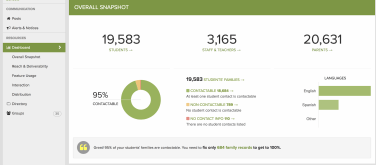
10. Analytics: With the reports, it’s easy to determine who received messages, how they obtained the information and how many people still need to be contacted. Access to the “Overall Snapshot” makes it easy to see how the information is being received and areas that need to be improved.


School to home communication and collaboration is at the heart of ParentSquare

Find out how ParentSquare can make a difference in your school. I recommend that you schedule a demo to learn more about the features and possibilities with ParentSquare. Personally, I like to get started by exploring the website, learning about the team and the platform as much as I can before the demo. It is helpful to consider the different methods or tools you currently use for communicating and collaborating with students and families. Perhaps even make a list to compare. You will see how ParentSquare unifies so many time-consuming tasks and streamlines the exchange of forms and correspondence, into one tool that provides it all.

ParentSquare provides a consistent and reliable way to communicate within the school and school district, fostering and building the relationships that promote better communication, student success, and family engagement. Sign up for a demo today!

_

E


Promoting Family Engagement: 5 Ways to Foster Meaningful Connection

Originally published on Getting Smart


Involving families in the education of our students is crucial to their success. Beyond just involving families, schools need to strive for family engagement and the creation of partnerships between school, home, and community. These partnerships, or connections between “stakeholders”, are important for promoting student well-being and success. When there is a greater focus on fostering more meaningful and personal connections, the school, community, and families can work together to provide the support, structure and make decisions for the benefit of student achievement.

Importance of Connecting

To promote family engagement, we must be intentional in learning about the families in our schools. It is important to make an initial connection, invite families in to engage in conversations and start to develop an awareness of each family’s needs, preferences and prior experiences in terms of involvement with the educational community. We should also explore any perceived or real barriers to family engagement. Recognizing some of the biggest barriers to family engagement will help schools to develop the most effective strategies to help families feel more connected to and supported by the school.

A survey of over 18,000 parents indicated some of the biggest barriers to family engagement were: time, lack of information, availability of childcare, and inconsistent treatment of students. Using this data, schools can develop specific strategies aimed at reducing and eliminating these barriers. Understanding the diverse needs of the families and students in our school system is crucial, as we always want to create a welcoming and supportive environment, one which should also be reflective of the educational setting for our students. A strong and collaborative home to school partnership has been shown to positively impact student performance as well as empower parents.

Communication between school and home has traditionally involved sending information in letter form, an email or by making a phone call. While these methods are still useful, they are not the best choices in terms of timeliness, especially when it comes to time-sensitive matters. Being able to connect and share school news and update families on student progress, in a timely manner, is vital to classrooms and fostering this sense of “community”. The sense of “community” comes from focusing on the building of family relationships, which are critical for student success in the classroom.

In a survey done by SpeakUp in 2015 (cited in Learning Transformed), 55% of the half million K-12 parents surveyed stated that they wanted a weekly text message with updates. The same survey given five years prior yielded a result of only 5% of parents interested in this form of communication. With the digital age and many options for communicating, it is not that surprising to see such an increase. However, before starting to use a certain messaging tool, teachers should first consider what might be the best way to connect with parents and how to provide access to the classroom resources which will support student growth. Sharing an initial survey can help educators can determine how to best establish a classroom presence and open channels of communication.

Connecting with Families

There are many ways to connect with parents. With technology, tasks such as sending class updates, assignment reminders, creating a calendar, sharing photos and distributing information are much easier. Knowing that families have mobile devices, does not guarantee that WI-FI access is available, and this is something that can be determined through the use of a survey.

In a recent Trends in Community Engagement report, written in partnership with Project Tomorrow, 30,000 parents expressed expectations for frequency and forms of communication. Among the key findings of this report were that parents want timely and impactful communication. While parents want to be kept informed, they do not want to be overwhelmed with a flood of information. The CDC created strategies to help schools build frameworks to promote family engagement. The focus is to “Connect, Engage, Sustain” families’ in the educational community. Schools can refer to the many resources with tips for promoting engagement. To get started, here are five different ways to “connect, engage and sustain” family involvement.

1) Communication Tools: By using social media tools such as Twitter or Instagram, school leaders, and classrooms can transmit messages quickly and with a far reach. Tools such as Remind, or BloomzApp enable teachers and parents to communicate and also share information quickly. Both options offer translation capabilities which promote digital equity and accessibility. ParentSquare, is a multi-purpose platform with capabilities to facilitate communication, collaboration and increase family engagement in schools. ParentSquare is for use in grades PreK-12, geared toward streamlining parent notifications, increasing participation and family engagement in the school community and more. It can be used by students, teachers, staff members, administrators, and parents, and it creates a virtual space where so many vital communications and interactions can be completed. By using these tools, teachers and parents communicate instantly, privately, and as often as needed throughout the year.

2) Video Tools: Sharing news about student work, or creating a lesson for students to view outside of class, can be done with tools such as EducreationsFlipgrid, or Screencastify. Teachers can record videos of weekly announcements or special events, or even teach a lesson and share the links with parents, which will create a more supportive connection between home and school. Videos can also be a great way to have students share their learning, even creating a digital portfolio, or have families record video introductions to learn about one another.

3) Blogging/Class Webpage: Maintaining a classroom space in the form of a blog or a class website, can be done easily using tools like KidblogPadletEdmodo or other web-based learning platforms. When families know they can refer to one centralized location to obtain class updates, ask questions, or read about class events, it provides a more structured framework for engaging families in the daily activities of the school and fosters a greater connection between school and home. It also aids in resolving the barriers of time and lack of information, as families can refer to these spaces when convenient.

4) School and Community: There are a lot of possibilities for amplifying student learning by connecting with and sharing news of school events within the community itself. Social media can be one way of connecting, or simply by seeking out the local library and businesses to bring in real-world experiences for learning and to inform the community of the educational events going on at school. Invite the community into events such as Back to School nights, Open Houses or STEAM showcases, or hold a learning night for families. Any of these offer a good opportunity to meet and engage families in conversations and planning to impact student learning.

5) Family Activities: Finding ways to involve parents in the learning process can be a challenge. A good opportunity to co-learn is to take part in something called “Family Playlists”. A Family Playlist, devised by PowerMyLearning, basically has the student becoming the “teacher”. In their role as “teacher”, students share their knowledge with the family, who then provides feedback to the classroom teacher, as to how the student conveyed the information and their confidence in doing so. Trying this method is a good way to further involve families in the educational experience, leading to a greater understanding of the type of learning occurring in school as well as provide beneficial insight into a child’s progress. It also promotes ongoing and supportive collaboration between home and school.

There are many strategies that schools can use to keep families informed and involved. The key is to find a way to not only make an initial connection and build the “family to school” partnership but to engage families and continue to collaborate and grow together. These connections will lead to the creation of solid and supportive relationships between school and home, which will promote student achievement and enhance their sense of belonging.

This slideshow requires JavaScript.

This slideshow requires JavaScript.

ParentSquare: Building a Community from School to Home

This post is sponsored by ParentSquare. All opinions are my own


In my previous post, I shared the background of ParentSquare, where the inspiration came from and provided a basic overview of what the platform offers. To learn more, I scheduled a demo with Anupama Vaid, Founder and President of ParentSquare, and was able to “experience” the platform from the perspective of a parent, teacher, and administrator. I also had an opportunity to explore the platform on my own, delve more into each of the features, and compare it to the tools that I use in my own classroom as well as those used within my school.

ParentSquare offers unique features that make it stand out when compared with other similar home-to-school communication platforms currently used in schools. While other platforms offer similar benefits, one of the things I appreciate most about ParentSquare is understanding the vision that Anu has for the platform. She has a genuine passion for connecting families in the school community.

The Power of Technology

When I spoke with Anu, we first talked about technology and its benefits. When asked about the purpose of ParentSquare and what makes it different from similar tools, Anu said her goal is to provide teachers with “a system that takes care of everything, one that is automatic.” Because of the way ParentSquare is designed, teachers will find that there is not much of a learning curve at all and that it is very easy to navigate. She added, “The purpose is to simplify the technology enough so that everyone can use it because that’s the power in technology.”

Everything in ParentSquare has a similar look and feel, “if you know how to do one thing, you know how to do everything.” For students, parents, teachers, and administrators, this ease of use and accessibility are key.

When it comes to ParentSquare, Anu has a unique perspective. She can evaluate the benefits by using it as a parent, which gives her a more authentic experience with the platform. And she is in a position to make changes based on the feedback she receives and through her own experience in communicating with her children’s teachers.

What makes ParentSquare stand out?

The first thing that I noticed about ParentSquare is how easy it is to navigate in the platform. When looking at digital tools, especially those that offer as many features as ParentSquare, a common question is if there will there be a big learning curve. A key feature of ParentSquare is in its simplicity. Students, parents, teachers, and administrators, whether tech-savvy or new to technology, will be comfortable using ParentSquare.

With ParentSquare, you can streamline many of the tasks and communications that are a regular part of school, but that typically come in multiple formats. ParentSquare takes everything that schools and teachers are currently using and unifies them in one platform that is easy to use and widely accessible. Schools can establish consistency in communication which will increase family engagement and provide all of the necessary resources in a safe digital environment.

Features that make a difference

  1. Smart Alerts and Notices: Send alerts for school closings, urgent notices, or quick reminders to parents. Alerts can be sent to the entire district, individual schools, parents, or students. Sending a recorded message or using the text-to-speech feature provided by ParentSquare is easy to do. Through the reports, you can verify the number of messages that have been received, even getting a prompt that provides the percentage of contacts being reached and the number needed to reach 100%.
  2. Classroom Communication: Posting a message takes little time and messages can be sent to parents, privately exchanged with teachers, or as part of a group chat. Parents choose their preferred method of contact and you simply create one message that is delivered to parents in the format and language they choose.
  3. School Business and Workflows: ParentSquare offers many resources such as:
  • Parent Conference Signups
  • Class “wish lists”
  • Volunteer requests
  • RSVPs for events
  • Permission forms
  • Calendar of events (can be synced with personal Google calendar)
  • File and photo sharing
  • Quick polls
  • Absence excuses

Exploring the features of ParentSquare

While exploring the demo site, I decided to look at features related to two areas:

  • Clerical tasks: taking attendance, creating permission forms, and contacting parents.
  • Daily classroom procedures: sending class announcements, posting reminders, and sharing class materials.

Personally, I have been using between four and six different apps and websites to complete these tasks. However, with ParentSquare, you can facilitate faster and better communication and collaboration between home and school. And more importantly, it will help to foster the relationships that are the foundation of learning.

Here are just five of the many benefits of using ParentSquare in schools:

  1. Parent-Teacher Communication – With ParentSquare, it is easier to:
  • Provide updates on student progress
  • Be accessible for parent concerns
  • Arrange parent-teacher conferences
  • Verify when messages have been received and who you need to reach

2) Directory – Parental contact information is more accessible, taking less time to find and exchange emails or messages. You can search by student or parent name, email address or phone number.

3) Paper-free – Easier to keep track of permission forms, absence excuses, and volunteer sign-ups. Exchange information faster and access the “paperwork” when you need to without having to print extra copies or keep folders full of documents.

4) Grade reporting – ParentSquare integrates with your grade book and notifications can be sent to keep parents informed about student grades.

5) Attendance Tasks – Keeping attendance records and gathering excuses for absences is much simpler using ParentSquare. Parents receive notices of absences and can respond with an excuse instantly within the app or on the web.

These are the first five areas that I thought of which likely take up a good portion of time for most educators each day. Using ParentSquare to facilitate these five tasks alone would make a big difference. In addition to being beneficial for time management, it would foster the creation of a supportive and engaged community of students, parents, teachers, and administrators.

Sign up for your demo today!

d550ec98-2667-430e-af7b-f4c9c203d686.gif

ParentSquare: Opening Doors to Better Communication

This post is sponsored by ParentSquare. All opinions are my own.

For the past three years, I have enjoyed attending the Future of Educational Technology Conference (FETC) held in Orlando at the end of January. It has become one of my favorite conferences because of the diverse opportunities available to explore emerging technologies and to network. One of my favorite things about FETC is seeing the new tools and exploring different options for my students, as well as finding some ideas to share with members of my PLN.

In the middle of January, I started to receive flyers from edtech companies who would be at FETC. My habit is to check out their website and then make time to stop by their booth and have a conversation to learn more. This year, I also received one email, from Anupama Vaid, Founder and President of ParentSquare.

Her email invited FETC attendees to stop by a hospitality suite hosted by ParentSquare, to learn more about the platform and spend time networking. Because of my schedule, I would not be able to attend, so I emailed Anu to introduce myself and make an initial connection. We had hoped to meet while there, but of course, time flies when you are at FETC and we missed the opportunity to connect in person. With a call setup for a few weeks later, I was glad to have more time to explore ParentSquare on my own before “meeting” with Anu earlier this month.

The story behind ParentSquare

Beyond knowing what a particular tool does or how a platform works and the benefit for students, I really enjoy getting to know and connect with the people behind these tools. Understanding their story and motivation for creating their product helps to make a more authentic connection with them and to see if my goals as a teacher are in alignment with their purpose so I can provide the best options for my students.

I enjoyed having the opportunity to learn about the start of ParentSquare and the growth that it has seen over the past eight years. Anu shared the story behind ParentSquare and her passion for the work that she does is clear. As a parent, Anu often received a lot of different messages and communications from her children’s’ school. While receiving the information was not a problem, the variety and inconsistency of formats (email, paper, newsletters, even Google groups) being used in schools was a problem. Parents had to keep up with and know the practices for communicating with each teacher.

Anu thought there had to be a better, more consistent way and she made it her goal to design something that would facilitate all of these vital communications in a more accessible and simplified way, that everyone (families, teachers, and administrators) could access. By using one tool, there is consistency, reliability and it promotes more equity when everyone has the same options for staying informed and feeling connected to the school. Anu wanted to “get everyone to be on the same platform, working together toward a common goal,” to unite all stakeholders in the educational community.

Starting with four schools during the first two years, ParentSquare has grown across the United States and is now being used in more than 1500 schools in 36 states. Moving forward, Anu hopes to connect with more schools and educators, to communicate in more effective ways so that together we can provide the best learning experience for students and the most support for their families.

What does ParentSquare offer?

ParentSquare is more than simply a one-way communication tool. It is a multi-purpose platform with capabilities to facilitate communication, collaboration and increase family engagement in schools. ParentSquare is for use in grades PreK-12, geared toward streamlining parent notifications, increasing participation and family engagement in the school community and more. It can be used by students, teachers, staff members, administrators, and parents, and it creates a virtual space where so many vital communications and interactions can be completed. It truly fosters a learning community.

Screen Shot 2018-03-18 at 8.30.54 AM

When I explored ParentSquare, what I noticed first is the setup of the landing page and how easy it is to locate the information you are looking for. It is a versatile tool that helps to facilitate many different interactions and increase communication between home, school and the community. Having time to explore ParentSquare closely, I thought about the tools that I use for communicating with students and families, and realized that rather than using multiple different tools, I could use ParentSquare to do all of that and more.

d550ec98-2667-430e-af7b-f4c9c203d686

With ParentSquare, communicating is easy. You can quickly exchange information, share photos, engage in two-way conversations with parents, plan events, to name just a few of the options, and I was amazed at how easy it was to find what I needed. You can see right away how beneficial it is for schools and families. If you find yourself or your school using multiple different apps to keep track of correspondence, announce events, share files and photos, send messages, or even ask for volunteers, ParentSquare enables you to use just one tool that facilitates so much within the school community.

screencapture-localhost-3000-schools-1-apps-1512408546362

There are three main areas that ParentSquare provides: Communication, Resources and Participation with many options available within each.

The landing page is easy to navigate to keep track of events, messages, upcoming activities like fundraisers or school events.

To communicate, you can send or schedule a post, create an alert, or even send a two-way message to interact with parents one-to-one.

Parents can opt to receive an email with a link to read without having to log in or they can choose to read a text message or app notification.

Parents can also choose to receive their notifications in a digest format. With a digest format, parents will receive all notifications from the day at a specified time, rather than receiving notifications that are dispersed throughout the day.

Signing up for events and sending RSVPs have never been easier.

Why choose ParentSquare?

Technology tools like ParentSquare provide so many benefits for schools and families. By using ParentSquare, schools can provide a more consistent, effective and reliable way to facilitate higher engagement and better communication between school and home. Parents will appreciate having one tool with multiple functions that help to bridge the gap that can happen when using multiple apps or means of communication within the same school setting. School to home communication and collaboration is at the heart of ParentSquare.

Sign up for a demo today and stay tuned for the next post which will highlight some of the features of ParentSquare and how to get started.


Class Updates: Communication and Collaboration made easy!

Sign up for free here for iOS and here for Android.

Why having a way to connect is important

One of the most important tasks for educators today is to find ways to be accessible to students. We want to build and foster a community of support, share information, and be available to our students. Developing a reliable way to communicate is critical for student success. While there are many traditional options available, ranging from posts on a class website, an email or even making a phone call home, educators need to be more accessible and have a way to exchange information in a timely manner.

With so many digital options available to choose from, those traditional methods of communicating have been converted into a much faster means of sharing information. Depending on the type of communication that you want to have for your classroom and parents, there are many possibilities to choose from. It simply takes figuring out what you hope to accomplish and to do better through this new method of communicating.

Why use Class Updates?

A few years ago, I started noticing what I refer to as a “disconnect.” When students were absent from class, had forgotten assignments at school, or did not understand the homework, it negatively impacted their opportunities for learning. I did not want the opportunity for learning to be lost due to a lack of communication and availability. I held myself responsible for finding a way to remedy the disconnect and find a way to be more available for students and for students to access class resources when they needed.

Class Updates, a student and teacher communication tool, offers a lot of ways to create more of a connection between students and teachers. When I first started using a messaging app, I only used it to send reminders to students and for students to be able to ask me a question. However, with Class Updates, there are some great features that enhance the learning experience and facilitate a better connection and method of communicating.

Some of the unique features of Class Updates include:

  1. User Profiles — include a profile pic, bio, and social media links
  2. Class/Teaching Schedule — set up your daily schedule, including start and end times
  3. Class/Group Calendar for important reminders/events/meetings — easy to set up a calendar to share with students
  4. Group Chat/Communication — message the entire class and facilitate conversations beyond the class period,
  5. In-app Messaging/Chat (individual to individual),
  6. Access to help when students need it — Teachers can be emailed directly from the app.

Sign up for free here for iOS and here for Android.

Students have shared how beneficial having tools like Class Updates is for asking questions, receiving reminders, and knowing when tests, homework and other events are coming up in class. You know something is working when the students tell you how helpful something is, especially by having the ability to ask questions and receive help when they need, which is often beyond the class period.

Some ideas for using Class Updates

-Field Trips are easier with a messaging tool

– Send reminders of assignments and upcoming tests and quizzes

– Announce a change in schedule

– Engage students in a group conversation after class ends

Questions?

Feel free to contact me at rdene915@gmail.com or connect with me on Twitter @rdene915. Remember to sign up and try it, Class Updates is free for everyone. Sign up for free here for iOS and here for Android.

Screenleap for Education: Learn From Anywhere at Anytime

This post is sponsored by Screenleap. Opinions expressed are my own.

At the end of January, I attended the Future of Educational Technology Conference (FETC) in Orlando. FETC has become one of my favorite conferences to attend and each year I return to my school with a lot of new ideas and tools that I’m excited to try in my classroom and share with colleagues and educator friends. This year was no exception. After reading about the 31 start-up companies that would be participating in the “Pitch Fest” competition happening in the expo hall, I decided that I wanted to start there. These companies—the “best-of-the-best startups”—would be pitching their products and services to a panel of judges. I find this to be one of the “musts” for me each year to learn about the new ideas and products available to educators. I enjoy getting to talk with the companies to understand their tools and how it benefits educators and students.

null

Before arriving, I had received a flyer from Screenleap. I took a quick look, but decided to set it aside and instead make time to meet with Tuyen Truong, the CEO and Founder of Screenleap, at the conference. We had a great conversation and I was immediately impressed with what I learned about Screenleap from Tuyen and from the reactions of other attendees who had stopped by the booth to learn more about Screenleap.

Not long after speaking with Tuyen, I presented my own poster session on designing “Creative, Personalized, and Productive Classrooms.” A common interest of the attendees was that they wanted to know options that would enable them to share lessons, to work with schedule changes that interrupted the normal class periods, and to provide access to learning opportunities for their students when their students needed them. Screenleap immediately popped into my mind and so I gave them a brief overview and pointed them in the direction of Screenleap’s booth in the EdTech Startup area.  

null

Tools with Purpose: Getting Started Quickly

Common issues for teachers regarding education tools are knowing where to start and whether something will have a big learning curve. These are both important factors, but we should also consider the WHY behind adding the technology. Based on the interests of the educators that I spoke with, thinking through it and trying it out on my own, Screenleap definitely addresses these concerns by making it easy for teachers to set up and start using with students and by saving valuable time for teachers who use it.

So How Does It Work?

null

Screenleap for Education allows teachers to share their screen with students and record it for later viewing. Whether the students are in the classroom or absent from class on a given day, they can watch the screen share live from wherever they are or access the lesson afterward when it is convenient for them. You can learn more about Screenleap for Education here. If you would like to try it out, you can start a free trial here!

Why Use Screenleap for Education?

When thinking about adding some new technology into the classroom, we really need to focus on the why behind choosing a specific tool or method. What difference will adding this tool make and how can it enhance the learning process and go beyond the traditional methods that are being used? What sets it apart from other tools you are currently using?

I think the benefits are clear with Screenleap for Education:

  1. Teachers can share from any device (including Chromebooks, iPads, Android, PCs, and Macs).
  2. Students don’t need to install any software to view their teacher’s screen, which makes it easily accessible to all students and saves time on IT administration.
  3. Everything is automatically recorded on the cloud for later playback. Teachers don’t need to manually upload the recording after the screen share.
  4. It saves teachers a lot of time because now they do not need to reteach lessons to students who miss a class since the recorded lessons are available for students to watch on their schedule. In addition, when it comes to re-teaching, you don’t always present the information the same way, so having a solid lesson that can quickly be shared with students to view and learn from is a real benefit for you.

Ideas for Using the Recording Feature

Depending on the content area you teach, or even if you have a different role than a classroom teacher, creating these recordings is easy and of great benefit. Having recordings available that you can share with colleagues, offer as extra instruction for students needing review, or even as a way to get feedback from colleagues about how you delivered a lesson, are just a few of the great ways to use the recording feature of Screenleap for Education. There are a lot of other possibilities for teachers, students, and administrators when the recording feature is used as part of a teacher’s daily instruction.

Getting Started

I found Screenleap for Education very intuitive and easy to get started with:

  1. After creating your account, there is an initial setup step where you can create your classes and add students to them.
  2. Once your classes are set up, it is easy to start sharing your screen with your students: all you need to do is click on the button for the class you want to share when your class starts. If it’s your first time sharing your screen, you will be walked through a one-time app installation before your screen share begins. null
  3. Once your screen share has started, your students can watch your screen share by signing into their accounts and clicking on the “View live class” button for your class.
  4. While you are sharing your screen, it is automatically recorded in the cloud.
  5. When you stop your screen share and have recording enabled, your recording will be processed and made available to you from the “Recordings” page. If you have automatic sharing configured, the recording will also be made available for your students to review.

null

Additional Features That I Like

  • If you want to remove something from your class recording, you can do so and then upload the updated version.
  • You can share the same recording with multiple classes.
  • You can track student engagement in real-time by clicking on “engagement” or after the recording has been processed. You will see a snapshot of the engagement graph at the bottom of every recording.

Conclusion

Screenleap for Education offers a lot of benefits for teachers, students, and administrators: students can easily follow along in the classroom or from home, teachers do not have to reteach lessons that students miss, students can review lessons before tests, and administrators have resources available  that can help to improve test scores for their schools through better learning. In addition, being able to stay connected and keep up with class—even when not in the classroom—and having information available to share with other teachers and administrators really makes Screenleap stand out when it comes to tools that benefit student learning.

Let me know what you think of Screenleap for Education. Again, you can start a free trial here

Exploring and Creating with 3D Bear Poth

Sponsored Content, All opinions are my own

Sign up for your free one month trial! https://3dbear.io/freetrial

Exploring the world in AR: 3DBear brings your environment to life

Ever since learning about 3DBear a few months ago, I have continued to be impressed with the platform and the company’s focus on meeting the needs and interests of educators and students. At both FETC and TCEA, I had the opportunity to spend time speaking with the 3DBear team and was able to get a better understanding of their vision for 3DBear and learn more about the newer features and ways to use it in the classroom. Even when I first started creating with 3DBear, I immediately saw a lot of benefits for classroom use regardless of content area or grade level, or even one’s role in education. With a library full of icons to choose from, animations, music, options for changing colors and sizes, moving object positions, and other functions like adding audio and student voice, it is possible to engage students in truly unique ways to learn. It did not take long to see the potential for using 3DBear not only as a tool for students as the creators but also as an instructional tool for teachers as a way to engage students more in learning by “hooking” them in with the use of augmented reality. 3DBear can be a game changer for students, acting as a catalyst to draw students in and let them go on a creative adventure. Get started today with a free teacher trial here!

Why use Augmented Reality?

A popular topic at both FETC and TCEA was Augmented and Virtual Reality. Often questions are asked whether the use of AR and VR has sustainability in education and I believe that there is. Each day I receive numerous email alerts sharing news from around the world about how teachers are using augmented and virtual reality to amplify student learning. Tools like 3DBear have tremendous potential to immerse students in a meaningful learning adventure, giving them more control of how, when and where they learn. Besides being fun to use, it offers students time to build their skills in critical thinking, problem-solving, collaboration and fosters creativity. It lets students make decisions and leads to a more student-driven classroom. This is what we want for our students, choices, agency, and engagement.

(photo credit to Mitch Weisburgh)

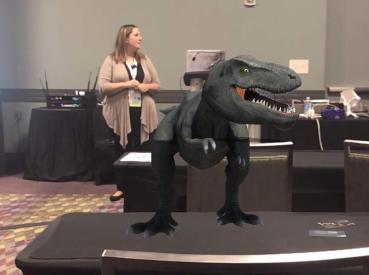
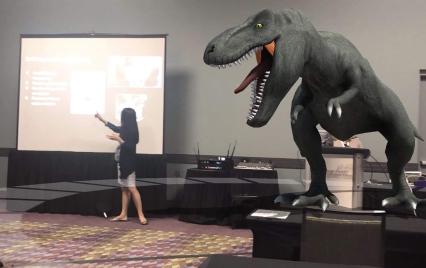
Walking among or narrowly escaping the dinosaurs

While presenting several sessions at both of these conferences this month, I noticed a lot of people starting to use 3DBear in unique ways. During sessions, attendees chose to be more active, and rather than simply listening in to how these augmented reality tools can be used, instead began quickly creating with them and even sharing them out socially. Completely unaware of the danger that I was in until seeing the tweet, I was surprised and thankful that I escaped the dinosaur lurking behind me as I presented at FETC! But I was concerned about the attendees when I saw the dinosaur that was lurking in the front of the room near Jaime. The excitement behind using these tools is evident when people begin creating and sharing them during your session, just minutes after you’ve introduced and only minimally demonstrated the tool. The learning curve of 3DBear? Not much at all! It’s very easy to navigate and dive right in to create your own world in your physical environment. Get started today!

(photo credit Mitch Weisburgh)

Why 3DBear

Students can use it to create 3D objects in different spaces and can then record a story to go along with it. The potential and power of storytelling in AR is awesome. What better way to have students represent their learning than to design their own world, decide what 3D objects to place in their environment and then create a narration to go along with it. Students can even upload items from their device or from Thingiverse. Student-driven learning and possible for students in grades K and up. More than just listening to teachers and how it benefits students, ask students for feedback. (See a video from a school in Medford and how students responded to 3DBear). Also seek feedback from educators, whether on social media or in my experience from attendees in the different sessions presented at FETC and TCEA.

Potential for Storytelling and Adventure

As educators, we want our students to have a learning “experience,” more than the traditional methods of learning and classroom instruction can offer. We need to empower students to become more than consumers of content, and instead help them to embrace the opportunity to become the creators and driving their own learning. By doing this, we start them on a learning journey that will serve to attach more meaning to the content, in a personalized and exciting way to learn, and above all, a more authentic experience.

There are many possibilities for using 3DBear and because time can be a deciding factor when it comes to exploring new tools and methods for classroom use, this is where 3DBear offers a lot for educators. Teachers have access to a teacher dashboard where they can see student work, track progress and explore the worlds that students are creating. There are lesson plans for Coding, Design Thinking, ELA, Math, Science, Social Studies, STEM, and STEAM-related themes available for different grade levels which include pacing guidelines. While the lessons are drafted for certain grade levels or range of grades, slight adjustments in the content enables teachers to implement these lessons into their classroom.

One of the best things about 3DBear is that teachers won’t have to spend a lot of time trying to figure out how to get started using it in the classroom. We can learn just enough and then put it in the hands of our students and let them run with it. Many students learn more by doing, and when they have opportunities to engage in hands-on activities, it leads to more personalized experiences and student-driven learning. A world of learning that they create is right in their hands.

When thinking about adding some new technology into the classroom, we really need to focus on the why behind choosing a specific tool or method. Ask ourselves what makes it different and what can it do differently for students that can enhance the learning process and go beyond the traditional methods that are already being used in the classroom. What sets it apart from other options or methods you have been using? I think the answer is clear. Students are the designers.

A Few Ideas to Try

  1. My town: Sharing where we live, describing a location or any lesson where students need to narrate a story, they can create an environment using 3DBear and add characters and more into their project. Once created, students can tell a story about the scene or even narrate in a foreign language. Why not have students create a “welcome to our town” project, adding in 3D objects and telling a story that can be shared with the community? A good way to share student work and give more meaning to the work they are doing.

(Alamo photo credit Jaime Donally)

  1. A book summary: One idea is to have students review a book, summarize something they read in class by bringing it to life with 3DBear. If the number of devices is an issue, use stations and have students work in pairs or small groups, each adding to the story.
  2. Let me teach you: Give students an opportunity to be the teacher. Choose a theme or have students select a topic and then come up with a way to use 3DBear to explain it to classmates. There are many options available for students to choose from, and it will reinforce their problem-solving, critical thinking, and collaboration skills, as well as boost creativity as they decide how to best visualize their lesson for others.
  3. Actors in a scene: Give students the chance to interact with a 3D character and maybe even sing together or dance together (who doesn’t love doing the floss with a 3D character?).
  4. Random objects: To really push their thinking, why not create a scene with a variety of characters, objects and more, and then ask students to write a story about it. A task like this can be applied to so many content areas, and grade levels and will definitely be a more authentic way to practice and learn. For students in Spanish classes, it is fun to add random objects into the classroom and have students write a story to describe it. Or, another possibility is to provide students with a narration in the target language and have them create a scene to represent the story.

So many ways for students to leverage technology for learning. They need our guidance to find a starting point sometimes, but then we need to just let them go with it and explore and create on their own. Besides building technology skills and learning about emerging trends, they will engage in powerful learning that not only reinforces the content area but also promotes the development of social emotional learning skills in the process. Augmented Reality has many benefits, the key is staying focused on your “why” for wanting to use it, and then finding the right task to get started. And remember, let the students take charge and learn from and teach one another, including you. Sign up for your teacher trial at 3DBear!

And share how you are using 3DBear in your classroom! @Rdene915

TCEA and FETC

A few of my favorites

Two conferences and time spent with the greatest friends who inspire me every day.

I have learned so much over the past two weeks by attending these conferences and every time I return I cannot wait to share my learning with my students. A large part of my learning happens by spending time with my closest educator friends. There are so many things that I want to learn, and I am fortunate to know a lot of educators who are working with different tools and technologies every day. We always have something to learn, even if we have been teaching for a long time or using a tool or implementing a strategy for years. For me, some of my best experiences have been attending sessions led by my friends and co-presenting, or from the many ideas that attendees share within sessions.

Another favorite of these conferences is time together with faraway friends.

Sometimes conferences can become so busy that we are often all pulled in different directions. Because this happens, and we know ahead of time that it will, we truly cherish the time we have together even if only for a brief moment, a quick meal or just enough time to give hugs, take a picture and then head off to where our schedule requires us to be. And even if all of us can’t be together in the same physical space, technology allows us to share our experiences by connecting through Voxer, or sharing videos or going live on Facebook.

By knowing how busy our schedules can be, it has helped us to become more proactive and intentional about setting aside that precious time to spend together, time that matters more than anything. So we, the 53s, set aside time to have dinner, have some fun taking selfies and then to go find a space to play some games. Yes, games. Trying out a new game where you have to create a pitch for a random company and then try to “sell” the idea to an investor, or playing other games that are based on spontaneity too, led to all sorts of laughter and stories to be told. Thankful for the opportunities we had to set aside a specific time to just relax during a nice dinner at Fogo de Chao or Paesano’s and know that we have a couple of hours just to spend together, in and around the other chaos that often is our schedule.

fb_img_1549727124935

Jennifer, Mandy, Jaime, Marialice, Stew

I love the random moments of adventure that appear as you’re walking down the street and you see a larger-than-life swing, and it occurs that it might be a fun idea to just go and take a ride on it. Not letting on that you might be a little bit afraid because after all, the swing stands at about 385 feet and spins you around somewhere between 50 and 60 miles per hour, way up at the top, flying through the air, at night. It’s not your average swing and finding people to brave it with you under normal circumstances might be a challenge. But when you find that you are left standing there staring up at the swing with big eyes and a daring spirit, you are lucky to find an unsuspecting friend, thank you Rodney, and you just decide to give it a go, buy the tickets, cross your fingers and hope for the best.

What happens? You bond over a slightly scary but super fun experience to think back upon for a long time to come. Sharing the pictures, and the video with others which leads them to ask you “what in the world would make you want to ride that?” Or “you couldn’t pay me enough to go on that ride!” And knowing that you did it, you conquered some fears and even kept your eyes open, while singing at the top of your lungs and just enjoying the experience, got you through it. And you shared the awesomeness with a good friend sitting beside you.

But when the time comes and you have to go your separate ways again to head back to your homes, often states away or even in another country, a bit of sadness is there. We get so used to being in that same space and enjoying that time together. But the more often that happens, I have started to notice that the distance may separate us but it cannot diminish the closeness that we feel, it is quite the opposite actually. I feel that it strengthens our bond each time that we get to spend together.

There were many laughs and even some tears because we laughed so hard, funny stories sometimes awkward “only could happen to us” moments, but it’s always the best part of every conference.

img_20180123_155101356

Rodney Turner, Jaime Donally, Tisha  Richmond and I  presenting together  FETC

TCEA

My first time attending and presenting at TCEA, held in San Antonio this year and it is definitely one that I hope to make a part of my yearly conference plans. My only regret is not having more time to spend there learning and taking in all of the different professional development opportunities that were everywhere within and beyond that conference center. Whether in the sessions, the Keynotes, the learning stations, poster sessions, Innovator spotlights and mostly just in those times you have talking with members of your PLN and learning from each other. Fun time spent presenting together, and I’ve decided that I truly enjoy presenting with my friends like Jaime, Jennifer, Tisha, Evan, Mandy, Rodney, and Jarod. There is a dynamic between us and it just seems to really work. We have different backgrounds and roles in education and can learn a lot from each other. Presenting together was something we started at ISTE two years ago and has become part of each conference. And if not presenting together, we are there to support one another as tech support, food and drink delivery services, comedic relief or anything that might be needed. We somehow just know what we need to do and do it.

The other benefit is getting more time with people who you’ve known on Twitter or some other form of social media or even by interacting in a webinar and you just haven’t had the time to spend together in the “real world.” That is until you’re in the same space of the conference and you truly get to connect with these other people who you feel like you already know anyway.

There are a lot of words that I could use to highlight the experiences but I think at least for this post, I’d rather share some of the photos, and let the photos tell the story.

Fun  at MERGE HQ, Jaime, Joy, Jen, Marialice

The big cat pillow!

The “professional taste-tester” at Haagen Dazs

Mandy Froehich

On the Riverwalk with Jennifer Casa-Todd TCEA

Jaime, jon, Amy, Andi and Claudio – FETC

Tisha and I presenting on Infographics  FETC

Jaime and  Evan, arriving late to the presentation!

Mandy Froehlich session – thanks for the shout-outs!

Taking some risks with Rodney  Turner

This slideshow requires JavaScript.

FETC 2019: Better every year

FETC 2019 Takeaways Part I: Adventures

IMG_20160629_221024600.jpg

Getting ready to go
There are a lot of discussions and questions leading up to any conference. For first time attendees the most common questions are: What sessions should I attend? What type of clothing do I need? What should I expect? What are the “must attend” events? and many more questions like this. Everyone wants to know how to “plan.”

Three years ago was my first FETC trip and I had no idea what to expect and only knew a few people who were attending. I have been to many different conferences, but none quite like FETC. At first I was nervous about not really knowing a lot of people there, and figured that I would just figure it out and see what opportunities popped up. I was fortunate to have connected with Jaime Donally and then met up with Mandy Froehlich and Rodney Turner. We were building our friendship, connecting our friends together, and starting what would become an important part of each of our lives. Our group, called #my53s.

Jaime Donally

Rodney Turner, Mandy Froehlich

First, it is all about the relationships and memories made

FETC draws in people from all over the country and from around the world. A conference that can seem so large, with people moving in every direction, traveling quickly between the North and South but yet at times seems so small, when you find yourself running into the same people in different areas of ​​such a large event space. It has so much to offer, that it is hard to do it justice by trying to summarize it or simply writing about one aspect of it. So I thought I would start with what I consider to be the biggest takeaway every single time: Relationships.

Rodney, Evan Abramson, Tisha Richmond, and Mandy

From that first trip to Orlando for FETC until now, I have seen our friendship grow and the impact it has on each of us. What I have learned is that when it comes to conferences, it really doesn’t matter what you decide to do, how you set up your schedule, whether or not you know anyone, because no matter what decision you make you can’t go wrong. Honestly. There are no “wrong” or “bad” choices because opportunities are everywhere. Sticking to a schedule can be tough, and if you stress about what sessions to attend or how to plan for every minute, you will miss out on what I think is the best learning experience at any conference. Time spent with PLN and your edufriends.

Conferences are a place for building relationships and making connections above anything else. So if you want to learn what FETC is about let me start by telling you about the relationships and why they matter.

The value of connections

I absolutely love them!

These are relationships that started through Social Media. Specifically through Twitter, which I never wanted and never understood.

At conferences like FETC, meeting your “#eduheroes” finally F2F is a possibility. Even though we all feel like we already know each other, after many Twitter chats and social media interactions, especially on Voxer, it is nice to be together and talk (about technology) without the technology.

First steps for FETC

​Having core groups to connect with is something I highly recommend. All it takes is one or two people and you can build your entire group, so at no point do you feel alone during the conference.​ One of Rodney’s messages from years ago was to be on the lookout for people you notice sitting alone. Take a moment to go over and start a conversation, invite people to join you.​ At conferences like this, the “vibe” is that people want to connect, to share, to be a part of a conversation. Even if only for a few moments. It is those moments that matter the most. Be open to those opportunities and better yet, create them.

So, how can you prepare for FETC next year or the next conference?

Maybe the best plan is to not have a plan. Maybe just have an idea. A focus. Time passes by so quickly and there are so many choices that it can be overwhelming, especially for a first time attendee. Not everybody can make the same decision about what would be the best session or event to attend. You have to make your own decision and even though there is comfort in attending with somebody you know, it is equally if not more beneficial to go your own way, interact with other educators and create new relationships. You can then come back to that core group with new ideas and new friends, and you never know, it’s such a small world sometimes that you might find that you all know the same people.

The #4OCFPLN

A little over a year of connecting and growing with this unconventionally formed PLN, I love being part of the #4OCFPLN, a group that started through a book study on Voxer. I already knew a few of the members but we were able to build new relationships, strong connections and become a real learning family. So much anticipation of meeting face-to-face at conferences like FETC, which has been amazing. It’s funny at times because we realize that some people just don’t understand how you can become such close friends with people you’ve never officially “met” in the same physical space. I don’t know either but it just happens. You can build connections and foster supportive relationships and really get to know other educators. We “see” them based on the way they speak, through the passion they have for the work that they do, the personal experiences they share within the group and so much more. Even if you only have a few quick moments to say hello, to give a hug and to take a photo, it adds so much more to those connections. You already know one another it provides an extra element of realizing that yes in fact these people are real!

Elizabeth Merce and Mandy Tatum

Finally meeting F2F!


Finest moments with #my53s

Bad Uber rides, overpriced moderately tolerable food (not from a chain), ridiculously funny games that result in companies like Platypus Help and Obnoxious Waffles, narrowly avoiding dinosaurs and then some scary rides at night. Sharing awkwardly funny moments, inside jokes, random thoughts, peculiar  traits and fun facts, and growing closer each day. We know each other so well and continue to strengthen our bond with every day that passes. And because of this group, I am stronger and braver than I ever thought I could be.

We live in different states, and in different countries, but even with such great distances between us, we manage to stay closely connected. We know we are there for one another, and the only thing that could make it better would be if we got to spend more time in the same space. But there are always opportunities and if the whole group can’t be together, when even a few of us can be, we all share in the excitement and joy of that time together.

Share your thoughts and experiences and photos, we would love to hear from you! Next up, a focus on some of the FETC events and takeaways. Once I return from TCEA, I will share some other takeaways from the wonderful experience of FETC. Of course, depending on the time spent with Jaime, Jennifer, Mandy and Marialice, I may need to share that first!

385 feet hight, four minutes, 50 mph! and only $12!

1548898945048_5341364457_580acd9f