Changing the Classroom

Image Credit Pixabay

Guest Post: Jenn Breisacher, Founder of Student-Centered World (www.studentcenteredworld.com)  

Twitter: @StuCentWorld, Instagram: @studentcenteredworld


Somewhere along the way, teachers got scared.

I don’t mean scared in the traditional sense. Yes, sometimes there are heart-stopping moments for one reason or another, but teachers aren’t scared of their climate.

Teachers became scared of today.

As long as we can remember, teaching has been about this technique or that in the classroom. We are sent to learn about different methods and spend hours of professional development learning about different ways to help our students be successful. Some teachers take this in stride while others sit back and roll their eyes, knowing that when they go back to the classroom, they’ll just stick to “what works”.

It always has, right?

But what happens when an entire generational shift occurs? What happens when an entire generation doesn’t know what life was like before September 11th? That landlines used to be the only way to call somebody? That “likes” and “follows” used to be a phenomenon that was done in person?

Folks, that generation is here…and “what works” doesn’t work for them.

Generation Z has entered our classrooms and they are different than any other group that has been taught in traditional education before. They are hands-on, tech-savvy, and need to know that what they are learning will help them make a difference. Simply put, traditional methods of instruction will not allow them to perform at their best. 

Let me say it again, “Traditional methods of instruction will not allow Generation Z to perform at their best.”

I’m not saying they can’t learn with traditional instruction. Sure, by osmosis they may learn by sitting and listening to a lecture or taking notes from a PowerPoint…but this is not how they will learn best. As educators, we don’t want to simply go through the motions. We don’t want to know our students learned the bare minimum to pass and move along. We want them to have a thirst for knowledge, to want to know more, learn more, do more. Yes, they may “learn” in a traditional classroom, but there will be multiple layers of potential that simply does not get tapped.


The world our students are entering is so competitive, but not in the ways we remember. Jobs used to be industrial, but now they’re turning entrepreneurial. We need to give our students the power to head into that world with confidence. We need to help give them an edge so when the going gets tough, they know what to do. We are preparing our students for jobs that don’t yet exist, which is a scary thought. (Don’t believe me? How many of you recall friends who wanted to be social media managers while you were in school? That’s just one example). The only way we can ensure their success is if we train them now to think outside of the box and to be willing (sometimes quite literally) to get their hands dirty and think like no one else.

This is the scary part for teachers.

Yes, throughout the years, life has changed. Every generation of students who have come to school has had different needs and interests than the ones before them. However, the birth of the information age and the worldwide connections that are now made in an instant are things that have never been seen before. We can debate for days whether or not this is good for society…whether or not “these kids” are being helped or harmed because they know how to function a Smart Phone by the time they’re 2. While those debates are fine, they’re not changing anything regarding what clientele we have in our classrooms right now. These changes to society aren’t going anywhere…at least not for a long time…and it’s our job…our duty…to make sure we are adapting in the classroom so these kids are learning in a proactive way for the world that awaits them, not the way it’s always been done in a world that no longer exists.


Change is scary for everyone. It takes us out of our comfort zone and makes us dabble in ideas that may be foreign to us…but remember, those ideas are not foreign to our students. If we want them to be as successful as possible in life, we need to help prepare them for the world that awaits them, not the world that awaited us.


Promoting Healthy Self-Esteem in Schools

Guest Post 

Katy Garvey, @Katy_Garvey, Social Learning Manager, The Source for Learning Inc., Former MS Principal, Reston, VA

Promoting Healthy Self-Esteem in Schools

Adolescent mental health and the social-emotional well-being of our students is something educators face daily. More frequently (thank goodness!), this topic is being brought to the forefront of many school districts. In my near 15 years in the public school system, I witnessed a transition to more mental health awareness practices as well as preventative and proactive care. The “middle years” can often be the most challenging, as our children are trying to figure out who they are, establish independence, all the while amidst changes in their bodies and minds. Oh, and we still expect them to demonstrate academic and social competencies in school! That is A LOT!


As educators, we know that when students feel good about themselves; in turn, they are much more likely to be more successful in the classroom. But, how do we set up our teen students for success? It takes a continuously committed focus on daily routines and practices that help build self-esteem. I will share some basic ideas and teaching strategies to consider when working to promote a healthy sense of worth and belonging in our students.


  1. Ask a “question of the day.”

We know that building and maintaining relationships are key and creating connections with students can go a long way in promoting their self-confidence. Try starting each class period with an open-ended question. Students can use an e-journal or blog (see some ideas HERE for blogs or e-journals) to record their thoughts. You could even move toward “circling up” and having students share their responses. Remember if you do this, always give the “pass” option. Read more about circle practice in the classroom HERE. In my time as a high school classroom teacher, I had the unique opportunity to teach a section of a class called Peer Helping, where the focus was to create meaningful relationships and mentorships between secondary and elementary school students. The first quarter of the year, the students were with me in the classroom, and we began each day in this way. As the year progressed, it was amazing to see how the students opened up, sharing beliefs and feelings. Additionally, an uncanny sense of community was established in my classroom as a result- it was something I’ll never forget! 

  1. Have students set goals, monitor progress toward them, and celebrate successes.

These could be behavioral goals, academic goals, extracurricular goals, or all of these. Ensure that the goals are attainable and always find something to celebrate…no matter how big or small. Also, make sure to work with students to create opportunities for them to succeed based on their strengths and interests. Lastly, remember, this will also vary student to student- we are striving for equity, not equality.

  1. Provide ongoing, genuine praise and feedback.

Talk to students frequently and provide consistent, specific feedback on learning and goals. It is important for students to know not only that you care, but that you are an active participant in their academic and social success. Written feedback is also impactful, but strive to be specific—instead of saying (or writing) “great job,” how about something like “I love the way you analyzed that text with such specific details”! This way, students know what the desired outcomes are and also when they meet expectations for success.

Well, that’s certainly a whole lot, but hopefully, it gets you started on the road to shaping our students’ self-esteem and creating those classroom routines and practices that foster a positive learning environment. I would love to know what you do in your daily practice to promote teen self-esteem. Drop a comment and let us all know!


Buncee: More than just a presentation tool

Buncee: More than just a presentation tool!

There are a lot of great digital tools out there for educators to bring into their classrooms. When it comes to deciding on a specific tool to use, we must always think about our purpose and perhaps ask ourselves a few questions, such as: why are we looking for a digital tool, what are we hoping to accomplish by using it and how will it benefit students and learning? I’m often asked by colleagues either to recommend a new tool or direct them to something specific based on their requirements, such as video, audio, text and more. Because Buncee is such a versatile tool and offers so many options all-in-one, I find myself recommending it a lot. It is easy to get started with and full of choices for teachers and students.

Educators want to use tools that promote student choice and student voice and offer more than just one purpose. The reason I recommend Buncee is because it offers much more than simply being a way to create presentations. In addition to all of the wonderful things that can be created using Buncee, there are additional benefits for educators and students that might be overlooked or simply not thought of when getting started. For example, educators can meet the ISTE Standards for Students and Educators. By having students create with Buncee, students become empowered learners, creative communicators, innovative designers, knowledge constructors and engage in learning that meets each of the ISTE standards. With technology, we want to make sure that it is being used in a way that amplifies student voice and choice in learning.

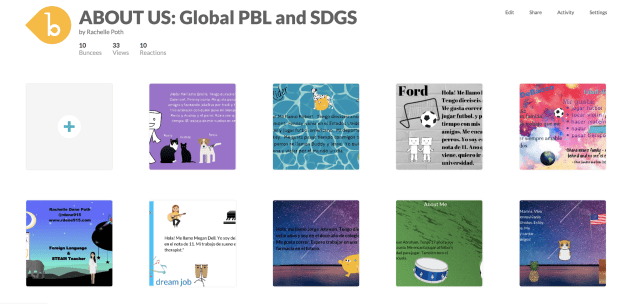
However, Buncee does more than that. Beyond addressing the ISTE standards and providing students with more authentic and personalized learning experiences when creating with Buncee, there are other skills that are being addressed. In my own classroom, we have used Buncee for many different projects and even for project-based learning (PBL). My students created Buncees to share with their global peers in Argentina and Spain. Creating an “About Me” Buncee enabled all students to develop a more global understanding and become aware of cultural differences, as well as to develop empathy in the process.

Students enjoy creating with Buncee and even more than seeing their own creations, they really enjoy seeing what their classmates create. I have noticed that students become more comfortable with one another in class and start to build closer connections while working on their Buncees. Even the quietest students begin to ask questions, interact more and have been more engaged in creating when using Buncee than they had with other tools before. Students tell me that they enjoy teaching one another, learning about their classmates in unique ways, and feel like they are part of a classroom community.

Knowing that students are picking up on this has been a great way to foster the social-emotional skills (SEL) students need now and in the future. Buncee is so invested in providing a lot of options and opportunities for students and educators to enjoy learning, creating and growing together. Now Buncee has templates available to address SEL.

What is Social-emotional learning?

CASEL (The Collaborative for Academic, Social, and Emotional Learning), formed in 1994, is an organization which actively works toward promoting the importance of developing SEL skills in education. SEL is focused on five competencies: self-awareness, self-management, social awareness, relationship skills, and responsible decision making. The development of these skills can benefit the level of student engagement as well, leading to higher academic achievement and reduce discipline issues in the classroom.

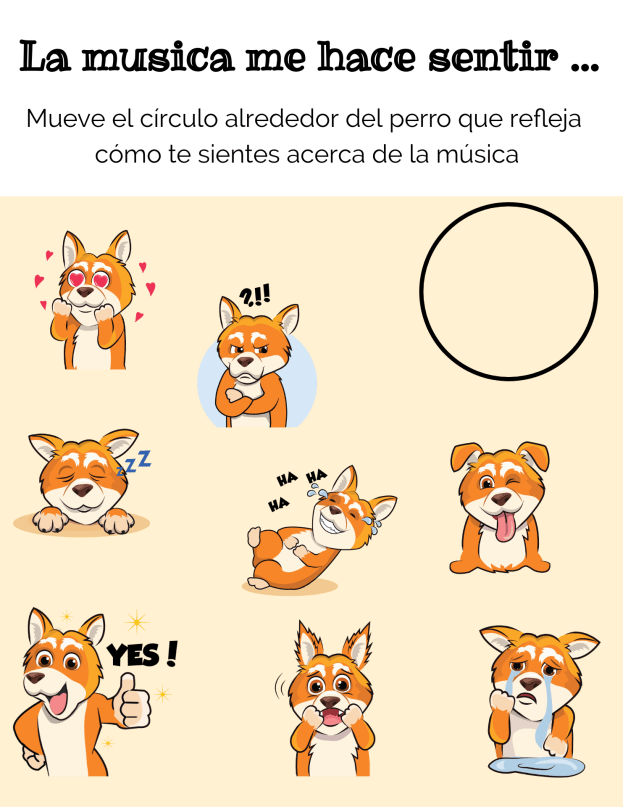
Providing opportunities for students to interact through the use of digital tools and activities in the classroom promotes the development of social-emotional learning skills. Using some of the Buncee templates and emojis, students can comfortably express how they are feeling, provide a quick check-in based on their level of understanding, share personality characteristics or likes and dislikes, or respond to questions in class, for a few options. Buncee is “giving a voice to the voiceless.”

In my own experience, I have seen students who have preferred to not speak out in class or who voiced that they were not creative or would not be able to do a presentation, design amazing Buncees and be excited to share with their classmates. Students build confidence while creating and the benefit is that they become more engaged in and excited to share their learning and interact with classmates. It helps to foster the development of skills such as problem-solving, working with different layouts, visualizing and displaying student learning.

It is always a good idea to ask students for feedback. I want to know what their thoughts are, if the tool or strategy is making a difference for them and if so, how. Here are some student thoughts about Buncee.

“It helps me to express my ideas more easily and make presentations which are much more interactive for myself and for my classmates.”

It is made in a way that allows students to make it really personal and specific to what they need. If students are enjoying their work and are able to make it their own, then they will be more willing to learn and will improve because of using Buncee.”

Hearing from students is important and making sure that all students feel comfortable expressing themselves is even more important. With Buncee, students have many choices to find what interests them and to express themselves in a way that is authentic, meaningful and personalized.

Getting 2gnoMe

Personalized Learning for Teachers

Earlier this year, I was seeking guest posts for the monthly ISTE Teacher Education Network newsletter. One of the emails that I received included a link to a platform called 2gnōMe. I had not heard of it, so before responding, I took time to explore the website to better understand how it was being used by educators. After looking over the website and watching the video on the landing page, I learned that 2gnōMe is a platform that enables school leaders to provide personalized professional development for educators. The benefit of 2gnōMe is that the platform helps educators to ideally avoid, or at least reduce, the one-size-fits-all approach to PD and break away from what has become known as the “sit and get” professional development. For administrators, it enables school districts to clarify what individual teachers might need from available resources and personalize their learning experience, at scale, to measure its usefulness and impact.

The background

I contacted Ilya Zeldin, the CEO of 2gnōMe, to learn more about the company’s background, the purpose of the platform and to watch its demo. During our conversation, Ilya shared his vision for the platform and his goals for moving forward and getting the platform into school districts and learning providers. When he began designing the 2gnōMe platform, he focused on human connection and empowerment. Ilya said:

“That was the reason I developed the 2gnōMe concept. I would like to re-imagine the learning process for all adults, but the stakes are just too high with teachers. While teachers are asked to differentiate learning for students in their classroom, they rarely get the same kind of personalized professional learning when it comes to their own needs.”

According to Ilya, 2gnōMe enhances individual skills awareness and uses data to provide teachers and school-level leaders with crucial information to support teachers’ efforts to improve their practice, implement innovative practices, and achieve better results for their students.

During the demo, I saw the example of the 2gnōMe approach and platform based on the ISTE Standards for Educators. As teachers first reflect on their classroom practice, the data is compiled to then provide a more personalized learning experience for them. There is enhanced skills awareness — (the missing piece) after the self-reflection about the teaching practice. The underlying purpose is to impact how teachers can upgrade their skills and to narrow the growing gap between teachers and students when it comes to the integration of technology. By leading teachers through the assessments and providing an easy to navigate the platform, it creates additional opportunities for teachers to build technology skills. More than just content, 2gnōMe has been referred to as a “learning experience platform.”

How does it work?

2gnōMe offers a unique teacher-centric approach and can simplify leadership’s efforts based on their specific PD framework or standards used with teachers. As an ISTE member, I was interested in learning more about its use with the ISTE Standards, which is one of the options available. Using the platform, teachers take assessments and the results help districts scale personalized learning for every teacher. By addressing their learning needs, the program enhances self-awareness about critical skills and behaviors of teachers.

In my experience using the platform, I worked through each of the ISTE Standards for Educators by completing each assessment. The assessments required me to respond to a series of statements by selecting an option based on my perceived skill or comfort level in various areas. The questions and ratings pushed me to really reflect on my practice and consider areas that I need to grow professionally.

What is impressive is how the platform then takes the responses and determines areas where teachers can work to improve. For teachers such as myself, using 2gnōMe enables me to better hone in on my level of skills in each of the different areas, in particular with the ISTE Standards for Educators. For example, once I completed the “Learner” standard, I received information related to the teaching competencies and results that include a summary of strengths and areas that I might need additional support. When the results are received, personalized learning recommendations are provided, which the teacher can view within the platform or click the link to view the webpage externally.

Navigating the platform is easy and the data is displayed in a way that enables you to process the information quickly and understand the next steps. Returning to the platform and finding your results, summary, and portfolio is easy. Being able to review the results, use the summary for further self-reflection and even add items to a portfolio will empower teachers to advocate for their own professional development and also foster peer collaborations through the platform.

Features

Areas that caught my attention were how quickly the additional learning resources are compiled and available immediately to the educator. Having these so readily accessible enables each individual to explore different tools and learning providers available for professional development without the need for teachers, already short on time, to locate resources for themselves.

The Dashboard includes Goal Setting, Professional Learning, and Lifelong Learning and within each focus area, a list of the results for each are provided. Along with the scale showing your individual rating, an average rating is included which shows how you compare with peers. These are great points to use for building your professional collaborations and even mentorships with colleagues.

Benefits for the Educator Community

As a teacher, what I appreciate most about the 2gnōMe platform is that it coordinates a more holistic and continuous learning experience for educators. Just as our students need personalized learning experiences, educators need the same opportunity to build their own skills in our practice. Through 2gnōMe, teachers are able to self-assess and gain access to the right resources that meet their needs, without having to do all of the work. It analyzes all of the data and provides/creates a more personalized experience by gathering from the resources that are built within or made accessible through the platform.

  • Customizable platform to rubrics for learning.
  • Establishes a baseline of skills
  • Enhances teacher self-awareness
  • Promotes teacher-agency
  • Identifies teacher readiness
  • Provides access to portfolios, credentials, and PLCs
  • Personalized learning for educators at scale
  • Recommends courses for professional learning

For school administrators responsible for making decisions about the types of professional development to provide for teachers, using the 2gnōMe platform helps to simplify the decision-making process. It empowers education leaders to support teachers with personalized learning at scale, across their professional development systems. Using the data, administrators can see the type of learning that each educator might need or benefit from, and it personalizes the learning experience for each educator as they work through the different assessments in the platform.

Administrators recognize that teachers have different skill sets and they need to be able to identify what teachers know and what they need, to be able to provide the best learning experiences for students. To do this, there needs to be a consistent method that can customize the personal and professional learning experience for teachers. With 2gnōMe this is possible through:

  • Needs Assessment
  • Personalized Professional Learning
  • Resource Allocation Insights
  • Teacher Induction & Retention
  • Custom PLCs
  • Digital Portfolios for Teachers

Using 2gnōMe, teachers will engage in authentic, meaningful and personalized professional development in a supportive learning space. Together, teachers and schools will improve their practice, implement innovative methods, and achieve better results.

Learn more about district benefits and sign up for a Pilot here.

Be sure to follow @2gnōMe and meet up while attending ISTE.

See the interview with Jeff Bradbury and Ilya, Teachercast interview  ISTE 2018

School Communication Tools Comparison

Post sponsored by ParentSquare. The opinions expressed are my own.

Why Schools and Districts Need ParentSquare

The functionality of a teacher tool with a district-adopted platform

Finding a reliable and secure way to facilitate communication between school and home is critical for helping our students to be successful. When implementing digital tools and district-wide platforms, schools and districts must be cognizant of the rights and responsibilities when it comes to student privacy and digital safety. District leaders must protect the school community by maintaining a safe learning environment while also empowering teachers and families with the right tools to build community and promote family involvement.

For many classroom teachers, the options for tools to use are becoming more limited, whether because of access or school and district policies. While there are many free digital communication tools available, more and more teachers are being asked to not use the free tools and to implement tools that are district- or school-managed. Teachers must look for and recommend alternatives that will provide the same functionality they are used to and that will not require a lot of time to make the transition.

Choosing the Right Platform

There are many digital communication tools available to schools which offer a lot of benefits. It is important to find something that provides quality resources, centralizes school information, and which gives teachers the freedom they need to create a virtual space for their students and families.

Through the right platform, teachers can complete important tasks such as sending class updates, asking for volunteers, scheduling conferences and school events, sharing files and photos, and communicating various types of information to families, for a start. Being able to connect families and the school community with what is happening inside the classrooms strengthens the connection between home and school.

At the school and district level, being able to provide everything that students and families need through a comprehensive program and in a manner that parents and families choose is important. The entire school community benefits by having a consistent and efficient program in place that meets the needs and preferences of each of its members. So why should schools choose ParentSquare?

A Centralized Space for the Community

ParentSquare is available for the district- or school-wide implementation. If you find that you or your school are using multiple different apps to exchange information and communicate, ParentSquare provides one tool that does all of this and more. ParentSquare takes multiple tasks and communicative needs (messaging, attendance and grade notifications, event planner, calendar, fundraising, lunch balances, and much more*) that schools and teachers are currently using and unifies them in one easy to use and widely accessible platform.

ParentSquare facilitates timely and relevant communication between home and school through push notifications with real-time interactions and reports to show the reach and deliverability of messages, making it easy to identify who has or has not been contacted. Schools can create wishlists, ask for volunteers and launch fundraising campaigns, therefore streamlining more of the common tasks for schools. ParentSquare enables schools and districts to share information from the same source, which promotes consistency and efficiency in a simplified platform.

Unique Features

With district-wide adoption of ParentSquare, school districts can provide one comprehensive tool to connect families with their child’s school and the district, in a centralized space. Schools can then provide a more consistent, effective and reliable way to facilitate higher engagement and better communication between school and home.

Although ParentSquare combines multiple apps and resources into one platform, it is very easy to navigate. Everything in ParentSquare has a similar look and feel, “if you know how to do one thing, you know how to do everything.” The design encourages parents and families to interact more in the space and work together toward fostering a collaborative relationship between home and school. Communication happens through posts and direct messaging which facilitates a higher level of engagement for families and greater connectedness. Parents can opt-out of certain communications and enjoy the benefits of being connected with the school and their children’s teachers, by receiving messages based on their preferences.

Another unique feature of ParentSquare is the Smart Alert and Notices for sending emergency alerts with options to send to the entire district, individual schools, parents, or students. You can choose between sending a recorded message or one created using the text-to-speech feature provided by ParentSquare. The receipt of each message is verified and detailed analytics for reach and deliverability show the percentage of contacts reached and the number needed to achieve 100%.

ParentSquare scores on the integration aspect too, integrating with many SISs, so teachers do not have to invite parents and maintain a contact list, thus also protecting privacy. Parents need not join and create a password, they are still kept informed and in the loop, thereby including every parent.

ParentSquare helps to streamline school business and workflows by providing:

  • Attendance notifications with excuse notes
  • Grades, Assignments, Assessments, Attendance in the Portal and App
  • Social and Web Share (web widget)
  • Invoices (recurring and one-time)
  • Payments (spirit wear, tickets, etc.)
  • Fundraiser with Battery meter
  • Calendar and RSVP (adults and kids)
  • Lunch Balance Notifications and other notices with merge fields
  • Secure Document Delivery including postal mail (progress reports, report cards)
  • Advanced analytics
  • SIS integrations
  • Support

Beyond the Platform: What Does ParentSquare Offer?

One thing that I think is important is that edtech companies offer a unified space for educators, parents, and students to access information when they need it. All companies should be intentional about providing support and resources such as webinars, user stories, blogs written by members of the team or teachers currently using the platform, and make sure the information is current. It’s equally as important to actively share new features and any changes that are coming in the near future. I appreciate being able to find a lot of resources and support when I am using a digital tool or platform with my classes.

ParentSquare provides a wealth of information on their site including blog posts, Meet the team, webinars, new features, thought leadership, educator insights, best practices and more. The ParentSquare team also sends newsletters full of information to keep customers informed of events and updates to their platform. ParentSquare is fully invested in family engagement and is helping to streamline the communication between home and school. With ParentSquare, schools can provide a more consistent, effective and reliable way to communicate, and promote student success and family engagement. Learn more about it here.

Key features: Also check out the video here.

Key Features
Privacy Available, updated 2018
District Level Oversight
Messaging to and between parents
Messaging between teachers and staff
Individual/Group Messaging
Notifications as text, email, app
Send/Schedule reminders
Language Translation 100+ with Real-time translation
Class/School Calendar 2-way Sync with Google and iCal
File and Photo Sharing
Conference & Volunteer Signups
Single Sign-on
Unlimited Message Length
Coordinate Events/RSVP
Permission Slips
Devices: iOs, Android, Web
Attendance
Grades and Assignments
Report Card Delivery
Attendance Delivery and Excuse Notes
Truancy Letters
Cafeteria Balance
Payments and Invoices Recurring & one time
Polls and Surveys

Learning as we go

Recently I had a colleague ask me for some ideas for dealing with challenges when it comes to classroom management, student behaviors and just keeping up with the responsibilities of teaching in general. I’m always happy to have time to talk with other educators, there is so much to learn by connecting. I think sometimes there is an assumption that because someone may have been teaching for 10 or more years, or worked in the same school district for a long period of time, that’s there is a higher level of knowledge and skill held by a teacher that fits into this description. While of course the more that you teach, it might seem like you would have a lot of ideas and answers to share with younger or new to the school teachers, but the longer you have taught also means, I think, that you have that much more to learn.

Having taught for about the last 25 years, I’ve had a lot of different experiences, some good, some bad, some in between and some just absolutely fantastic. I have been in the position where I needed to improve, and felt like no matter what I tried to do or could try to do, that I just would not succeed. That I would lose my job. I’ve also been at the opposite end where I felt like things were going well, I could feel more success and a change in how I had been teaching in the classroom and in my connections and relationships that I had built with the students and colleagues.


I think if you ask any educator, most can probably identify the best year they’ve had, and if they can’t, they just can’t yet. We always have room to grow and things take time. How do educators decide what makes it the best year? For some, is it a year without many challenges, the students are well-behaved, homework is complete, other clerical tasks and responsibilities held by the teacher are finished, observations went very well and teacher ratings are satisfactory or proficient or whatever the ranking may be? Maybe. But how do we truly define what would be the best year ever?

It takes time to build

I am fairly certain that last year was the best year I’ve had yet. I think because I changed a lot of things in my classroom, I stopped worrying so much about having every minute of every class accounted for and instead gave the students more possibilities to lead in the classroom and for me to have more opportunities to interact with them. Now it did not come without its challenges, some student behaviors that in some cases pushed me so far beyond frustration that I thought I reached my breaking point. I reacted in ways that I was not proud of, but I let the frustration get the best of me. I stopped seeing the student and only saw the behaviors. My “lens” had become clouded and it took some reflection and just not feeling very good about it for me to realize that I had to do something different.


The common feeling or response is when you feel like there is a lot to handle or come up with a plan for, can feel so isolating. you might feel lost or like others are judging you based on what you perceive to be your weak areas when it comes to instruction. And I’ve had a few people confide in me that they feel like they’re too different or too weird or they’re not normal enough to be teachers. Hearing those kinds of things breaks my heart because I don’t want to see teachers become disengaged or to lose their passion for doing the work that teachers do because of worrying about how others may or may not perceive them.

My response is always it’s good to be different, what does normal look like anyway? Does normal mean everybody gets and does the same thing? Does being normal mean you fit into some kind of mold, one that may or may not be who you truly are? I think the best that we can do for our students is to show them who we are because we want to know who they are.

We can’t hide behind some perceived idea or model of what a teacher should or should not look like. Nor should we compare ourselves to our colleagues or other teachers that we may have had in our own experience. When we do this we lose sight of something and I think it’s important for us to demonstrate and model for students. We need to worry about ourselves first and only compete with who we are today by judging it based on who we become tomorrow. Everyone has weaknesses, everybody struggles, everybody feels like they don’t belong at times, a friend once wrote about being in the land of misfits, I’m totally fine with that.


What can we do, regardless of what year we are in during our careers? New teachers have a lot to offer veteran teachers. There are better pre-service teacher programs and more information available to current students that are seeking to get into the profession, than what is available to us veteran teachers, who may not have access to or may not even know they exist. And for the new teachers, when you are assigned to have a mentor in your school, I really don’t think you should consider it to be that you are the learner and that you must follow and adhere to all of the advice of your mentor. You have to decide who you want to be, what is your purpose, your why, your spark, your passion for doing what you’re doing?


We can get lost and swept up in all of the activities that pull us every single day leaving us very little if anything at all to work with to build our own skills. As veteran teachers, we need to seek out mentors for ourselves as well, and that might mean connecting with a newer teacher to your building or a new teacher to the profession. How can we expect our students to interact and understand different perspectives, and to be accepted if we ourselves do not do the same thing and go beyond that?

It starts with us and it always starts with us to take that first step. We have to be okay with who we are and commit to doing whatever is best for our own personal and professional growth but being mindful of what that means and how it will impact those we lead and learn with.


So if at any time you feel down, lost or frustrated or like you’re becoming disengaged or that you don’t fit in, please send me a message. I’d love to talk to you and share some of my own experiences on my 25-year learning journey. Need to connect? Reach out to me on  Twitter @Rdene915!


Animated GIF-downsized_large (5)

Thank you Kristi Daws for creating these images!!

Time for new ideas


null

The end of the school year is the perfect time to try the tools or explore new ideas that perhaps you did not get to throughout the year. We can also use this as a time to prep for the next school year. By trying different tools and platforms during the last few weeks, we can then take the summer break to reflect on their impact on student learning. During the spring, I notice a drop in student engagement and an increase in the number of students missing classes due to testing, sporting events, or regular absences. Finding a way to keep students connected and engaged in the lesson is critical.

To resolve these challenges, I try to find something that will benefit students, resolve any disconnect or gaps in learning that might be happening and increase engagement. A new tool that caught my attention recently is NoteAffect. It is a platform focused on enhancing and understanding student engagement and empowering teachers with a powerful tool to better understand student learning.

Why NoteAffect?

NoteAffect provides a unique platform for personalizing the learning experience for students. Using NoteAffect, teachers can deliver lessons in a more interactive way that empowers students to be more involved in the lesson and have access to all of the course materials within one platform. Whether or not students are present in class, they can log in to their account at any time and either view the lesson they missed, or review a lesson in preparation for an exam or for continued review.

NoteAffect offers the right resources and methods to better engage students in learning and helps teachers to track student progress, better understand the questions that students might have and use it as a way to reflect on their own teaching practice. Worried about having devices that are compatible with? No worries as NoteAffect can be used on a PC, Mac, Chromebooks, Android, and iOS devices, so students can interact in class or on their own schedule.
null

Getting started with NoteAffect is easy!

Finding time is always a challenge with so much to do in our school days and prepping throughout the week. However, with NoteAffect, teachers can quickly set up an account, invite students to join classes and begin sharing a lecture. The dashboard is easy to navigate and it provides access to the materials that empower teachers to better understand student needs and learning trends.

Once you have created your courses in NoteAffect, it is easy to have students join in the course and participate in minutes.

To invite students, simply follow these steps:

  1. Go to your Dashboard and select “Instructor Tools” and then “Course Management.”
  2. Select the appropriate course from the menu on the left.
  3. Select “Participants” and then select “Add participant” from the top right corner.
  4. Enter the student’s email address and click “Add.”
  5. Students will receive an email with a  prompt to join the course.

Once students are participants in your course, they will be able to see any prior lectures and participate in the current lecture being delivered.

To start a lecture:

  1. Click “Start new lecture” and you will be prompted to open the Broadcaster.
  2. Once the Broadcaster window opens, use the drop-down menu to determine which application to display or if you have other files that you want to use for your lecture.
  3. Once you select the app, it starts to share your screen with your students and it will record the audio as well.
  4. When finished, simply End Lecture and it will be available to students.

Features of NoteAffect

  • Students can take notes, highlight important points, make annotations on the lecture notes and even submit an anonymous question during class. Classmates can see the questions and upvote a classmate’s question, making it more interactive.
  • It’s a great way to have everything accessible in one place as opposed to writing on pieces of paper or having to pull from different presentations. By using notes, students have access to everything within one platform, making it even easier for students to manage.
  • Teachers can deliver their lessons and add in or embed live polling, and further engage students in the lesson.
  • Using the analytics, teachers can see the level of participation and engagement with the material.
  • Analytics provide information including the views, notes taken, words per note and annotations made by students, providing a clearer picture of the level of understanding and engagement of students.

null

It will be easy to get started with NoteAffect in your classroom or to recommend to colleagues and administrators for use in their classrooms and schools. To learn more, check into NoteAffect here and get started with a demo today! Be sure to follow them on Twitter 


For my prior post on NoteAffect, click here


Learn with Socrates: Get started before the year ends!

This post is sponsored by Socrates. All opinions are my own.

When I think about trying some new tech tool, I first consider my purpose when deciding which tool to try. As educators, our goal should be to leverage technology in a way that helps to empower students, promote personalized and student-driven learning, and amplify their learning potential.

As the school year winds down, I think we have a great opportunity to provide some new, authentic learning experiences for our students. We can use these last few weeks of school to do some really cool things. If you notice that students are kind of drained or their motivation or engagement seems to be lacking, then I think it’s the perfect opportunity to try something that you’ve had on your mind but never quite found the time, or to try something new that you recently learned about. Either way, in my own experience, I have seen improvements in these areas by providing access to different digital tools for students to choose from and that meet their needs and interests. Of course, finding something that enables students to have fun while learning is never a bad thing. I recently found something that will definitely help: Socrates

Why Socrates?

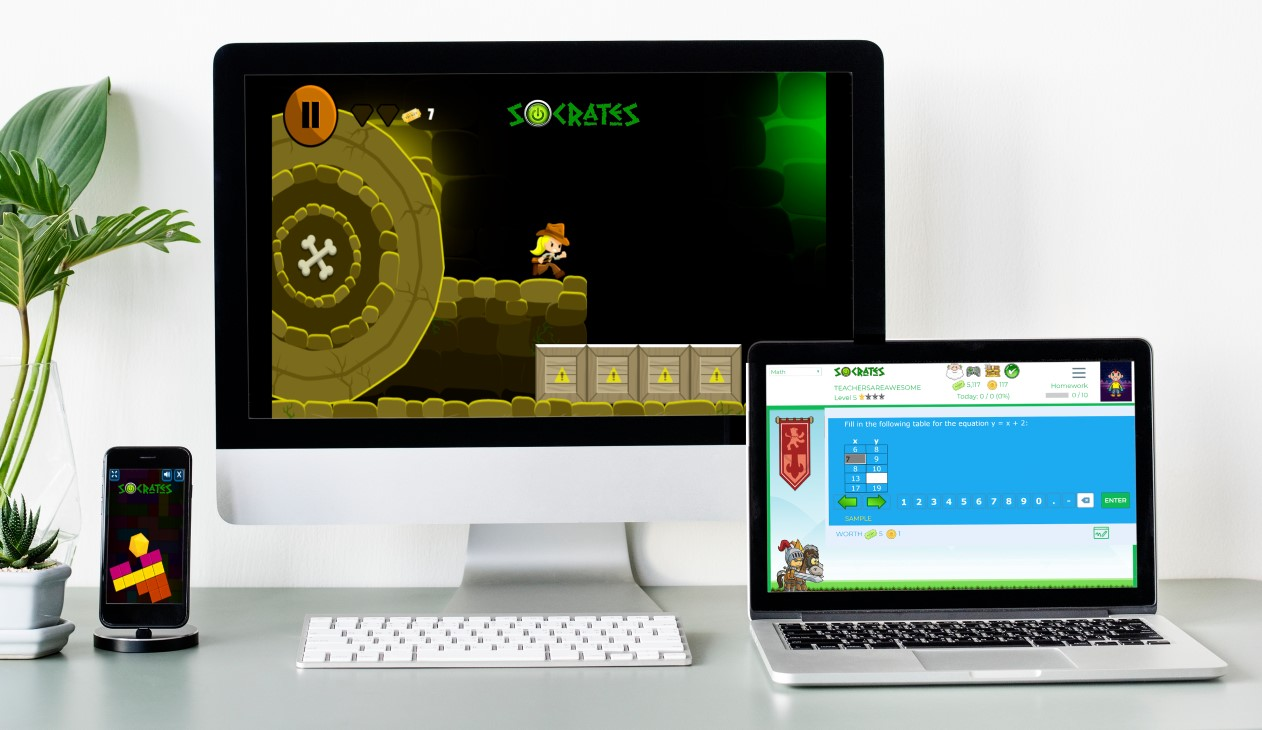
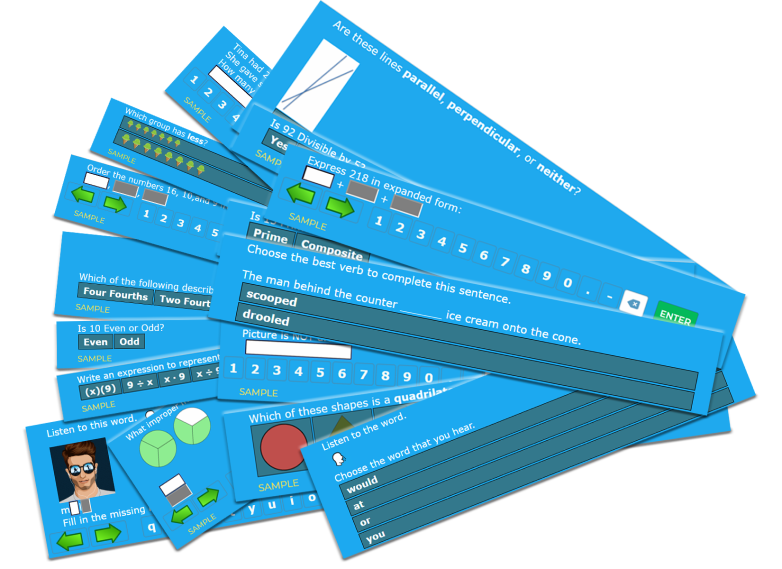
Socrates provides a unique game-based learning platform that is focused on differentiating instruction for students. By using Socrates, teachers have access to a wealth of resources and ways to better engage students in learning, helping them to build their skills in content areas such as math and English through the use of games. Because the platform uses artificial intelligence, it is able to adjust to student needs by creating an individualized learning path in real-time, which makes Socrates stand out from other learning platforms. It is easy for teachers to track student progress and quickly identify where students might need some extra help or instruction. It enables students to progress at a pace that meets their individual needs and provides them with the right supplemental resources they need when they need them.

Getting started with Socrates is easy!

Finding time is always a challenge with so much to do in our school days and prepping throughout the week. However, with Socrates, teachers can quickly set up an account, add students to classes and start assigning free practice, homework, and tests in no time at all. The Teacher and School Command Center Modules in Socrates provide a powerful teacher assistant that informs teachers when and where each student needs help. Being able to act on that information quickly is key for teachers, and this is where the AI makes an impact on student learning and growth. Get started today! (link)

Worried about having devices that are compatible? Socrates can be used on a PC, Mac, Chromebooks, Android, and iOS devices. Students can complete their work in class or on their own schedule wherever they have access to a device.

How to get students started

To add new students, simply follow these steps:

1. Go to your teacher Dashboard and select “Manage.”

2. Click the student icon to add a new student.

3. Enter student first and last name.

4. Add a student ID (at least 4 digits).

5. Select the grade level for the student.

6. Click “Create a student account and add to the roster.”

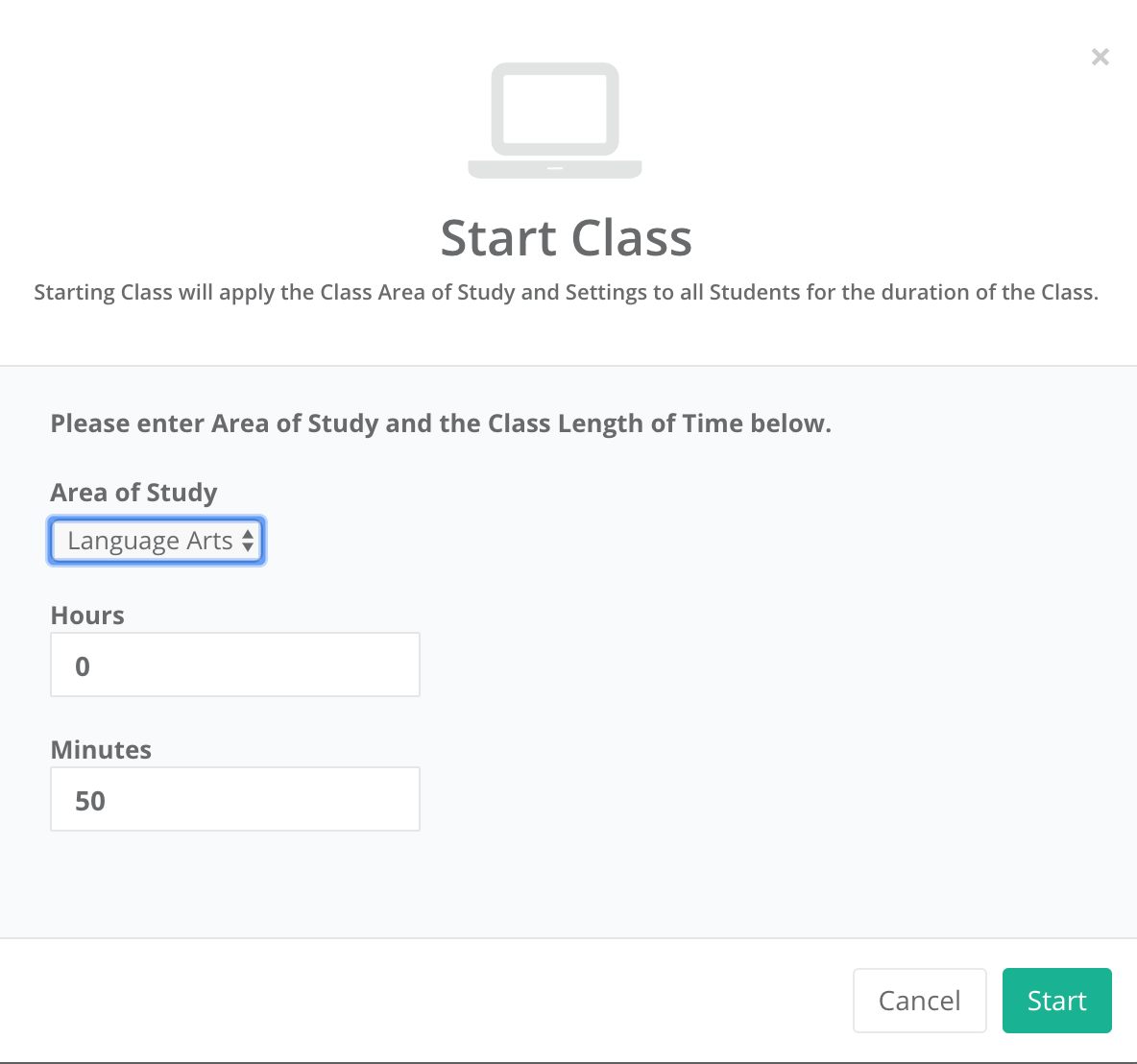
Making changes to student account information is easy using the Command Center. Teachers can specify a grade level, an active area of study, learning style, and gameplay (ranging from High gameplay to No games). Assessing student progress and making changes to their learning profile is easy to do within the Command Center.

Free practice, homework, and tests

It is easy to find the right activities for students and to start a class or set up activities for students to work on at a later time.

To get started:

  1. On the dashboard, select “Assignments.”
  2. Once assignment opens, select the Area of Study (K through 5th) and the content area (Math or Language Arts)
  3. Select the topic, and continue making selections for the specific content material.
  4. On the Assignment details, change the name, the number of questions, add a start and end date if applicable.
  5. Choose to assign as Free Practice, Homework, or to Print.
  6. Once selected, the assignment is added to the student____________ and a box prompts you with “OK” to signify the assignment has been created.

First impressions

Before getting students logged in, we discussed artificial intelligence and how it was used in the Socrates platform. Students were excited to get started. I was impressed by how quickly I could create accounts for my students and get them logged in. They were able to navigate the platform without my assistance and enjoyed having so many choices in which games to try first. Being able to track their progress and make adjustments so quickly is definitely a benefit of the Socrates platform.

If you have not yet tried it, I recommend getting started here. Socrates offers a 30-day free trial. I encourage you to try it out for the rest of the school year and see what students think and reflect on how it benefits learning now and through the summer.

For more information, see the blog, be sure to share your feedback and also follow Socrates on Twitter: @learnwithsocra1

null

Socrates: Engaging Students and Empowering Teachers

Learning at the Speed of You

In the spring, I like to explore new tools and ideas for use in my own classroom and for colleagues who want to try something new before the school year ends. Spring is the perfect time to try out teaching methods or tools that you perhaps did not have time for yet, or to find something that will keep students engaged through the end of the school year and maybe even to use to avoid the “summer slide.”

A few weeks ago, I came across Socrates, a learning platform also referred to as a “learning engine.” Socrates offers many valuable features for students and teachers, that make it a standout and I am looking forward to sharing its features, ideas to get started and tips over the next few weeks.

The story behind Socrates

I’m always interested in the people behind the product and learning about their motivation for designing something for educators and students. To learn more, I contacted Brian Rosenberg, the Co-Founder, and Chief Executive Officer, to gather some background information on the platform, to find out how it uses Artificial Intelligence, which is a key area of interest for me, and the types of resources available for students, teachers, parents and for homeschooling. The platform, created by Education Revolution, LLC has already received recognition several times this year. Socrates offers such distinct features, which makes it clear why it was endorsed by and received a grant from the National Science Foundation. Less than 5% of the companies are chosen, and Socrates, selected for its unique innovation and having a clear benefit to society was the first winner in Nevada in six years. More recently at the Magnet Schools Conference in Baltimore, Brian had a chance to share the vision of Socrates. He shared that the platform “was created to help provide equal access to students regardless of their socio-economic background.”

Impressive features

I scheduled a demo with Brian and was able to “experience” the platform from the perspective of a teacher and student. As Brian showed me the different components in the Teacher Dashboard, the analytics, and a variety of information available for teachers to use to guide instruction was impressive. One of the first things I consider is ease of navigating through the platform and whether the layout is visually engaging and rich in terms of content.

One aspect of Socrates that makes it unique is that it functions through the use of Artificial Intelligence and cloud computing, there is no IT setup and it can be used on any device. Socrates is fully automated and using the AI, it can quickly assess individual student or whole class needs, and then make adjustments in the learning path. While it the artificial intelligence allows it to automatically adjust for each student, it provides extensive tool for teachers to take over the learning experience and is designed to be a teacher assistant, not a teacher replacement According to Brian, there are 1300 categories of information with millions of questions, and it can adjust to particular topics as students progress, and goes question by question to make changes and create a unique learning path for each student.

Currently available content is Math and ELA (K-5) with Science about to release. During our recent conversation, Brian highlighted a “roadmap” for some updates and new features coming up in the platform over the next few months and at the beginning of 2020. There are plans to roll out activities for K-8 Science, grades 6-8 Math and Language Arts throughout the summer and early fall. Later this year and into early 2020, plans are in the works for Social Studies, ESL, high school Math, and even Test Prep. The number of resources currently available within Socrates is impressive, but with the additional features being added, it will provide an even more robust learning platform.

Socrates recently launched in Mexico, and therefore the teacher and student application is available in English or Spanish.

I will have the opportunity to explore the Socrates platform on my own and will take a closer look at each of the features, comparing it to other tools that have the same end goal as Socrates: providing students with a unique, individualized, learning path.

Experiencing the Power of Socrates

A few of the features that I will be looking at:

  • Dynamic Assessment: How the platform assesses students to find out the specific student needs.
  • Teacher Dashboard: Explore how to move students between classes, look at options available for each student, sorting of data
  • Weekly Reports: Look at the information available, ease of obtaining a snapshot of student progress
  • Command Center: Closer look at features and tools available.
  • Navigation of platform: Evaluate the learning curve for teachers and students, watch tutorial videos
  • Categories of Games: Explore the different categories, rewards, and badges available for students
  • Shop: Look at “cards” available to students, some examples are Greek Mythology, Presidents and more.

If you have been using Socrates, I would love to hear from you. If you have not yet tried it, I recommend getting started here. Socrates offers a 30-day free trial, and Brian encouraged teachers to try it out for the rest of the school year and said that their students can use it over the summer at no charge if they sign up before the end of the school year.

The classroom version: http://withsocrates.com/classroom/

***Coupon code is THRIVEinEDU2019. It can be used for the classroom edition or for the summer edition ($39.99 for the summer for teachers with summer school classes)

Connect with them on Social Media to keep informed of the great new features coming. Twitter is learnwithsocra1Facebook is learnwithsocrates

In Other Words, my new book is now available! Click here for more information on how to get a signed copy.


In Other Words: Quotes that Push Our Thinking

Teddy Roosevelt once said, “I am a part of everything I have read.” When I read his quote, it greatly resonated with me because of my love of quotes and the impact they can have in our lives. In Other Words is a book full of inspirational and thought-provoking quotes that have pushed my thinking, inspired me and given me strength when I needed it. The book shares stories around the importance of growing ourselves as educators, knowing our why, as well as learning from and embracing failures and taking risks with learning so we can become our best selves for those we lead and learn with.

Get your signed copy here: bit.ly/Inotherwordsbook

1553983585916_0601087574_47b12722

There are stories shared by educators with different backgrounds and different perspectives. My own experiences and interpretations and the educator vignettes shared by my PLN (Personal or Professional Learning Network) will hopefully push your thinking, inspire you, and provide whatever it is that you need. My hope is that by sharing our stories, it will inspire you to share yours.


There were many people involved throughout this journey. I reached out to members of my PLN and friends to include as many educators and students as possible. I  wanted to share more than just my story, but rather many stories and experiences.   This book is one that can be read by anyone, not just people in education. There are many quotes, unique personal experiences, beautiful graphics and more.

About the book #Quotes4EDU

In this book, I share some of my experiences and reflections based on quotes. I have included the stories of different educators in the form of vignettes or guest chapters. One chapter was written by two of my students and my book cover was drawn by one of my 9th-grade students. The story behind the book cover is included at the beginning of the book.  The book is available on Kindle or in paperback: bit.ly/Inotherwords  A few of the stories are available for listening on Synth. gosynth.com/p/s/pyzbnm  

Chapter Authors
Dennis Griffin
Maureen Hayes
Holly King
Elizabeth Merce
Melissa Pilakowski
Laura Steinbrink
Amy Storer
Donald Sturm
Cassy DeBacco
Celaine Hornsby
Vignettes
Marialice B.F.X. Curran
Jon Craig

Kristi  Daws

Sarah Fromhold
Jeff Kubiak
Matthew Larson
Jennifer Ledford
Kristen Nan
Toutoule Ntoya
Paul O’Neill
Zee Ann Poerio
Rodney Turner
Heather Young
Graphics 
Michael Mordechai Cohen
Dene Gainey
Manuel Herrera
Shelby  Krevokuch
Amber McCormick
Dana Ladenburger
Heather Lippert
Scott Nunes
Chris Spalton
Tisha Richmond
Monica Spillman
Laura Steinbrink
Kitty Tripp
Julie Woodard
Animated GIF-downsized_large (5)

Thank you Kristi Daws for creating these images!!


This slideshow requires JavaScript.