As an educator, attorney, and advocate for innovation in education, I’ve had the opportunity to work with my students through project-based learning experiences that have led them on real-world entrepreneurial journeys as they sought solutions to global challenges. In my eighth-grade STEAM course, students selected and researched careers; developed logos, business concepts, and branding strategies; and even created podcasts to make their business plan.
I noticed them developing artistic talents, whether through painting, calligraphy, crocheting, or making plushies. We talked about their love of creation and how they could create a business. Being an entrepreneur does not necessarily mean that students will start their own businesses, but rather, they will develop in-demand skills such as resilience, creativity, collaboration, problem-solving, and adaptability, which promote flexibility in our changing world. These entrepreneurial experiences enable students to shift from consumers of content to creators, leaders, problem solvers, and innovators.
Essential skills for an entrepreneurial mindset
Students need to extend learning beyond the classroom walls. In my school, students have opportunities to engage in career shadowing, do volunteer work, or participate in events organized by local companies or those that provide career learning experiences. These opportunities promote collaboration, enabling students to work together to design solutions and become changemakers and entrepreneurs. Here are some of the ways these activities build students’ skills:
Agency creates opportunities for ideation and iteration. Through project-based learning or challenge-based learning, students choose a focus for their work and learn that their ideas matter and that they can design their learning journey. Entrepreneurs know that it takes time to improve and build a brand, product, or solve a problem.
Collaboration celebrates the effort, not just the outcomes. Students engaging in project or independent work become involved in decision-making and learn to appreciate the learning process, which provides opportunities for discussion through feedback and promotes greater collaboration.
Creativity and innovation connect learning to real-world problems that students care about. Ask students about challenges they see in their community, and pull those into their learning. Students connect with it more deeply and will create and innovate because it is meaningful and purposeful to them.
Continue reading the article on Edutopia for more ideas!
About Rachelle
Dr. Rachelle Dené Poth is a Spanish and STEAM: What’s Next in Emerging Technology Teacher. Rachelle is also an attorney with a Juris Doctor degree from Duquesne University School of Law and a Master’s in Instructional Technology. Rachelle received her Doctorate in Instructional Technology, with a research focus on AI and Professional Development. In addition to teaching, she is a full-time consultant and works with companies and organizations to provide PD, speaking, and consulting services. Contact Rachelle for your event!
Rachelle is an ISTE-certified educator and community leader who served as president of the ISTE Teacher Education Network. By EdTech Digest, she was named the EdTech Trendsetter of 2024, one of 30 K-12 IT Influencers to follow in 2021, and one of 150 Women Global EdTech Thought Leaders in 2022.
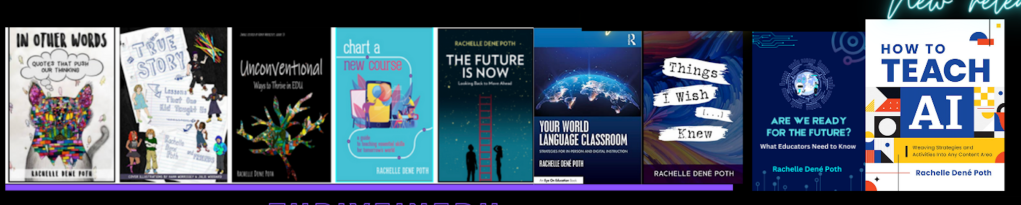
She is the author of ten books, including ‘What The Tech? An Educator’s Guide to AI, AR/VR, the Metaverse and More” and ‘How To Teach AI’. In addition, other books include, “In Other Words: Quotes That Push Our Thinking,” “Unconventional Ways to Thrive in EDU,” “The Future is Now: Looking Back to Move Ahead,” “Chart A New Course: A Guide to Teaching Essential Skills for Tomorrow’s World, “True Story: Lessons That One Kid Taught Us,” “Things I Wish […] Knew” and her newest “How To Teach AI” is available from ISTE or on Amazon.
Contact Rachelle to schedule sessions about Artificial Intelligence, AI and the Law, Coding, AR/VR, and more for your school or event! Submit the Contact Form.
Follow Rachelle on Bluesky, Instagram, and X at @Rdene915
**Interested in writing a guest blog for my site? Would love to share your ideas! Submit your post here. Looking for a new book to read? Find these available at bit.ly/Pothbooks
************ Also, check out my THRIVEinEDU PodcastHere!
Join my show on THRIVEinEDU on Facebook. Join the group here.
Every October, schools around the world celebrate Digital Citizenship Week, a time to focus on educating others on how to engage responsibly, safely, and ethically in digital spaces. This week, events are happening to bring greater awareness to the importance of digital citizenship. There are activities and webinars provided by Common Sense and other organizations with resources for schools. However, we need to focus on it throughout the year. Digital citizenship has become an essential life skill. It is how we understand the connection between technology, ethics, communication, and well-being. Preparing students means helping them understand not just how to use technology, but how to use it well and for good.
Especially today, in a world surrounded by AI, students have access to so many tools that enable them to create, connect, and collaborate. With these opportunities comes greater responsibility, and as educators, providing guidance to our students is more important than ever. Digital citizenship is not just about “don’t click this” or “stay off of that site.” It is about student agency, empathy, discernment, digital well-being, and community-building.
The ISTE Standards for Students address this by highlighting the importance that students move beyond being simply consumers of technology, but creators and innovators. That they emerge as Digital Citizens who “recognize the rights, responsibilities and opportunities of living, learning and working in an interconnected digital world.” Digital citizenship is foundational to preparing students for both college and career readiness and future success.
Why Digital Citizenship Matters More Than Ever
Today’s students are growing up in a world where:
Communication happens across multiple platforms, immediately, and often publicly.
AI tools have tremendous power and can generate content in seconds, without a guarantee of being accurate or not.
Online actions leave permanent digital footprints.
Collaboration is global, instant, multilingual, and multimodal.
Well-being and identity formation are increasingly tied to online spaces.
In my work with some schools that are focused on digital wellness and innovation, they are rethinking their policies and shifting in thought. They are looking at digital citizenship as a mindset and skillset rather than a compliance checklist.
With the right support and learning opportunities in place, all students will learn to: ✔ evaluate credibility ✔ protect personal data ✔ engage with empathy ✔ think before they post ✔ advocate for themselves and others ✔ leverage technology for positive impact
They will gain confidence, agency, and voice in authentic, meaningful, and responsible ways.
Aligning with the ISTE Standards for Students
Digital Citizenship Week is a great time to explore the resources from ISTE that provide free lessons. Focus on the Core Competencies of Balanced, Informed, Inclusive, Engaged, and Alert.
It also offers an opportunity to connect instruction with key strands of the ISTE Standards, especially:
1. Digital Citizen “Students recognize the responsibilities and opportunities for positively contributing to their digital communities.”
2. Knowledge Constructor “Students critically curate a variety of resources using digital tools to construct knowledge, produce creative artifacts, and make meaningful learning experiences for themselves and others.”
3. Global Collaborator “Students use digital tools to broaden their perspectives and enrich their learning by collaborating with others and working effectively in teams locally and globally.”
Activity Ideas
Here are a few adaptable activities for different grade levels. Each aligns with the ISTE Standards and can be completed within 15–45 minutes.
Elementary (K–5)
Activity 1: “Digital Footprints in the Sand” Students trace a footprint on paper and fill it with icons or words representing safe things they can share online (favorite book, pet’s name) vs. things they should not (birthday, address, school name). ISTE: Digital Citizen
Activity 2: Kindness Chain Reaction Students write a positive digital message or example of an encouraging online interaction on a paper link. The class builds a kindness chain displayed throughout the week. ISTE: Global Collaborator
Middle School (6–8)
Activity 1: “True or Fake?” Digital Source Investigation Present students with three online “facts” or headlines. In pairs, they determine which is credible and why. They cite what signals helped them evaluate reliability (URL, author, publication, etc.). ISTE: Knowledge Constructor
Activity 2: Digital Well-being Workshop Students brainstorm behaviors that keep them emotionally healthy online. The class builds a wellness checklist (screen limits, muting apps, balance between offline and online activities). ISTE: Digital Citizen
High School (9–12)
Activity 1: AI & Authorship Mini-Debate In small teams, students debate: “Should AI-generated writing be considered original work?” Extend to ethics, attribution, and bias. ISTE: Digital Citizen & Creative Communicator
Activity 2: “My Digital Legacy: Who Am I Online?” Students reflect on how they are perceived digitally and create a personal statement describing how they choose to show up online as leaders. ISTE: Empowered Learner
Student Leadership Opportunities
Bringing students into digital citizenship planning increases relevance and impact. Consider:
Student-created PSAs during morning announcements or posters displayed in the school
Peer digital mentors and mentoring activities
Student-led “digital wellness” club
TED-Ed club or TED-style talks on AI, privacy, or inclusivity
Digital Citizenship Week is meant to be the beginning of an ongoing learning journey for everyone in the school community. Schools can further support the development of these essential skills by:
Integrating media literacy in research projects Encouraging the use of bilingual / multilingual tools for family communication (Check out School In One) Practicing ethical generative AI use Modeling digital well-being and boundaries Hosting family nights or sharing family one-pagers
Digital Citizenship Week is a time to teach students to navigate digital spaces with care, empathy, responsibility, and discernment. By using the ISTE Standards as guidelines, we emphasize student agency, ethical engagement, and global connection. We are living in a world shaped by rapid innovation, where these skills are not optional, but rather they are foundational to the future of learning.
About Rachelle
Dr. Rachelle Dené Poth is a Spanish and STEAM: What’s Next in Emerging Technology Teacher at Riverview High School in Oakmont, PA. Rachelle is also an attorney with a Juris Doctor degree from Duquesne University School of Law and a Master’s in Instructional Technology. Rachelle received her Doctorate in Instructional Technology, and her research focus was on AI and Professional Development. In addition to teaching, she is a full-time consultant and works with companies and organizations to provide PD, speaking, and consulting services. Contact Rachelle for your event!
Rachelle is an ISTE-certified educator and community leader who served as president of the ISTE Teacher Education Network. By EdTech Digest, she was named the EdTech Trendsetter of 2024, one of 30 K-12 IT Influencers to follow in 2021, and one of 150 Women Global EdTech Thought Leaders in 2022.
She is the author of ten books, including ‘What The Tech? An Educator’s Guide to AI, AR/VR, the Metaverse and More” and ‘How To Teach AI’. In addition, other books include, “In Other Words: Quotes That Push Our Thinking,” “Unconventional Ways to Thrive in EDU,” “The Future is Now: Looking Back to Move Ahead,” “Chart A New Course: A Guide to Teaching Essential Skills for Tomorrow’s World, “True Story: Lessons That One Kid Taught Us,” “Things I Wish […] Knew” and her newest “How To Teach AI” is available from ISTE or on Amazon.
Contact Rachelle to schedule sessions about Artificial Intelligence, AI and the Law, Coding, AR/VR, and more for your school or event! Submit the Contact Form.
Follow Rachelle on Bluesky, Instagram, and X at @Rdene915
**Interested in writing a guest blog for my site? Would love to share your ideas! Submit your post here. Looking for a new book to read? Find these available at bit.ly/Pothbooks
************ Also, check out my THRIVEinEDU PodcastHere!
Join my show on THRIVEinEDU on Facebook. Join the group here.
AI isn’t coming—it’s already here. It has been embedded in the various educational platforms we use and the assessments we give. It’s likely involved in both the professional development we participate in and the writing and work that our students are doing.
As an educator, speaker, and advocate for technology integration, I’ve spent a lot of time researching, using, and teaching with AI so that I can prepare students and other educators. In my classroom, from using a variety of AI tools that help me save time so I can spend it working with students to integrating chatbots to support student learning, I see the value and impact of leveraging this technology. If we want our students to be ready for their future careers, we must start teaching them about AI. They need to move beyond being consumers of content and instead become creators and innovators.
Where Do We See AI?
For educators, many AI-powered platforms help us to target instruction, assess students, and find resources for our lessons.
Confidence building: Encouraging students to speak in class can be a challenge. At the end of 2023, I started to use SchoolAI with my students and created a “Sidekick” for them to have conversations in Spanish based on the content that I used for the prompt. They loved it—it not only helped them build language skills and confidence but also showed how AI can support their learning. MagicSchool AI is another great option, with a tutor function that helps students in areas where they need support. Both of these tools also have historical characters that students can chat with and other features to enhance learning. I love that I can monitor student responses, provide additional support, and adjust instruction as needed.
Using Eduaide, teachers can kick off a class debate with pros and cons and an outline to quickly get started, and they can also develop other collaborative and engaging activities for students.
For language learners, confidence matters. Snorkl enables students to practice speaking and receive real-time AI and teacher feedback. The AI gives real-time feedback on fluency and pronunciation, helping students grow as communicators and build confidence. Snorkl can be used with students starting in kindergarten, and it has a library full of ready-to-use activities. Throughout the times I have used Snorkl or one of the chatbots, the feedback provided has been tailored to each student’s responses and offered insights and examples to support their learning.
Continue reading the rest of this post on Edutopia.
About Rachelle
Dr. Rachelle Dené Poth is a Spanish and STEAM: What’s Next in Emerging Technology Teacher at Riverview High School in Oakmont, PA. Rachelle is also an attorney with a Juris Doctor degree from Duquesne University School of Law and a Master’s in Instructional Technology. Rachelle received her Doctorate in Instructional Technology, and her research focus was on AI and Professional Development. In addition to teaching, she is a full-time consultant and works with companies and organizations to provide PD, speaking, and consulting services. Contact Rachelle for your event!
Rachelle is an ISTE-certified educator and community leader who served as president of the ISTE Teacher Education Network. By EdTech Digest, she was named the EdTech Trendsetter of 2024, one of 30 K-12 IT Influencers to follow in 2021, and one of 150 Women Global EdTech Thought Leaders in 2022.
She is the author of ten books, including ‘What The Tech? An Educator’s Guide to AI, AR/VR, the Metaverse and More” and ‘How To Teach AI’. In addition, other books include, “In Other Words: Quotes That Push Our Thinking,” “Unconventional Ways to Thrive in EDU,” “The Future is Now: Looking Back to Move Ahead,” “Chart A New Course: A Guide to Teaching Essential Skills for Tomorrow’s World, “True Story: Lessons That One Kid Taught Us,” “Things I Wish […] Knew” and her newest “How To Teach AI” is available from ISTE or on Amazon.
Contact Rachelle to schedule sessions about Artificial Intelligence, AI and the Law, Coding, AR/VR, and more for your school or event! Submit the Contact Form.
Follow Rachelle on Bluesky, Instagram, and X at @Rdene915
**Interested in writing a guest blog for my site? Would love to share your ideas! Submit your post here. Looking for a new book to read? Find these available at bit.ly/Pothbooks
************ Also, check out my THRIVEinEDU PodcastHere!
Join my show on THRIVEinEDU on Facebook. Join the group here.
“Where are you with AI today—curious, testing, using weekly, or all in?”
That’s how we opened our recent panel on AI literacy for educators. Whether you feel energized, overwhelmed, or skeptical, you’re not alone, and that’s exactly why having conversations around AI and how to bring it into our schools matters.
Why AI Literacy, Why Now?
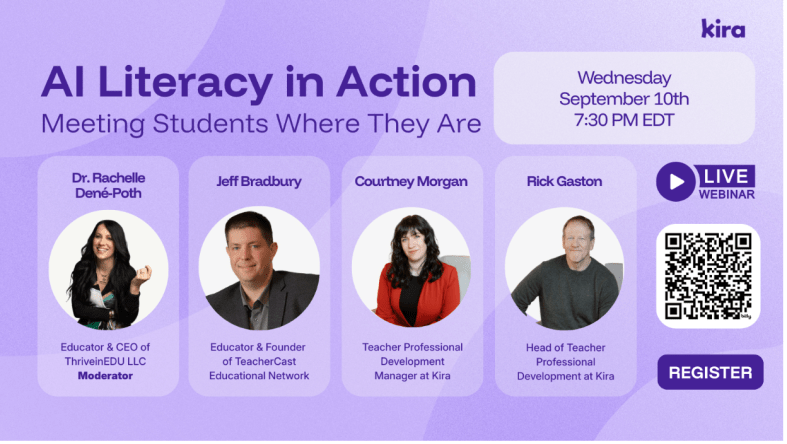
I enjoyed the opportunity to serve as the panelist for this great discussion about AI Literacy. We had so much engagement from attendees from more than 25 countries around the world!
The panelists engaged in rich discussion and offered insight into our role as educators and how we can help our students and ourselves better understand: What do we need to be doing when AI-powered tools surround us?” How does learning change?
Literacy isn’t about knowing how to navigate AI platforms, but rather it is about habits of mind. Asking better questions, evaluating outputs, knowing how to evaluate sources, understanding the limitations of AI, and aligning use with learning goals, ethics, and policy. AI is something that we need to consider and how it is involved in our planning, teaching, assessment, and reflection. And being able to determine whether something is real or not, something that I thought more about after reading the book Futureproof, by Kevin Roos, two years ago. Shifting from digital literacy to discernment is key.
The Skepticism Is Real (and Reasonable)
We started our discussion with what we called initial skepticism. Many teachers are hesitant to introduce AI into their classrooms, schools, or even their own workflows. As Jeff Bradbury put it:
“There are educators out there trying to figure this out, but they are not yet sure how to do it. There are educators out there who are scared. And then you have educators on the other side of the innovation curve… How do you work with all of those at the same time?”
He continued: “That question hits home. In every district I visit, I meet the AI All-Ins, the Cautious Curious, and the Not-Now crowd. Suppose this is your staff, good, because having discussions with educators who have these different viewpoints is key. It means you have internal mentors and internal skeptics—the two groups you need most to build something responsible and resilient, especially when the topic is AI”.
Some ideas shared: Start with a common language or practices. Define “AI literacy” and what that means. Identify how to best use AI (lesson planning, differentiation, feedback drafting) and some ways where you want to avoid the use of AI or be more cautious (grading without verification, sensitive data, replacing teacher judgment). Establishing clear guardrails reduces anxiety and helps to ensure that AI implementation in our schools is consistent and purposeful.
The “Aha” That Changes Everything: Specificity
Jeff told a story about a colleague—a music teacher—who tried AI “seven or eight different ways” to create a budget and concluded, “I hate this thing.” The pivot came with one question: “Were you specific?” Did he tell the AI it was for a middle school music program? The approximate budget? The categories? The constraints?
“You didn’t fail eight ways,” Jeff said. “You found eight ways the system didn’t have enough to listen to you.”
The quality of your prompt is not about clever “hacks”—it’s about context, criteria, and constraints.
Prompting is a pedagogy: We are modeling for students how to ask precise questions, set criteria, and iterate. That is AI literacy.
Meet Teachers Where They Are
Rick Gaston and Courtney Morgan from Kira emphasized a simple, human truth: people learn faster when they feel safe and seen.
“We like to meet teachers where they’re at to help them begin with AI,” Rick said. “Start with lesson content they’re comfortable with and have them experience how quickly AI can provide new ideas in that content area.”
“We believe in learning by doing,” Courtney added. “We facilitate that process so teachers can experience that our AI tools can be their teaching buddies.”
I love that phrase: teaching buddies. Not a shortcut. An assistant or collaborator who drafts, riffs, and reframes so that educators can focus on the human aspects of teaching, such as relationships, feedback, and instructional decision-making.
Time: The Gift Teachers Actually Feel
Jeff’s coaching mantra resonated with the chat: “What is the one thing I can give you that no one else can? Time.” When AI saves a teacher 30 minutes tonight, their stance moves from skeptical to curious. When it saves them three hours before conferences, they become advocates.
Concrete time-savers that build trust:
Parent emails: Draft a positive progress update with two examples of growth and one specific next step—translated into Spanish and English.
Rubric remix: Convert a long analytic rubric into a student-friendly checklist; add “I can” statements.
Formative checks: Generate two exit tickets (one multiple-choice, one open-ended) targeting the same standard; include an answer key/rubric slice.
When teachers see the time they can save and then shift to students or colleague interactions, they’re more willing to explore deeper integrations of AI into their practice.
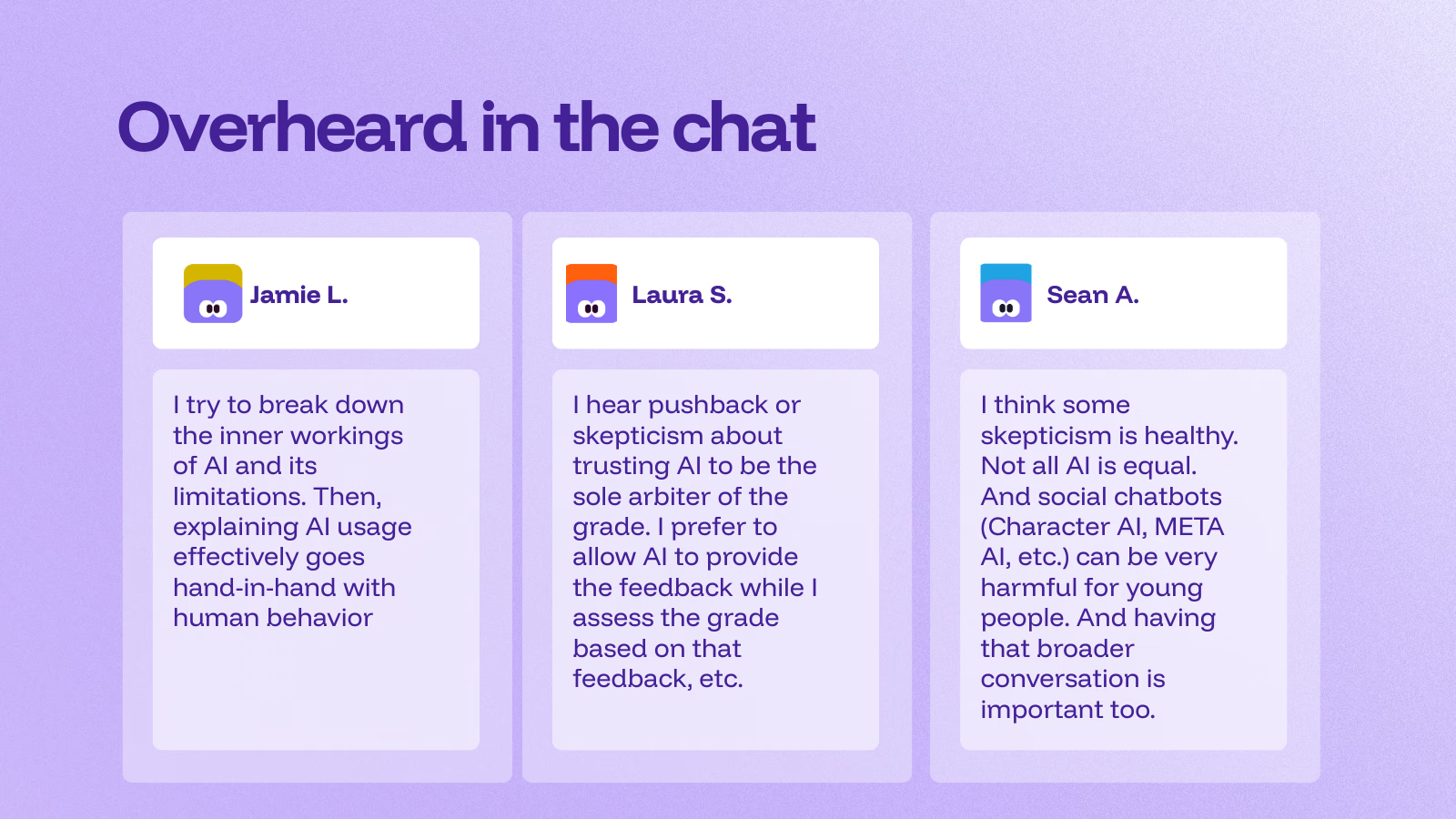
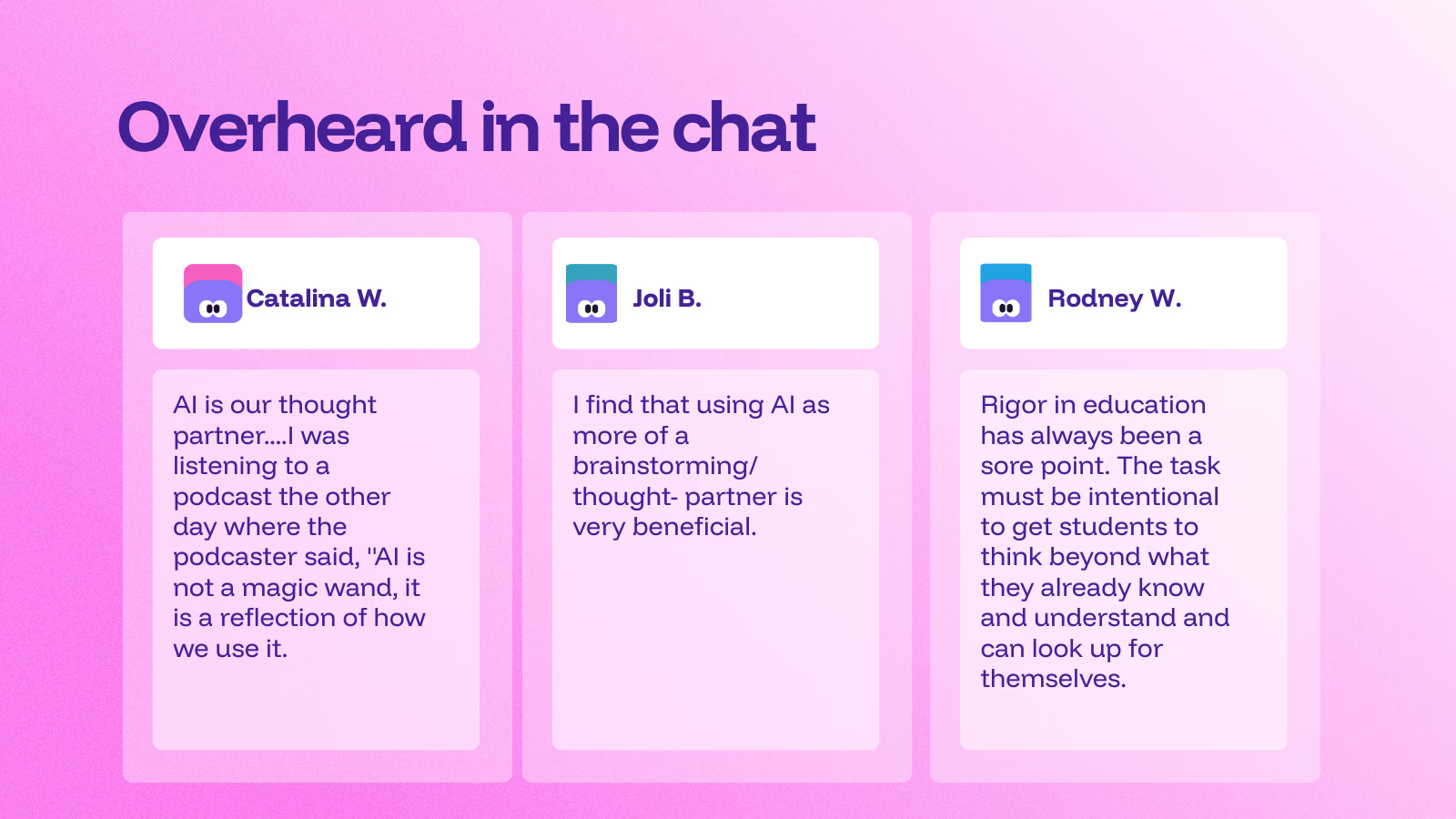
Additional insights from participants (courtesy of Kira)
About Kira
Kira is an AI-powered teaching & learning platform built to save teachers time, personalize instruction, and keep teachers in control.
During the panel discussion, attendees had the chance to learn more about the platform and the AI Tutor. “This is just a quick preview of the Kira platform,” said Courtney, “and why we keep mentioning the built-in AI Tutor we’re really proud of.”
At its core, the AI Tutor is designed to coach, rather than simply provide answers. Students can highlight any passage and ask a question, or simply discuss it directly with the tutor. “You’re going to see me try to make it solve the problem for me,” Courtney joked, “but it won’t. Instead, it walks you through highly scaffolded steps.” That means support questions, targeted hints, and extra practice. The Tutor will work at nudging learners toward the how and why, not just the what. You can adjust the support level and reading level per student. It never gives direct answers and provides context-aware, course-specific feedback.
The AI Tutor is subject-agnostic and works across K–12 courses, math included. It’s available to both teachers and students, and it’s been a game-changer for first-time teachers who lean on it to deepen their own understanding while teaching. The message is clear: AI as a teaching buddy, not a replacement.
Differentiation is built in. Teachers can adjust the tutor’s level of support if students are over-relying on it, or increase it for learners who need more targeted assistance, including those with IEPs or language-learning needs. The goal is precision teaching: the right help, to the right student, at the right moment.
Getting started is easy. Kira offers ready-to-use courses, including AI Demystified for students, answering the big questions, “What is AI? What is it doing? How do I use it responsibly?”—and AI 101 for Educators, which builds teacher AI literacy. Looking to be part of a learning community?
Join the upcoming AI 101 for Educators cohort starting in October. Learn more and express your interest here! It is a short, self-paced PD (about 2 hours) for any subject area that builds confidence using AI in real classrooms.
It will cover:
What is AI, and what AI tools are helpful for educators?
How can I teach my students to use AI responsibly?
How can I use AI tools to enhance my students’ critical thinking?
How can I reduce risks and maximize the benefits of using AI in the classroom?
Once you fill out the form, the team at Kira will follow up with more details.
Dr. Rachelle Dené Poth is a Spanish and STEAM: What’s Next in Emerging Technology Teacher at Riverview High School in Oakmont, PA. Rachelle is also an attorney with a Juris Doctor degree from Duquesne University School of Law and a Master’s in Instructional Technology. Rachelle received her Doctorate in Instructional Technology, and her research focus was on AI and Professional Development. In addition to teaching, she is a full-time consultant and works with companies and organizations to provide PD, speaking, and consulting services. Contact Rachelle for your event!
Rachelle is an ISTE-certified educator and community leader who served as president of the ISTE Teacher Education Network. By EdTech Digest, she was named the EdTech Trendsetter of 2024, one of 30 K-12 IT Influencers to follow in 2021, and one of 150 Women Global EdTech Thought Leaders in 2022.
She is the author of ten books, including ‘What The Tech? An Educator’s Guide to AI, AR/VR, the Metaverse and More” and ‘How To Teach AI’. In addition, other books include, “In Other Words: Quotes That Push Our Thinking,” “Unconventional Ways to Thrive in EDU,” “The Future is Now: Looking Back to Move Ahead,” “Chart A New Course: A Guide to Teaching Essential Skills for Tomorrow’s World, “True Story: Lessons That One Kid Taught Us,” “Things I Wish […] Knew” and her newest “How To Teach AI” is available from ISTE or on Amazon.
Contact Rachelle to schedule sessions about Artificial Intelligence, AI and the Law, Coding, AR/VR, and more for your school or event! Submit the Contact Form.
Follow Rachelle on Bluesky, Instagram, and X at @Rdene915
**Interested in writing a guest blog for my site? Would love to share your ideas! Submit your post here. Looking for a new book to read? Find these available at bit.ly/Pothbooks
************ Also, check out my THRIVEinEDU PodcastHere!
Join my show on THRIVEinEDU on Facebook. Join the group here.
I started researching artificial intelligence in July 2017. I dove into the topic so that I could write a blog post for Getting Smart in January 2018. I had no idea at that point, thinking ahead, how much time I would invest in learning about AI and how much I would invest in working with students and educators over the past 7 1/2 years.
I love working with students in my classroom and also, I am very much aware of the ethical and legal considerations that we have to think about when it comes to any technology, but more specifically AI. Over the past two years, I have challenged myself to go beyond the training that I have done related to AI and different tools, and now I have also been focusing on AI and the law, working with administrators to evaluate policies, create opportunities to provide professional development for the educators in their school systems, and so much more. I am always looking for more opportunities to work within schools.
And with all these opportunities, things have changed a lot from seven years ago when I started presenting, compared with nearly 2 years ago when ChatGPT came out, and even this year. Artificial intelligence isn’t just a buzzword anymore—it’s becoming a tool that education leaders can no longer ignore. As an educator and consultant who works at the intersection of AI, law, and learning, I’ve seen how quickly AI is reshaping classrooms and professional practices. But what about those leading from an administrator’s viewpoint?
For administrators, AI is not just about the tools students or teachers use; it’s about strategy, policy, and shaping the future of learning in your schools. So how can you, as an education leader, leverage AI effectively and responsibly? Here are some ideas and practical tips to help you get started.
1. Streamlining Administrative Work
One of the most immediate uses of AI is in reducing the workload that often takes administrators away from instructional leadership. AI-powered tools can:
Draft communications: If you spend time writing newsletters to families, updates to the school board, or memos for staff, AI can help you to generate polished drafts that you can refine and personalize.
Summarize long reports: Instead of sifting through dozens of pages, AI can condense state policy updates, research articles, or professional learning reports into actionable takeaways.
Automate scheduling: Tools now exist that can suggest meeting times, analyze calendar patterns, and even help coordinate professional development sessions.
💡 Reminder: Always add your authentic voice and context when using AI for communication. AI should be used as an assistant, not as a replacement for the work we do.
2. Using AI for Data-Informed Decisions
Administrators are constantly making decisions based on data. They focus on assessment results, attendance records, and even budgetary considerations. AI can help to identify patterns and provide insights more quickly. For example:
Equity checks: AI can highlight disparities in discipline, participation, or achievement data that might otherwise be hidden.
Enrollment predictions: Some districts are already using AI to forecast shifts in student numbers and staffing needs.
Resource allocation: Imagine tools that analyze spending trends and suggest areas where funds could be more impactful.
💡 Tip: AI should not replace your own judgment. Use it as a lens to see trends and then combine those insights with your leadership expertise and community input.
3. Supporting Teachers with AI
Your role is so important, especially for supporting teachers:
Lesson planning: Teachers can use AI to brainstorm activities aligned with standards or to differentiate for diverse learners.
Assessment support: AI-powered graders can provide fast feedback on essays or projects, giving teachers more time to focus on deeper feedback.
Professional growth: AI-driven platforms can recommend resources or communities based on teachers’ needs and interests.
💡 Tip: Encourage and support teachers as they experiment with AI. Promote ideas like generating quiz questions or creating rubrics. Building confidence and trust is key.
4. Enhancing Communication and Community Engagement
Administrators recognize that clear communication with families and the broader school community is crucial. AI can assist in many ways:
Translation tools: AI-driven translators are becoming increasingly accurate, enabling schools to connect with families in their native languages. Promoting accessibility and inclusivity is absolutely essential.
Chatbots for FAQs: Districts can set up AI-powered bots on websites to answer common parent questions about schedules, policies, or enrollment.
Sentiment analysis: Some tools can gauge community concerns by analyzing feedback surveys or social media mentions.
💡 Reminder: Being transparent helps to build trust. If you’re using AI to engage families, be clear about what it is and how it works.
5. Keeping Students Safe and Supported
Administrators have a responsibility to ensure that AI tools support—not endanger—student well-being. This means looking at both opportunities and risks:
Early warning systems: AI can help flag attendance or behavioral patterns that may indicate a student is at risk.
Cybersecurity monitoring: With cyber threats on the rise, AI can help IT teams detect unusual activity more quickly.
Digital citizenship: As students use AI themselves, administrators can help set the tone for safe, ethical, and responsible use.
💡 Tip: Always vet AI tools for compliance with laws like FERPA and COPPA, and check with legal teams before large-scale implementation. I am available to help you with policy creation and evaluation for your school!
6. Building an AI-Ready Culture
Perhaps the most critical role for administrators is shaping culture. AI is somewhat new(in the sense that GenAi is new and it can be intimidating, but it’s also full of promise. Leaders can set the tone by:
Modeling use: Share examples of how you use AI to save time or make decisions.
Creating professional learning opportunities: Dedicate PD sessions to exploring AI tools and their classroom applications.
Starting conversations: Make space for teachers, students, and families to share questions and concerns.
7. Policy and Ethical Leadership
AI brings with it new challenges in ethics and policy. Administrators should be proactive in:
Drafting AI guidelines: Develop policies for teachers and students that encourage innovation while addressing risks.
Evaluating vendors: Not every AI tool is created equal. Ask about how tools protect student data, align with standards, and support equity.
Monitoring impact: Establish checkpoints to evaluate whether AI tools are meeting their intended goals.
💡 Tip: Create a small task force of teachers, tech staff, and even students to help monitor AI use in your school or district. Shared ownership builds stronger policies.
Planning Ahead
As an administrator, it’s okay to not have all the answers about AI. You just need to be willing to ask the right questions. Over the past seven+ years, I have seen the most success when educators approach AI with curiosity, caution, and courage.
Curiosity allows you to explore the potential of AI without fear. Caution keeps you grounded in ethics, equity, and student safety. Courage helps you lead your community into a future that is still unfolding.
AI can be a powerful tool to help administrators focus on what matters most: supporting teachers, empowering students, and building thriving school communities.
The question isn’t whether AI belongs in education leadership—it’s how you, as an administrator, will guide its use. By starting small, asking thoughtful questions, and keeping your community at the center, you can ensure AI becomes an asset rather than a distraction.
About Rachelle
Dr. Rachelle Dené Poth is a Spanish and STEAM: What’s Next in Emerging Technology Teacher at Riverview High School in Oakmont, PA. Rachelle is also an attorney with a Juris Doctor degree from Duquesne University School of Law and a Master’s in Instructional Technology. Rachelle received her Doctorate in Instructional Technology, and her research focus was on AI and Professional Development. In addition to teaching, she is a full-time consultant and works with companies and organizations to provide PD, speaking, and consulting services. Contact Rachelle for your event!
Rachelle is an ISTE-certified educator and community leader who served as president of the ISTE Teacher Education Network. By EdTech Digest, she was named the EdTech Trendsetter of 2024, one of 30 K-12 IT Influencers to follow in 2021, and one of 150 Women Global EdTech Thought Leaders in 2022.
She is the author of ten books, including ‘What The Tech? An Educator’s Guide to AI, AR/VR, the Metaverse and More” and ‘How To Teach AI’. In addition, other books include, “In Other Words: Quotes That Push Our Thinking,” “Unconventional Ways to Thrive in EDU,” “The Future is Now: Looking Back to Move Ahead,” “Chart A New Course: A Guide to Teaching Essential Skills for Tomorrow’s World, “True Story: Lessons That One Kid Taught Us,” “Things I Wish […] Knew” and her newest “How To Teach AI” is available from ISTE or on Amazon.
Contact Rachelle to schedule sessions about Artificial Intelligence, Coding, AR/VR, and more for your school or event! Submit the Contact Form.
Follow Rachelle on Bluesky, Instagram, and X at @Rdene915
**Interested in writing a guest blog for my site? Would love to share your ideas! Submit your post here. Looking for a new book to read? Find these available at bit.ly/Pothbooks
************ Also, check out my THRIVEinEDU PodcastHere!
Join my show on THRIVEinEDU on Facebook. Join the group here.
As we head into a new school year, there’s always a familiar pattern—new schedules, maybe new students, seating charts, lesson planning, and so much more. We all have our usual back-to-school routines, but what if instead we took some time to learn more about our students and brought in opportunities that will prepare them with essential skills they’ll need for the future?
In our classrooms, we are teaching the next generation of creators, innovators, problem-solvers, and leaders. As the world continues to evolve rapidly, largely shaped by AI and other emerging technologies, our methods and maybe even our approach to education may need to be adjusted
Here are a few practical, engaging ways to kick off a new school year that will help students build future-ready or future-focused skills.
1. Foster Curiosity with a Future-Forward Inquiry Project
One of my favorite ways to begin the year is with a “What If…” inquiry activity. Present an open-ended question to students:
What if school took place in the metaverse?
What if every job used AI in some way?
What if we had to solve global problems using only local resources?
Then give students an opportunity to explore and discuss. They can brainstorm, sketch ideas, conduct research, or even collaborate in small groups. An activity like this will not only spark creativity and critical thinking, but it’s also a great way to gather insight into their interests, comfort level with tech, and their ability to think in different ways.
Bonus: You can ask this same question later in the year to compare or even to use it as a focus for a full project or assessment to see how their thinking has evolved.
2. Practice Communication Skills
Our students need to be able to communicate clearly across digital platforms, cultural contexts, and group dynamics. Early in the year, try giving students a prompt like:
“What would you want the world to know about your generation?”
Have them respond however they choose, whether sharing out loud, creating a short video, an infographic, or even a podcast clip. Another way to boost communication is by making time for a gallery walk or student showcase. Getting students to share their ideas and discuss them with one another is great for building the classroom community.
It also builds media literacy, student confidence, and fosters collaboration. And another benefit is that for us as educators, we have truly authentic artifacts of student voice and that helps students to feel that their work is more meaningful and valued in our classrooms.
3. Use AI Tools to Teach Digital Literacy and Responsibility
I have long been saying that whether we’re ready or not, we have to be willing to embrace the changes in technology. Over the past few years, we have experience so many changes because of AI. Our students will grow up and work in an AI-powered world. To prepare them, and ourselves, we need to focus on AI literacy, which is more than just explaining how tools like ChatGPT or Google Gemini or another LLM works. We also need to help them understand the when, why, and how to use these tools responsibly.
Start simple. Involve students in generating text with an AI tool and then ask them to fact-check it. Another idea is to generate a paragraph and ask students about the tone, does it sound human, and other questions that get them to really think about the output that is generated.
What I love about doing these activities in my classroom and when I am training educators, is that they open up important discussions about ethics, bias, and considerations of how to evaluate the information received. creativity.
4. Build Collaboration and Problem-Solving Skills
Problem-solving is most effective when students are working together to brainstorm ideas and iterate solutions.
One idea is to try a design challenge in the first weeks of school that connect to your content area. For example:
In science: Build a prototype for a sustainable invention.
In social studies: Redesign your community for accessibility.
In language arts: Create a character who solves a major future problem.
I sometimes only offer basic overviews with minimal instructions and encourage students to lead the way. I emphasize the process itself by asking them, “How did they approach the task? What obstacles did they face? What did they learn?”
An activity like this promotes real-world teamwork, growth mindset, and building resilience—all skills that will benefit our students far beyond our classroom.
5. Focus on SEL and Identity as a Foundation
Before students can engage deeply in learning, they need to feel seen, heard, and safe. The beginning of the year is the ideal time to promote social-emotional learning (SEL) by helping students explore who they are and what they care about.
Some activities that I have used and that colleagues have shared, include:
“My Learning Superpower” profiles
Vision boards for the year ahead
Journaling about strengths and challenges
Weekly gratitude or goal-setting circles
Beginning of the year “About Me” and a revisit of the responses later in the year.
Activities like these suggestions help students build self-awareness, empathy, and regulation, which are essential for pushing through both academic and personal challenges in a changing world.
When students better understand themselves, they will be more prepared to set their own goals, advocate for their needs, and engage in learning with purpose.
6. Introduce Real-World Problem Scenarios
One of the most exciting ways to build future-ready skills is through project-based learning based on real-world issues. Even in the first few weeks of school, you can get started by suggesting scenarios like:
A local water crisis that needs data analysis and a communication plan
A new social media platform that students must market ethically
A schoolwide challenge to reduce waste or carbon emissions
These activities tie directly to critical thinking, civic engagement, and applied learning which gives students a chance to make meaningful connections between what they know and where they live.
7. Create Space for Reflection and Metacognition
Helping students understand how they learn and not just what they learn is a game-changer.
In the classroom, build in short reflection prompts such as:
“What challenged you today?”
“What’s one mistake that taught you something?”
“How did you show persistence?”
“What did you try that was new?”
“What is something that you could do better tomorrow?”
Use tools like Padlet, Wakelet, a mind-mapping tool, even podcasting tools or traditional notebooks like I did years ago, to give students a space to share their voice during their learning journey. Over time, these reflections can shape stronger self-regulation, grit, and ownership.
The start of the school year is a time when culture is built, expectations are set, and curiosity is at its peak. It’s also when students begin to decide:
“Is this a place where I will be welcome?”
“Will I improve over the year? “Will my ideas matter?” “Can I shape my future here?”
Classrooms should be a space that reflect the world our students are preparing for, and not the world that we grew up in. The future is a place where AI literacy, collaboration, ethical thinking, creativity, and resilience are woven into our classrooms, starting from the first day and continuing throughout the year. It just takes one step forward to begin.
About Rachelle
Dr. Rachelle Dené Poth is a Spanish and STEAM: What’s Next in Emerging Technology Teacher at Riverview High School in Oakmont, PA. Rachelle is also an attorney with a Juris Doctor degree from Duquesne University School of Law and a Master’s in Instructional Technology. Rachelle received her Doctorate in Instructional Technology, and her research focus was on AI and Professional Development. In addition to teaching, she is a full-time consultant and works with companies and organizations to provide PD, speaking, and consulting services. Contact Rachelle for your event!
Rachelle is an ISTE-certified educator and community leader who served as president of the ISTE Teacher Education Network. By EdTech Digest, she was named the EdTech Trendsetter of 2024, one of 30 K-12 IT Influencers to follow in 2021, and one of 150 Women Global EdTech Thought Leaders in 2022.
She is the author of ten books, including ‘What The Tech? An Educator’s Guide to AI, AR/VR, the Metaverse and More” and ‘How To Teach AI’. In addition, other books include, “In Other Words: Quotes That Push Our Thinking,” “Unconventional Ways to Thrive in EDU,” “The Future is Now: Looking Back to Move Ahead,” “Chart A New Course: A Guide to Teaching Essential Skills for Tomorrow’s World, “True Story: Lessons That One Kid Taught Us,” “Things I Wish […] Knew” and her newest “How To Teach AI” is available from ISTE or on Amazon.
Contact Rachelle to schedule sessions about Artificial Intelligence, Coding, AR/VR, and more for your school or event! Submit the Contact Form.
Follow Rachelle on Bluesky, Instagram, and X at @Rdene915
**Interested in writing a guest blog for my site? Would love to share your ideas! Submit your post here. Looking for a new book to read? Find these available at bit.ly/Pothbooks
************ Also, check out my THRIVEinEDU PodcastHere!
Join my show on THRIVEinEDU on Facebook. Join the group here.
Educators today have more options than ever for assessing student learning. Years ago, our toolkit was limited to paper-based tests, verbal check-ins, classroom observations, and creative projects. While effective, these methods were time-consuming and often didn’t lead to meaningful engagement with feedback. In my own experience, students would frequently glance at their grade, then toss the paper aside—missing the valuable feedback meant to help them grow.
We know feedback is critical for student growth—it must be authentic, meaningful, and timely. Since the end of 2022, advances in generative AI have introduced powerful tools that can help educators meet these goals more efficiently and effectively. When chosen and implemented thoughtfully, AI-powered tools can transform how we assess, teach, and connect with students.
Rethinking Assessment with AI
AI tools are not a replacement for strong pedagogy; rather, they serve as a support system that can amplify good teaching. Traditional assessments are now being enhanced—or in some cases, reimagined—with technology that provides real-time data, personalized feedback, and engaging formats that meet students where they are.
When deciding whether to integrate a specific AI tool, I always ask myself:
Will it help me assess student learning more efficiently?
Can it help me provide feedback that students will actually read and act on?
Does it allow for differentiation and accessibility?
One major advantage of AI tools is automated scoring and instant feedback, which significantly reduces grading time. This allows educators to focus on what matters most—supporting students. AI-driven analysis offers immediate and valuable insights into student performance, helping educators to identify trends and tailor instruction to meet evolving needs.
AI can also ensure greater consistency in grading and provide accessible pathways for students with diverse needs through features like text-to-speech, translation, and adaptive learning pathways. With AI tracking student progress, questions and assignments can be adjusted in real-time to offer the right level of challenge and support.
Choosing the Right AI Tools: Questions to Guide You
With so many tools available, selection can be overwhelming. To avoid using tech for tech’s sake, consider these essential questions:
What is the purpose? Begin with the “why.” What instructional challenge are you trying to solve?
Does it support your content area and learning goals? Choose tools aligned with curriculum standards and classroom objectives.
Will it elevate your teaching, not replace it? Technology should enhance, not substitute, quality instruction.
Is student data safe? Always evaluate data privacy policies and ensure compliance with FERPA, COPPA, or your district’s guidelines.
Does it offer choice and voice? Look for tools that let students express learning in various formats—written, spoken, visual, etc.
How user-friendly is it for families and students? Accessibility and ease of use matter for long-term success.
I also ask myself:
Do I want students to continue discussions beyond class time?
How quickly can I provide feedback?
Is there an option for audio, video, or scaffolded feedback?
4 AI Tools to Get Started
Here are four versatile AI tools that I regularly recommend for planning, instruction, and assessment:
A fast way to create interactive, student-driven lessons. Simply input a topic, and Curipod generates an engaging lesson with polls, open-ended questions, word clouds, and more. It’s great for sparking classroom discussion and promoting real-time student voice.
Perfect for differentiating content across grade levels and reading abilities. Input a prompt, website, PDF, or even a video link, and Diffit generates reading passages with vocabulary support and comprehension questions. You can export content to Google tools for seamless integration.
Designed by teachers, for teachers, Eduaide offers over 120 content creation tools. From syllabi and lesson plans to gamified activities, feedback, and even IEP support, this tool can save hours of planning time while providing high-quality resources that align with best practices.
Quizizz AI makes assessment creation fast and fun. Input a webpage, document, or even a set of questions, and the platform generates quizzes with real-world scenarios and themes. Since last Arpil, Quizizz includes accommodation profiles to ensure equitable access for all learners.
Final Thoughts: Plan with Purpose, Teach with Intention
AI should never be a gimmick. Before adopting any new tool, always reflect on how it will support student learning and make your work as an educator more impactful. The most effective tools are the ones that align with your goals and empower students to become active participants in their learning.
We are also responsible for modeling ethical and responsible AI use in our classrooms. As students explore these tools, we can guide them in using AI as a partner in learning, one that supports curiosity, creativity, and critical thinking.
The future of education isn’t just about technology—it’s about purposefully using technology to create more engaging, inclusive, and personalized learning experiences. AI isn’t here to replace us but to support us in doing what we do best: inspiring and empowering learners.
About Rachelle
Dr. Rachelle Dené Poth is a Spanish and STEAM: What’s Next in Emerging Technology Teacher at Riverview High School in Oakmont, PA. Rachelle is also an attorney with a Juris Doctor degree from Duquesne University School of Law and a Master’s in Instructional Technology. Rachelle received her Doctorate in Instructional Technology, and her research focus was on AI and Professional Development. In addition to teaching, she is a full-time consultant and works with companies and organizations to provide PD, speaking, and consulting services. Contact Rachelle for your event!
Rachelle is an ISTE-certified educator and community leader who served as president of the ISTE Teacher Education Network. By EdTech Digest, she was named the EdTech Trendsetter of 2024, one of 30 K-12 IT Influencers to follow in 2021, and one of 150 Women Global EdTech Thought Leaders in 2022.
She is the author of ten books, including ‘What The Tech? An Educator’s Guide to AI, AR/VR, the Metaverse and More” and ‘How To Teach AI.’ In addition, other books include, “In Other Words: Quotes That Push Our Thinking,” “Unconventional Ways to Thrive in EDU,” “The Future is Now: Looking Back to Move Ahead,” “Chart A New Course: A Guide to Teaching Essential Skills for Tomorrow’s World, “True Story: Lessons That One Kid Taught Us,” “Things I Wish […] Knew” and her newest “How To Teach AI” is available from ISTE or on Amazon.
Contact Rachelle to schedule sessions about Artificial Intelligence, Coding, AR/VR, and more for your school or event! Submit the Contact Form.
Follow Rachelle on Bluesky, Instagram, and X at @Rdene915
**Interested in writing a guest blog for my site? Would love to share your ideas! Submit your post here. Looking for a new book to read? Find these available at bit.ly/Pothbooks
************ Also, check out my THRIVEinEDU PodcastHere!
Join my show on THRIVEinEDU on Facebook. Join the group here.
In Part 1 of this series, I shared some of the ways AI is transforming education—personalized learning, automation of routine tasks, and improved accessibility. But like any powerful tool, AI also comes with challenges that we need to think through carefully if we want it to truly support students and educators.
Thinking through it carefully doesn’t mean that we should ban the use of AI or greatly limit it. It means being intentional about how we use it, asking the right questions, and making sure that technology enhances learning rather than replacing it, and understanding how to make sure that we are using tools that are safe for students and educators.
Here are some challenges (and opportunities) that AI in education brings, as well as ideas for how we can navigate them wisely.
1. The Balance Between AI and Human Instruction
AI-powered learning platforms are helping teachers provide personalized instruction in ways that weren’t possible before. While we have always been able to personalize instruction in our classrooms, these tools can save time, enable faster feedback, and provide greater insights into student learning in less time. Adaptive learning tools can indicate gaps in understanding, adjust content based on individual student progress, and provide instant feedback.
All of these possibilities are beneficial. But these possibilities raise an important question: Where does AI fit into the teacher-student relationship?
Why It Matters:
AI can help educators, or anyone, to be more efficient, but teaching isn’t just about delivering content. It’s about essentially human qualities such as mentorship, creativity, and human connection—things AI can’t replicate. If we rely too much on AI-driven instruction, we risk creating a learning environment and experiences that are transactional rather than transformational in our schools.
Some solutions:
Use AI to complement, not replace, teacher-led instruction. AI is capable of handling routine tasks and providing insights, but teachers bring authentic connections, relevant context, and inspiration that technology can’t.
Prioritize collaborative learning, project-based learning experiences, and hands-on activities to balance AI-driven efficiency with human creativity.
Encourage students to engage in critical thinking and discussion— essential skills that go beyond what AI is able to offer.
2. AI-Generated Content: Helpful or a Shortcut?
There are so many questions surrounding AI-generated content. Should we use it? Can we create with AI and sell it, or are we violating copyright? We know there are endless things we can create, from lesson plans to assessments, project ideas, audio and video creations, and more. AI has become a “go-to” tool for educators and learners alike. But is that always a good thing?
Why It Matters:
AI can generate fast, but speed doesn’t always mean quality or accuracy. Sometimes, AI outputs are generic, lack depth, or contain inaccuracies. As educators, we need to work with it, evaluate our prompts and the output, and find ways to guide students to appropriate use of the tools available. If students rely too much on AI for writing or problem-solving, they will miss out on the critical thinking and creativity that come with the process.
Some solutions:
Guide students on how to engage with AI critically. It’s not about completely banning AI tools but helping students learn when and how to use them responsibly.
Encourage students to edit, refine, and build on AI-generated content rather than accepting it at face value. Think of AI as a brainstorming tool, not a finished product.
Use AI for efficiency, not as a replacement for thought. Generating a study guide is great. Letting AI do all the work is not so great.
3. Data Privacy and Student Security
AI-powered tools are collecting a lot of student data—performance analytics, typing patterns, and even behavioral insights in some cases. While this data can help improve learning experiences, it raises important questions surrounding privacy, security, and consent.
Why It Matters:
AI is making education more personalized, but we make sure that this enhanced personalization doesn’t come at the cost of student privacy. Some questions that schools and educators should consider on a regular basis are:
What data is being collected, and how is it stored?
Who has access to it?
Is it being used to help students learn or for other purposes?
Some solutions:
Choose AI tools that prioritize transparency and security. Ask companies tough questions about their data policies. Review the policies frequently to make sure that the companies are staying up-to-date as AI evolves.
Teach students about digital literacy and privacy so they understand how their data is being used and can advocate for themselves.
Dedicate time to developing clear school policies on AI and data use. If we don’t ask these questions now, we might not like the answers later.
4. Making Sure Every Student Benefits
AI has great potential for providing personalized support to students who need it most. However, if only well-funded schools have access to the best AI-powered tools, it could widen educational gaps.
Why It Matters:
Not all students have equal access to technology. We learned this in 2020 as schools had to shift to virtual learning. If AI-driven learning becomes the norm, students in under-resourced schools could fall behind and risk being unprepared for the evolving world of work involving AI.
Bias in AI models can unintentionally disadvantage certain student groups if the training data isn’t diverse enough.
Some solutions:
Advocate for equitable access to AI tools in schools, ensuring that every student—not just those in tech-rich districts—benefits from AI-driven learning.
Be mindful of bias in AI-driven assessments and grading tools. If AI is making decisions that impact students, we need to question how those decisions are being made.
5. The Need for Clear AI Guidelines in Schools
One of the biggest challenges right now is that there’s no universal roadmap for AI in education. Schools are adopting AI tools at different rates, and students are at different levels of understanding about their risks and benefits. Some schools do not have policies in place or have not even started the discussion. I have learned this over the past six months when working with schools across the country in my AI and the Law training sessions and speaking events.
Why It Matters:
Without clear guidelines, educators are left to figure things out on their own, which can lead to inconsistent policies and even ethical dilemmas.
Schools need AI policies that address data privacy, academic integrity, and responsible AI use.
Some solutions:
It takes a team. Work together to develop best practices for AI in the classroom. AI in our schools isn’t just a tech issue—it’s a teaching issue.
Push for state and district-level guidelines so that AI use in education is consistent and transparent.
Keep the conversation going—AI is evolving fast, and education needs to keep up. We need to be proactive rather than reactive.
As we continue integrating AI into our schools, I believe the key is approaching it with curiosity, caution, and a commitment to making it work for all learners. I would not consider the challenges that I have shared to be giant roadblocks but rather opportunities for us to be proactive and strategic about the use of AI in the classroom.
By staying informed, advocating for responsible AI use, and keeping students and educators at the center of the conversation, we can ensure that AI enhances education rather than disrupting it. In Part 3 of this series, I plan to look at what’s next for the future of learning. What skills will students need in an AI-driven world, and how do we prepare for what’s coming?
Thanks for reading! Stay tuned for Part 3. If you’re looking for PD training for your school or a speaker for your event, contact me via bit.ly/thriveineduPD.
About Rachelle
Dr. Rachelle Dené Poth is a Spanish and STEAM: What’s Next in Emerging Technology Teacher at Riverview High School in Oakmont, PA. Rachelle is also an attorney with a Juris Doctor degree from Duquesne University School of Law and a Master’s in Instructional Technology. Rachelle received her Doctorate in Instructional Technology, and her research focus was on AI and Professional Development. In addition to teaching, she is a full-time consultant and works with companies and organizations to provide PD, speaking, and consulting services. Contact Rachelle for your event!
Rachelle is an ISTE-certified educator and community leader who served as president of the ISTE Teacher Education Network. By EdTech Digest, she was named the EdTech Trendsetter of 2024, one of 30 K-12 IT Influencers to follow in 2021, and one of 150 Women Global EdTech Thought Leaders in 2022.
She is the author of nine books including, ‘In Other Words: Quotes That Push Our Thinking,” “Unconventional Ways to Thrive in EDU,” “The Future is Now: Looking Back to Move Ahead,” “Chart A New Course: A Guide to Teaching Essential Skills for Tomorrow’s World, “True Story: Lessons That One Kid Taught Us,” “Things I Wish […] Knew” and her newest “How To Teach AI” is available from ISTE or on Amazon.
Contact Rachelle to schedule sessions about Artificial Intelligence, Coding, AR/VR, and more for your school or event! Submit the Contact Form.
Follow Rachelle on Bluesky, Instagram, and X at @Rdene915
**Interested in writing a guest blog for my site? Would love to share your ideas! Submit your post here. Looking for a new book to read? Find these available at bit.ly/Pothbooks
************ Also, check out my THRIVEinEDU PodcastHere!
Join my show on THRIVEinEDU on Facebook. Join the group here.
I have been researching artificial intelligence for almost 8 years. I enjoy teaching my students about it and working with educators to help them get started with it in their classrooms. Over the past two and a half years, many concerns have been expressed about the impact of AI in education, whether or not it is just a fad, and whether or not it belongs in education.
As someone who has spent years teaching, researching, and presenting sessions or in class about AI’s role in education, I’ve seen its potential to transform learning. I’ve also seen the risks and negative impacts when schools rush to adopt AI tools without considering ethical implications, data privacy, or long-term effects.
AI is all around us in our work as educators, whether we realize it or not. AI automates tasks, helps to personalize learning, and even serves as a co-teacher or teaching assistant in some classrooms. But if we don’t take the necessary precautions when deciding how we use AI, it could also have negative effects. Without careful consideration, we could widen inequities and compromise student privacy, leaving schools unprepared for the legal and ethical challenges that come with it.
Where AI is Thriving in Education
There are attention-grabbing headlines daily, and I receive at least ten emails related to AI and its benefits. Educators can access AI tutors, save time with AI-generated lesson plans, and have AI assistance in grading. These AI tools can be highly beneficial for overworked teachers or underfunded schools. Talks about teacher burnout and schools looking for resources and grants are ongoing focus points of conversations surrounding AI.
Let’s consider the benefits of AI-powered personalized learning platforms, for example. They can analyze student performance and adapt the content in real-time, offering remediation or enrichment based on each student’s needs. Feedback needs to be authentic, meaningful, and timely. Providing immediate feedback is invaluable, especially when teaching large group sizes, where personalized instruction can be a bit more challenging because of time constraints.
Then there’s AI-assisted grading. Tools like CoGrader and other AI essay graders are helping teachers provide feedback more efficiently. Instead of spending hours marking papers, educators can use AI to highlight patterns in student writing, suggest improvements, and free up time for deeper instruction and evaluation of student work.
AI has a role in accessibility. Speech-to-text software, real-time language translation, and adaptive technologies powered by machine learning are breaking down barriers for students with disabilities and English language learners.
AI provides many benefits to educators and students, but it’s also raising some serious concerns that we must address.
The Data Privacy Problem
Most AI tools require data to function. They need student performance metrics, behavioral analytics, and keystroke tracking. What happens to that data? Who owns it? Who protects it? We need to know the answers to these and more questions.
Another area that I focus on is cybersecurity. I have spoken with educators from schools adopting AI without fully understanding its implications. FERPA and COPPA exist to protect student data, but many AI tools may not follow these perfectly. Some may collect and store more data than necessary, and schools may not have the time or the team to carefully evaluate whether a tool is in compliance with COPPA and FERPA.
Take AI-powered proctoring software, for instance. These systems monitor students through webcams, track eye movements, and flag “suspicious” behavior. However, false positives are common, and the amount of biometric data collected raises ethical concerns.
Even seemingly harmless AI chatbots designed to answer student questions collect interactions that could be stored indefinitely. Without strong policies, we risk turning education into a massive, unregulated data experiment.
So, Where Do We Go From Here?
Educators must regularly lead the AI conversation. One of my biggest concerns is that educators are left out of it. School leaders and edtech companies might be making decisions about AI adoption in their schools without input from the teachers who will use these tools.
We also need to teach students how to engage critically with AI. Just as we teach digital citizenship, we should teach AI literacy—how to evaluate AI-generated content, spot misinformation, and understand the limits of machine learning.
If we want AI to work for education, not against it, educators must be trained not just on how to use AI but on its implications.
AI isn’t going away. If anything, its role in education will only expand. The question isn’t whether we should use AI in schools—it’s how we use it responsibly.
Stay tuned for the continued conversation in part two of this AI series.
About Rachelle
Dr. Rachelle Dené Poth is a Spanish and STEAM: What’s Next in Emerging Technology Teacher at Riverview High School in Oakmont, PA. Rachelle is also an attorney with a Juris Doctor degree from Duquesne University School of Law and a Master’s in Instructional Technology. Rachelle received her Doctorate in Instructional Technology, and her research focus was on AI and Professional Development. In addition to teaching, she is a full-time consultant and works with companies and organizations to provide PD, speaking, and consulting services. Contact Rachelle for your event!
Rachelle is an ISTE-certified educator and community leader who served as president of the ISTE Teacher Education Network. By EdTech Digest, she was named the EdTech Trendsetter of 2024, one of 30 K-12 IT Influencers to follow in 2021, and one of 150 Women Global EdTech Thought Leaders in 2022.
She is the author of nine books including ‘In Other Words: Quotes That Push Our Thinking,” “Unconventional Ways to Thrive in EDU,” “The Future is Now: Looking Back to Move Ahead,” “Chart A New Course: A Guide to Teaching Essential Skills for Tomorrow’s World, “True Story: Lessons That One Kid Taught Us,” “Things I Wish […] Knew” and her newest “How To Teach AI” is available from ISTE or on Amazon.
Contact Rachelle to schedule sessions about Artificial Intelligence, Coding, AR/VR, and more for your school or event! Submit the Contact Form.
Follow Rachelle on Twitter(X) and Instagram at @Rdene915
**Interested in writing a guest blog for my site? Would love to share your ideas! Submit your post here. Looking for a new book to read? Find these available at bit.ly/Pothbooks
************ Also check out my THRIVEinEDU PodcastHere!
Join my show on THRIVEinEDU on Facebook. Join the group here.
I recently spoke with several tech coaches who had audited digital tools in their buildings—they found more than 400 tools being used in their schools! I know a lot about technology, yet I still struggle to strike the right balance of technology in the classroom. Avoiding overreliance on technology in our highly digital world can be challenging. One solution is to “unplug.”
Integrating into your classroom unplugged activities that do not require technology can offer many benefits, including helping students develop a variety of skill sets. Although each of these ideas can also be implemented with technology, there are ways to use these without the tech and that help amplify the learning experience for students. Having an unplugged classroom does not always require a lot of planning or materials. When I notice a decrease in student engagement in my classroom, I shift to trying new methods and mixing up the activities to promote student choice and more active learning.
Ways to Unplug
1. Genius hour. Students select a topic of interest and have time to develop a presentation. They may refer to resources such as books, videos, or internet research, but their presentation must be done without the use of technology. Students can create a visual display, such as a poster, a replica, or a demo of their topic, and then deliver a presentation to their classmates.
2.Place-based learning. Opportunities to explore the community while connecting content to the real world make learning experiences more valuable and meaningful for students. One year, my students did an outdoor project about childhood, and they visited a local park and playground for research.
Students in a history class could visit local historical sites to better understand the content they are learning. Science classes such as biology or ecology can have students explore local areas, learn about the ecosystem, and participate in projects to clean up the community or learn about and present solutions to environmental concerns. Place-based learning boosts student engagement, fosters student agency, and helps students develop a greater understanding of their impact on the community and even the world.
Dr. Rachelle Dené Poth is a Spanish and STEAM: What’s Next in Emerging Technology Teacher at Riverview High School in Oakmont, PA. Rachelle is also an attorney with a Juris Doctor degree from Duquesne University School of Law and a Master’s in Instructional Technology. Rachelle received her Doctorate in Instructional Technology, and her research focus was on AI and Professional Development. In addition to teaching, she is a full-time consultant and works with companies and organizations to provide PD, speaking, and consulting services. Contact Rachelle for your event!
Rachelle is an ISTE-certified educator and community leader who served as president of the ISTE Teacher Education Network. By EdTech Digest, she was named the EdTech Trendsetter of 2024, one of 30 K-12 IT Influencers to follow in 2021, and one of 150 Women Global EdTech Thought Leaders in 2022.
She is the author of nine books including ‘In Other Words: Quotes That Push Our Thinking,” “Unconventional Ways to Thrive in EDU,” “The Future is Now: Looking Back to Move Ahead,” “Chart A New Course: A Guide to Teaching Essential Skills for Tomorrow’s World, “True Story: Lessons That One Kid Taught Us,” “Things I Wish […] Knew” and her newest “How To Teach AI” is available from ISTE or on Amazon.
Contact Rachelle to schedule sessions about Artificial Intelligence, Coding, AR/VR, and more for your school or event! Submit the Contact Form.
Follow Rachelle on Twitter(X) and Instagram at @Rdene915
**Interested in writing a guest blog for my site? Would love to share your ideas! Submit your post here. Looking for a new book to read? Find these available at bit.ly/Pothbooks
************ Also check out my THRIVEinEDU PodcastHere!
Join my show on THRIVEinEDU on Facebook. Join the group here.