
In Collaboration with Sheryl Place, BookWidgets
In today’s digital era, educators are constantly seeking innovative ways to make learning more interactive and engaging for students. One such tool that has gained popularity among teachers is an interactive Video Quiz. This powerful educational technology combines the use of videos with interactive quizzes, fostering active participation and enhancing comprehension. There are a few tools you can use to create interactive question videos. Think about Edpuzzle or EducaPlay. An alternative to Edpuzzle you might have heard of is the BookWidgets Video Quiz with the possibility to pause a video and ask over 35 different question types!
In this blog post, we will explore the features and benefits of the BookWidgets Video Quiz and how it can revolutionize the learning experience for students.

BookWidgets, a teacher content creation and evaluation tool, simplifies content creation, feedback, and grading processes while enhancing student learning experiences. Its innovative resources empower educators to effortlessly create interactive content and promote personalized learning.
What is a Video Quiz Widget?

BookWidgets has various types of digital exercises template teachers can fill with their own lesson content. They are called “widgets”. The BookWidgets Video Quiz is one of the 40 widget types you can choose. It seamlessly integrates with YouTube and Vimeo platforms. Educators can choose from a wide range of question types including multiple-choice, true/false, fill-in-the-blanks, voice recording, and more, and insert them at specific stopping points or cue points in the video. There are great ideas for getting started with a Video Quiz.
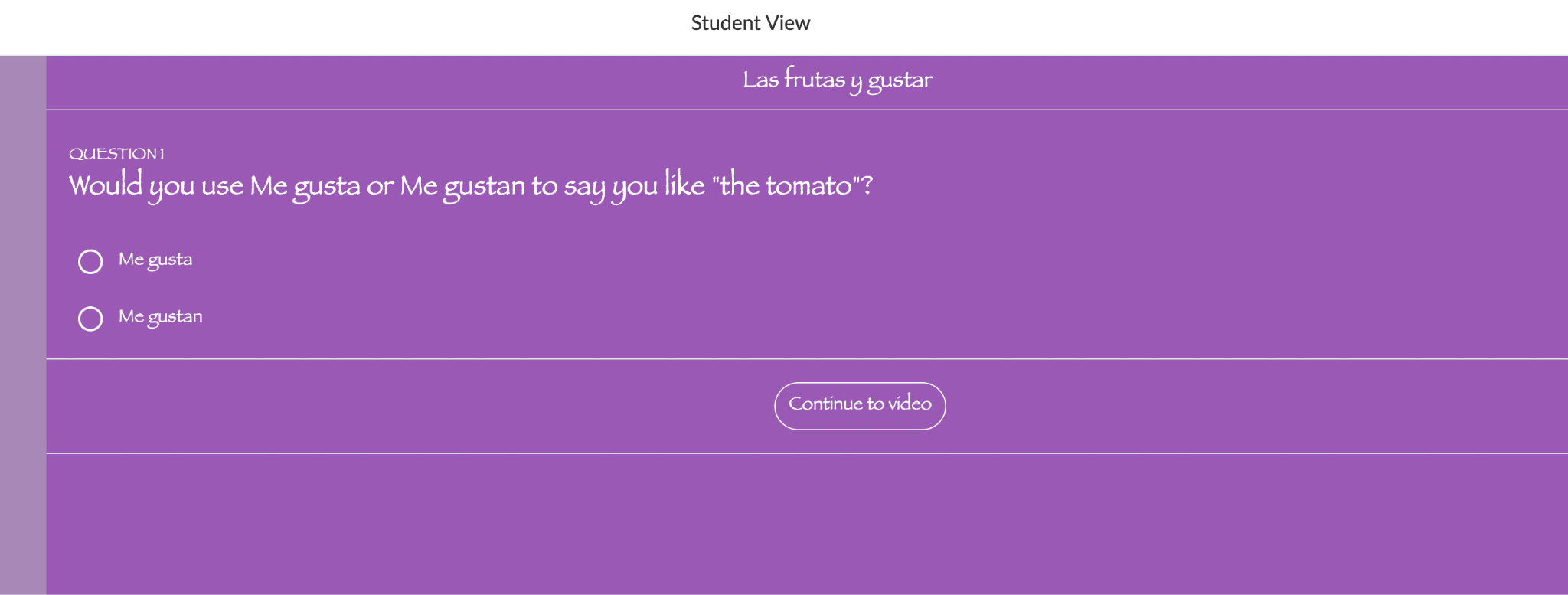
Creating interactive lessons for students is so easy! Check out this Spanish I video quiz on the verb “gustar” and “las frutas. “Adding in a few questions to check for student understanding and giving them an opportunity to learn at their pace and review as needed is why I love using the video quizzes in BookWidgets. Simply choose a video from Vimeo, YouTube,or one of your own created videos for your students that you may show in class. Rather than use these alone, instead, create a video quiz in BookWidgets for them to extend their learning beyond the classroom and for you to be able to understand where they are in the learning process!
Engaging Students with Interactive Learning:

One of the key advantages of the BookWidgets Video Quiz is its ability to captivate students’ attention and keep them actively engaged throughout the learning process. There are more than 35 question types to choose from to add to the quiz which makes it easier to customize the quiz for any grade level or content area.
By embedding questions within videos, students are prompted to think critically, analyze content, and apply their knowledge in real-time. This interactive approach encourages active participation, leading to improved comprehension and retention of the subject matter. Video Quizzes are perfect for Flipped Learning. Learn more about the use of BookWidgets for flipping your classroom learning space!
Customization and Flexibility:
BookWidgets Video Quiz offers educators a high degree of customization and flexibility. Teachers can tailor the quiz to suit their specific instructional goals, selecting the video content and designing the questions accordingly. The interactive elements of the videos help to capture students’ attention and make the learning process more engaging for them.
Teachers also have the option to add hints, explanations, and feedback to guide students’ learning process. I like adding in a note at the beginning or end of the video quiz to remind students to jot down some notes or hints at grammar topics or specific vocabulary to focus on for example. This adaptability empowers teachers to create personalized assessments that cater to the diverse learning needs of their students.
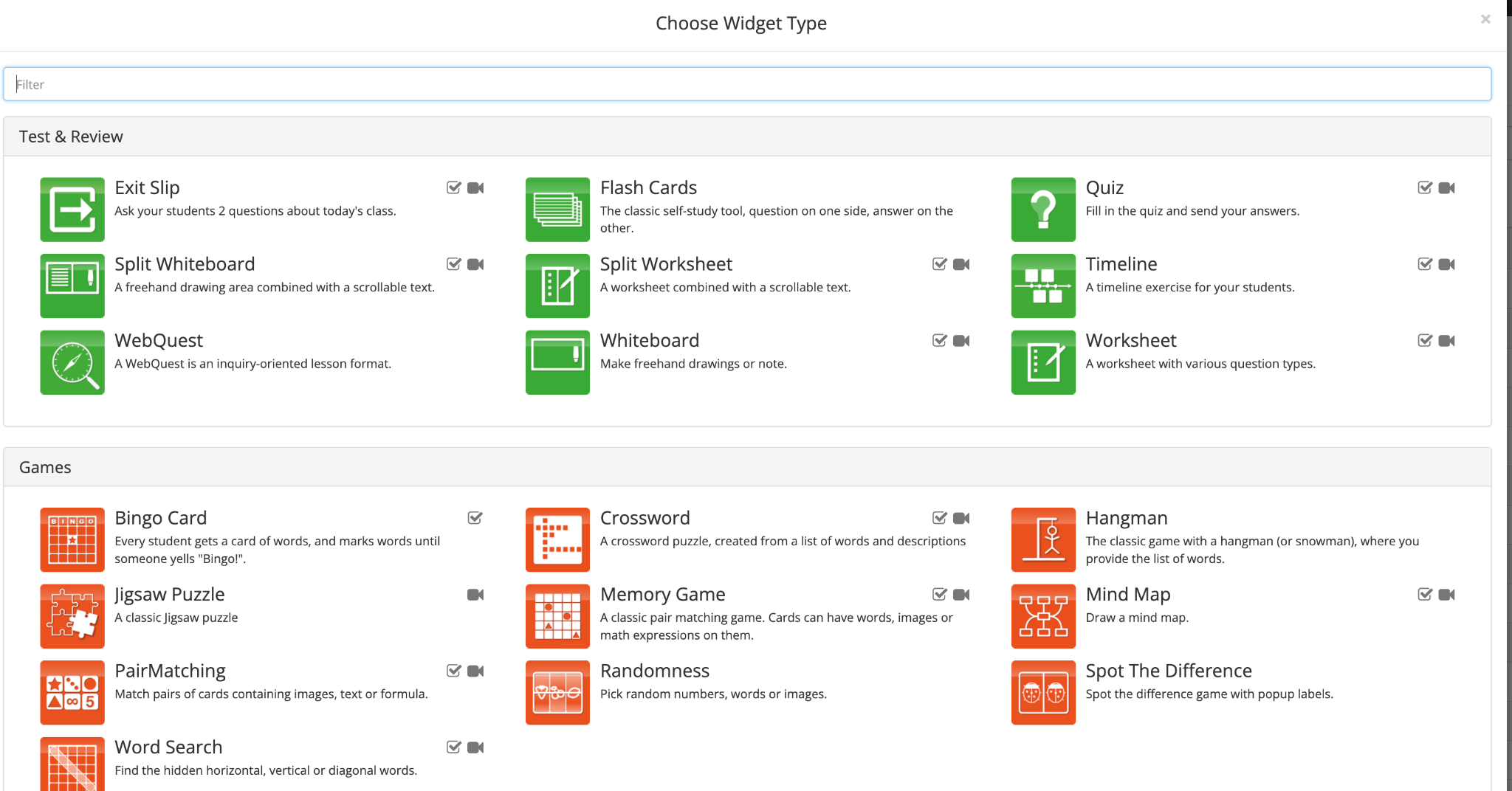

We have used the bingo cards, crosswords, snowman games, jigsaw puzzles, video quizzes, and word searches in my classes. Each of these offers opportunities to differentiate the instruction and provide more choices for students as they practice the vocabulary and related content. In my own classroom as a language educator, I also want to be able to assess students’ speaking skills and within BookWidgets, having the option for students to record their voices is great for designing assessments and guiding students in the feedback process. Here are some additional examples that can be used in language classes!
Real-time Assessment and Feedback:
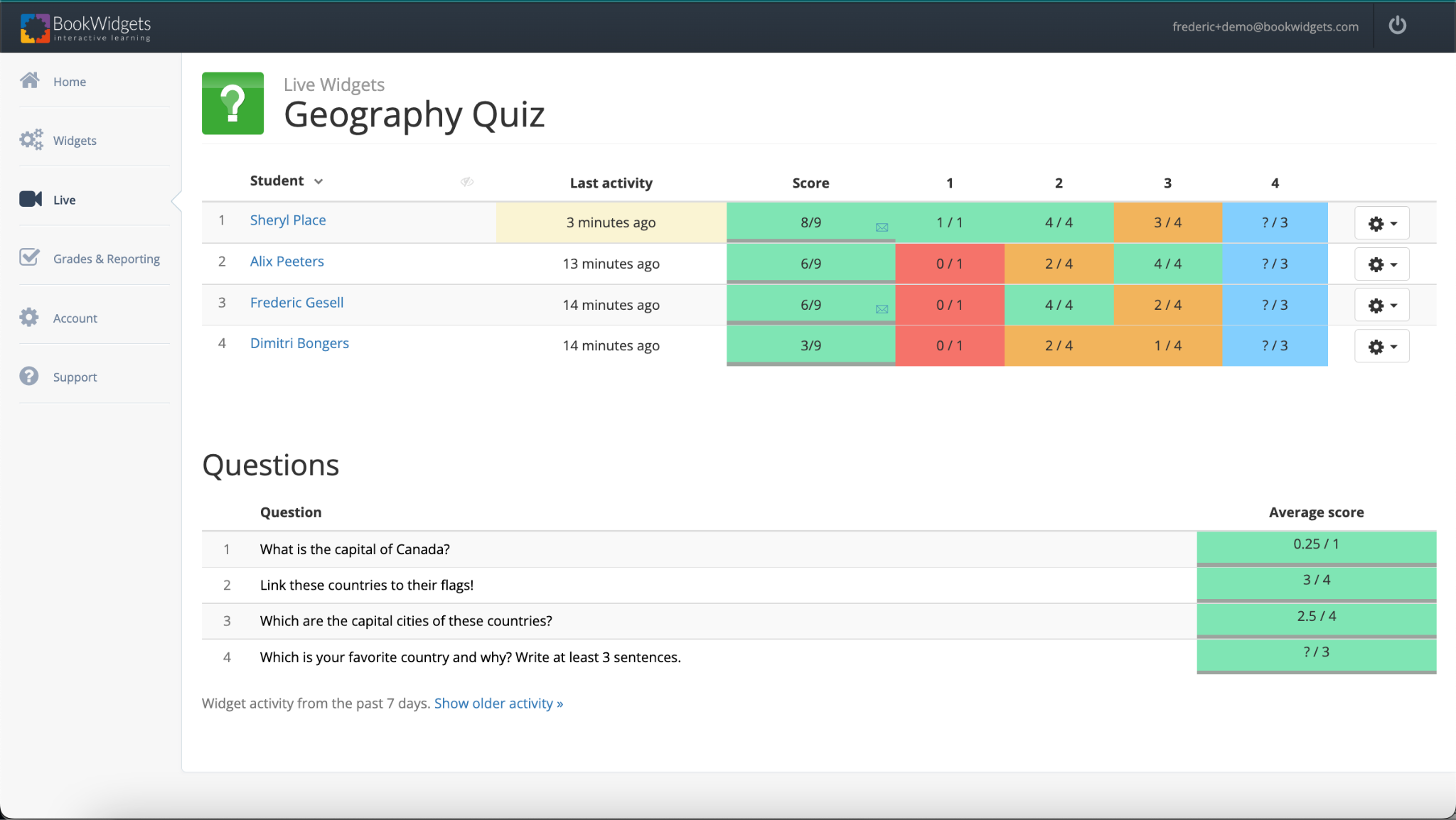
One of the most significant advantages of the BookWidgets Video Quiz is its ability to provide instant assessment and feedback to students. Teachers are able to view student progress using LIVE mode and immediately see where students may need support and encouragement or enrichment.
What is so great about BookWidgets is being able to have access to real-time data. Within the dashboard, I can quickly see the flashcards that my students have practiced, how much time they spent on them, and even how many times they flipped a specific card. Being able to see their work helps me to better plan my instruction and the activities that I design for them. Understanding our students’ needs is essential so we can provide additional resources and encouragement for them as they engage with and master the content.
As students complete the quiz, their responses are automatically graded, saving teachers valuable time. Immediate feedback allows students to gauge their understanding of the content, identify areas for improvement, and reinforce their learning. Such timely feedback fosters a continuous learning loop and helps students stay motivated. We know the importance of authentic, meaningful,and timely feedback and with BookWidgets, educators can respond to students’ needs right away and have a clear understanding of where students are in the learning process. Saving time with our assessments by using these tools enables us to then spend that time with students and engage in meaningful conversations about their progress.
Tracking Progress and Analytics:
Via the Reporting Dashboard, BookWidgets offers valuable insights into student progress and performance through its analytics feature. Teachers can easily track individual and class-wide progress, identify patterns, and assess the effectiveness of their instructional strategies. These analytics enable educators to make data-driven decisions, modify their teaching methods if necessary, and provide targeted support to students who may require additional assistance.
When we have this data, we can provide more timely responses to student needs in our classrooms. The Dashboard makes it easy to identify areas that we can focus more on with individual students or the class and also provides us with an opportunity to reflect on the activities and strategies we are using.
BookWidgets FREE in Google Classroom We have some exciting news for schools using BookWidgets within Google Classroom! If your school has the Google Workspace Teaching & Learning Upgrade Edition or Google for Education Plus Edition, you can now use the BookWidgets add-on in Google Classroom for free until August 31st.
Every teacher can find the add-on in Google Classroom and start using it immediately. Just follow the steps below (and share them with your fellow teachers):
- Go to Google Classroom,
- Select a class and go to “Classwork“,
- Click on “Create” and choose “Assignment“,
- Fill in the details of your assignment. Then, click the BookWidgets add-on under the “add-ons” section in your assignment. If BookWidgets is unavailable, ask your Google Workspace administrator to add or allow the BookWidgets add-on;
- After clicking the add-on, BookWidgets will pop up and you’re ready to go!
Make sure to watch this webinar to get started with the BookWidgets add-on in Google Classroom. New to BookWidgets and still figuring out the added value for your students? This blog post will get you inspired!
Why Video Quizzes Make A Difference
Incorporating the BookWidgets Video Quiz into educational practices opens up a world of interactive and engaging learning experiences. By combining videos with interactive quizzes, teachers can foster active learning, customize assessments, provide instant feedback, and track student progress effectively. This powerful tool not only enhances comprehension but also encourages critical thinking, collaboration, and self-directed learning. With the BookWidgets Video Quiz, educators have a versatile tool at their disposal to create dynamic and impactful learning experiences that prepare students for success in the digital age.
Get started today!
Create an account! It is easy to get started and create your own widgets to use in your classroom. Want 3 months to try it out? Sign up here!
Are you headed to ISTE 23 in Philadelphia? Don’t miss the chance to meet with the BookWidgets Team and join in sessions for opportunities to learn more about BookWidgets! Stop by the Chopped Playground to learn from Lucie Join Kate for “SCAMPERing into Human-Centered Design and Sheryl’s session on Creative Grading and Assessment at the Learning in Disguise Playground. Don’t miss the Lightning Talks and Kate’s session on Reimagine Education – Human-Centered and “Understanding Microsoft Teams The Digital Learning Hub in My Classroom and Yours with Kate, Sheryl, and Jeff Bradbury! Rachelle will be sharing about BookWidgets during her session “Chart A New Course” on Tuesday morning at 10:00 am!
Looking for some PD for your school? I provide in-person and virtual training on the following topics. If you want to learn more about and explore AI and ChatGPT, contact me to schedule! Rdene915@gmail.com

 Learning as I go: Reflections & lessons learned